Terraform Enterprise HVD on AWS EC2
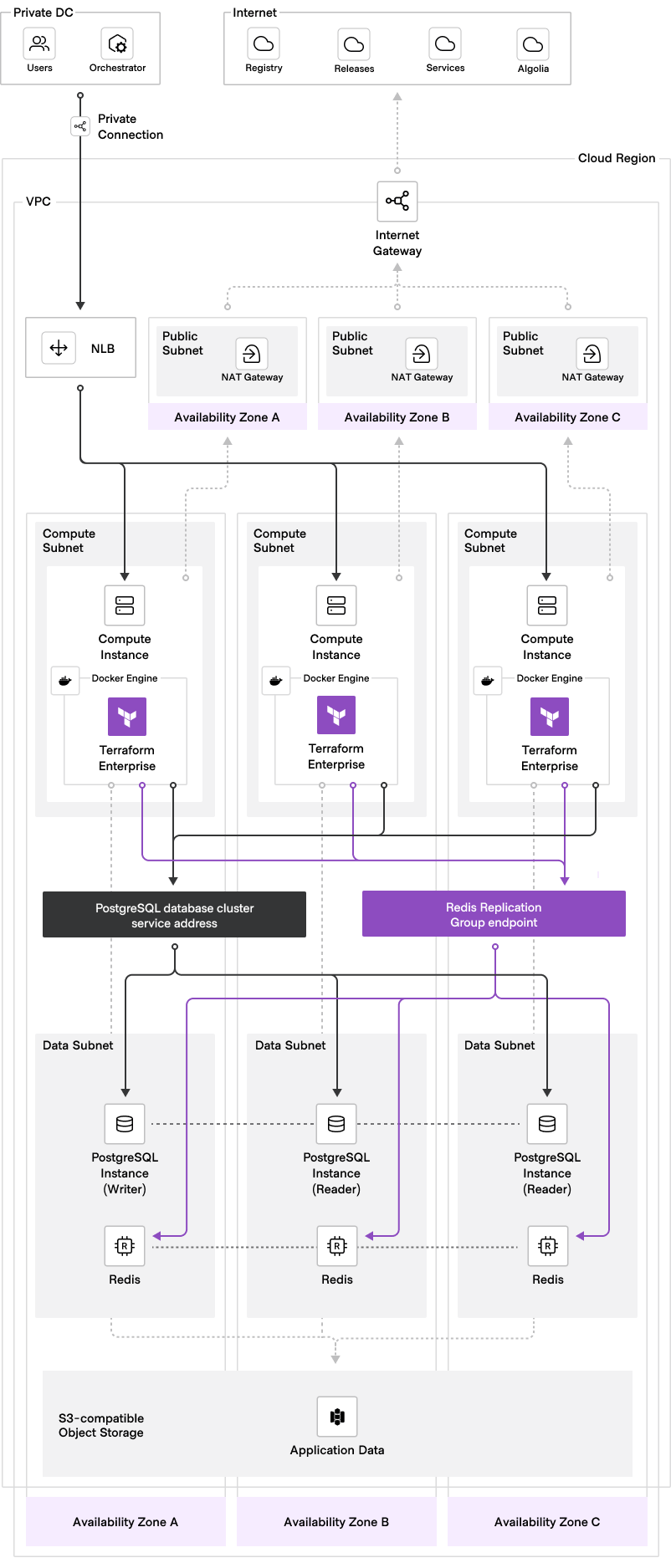
Terraform module aligned with HashiCorp Validated Designs (HVD) to deploy Terraform Enterprise (TFE) on Amazon Web Services (AWS) using EC2 instances with a container runtime. This module defaults to deploying TFE in the active-active operational mode, but external is also supported. Docker and Podman are the supported container runtimes. Optional secondary-hostname support is included for external integrations such as OIDC, VCS, and run tasks.
Prerequisites
General
- TFE license file (e.g.
terraform.hclic) - Terraform CLI
>= 1.9installed on clients/workstations that will be used to deploy TFE - General understanding of how to use Terraform (Community Edition)
- General understanding of how to use AWS
gitCLI and Visual Studio Code editor installed on workstations are strongly recommended- AWS account that TFE will be deployed in with permissions to create these resources via Terraform CLI
- (Optional) AWS S3 bucket for S3 remote state backend that will be used to manage the Terraform state of this TFE deployment (out-of-band from the TFE application) via Terraform CLI (Community Edition)
Networking
- AWS VPC ID and the following subnets:
- Load balancer subnet IDs (can be the same as EC2 subnets if desirable)
- (Optional) Secondary public load balancer subnet IDs when creating a managed secondary hostname NLB
- EC2 (compute) subnet IDs
- RDS (database) subnet IDs
- Redis subnet IDs (can be the same as RDS subnets if desirable)
- (Optional) S3 VPC endpoint configured within VPC
- (Optional) AWS Route53 hosted zone for TFE DNS record creation
- (Optional) AWS public Route53 hosted zone for a managed secondary TFE DNS record
- Chosen fully qualified domain name (FQDN) for your TFE instance (e.g.
tfe.aws.example.com) - (Optional) Chosen secondary externally resolvable FQDN for TFE integrations (e.g.
tfe-external.aws.example.com)
📝 Note: It is recommended to specify a minimum of two subnets for each subnet input to enable high availability.
Security groups
- This module will automatically create the necessary security groups and attach them to the applicable resources
- Identify CIDR range(s) that will need to access the TFE application (managed via cidr_allow_ingress_tfe_443 input variable)
- Identify CIDR range(s) that will need to access the shell of the TFE EC2 instances (managed via cidr_allow_ingress_ec2_ssh input variable)
- Be familiar with the TFE ingress requirements
- Be familiar with the TFE egress requirements
TLS certificates
- TLS certificate (e.g.
cert.pem) and private key (e.g.privkey.pem) that matches your chosen fully qualified domain name (FQDN) for TFE- TLS certificate and private key must be in PEM format
- Private key must not be password protected
- TLS certificate authority (CA) bundle (e.g.
ca_bundle.pem) corresponding with the CA that issues your TFE TLS certificates- CA bundle must be in PEM format
- You may include additional certificate chains corresponding to external systems that TFE will make outbound connections to (e.g. your self-hosted VCS, if its certificate was issued by a different CA than your TFE certificate).
- (Optional) Separate TLS certificate, private key, and CA bundle for
tfe_hostname_secondarywhen enabling a secondary hostname
📝 Note: All three of these files will be created as secrets in AWS Secrets Manager per the next section.
Secrets management
The following bootstrap secrets stored in AWS Secrets Manager in order to bootstrap the TFE deployment and installation:
- TFE license file - raw contents of license file stored as a plaintext secret (e.g.
cat terraform.hclic) - TFE encryption password - random characters stored as a plaintext secret (used to protect internally-managed Vault unseal key and root token)
- TFE database password - used to create RDS Aurora (PostgreSQL) database cluster; random characters stored as a plaintext secret; value must be between 8 and 128 characters long and must not contain
@,", or/characters - Explorer database password (optional) - random characters stored as a plaintext secret; used when providing a separate Explorer password via
tfe_explorer_database_password_secret_arn; value must be between 8 and 128 characters long and must not contain@,", or/characters - TFE Redis password - used to create Redis (Elasticache Replication Group) cluster; random characters stored as a plaintext secret; value must be between 16 and 128 characters long and must not contain
@,", or/characters - TFE TLS certificate - file in PEM format, base64-encoded into a string, and stored as a plaintext secret
- TFE TLS certificate private key - file in PEM format, base64-encoded into a string, and stored as a plaintext secret
- TFE TLS CA bundle - file in PEM format , base64-encoded into a string, and stored as a plaintext secret
- Secondary TFE TLS certificate - optional file in PEM format, base64-encoded into a string, and stored as a plaintext secret
- Secondary TFE TLS certificate private key - optional file in PEM format, base64-encoded into a string, and stored as a plaintext secret
- Secondary TFE TLS CA bundle - optional file in PEM format, base64-encoded into a string, and stored as a plaintext secret
📝 Note: See the TFE bootstrap secrets doc for more details on how these secrets should be stored in AWS Secrets Manager.
Compute
Connecting to shell of EC2 instances
One of the following mechanisms for shell access to TFE EC2 instances:
- EC2 SSH key pair
- AWS SSM (can be enabled by setting ec2_allow_ssm boolean input variable to
true)
Log forwarding (optional)
One of the following logging destinations:
- AWS CloudWatch log group
- AWS S3 bucket
- A custom fluent bit configuration that will forward logs to custom destination
Usage
-
Create/configure/validate the applicable prerequisites.
-
Refer to the ready-made Terraform configuration provided in the main example subdirectory within the examples directory for how to deploy this module. To get started, copy all of the Terraform files from the main example into a new destination directory. This will serve as your root Terraform configuration for managing your TFE deployment. Below is a common directory structure for managing multiple TFE deployments:
.
└── environments
    ├── production
    │   ├── backend.tf
    │   ├── main.tf
    │   ├── outputs.tf
    │   ├── terraform.tfvars
    │   ├── variables.tf
    │   └── variables_provider.tf
    └── sandbox
        ├── backend.tf
        ├── main.tf
        ├── outputs.tf
        ├── terraform.tfvars
        ├── variables.tf
        └── variables_provider.tf
📝 Note: In this example, the user will have two separate TFE deployments; one for their
sandboxenvironment, and one for theirproductionenvironment. This is recommended, but not required.📝 Note:
variables_provider.tfdefines provider configuration variables (not module variables) and must be copied from the examples directory. -
(Optional) Uncomment and update the S3 remote state backend configuration provided in the
backend.tffile with your own custom values. While this step is highly recommended, it is technically not required to use a remote backend config for your TFE deployment. -
Copy the provided
terraform.tfvars.examplefile and rename it toterraform.tfvars. Then, replace or validate all of the variable values enclosed in the< >characters with your own custom values. Inline helper comments are included with some of the variables to help guide you in setting appropriate values. For detailed information about each input variable, as well as additional optional inputs, refer to the variable descriptions, the deployment customizations documentation, or the example README for additional configuration guidance. -
Ensure the module
sourcemeta-argument within yourmain.tfaccurately reflects the location from which you are calling this module. We recommend calling the module directly from its Terraform registry location as shown below:module "tfe" { source = "hashicorp/terraform-enterprise-hvd/aws" version = "x.x.x" ... } -
Navigate to the directory containing your newly created root Terraform configuration for the TFE deployment, and run
terraform init,terraform plan, andterraform apply. -
After your
terraform applyfinishes successfully, you can monitor the installation progress by connecting to your TFE EC2 instance shell via SSH or AWS SSM and observing the cloud-init (user_data) logs:Connecting to the EC2 instance
SSH when
ec2_os_distroisubuntu:ssh -i /path/to/ec2_ssh_key_pair.pem ubuntu@<ec2-private-ip>SSH when
ec2_os_distroisrheloral2023:ssh -i /path/to/ec2_ssh_key_pair.pem ec2-user@<ec2-private-ip>Viewing the logs
View the higher-level logs:
tail -f /var/log/tfe-cloud-init.logView the lower-level logs:
journalctl -xu cloud-final -f📝 Note: The
-fargument is to follow the logs as they append in real-time, and is optional. You may remove the-ffor a static view.Successful install log message
The log files should display the following log message after the cloud-init (user_data) script finishes successfully:
[INFO] tfe_user_data script finished successfully! -
After the cloud-init (user_data) script finishes successfully, while still connected to the TFE EC2 instance shell, you can check the health status of TFE:
cd /etc/tfe sudo docker compose exec tfe tfe-health-check-status -
Follow the steps to create the TFE initial admin user.
Secondary hostname support
This module can optionally configure the Terraform Enterprise runtime with TFE_HOSTNAME_SECONDARY plus the documented hostname-choice settings for OIDC, VCS, and run tasks. When you want the module to manage the external endpoint as well, you can also create a dedicated public secondary NLB and Route53 alias record with its own CIDR filtering while leaving the primary hostname path unchanged.
When tfe_hostname_secondary is set, provide matching secondary TLS secrets so the TFE instance can serve both hostnames. If you choose to have the module manage the external endpoint, ensure the secondary hostname resolves publicly and that secondary_lb_subnet_ids point to public subnets.
Docs
Below are links to various docs related to the customization and management of your TFE deployment:
- Deployment customizations
- TFE version upgrades
- TFE TLS certificate rotation
- TFE configuration settings
- TFE bootstrap secrets
Module support
This open source software is maintained by the HashiCorp Technical Field Organization, independently of our enterprise products. While our Support Engineering team provides dedicated support for our enterprise offerings, this open source software is not included.
- For help using this open source software, please engage your account team.
- To report bugs/issues with this open source software, please open them directly against this code repository using the GitHub issues feature.
Please note that there is no official Service Level Agreement (SLA) for support of this software as a HashiCorp customer. This software falls under the definition of Community Software/Versions in your Agreement. We appreciate your understanding and collaboration in improving our open source projects.
Requirements
| Name | Version |
|---|---|
| terraform | >= 1.9 |
| aws | ~> 5.100 |
Providers
| Name | Version |
|---|---|
| aws | ~> 5.100 |
Resources
Inputs
| Name | Description | Type | Default | Required |
|---|---|---|---|---|
| ec2_subnet_ids | List of subnet IDs to use for the EC2 instance. Private subnets is the best practice here. | list(string) | n/a | yes |
| friendly_name_prefix | Friendly name prefix used for uniquely naming all AWS resources for this deployment. Most commonly set to either an environment (e.g. 'sandbox', 'prod'), a team name, or a project name. | string | n/a | yes |
| lb_subnet_ids | List of subnet IDs to use for the load balancer. If lb_is_internal is false, then these should be public subnets. Otherwise, these should be private subnets. | list(string) | n/a | yes |
| rds_subnet_ids | List of subnet IDs to use for RDS database subnet group. Private subnets is the best practice here. | list(string) | n/a | yes |
| tfe_database_password_secret_arn | ARN of AWS Secrets Manager secret for the TFE database password used to create RDS Aurora (PostgreSQL) database cluster. Secret type should be plaintext. Value of secret must be from 8 to 128 alphanumeric characters or symbols (excluding @, ", and /). | string | n/a | yes |
| tfe_encryption_password_secret_arn | ARN of AWS Secrets Manager secret for TFE encryption password. Secret type should be plaintext. | string | n/a | yes |
| tfe_fqdn | Fully qualified domain name (FQDN) of TFE instance. This name should resolve to the DNS name or IP address of the TFE load balancer and will be what clients use to access TFE. | string | n/a | yes |
| tfe_license_secret_arn | ARN of AWS Secrets Manager secret for TFE license file. Secret type should be plaintext. | string | n/a | yes |
| tfe_tls_ca_bundle_secret_arn | ARN of AWS Secrets Manager secret for private/custom TLS Certificate Authority (CA) bundle in PEM format. Secret must be stored as a base64-encoded string. Secret type should be plaintext. | string | n/a | yes |
| tfe_tls_cert_secret_arn | ARN of AWS Secrets Manager secret for TFE TLS certificate in PEM format. Secret must be stored as a base64-encoded string. Secret type should be plaintext. | string | n/a | yes |
| tfe_tls_privkey_secret_arn | ARN of AWS Secrets Manager secret for TFE TLS private key in PEM format. Secret must be stored as a base64-encoded string. Secret type should be plaintext. | string | n/a | yes |
| vpc_id | ID of VPC where TFE will be deployed. | string | n/a | yes |
| additional_no_proxy | Comma-separated list of domains, IP addresses, or CIDR ranges that TFE should bypass the proxy when making outbound requests, provided http_proxy or https_proxy are set. This list is in addition to automatically included addresses like RDS, S3, and Redis, which are dynamically added to no_proxy by the user_data script. Do not set if http_proxy and/or https_proxy are not configured. | string | null | no |
| asg_health_check_grace_period | The amount of time to wait for a new TFE EC2 instance to become healthy. If this threshold is breached, the ASG will terminate the instance and launch a new one. | number | 900 | no |
| asg_instance_count | Desired number of TFE EC2 instances to run in autoscaling group. Must be 1 when tfe_operational_mode is external. | number | 1 | no |
| asg_max_size | Max number of TFE EC2 instances to run in autoscaling group. Only valid when tfe_operational_mode is active-active. Value is hard-coded to 1 when tfe_operational_mode is external. | number | 3 | no |
| cidr_allow_egress_ec2_dns | List of destination CIDR ranges to allow TCP/53 and UDP/53 (DNS) outbound from TFE EC2 instances. Only set if you want to use custom DNS servers instead of the AWS-provided DNS resolver within your VPC. | list(string) | null | no |
| cidr_allow_egress_ec2_http | List of destination CIDR ranges to allow TCP/80 outbound from TFE EC2 instances. | list(string) | [ | no |
| cidr_allow_egress_ec2_https | List of destination CIDR ranges to allow TCP/443 outbound from TFE EC2 instances. Include the CIDR range of your VCS provider if you are configuring VCS integration with TFE. | list(string) | [ | no |
| cidr_allow_egress_ec2_proxy | List of destination CIDR range(s) where proxy server exists. Required and only valid when http_proxy and/or https_proxy are set. | list(string) | null | no |
| cidr_allow_ingress_ec2_ssh | List of CIDR ranges to allow SSH ingress to TFE EC2 instance (i.e. bastion IP, client/workstation IP, etc.). | list(string) | null | no |
| cidr_allow_ingress_tfe_443 | List of CIDR ranges allowed to access the TFE application over HTTPS (port 443). | list(string) | [ | no |
| cidr_allow_ingress_tfe_admin_console | List of CIDR ranges to allow ingress traffic on the admin console port. Required when tfe_admin_console_disabled is false. | list(string) | null | no |
| cidr_allow_ingress_tfe_metrics_http | List of CIDR ranges to allow TCP/9090 (HTTP) inbound to metrics endpoint on TFE EC2 instances. | list(string) | null | no |
| cidr_allow_ingress_tfe_metrics_https | List of CIDR ranges to allow TCP/9091 (HTTPS) inbound to metrics endpoint on TFE EC2 instances. | list(string) | null | no |
| cidr_allow_ingress_tfe_secondary_443 | List of CIDR ranges allowed to access the secondary TFE public Network Load Balancer (NLB) over HTTPS (port 443). | list(string) | [ | no |
| cloudwatch_log_group_name | Name of CloudWatch Log Group to configure as log forwarding destination. Only valid when tfe_log_forwarding_enabled is true. | string | null | no |
| common_tags | Map of common tags for all taggable AWS resources. | map(string) | {} | no |
| container_runtime | Container runtime to use for TFE. Supported values are docker or podman. | string | "docker" | no |
| create_route53_tfe_dns_record | Boolean to create Route53 Alias Record for tfe_hostname resolving to Load Balancer DNS name. If true, route53_tfe_hosted_zone_name is also required. | bool | false | no |
| create_tfe_explorer_db | Boolean to create and use a module-managed dedicated Aurora PostgreSQL database cluster for Explorer when tfe_explorer_enabled is true and no explicit Explorer database host, name, and user values are provided. | bool | true | no |
| create_route53_tfe_secondary_dns_record | Boolean to create a Route53 Alias record for tfe_hostname_secondary resolving to the secondary public Network Load Balancer (NLB). | bool | false | no |
| create_secondary_tfe_nlb | Boolean to create a dedicated public Network Load Balancer (NLB) for tfe_hostname_secondary. | bool | false | no |
| custom_fluent_bit_config | Custom Fluent Bit configuration for log forwarding. Only valid when tfe_log_forwarding_enabled is true and log_fwd_destination_type is custom. | string | null | no |
| custom_tfe_startup_script_template | Filename of a custom TFE startup script template to use in place of of the built-in user_data script. The file must exist within a directory named './templates' in your current working directory. | string | null | no |
| docker_version | Version of Docker to install on TFE EC2 instances. Not applicable to Amazon Linux 2023 distribution (when ec2_os_distro is al2023). | string | "28.0.1" | no |
| ebs_iops | Amount of IOPS to configure when EBS volume type is gp3. Must be greater than or equal to 3000 and less than or equal to 16000. | number | 3000 | no |
| ebs_is_encrypted | Boolean to encrypt the EBS root block device of the TFE EC2 instance(s). An AWS managed key will be used when true unless a value is also specified for ebs_kms_key_arn. | bool | true | no |
| ebs_kms_key_arn | ARN of KMS customer managed key (CMK) to encrypt TFE EC2 EBS volumes. | string | null | no |
| ebs_throughput | Throughput (MB/s) to configure when EBS volume type is gp3. Must be greater than or equal to 125 and less than or equal to 1000. | number | 250 | no |
| ebs_volume_size | Size (GB) of the root EBS volume for TFE EC2 instances. Must be greater than or equal to 50 and less than or equal to 16000. | number | 50 | no |
| ebs_volume_type | EBS volume type for TFE EC2 instances. | string | "gp3" | no |
| ec2_allow_all_egress | Boolean to allow all egress traffic from TFE EC2 instances. | bool | false | no |
| ec2_allow_ssm | Boolean to attach the AmazonSSMManagedInstanceCore policy to the TFE instance role, allowing the SSM agent (if present) to function. | bool | false | no |
| ec2_ami_id | Custom AMI ID for TFE EC2 launch template. If specified, value of ec2_os_distro must coincide with this custom AMI OS distro. | string | null | no |
| ec2_iam_instance_profile_name | Name of an existing IAM instance profile to attach to TFE EC2 instances instead of creating one. When set, the module attaches its inline policy and optional SSM policy attachment to the role associated with this instance profile. | string | null | no |
| ec2_instance_size | EC2 instance type for TFE EC2 launch template. | string | "m7i.xlarge" | no |
| ec2_os_distro | Linux OS distribution type for TFE EC2 instance. Choose from al2023, ubuntu, rhel (RHEL9), rhel10 (RHEL 10), centos. | string | "ubuntu" | no |
| ec2_ssh_key_pair | Name of existing SSH key pair to attach to TFE EC2 instance. | string | null | no |
| http_proxy | Proxy address (including port number) for TFE to use for outbound HTTP requests (e.g. http://proxy.example.com:3128). | string | null | no |
| https_proxy | Proxy address (including port number) for TFE to use for outbound HTTPS requests (e.g. http://proxy.example.com:3128). | string | null | no |
| is_secondary_region | Boolean indicating whether this TFE deployment is in the primary or secondary (replica) region. | bool | false | no |
| lb_is_internal | Boolean to create an internal (private) load balancer. The lb_subnet_ids must be private subnets when this is true. | bool | true | no |
| lb_stickiness_enabled | Boolean to enable sticky sessions for the load balancer. When lb_type is nlb, sticky sessions enabled by client IP Address. | bool | true | no |
| lb_type | Indicates which type of AWS load balancer is created: Application Load Balancer (alb) or Network Load Balancer (nlb). | string | "nlb" | no |
| log_fwd_destination_type | Type of log forwarding destination for Fluent Bit. Supported values are s3, cloudwatch, or custom. | string | "cloudwatch" | no |
| rds_apply_immediately | Boolean to apply changes immediately to RDS cluster instance. | bool | true | no |
| rds_aurora_engine_mode | RDS Aurora database engine mode. | string | "provisioned" | no |
| rds_aurora_engine_version | Engine version of RDS Aurora PostgreSQL. | string | "16.10" | no |
| rds_aurora_instance_class | Instance class of Aurora PostgreSQL database. | string | "db.r6i.xlarge" | no |
| rds_aurora_replica_count | Number of replica (reader) cluster instances to create within the RDS Aurora database cluster (within the same region). | number | 1 | no |
| rds_availability_zones | List of AWS availability zones to spread Aurora database cluster instances across. Leave as null and RDS will automatically assign 3 availability zones. | list(string) | null | no |
| rds_backup_retention_period | The number of days to retain backups for. Must be between 0 and 35. Must be greater than 0 if the database cluster is used as a source of a read replica cluster. | number | 35 | no |
| rds_deletion_protection | Boolean to enable deletion protection for RDS Aurora global cluster. | bool | false | no |
| rds_force_destroy | Boolean to enable the removal of RDS database cluster members from RDS global cluster on destroy. | bool | false | no |
| rds_global_cluster_id | ID of RDS global cluster. Only required only when is_secondary_region is true, otherwise leave as null. | string | null | no |
| rds_kms_key_arn | ARN of KMS customer managed key (CMK) to encrypt TFE RDS cluster. | string | null | no |
| rds_parameter_group_family | Family of RDS Aurora PostgreSQL database parameter group. | string | "aurora-postgresql16" | no |
| rds_performance_insights_enabled | Boolean to enable performance insights for RDS cluster instance(s). | bool | true | no |
| rds_performance_insights_retention_period | Number of days to retain RDS performance insights data. Must be between 7 and 731. | number | 7 | no |
| rds_preferred_backup_window | Daily time range (UTC) for RDS backup to occur. Must not overlap with rds_preferred_maintenance_window. | string | "04:00-04:30" | no |
| rds_preferred_maintenance_window | Window (UTC) to perform RDS database maintenance. Must not overlap with rds_preferred_backup_window. | string | "Sun:08:00-Sun:09:00" | no |
| rds_replication_source_identifier | ARN of source RDS cluster or cluster instance if this database cluster is to be created as a read replica. Only required when is_secondary_region is true, otherwise leave as null. | string | null | no |
| rds_skip_final_snapshot | Boolean to enable RDS to take a final database snapshot before destroying. | bool | false | no |
| rds_source_region | Source region for RDS cross-region replication. Only required when is_secondary_region is true, otherwise leave as null. | string | null | no |
| rds_storage_encrypted | Boolean to encrypt RDS storage. An AWS managed key will be used when true unless a value is also specified for rds_kms_key_arn. | bool | true | no |
| redis_apply_immediately | Boolean to apply changes immediately to Redis cluster. | bool | true | no |
| redis_at_rest_encryption_enabled | Boolean to enable encryption at rest on Redis cluster. An AWS managed key will be used when true unless a value is also specified for redis_kms_key_arn. | bool | true | no |
| redis_auto_minor_version_upgrade | Boolean to enable automatic minor version upgrades for Redis cluster. | bool | true | no |
| redis_automatic_failover_enabled | Boolean for deploying Redis nodes in multiple availability zones and enabling automatic failover. | bool | true | no |
| redis_engine_version | Redis version number. | string | "7.1" | no |
| redis_kms_key_arn | ARN of KMS customer managed key (CMK) to encrypt Redis cluster with. | string | null | no |
| redis_multi_az_enabled | Boolean to create Redis nodes across multiple availability zones. If true, redis_automatic_failover_enabled must also be true, and more than one subnet must be specified within redis_subnet_ids. | bool | true | no |
| redis_node_type | Type (size) of Redis node from a compute, memory, and network throughput standpoint. | string | "cache.m5.large" | no |
| redis_parameter_group_name | Name of parameter group to associate with Redis cluster. | string | "default.redis7" | no |
| redis_port | Port number the Redis nodes will accept connections on. | number | 6379 | no |
| redis_subnet_ids | List of subnet IDs to use for Redis cluster subnet group. Private subnets is the best practice here. | list(string) | [] | no |
| redis_transit_encryption_enabled | Boolean to enable TLS encryption between TFE and the Redis cluster. | bool | true | no |
| route53_tfe_hosted_zone_is_private | Boolean indicating if route53_tfe_hosted_zone_name is a private hosted zone. | bool | false | no |
| route53_tfe_hosted_zone_name | Route53 Hosted Zone name to create tfe_hostname Alias record in. Required if create_route53_tfe_dns_record is true. | string | null | no |
| route53_tfe_secondary_hosted_zone_is_private | Boolean indicating if route53_tfe_secondary_hosted_zone_name is a private hosted zone. Secondary hostname DNS must be public when created by this module. | bool | false | no |
| route53_tfe_secondary_hosted_zone_name | Route53 Hosted Zone name to create the tfe_hostname_secondary alias record in. Required if create_route53_tfe_secondary_dns_record is true. | string | null | no |
| s3_destination_bucket_arn | ARN of destination S3 bucket for cross-region replication configuration. Bucket should already exist in secondary region. Required when s3_enable_bucket_replication is true. | string | "" | no |
| s3_destination_bucket_kms_key_arn | ARN of KMS key of destination S3 bucket for cross-region replication configuration if it is encrypted with a customer managed key (CMK). | string | null | no |
| s3_enable_bucket_replication | Boolean to enable cross-region replication for TFE S3 bucket. An s3_destination_bucket_arn is required when true. | bool | false | no |
| s3_enable_bucket_replication_bidirectional | Enables bidirectional replication from secondary region to primary region. Only valid when s3_enable_bucket_replication and is_secondary_region are true. | bool | false | no |
| s3_enable_bucket_replication_rtc | Boolean to enable real-time change (RTC) monitoring for TFE S3 bucket replication. Only valid when s3_enable_bucket_replication is true. | bool | false | no |
| s3_force_destroy | Boolean to enable force destruction of S3 bucket and all objects within it. When true, the bucket can be destroyed even if it contains objects. | bool | false | no |
| s3_kms_key_arn | ARN of KMS customer managed key (CMK) to encrypt TFE S3 bucket with. | string | null | no |
| s3_log_fwd_bucket_name | Name of S3 bucket to configure as log forwarding destination. Only valid when tfe_log_forwarding_enabled is true. | string | null | no |
| secondary_lb_subnet_ids | List of public subnet IDs to use for the secondary Network Load Balancer (NLB). Required when create_secondary_tfe_nlb is true. | list(string) | null | no |
| tfe_admin_console_disabled | Boolean to disable the TFE Admin Console for advanced troubleshooting and diagnostics. When disabled, the admin console will not be accessible. | bool | true | no |
| tfe_admin_https_port | Port the TFE application container listens on for system (admin) API endpoints HTTPS traffic. This value is used for both the host and container port. | number | 9443 | no |
| tfe_alb_tls_certificate_arn | ARN of existing TFE TLS certificate imported in ACM to be used for application load balancer (ALB) HTTPS listeners. Required when lb_type is alb. | string | null | no |
| tfe_capacity_concurrency | Maximum number of concurrent Terraform runs to allow on a TFE node. | number | 10 | no |
| tfe_capacity_cpu | Maximum number of CPU cores that a Terraform run is allowed to consume in TFE. Set to 0 for no limit. | number | 0 | no |
| tfe_capacity_memory | Maximum amount of memory (in MiB) that a Terraform run is allowed to consume in TFE. | number | 2048 | no |
| tfe_cost_estimation_iam_enabled | Boolean to add AWS pricing actions to TFE IAM instance profile for cost estimation feature. | string | true | no |
| tfe_database_name | Name of TFE database to create within RDS global cluster. | string | "tfe" | no |
| tfe_database_parameters | PostgreSQL server parameters for the connection URI. Used to configure the PostgreSQL connection. | string | "sslmode=require" | no |
| tfe_database_user | Username for TFE RDS database cluster. | string | "tfe" | no |
| tfe_explorer_database_host | PostgreSQL server for Explorer in HOST[:PORT] format. Leave as null to have the module create and use a dedicated Explorer Aurora database when create_tfe_explorer_db is true, or reuse the primary TFE database when create_tfe_explorer_db is false. | string | null | no |
| tfe_explorer_database_name | Name of the PostgreSQL database used by Explorer. Leave as null to have the module use the Explorer database name it manages when create_tfe_explorer_db is true, or reuse the primary TFE database name when create_tfe_explorer_db is false. | string | null | no |
| tfe_explorer_database_parameters | PostgreSQL server parameters for the Explorer connection URI. Leave as null to reuse tfe_database_parameters. | string | null | no |
| tfe_explorer_database_password_secret_arn | ARN of AWS Secrets Manager secret for the Explorer database password. Leave as null when tfe_explorer_database_passwordless_aws_use_instance_profile is true or to reuse the module-managed TFE database password for the module-managed Explorer database or shared primary-database fallback. | string | null | no |
| tfe_explorer_database_passwordless_aws_db_resource_id | RDS or Aurora database resource ID used to grant rds-db:connect permissions for Explorer database IAM authentication. Leave as null to use the module-managed Explorer Aurora DB instance (DBI) resource ID when create_tfe_explorer_db is true, otherwise the module-managed TFE Aurora DB instance (DBI) resource ID. | string | null | no |
| tfe_explorer_database_passwordless_aws_region | AWS Region of the Explorer RDS PostgreSQL resource when using Explorer database IAM authentication. Leave as null to use the current provider region. | string | null | no |
| tfe_explorer_database_passwordless_aws_use_instance_profile | Boolean to use the EC2 instance profile for Explorer database IAM authentication. | bool | false | no |
| tfe_explorer_database_user | PostgreSQL username used by Explorer. Leave as null to have the module use the Explorer database user it manages when create_tfe_explorer_db is true, or reuse the primary TFE database user when create_tfe_explorer_db is false. | string | null | no |
| tfe_explorer_enabled | Boolean to enable Terraform Enterprise Explorer. Explorer is only supported when tfe_operational_mode is active-active or external. | bool | false | no |
| tfe_hairpin_addressing | Boolean to enable hairpin addressing for layer 4 load balancer with loopback prevention. Must be true when lb_type is nlb and lb_is_internal is true. | bool | true | no |
| tfe_hostname_secondary | Secondary externally resolvable fully qualified domain name (FQDN) for TFE integration traffic such as OIDC, VCS, or run tasks. | string | null | no |
| tfe_http_port | Port the TFE application container listens on for HTTP traffic. This is not the host port. | number | 8080 | no |
| tfe_https_port | Port the TFE application container listens on for HTTPS traffic. This is not the host port. | number | 8443 | no |
| tfe_iact_subnets | Comma-separated list of subnets in CIDR notation (e.g., 10.0.0.0/8,192.168.0.0/24) that are allowed to retrieve the TFE initial admin creation token (IACT) via the API or web browser. Leave as null to disable IACT retrieval via the API from external clients. | string | null | no |
| tfe_iact_time_limit | Number of minutes that the TFE initial admin creation token (IACT) can be retrieved via the API after the application starts. | number | 60 | no |
| tfe_iact_token | A pre-populated TFE initial admin creation token (IACT). Leave as null for the system to generate a random one. | string | null | no |
| tfe_iact_trusted_proxies | Comma-separated list of proxy IP addresses that are allowed to retrieve the TFE initial admin creation token (IACT) via the API or web browser. Leave as null to disable IACT retrieval via the API from external clients through a proxy. | string | null | no |
| tfe_image_name | Name of the TFE application container image. Override this only if you are hosting the image in a custom registry. If you are using Amazon ECR, specify only the repository name here (e.g., 'tfe-app'), not the full image path. | string | "hashicorp/terraform-enterprise" | no |
| tfe_image_repository_password | Password for authenticating to the container registry that hosts the TFE application container image. Leave as null if using the default TFE registry, as the TFE license will be used as the password. If you are using Amazon ECR, this should be a valid ECR token or leave as null to use the instance profile. | string | null | no |
| tfe_image_repository_url | Container registry hostname for the TFE application container image. Override this only if you are hosting the image in a custom registry. If you are using Amazon ECR, specify only the registry URI (e.g., '.dkr.ecr..amazonaws.com'), not the full image path. | string | "images.releases.hashicorp.com" | no |
| tfe_image_repository_username | Username for authenticating to the container registry that hosts the TFE application container image. Override this only if you are hosting the image in a custom registry. If you are using Amazon ECR, specify 'AWS'. | string | "terraform" | no |
| tfe_image_tag | Tag for the TFE application container image, representing the specific version of Terraform Enterprise to install. | string | "v202505-1" | no |
| tfe_ipv6_enabled | Boolean to enable TFE to listen on IPv6 and IPv4 addresses. When false, TFE listens on IPv4 addresses only. | bool | false | no |
| tfe_license_reporting_opt_out | Boolean to opt out of reporting TFE licensing information to HashiCorp. | bool | false | no |
| tfe_log_forwarding_enabled | Boolean to enable TFE log forwarding feature. | bool | false | no |
| tfe_metrics_enable | Boolean to enable TFE metrics endpoints. | bool | false | no |
| tfe_metrics_http_port | HTTP port for TFE metrics scrape. | number | 9090 | no |
| tfe_metrics_https_port | HTTPS port for TFE metrics scrape. | number | 9091 | no |
| tfe_object_storage_s3_access_key_id | Access key ID for S3 bucket. Required when tfe_object_storage_s3_use_instance_profile is false. | string | null | no |
| tfe_object_storage_s3_secret_access_key | Secret access key for S3 bucket. Required when tfe_object_storage_s3_use_instance_profile is false. | string | null | no |
| tfe_object_storage_s3_use_instance_profile | Boolean to use TFE instance profile for S3 bucket access. If false, tfe_object_storage_s3_access_key_id and tfe_object_storage_s3_secret_access_key are required. | bool | true | no |
| tfe_oidc_hostname_choice | Hostname choice for TFE OIDC workload federation integrations. Supported values are primary and secondary. | string | "primary" | no |
| tfe_operational_mode | Operational mode for TFE. Valid values are active-active or external. | string | "active-active" | no |
| tfe_redis_password_secret_arn | ARN of AWS Secrets Manager secret for the TFE Redis password used to create Redis (Elasticache Replication Group) cluster. Secret type should be plaintext. Value of secret must be from 16 to 128 alphanumeric characters or symbols (excluding @, ", and /). | string | null | no |
| tfe_run_pipeline_docker_network | Docker network where the containers that execute Terraform runs will be created. The network must already exist, it will not be created automatically. Leave as null to use the default network created by TFE. | string | null | no |
| tfe_run_pipeline_image | Fully qualified container image reference for the Terraform default agent container (e.g., 'internal-registry.example.com/tfe-agent:latest'). This is referred to as the TFE_RUN_PIPELINE_IMAGE and is the image that is used to execute Terraform runs when execution mode is set to remote. The container registry hosting this image must allow anonymous (unauthenticated) pulls. | string | null | no |
| tfe_run_task_hostname_choice | Hostname choice for TFE run task integrations. Supported values are primary and secondary. | string | "primary" | no |
| tfe_tls_ca_bundle_secret_arn_secondary | ARN of AWS Secrets Manager secret for the secondary TFE TLS certificate authority bundle in PEM format. Secret must be stored as a base64-encoded string. Secret type should be plaintext. | string | null | no |
| tfe_tls_cert_secret_arn_secondary | ARN of AWS Secrets Manager secret for the secondary TFE TLS certificate in PEM format. Secret must be stored as a base64-encoded string. Secret type should be plaintext. | string | null | no |
| tfe_tls_enforce | Boolean to enforce TLS. | bool | false | no |
| tfe_tls_privkey_secret_arn_secondary | ARN of AWS Secrets Manager secret for the secondary TFE TLS private key in PEM format. Secret must be stored as a base64-encoded string. Secret type should be plaintext. | string | null | no |
| tfe_usage_reporting_opt_out | Boolean to opt out of reporting TFE usage information to HashiCorp. | bool | false | no |
| tfe_vault_disable_mlock | Boolean to disable mlock for internal Vault. | bool | false | no |
| tfe_vcs_hostname_choice | Hostname choice for TFE version control system (VCS) integrations. Supported values are primary and secondary. | string | "primary" | no |
Outputs
| Name | Description |
|---|---|
| elasticache_replication_group_arn | ARN of ElastiCache Replication Group (Redis) cluster. |
| elasticache_replication_group_id | ID of ElastiCache Replication Group (Redis) cluster. |
| elasticache_replication_group_primary_endpoint_address | Primary endpoint address of ElastiCache Replication Group (Redis) cluster. |
| lb_dns_name | DNS name of the Load Balancer. |
| rds_aurora_cluster_arn | ARN of RDS Aurora database cluster. |
| rds_aurora_cluster_endpoint | RDS Aurora database cluster endpoint. |
| rds_aurora_cluster_members | List of instances that are part of this RDS Aurora database cluster. |
| rds_aurora_global_cluster_id | RDS Aurora global database cluster identifier. |
| s3_bucket_arn | ARN of TFE S3 bucket. |
| s3_bucket_name | Name of TFE S3 bucket. |
| s3_crr_iam_role_arn | ARN of S3 cross-region replication IAM role. |
| secondary_lb_dns_name | DNS name of the secondary public Network Load Balancer (NLB). |
| tfe_admin_console_url_pattern | URL pattern to access the TFE Admin Console. Only applicable if tfe_admin_console_disabled is set to false. |
| tfe_create_initial_admin_user_url | URL to create TFE initial admin user. |
| tfe_database_host | PostgreSQL server endpoint in the format that TFE will connect to. |
| tfe_explorer_database_warning | Warning emitted when Explorer is enabled but still reuses the primary TFE database instead of a dedicated Explorer database. |
| tfe_secondary_url | URL to access TFE external integrations based on value of tfe_hostname_secondary input. |
| tfe_url | URL to access TFE application based on value of tfe_fqdn input. |