unslop
Created by Damir Sokolovsky (@heydamir), who started the Unslopping series on X.
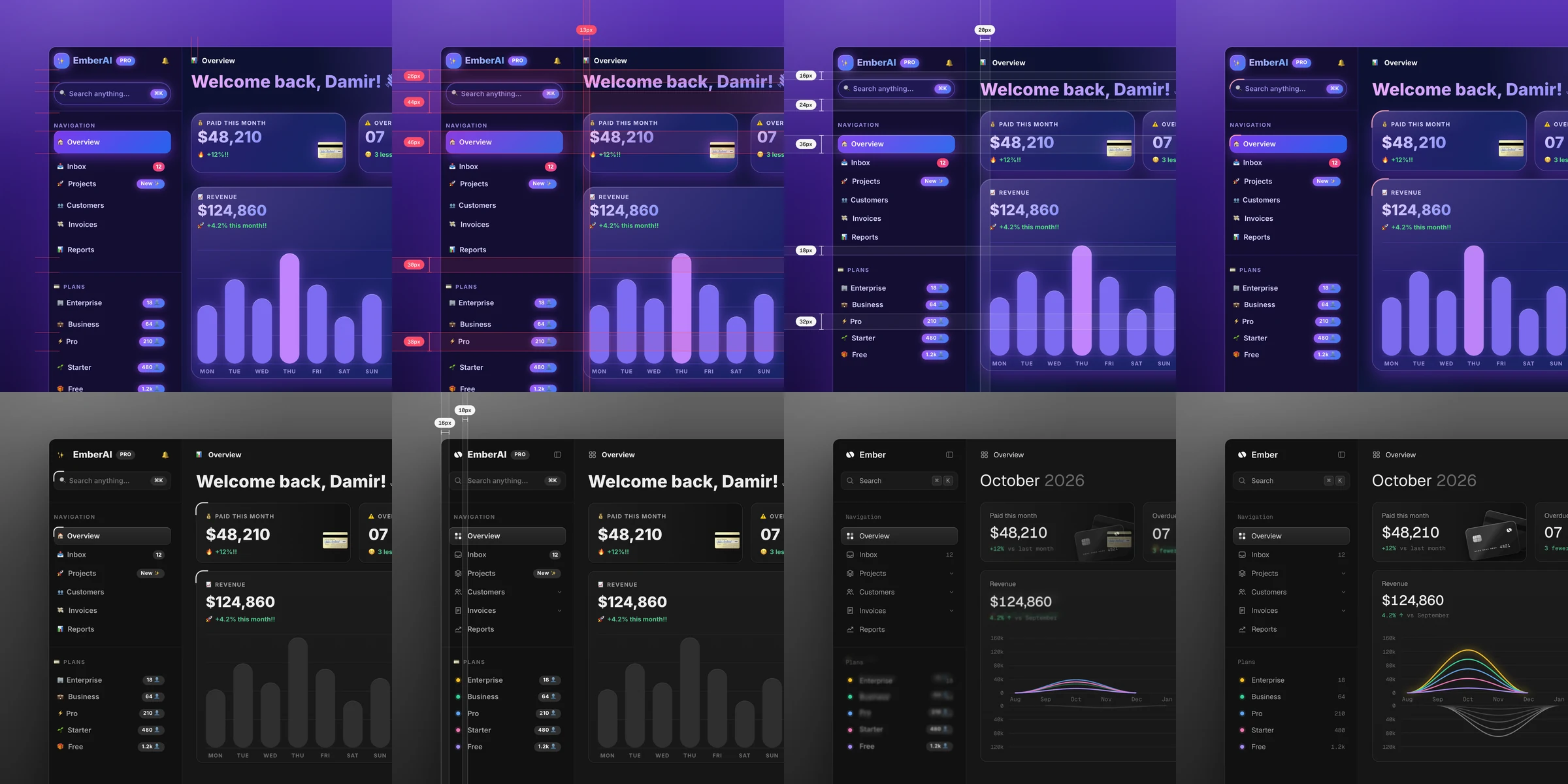
unslop is a skill for Claude Code and Codex that turns vibecoded, AI-looking UI into a designed interface with its own character. It finds the slop first, the purple gradients, glows, emoji labels, shouty copy and uneven spacing, then sets a direction from your product and fixes the screen pass by pass like a designer doing a redline review. It works in whatever your screen is built with, like Next.js, React, Vue, Svelte, Tailwind or plain HTML and CSS, on dashboards, apps and landing pages, and even on a live site when all you have is a link.
Install
For Claude Code, copy the skill into your skills folder.
git clone https://github.com/heydamir/unslop
mkdir -p ~/.claude/skills && cp -r unslop/skills/unslop ~/.claude/skills/
For a single project, copy it into .claude/skills/ inside that project instead.
For Codex, ask it to install the skill straight from this repo.
$skill-installer install https://github.com/heydamir/unslop/tree/main/skills/unslop
Or copy it by hand into ~/.agents/skills/, or into .agents/skills/ inside a single project.
git clone https://github.com/heydamir/unslop
mkdir -p ~/.agents/skills && cp -r unslop/skills/unslop ~/.agents/skills/
To snapshot a live site or create a story video, install Playwright and its Chromium browser from the project directory where you run the skill:
npm install -D playwright
npx playwright install chromium
Story videos also require ffmpeg installed and available on your PATH.
Use
In Claude Code, type /unslop with what you want. In Codex, type $unslop the same way. Or just ask in your own words and the agent picks the skill up by itself.
/unslop this dashboard
/unslop the hero of https://example.com
/unslop my landing page and make the story video so I can post it
It audits the screen and proposes a direction before it edits anything, so you can steer it early. If the screen is already good, it tells you so and suggests a few small refinements instead of redesigning it.
What it does
- Audit. Lists every sign of slop with where it lives.
- Direction. Character, world, the one or two moments that carry the color, and a signature detail, all taken from your product.
- Passes. Spacing, color, icons, copy, type, layout, details, visuals and motion, in that order.
- Visuals. Shows your product instead of a glossy blob. When a hero needs a scene or an object, it can generate one through an image service like fal, Replicate, OpenAI images or Higgsfield. If none is connected, it offers to connect one as an MCP server, and it shows the prompt and asks before every paid generation. Dashboards and apps rarely need one.
- Story video. A square video under 10 seconds of your screen unslopping itself, ready to post. It needs Playwright and ffmpeg.
Try it on the two vibecoded screens in examples.
Hire the unslopper
Would rather have a designer do it? Damir unslops one key screen in 3 days, built in your stack, at heydamir.design/unslop.
License
CC BY 4.0. Use it, change it and share it, including commercially, as long as you credit Damir Sokolovsky (@heydamir) and link back to this repository.