Run Codex locally. Control it from Discord.
Approve, resume, interrupt, and monitor AI coding work from your phone.
CodeHelm lets you start, resume, approve, interrupt, and monitor local Codex sessions from a Discord thread.




Demo · Quick Start · Workflow · Discord Setup · Development
⚡ Overview
CodeHelm runs a local daemon, manages a local Codex App Server, and turns a Discord channel into a control surface for Codex sessions. You can set a workdir, start or resume a session, approve requests, interrupt a running turn, and follow progress in one Discord thread instead of bouncing between tools.
Perfect for:
- approving Codex actions while away from your terminal
- keeping AI coding sessions visible to your team
- resuming long-running sessions without losing context
You only need to: start CodeHelm locally, connect Codex to the printed remote address, and use the configured Discord channel.
CodeHelm will return: a managed Discord thread attached to a real Codex session, with transcript updates, approval controls, and final output in one place.
Demo
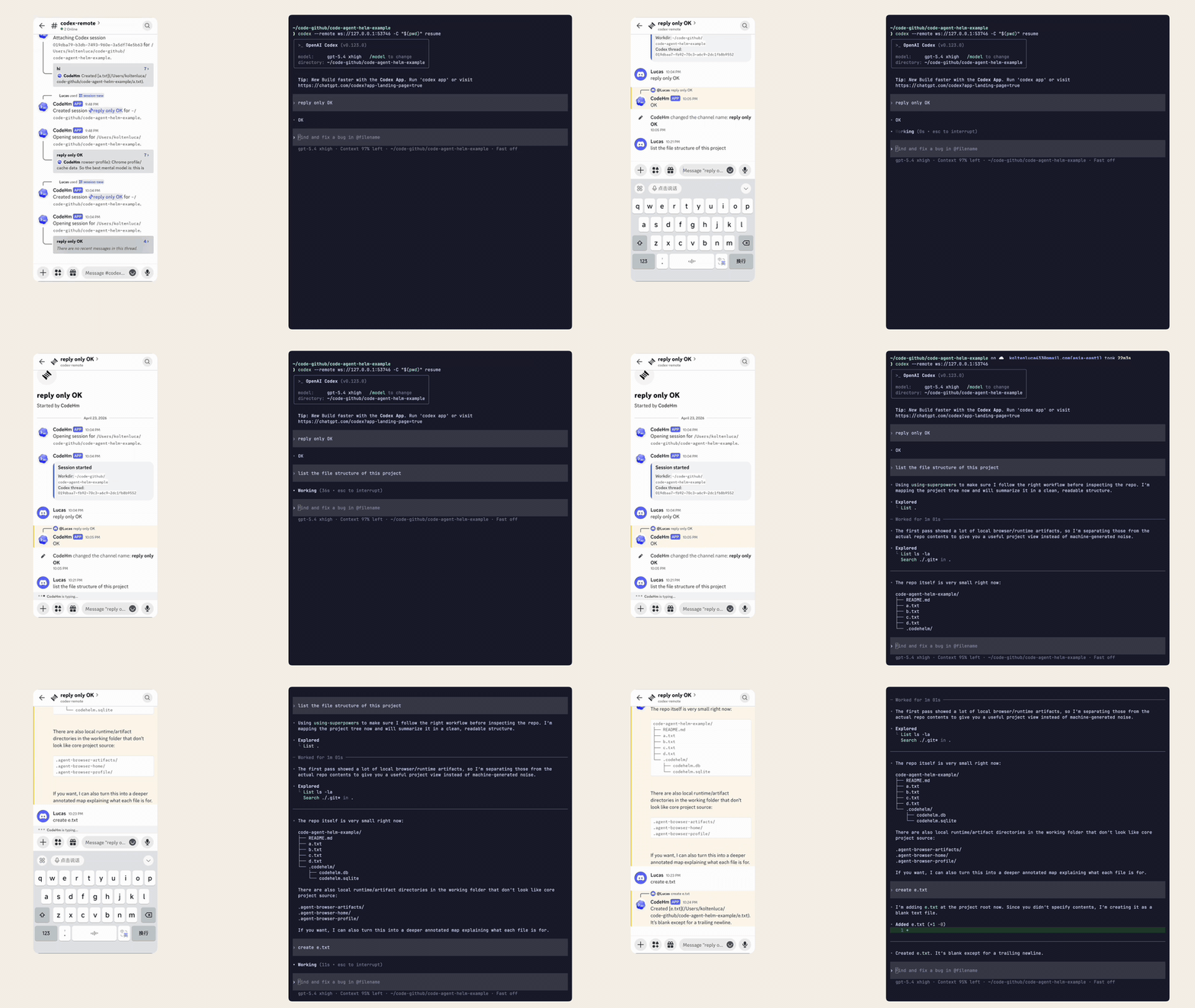
Workflow
- Start the local daemon: CodeHelm connects to Discord and starts a managed Codex App Server on loopback.
- Connect Codex: run
codex --remote <ws-url>with the address printed bycode-helm start. - Choose a workdir: use
/workdirin the configured Discord control channel. - Create or resume a session: use
/session-newor/session-resume. - Work inside the managed thread: send follow-up messages, approve requests, inspect status, interrupt turns, and read the final answer.
Each managed Discord thread stays attached to one Codex session, so you can leave and come back later without starting from scratch.
Quick Start
Install
Prerequisites
| Tool or setup | Requirement | Check |
|---|---|---|
| Bun | Installed on the machine running CodeHelm | bun --version |
| Codex | Installed on the same machine | codex --version |
| Discord bot | Bot token, target server, control channel | Discord setup guide |
| Discord channel | Text or announcement channel with public threads | Check channel permissions |
| Bot intent | Message Content Intent enabled | Discord Developer Portal |
1. Install CodeHelm
Choose one install method:
npm install -g code-helmbun add -g code-helmBun is still required at runtime even if you install the package with npm.
2. Onboard Discord
code-helm onboardThe guided setup asks for:
- your Discord bot token
- the target guild
- the control channel
3. Start CodeHelm
Foreground:
code-helm startBackground:
code-helm start --daemonBy default, CodeHelm starts the managed Codex App Server at ws://127.0.0.1:4200.
If that port is already in use, choose another port for this run:
code-helm start --port 4201
code-helm start --daemon --port 4201
4. Connect Codex
Use the address printed by code-helm start:
codex --remote <ws-url>If you want Codex to start in your current shell directory:
codex -C "$(pwd)" --remote <ws-url>5. Control Sessions From Discord
Control-channel commands:
| Command | Purpose |
|---|---|
/workdir | Set the current local workdir |
/session-new | Start a fresh Codex session |
/session-resume | Reattach an existing Codex session |
/session-close | Close the current managed session thread |
/session-sync | Recover a degraded managed session thread |
Managed-thread commands and actions:
| Command or action | Purpose |
|---|---|
| Send a normal thread message | Continue the Codex conversation |
| Approval buttons | Approve or decline Codex requests |
/status | Show the current managed session status |
/interrupt | Interrupt the current Codex turn |
Commands
| Command | Purpose |
|---|---|
code-helm onboard | Configure the Discord bot and control channel |
code-helm start | Run CodeHelm in the foreground |
code-helm start --daemon | Run CodeHelm in the background |
code-helm status | Show daemon state and the Codex remote URL |
code-helm stop | Stop the background daemon |
code-helm check | Check whether a newer package is available |
code-helm update | Update the installed package |
code-helm autostart enable | Start the daemon at login on macOS |
code-helm autostart disable | Remove the login-startup entry on macOS |
code-helm uninstall | Remove local CodeHelm config, state, and db |
code-helm version | Print the installed version |
Development
For local repository development:
bun install
bun test
bun run typecheck
Useful development commands:
bun run dev
bun run migrate