Birth
English | 简体中文





Manage your Mac's startup items at a glance.
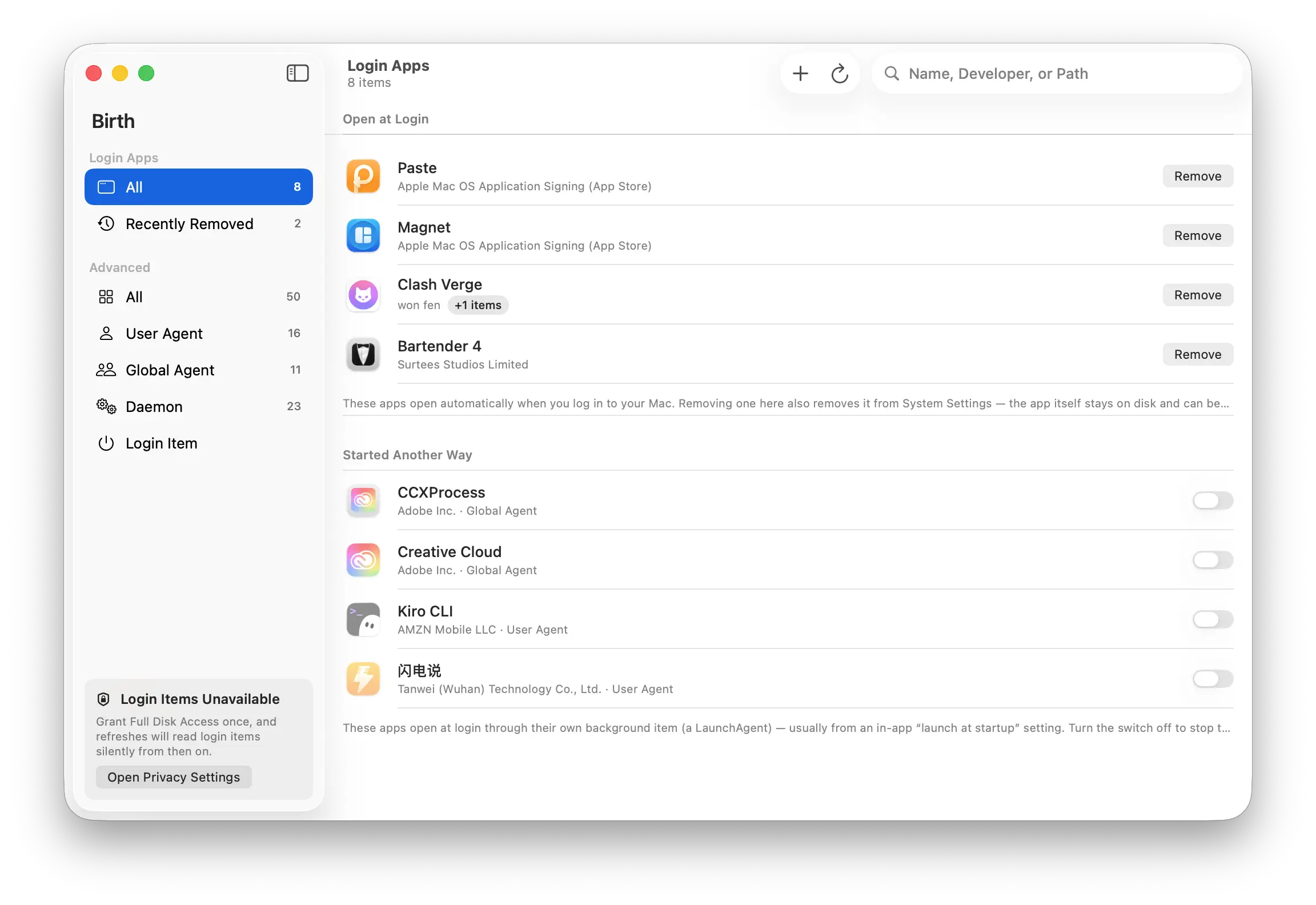
Birth is a free, open-source startup item manager for macOS. It gathers every background item, daemon, and login item on your system into one window, tells you who put it there (code-signing identity) and whether it's running right now — and lets you disable or remove any of them with one click.
launchd is PID 1 — every process on your Mac is born from it. Startup items are your Mac's birth rites; Birth lets you decide which ones deserve to stay.
Why
macOS scatters startup items across at least four mechanisms:
| Source | What lives there | Shown in System Settings? |
|---|---|---|
~/Library/LaunchAgents | The current user's background items | Only as a vague "background items" |
/Library/LaunchAgents | Background items for all users | Same |
/Library/LaunchDaemons | Root daemons | Same |
| BTM login items | "Open at Login" apps | Yes, but no paths, no details |
System Settings won't tell you where the plist lives, which executable it points to, or who signed it — and third-party updaters, helper processes, and uninstall leftovers thrive on exactly that opacity. Birth tears it off.
Features
Login Apps (everyday)
- Zero-permission viewing of the "Open at Login" list — works the moment you open the app, no prompts
- Add / remove login apps (a one-time Automation permission is requested only on your first change); you can also just drag an app into the window
- Every app shows its developer signing identity, plus the background pieces it quietly installed alongside itself (a "+N items" badge, one click away)
- Recently Removed: removed apps stay on a dedicated sidebar page, one click to re-enable
Advanced (audit)
- Four layers in one view: user agents / global agents / daemons / login items — third-party only by default, one click to include everything
- Signing identities verified against certificate-chain anchors: Apple / App Store / Identified Developer / Untrusted Certificate / Ad-hoc / Unsigned / Invalid
- Masquerade detection: items claiming
com.apple.*whose signature disproves it get a red "Masquerading" badge — the most common malware persistence disguise - Live run state (PID) and one-click enable/disable (password-free for user-level items; daemons go through the standard macOS administrator prompt)
- Search & locate: by name, developer, or path; type a PID and get an instant answer to "which startup item spawned this process"
- Filter & sort: filter by run state (running / loaded / not loaded) and enablement; click any of the five column headers to sort — the sort column and direction are remembered, Finder-style
- Safe removal: the job is stopped first, its plist goes to the Trash, and a backup is kept in
~/Library/Application Support/Birth/Backups - Property-list viewer (binary plists rendered as readable XML)
Permissions: asked when needed, once
| Action | Permission | When |
|---|---|---|
| View the Login Apps list | None | — |
| Browse user agents / global agents / daemons | None | — |
| Enable/disable user & global agents | None | — |
| Add / remove login apps | Automation (System Events) | One prompt on first change |
| View the Login Items category | Full Disk Access | Checked once in System Settings |
| Enable/disable daemons; remove global items | Administrator password | Every operation (macOS security model) |
Missing permissions degrade gracefully: one-time setup guidance in the app, an automatic refresh when you come back from System Settings, and silence from then on.
Install
Requires macOS 14 (Sonoma) or later. Primarily developed and tested on macOS 26; if you hit problems on earlier versions, please file an issue.
Option 1: DMG
Download the latest Birth-x.x.x.dmg from Releases and drag Birth into Applications. The DMG is a universal binary — it runs natively on both Apple Silicon and Intel Macs.
Birth is a personal open-source project and is not notarized by Apple. On first launch, macOS will warn that the developer can't be verified: go to System Settings → Privacy & Security and click "Open Anyway" at the bottom of the page — once.
Option 2: Build from source
git clone https://github.com/iAmCorey/birth.git
cd birth
./scripts/make-app.sh
open dist/Birth.app
By default this builds for your machine's architecture (arm64 on Apple Silicon, x86_64 on Intel) — the fastest build and the smallest app. To build a universal app that runs on both chips (the form official DMGs ship in), use:
./scripts/make-app.sh universalWith Xcode 26 or later installed, packaging also compiles the adaptive Default/Dark app icon used by macOS 26. Command Line Tools or an older Xcode still produce a working app with the legacy static icon, but the release gate requires the adaptive icon.
(A Homebrew cask is planned.)
Development
swift test                    # unit tests
./scripts/release-check.sh    # release gate: tests → universal package → self-contained smoke launch → health checks
./scripts/make-dmg.sh # distribution DMG- SwiftUI + Swift Package Manager — no Xcode project file, zero third-party dependencies
- Three targets:
BirthCore(scanning/control/signing, UI-free),BirthUI(the whole app, testable),Birth(a three-line main) release-check.shmust pass before every release — one red light and it doesn't ship
Notes & limitations
- The signing badge shows identity, not integrity: Birth verifies certificate-chain anchors ("who signed this"); it does not hash the full bundle contents — that's Gatekeeper's job.
- The Login Items category is read-only: macOS offers no third-party API to toggle these items, so Birth gives you a one-click jump to System Settings instead.
- Birth currently ships with an ad-hoc signature, which changes with every build. After upgrading, Full Disk Access and Automation permissions must be re-granted in System Settings (toggle Birth off and back on). Within a single version, a grant persists.
Uninstall
Move Birth.app to the Trash. For a deeper clean (optional):
defaults delete dev.birth.Birth                            # preferences
rm -rf ~/Library/Application\ Support/Birth                # removal backups
Don't forget to remove Birth's permissions in System Settings → Privacy & Security.
Feedback
Bugs and ideas → GitHub Issues.