NeonClipping
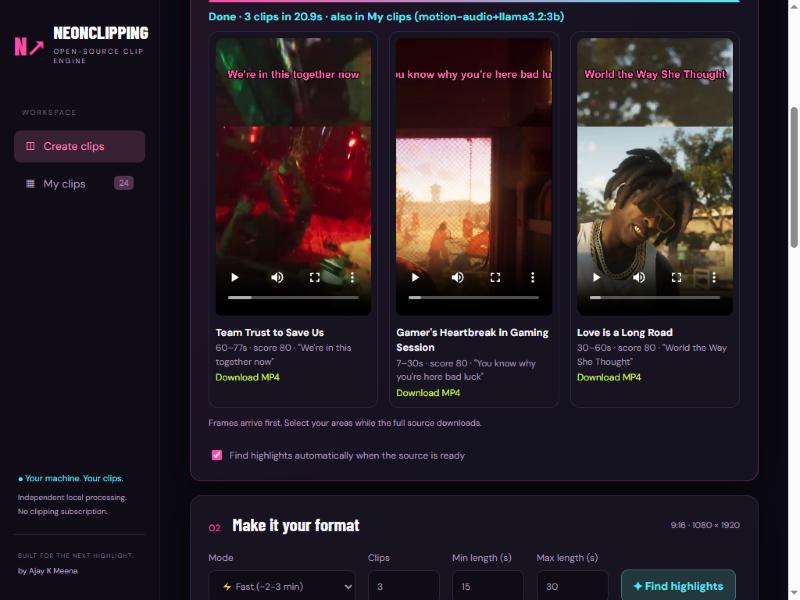
Paste a link. Get captioned 9:16 clips in about two minutes. Free, local, open-source.
NeonClipping turns long YouTube / Twitch / Kick videos (or your own MP4) into vertical, captioned clips with a title and hook for each. Everything runs on your machine: no account, no subscription, no upload.


🌐 Website with one-click Windows setup: https://iamajmeena.github.io/neonclipping/
Made by Ajay K Meena (Director, DOP, colorist, DaVinci Resolve educator, Jaipur). If NeonClipping saves you time, please ⭐ star the repo and follow @iamajmeena on Instagram.
📘 Guides (Hindi + English, PDF): docs/NeonClipping-Guide-EN-HI.pdf
🤖 Let an AI agent install it for you: copy docs/NEONCLIPPING-AGENT-SETUP-PROMPT.txt into Claude Code, Codex CLI or Cursor.
How it finds good moments
Two modes, one button.
⚡ Fast mode (default, videos over 10 min) copies the trick that makes the fastest clippers fast: never look at the whole video.
- Download audio only (79 MB for an 85-minute video, about 10 s).
- Take the transcript for free from YouTube's own captions (word-timed). No speech model needed. For other sources a local Whisper model is used as the fallback.
- Score the whole audio track for sudden loudness jumps (vs a 2-minute local baseline), raised voices (2–4 kHz energy) and quiet-to-loud transitions.
- Take the best moments, read each one's transcript with a local LLM (Ollama) and let it score the moment, write a title and a hook. Snap the start and end to sentence boundaries inside your Min/Max length.
- Download only the chosen sections of the video (not the whole file), trim exactly by matching their sound to the audio track, and render 1080x1920 clips with burned-in captions.
🔬 Deep mode downloads the whole video, adds optical-flow motion (OpenCV Farneback: fast objects, impacts, camera whips) and cut density to the audio signals, shortlists 4× more candidates and gives the LLM 15 seconds of context before and after each one.
Measured on one machine (RTX 2060, 16 threads), Fast mode, 3 clips each:
| Source | Time |
|---|---|
| 85-minute YouTube stream (YouTube captions) | 97 s |
| 3-hour Twitch VOD (no captions, local speech model) | 136 s |
| 90-second YouTube trailer | 21 s |
| 90-second local MP4 | 14 s |
Your numbers depend on network and CPU.
How it decides what is a good moment
Every candidate moment is scored from several signals, then the best ones are kept:
| Signal | What it looks for |
|---|---|
| Loudness jump | A sudden boom or shout compared with the last two minutes |
| Raised voice | Energy in the 2–4 kHz band (screaming, yelling) |
| What is said | "oh my god", "oh shit", "run", "police", "bhaago", "arre yaar" and similar (English, Hinglish, Hindi) |
| On-screen action | Fast motion (optical flow), explosion-like flashes, red/blue light flicker, scene cuts |
| AI score | A small local LLM reads the transcript: emotion, punchline, payoff |
It learns from you. Under every clip there are 5 stars. Your ratings stay on your computer (data/feedback.jsonl). After 8 ratings the weights of the signals above are re-fitted (ridge regression pulled toward the defaults, blended in gradually), so a gamer-shouting-heavy taste ranks shouting higher and a calm-explainer taste ranks it lower. Nothing is uploaded.
Features
- One-click Make clips, live progress, clips appear one by one with preview and MP4 download.
- Min / Max clip length (e.g. 30–80 s). Clips end on a sentence.
- Facecam position presets (top-left, top-right, bottom-left, bottom-right, bottom-centre, none) for the usual streamer layouts, remembered between sessions. Or draw the face and gameplay boxes yourself in the editor.
- 11 native layouts: camera above/below gameplay, blurred fill, full-screen crop, gameplay only, four corner overlays, circle facecam and side-by-side. Independent face/game selection and a face-size slider. Preview-only platform safe zones.
- Caption styles: GTA Neon, Impact, Clean, Hormozi and MrBeast. Word-timed, editable words, SRT export.
- Hinglish captions: Hindi speech is written in English letters ("kya haal hai bhai") by default. Pick Hinglish / हिंदी / English explicitly if you like. Caption accuracy: Fast, Accurate (Whisper large-v3-turbo, default) or Best Hindi (large-v3, much slower on small GPUs).
- Make clips uses your own setup: facecam preset or the boxes you draw in step 03.
- Optical-flow motion + audio highlight ranking, frame-accurate NVENC export (falls back to x264).
- Nothing leaves your computer. The server binds to
127.0.0.1only.
Change clips after generating them
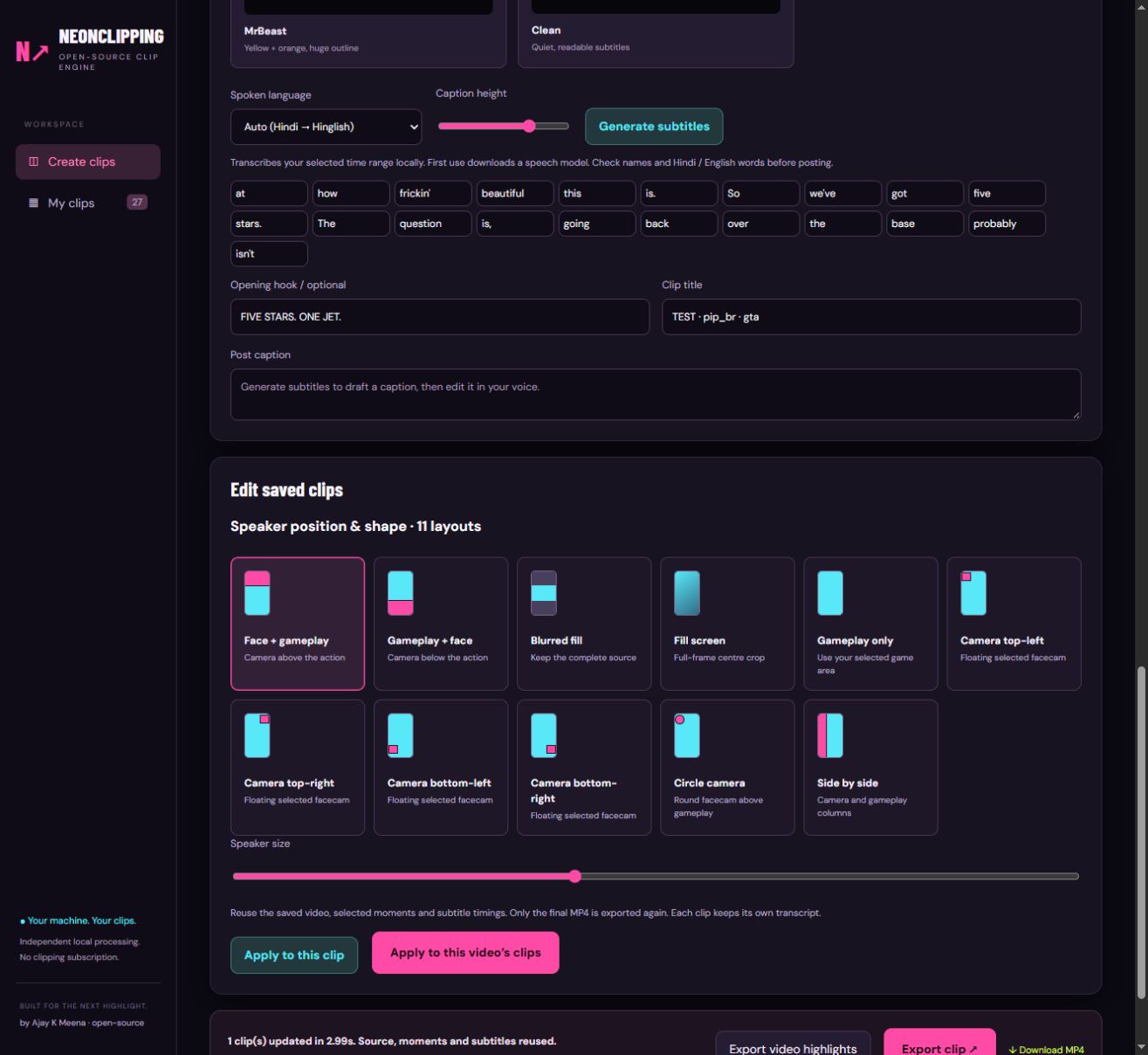
Open My clips → Edit clip. The saved editor includes all 11 speaker position/shape layouts, a speaker-size slider, editable subtitle words, caption style and caption height.
- Apply to this clip updates the opened clip.
- Apply to this video's clips updates the currently saved clips associated with the same source URL. Each keeps its own timestamps, transcript, title and hook. New clips still being generated are not included in that snapshot.
- Source download, highlight discovery and speech recognition are not repeated. Burned-in captions and framing require encoding a new final MP4.
- Original source files must remain in
data/. Previous MP4s are kept; the library displays the latest versions. Old exports missing saved word timings can recover captions from their SRT, with approximate per-word timing. - This edits the selected moments; changing the clip's start/end or spoken language requires a separate trim/transcription workflow.
Validation on one 796.9-second source: all 11 layouts and five caption styles exported with audio and decoded successfully. A seven-clip layout/style update took 119.58 seconds while reusing each clip's exact source, range and word list. These are local checks, not guaranteed runtimes or a caption-quality benchmark.
Run the portable regression tests with python -m unittest discover -s tests -v.
Install
Easiest (Windows): download NeonClipping-Setup.bat from the website or the Releases page and double-click it. It checks your PC, installs Python and FFmpeg if missing, installs NeonClipping into %LOCALAPPDATA%\NeonClipping, creates a Desktop shortcut and opens the app. Mac/Linux: install.sh (new, not yet tested on a real Mac). Or follow the steps below.
Requirements: Python 3.10+, FFmpeg on PATH. Optional but recommended: Ollama with ollama pull llama3.2:3b for AI titles, hooks and scores (without it clips are picked by the audio/motion score), and an NVIDIA GPU for NVENC and faster-whisper.
git clone https://github.com/iamajmeena/neonclipping
cd neonclipping
# Windows
./run.ps1
# Linux / macOS
./run.sh
Open http://127.0.0.1:8770, paste a link, press ⚡ Make clips.
Optional GPU speech model support (only used when a video has no YouTube captions):
.venv/bin/pip install nvidia-cublas-cu12 "nvidia-cudnn-cu12==9.*"Set NEONCLIPPING_CPU=1 to force CPU. Set NEONCLIPPING_PORT=9000 to use another port.
How it is built
| File | Job |
|---|---|
app.py | FastAPI server, /make pipeline, export, library |
smart.py | Moment scoring: transcript + local LLM, sentence snapping |
highlights.py | Audio-jump / shout / optical-flow / cut ranking, parallel decode |
captions_yt.py | YouTube word-timed captions (json3) parser |
captions.py | Local Whisper (GPU first, CPU fallback), ASS/SRT styles |
translit.py | Devanagari → Hinglish (word by word, keeps timings) |
standalone.py, previews.py | Link import, early preview frames |
Live clipping (while the stream is on)
Paste a Twitch channel link or a YouTube Live link into the Live clipping panel and press Start. NeonClipping records the stream (Streamlink), reads chat anonymously, counts messages in 10 s buckets and cuts a clip around every chat spike (chat velocity more than 2.5 sigma and 2.5x the 5-minute baseline). The clip starts about 24 s before the spike, because chat reacts after the moment. It then gets captions, a hook and title, your layout and facecam boxes, and a viral score like any other clip. Clip the last 30 s now cuts on demand, Stop ends the session. It only works while the stream is live; for finished videos use Make clips.
There is also a command-line version in live/live_clip.py.
Creators (clip a streamer automatically)
Add a Twitch name or a Twitch / YouTube channel link in the Creators panel. NeonClipping checks every minute; when that creator goes live it records the stream and clips the chat spikes, using the layout, facecam boxes and caption style you had selected when you added them (“Use my current layout” updates it). Clips appear under the creator and in My clips.
- One stream at a time (recording and rendering are heavy); other creators wait their turn.
- NeonClipping must stay open. Unattended recordings stop after 3 hours (a new one starts if the creator is still live), stop when less than 8 GB of disk is free, and the big recording file is deleted after the last clip is cut.
- Pressing Stop pauses that creator for 30 minutes; switching Auto off and on resumes at once.
- Tested on Twitch (recording, chat spikes, clip, feed). YouTube channels are detected through yt-dlp; an auto-clipped YouTube stream was not run end to end.
Tests
tests/ holds an end-to-end suite that runs against the live server: page and API validation, every layout and caption style rendered and measured, editing one / all clips of a video, Make clips on real YouTube / Twitch / local sources in every mode and language, live clipping on a real stream, the creator list, star ratings, the installer and the website. Unit tests cover the chat-spike rule, caption grouping and re-editing. The last full run is in tests/REPORT.md: 187 checks, all passing, plus the 12 problems the run found and fixed.
python -m unittest tests.test_captions tests.test_live tests.test_reedit
python tests/e2e.py static export edit creators feedback   # server must be running
python tests/e2e_make.py          # real downloads + transcription (about 25 min)
python tests/e2e_live.py          # needs a Twitch channel that is live
python tests/e2e_site.py          # website, links, release assets
python tests/make_report.py       # rebuild tests/REPORT.md
Style & extras
- Templates: wrap the clip in an X post (light or dark), a TikTok hook box or a Breaking news broadcast frame. Type the name, handle and hook; the card, avatar letter, check mark and ticker are drawn for you.
- Background card: padded, rounded-corner video card on a blurred copy, a colour, a gradient or your own image (dimmed, blurred).
- Logo / watermark (4 corners, size, opacity), credit line (or "Clip: channel name" automatically), outro ribbon that slides in for the last seconds.
- Music bed: one track under the voice that rises to a peak volume in the last seconds (volume, peak and riser length are yours).
- Six caption animations: highlight (word by word), pop-in, pop-in line, one by one, build up, full line.
- Import captions: drop an
.srtor.assfile; the words are timed to the clip and can be edited. - All of it works in Make clips, single exports and "Edit saved clips" (including "apply to all clips of this video").
Find my facecam
The Find my facecam chip (or "find it automatically when I press Make clips") looks at 14 frames of the video, finds rectangles whose border stays in the same place, and keeps the one that holds a face (small local YuNet face model, MIT licence, models/). It rejects the game's minimap and HUD panels, finds webcams in a corner or floating on a side, and answers "no facecam" when it is not sure. Measured on 30 real saved streams: found the webcam on every stream that has one; clean "not found" on trailers and talking-head videos. Not perfect: some boxes cover only the face inside a framed webcam.
Long streams with a free chatbot
AI parts (below step 01): paste a YouTube link, NeonClipping splits the video's captions into ~25-minute parts and gives a copy-ready prompt per part. Paste each into any free chatbot, paste all answers back (JSON or lines like 12:30-13:10 title), tick the moments and press Make clips: only those sections are downloaded and rendered. A chatbot given a 9-hour transcript in one go only reads the start; small parts fix that. Nothing is sent anywhere by NeonClipping; the chatbot step is manual.
Honest limits
- Highlight picking is a heuristic plus a small local LLM. It finds loud, energetic, quotable moments, not guaranteed "viral" ones. Review before posting.
- The action cues (motion, flash, light flicker) are simple heuristics on a tiny low-resolution copy; they rank moments, they do not recognise "a police chase". Star ratings are how it gets better at your taste.
- The LLM sees text only. It cannot see the screen.
- Without YouTube captions (Twitch VODs, uploaded files) a speech model must transcribe each candidate, which is slow on CPU.
- Auto-caption accuracy follows the source: YouTube's auto captions are imperfect, especially Hinglish.
- Deep mode was verified on a short video only; on multi-hour videos it downloads the whole file first and is slow by design.
- Facecam presets are starting points, not detection: if you pick Bottom-right but the cam is bottom-left, the top half of the clip will show the wrong area. Pick the right corner or draw your own boxes.
Support
NeonClipping is free. If it saves you time you can ⭐ star the repo, follow @iamajmeena, or optionally donate via Razorpay (UPI / cards): https://rzp.io/rzp/JN41CpW. The app also has a ♥ Donate button. Nothing is ever locked behind a donation.
Credits and inspiration
Design ideas studied from open-source clippers: PeakCut (audio-first download, captions as transcript, section download), ClipCutter, content-ai, and the Growlance live-clipper script. Also studied: PeakCut's facecam-by-static-border idea and creator list (reimplemented here with our own code, plus a face check), the public feature list of the YIZERGE desktop editor (templates, background card, music riser, caption animations; only its public web page was read), and a creator's walkthrough of splitting a 9-hour stream into small transcript parts for a free chatbot. Built on FFmpeg, yt-dlp, FastAPI, faster-whisper, OpenCV (YuNet face detector, MIT), Ollama.
License
MIT. See LICENSE.