Head-Coupled Perspective Viewer
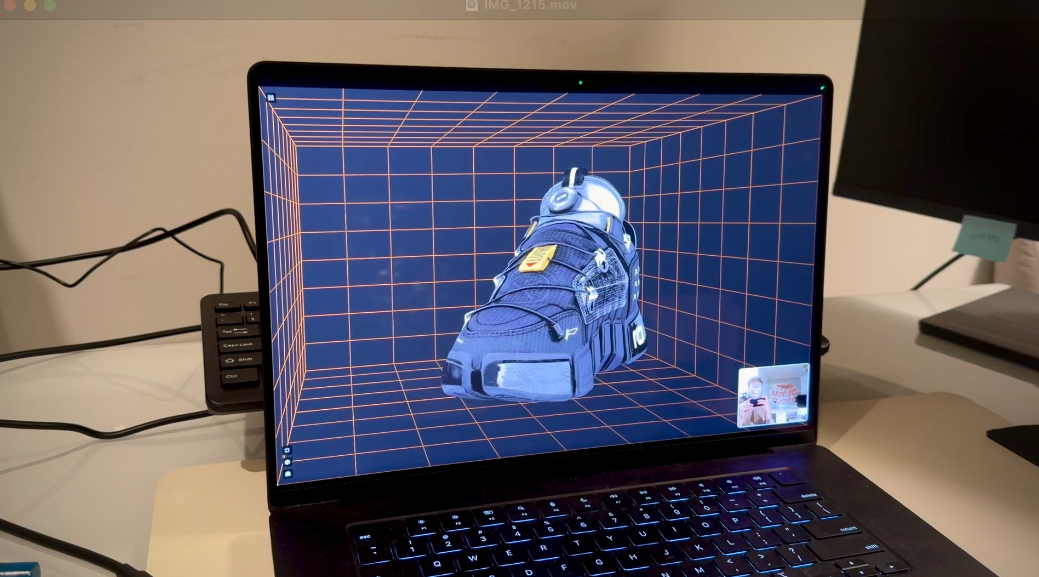
A real-time head-tracking 3D viewer that creates an immersive "Johnny Chung Lee" style head-coupled perspective effect. The application uses MediaPipe face tracking to adjust the Three.js camera perspective based on your head position, making 3D objects appear to exist in physical space behind your screen.
Features
- 👁️ Real-time head tracking using MediaPipe Face Mesh
- 🎮 Dynamic camera perspective that responds to head movement
- 👟 Interactive 3D model viewer (shoe model included)
- 🎯 Physical calibration system for accurate perspective
- 🎛️ Advanced control panel for model positioning, scaling, and rotation
- 🐛 Debug mode with visual helpers
- 📹 Webcam integration with permission handling
- 🔄 Automatic CDN availability checking
- ⚡ Optimized performance with independent render loops
- 🎨 Clean, modern UI with Tailwind CSS
Technology Stack
- React - UI framework with hooks for state management
- TypeScript - Type safety and better developer experience
- Three.js - 3D rendering and scene management
- MediaPipe - ML-powered face detection and landmark tracking
- Tailwind CSS - Utility-first CSS framework
- Vite - Next-generation frontend tooling
- GLB Models - 3D model format support
How It Works
This application combines computer vision and 3D graphics to create an illusion of depth:
- Face Tracking: MediaPipe Face Mesh detects 468 facial landmarks in real-time from your webcam
- Head Pose Estimation: Key landmarks (eyes, nose) are analyzed to calculate your head's position in 3D space
- Smoothing: Exponential moving average filters reduce jitter while maintaining responsiveness
- Camera Adjustment: The Three.js camera position updates based on your head movement
- Perspective Rendering: Objects appear to move naturally as you shift your viewpoint, creating a window-into-a-world effect
The result is a compelling 3D experience where moving your head left makes you see around the right side of objects, just like looking through a real window.
Getting Started
-
Install dependencies:
npm install -
Start the development server:
npm run dev -
Open your browser and allow webcam access when prompted
-
Follow the calibration wizard to set up physical screen measurements for optimal perspective accuracy
-
Move your head around to see the 3D effect! The model will appear to exist in space behind your screen
Project Structure
src/
├── components/              # React components
│   ├── CalibrationWizard.tsx       # Physical calibration UI
│   ├── CameraPermission.tsx        # Webcam permission handling
│   ├── FaceMeshView.tsx            # Face tracking visualization
│   ├── ModelViewer.tsx             # 3D model loader
│   ├── ShoeControlPanel.tsx        # Model adjustment controls
│   ├── ThreeView.tsx               # Main Three.js scene
│   └── CdnStatusIndicator.tsx      # CDN availability check
├── hooks/                   # Custom React hooks
│   ├── useFaceLandmarker.ts        # MediaPipe face detection
│   └── useFaceMesh.ts              # Face mesh processing
├── utils/                   # Utility functions
│   ├── calibration.ts              # Physical screen calibration
│   ├── headPose.ts                 # Head position extraction
│   ├── offAxisCamera.ts            # Off-axis projection math
│   └── threeScene.ts               # Three.js scene setup
├── App.tsx                  # Main application component
└── main.tsx                 # Application entry point
Controls
- Fullscreen Button (bottom left): Toggle fullscreen mode for maximum immersion
- Settings Button (bottom left): Open calibration wizard to adjust physical measurements
- Debug Button (bottom left): Show visual helpers and coordinate system
- Control Panel (top right): Fine-tune model position, scale, and rotation
- Face Preview (bottom right): Shows your webcam feed with face tracking active
Calibration System
The application includes a physical calibration wizard to improve perspective accuracy:
- Screen Size: Measure your screen's width and height in centimeters
- Viewing Distance: Measure your typical distance from the screen
- Pixel Density: Automatically calculated from screen resolution
This calibration data is stored locally and used to compute accurate head positions relative to your physical screen, making the 3D effect more convincing.
Performance Considerations
- MediaPipe and Three.js run in independent render loops for optimal performance
- Exponential moving average smoothing reduces jitter without lag
- GPU-accelerated WebGL rendering
- Typical frame rate: 30-60 FPS depending on device
- Automatic resource cleanup and memory management
- CDN availability monitoring with fallback handling
Technical Deep Dive
Head Pose Estimation
The application extracts head position from facial landmarks using:
- Inter-ocular distance as a proxy for depth (closer faces have larger eye separation)
- Eye midpoint for horizontal and vertical position
- Exponential moving average smoothing with configurable factor (default: 0.3)
- Clamping to prevent extreme values from causing visual artifacts
Sensitivity can be adjusted in src/utils/headPose.ts:
strengthX: 4  // Horizontal movement multiplier
strengthY: 3  // Vertical movement multiplier
strengthZ: 2  // Depth movement multiplier
Future Enhancements
For geometrically-correct perspective rendering, the current parallax-based approach could be upgraded to true off-axis projection:
- Implement custom frustum calculation based on eye position
- Use camera projection matrix directly instead of position translation
- Add 6-DOF tracking with orientation (pitch, yaw, roll)
- Implement solvePnP for full head pose estimation
See HEAD_COUPLED_PERSPECTIVE.md for detailed implementation notes.
Browser Support
This application requires modern browsers that support:
- WebGL 2.0 - For Three.js rendering
- WebAssembly - For MediaPipe models
- getUserMedia API - For webcam access
- Canvas API - For face mesh visualization
Tested on:
- Chrome/Edge 90+
- Firefox 88+
- Safari 14.1+
Inspiration
This project is inspired by Johnny Chung Lee's groundbreaking head tracking demo using a Wii remote. The technique creates a compelling illusion of 3D depth by adjusting the rendering perspective based on the viewer's position.
Acknowledgments
- MediaPipe for powerful ML models
- Three.js for 3D rendering capabilities
- Johnny Chung Lee for pioneering head-coupled perspective
- React and Vite for modern development tools