Sara is a RouterOS security assessment toolkit. It connects to a MikroTik router over the RouterOS API, finds weak configuration settings and looks up CVEs for the installed RouterOS version. Sara never changes the configuration and needs only read access.
Disclaimer
Use Sara only on networks and devices you own or have permission to test. The author is not responsible for any misuse of this tool.
Modes
| Mode | What it does |
|---|---|
audit | Checks the configuration for weak settings: cleartext management services, unrestricted access, exposed L2 protocols, risky services, SNMP, Wi-Fi security and more |
cve | Finds CVEs for the RouterOS version, read from the router or given with --version |
Install
Works on Unix-like systems and requires Python 3.9 or later. Sara does not need root, so a regular pipx installation is enough:
sudo apt install pipx git
pipx ensurepath
pipx install git+https://github.com/ifritnoises/sara
On the router, enable the api-ssl service (port 8729) and create an account with the read and api policies:
/user group add name=sara-audit policy=read,api
/user add name=sara group=sara-audit password=<password>
Usage
Audit
sara audit $IP $USERNAMEThe password is always asked interactively.
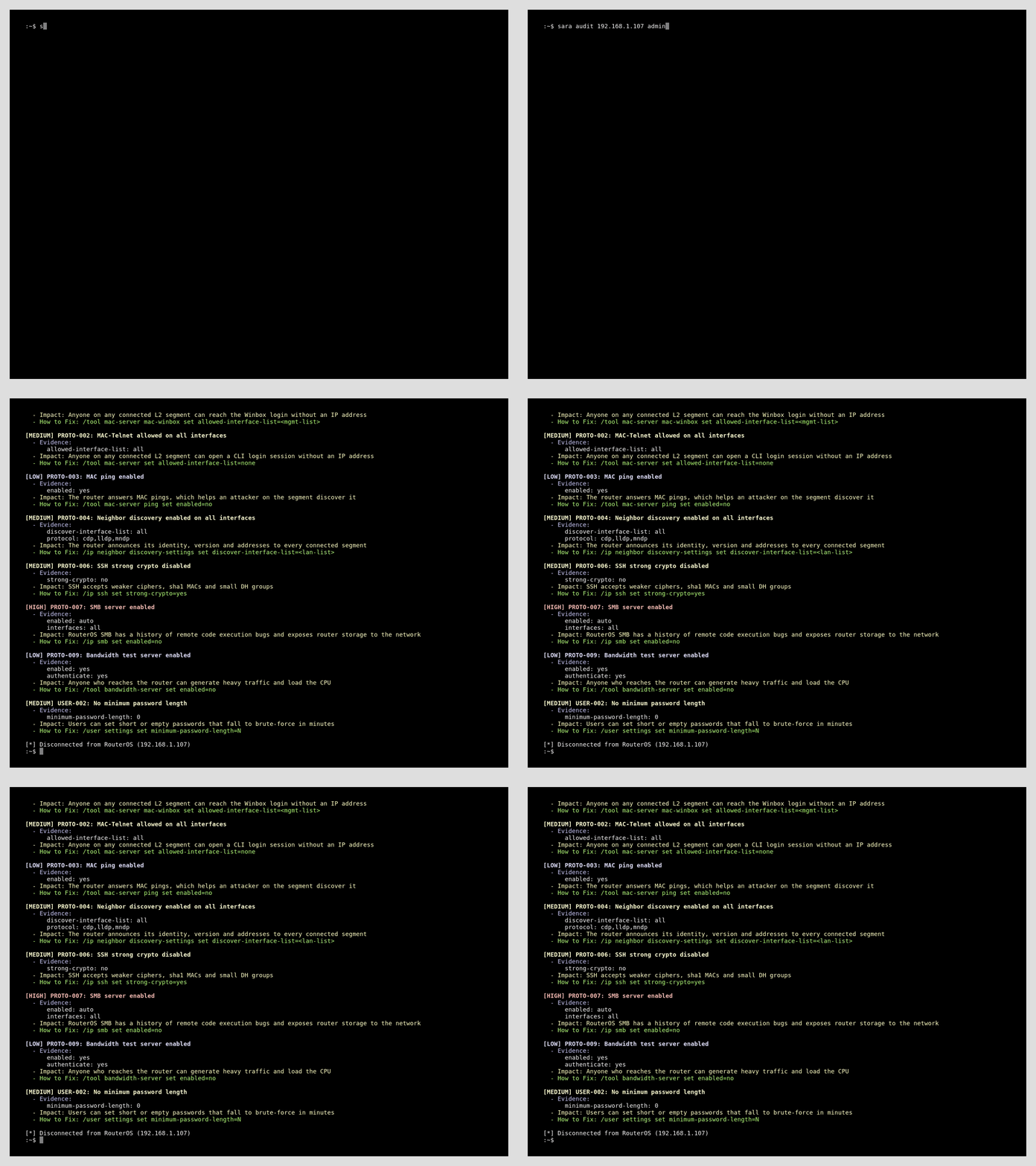
By default Sara uses api-ssl on port 8729. Routers usually have self-signed certificates, so the certificate is not verified, but the channel is still encrypted. Use --port for a non-standard port. --plaintext switches to the unencrypted api service on port 8728 and sends credentials in clear text.
[!WARNING] By default
api-sslon RouterOS has no certificate and offers only anonymous TLS ciphers, which most distributions disable. Sara then retries with these ciphers and prints a warning: the channel is still encrypted, but the router identity is not verified. To avoid this, assign a certificate toapi-ssl:/certificate add name=api-ssl common-name=router key-usage=tls-server /certificate sign api-ssl /ip service set api-ssl certificate=api-ssl
Each finding shows the values read from the router, the impact and a RouterOS command to fix it. Checks that find nothing print nothing. Menus that do not exist on the device, such as Wi-Fi on a router without the package, are skipped.
| ID | Severity | Check |
|---|---|---|
| MGMT-001 | critical | Cleartext management services enabled (telnet, ftp, www, api) |
| MGMT-002 | critical | Management services accept connections from any address |
| MGMT-003 | medium | User accounts accept logins from any address |
| MGMT-004 | medium | Default usernames present |
| PROTO-001 | medium | MAC-Winbox allowed on all interfaces |
| PROTO-002 | medium | MAC-Telnet allowed on all interfaces |
| PROTO-003 | low | MAC ping enabled |
| PROTO-004 | medium | Neighbor discovery enabled on all interfaces |
| PROTO-005 | medium | RoMON enabled |
| PROTO-006 | medium | SSH strong crypto disabled |
| PROTO-007 | high | SMB server enabled |
| PROTO-008 | high | UPnP enabled |
| PROTO-009 | low / medium | Bandwidth test server enabled (medium without authentication) |
| PROTO-010 | low | DDNS enabled |
| PROTO-011 | high | SNMP enabled with a default community |
| PROTO-012 | high | SNMP community with write access |
| PROTO-013 | medium | Router answers remote DNS requests |
| USER-002 | medium | No minimum password length |
| SYS-001 | high | RouterBOOT protection disabled (not applicable on CHR) |
| HW-001 | low | PoE forced on without device detection |
| WIFI-001 | medium | PMKID enabled |
| WIFI-002 | medium | WPS enabled |
CVE Lookup
Check the version running on a router, or any version without connecting:
sara cve $IP $USERNAME
sara cve --version $VERSION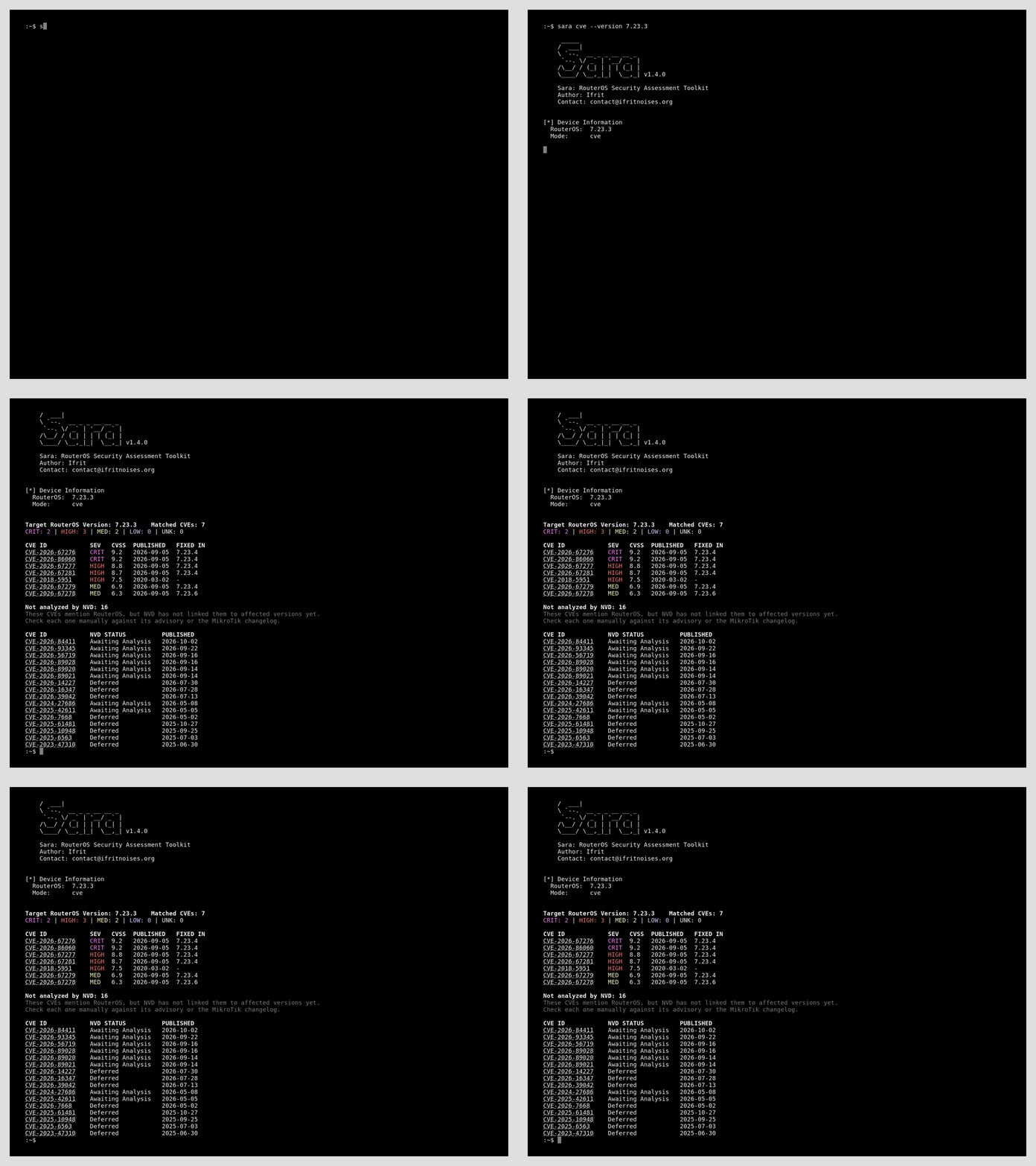
The data comes from the NVD API on every run, so this mode needs internet access.
Known Limitations
- NVD does not add affected version ranges to every CVE right away, and some CVEs never get them. Sara prints those CVEs in a separate table, so check them manually against the MikroTik changelog.
- Without an API key NVD limits the request rate. Running
cvemany times in a row may be refused for a short while.
License
Released under the MIT License. See LICENSE for details.
Copyright (c) 2026 Ifrit contact@ifritnoises.org