Codex Privacy HUD


English | 简体中文
Trace your privacy disclosure the same way you already trace your token usage — live, in every conversation.
See what your agent knows. Control where it goes.
A local-first Codex plugin that maintains a live disclosure ledger for every Codex session, minimizes sensitive context before tool execution, and lets you inspect what it observed crossing each boundary — into model context, out to an MCP tool, out to an external host.
Boundary, not recipient: a second MCP server is not a second destination today, and what a subagent inherited is not recorded at all (limits 19 and 20).
Detection runs on your own machine, via openai/privacy-filter loaded locally through transformers — no prompt, file, or secret is ever sent anywhere to be scanned. The plugin makes no outbound network calls at all; the only socket it opens is a local one to its own daemon on 127.0.0.1.
Token HUD:    How much context has been consumed?
Privacy HUD:  How much sensitive context has been disclosed?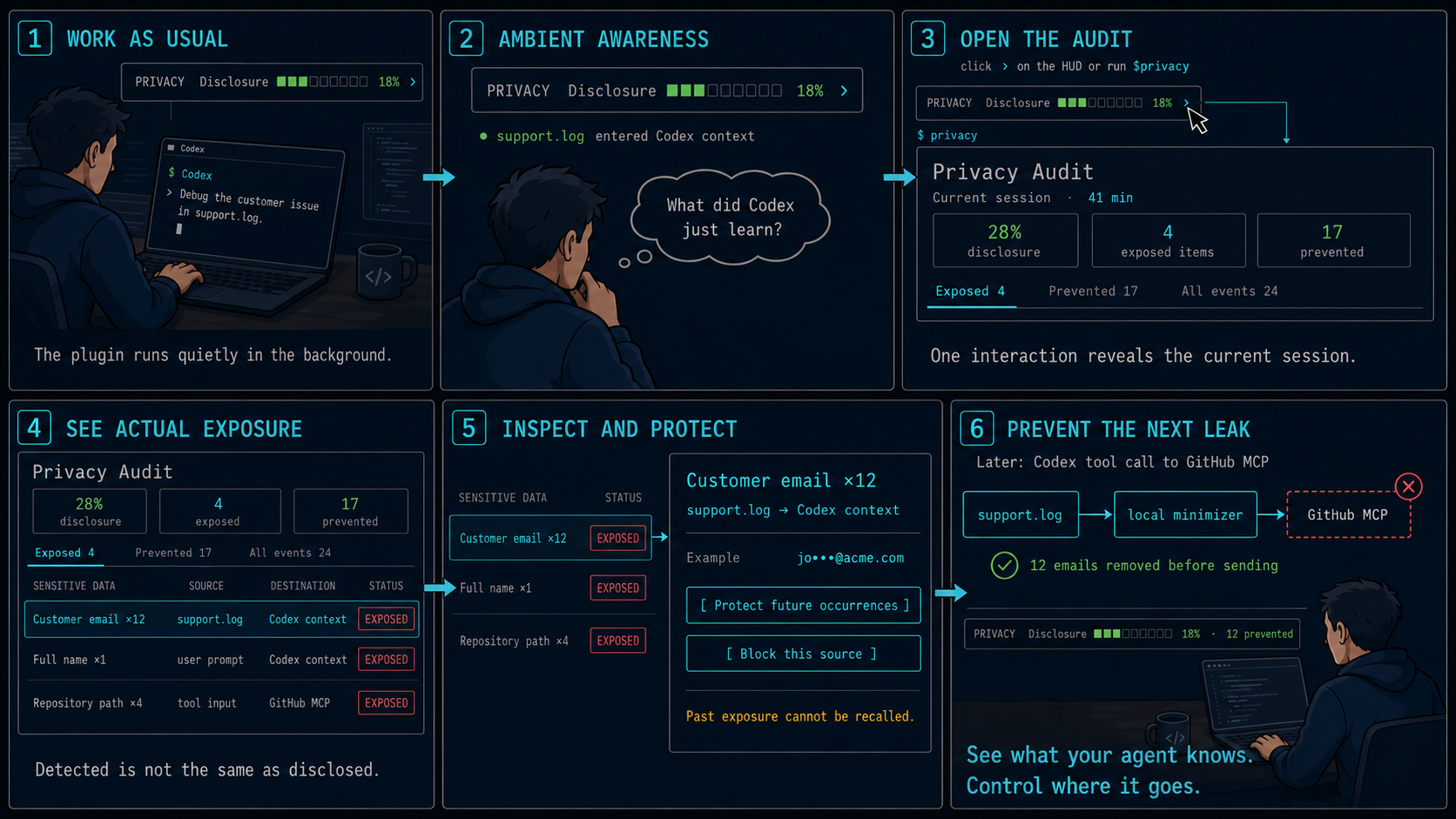
Before you rely on it: the start of a session is not monitored while the model loads, hosted tools bypass hooks, and detection is heuristic. The HUD marks a session whose record has a known hole rather than showing it as a clean 0%, but it cannot tell you what it missed. Read the known limits.
- News
- Install
- What you see
- How it works
- Known limits
- Configuration
- Troubleshooting
- Uninstall
- Installing by hand
- Documentation
- License
News
- 2026-09-15: patched Codex 0.154.0 builds for
aarch64-apple-darwinandx86_64-apple-darwinare published on the GitHub releasecodex-0.154.0-hudand on the rollinglatest.install.shfinds them. - 2026-09-15: the
privacystatus-line item now renders inside a patched Codex, and the macOS install is one command. - 2026-09-05: verified by hand against Codex CLI 0.153.0 that running the plugin on its own development session yields zero exposures (zero events, budget 0.0/120.0). It is not an automated test: it needs a live Codex session, which CI has neither the binary nor the network for.
Install
Verified end-to-end against a real Codex CLI install on 0.145.0 and 0.153.0.
Before you start
- macOS on Apple Silicon or Intel. (Linux and Windows are not packaged; see Installing by hand for the fallback pane.)
- Codex CLI already installed and signed in —
codex --versionprints something likecodex-cli 0.154.0. The installer needs that number to pick the matching patched build. - Python 3.11 or newer on your
PATH(python3 --version). On a Mac without one:brew install python@3.12. - About 3 GB of disk if you want name and address detection (that is the size of the
openai/privacy-filterweights), and a few minutes.
Run it
curl -fsSL https://raw.githubusercontent.com/inin-zou/codex-privacy-hud/main/install.sh | shThe script asks exactly one question — whether to download the detection model. Everything else is automatic. This is what it does, in the order it prints:
| step | what happens | where it lands |
|---|---|---|
| 1 | Finds your codex, reads its version, checks python3 >= 3.11 | — |
| 2 | Creates a private virtualenv and installs the plugin package into it (a few minutes; this pulls torch and transformers) | ~/.local/share/codex-privacy-hud/venv/ |
| 3 | Asks before downloading the openai/privacy-filter weights (~2.8 GB, from Hugging Face, once). Answer y for full detection. Answer n and you still get credential and path detection, but names and addresses go undetected — privacy-hud-doctor will say so. | ~/.cache/huggingface/hub/ |
| 4 | Installs the plugin into Codex (codex plugin marketplace add + codex plugin add) | Codex's plugin directory |
| 5 | Records which Python interpreter the daemon must run in | ~/.codex/plugins/data/codex-privacy-hud-…/runtime.json |
| 6 | Downloads the patched Codex build for your exact version, verifies its SHA-256, unpacks it, and links your official codex-code-mode-host beside it (the tarball carries only codex; Code Mode needs that sibling, and the official one of the same version is the right one) | ~/.local/share/codex-privacy-hud/<version>/ |
| 7 | Writes a small forwarder named codex and, if needed, adds ~/.local/bin to your shell PATH | ~/.local/bin/codex |
| 8 | Adds privacy to [tui].status_line in your Codex config, creating the key with Codex's defaults if you never set one | ~/.codex/config.toml |
| 9 | Runs privacy-hud-doctor and prints its table — every line should read OK or WARN, never FAIL | — |
The binary CI publishes is unsigned and unnotarized; the installer removes the quarantine attribute itself, and the SHA-256 it verifies protects against a corrupted download, not against a compromised release.
Flags: --yes answers the model question with yes; --no-model skips the
download without asking. Both are useful for scripted installs, and the
script needs one of them when there is no terminal to ask on.
Steps 2, 3, and 6 are the only network access anything here ever causes:
the package, the weights, and the patched build, all downloaded by the
installer, once, before any Codex session exists. The runtime itself never
goes online: it sets HF_HUB_OFFLINE=1 before importing transformers and
opens no socket except its own on 127.0.0.1.
Plugin only, from the Codex CLI
The plugin itself installs like any other Codex plugin, with nothing to clone:
codex plugin marketplace add inin-zou/codex-privacy-hud
codex plugin add codex-privacy-hud@codex-privacy-hud
The first command clones this repository into Codex's marketplace store;
the second copies it into the plugin cache,
~/.codex/plugins/cache/codex-privacy-hud/codex-privacy-hud/<version>/.
That gives Codex the $privacy skill, the hooks, and the MCP server, and
it puts install.sh on your machine, but it does not run it: the daemon's
Python environment, the detection model, and the patched Codex build are
still missing, so every hook answers
Privacy HUD unavailable — disclosure unverified and $privacy reports no
daemon.
From here:
- Run
codex. Codex 0.154 opens with Hooks need review for the plugin's eight hooks; choose Trust all and continue. Nothing from the plugin runs before that. - Send any message. The first turn shows a one-line reminder. Type
$privacy setup: Codex runs the installer from the plugin cache (sh ~/.codex/plugins/cache/codex-privacy-hud/codex-privacy-hud/<version>/install.sh --yes) and asks once for permission to run it outside the sandbox, since it writes to your home directory and downloads. Approve, and wait; the model download takes a few minutes. The reminder prints the same path, so you can also run it in another terminal. It is the same script as the one-liner above and is safe to run over an existing plugin install;--yesdownloads the model without asking,--no-modelskips it. - Restart Codex so the patched build and the status item are picked up.
docs/installing-by-hand.md has every step the script performs, if you would rather do them yourself.
First launch
Open a new terminal (so the PATH change is picked up) and run codex.
The status line looks unchanged at first: Codex fires its SessionStart
hook with the first turn, not at boot, so nothing reaches the daemon until
you send a message. After your first prompt the item appears under the
composer next to the usual ones, as in the screenshot below:
Privacy ░░░░░░░░░░ 0% · gpt-5.4 · ~/proj · Context 96% leftIt is 0% until something sensitive crosses into model context; the number
moves as files, prompts, and tool arguments do. (On a machine where the
daemon is not yet running, that first prompt also starts it, which takes
about seven seconds to load the model — the reply to that first hook says
Privacy HUD unavailable — disclosure unverified, the item shows up a
moment later, and that load window is unmonitored: see
Known limits.) Then:
/statusline— Codex's own picker; tick or untickprivacyto add or remove the item for good. It is saved inconfig.toml.$privacy hud off/$privacy hud on— hide or show it for now, without touching your config.$privacy hud statustells you which ofabsent | stale | hidden | shownit is in.$privacy— the full session audit (Level 2).
What you see
Level 1 — Ambient. One item in Codex's own status line, under the composer:
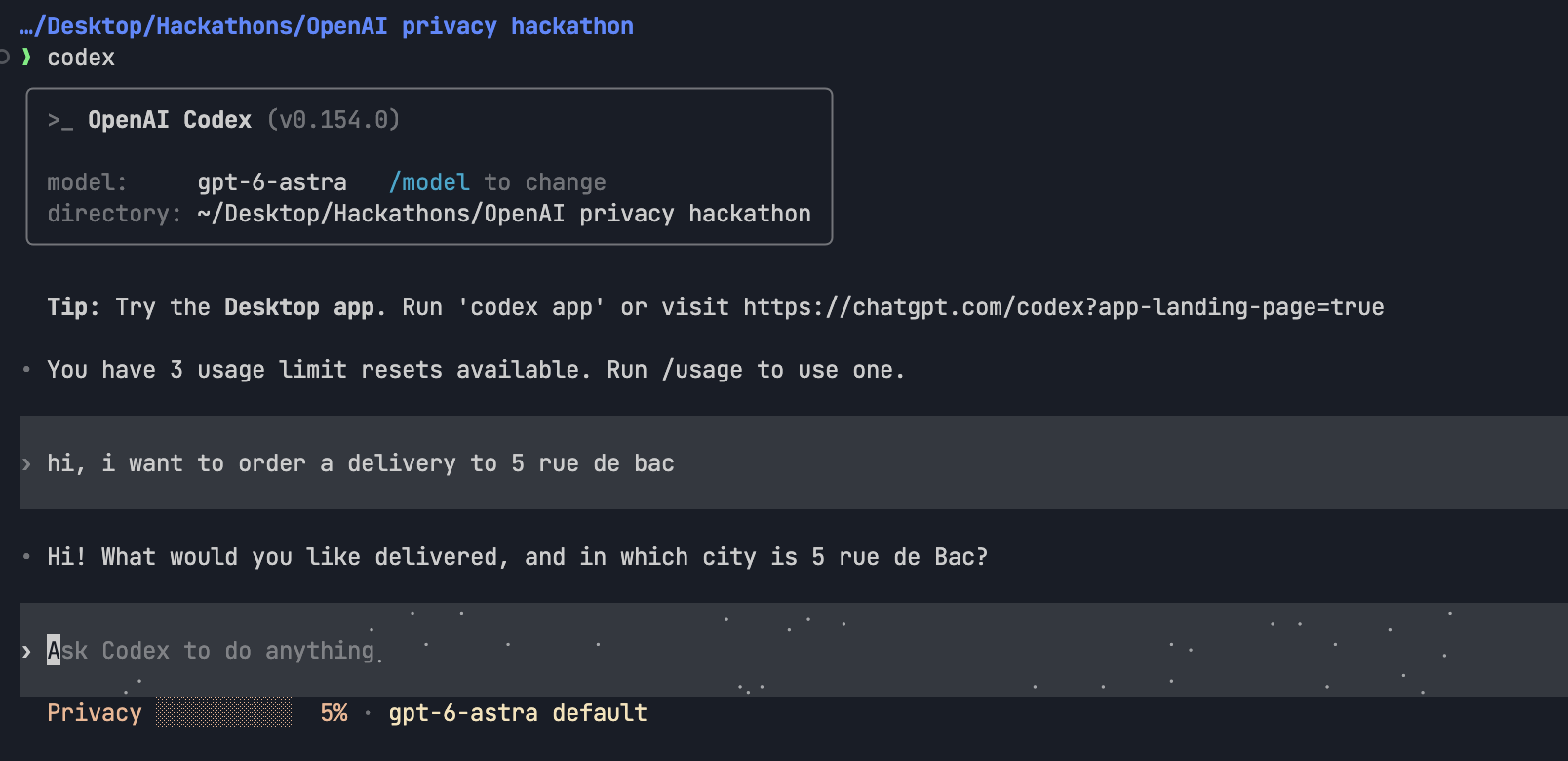
gpt-5.4 · ~/proj · Privacy ███░░░░░░░ 28% ⚠2Real output from a live Codex 0.154 session running the patched build (not a mockup): one prompt containing a street address, and the Privacy item under the composer already at 5%, beside Codex's own model and directory items:
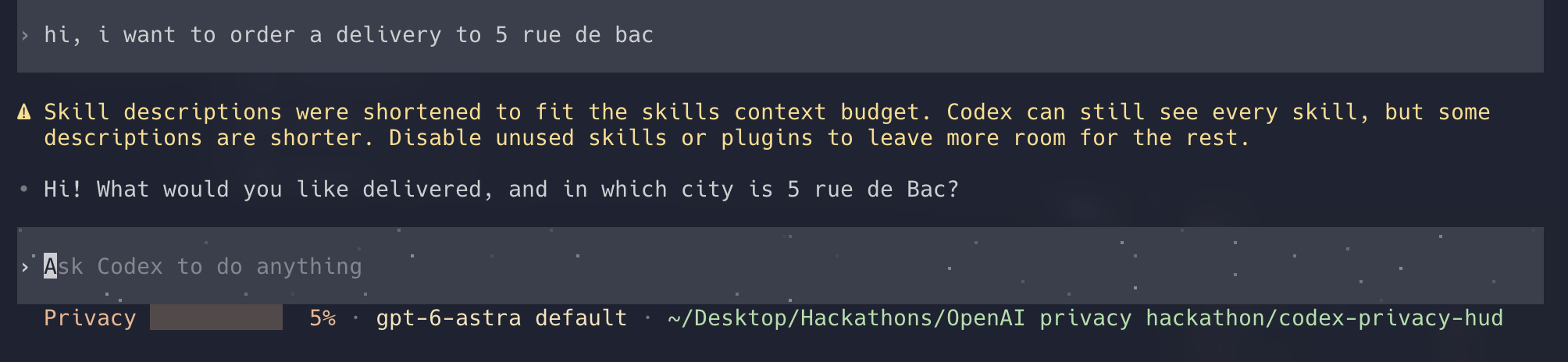
Stock Codex has no plugin-owned status item, so this needs a Codex build
with a small patch (patches/privacy-status-line.patch, one added item,
nothing else). install.sh fetches that build for your exact Codex version
and places it beside your official binary — it never modifies the official
one — and codex then resolves to the patched build only while the versions
match. Toggle the item with /statusline inside Codex, or hide it for now
with $privacy hud off. Without a matching build, the fallback is a
companion pane: privacy-hud-ambient --watch in a second terminal.
The pane draws the same line in three forms. The ordinary one:
PRIVACY Disclosure ███░░░░░░░ 30% ›And, when the ledger's account of the session has a known hole, a form that says so instead of reporting a clean number:
PRIVACY Disclosure ░░░░░░░░░░ 0% ⚠unverified ›Below 28 columns the word does not fit and the line becomes ⚠ 0%, the warning glyph taking the band dot's place, so truncation can never leave a bare percentage behind.
Level 2 — Session audit ($privacy). Summary tiles and a tabbed table of every flow:
SENSITIVE DATA        SOURCE           DESTINATION      STATUS
Customer email ×12    support.log      model context    [EXPOSED]
Full name ×1          user prompt      model context    [EXPOSED]
Repository path ×4    tool input       GitHub MCP       [EXPOSED]
API credential ×1     .env             none             [PREVENTED]
Tabs: Exposed · Prevented · All events.
Level 3 — Exposure detail. One flow, its masked evidence, and forward-looking remedies (Protect future occurrences; on a row that names a real origin, Block values read from <file>). Never an undo — already disclosed data cannot be recalled, and a source rule only matches values that leave unchanged.
The MCP tools. Codex also gets five tools the model can call: a session summary, the exposure list, one exposure's detail, the read-guard state, and writing a policy rule. The server registers them as privacy.<name>; Codex presents them to the model with underscores, so what you will see in a transcript is privacy_get_session_summary, privacy_list_exposures, privacy_get_exposure_detail, privacy_read_guard_status and privacy_update_policy. The first four read; the fifth can only tighten, because the engine keeps its one unconditional block — a credential on an outbound call — ahead of every rule you or the model can write: a call carrying a credential is decided by the built-in default, and a mask rule on it is not consulted at all. That holds whatever the rule names, which is the point — a rule written about something innocuous, like a file path, can still land on a call that happens to carry a credential too. A mask rule naming a blocked type outright is refused when written, because it would now decide nothing while looking like protection you applied. Turning the read guard off and hiding the HUD are not among the five at all, because an MCP tool is called by the model, and a switch that loosens protection is not one to hand to the thing being enforced against; those two stay behind $privacy, which you type. Allowing a blocked call once is not among them either, but for a different reason: it has no surface at all — not $privacy, not the audit UI, not an MCP tool — see known limit 13.
How it works
The problem
Coding agents read your filesystem, run shell commands, call MCP servers, and spawn subagents on your behalf, and you cannot find out:
- Which of your files' contents actually entered the model context?
- Did that GitHub MCP call carry a customer email in its arguments?
- Did the subagent inherit the
.envyou read twenty minutes ago? - Did that
curlpipe your support log to an external host?
Secret scanners are pre-commit, not pre-inference. DLP products are server-side and require shipping the very data you want to protect. Permission prompts are about capability, not content.
Detection is not disclosure
The distinction the product is built on:
| Event | Counts toward the disclosure budget |
|---|---|
| A local scanner detects an email in a file | No |
| File content enters model context | Yes |
| Data is passed to a subagent through a tool call | Yes — new destination |
| What a subagent inherits at spawn | No — not observed at all (limit 19) |
| Arguments sent to an MCP tool | Yes |
| A shell command sends data to an external host | Yes |
| Content redacted or blocked before send | No — counted as prevented |
So the audit shows crossings, not findings — one row per value observed crossing a boundary, with the boundary's category as its destination. Not a multi-hop chain: the flows table exists and nothing writes it, and a ×N count is N hits on one dedupe key, not N distinct values:
support.log → main agent → GitHub MCPThe read guard
Every rule above applies on the way out. One thing can be stopped on the way in: a shell command that reads a known-sensitive path — .env, id_rsa, deploy/key.pem — fires PreToolUse before it runs, so the call can be denied. The command does not execute, so nothing from that file reaches the model.
The shell is the whole of it, because that is how Codex reads a file: it has no native file-read tool, so the model runs cat. Any other tool is allowed unexamined — limit 14.
It is off by default. As installed, a recognised read of such a path is recorded and the guard mentions itself once per session; nothing is blocked. The commands:
$privacy read on        # deny recognised reads of known-sensitive paths
$privacy read off       # go back to recording them
$privacy read status    # prints `on` or `off`
The setting is written to ~/.codex/plugins/data/codex-privacy-hud-…/settings.json, not config.toml. A change applies to a running session with no restart. That file is not one you see from inside Codex, so $privacy read status and privacy-hud-doctor are how you find out what it says.
What it does not cover is limits 14–18 below: it acts only on shell commands, and only the reads it can recognise there (cat .env, but not wc -l .env); it never blocks a template file such as .env.example; and it writes an audit row naming the pattern that matched rather than the file.
The ledger
flowchart TD
    A["Codex lifecycle hooks"] --> B["Local privacy engine"]
    B --> C["Session disclosure ledger"]
    C --> D["Compact HUD"]
    C --> E["Interactive audit UI"]
    B --> F["Allow, rewrite, or block"]
The ledger is event-sourced from hook boundaries, never by asking a model what is in context. Every byte that can enter model context from your machine passes through a small set of chokepoints — UserPromptSubmit, PostToolUse, SubagentStart, PreToolUse — which together form a cut of the data-flow graph. We observe the transactions and reconstruct the balance.
There is no second LLM call to audit the first one. That would re-transmit the sensitive data being audited, cost a round trip per turn, and produce a non-deterministic ledger. See architecture.md §3.
Privacy of the privacy tool
- Detection runs entirely locally. No content is sent anywhere for classification.
- The ledger stores metadata only — types, counts, sources, destinations, timestamps, masked exemplars. There is no
contentcolumn, nopromptcolumn, noraw_valuecolumn. The schema is the guarantee. - Value identity uses a session-scoped salted HMAC held in memory and destroyed at session end, so cross-session correlation is impossible by construction.
- No telemetry. No analytics. No network calls except
127.0.0.1. - Running Privacy HUD on its own development session must yield zero exposures.
What the forwarder is, and what it is not
Your official codex binary is never modified, moved, or replaced.
~/.local/bin/codex is a ten-line shell script: it finds the official
binary on your PATH, asks it for its version, and runs the patched build
of that same version if one is installed — otherwise it runs the official
binary unchanged. Upgrade Codex with brew or npm and the forwarder simply
falls through to the new official version until a matching patched build
exists; nothing breaks, you just lose the status-line item in the meantime.
If the installer prints a block starting with !! PATH:, another codex
comes earlier on your PATH than ~/.local/bin. Put the line it shows
first in your shell rc file and open a new shell, or the status item will
never appear.
Known limits
Stated up front, because a privacy tool that overclaims is worse than none:
- The start of a session is unmonitored. Whatever is disclosed in those first seconds is not in the ledger, and no later reading can say what it was. (details)
- "Unverified" marks the gaps it can see, and there are gaps it cannot. So
⚠unverifiedmeans "the ledger holds evidence of a hole"; its absence means "nothing on record contradicts a complete account", which is a weaker claim than "complete" and must not be read as the stronger one. (details) - Hosted tools bypass hooks. WebSearch and similar do not trigger local function-tool hook paths. (details)
- No
askdecision in Codex hooks, and no interactive consent at all. A hook can allow or deny, not ask. The designed deny → review → token → retry loop cannot be entered: no surface mints a token, so a denied call stays denied for the session. (details) - The status-line item lives in a separately built Codex — never in your official one. The plugin never modifies your official Codex binary. (details)
- A command that reads a file itself is not inspected. The engine scans the text of a tool call, not what that call will read at runtime. (details)
- Detection is heuristic. A determined adversary can encode around regex and NER. (details)
- Which session is being shown is inferred, not read — and the audit says so when it cannot be sure. The fallback pane carries no such marker; pin it with
--session-idwhen it matters. (details) - Nothing recalls disclosed data. Ever. (details)
- A source rule matches the whole value, normalised. A model that summarizes or rewrites what it read defeats it. The promise is "this value does not leave unchanged", not "nothing about this file leaves" — and matching keys on an HMAC of
value.strip().lower(), so it is not a byte comparison either. (details) - Origin extraction is best-effort.
cat .envis recognised;python -c "open('.env')"is not. A row with no origin offers no rule, rather than one that would not work. (details) - The taint map dies with the daemon. A daemon replaced mid-session loses it, and source rules stop matching with no error. (details)
- No policy rule can be removed within the session that wrote it. True of
Protect future occurrencessince long before source rules existed. A new Codex conversation is the only clean slate. (details) - Only a shell command whose read the extractor recognises is stopped. The guard sees one tool — the shell — because that is how Codex reads a file; any other tool is allowed unexamined. Within the shell,
cat .envis stopped;wc -l .env,source .env,cp .env /tmp/x,strings id_rsa,head -5 .envandpython -c "open('.env')"are not — no deny, no notice, no row. Limit 11 holds the mechanism. (details) - A template file is never blocked, even one that really holds a key. Detection still flags it. (details)
- Nothing is blocked until you turn it on. The default records the read and mentions the guard once per session; it stops nothing. (details)
- A blocked read can leave a record that says the opposite, in one sequence. Read with the guard off, turn it on, read again: the ledger dedupes on
(session_id, value_hash, destination), so the deny lands as acountincrement on the earlier row. What stays is onelocal_accessrow saying the first file was read twice and nothing was blocked. Nopreventedrow is written, so the status item's blocked badge stays0through a deny that did happen. (details) - A blocked read's row does not name the file. It rides on the pattern that matched (
.pem,.env, …), so two different files that match the same pattern dedupe into one row. You can see something was blocked; not which file. The badge counts rows, so two denied reads of two.pemfiles read as1. (details) - What a subagent inherited is not recorded. The
SubagentStartobservation carries no text, so no detector runs on it and no row results. "Did the subagent inherit the.env?" has no answer in the ledger. (details) - A destination is a boundary category, not a recipient. Every MCP call is
mcp_tool; a second MCP server is not a second destination, and adds nothing further to the budget. Thedestinationstile counts categories, not services. (details)
Configuration
| knob | what it does |
|---|---|
/statusline inside Codex | Ticks or unticks the privacy item for good. The choice is saved in config.toml. |
$privacy hud on|off|status | Hides or shows the item for now, without touching your config. status prints absent, stale, hidden, or shown. |
$privacy read on|off|status | Turns the read guard on or off — see The read guard. On, a recognised read of a known-sensitive path is denied before it runs; off (the default), it is recorded. status prints on or off. Saved in settings.json under ~/.codex/plugins/data/codex-privacy-hud-…/, and applies to a running session immediately. |
$privacy setup | Runs the installer that came with the plugin, for an install made with codex plugin add alone. Asks once to run outside the sandbox. |
[tui].status_line in ~/.codex/config.toml | The list of status-line items Codex renders. The installer adds "privacy" to it. |
install.sh --yes / --no-model / --release-base-url URL / --uninstall / --purge | --yes answers the model question with yes, --no-model skips the download, --release-base-url fetches the patched build from somewhere other than this repository's GitHub releases, --uninstall removes what the installer created, --purge also removes the ledger and the weights. |
PRIVACY_HUD_NO_SPAWN=1 | Turns daemon auto-start off entirely, for a sandbox where the spawn cannot succeed. |
privacy-hud-ambient --watch [N] / --once / --session-id <id> | Runs the fallback pane: redraw every N seconds, print one line and exit, or pin the pane to one session. |
Troubleshooting
no patched build published for codex <ver> yet— there is no release for your Codex version. Everything else installed; the status item will appear once a build for that version is published (rerun the installer then). Until then the fallback pane works:~/.local/share/codex-privacy-hud/venv/bin/privacy-hud-ambient --watchin a second terminal.- The status line shows no
privacyitem after upgrading Codex — the forwarder found no patched build for the new version and ran your official binary unchanged, so nothing broke and the item is simply gone for now. A workflow checks for new Codex releases every six hours and publishes a build when the patch still applies, so a version that has been out for a day usually has one; rerun the installer (or$privacy setup) to pick it up. If there is none, an issue says why:patch needs rebasing for Codex <version>when the patch no longer applies, orrelease build failed for Codex <version>when it applied but the build did not finish. !! config.toml: …— yourconfig.tomlhas a[tui]table or astatus_linekey in a shape the installer will not edit blind. It changed nothing; add"privacy"to[tui].status_lineyourself, using the line it prints.- Doctor shows
FAIL— read its fix line; it names the exact command.privacy-hud-doctor --check-modelgoes further and loads the detector for real. - To start over: run the uninstaller, then install again.
Uninstall
curl -fsSL https://raw.githubusercontent.com/inin-zou/codex-privacy-hud/main/install.sh | sh -s -- --uninstallRemoves exactly what the installer created (listed in
~/.local/share/codex-privacy-hud/manifest.json) and restores codex to
the official binary. Your disclosure ledger and the model weights stay
unless you add --purge. The plugin itself is removed separately with
codex plugin remove codex-privacy-hud.
Installing by hand
You want this if there is no install.sh for your platform, if you are on Linux, or if you are repairing a broken install. Every step the installer performs is written out in docs/installing-by-hand.md.
Documentation
| doc | what it covers | read it when |
|---|---|---|
docs/installing-by-hand.md | Each install step run by hand, the privacy-hud-setup and privacy-hud-doctor commands, and the fallback pane. | You cannot use install.sh, or you want to control each step. |
docs/known-limits.md | All twenty limits in full, with the measurements behind them. | You are deciding how far to trust a number the HUD shows. |
patches/README.md | The one-item Codex status-line patch and how to regenerate it against a new tag. | You want to audit or rebuild the patched Codex binary. |
.claude/docs/architecture.md | Component map, process model, ledger schema, hook dispatch, and the consent loop. | You are working on the plugin itself. |
License
MIT.