Inline Studio - AI filmmaking on a node canvas, powered by your own ComfyUI
Inline Studio is a free, open-source desktop app for AI filmmakers: build, iterate, and assemble AI films on a free-form node canvas while your own ComfyUI does the rendering.





What is Inline Studio?
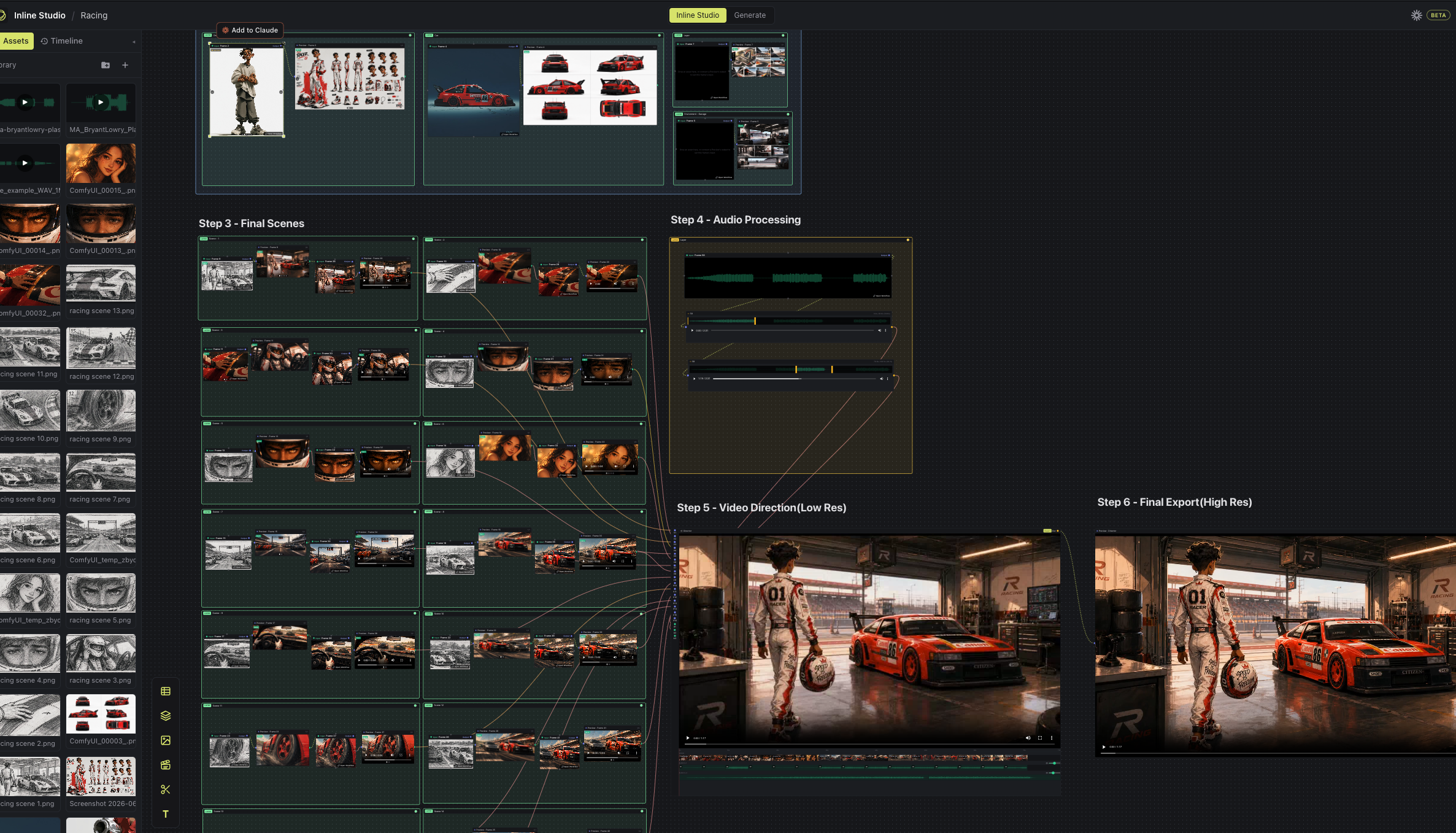
Inline Studio is a free, open-source desktop app for AI filmmaking on a node canvas, powered by your own ComfyUI. It gives AI filmmakers a free-form canvas to build generative pipelines - text to video, image, and audio - where every render is kept as a versioned, non-destructive take, and finished frames assemble into a finished cut inside the app. You bring your own ComfyUI (local GPU or a cloud GPU via RunPod); Inline Studio does everything around the render: exploring options, keeping what works, and shaping a repeatable process you can iterate on and share.
Who it's for: AI filmmakers, motion artists, and generative creators who want to make AI short films and longer cuts with ComfyUI without losing every good version along the way.
Features
- Free-form node canvas - lay out your whole AI film like a mood board that can actually generate. Marquee-select, copy/paste, undo/redo, layers, and text notes all work the way your hands expect.
- Versioned, non-destructive takes - every render is kept. Generating again adds a new take; nothing is overwritten. Star the keeper and it flows downstream.
- Chain frames into a generative pipeline - wire one frame's output into the next frame's input. Refine a shot, feed it forward, regenerate the source, and everything downstream follows.
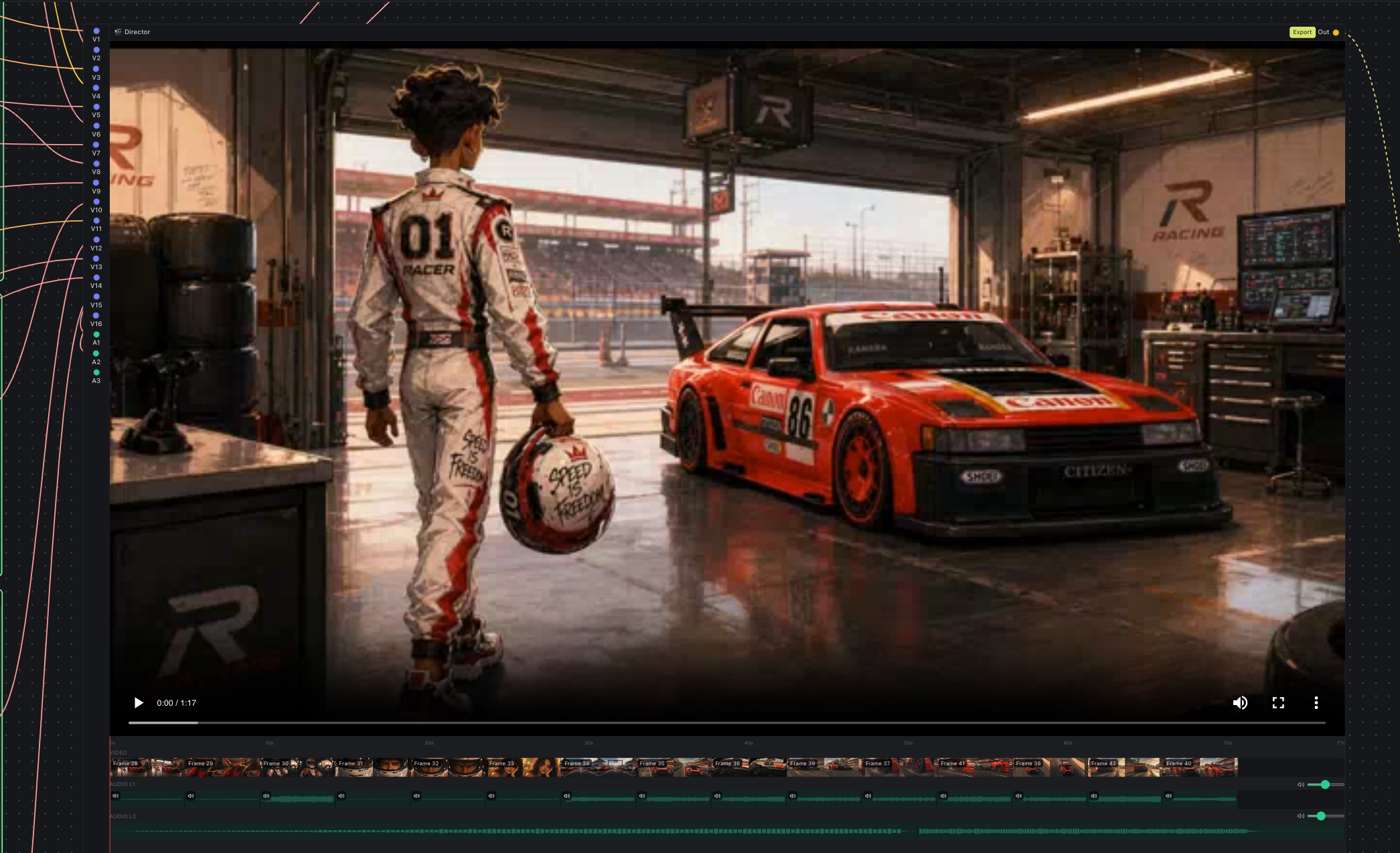
- Video Director node - a timeline-in-a-node that assembles your rendered frames into a single cut, with layered audio (the videos' own audio plus your own music/VO), per-input and per-layer volume, an in-node preview to scrub, and high-res export.
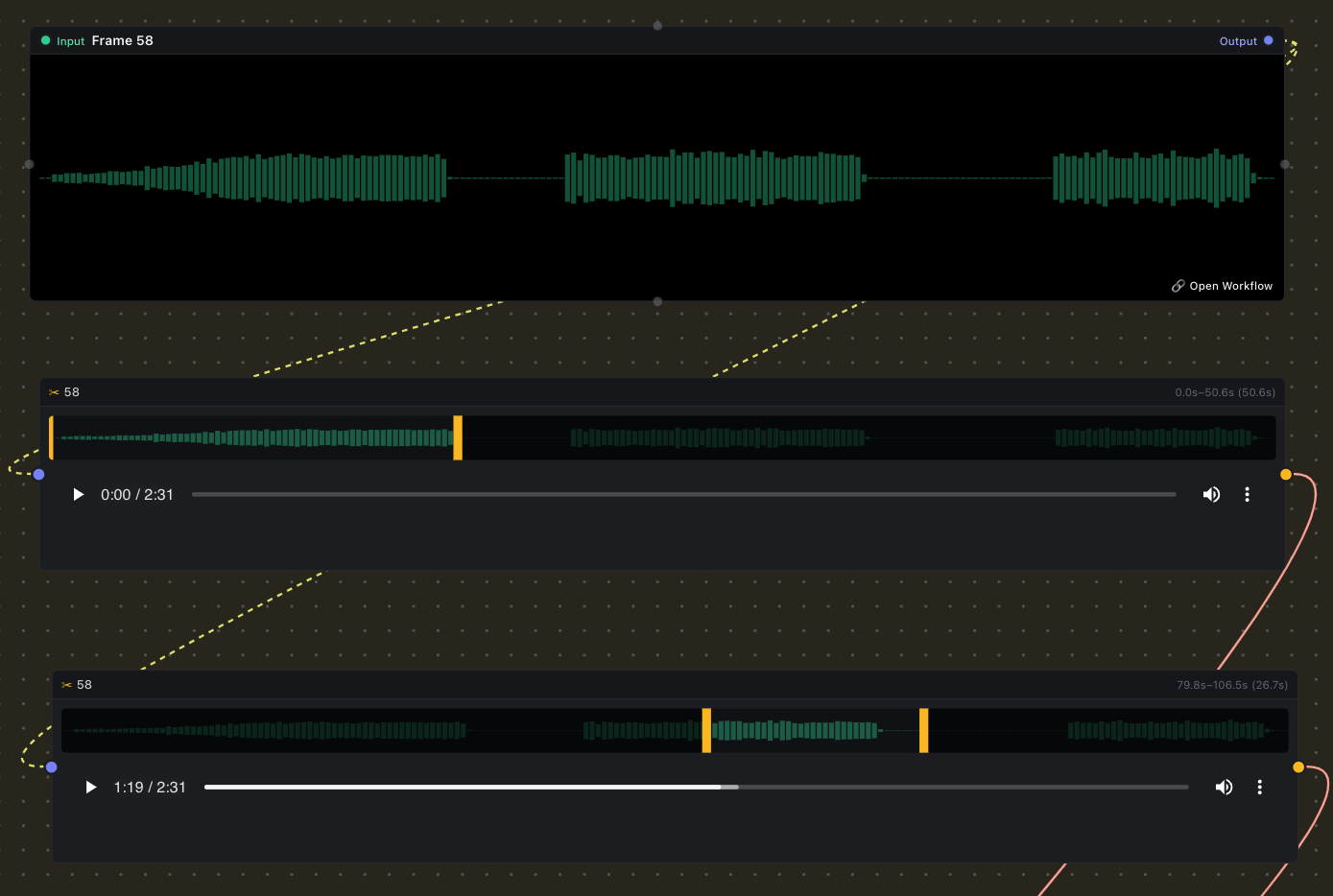
- Trim Video/Audio node - drop in a clip, drag the in/out handles over its filmstrip/waveform, and pass just the trimmed segment downstream.
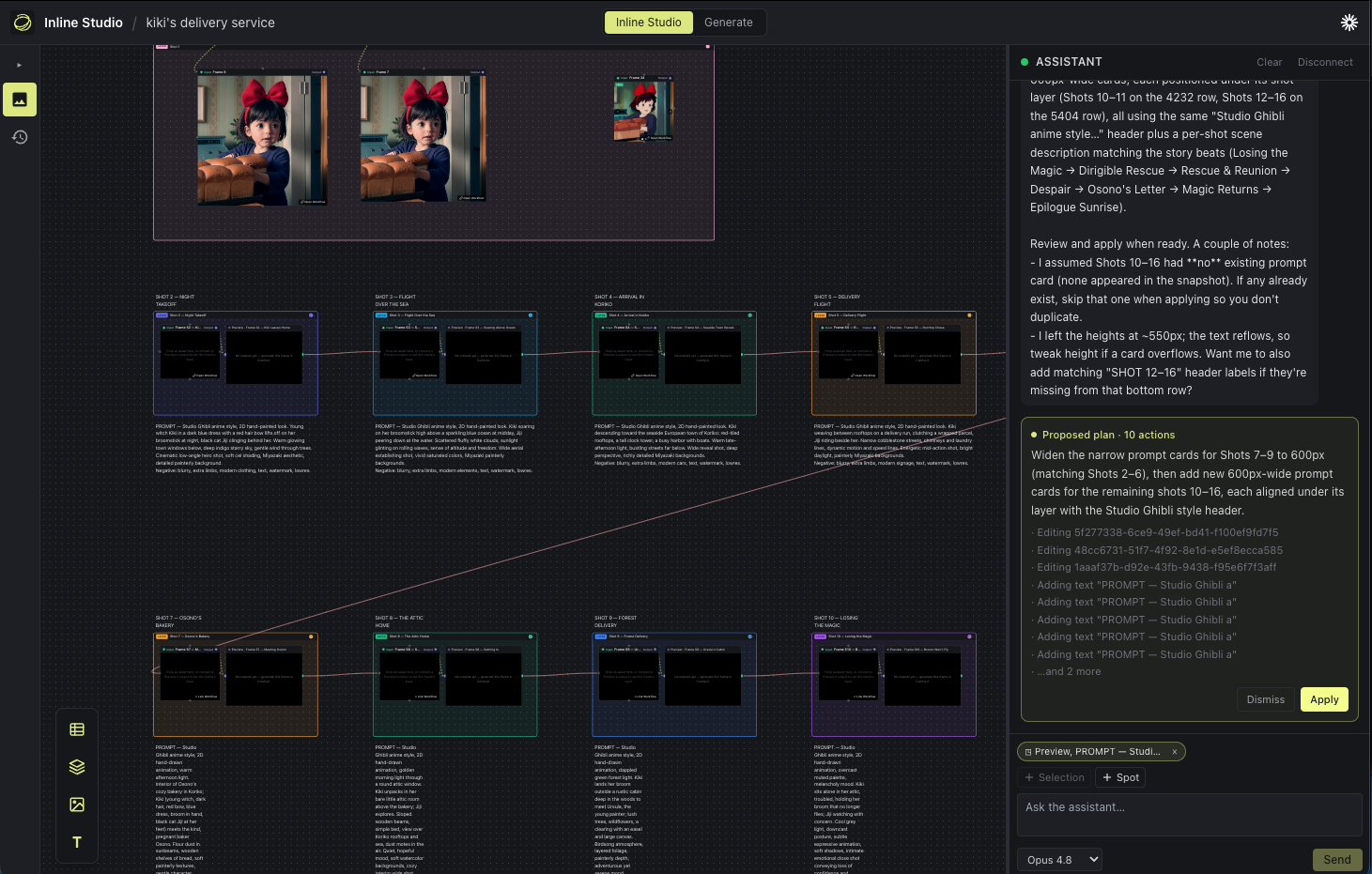
- Built-in Claude assistant - an AI assistant that works alongside you on the canvas, using your own Anthropic API key (stored encrypted on your machine, only ever sent to Anthropic).
- Bring your own ComfyUI - connect any ComfyUI instance, local or cloud. Your media, your models, your machine.
- Free & open source (MIT) and cross-platform - macOS (Apple Silicon & Intel), Windows, and Linux.
| Trim Video/Audio node | Video Director node |
|---|---|
 |  |
New here? Follow our Animated Short Film with LTX 2.3 and GPT Image Generation tutorial →
How it works
ComfyUI is the most capable generative engine going - image, video, audio, LLM, every new model lands there first. But generating is the easy part. The work that makes an AI film is what comes after: exploring options, keeping what's good, and shaping a repeatable process out of it. Inline Studio is the layer where that happens, organised around one model:
Project → Sequence → Frame → Take[]
- Project - a single portable
.inlinestudiofolder you can move, back up, or hand to a collaborator. - Sequence - an ordered group of frames; a scene of your film.
- Frame - the atomic unit. A frame is not a file - it's a slot with a history of takes. Its inputs are library assets or another frame's chosen output (the refine/flow link).
- Take - one immutable ComfyUI render of a frame. The frame points at the take you starred as hero, and that hero flows downstream to everything wired after it.
That take history is the core value ComfyUI lacks: keep every version that worked, page through them, and pick the keeper without ever overwriting your earlier renders.
When it's time to generate, the Generate tab opens your own ComfyUI right inside the app. Inline Studio hands it the frame's inputs, wires them into the workflow, pulls the finished renders back in as takes, and the full node graph is always one click away when you want it.
Export the whole pipeline, not just the final render
From the home screen, Export zips a project into one archive. Import it on the other side and you get everything back: the inputs (every imported asset), the outputs (all the generated takes), and the ComfyUI workflows that turned one into the other. Whoever opens it can re-run the pipeline exactly and keep iterating.
Bring your own ComfyUI
Inline Studio doesn't bundle or manage ComfyUI - you bring your own, run it wherever you like, and point Inline Studio at it. This keeps you in full control of your nodes, models, and the render.
- Running locally with a GPU? Start ComfyUI with
--enable-cors-headerand paste its address into the Generate tab. - No GPU? Spin up ComfyUI on a cloud GPU - the app walks you through deploying it on RunPod - and paste the public URL. Any reachable ComfyUI works.
Your media, your models, your machine. ComfyUI does the rendering. Inline Studio gives the work a shape you can iterate and share.
A built-in assistant (Claude)
Inline Studio ships with an AI assistant powered by Claude that works alongside you on the canvas. Connect your own Anthropic API key - it's stored encrypted on your machine and never sent anywhere but Anthropic - and open the assistant from the Claude icon in the header.
Install
Grab a prebuilt installer from the latest release and open it:
- macOS: download the
.dmgfor your chip -arm64for Apple Silicon (M1/M2/M3…),x64for Intel Macs - open it, and drag Inline Studio into Applications. - Windows: download the
-setup.exeand run it. - Linux: download the
.AppImage, make it executable (chmod +x Inline Studio*.AppImage), and run it.
The builds are currently unsigned, so on first launch your system may warn about an unidentified developer:
- macOS: right-click the app and choose Open, then Open again. If it says the app is "damaged", run
xattr -dr com.apple.quarantine /Applications/Inline Studio.app. - Windows: on the SmartScreen prompt, click "More info" then "Run anyway".
To actually generate, you'll also need a ComfyUI instance to connect to (see Bring your own ComfyUI). The canvas and planning work without it.
Getting started from source
Prefer to run from source? You'll need Node.js 20.11+ (22 recommended).
git clone <this-repo>
cd inline-studio
npm install      # also rebuilds the native SQLite module for Electron
npm run dev      # launches the app with hot-reload
To generate, start ComfyUI with CORS enabled and connect it on the Generate tab:
python main.py --enable-cors-header # then paste http://127.0.0.1:8188 in-appOn macOS sandboxes that set
ELECTRON_RUN_AS_NODE=1, launch withenv -u ELECTRON_RUN_AS_NODE npm run dev.
Build from source (desktop app)
To produce an installer you can hand to someone, package it for your platform:
npm run package:mac      # arm64 + x64 .dmg in dist/
npm run package:win      # NSIS .exe installer in dist/
npm run package:linux    # AppImage in dist/
A few things to know:
- Build each OS - and each Mac arch - on matching hardware. Inline Studio ships a native module (SQLite), which has to be compiled for the target machine, so build the Mac app on a Mac and the Windows app on Windows. The same applies to Mac CPU arch: an Intel (
x64) dmg has to be built on an Intel Mac and an Apple Silicon (arm64) dmg on an Apple Silicon Mac - cross-building bundles the wrong native binary. CI handles this for you (see below). - After packaging,
npm run devmay complain about the native module. Packaging rebuilds SQLite for the target architecture; runnpm run rebuildto restore it for local development. - The builds are unsigned. On first launch macOS and Windows will warn about an unidentified developer. On a Mac, right-click the app and choose Open (or remove the quarantine flag with
xattr -dr com.apple.quarantine /Applications/Inline Studio.app). For real distribution you'll want code signing and notarization. - App icon. The icon lives in
build/(icon.pngis the source). Replace it there and re-package to rebrand.
Releases are automated: bump the version in package.json and run the Build & Release workflow from the Actions tab. It builds installers for macOS (Apple Silicon and Intel - each on its own runner), Windows, and Linux on GitHub Actions and uploads them to a draft GitHub Release.
FAQ
Is Inline Studio free?
Yes. Inline Studio is free and open source under the MIT license. There's no paid tier to use the app.
Do I need a GPU?
Not on the machine running Inline Studio. ComfyUI does the rendering, so you only need a GPU wherever ComfyUI runs - that can be a local GPU on the same machine, or a cloud GPU you connect to. Inline Studio's canvas and planning work without any GPU at all.
Does Inline Studio include ComfyUI, and how do I connect it?
No - you bring your own ComfyUI. Inline Studio doesn't bundle or manage it. Start ComfyUI with CORS enabled (python main.py --enable-cors-header) and paste its address into the Generate tab, or point Inline Studio at a cloud ComfyUI instance by pasting its public URL. Any reachable ComfyUI works.
How do I access the nodes and models available in ComfyUI?
Through your own ComfyUI. Connect an existing setup or launch one on a cloud GPU via RunPod - the app walks you through it - and you keep full control of ComfyUI: its nodes, custom nodes, and models are all yours. The Generate tab embeds the full ComfyUI node graph, so everything you'd do in ComfyUI directly is available inside Inline Studio.
Contributing
Inline Studio is early and moving fast, and issues, ideas, and pull requests are all welcome. If you're poking at the code, CLAUDE.md is the engineering guide: it explains the architecture, the data model, and the conventions to follow.
Want to help by using it for real? Try the creator task: build a short 20-second AI film in Inline Studio and send us your feedback.
Help shape Inline Studio
Are you an AI filmmaker who wants to help us make this better? We run a paid trial feedback program: use Inline Studio on real work, tell us what helps and what gets in your way, and get paid for your time.
Come say hi on our Discord and reach out, we'll get you set up.
License
MIT.