Intel GPU AI Skills











A collection of Agent Skills for setting up, running, benchmarking, and profiling arbitrary Hugging Face safetensors and GGUF models on Intel GPUs (Arc, Arc Pro, Battlemage). Covers the PyTorch + Transformers, vLLM-XPU, SGLang-XPU, and llama.cpp-SYCL stacks, plus CUDA to XPU migration.
Format follows the Agent Skills specification.
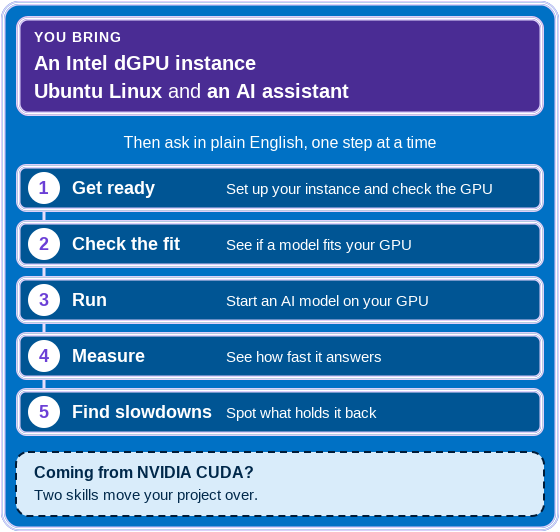
How it works. Install the skills, then ask your AI assistant in plain English. The five steps below match the tables in Skills.
Skills
Setup — get the host ready
| Skill | Useful for | Example prompt |
|---|---|---|
xpu-system-setup | First-time host setup: installs xpu-smi, Level Zero runtime, Docker, configures the render group and Intel GPU PPA. Also fixes Battlemage-specific prerequisites. | "Prepare this bare-metal Ubuntu box for Intel GPU work." |
xpu-discover | Inventory Intel GPUs and check driver health (xpu-smi wrapper). CUDA analogue is nvidia-smi. | "Is my Intel GPU detected? Run a quick health check." |
xpu-runtime-preflight | Check shared host, device, Docker, proxy, storage, and optional container readiness before using GPU/XPU skills in this pack. | "Before using the XPU skills on this host, run the preflight and tell me what blocks it." |
xpu-container-run | Launch a Docker container with Intel GPU access (/dev/dri, render group, ZE_AFFINITY_MASK, --ipc=host). | "How do I launch a Docker container that can see my Intel GPU?" |
Plan — size and configure before you launch
| Skill | Useful for | Example prompt |
|---|---|---|
model-can-it-fit | Estimate VRAM (weights + KV + activations + framework) from HF config.json. Decoder-only LLM, MoE, VLM; refuses diffusion. | "Will Qwen2.5-32B in int4 fit on my Arc Pro B70 at 8K context, concurrency 4?" |
model-config-recommend (experimental) | Recommend a vLLM-XPU deployment config (quant, KV dtype, DP/TP, capacity) using roofline math against Intel Arc B-series specs. Predict → calibrate → verify. | "What's the best config to serve Qwen2.5-7B on my B70 at 8K?" |
xpu-deploy-plan | Chain preflight, fit, config-recommend, and a runtime skill into one PLAN.md with an exact launch command, smoke test, and rollback. | "Give me a coordinated deployment plan for Llama-3-8B on this box." |
Run — get a model on the GPU
| Skill | Useful for | Example prompt |
|---|---|---|
xpu-model-type-detect | Detect a Hugging Face model's actual type (text-gen, VLM, diffusion, encoder, etc.) before loading, so the agent picks the right AutoModel class and input kwargs. | "What kind of model is this, and how should I load it?" |
torch-xpu-run | Run any HF safetensors model via upstream PyTorch + Transformers + torch.xpu. CUDA → XPU code translation. | "Run gemma-3 in pure PyTorch on my Intel GPU." |
vllm-xpu-run | Serve a model with vLLM-XPU's OpenAI-compatible HTTP API. Image picker, flag rationales, multi-GPU patterns. | "Start a vLLM server with Qwen2.5-7B on my Intel GPU." |
vllm-omni-xpu-run | Serve omni-modality and generative models (Qwen-Omni chat, text-to-image, video, TTS) with vLLM-Omni (vllm serve --omni). Image build, per-stage device placement, output-validated smoke tests. | "Serve Qwen2.5-Omni-7B with vLLM-Omni on my Arc Pro B60." |
sglang-xpu-run | Serve a model with SGLang's XPU backend (--device xpu --attention-backend intel_xpu). RadixAttention prefix caching. | "Serve Qwen3 with sglang on my Battlemage GPU." |
llamacpp-xpu-run | Run a GGUF model via llama.cpp's SYCL backend with an OpenAI-compatible llama-server; no Python/PyTorch required. | "Serve this GGUF model locally on my Arc GPU with llama.cpp." |
Benchmark — measure how fast
| Skill | Useful for | Example prompt |
|---|---|---|
torch-xpu-bench | Single-process bench of an HF model via pure PyTorch (no server). TTFT, decode rate, peak XPU memory. | "Bench Qwen3-8B forward pass on Intel without any server." |
vllm-xpu-bench | Bench a running vLLM-XPU server (vllm bench serve / throughput). TTFT, TPOT, ITL, throughput at concurrency. | "Benchmark TTFT and TPOT on my running vLLM-XPU server." |
sglang-xpu-bench | Bench a running SGLang server (sglang.bench_serving). Includes prefix-cache hit-rate measurement. | "Measure RadixAttention prefix-cache hit rate on my sglang server." |
Profile — find why it's slow
| Skill | Useful for | Example prompt |
|---|---|---|
torch-xpu-profile | Profile an HF model with torch.profiler + Kineto. Export Chrome trace; find hot ops + idle gaps. | "Why is my Qwen2.5 generate() slow on Intel?" |
vllm-xpu-profile | Profile a running vLLM server via /start_profile and /stop_profile, or offline vllm bench --profile. | "Capture a vLLM-XPU profile around a real-traffic window." |
xpu-profile-unitrace | SYCL / Level Zero kernel-level profiling with unitrace (PTI-GPU; built from source). Per-kernel timing, oneCCL events, HW counters. | "Show me the actual SYCL kernel names taking the time." |
vtune-xpu-offload | Intel VTune xpu-offload: is the time on the host, in CPU-GPU copies, or on the GPU? GPU busy computed against un-profiled timing, per phase. | "Check with VTune whether my GPU, the CPU or data copies are the bottleneck." |
vtune-gpu-hotspots | Intel VTune gpu-hotspots: which kernels take the GPU time and why (stalls, occupancy, bandwidth), checked against peak with bytes ÷ time. | "Use VTune to find which GPU kernels are slow and whether they are memory- or compute-bound." |
vtune-vllm | Intel VTune on a vLLM server: profile only the load window (start paused, resume/pause), decode kernels with graphs off, VTune in a container. | "Profile my vLLM server with VTune under load, without start-up." |
enable-full-system-monitoring | Deploy Prometheus + Grafana + XPU Manager monitoring with Docker Compose from intel/full-system-monitoring. GPU metrics, vLLM inference metrics (ports 8000–8008 by default), system resources. | "Set up monitoring for my Intel GPU host so I can see utilization and vLLM latency." |
Migrate — assess AI projects and port PyTorch code
| Skill | Useful for | Example prompt |
|---|---|---|
cuda-to-xpu-migration | Assess a CUDA-based AI repo, notebook, container, or launch script; report blockers and recommend Intel GPU/XPU skills. Assessment only; does not rewrite code. | "Assess this CUDA training repo for Intel XPU and produce a migration plan." |
xpu-port | Port PyTorch Python code from CUDA to Intel GPU using torch.xpu: scan, rewrite, and check numerical correctness against CPU FP64. Optional generic availability checks; still targets XPU only. | "Port the PyTorch Python code in ./my-model from CUDA to XPU now." |
These skills do not translate CUDA C++ kernels to SYCL. CUDA-native components are flagged for replacement or redesign.
The descriptions are designed to disambiguate by deployment shape: "benchmark X" alone is intentionally ambiguous (which framework?), so a good agent will ask whether you mean PyTorch / vLLM / sglang before picking. If you want to be explicit, mention the skill by name: "Use the vllm-xpu-bench skill to ...".
Installing
These skills work with any agent that supports the Agent Skills standard, including Claude Code, opencode, OpenAI Codex, Cursor, GitHub Copilot CLI, Gemini CLI, Qwen Code, Kimi Code, Hermes Agent, and OpenClaw.
Local clone, all agents at once (recommended)
git clone https://github.com/intel/gpu-ai-skills.git intel-gpu-ai-skills
cd intel-gpu-ai-skills
bash scripts/install.sh
Installs into every agent skills directory it detects. Pass --all to also create dirs for agents you haven't used, --agent <name> for one agent, --uninstall to reverse.
Claude Code
/plugin marketplace add intel/gpu-ai-skills
/plugin install <skill-name>@intel-gpu-ai-skills
Gemini CLI
This repo ships gemini-extension.json:
gemini extensions install . --consent
# or from URL:
gemini extensions install https://github.com/intel/gpu-ai-skills.git --consent
Upgrading from an older install?
Please uninstall it first. Clean out any existing installs before reinstalling:
gemini extensions list
gemini extensions uninstall intel-gpu-ai-skills     # current name, if present
rm -rf ~/.gemini/extensions/intel-gpu-ai-skills

gemini extensions install . --consent
Clone / Copy
For any other agent, clone this repo and copy the skill folders into the agent's skills directory:
| Agent | Skill Directory | Docs |
|---|---|---|
| Claude Code | ~/.claude/skills/ | docs |
| opencode | ~/.config/opencode/skills/ | docs |
| OpenAI Codex | ${CODEX_HOME:-~/.codex}/skills/ | docs |
| GitHub Copilot CLI | ~/.copilot/skills/ | docs |
| Cursor | ~/.cursor/skills/ | docs |
| Qwen Code | ~/.qwen/skills/ | docs |
| Kimi Code | ~/.kimi/skills/ | docs |
| Hermes Agent | ~/.hermes/skills/ or hermes skills tap add intel/gpu-ai-skills | docs |
| OpenClaw | ~/.openclaw/skills/, <workspace>/skills/, or skills.load.extraDirs | docs |
Generic / AGENTS.md | <repo>/.agents/skills/ or ~/.config/agents/skills/ | uses agents/AGENTS.md |
cp -r plugins/intel-gpu-ai-skills/skills/* <skill-directory>/opencode also auto-loads from ~/.claude/skills/ and ~/.agents/skills/, so any of those paths works. GitHub Copilot CLI also accepts gh skill install intel/gpu-ai-skills --agent github-copilot --scope user (gh ≥ v2.90).
Layout
plugins/intel-gpu-ai-skills/skills/   # one directory per skill
scripts/               # repo tooling (install, publish, generate AGENTS.md)
agents/                # generated AGENTS.md fallback bundle
.claude-plugin/        # Claude Code plugin marketplace manifests
tests/                 # static validation
template/              # SKILL.md template for contributors
The agents/AGENTS.md bundle is generated from the individual SKILL.md files; re-run scripts/ tooling after adding a skill to keep it fresh.
Arc Pro B60/B70 (Battlemage)
On Ubuntu with the stock kernel, Battlemage GPUs require three prerequisites before the skills work. Run the diagnostic first:
bash plugins/intel-gpu-ai-skills/skills/xpu-system-setup/scripts/check_battlemage_prerequisites.shIt checks for nomodeset in GRUB, whether the running kernel has a PCI
alias for the Battlemage device ID, and whether the compute runtime is
functional (via clinfo/xpu-smi) — no specific kernel package or
runtime version number is hardcoded, since Intel's OMIX install guide
doesn't document one. Pass --fix to apply remediations, or follow
the steps in plugins/intel-gpu-ai-skills/skills/xpu-system-setup/SKILL.md
→ Battlemage Prerequisites.
Contributing
New skills go under plugins/intel-gpu-ai-skills/skills/<skill-name>/ with a SKILL.md. Start from template/SKILL.md.
Before committing any skill change:
bash scripts/check-skills.shSee CONTRIBUTING.md for the validation rules.
Validate
bash tests/static.shThe checks themselves are stdlib-only. On this development branch it also
runs guardrails/check.py, which needs PyYAML — without it that one step exits
PyYAML is required: pip install pyyaml and it fails:
python3 -m pip install pyyamlUnit tests for the VRAM calculator, which need pytest:
python3 -m pip install pytest
python3 -m pytest tests/test_fit.py -q      # 545 passed, 18 skipped without HF_TOKEN
These fetch each model's upstream config.json from the Hub at a pinned
revision on first use and cache it under tests/data/.cache/. The configs are
third-party files under their own licences and are deliberately not committed to
this repository; a config that cannot be fetched skips its tests rather than
failing them. To pre-fetch the configs and then run with no network, see
Layer 3a in HOW_TO_TEST.md.
For deeper testing — install round-trip, per-skill acceptance, end-to-end smoke — see HOW_TO_TEST.md.
Resources
- Agent Skills specification
- Anthropic — Equipping agents for the real world with Agent Skills
- vllm-project/vllm-skills — NVIDIA equivalents
- huggingface/skills — Hub workflows
- PyTorch XPU getting started
- vLLM XPU installation
License
Apache-2.0. See LICENSE.