

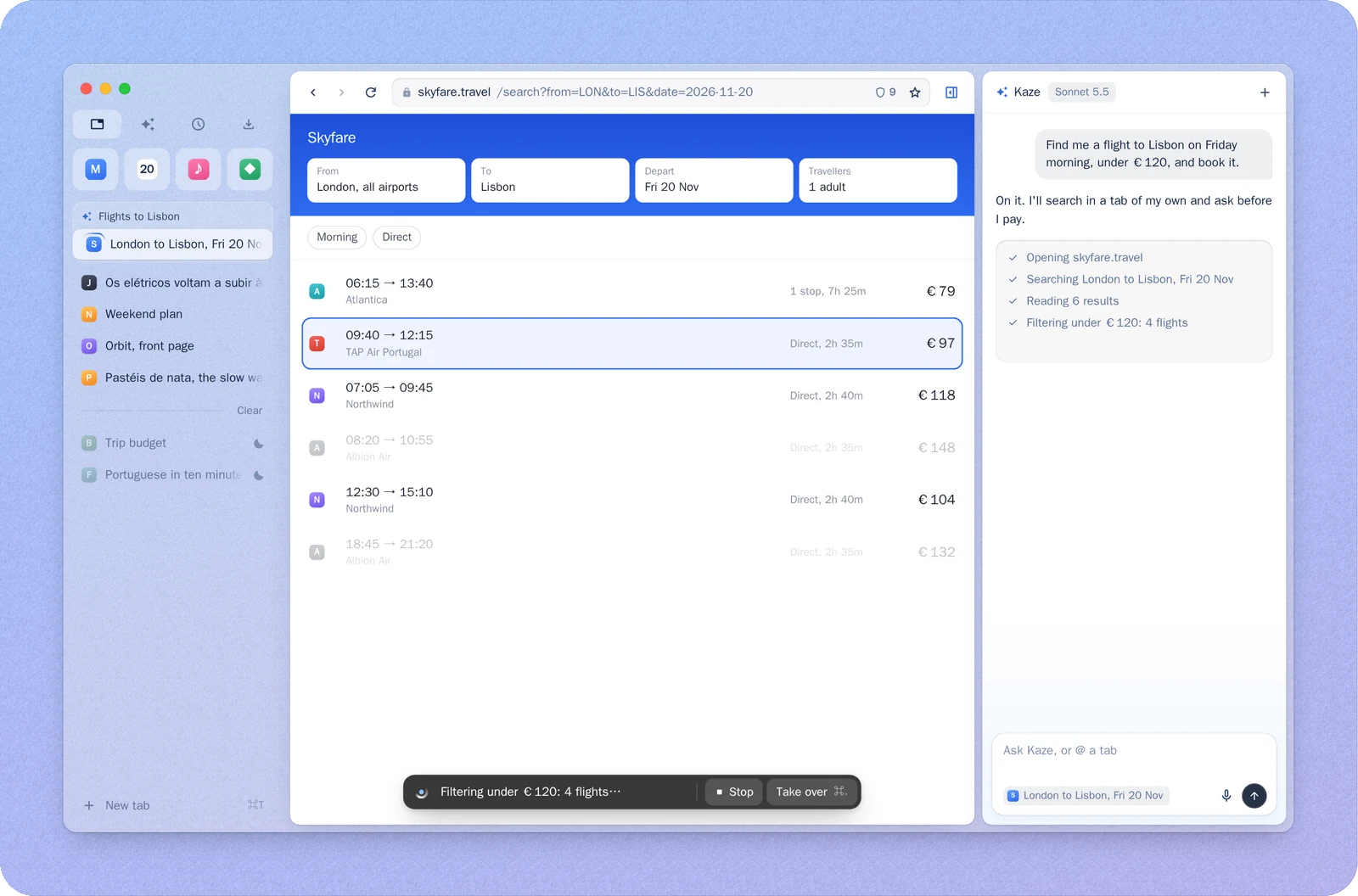
Kaze is a browser you use every day that has an agent built in. Ask it for something and it works in tabs of its own, next to yours: it shows each step, lets you take over at any moment, and asks before it pays, sends or deletes anything. The same tabs, with your logins, are open to the agents you already use, such as Claude Code and Codex.
Most AI browsing today means a choice. An extension drives your browser and takes it away from you while it works. A built-in or cloud browser leaves you signed out of everything. An AI browser often doesn't make a good everyday browser. Kaze is built to be both: a real browser for you, and a workspace for agents that never gets in your way.
Quick start
1. Install. Download the DMG from Releases,
Kaze-<version>-arm64.dmg for Apple silicon or Kaze-<version>.dmg for Intel, and drag Kaze to
Applications. It's free, needs no account, runs on macOS 13 or later and updates itself.
2. Bring your things. On first launch Kaze offers to bring in your tabs, logins, bookmarks, history and extensions from Chrome, Arc, Edge, Brave or Safari. Say yes and every site you're signed in to works in Kaze, and so does the agent.
3. Pick a model. Sign in with ChatGPT, add your own API key, or point Kaze at any OpenAI-compatible endpoint (Settings › Agent).
4. Ask. Press ⌘E to open the agent and try:
Find a flight from London to Lisbon on Friday under €120
It opens what it needs in a tab group named for the task while you keep browsing. Press ⌘. to take over, and when it's done, one press closes the tabs it opened.
5. Use it from your other agents. Kaze finds Claude Code, Codex, Cursor, Claude Desktop, Gemini CLI and DeepSeek Harness on your Mac and connects them once through its MCP server. In Claude Code, for example:
Read the flights I left open in Kaze and add the cheapest to plan.md
Disconnect any of them in Settings › External agents, and it stays disconnected.
Custom Agent endpoints
Kaze's built-in Agent can use a custom OpenAI-compatible endpoint. Open Settings › Agent › Add custom endpoint… to configure it.
For a local gateway such as Magpie:
- Start the gateway and confirm that it supports OpenAI Chat Completions with streaming and tool calls (function calling). Kaze calls
{base}/chat/completions; it does not use the Responses API. - Enter a Name and the gateway's OpenAI-compatible Base URL. For a server exposing
/v1/...on port 3425, usehttp://127.0.0.1:3425/v1. - Leave API key empty if the gateway does not require one; otherwise, enter its key.
- Leave Models empty to have Kaze fetch chat models from
{base}/models, or enter model IDs manually. - Select a model that supports tool calling and send a small browser task.
To let an external agent control Kaze's signed-in tabs, open Settings › External agents. Use one-click Connect for a supported client, or copy the MCP configuration into another MCP client. Magpie is a model gateway; an agent that uses Magpie for its model connects to Kaze through this external-agent flow.
Highlights
| Its own tabs, never yours | The agent works in background tabs gathered in a group named for the task. Your tabs stay where you left them. Each tab shows its state: working, needs you, done, or you're driving. |
| It asks before it acts | Before it pays, sends, deletes or runs anything, a card names the exact thing. Nothing happens until you say so. |
| Your models, your Mac | It runs on the model you choose. Activity, history and settings stay on your Mac. |
| It learns your sites | What the agent works out on a site is kept as that site's skill and given to it next time. You can read, edit or delete it in Skills. |
| More than one thing at a time | Subagents split a big task into parallel parts. Scheduled tasks run every morning at 8 or once on Friday. Activity remembers what you read, so "that tram article from last week" finds it. |
| A browser first | Tabs that tidy themselves, idle tabs that sleep, a ⌘K palette, ⌥E side-by-side translation, built-in ad blocking, Chrome extensions, one colour per window, English and 简体中文. |
In this repository
| Releases | Kaze's builds and release notes |
skills/ | The skills Kaze ships with, in the Agent Skills format |
Website/ | The homepage, kaze.build (static files, deployed with npx wrangler deploy) |
Kaze's browser tools come from BrowserMCP (Apache-2.0), an open-source MCP server for driving a signed-in browser with a JavaScript workspace and reusable site adapters. It is the engine Kaze lends to your other agents, and it also works on its own with Chrome.
Feedback
Bugs and ideas go in Issues. Please include Kaze's version (Kaze › About Kaze) and your Mac's chip.