
Taste
Taste turns a set of reference images into a reusable SKILL.md.
- Hosted demo: https://taste.jaytel.com
- Try a taste skill:
pipeline/taste/taste-skill/SKILL.md
Repo Shape
apps/web/          hosted frontend demo and API worker implementation
packages/ai/       reusable prompt, provider, chunking, and generation package
scripts/           local pipeline runner for humans and agents
reference-images/  ignored local drop folder for your own JPG/PNG/WebP inputs
pipeline/taste/    Jaytel's example generated taste skill and pipeline notes
docs/              README images and examples
The web app is a demo of the broader pipeline. The local pipeline is the easiest
way to use this repo privately: it writes artifacts to .taste/runs/... and
does not need Postgres, Vercel Blob, Cron, or hosted auth.
Quick Start: Local Pipeline
Use this path if you want to create a taste skill from your own images.
npm install
cp .env.example .env.local
Set the direct provider keys in .env.local:
OPENAI_API_KEY=...
ANTHROPIC_API_KEY=...
Put JPG, PNG, or WebP reference images in reference-images/, then run:
npm run taste
The final skill is written to:
.taste/runs/<run-id>/SKILL.md
.taste/runs/<run-id>/04-skill/SKILL.md
Convenience alternatives: instead of the two direct keys, you can set one
gateway key: OPENROUTER_API_KEY or AI_GATEWAY_API_KEY. Vercel's AI Gateway
uses AI_GATEWAY_API_KEY and routes plain AI SDK model strings through the
Gateway by default.
Run against a different folder:
npm run taste -- ./path/to/images
Useful options:
npm run taste -- ./images --out ./my-skill-run
npm run taste -- ./images --skill-name my-taste
npm run taste -- ./images --provider openrouter
npm run taste -- ./images --model openai/gpt-5.5
Comparison
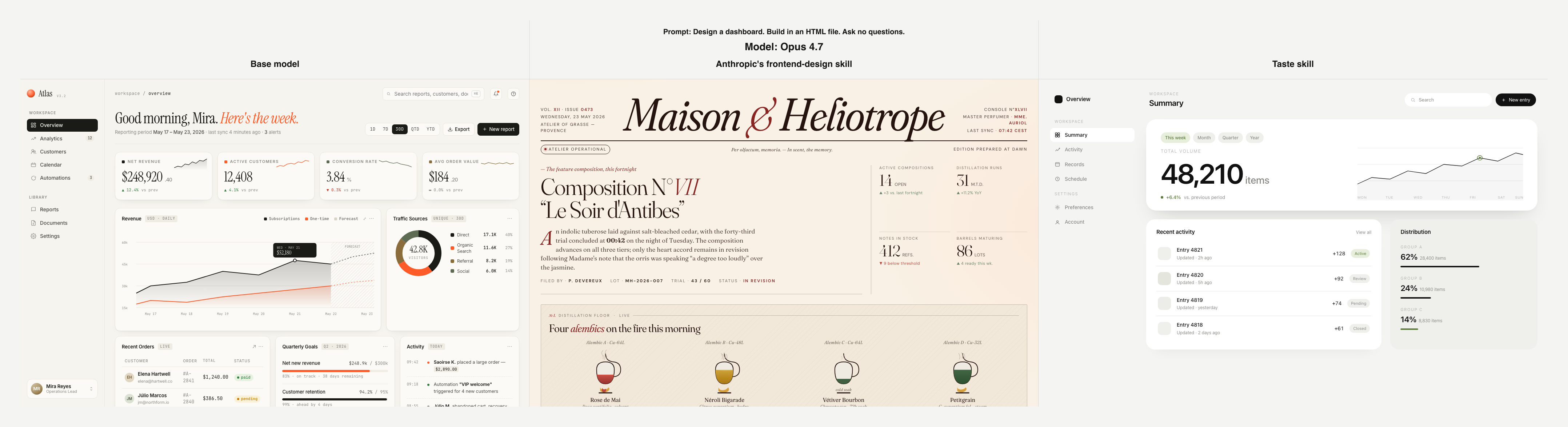
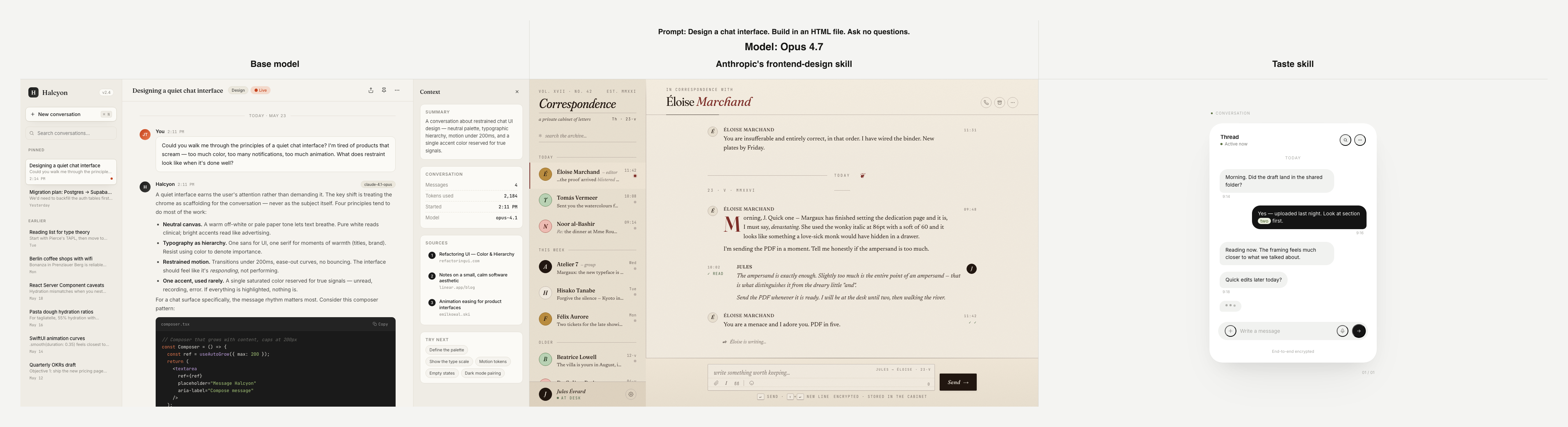
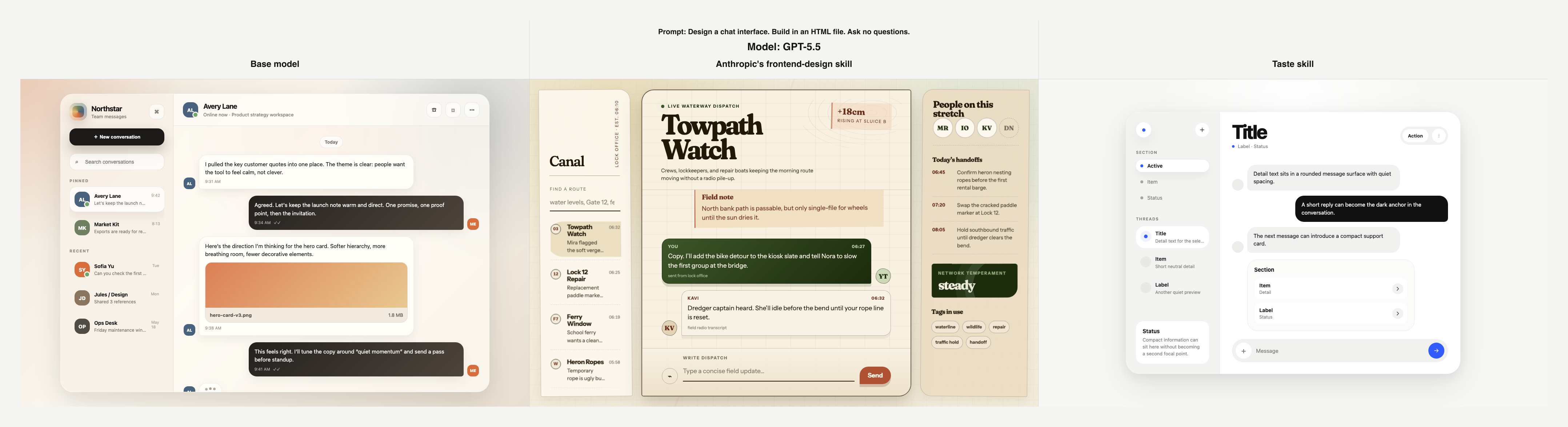
We ran a small frontend design comparison with three agents: one base model
with no skill, one using Anthropic's frontend-design skill, and one using the
generated Taste skill from pipeline/taste/taste-skill/SKILL.md. Each agent was
given the same prompt within each test and asked to produce a standalone HTML
file.
Test 01: Opus 4.7
Prompt: Design a dashboard. Build in an HTML file. Ask no questions.
Test 02: Opus 4.7
Prompt: Design a chat interface. Build in an HTML file. Ask no questions.
Test 03: GPT-5.5
Prompt: Design a chat interface. Build in an HTML file. Ask no questions.
How It Works
1. Curate References
Provide a tight set of reference images. High-resolution images help, and close-up crops are often better than full screens because they make the visual details easier to read.
The goal is not random inspiration. The useful signals are repeated examples of layout, spacing, color, type, texture, composition, density, and hierarchy.
2. Index the Corpus
The pipeline indexes every uploaded image, removes exact duplicates, and assigns stable image ids. The current production limit is 20 images per run.
Artifacts start here:
runs/{runId}/01-corpus/images.jsonl
3. Analyze Each Image
Each image is read independently by the configured vision models. The default two-key pipeline uses:
openai/gpt-5.5
anthropic/claude-sonnet-4-6
The prompts tell the models to ignore what the app does and focus only on visual evidence: layout, spacing, color, type, texture, rhythm, density, and hierarchy.
Raw notes are stored like this:
runs/{runId}/02-image-notes/raw/{imageId}/{model}.md
4. Fuse and Chunk
When an image's raw analyses finish, the synthesis model fuses them into one canonical note. The inputs are anonymized first, so the model sees source-neutral analyses instead of provider names.
Then the synthesized notes are grouped into chunks. Each chunk becomes a small rule synthesis. Larger runs are reduced through merge layers before producing one final Markdown rule set.
runs/{runId}/02-image-notes/synthesized/{imageId}.md
runs/{runId}/03-rule-set/chunks/{chunkId}-rules.md
runs/{runId}/03-rule-set/merges/{mergeId}-rules.md
runs/{runId}/03-rule-set/rule-set.md
5. Write the Skill
The skill writer turns the final rule set into concrete instructions. It keeps specific visual constraints and avoids vague aesthetic labels.
Instead of saying "make it premium and tasteful," the skill says things like:
- Use neutral sans-serif typography.
- Keep accent color localized.
- Use soft shadows and minimal borders.
- Avoid beige luxury-commerce defaults.
The final artifact is:
runs/{runId}/04-skill/SKILL.md
The current checked-in example skill is Jaytel's skill:
pipeline/taste/taste-skill/SKILL.md.
Production Shape
The hosted app stores workflow state in Postgres and writes run artifacts to private Vercel Blob storage.
browser uploads -> Next API routes -> Postgres workflow jobs
                                     -> OpenRouter OAuth session
                                     -> private Vercel Blob artifacts
apps/web/src/workflow/runner.ts owns the durable job flow. /api/jobs/drain
claims bounded batches with database leases, and Vercel Cron can re-enter the
drain so interrupted functions resume.
Verification
npm run check
npm test
npm run e2e:prod
The production E2E script requires BLOB_READ_WRITE_TOKEN,
INTERNAL_API_SECRET, and TASTE_E2E_COOKIE from a signed-in OpenRouter
session. Put local test images in
reference-images/ or set TASTE_REFERENCE_DIR;
reference images are intentionally gitignored.