🧹 Dev Cleaner Utility


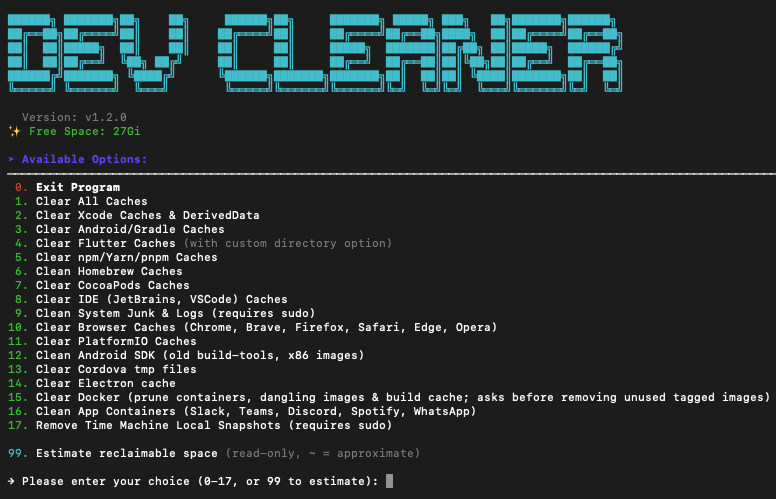
Support Latest macOS/Linux/Windows Dev Environments
This tool is for educational purposes, focusing on safely removing development-related junk files (Xcode, Flutter, Visual Studio, npm, etc.) to free up disk space.
✨ Features
- One-Click Cleanup: Clear Xcode, Flutter, Visual Studio, Gradle, npm, NuGet, IDE, and browser caches.
- Comprehensive Flutter Cleanup: Recursively finds and cleans all Flutter projects, removing:
- FVM SDK caches and configurations (
.fvm,.fvmrc) - Flutter build artifacts (
build,.dart_tool,.packages,pubspec.lock) - Android Gradle caches (
android/.gradle,android/build,android/app/build) - iOS CocoaPods caches (
ios/Pods,ios/Podfile.lock,ios/.symlinks, Flutter frameworks) - Global Flutter cache
- FVM SDK caches and configurations (
- AI CLI Tools: Prunes the old Claude Code binaries the native installer leaves behind (
~/.local/share/claude/versions, ~190 MB per release), keeping the version in use. - Interactive Menu: Allows selection of specific cleanup targets (e.g., Xcode only).
- Multi-platform Support: Supports macOS, Linux, and Windows.
💻 System Support
| Operating System | Architecture | Supported |
|---|---|---|
| macOS | Intel, Apple Silicon | ✅ |
| Linux | x64, ARM64 | ✅ |
| Windows | x64, ARM64 | ✅ |
👀 How to Use
⭐ Auto Run Script
Linux/macOS
To download, grant permission, and run the utility in one line:
curl -fsSL https://raw.githubusercontent.com/jemishavasoya/dev-cleaner/main/dev-cleaner.sh -o dev-cleanup.sh && chmod +x dev-cleanup.sh && ./dev-cleanup.sh🍺 Install via Homebrew
macOS/Linux
For a permanent installation using Homebrew:
# Tap the repository
brew tap jemishavasoya/dev-cleaner

# Install dev-cleaner
brew install dev-cleaner

# Run the utility
dev-cleaner

# Check version
dev-cleaner --version
To update to the latest version:
brew update
brew upgrade dev-cleaner
To uninstall:
brew uninstall dev-cleaner
brew untap jemishavasoya/dev-cleaner
🪟 Windows Installation
PowerShell (Run as Administrator)
One-Line Download & Run
irm https://raw.githubusercontent.com/jemishavasoya/dev-cleaner/main/dev-cleaner.ps1 -OutFile dev-cleaner.ps1; .\dev-cleaner.ps1Note: You may need to set the execution policy first:
Set-ExecutionPolicy -ExecutionPolicy RemoteSigned -Scope CurrentUser
Manual Download
- Download
dev-cleaner.ps1from this repository - Right-click the file → Run with PowerShell, or
- Open PowerShell as Administrator and run:
.\dev-cleaner.ps1
Command-Line Options
# Show help
.\dev-cleaner.ps1 -Help

# Show version
.\dev-cleaner.ps1 -Version

# Custom Flutter projects directory
.\dev-cleaner.ps1 -FlutterDir "C:\Projects\Flutter"

# Custom Visual Studio projects directory
.\dev-cleaner.ps1 -VsDir "C:\Projects\DotNet"

# Both custom directories
.\dev-cleaner.ps1 -FlutterDir "D:\Flutter" -VsDir "D:\VisualStudio"
Environment Variables
# Set in your PowerShell profile for persistence
$env:FLUTTER_SEARCH_DIR = "C:\Projects\Flutter"
$env:VS_SEARCH_DIR = "C:\Projects\DotNet"
Windows-Specific Cleanup
The Windows version includes all cross-platform cleanups plus:
- Visual Studio: Cleans
bin/,obj/,.vs/folders from all .NET projects, plus global VS caches (ComponentModelCache, MEFCacheData) - NuGet: Clears global packages cache (
~/.nuget/packages), HTTP cache, and temp files - Windows Temp: Clears user and system temp folders, plus Recycle Bin
Note: Some operations require Administrator privileges. The script will automatically request elevation if needed.
🤖 Claude Code Version Cleanup
Claude Code's native installer keeps every version it has ever installed under ~/.local/share/claude/versions/ and never removes the old ones, so weeks of background auto-updates quietly cost several GB. Option 19 (option 12 on Windows) prunes them. Because one of those files is the binary the claude command actually runs, this option is deliberately conservative:
- Always kept: the version the launcher (
~/.local/bin/claude) resolves to, and any binary a running session still has open. - Also kept on Windows: the newest file, since there is no symlink to resolve and an update can land in
versions\without being copied intobin\. - Skipped entirely — nothing is removed, with a warning — when the launcher is not a symlink into
versions/(you replaced it with your own script) or points at a version that is no longer on disk. The active version cannot be identified, so nothing is guessed. - Never touched:
~/.claude/and~/.claude.json. Settings, MCP configuration and session history live there.
🧹 Flutter Cleanup Details
The Flutter cleanup option (Option 4) performs a comprehensive recursive cleanup of all Flutter projects starting from the current directory. It:
- Recursively searches for all
pubspec.yamlfiles - Removes FVM SDK caches and configurations
- Cleans build artifacts:
build/,.dart_tool/,.packages,pubspec.lock - Removes Android Gradle caches from each project
- Removes iOS CocoaPods caches and Flutter frameworks
- Cleans global Flutter cache
💡 Pro Tip: If you have active projects you work on daily, consider running the cleanup from a specific subdirectory (e.g., ~/old_projects or ~/research) rather than your entire development folder. This avoids unnecessary rebuilds of dependencies for active projects.
Expected Space Savings: Users have reported freeing up 50-100GB+ of disk space after running Flutter cleanup on multiple projects.
You can also buy me a cup of coffee 
🤩 Contribution
We welcome you to submit Issues and Pull Requests!
Common Issues
Permission Errors
- If you encounter permission errors while running scripts, try running with
sudo(Linux/macOS) or as Administrator (Windows).
Free Space Did Not Change After Cleanup (macOS)
The summary prints two different things on purpose:
Reclaimed:  ~3.0Gi
Free space: 21.4Gi → 21.4Gi
Reclaimed is measured on the files that were actually deleted — that data is gone. Free space can lag behind, because APFS keeps the blocks of a deleted file allocated as long as a Time Machine local snapshot still references them (Finder calls this "purgeable" space). macOS releases it on its own, usually within 24 hours or as soon as the disk gets tight.
To get the space back right now, run option 17 (Remove Time Machine Local Snapshots) — or check what is pinned:
tmutil listlocalsnapshots /Two other cases where free space lags: apps still holding deleted files open (quit Xcode, Simulator, browsers), and Docker — docker system prune frees space inside Docker's own disk image, and the host only sees it once Docker Desktop compacts that image.
Tool Not Found
- Make sure tools like
flutterorbreware installed and added to your system PATH. - On macOS/Linux, check PATH with
echo $PATH. - On Windows, check Environment Variables in System Settings.