OnnxOCR
If this project helps you, please consider giving it a Star.

A high-performance multilingual OCR project based on ONNXRuntime


English | 简体中文
Version Updates
-
2026.05.01
- Added ONNX license plate detection and recognition.
- Added RapidTable-based ONNX table recognition.
- Added RapidLayout-based Chinese and English layout analysis.
- Added RapidDoc-based document layout analysis and Markdown export.
- Added
/plate,/table,/layout,/layout_markdown, and related HTTP endpoints.
-
2025.05.21
- Added PP-OCRv5 models, supporting Simplified Chinese, Traditional Chinese, Chinese Pinyin, English, and Japanese in one model.
- Improved overall recognition accuracy compared with PP-OCRv4.
- Recognition accuracy is consistent with PaddleOCR 3.0.
Core Advantages
- Deep learning framework free: a general OCR project ready for deployment.
- Cross-architecture support: PaddleOCR-converted ONNX models can run on ARM and x86 devices.
- Unified inference engine: all ONNX models create ONNXRuntime sessions through
onnxocr/inference_engine.py. - Multilingual support: one model supports 5 text types.
- Source-level integration:
rapid_layout,rapid_table, andrapid_doclive under theonnxocr/package, with no dependency onrapidocr==3.4.3orrapid-orientation. - Hardware adaptation friendly: downstream vendors can adapt GPU/NPU providers by modifying the unified inference engine.
Environment Setup
python>=3.8
pip install -i https://pypi.tuna.tsinghua.edu.cn/simple -r requirements.txt
Notes:
- By default, the repository only includes the PP-OCRv5 general OCR model files required by
tests/test_general_ocr.py. - Extra models for license plate recognition, table recognition, layout analysis, orientation classification, and RapidDoc Markdown export are large and should be downloaded on demand. For international users, HuggingFace is recommended.
- Larger PP-OCRv5 Server ONNX models can also be downloaded separately and used to replace det/rec models under
onnxocr/models/ppocrv5/.
Model Download
Extra models are hosted on HuggingFace: jingsongliu/onnxocr_model. International users are recommended to download from HuggingFace:
python scripts/download_models.py --source huggingface
The core HuggingFace API is:
from huggingface_hub import snapshot_download

model_dir = snapshot_download("jingsongliu/onnxocr_model")
For users in mainland China, ModelScope remains the default and recommended source:
python scripts/download_models.py
ModelScope repository: supersong/onnxocr_model.
The script copies the repository models/ directory into local onnxocr/models/ and checks required optional files such as onnxocr/models/rapid_doc/layout/pp_doclayoutv2.onnx.
To check local models only:
python scripts/download_models.py --check-only
One-Click Run
python test_ocr.py
test_ocr.py runs only general OCR by default. The optional examples are commented out; uncomment them after downloading the corresponding models with python scripts/download_models.py.
Feature-specific tests:
python tests/test_general_ocr.py
python tests/test_license_plate_ocr.py
python tests/test_table_ocr.py
python tests/test_layout_analysis.py
python tests/test_layout_markdown.py
Generated files are written to result_img/, which is ignored by git.
General OCR
import cv2
from onnxocr.onnx_paddleocr import ONNXPaddleOcr

img = cv2.imread("onnxocr/test_images/715873facf064583b44ef28295126fa7.jpg")
model = ONNXPaddleOcr(use_angle_cls=False, use_gpu=False)
result = model.ocr(img)
print(result)
License Plate Recognition
License plate recognition is integrated into ONNXPaddleOcr as an optional mode. Existing general OCR usage is unchanged.
from onnxocr.onnx_paddleocr import ONNXPaddleOcr, sav2PlateImg

plate_model = ONNXPaddleOcr(
    use_angle_cls=True,
    use_gpu=False,
    use_plate_recognition=True,
    plate_min_score=0.4,
)
plate_result = plate_model.ocr(img)
sav2PlateImg(img, plate_result, name="./result_img/test_plate_vis.jpg")
Model files:
onnxocr/models/license_plate/car_plate_detect.onnx
onnxocr/models/license_plate/plate_rec.onnx
Table Recognition
Table recognition is integrated from RapidTable. It reuses general OCR detection/recognition results, restores table structure, and outputs HTML, cell boxes, and logical row/column coordinates.
from onnxocr.onnx_paddleocr import ONNXPaddleOcr, sav2TableImg

table_model = ONNXPaddleOcr(
    use_angle_cls=True,
    use_gpu=False,
    use_table_recognition=True,
    table_model_type="slanet_plus",
)
table_result = table_model.ocr(img)
print(table_result["html"])
sav2TableImg(img, table_result, name="./result_img/test_table_vis.jpg")
Model files:
onnxocr/models/table/slanet-plus.onnx
onnxocr/models/table/ch_ppstructure_mobile_v2_SLANet.onnx
onnxocr/models/table/en_ppstructure_mobile_v2_SLANet.onnx
Chinese / English Layout Analysis
Layout analysis is integrated from RapidLayout. It locates document elements such as titles, text blocks, tables, figures, headers, and footers.
from onnxocr.onnx_paddleocr import ONNXPaddleOcr, sav2LayoutImg

layout_model = ONNXPaddleOcr(
    use_gpu=False,
    use_layout_analysis=True,
    layout_model_type="pp_layout_cdla",
)
layout_result = layout_model.ocr(img)
sav2LayoutImg(img, layout_result, name="./result_img/test_layout_vis.jpg")
For English layout analysis, set layout_model_type to pp_layout_publaynet.
Model files:
onnxocr/models/layout/layout_cdla.onnx
onnxocr/models/layout/layout_publaynet.onnx
Document To Markdown
Document-to-Markdown export is integrated from RapidDoc. It analyzes titles, paragraphs, tables, figures, and other layout elements, then saves the result as a Markdown file.
from onnxocr.layout_markdown import LayoutMarkdownConverter

converter = LayoutMarkdownConverter(
    layout_model_type="pp_doclayoutv2",
    formula_enable=False,
    table_enable=True,
)
result = converter.convert_file(
    "onnxocr/test_images/layout_cdla.jpg",
    output_md_path="./result_img/test_layout_markdown.md",
)
print(result["markdown_path"])
RapidDoc model files:
onnxocr/models/rapid_doc/layout/pp_doclayoutv2.onnx
onnxocr/models/rapid_doc/table/q_cls.onnx
onnxocr/models/rapid_doc/table/unet.onnx
onnxocr/models/rapid_doc/table/slanet-plus.onnx
Inference Engine Adaptation
General OCR, license plate recognition, table recognition, layout analysis, and RapidDoc document parsing all create ONNXRuntime sessions through onnxocr/inference_engine.py.
To adapt a downstream GPU/NPU provider, start from:
from onnxocr.inference_engine import create_session
Main extension points:
create_session(model_path, providers=None, use_gpu=False, gpu_id=0, sess_options=None)build_providers(use_gpu=False, gpu_id=0, providers=None)build_providers_from_engine_cfg(engine_cfg)ProviderConfig(engine_cfg)
Only onnxocr/inference_engine.py imports onnxruntime directly. Feature modules do not call ONNXRuntime APIs directly.
API Service
Start service:
python app-service.py
Main endpoints:
/ocr: general OCR./plate: license plate recognition./table: table recognition./layout: layout analysis./layout_markdown: image/PDF to Markdown.
WebUI:
python webui.py
Docker Image
docker build -t ocr-service .
docker run -itd --name onnxocr-service -p 5006:5005 ocr-service
Project Layout
onnxocr/
  inference_engine.py        # single ONNXRuntime entry
  onnx_paddleocr.py          # public user API
  predict_det.py             # general OCR detection
  predict_rec.py             # general OCR recognition
  orientation.py             # local RapidOrientation ONNX adapter
  license_plate.py           # license plate OCR
  table_recognition.py       # table recognition wrapper
  layout_recognition.py      # layout analysis wrapper
  layout_markdown.py         # RapidDoc Markdown wrapper
  rapid_layout/              # source-level RapidLayout ONNX integration
  rapid_table/               # source-level RapidTable ONNX integration
  rapid_doc/                 # source-level RapidDoc ONNX integration
  models/                    # local ONNX models
tests/                       # feature-specific tests
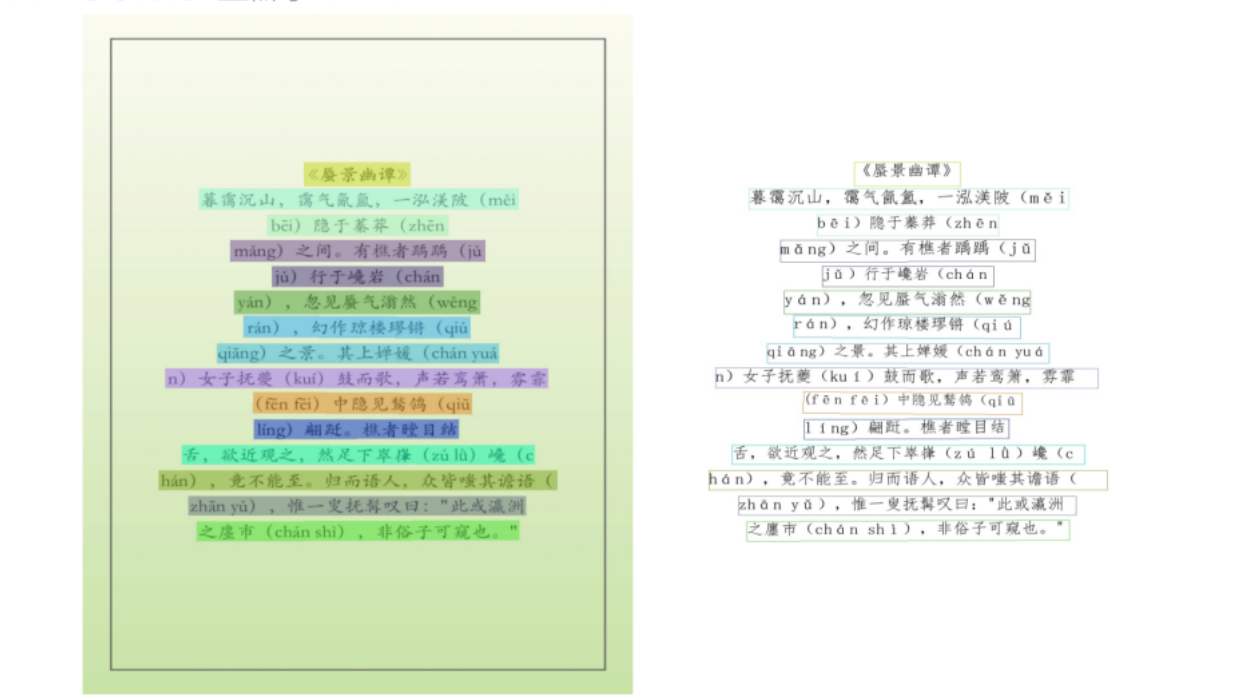
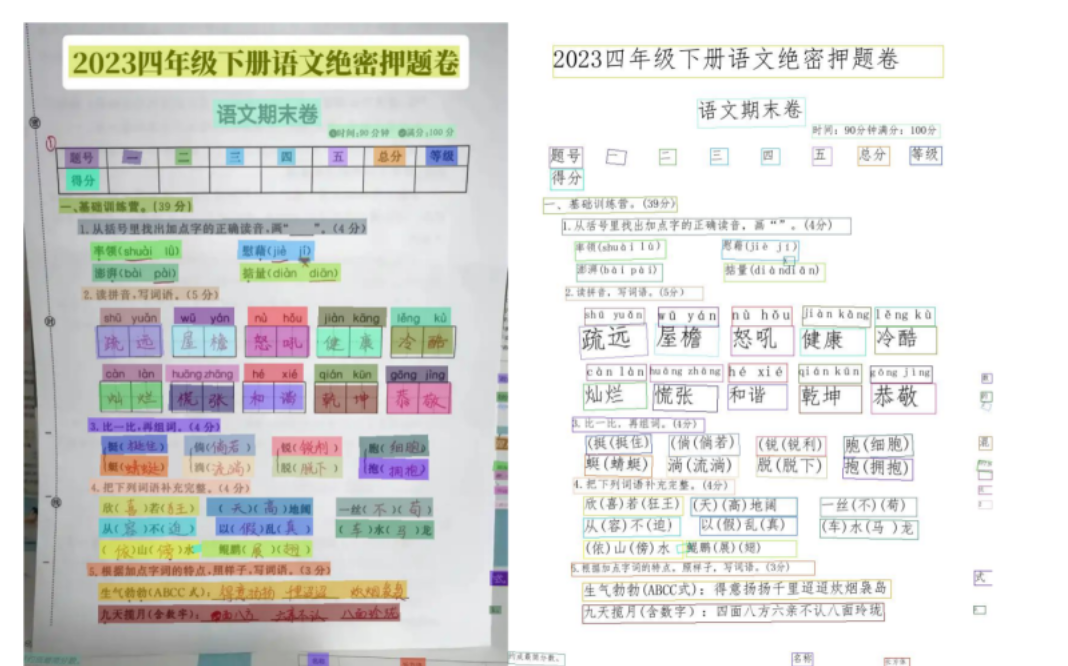
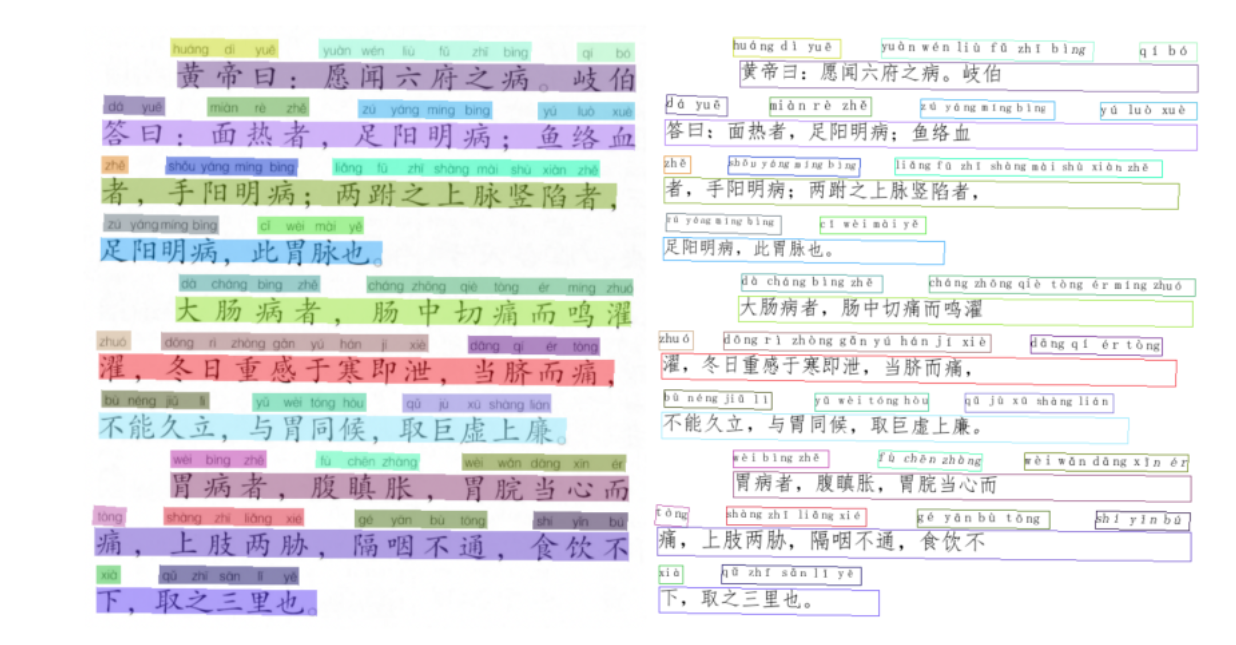
Effect Demonstration
| Example 1 | Example 2 |
|---|---|
 |  |
| Example 3 | Example 4 |
|---|---|
 |  |
Contact & Communication
OnnxOCR Community
Acknowledgments
Thanks to PaddleOCR for technical support and model references.
Thanks to the RapidAI open-source community, including RapidTable, RapidLayout, RapidDoc, and RapidOrientation, for excellent models, code, and engineering references.
Open Source & Donations
If you recognize this project, you can support it via Alipay or WeChat Pay.


Star History
Contribution Guidelines
Issues and Pull Requests are welcome.