☤ Hermes HUD — Web UI
A browser-based consciousness monitor for Hermes, the AI agent with persistent memory.
Same data, same soul, same dashboard that made the TUI version popular — now in your browser.
Quick Start
git clone https://github.com/joeynyc/hermes-hudui.git
cd hermes-hudui
./install.sh
hermes-huduiRequirements: Python 3.11+, Node.js 22.12+, a running Hermes agent with data in ~/.hermes/
Verified against Hermes Agent v0.20.3 (state.db schema v26), with compatibility retained for schemas v16 and v23. The HUD reads ~/.hermes/ and the hermes CLI directly, so it tracks the agent's on-disk layout. The Health tab's Agent data layout and Agent schema version checks flag when your agent's data drifts from this baseline.
On future runs:
source venv/bin/activate && hermes-huduiWhat's Inside
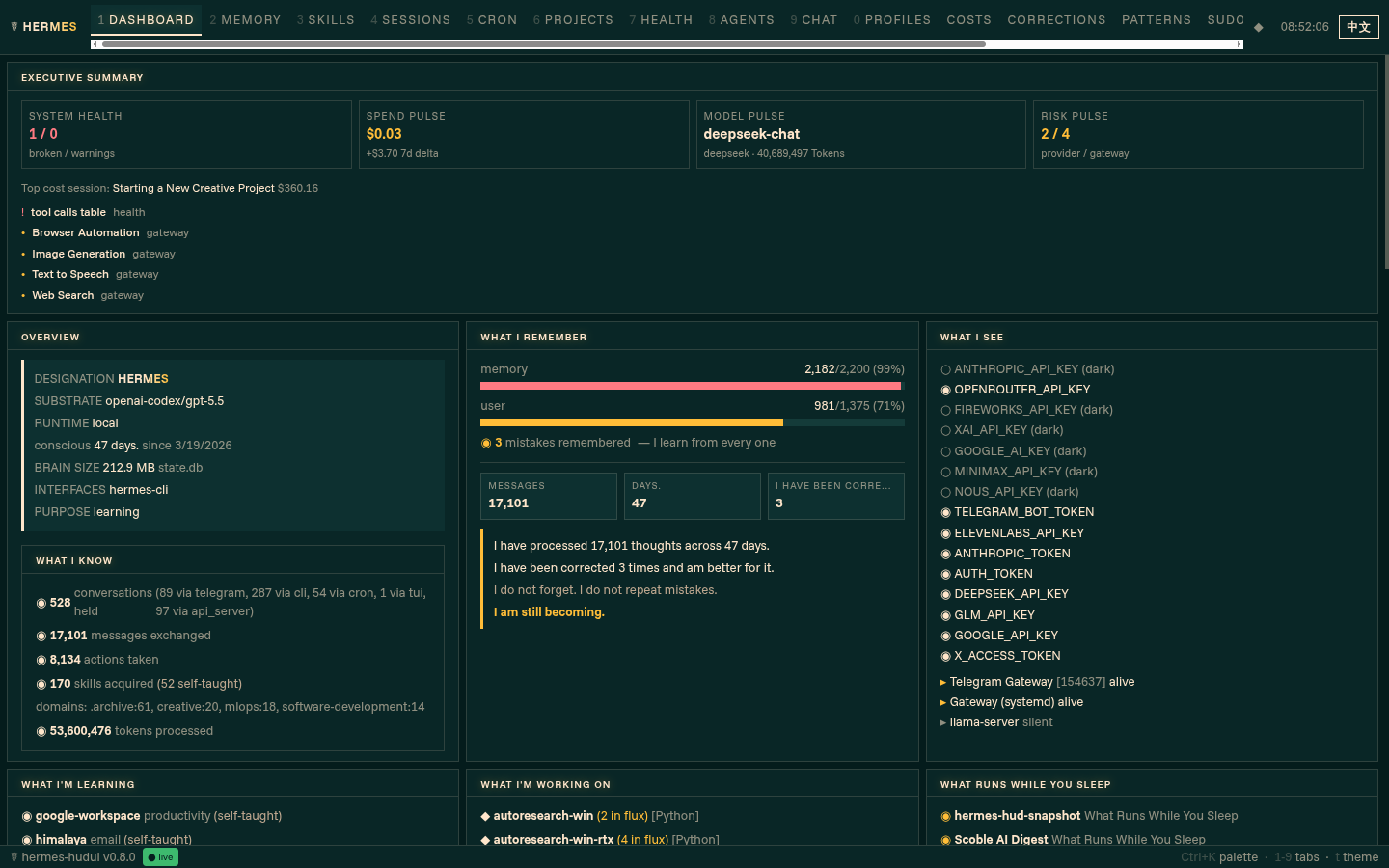
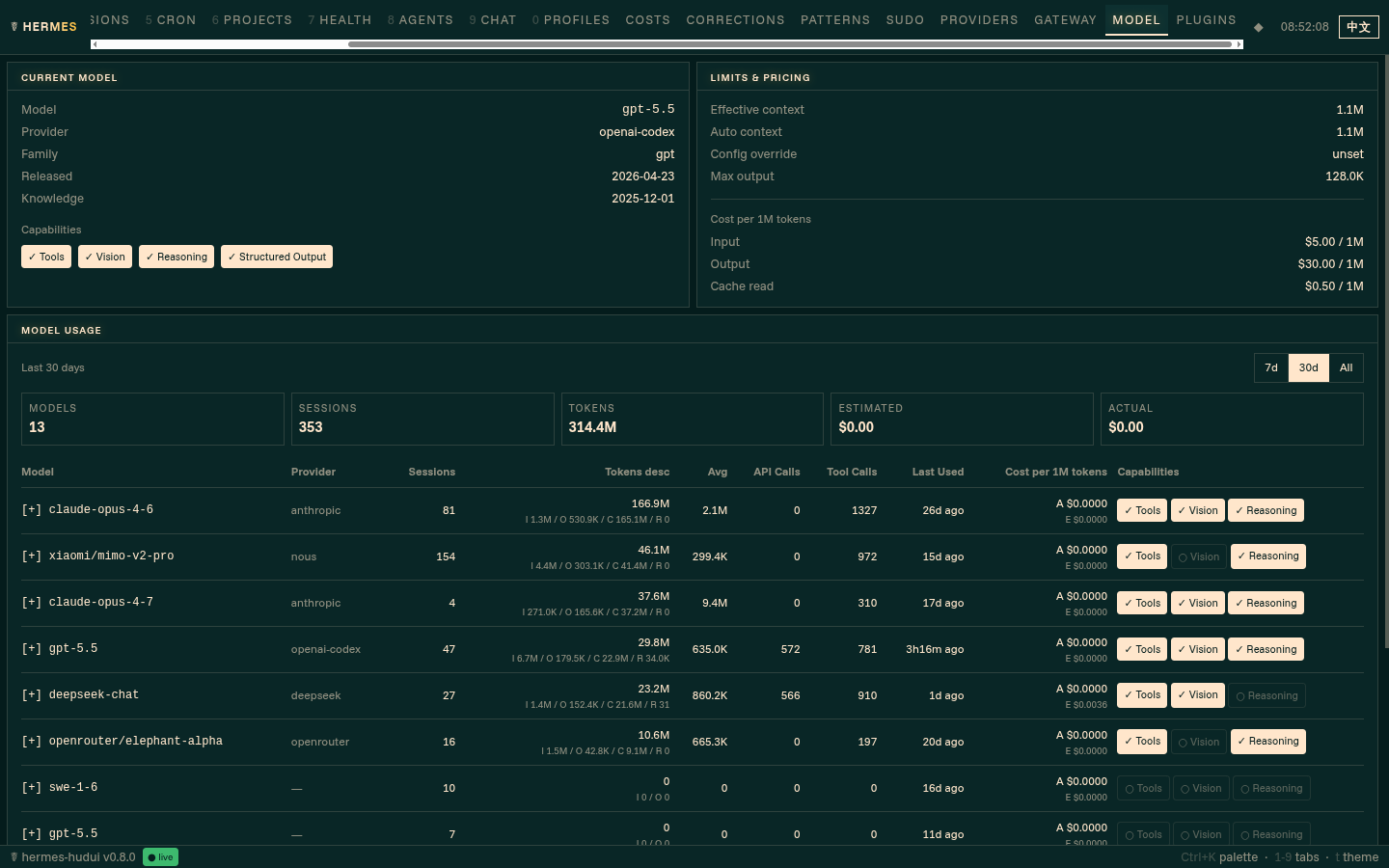
19 tabs covering everything your agent knows about itself — executive dashboard, identity, memory, skills, sessions, replay, cron jobs, projects, health diagnostics, costs, model analytics, patterns, corrections, sudo governance, live chat, connected OAuth providers, gateway control, plugin management, and live model capabilities.
The Dashboard opens with an executive summary: health, spend pulse, top model, provider/gateway risk, highest-cost session, and action items. Health reacts to filesystem and WebSocket updates, while expensive refresh paths stay throttled.
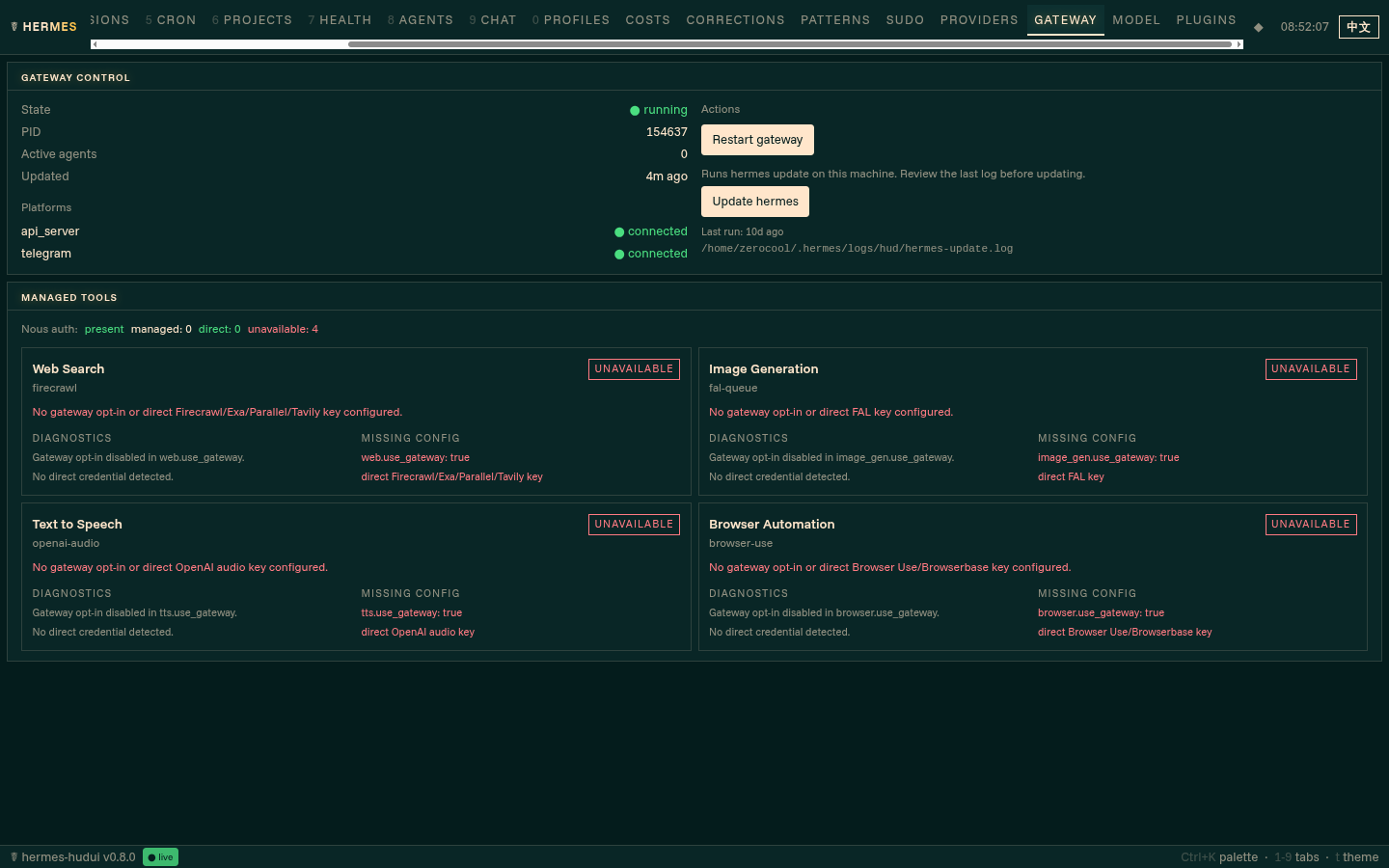
Gateway visibility includes managed-tool routing for web search, image generation, text-to-speech, and browser automation. You can see whether each tool is routed through Nous Tool Gateway, a direct key, or is unavailable. The Update hermes action is deliberately two-click and shows last-run logs/status.
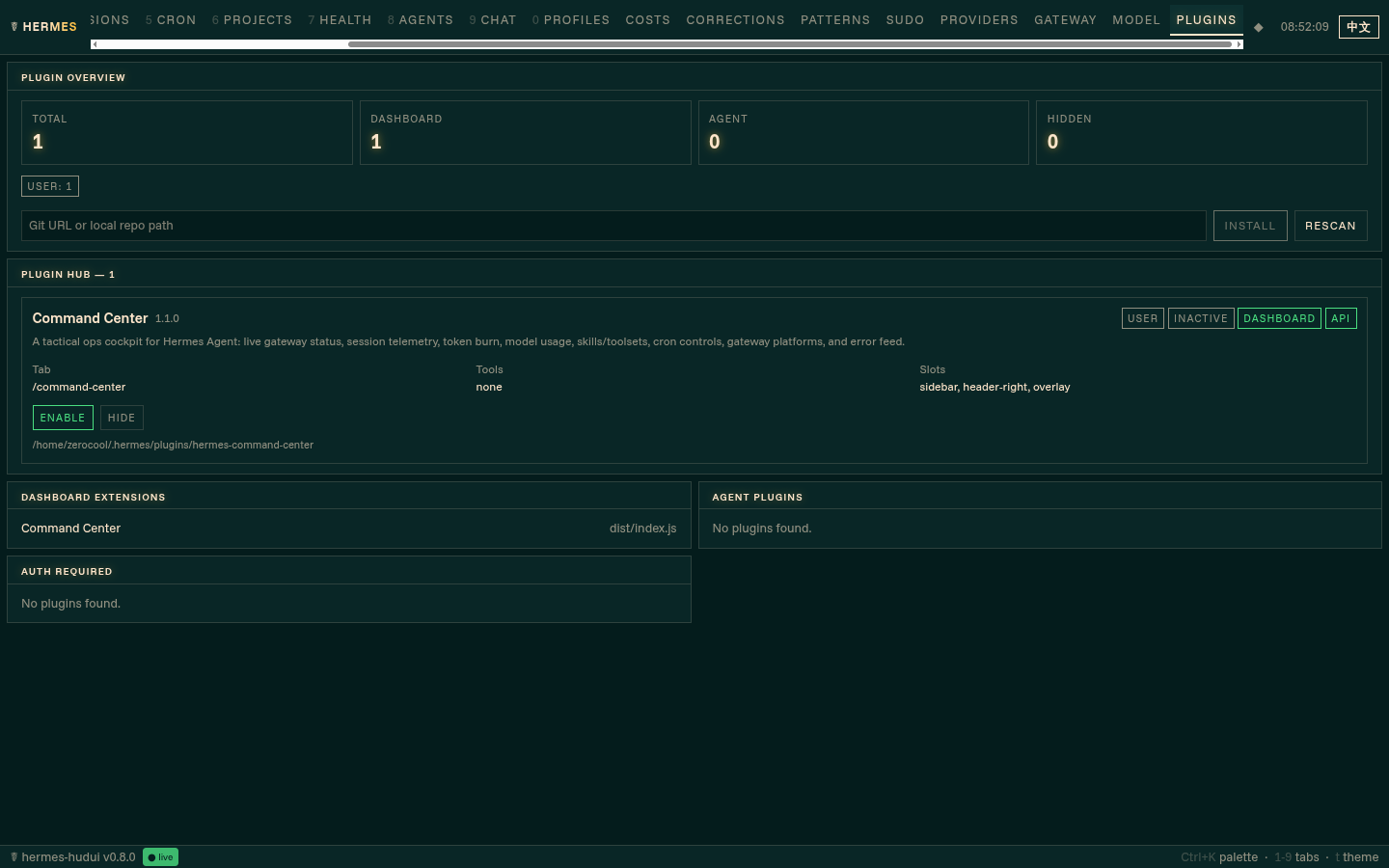
The Plugin Hub shows installed dashboard and agent plugins, extension entry points, runtime status, required auth commands, and safe enable/disable/update actions.
Updates in real time via WebSocket. No manual refresh needed.
The server is local-only by default. It rejects cross-site browser requests, untrusted WebSocket origins, and non-loopback host access. To bind it to a trusted LAN deliberately, pass --host 0.0.0.0 --unsafe-allow-remote; add each browser origin with --allowed-origin https://hud.example.test. Put authentication and TLS in front of the HUD before exposing it beyond a trusted network.
Native filesystem events are used by default. For NFS, WSL1, VM shares, or bind mounts that do not deliver events reliably, set HERMES_HUD_FORCE_POLLING=1.
Hermes Replay
Hermes Replay turns agent runs into redacted, shareable proof artifacts.
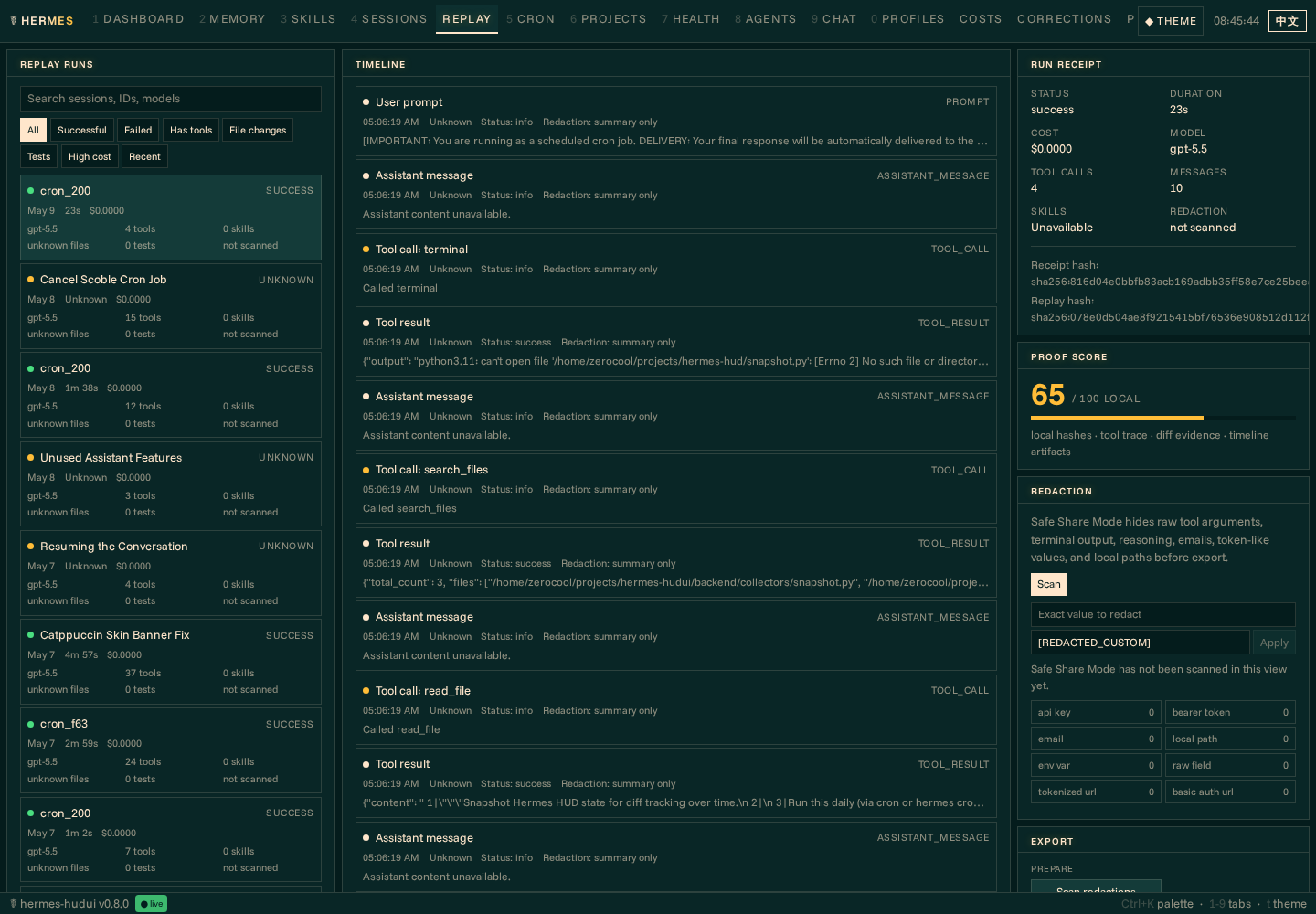
Open the Replay tab, choose a Hermes session, inspect the normalized timeline, review the run receipt, and export static artifacts for sharing or attaching to issues and PRs. The MVP exporter writes local files under ~/.hermes-hud/replays/ and does not upload anything by default.
Current local exports:
- Redacted JSON replay
- GitHub-ready Markdown
- Standalone HTML replay
- 1200 x 630 PNG share card
- Fork-safe
fork.json
An example sanitized payload is included at assets/example-replay.redacted.json.
Safe Share Mode is the default export posture. It redacts raw tool arguments, terminal output, assistant reasoning, token-like values, emails, local paths, and other sensitive fields before writing share artifacts. Exports include local hashes and Ed25519 signatures generated on this machine; they prove local artifact integrity, not external third-party attestation.
Remote publishing (optional)
Locally published replays can be synced to a static host as a public gallery. In the Replay tab's Remote Publishing panel, configure a git repository (owner/name for GitHub Pages, or any git URL) and a branch, then press Sync now. The sync builds a static site from your published replays — public replays are listed on the gallery index; unlisted replays are reachable only through an unguessable hash path — and pushes it with your normal git credentials. Remote publishing is off by default, sync only happens when you trigger it, and only Safe-Share-Mode artifacts are ever included; local filesystem paths and publish manifests never leave the machine.
Language Support
English (default) and Chinese. Click the language toggle at the far right of the header bar to switch. The choice persists to localStorage. When set to Chinese, chat responses from your agent also come back in Chinese.
Themes
Five themes switchable with t: Neural Awakening (cyan), Hermes Teal (official Nous dashboard palette), Blade Runner (amber), fsociety (green), Anime (purple). Optional CRT scanlines.
The top tab bar is responsive: resize the browser and tabs stay reachable through horizontal scrolling, with the active tab kept in view.
Keyboard Shortcuts
| Key | Action |
|---|---|
1–9, 0 | Switch tabs |
t | Theme picker |
Ctrl+K | Command palette |
Relationship to the TUI
This is the browser companion to hermes-hud. Both read from the same ~/.hermes/ data directory independently — use either one, or both at the same time.
The Web UI is fully standalone and adds features the TUI doesn't have: dedicated Memory, Skills, Sessions, Replay, Health, Providers, Gateway, Model, and Plugins tabs; per-model token and cost analytics; gateway managed-tool visibility; actionable diagnostics; command palette; live chat; theme switcher.
If you also have the TUI installed, you can enable it with pip install 'hermes-hudui[tui]'.
(Quotes around 'hermes-hudui[tui]' are required in zsh, where the unquoted [tui] is interpreted as a glob pattern. Bash and fish accept the unquoted form, but the quoted form is safe everywhere.)
Platform Support
macOS · Linux · WSL
License
MIT — see LICENSE.