
Honeycomb
Every GPU you own — one living map.
A control plane and OpenAI-compatible gateway for your home AI fleet: route every model through one endpoint, watch traffic light up the map, and drive it all from your Mac, iPad, or phone.




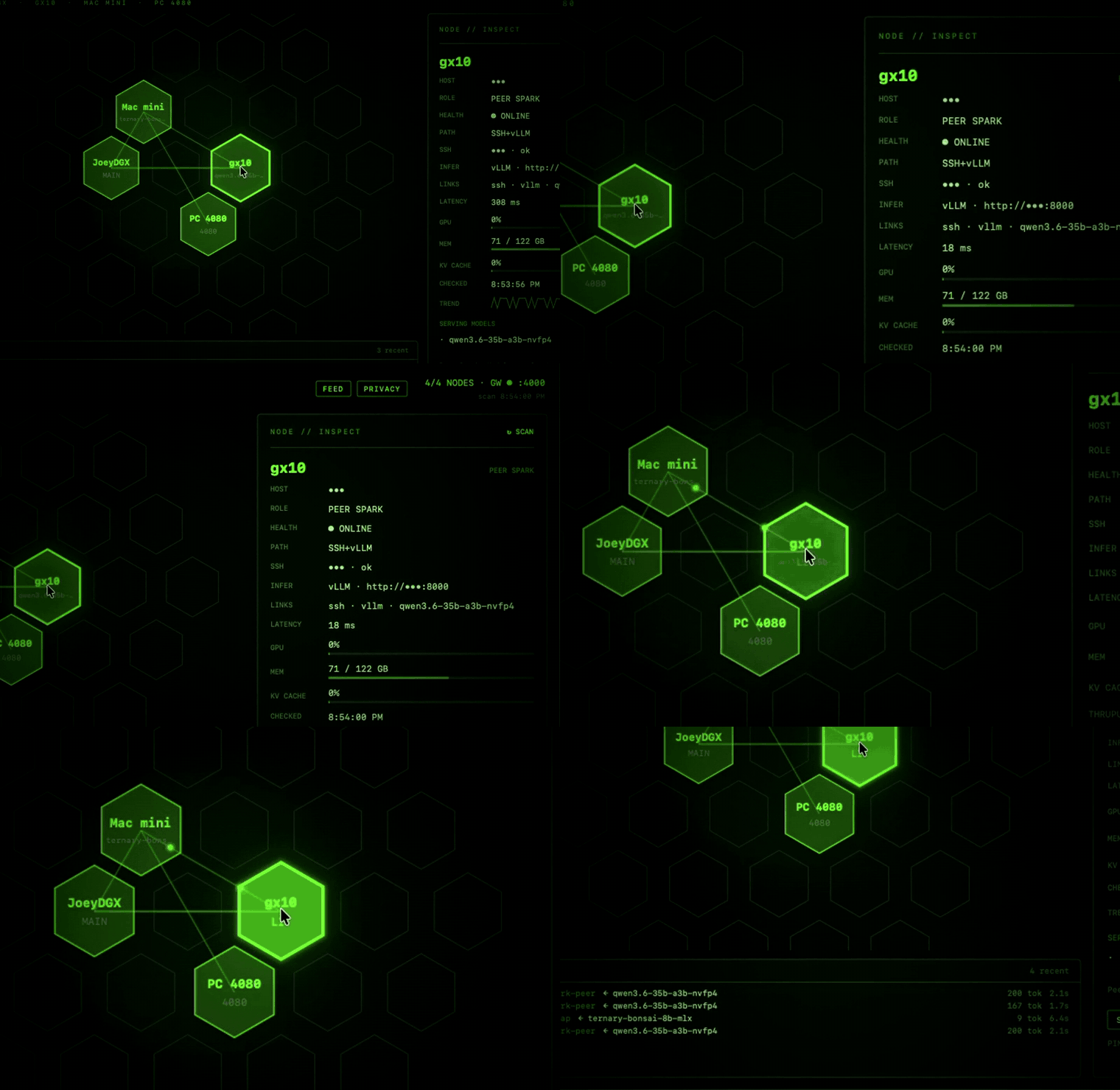
What it does
|
🔌 One API for the whole fleet Point any OpenAI-compatible client at |
🗺️ A map that tells the truth Each node is a hex — color is health, and it goes LIT with animated pulses when traffic flows. The inspector shows real GPU %, memory, KV-cache, tok/s, and latency trend. Never a catalog dump. |
|
🛠️ Fleet control from the map PING a node through the real wire, SERVE / STOP its inference container over SSH, and DOCTOR it with spark-doctor — auto-run when a node fails, so the "why" is already waiting. |
📱 Works everywhere A native macOS app (menu bar + notifications) and a self-contained web dashboard the gateway serves itself. Open it on an iPad or phone, Add to Home Screen, and run the fleet from anywhere over Tailscale. |
Architecture
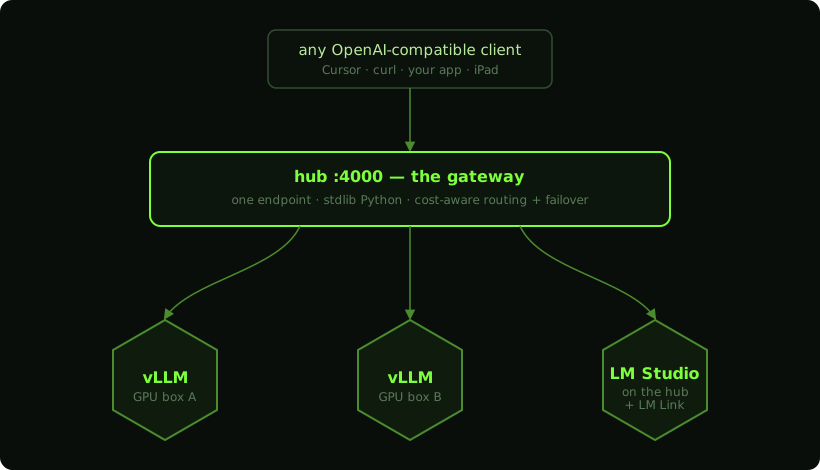
The hub is the Mac that runs the gateway and the app. Everything the
system believes about your fleet lives in one file: fleet.json.
Install
Download the app (no build tools needed)
Grab Honeycomb-<version>-macos-universal.zip from Releases, unzip, and
drag Honeycomb.app to /Applications. The app is universal (Apple
Silicon + Intel) and carries the gateway inside it — if the gateway
isn't running, the map offers a START GATEWAY button.
First launch: the app is signed ad-hoc, not notarized (that needs a paid Apple Developer ID). macOS will refuse a plain double-click. Right-click the app → Open → Open once; after that it launches normally. Everything it runs is in this repo — read it before you trust it.
Requirements: macOS 14+, python3 (from Xcode Command Line Tools:
xcode-select --install), and SSH keys to your GPU boxes. Optional per
feature: vLLM on the boxes, LM Studio on any machine you want to serve
from (not required on the Mac), Docker (SERVE/STOP),
spark-doctor (DOCTOR).
Then describe your machines — the app shows the exact path, and names any mistake it finds:
- fleet.json →
~/Library/Application Support/Honeycomb/fleet.json(see fleet.example.json) - gateway config →
~/Library/Application Support/Honeycomb/gateway-config.json(seeded from the example on first start; set acontrol_token)
The web dashboard is then live at http://<hub-ip>:4000 for any browser,
iPad, or phone.
Build from source
git clone <this repo> && cd honeycomb-lab
cp gateway/config.example.json gateway/config.json   # edit backends + token
(cd gateway && ./start.sh)                           # → http://0.0.0.0:4000
./Scripts/compile_and_run.sh                         # build + package + launch
cp -R Honeycomb.app /Applications/

./Scripts/make_release.sh    # universal .zip in dist/, for distribution
To run the gateway as a service (start at login, restart on crash), see docs/launchd.md.
The gateway
| Model id | Routes to |
|---|---|
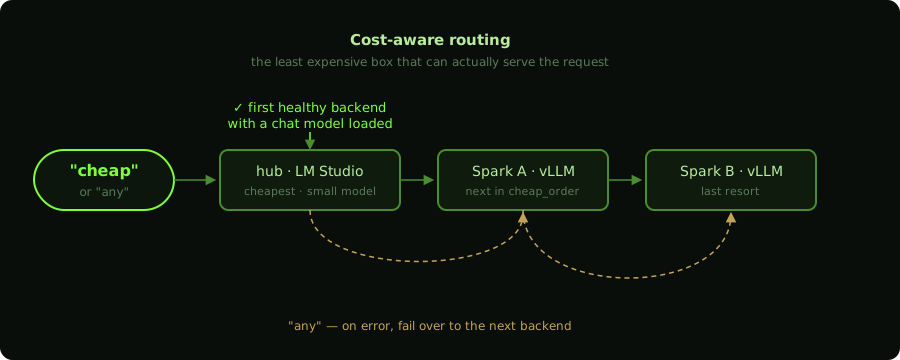
cheap | Cheapest healthy backend with a chat model loaded (cheap_order in config) |
any | Like cheap, plus automatic failover to the next backend on upstream errors |
| your aliases | Whatever you define in config.json (e.g. spark-main → box A's vLLM) |
backend/<model> | Explicit model on an explicit backend |
Any alias can opt into failover per-request with "failover": true.
Aliases with no pinned model auto-pick the backend's first chat-capable
model (embedding models are skipped).
Endpoints: /v1/chat/completions · /v1/completions · /v1/embeddings
(all proxied, stream + non-stream) · /health (backends, activity,
stats) · /nodes (fleet status for the dashboard) · /requests (recent
traffic) · /control/* (ping / doctor / container — see security below).
fleet.json
Nodes are described in ~/Library/Application Support/Honeycomb/fleet.json
(created from the bundled default on first launch; HONEYCOMB_FLEET env
var overrides the path). Start from fleet.example.json.
Probe types:
vllm-ssh(aliasssh-serve) — a GPU box reached over SSH. Host up = SSH; the running serve (vLLM, SGLang, or llama.cpp) is discovered from docker, including its API port and/metrics. Existingfleet.jsonfiles keep usingvllm-ssh.lmstudio-hub— the Mac running the app. Online as the control plane even if LM Studio is not installed. If the local server is already up on:1234, loaded models are listed; Honeycomb never launches the GUI.http-only— any OpenAI-compatible endpoint, including a PC running LM Studio. PointbaseURLat that machine (http://pc:1234). Loaded models come from LM Studio's HTTP API (/api/v0/models). This is the path for every Honeycomb user who wants to see a remote box.lmlink-peer— optional. A remote GPU reached through the hub's LM Studio via LM Link (lmLinkPeer= the peer's device name). Only needed if you actually use Link; requires Mac LM Studio already running.
Per-node fields: gatewayBackend + litAliases map the node to a
gateway backend so its hex lights on traffic; pingAlias enables PING;
container (+ sshHost) enables SERVE (starts that name); STOP discovers
whatever inference container is actually running so model swaps still stop cleanly.
doctorCommand enables
DOCTOR; hub: true marks the center node; axial: [q, r] pins the map
position; top-level links adds extra edges between nodes.
Web dashboard
Served by the gateway at / for browsers (API clients still get JSON).
Full feature parity: map, LIT pulses, inspector with metrics + latency
trend, traffic feed, and PING/DOCTOR/SERVE/STOP.
Security model:
- Control actions (
/control/*) require theX-Honeycomb-Tokenheader from anywhere but localhost. Setcontrol_tokeninconfig.json(openssl rand -hex 16); the dashboard prompts once and remembers it. The example config's__REPLACE_ME__sentinel never authorizes. - Requests must address the hub by IP literal or localhost. To reach it
by hostname (e.g. a tailnet MagicDNS name), add that name to
allowed_hosts— this blocks DNS-rebinding attacks that would otherwise let a malicious web page inherit the localhost exemption. - Control responses carry no CORS headers, so a page in your browser
can't script them; doctor findings in
/nodesare only returned to authorized callers. - There is no TLS: the gateway is built for a trusted LAN or a tailnet (Tailscale/WireGuard), not the open internet. Don't port-forward it.
spark-doctor integration
Give any SSH-serve node (vllm-ssh / ssh-serve) a doctorCommand that prints a
spark-doctor scan JSON to
stdout, and Honeycomb runs it on demand (DOCTOR button) and automatically
when inference dies or the node drops — findings render right in the
inspector, and fresh critical findings turn an online hex amber.
License
MIT — see LICENSE.