ChatGPT Revised Prompt Extractor
Extract and manage the hidden optimized image generation prompts from ChatGPT — with thumbnails, batch download, and round-based grouping.



English
What is this?
When you ask ChatGPT to generate images using DALL-E 3 / GPT-image-2, it internally rewrites your original prompt into a much more detailed and optimized version before sending it to the image model. This revised prompt is usually hidden from you — this userscript surfaces it.
A floating button (🖌) appears in the bottom-right corner on ChatGPT conversation pages. Click it to manually extract revised prompts and open the management panel; use the panel's Extract button to refresh.
Related project: iLab GPT Conjure
If you need a full local WebUI workbench for GPT-image-2 generation, reference images, prompt templates, shared gallery assets, local task history, and portable packages, see iLab GPT Conjure. Prompts extracted by this userscript can be copied into Conjure as direct generation inputs or reusable prompt templates.
Features
Core
- ✅ Extracts revised prompts from ChatGPT image generation conversations
- ✅ Manual extraction — no background API polling until you click
- ✅ Multi-strategy extraction (code blocks, tool messages, DALL-E metadata)
- ✅ Cleans up internal control tokens like
<|has_watermark|>
v5.2 — Advanced Robustness & Bug Fixes
- 🔄 Reliable Multi-turn Prompt Extraction — Resolved the bug where only the first turn's prompts were extracted, by replacing the linear traversal chain with a full DFS mapping tree and sorting images by creation time.
- 🛡️ User-Uploaded Image Filtering — Implemented 3-layer filtering (DOM role checks, backend file ID blacklist, context exclusion) to prevent user-uploaded source photos from leaking into the script panel as generated output.
v5.0 — Visual Management & Batch Downloads
- 🖼️ Thumbnail hover preview — hover over any thumbnail to smoothly reveal a large, uncropped high-res preview
- ☑️ Multi-select & ZIP Batch download — download all, selected, or per-round images dynamically packaged into a
.ziparchive - 🔲 Round grouping — multi-turn conversations are visually separated with dividers and dedicated "Download Round" buttons
- 🛡️ Token refresh — handles API
401 Unauthorizedtoken expirations during manual extraction - 🚦 Manual rate control — avoids repeated background polling and shows a retry hint if ChatGPT returns
429 Too Many Requests
UI/UX
- ✅ Floating button with badge count — non-intrusive, always accessible
- ✅ Collapsible cards per prompt — keeps UI clean for multi-image sessions
- ✅ One-click copy to clipboard
- ✅ Dark mode compatible
- ✅ SPA navigation aware — resets on conversation switch
Installation
-
Install the Tampermonkey Beta browser extension.
-
Install the script via one of the following methods:
Option A — GreasyFork (recommended): 📦 Install from GreasyFork
Option B — GitHub raw link: 📦 Install from GitHub
Option C — Manual: open Tampermonkey Dashboard → Create new script → paste the contents of
chatgpt_revised_prompt_extractor.user.js. -
Make sure "Allow userscripts on this site" is enabled in Tampermonkey for
chatgpt.com. -
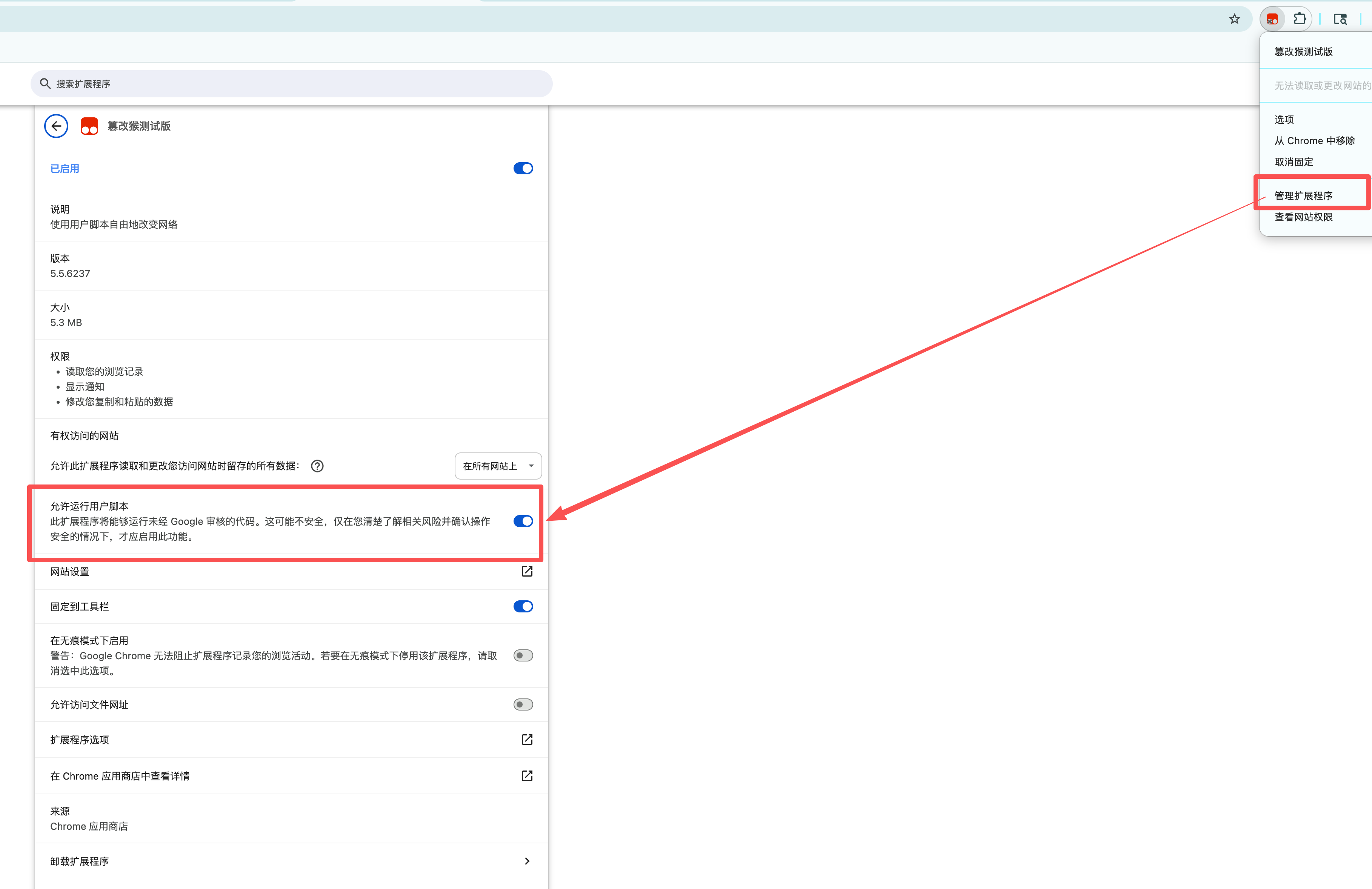
In Chrome's extension details page, open Manage extension and enable Allow User Scripts.
-
Navigate to any ChatGPT conversation that contains generated images, then click the floating button or Extract in the panel.
How it works
When you click Extract, the script requests the ChatGPT backend API (/backend-api/conversation/{id}) using your existing session token (extracted from the #client-bootstrap element). It then traverses the conversation mapping tree using multiple extraction strategies:
| Strategy | Source | Description |
|---|---|---|
| A | assistant code messages | Parses image_gen.text2im(prompt=...) Python-style calls |
| B | tool multimodal_text messages | Extracts Model caption: ... strings and part metadata |
| C | tool asset_pointer | Resolves file-service://file-xxxx → DOM image matching |
| D | Message metadata.dalle | Traditional DALL-E metadata field |
| E | metadata.image_generation | Image generation metadata object |
| F | metadata.aggregate_result.dalle | Aggregate result prompts array |
Image Resolution: Images are matched via a 3-tier strategy — first by asset_pointer file ID lookup in DOM, then by data-message-id DOM query, and finally by sequential assignment of unmatched DOM images. A delayed retry (3s) ensures images that load after API data are also captured.
Permissions
The script uses @grant none, meaning it runs in the page's own JavaScript context. This is required to access window.fetch and the session token — no external requests are made, everything stays within your existing ChatGPT session.
Compatibility
| Browser | Status |
|---|---|
| Chrome + Tampermonkey | ✅ Tested |
| Firefox + Tampermonkey | ✅ Should work |
| Edge + Tampermonkey | ✅ Should work |
| Safari + Userscripts | ⚠️ Untested |
中文
这是什么?
当你要求 ChatGPT 使用 DALL-E 3 / GPT-image-2 生成图片时,它会在内部将你的原始提示词改写成一个更详细、更优化的版本,再发送给图像模型。这个优化后的提示词(revised prompt) 通常对用户是隐藏的 —— 这个油猴脚本就是用来将它提取并显示出来的。
在 ChatGPT 对话页中,页面右下角会出现一个悬浮按钮(画笔图标)。点击后会手动提取优化提示词并展开管理面板;也可以在面板中点击「提取」重新刷新。
关联项目:iLab GPT Conjure
如果你需要完整的 GPT-image-2 本地 WebUI 工作台,包含参考图生成、提示词模板、 公用图库、本地任务历史和免安装一键包,可以使用 iLab GPT Conjure。 本脚本提取出的 revised prompt 可以直接复制到 Conjure 中生成图片,也可以沉淀为 可复用的提示词模板。
功能特性
核心功能
- ✅ 提取 ChatGPT 图片生成对话中的优化提示词
- ✅ 手动提取,不在后台自动轮询 API
- ✅ 多策略提取(代码块、tool 消息、DALL-E metadata)
- ✅ 自动清除
<|has_watermark|>等内部控制标记
v5.2 — 鲁棒性增强与缺陷修复
- 🔄 可靠的多轮对话提取 — 重构了提示词路径搜索算法,用完整的深度优先搜索 (DFS) 和创建时间排序替代单链遍历,解决多轮对话下可能只显示第一轮提示词的问题。
- 🛡️ 精确过滤用户上传图 — 引入 DOM 位置校验(排除 user 消息)、file ID 黑名单和过滤传递等三级防御机制,防止用户自己上传的参考图被错误加载到脚本面板中。
v5.0 — 视觉化管理与批量下载
- 🖼️ 缩略图悬浮预览 — 鼠标悬停在提示词缩略图上时,左侧会平滑浮出无裁切的高清大图预览
- 📥 ZIP 批量打包下载 — 支持“下载全部”、“下载选中”以及“单轮下载”,所有批量下载会自动打包为
.zip文件,告别浏览器弹窗风暴 - 🔲 对话轮次分组 — 多轮生成的图片会通过分割线清晰分组,每组带有独立的“下载本轮”按钮
- 🛡️ Token 自动刷新 — 手动提取时处理长时间挂机导致的 API
401错误 - 🚦 手动限流机制 — 避免后台重复轮询;如果触发 ChatGPT 的
429频率限制,会提示稍后手动重试
界面体验
- ✅ 悬浮按钮 + 角标计数,不遮挡页面内容
- ✅ 每条提示词独立折叠卡片,多图场景下界面整洁
- ✅ 一键复制到剪贴板
- ✅ 支持暗色模式
- ✅ 感知 SPA 导航,切换对话时自动重置
安装方法
-
安装 Tampermonkey Beta 浏览器扩展。
-
通过以下任意方式安装脚本:
方式 A — GreasyFork(推荐): 📦 从 GreasyFork 安装
方式 B — GitHub 直链: 📦 从 GitHub 安装
方式 C — 手动安装: 打开 Tampermonkey 管理面板 → 创建新脚本 → 粘贴
chatgpt_revised_prompt_extractor.user.js的内容。 -
确保在 Tampermonkey 中为
chatgpt.com启用了**「允许在此站点运行用户脚本」**。 -
在 Chrome 扩展详情页中,打开**「管理扩展程序」,并开启「允许运行用户脚本」**。
-
打开任意包含生成图片的 ChatGPT 对话,然后点击悬浮按钮或面板里的「提取」。
技术原理
点击「提取」后,脚本利用页面中已有的会话 token(从 #client-bootstrap 元素提取),请求 ChatGPT 的后端 API(/backend-api/conversation/{id}),再对对话消息树进行多策略遍历:
| 策略 | 数据来源 | 说明 |
|---|---|---|
| A | assistant code 消息 | 解析 image_gen.text2im(prompt=...) Python 风格调用 |
| B | tool multimodal_text 消息 | 提取 Model caption: ... 字符串及 part 元数据 |
| C | tool asset_pointer | 解析 file-service://file-xxxx → DOM 图片匹配 |
| D | 消息 metadata.dalle | 传统 DALL-E metadata 字段 |
| E | metadata.image_generation | 图片生成元数据对象 |
| F | metadata.aggregate_result.dalle | 聚合结果的 prompts 数组 |
图片解析:采用三级策略匹配 — 首先通过 asset_pointer 的 file ID 在 DOM 中查找,其次通过 data-message-id 定位,最后按顺序分配剩余 DOM 图片。并有 3 秒延迟重试机制确保延迟加载的图片也能被捕获。
权限说明
脚本使用 @grant none,即在页面自身的 JavaScript 上下文中运行。这是访问 window.fetch 和会话 token 的必要条件 —— 脚本不会发起任何外部请求,所有操作均在你现有的 ChatGPT 会话内进行。
FAQ
Q: 脚本安装后没有任何显示?
A: 请确认 Tampermonkey 中已为 chatgpt.com 启用「允许运行用户脚本」,并刷新页面。
Q: 悬浮按钮出现了,但点击后面板是空的?
A: 请先确认图片已经生成完成,然后点击悬浮按钮或面板里的「提取」。如果仍为空,这条对话可能没有可提取的 revised prompt,或 ChatGPT 的返回结构已变化。
Q: 提示词获取是实时的吗?
A: 不是。现在改为手动触发 API 请求,避免频繁后台轮询;MutationObserver 只在已有提示词时用于补充匹配延迟加载的图片。
Q: 图片缩略图没有显示?
A: 图片匹配依赖 DOM 加载时机,首次可能需要等待 3 秒的延迟重试。如果仍无显示,请打开浏览器控制台(F12)搜索 [RP] 日志协助排查。
License
MIT License — free to use, modify, and distribute.
Contributing
Pull Requests and Issues are welcome! If ChatGPT updates their API structure and the script breaks, please open an issue with the conversation API response snippet.
联系作者 / Contact
欢迎添加微信交流 AI 编程 和 AI 生图 经验,一起探索更多玩法 🤝
Feel free to connect on WeChat to discuss AI programming and AI image generation tips!