Jacquard
Jacquard is an experimental tile-based music sequencer built with Unity.
Instead of arranging notes on conventional tracks, Jacquard lets you build sequences by placing and stacking tiles on a two-dimensional grid. Notes, parameter locks, gates, and branches can be combined to create patterns that evolve and change as they repeat.
The project takes inspiration from trackers, generative sequencers, and hardware grooveboxes, while exploring a more visual and spatial approach to sequencing.

Basic Concepts
At its simplest, Jacquard works like a regular step sequencer. Place note tiles along the timeline to create a repeating sequence.

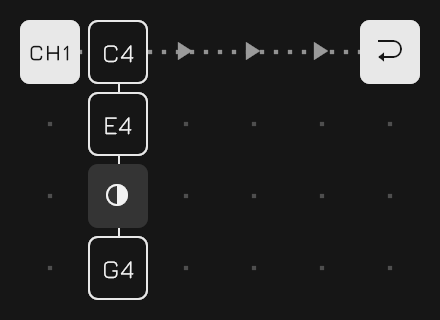
Tiles can also be stacked vertically. Notes in the same stack are played together, so stacking C, E, and G creates a C major chord.
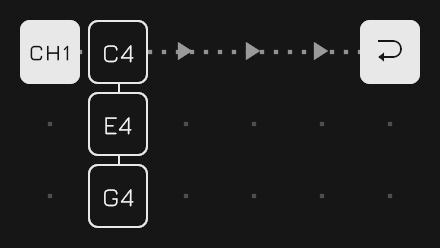
Stacks can contain more than notes. Parameter Lock tiles can be added to change sound parameters for a particular step.
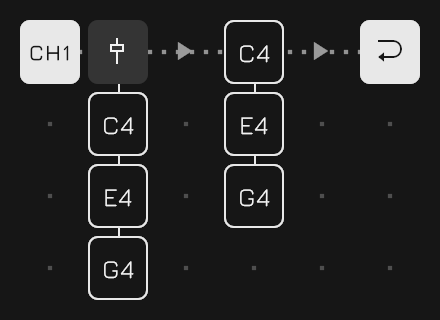
There are also conditional tiles that control whether other tiles in the stack are triggered. For example, a Chance Gate can make a note play only 50% of the time.
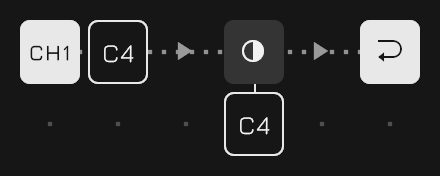
The order of tiles in a stack matters. A gate affects the tiles that follow it, allowing different parts of the same stack to behave differently.
For example, C and E can play every time while G is triggered only 50% of the time.
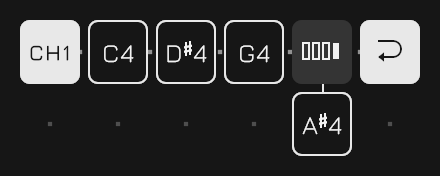
Cycle Gates add another kind of condition. They can trigger tiles only on specific repetitions of the sequence, making it easy to create patterns that change over several loops.
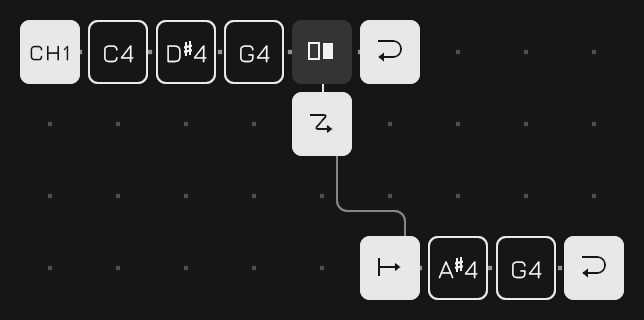
Sequences do not have to follow a straight path either. Jump tiles can redirect playback to another position, creating branches and alternative routes through a pattern.
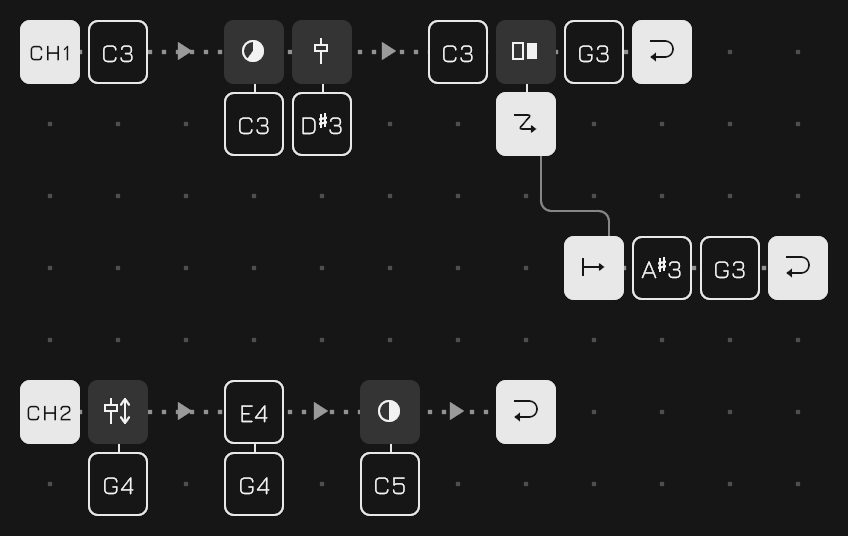
By combining stacks, parameter locks, gates, and jumps, a small grid can produce sequences with much more structure and variation than a conventional repeating pattern.
Useful Tips
Double-click a tile to copy its entire stack to the copy buffer. Double-click an empty slot to paste the buffered stack there.
This makes it quick to duplicate chords, parameter locks, or more complex stacks without rebuilding them tile by tile.
When a score is already playing, pressing a Load button does not switch scores immediately. Instead, the change is queued until the master lane reaches the end of its loop.
This allows one score to transition into another without interrupting the current phrase.
Pro Tips
A single channel can contain multiple lanes. Each lane runs independently, so they can have different lengths and serve different purposes.
One simple use is polyrhythm: lanes with different loop lengths gradually shift against each other and create longer evolving patterns.
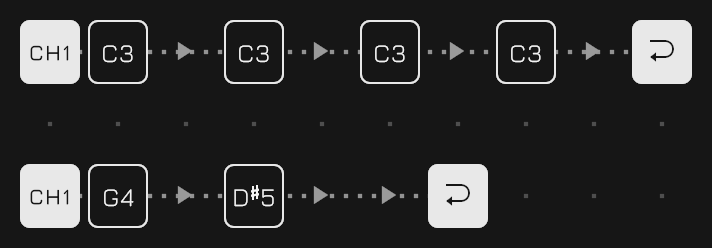
Another useful technique is to dedicate a lane to accents or other periodic parameter changes.
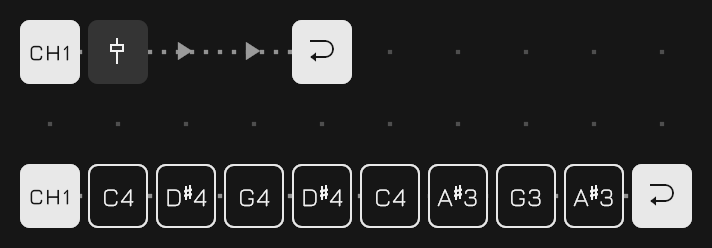
When multiple lanes exist in the same channel, they are applied from top to bottom. This ordering is important when using Parameter Locks: a lane that changes parameters should generally be placed above the lane whose notes use those parameters.
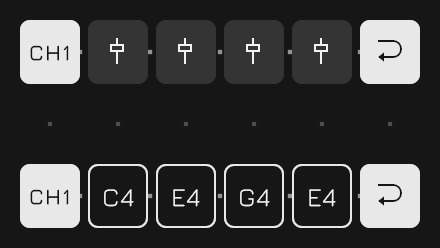
The first lane of Channel 1 has a special role: it is the master lane.
Its loop defines the synchronization boundary for the entire score. Queued score changes are applied when the master lane loops, and it also determines when newly started lanes begin playback.
In other words, the master lane acts as the musical clock for larger structural changes, making it possible to switch patterns and introduce parts while keeping everything aligned.
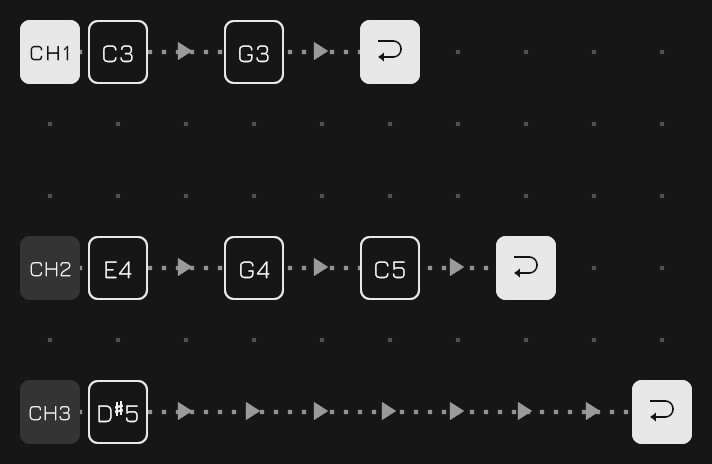
Every score is a plain text file in a single folder, and the folder can be reached from outside the app. On desktop, the Open score folder button on the System panel reveals it in the file manager. On iOS, the same folder appears in the Files app under On My iPhone (or On My iPad), as Jacquard's own folder.
From there scores can be copied, renamed, backed up, or moved between devices. A file dropped into the folder simply appears in the score list, since the list is that folder read out rather than anything the app remembers.
Android hides an app's own directory from every file manager on the phone, and in a browser the folder is storage the page keeps rather than a place on the machine, so there is no folder to hand over on either; the System panel carries Export and Import instead, which move one score at a time through the file picker the platform does show.
Make It Your Own
Jacquard was developed entirely with Unity and Claude Code, and everything needed to understand and modify the project is included in this repository.
That means you don't have to stop at the features provided here. You can add new tile types, change the sequencing rules, extend the sound engine, redesign the interface, or take the project in a completely different direction.
If you find something missing—or simply want something to work differently—don't hesitate to change it.
Make Jacquard your own.