GTA V on iPhone (5★ Port)
[!IMPORTANT] 📢 Everything you'll need is in the Five Star Port Telegram. Every new release, step-by-step help, answers to the common questions and a community that has been through the setup already. Questions about files, installs or builds are answered there, not by email or DM.
A fan project that runs the WebAssembly build of GTA V natively on iPhone: the engine compiled to ARM64, a native Metal renderer with every shader precompiled, Story mode or free-roam Sandbox, touch controls that act as a real controller (with the game's own aim assist), gyro aiming, tilt steering and graphics presets up to near-native resolution.
This repository contains no game files and no game code. You need your own copy of the game files. The app is built from them in your own GitHub account (or on your own Mac), and it plays from your own copy on your phone.
Not affiliated with or endorsed by Rockstar Games or Take-Two Interactive. Rights holders: contact kevin@aether.ee and the repository will be taken down promptly.
What you need
| Your own game files | Web build 8b0b5899ed: the folder that contains data/ and b/8b0b5899ed/, about 21 GB. |
| An iPhone with 6 GB of memory | iPhone 12 Pro, 13 Pro, any iPhone 14 or newer, on iOS 16 or later, with about 30 GB free. Older 4 GB iPhones will most likely run out of memory. |
| A GitHub account (free) | It builds the app for you. No card needed. |
| SideStore or AltStore (free) | Installs the app with your normal Apple ID. Setting it up needs a computer once (an Apple rule). SideStore · AltStore |
No paid Apple account is needed.
Install in 4 steps
1. Put your game files on your iPhone
Copy your game folder (the one with data/ and b/ inside) onto the iPhone, so it sits in the Files app under On My iPhone. Not iCloud Drive: iCloud can offload files to save space, and the game needs every file on the phone.
Any way that gets the folder there works, for example:
- AirDrop it from a Mac, or download and unzip it in the Files app.
- With a cable, once the app is installed (step 3): Finder on a Mac, or the Apple Devices app on Windows. Select your iPhone, open Files, and drag the folder onto GTA V Port. It then shows up in Files under On My iPhone › GTA V Port.
2. Build your app with 5★ Port Builder
Watch the 3-minute tutorial:
https://github.com/user-attachments/assets/1efff2dc-675e-473d-b988-0c23784404ed
Open fivestarport.vercel.app on your iPhone and follow the steps:
- Connect GitHub. The builder makes a private copy of this repository in your account. GitHub asks you to approve it once; keep "All repositories" selected.
- Pick three files from your game folder:
b/8b0b5899ed/game.wasmshaders.zip: in Files, openb/8b0b5899ed, long-press theshadersfolder and tap Compress, then pick the zip.data/manifest.json
- Upload and build. About 85 MB goes to your own private repository; the big
datafolder stays on your phone. GitHub then builds the app in about 25 minutes. You can close the page and come back later.
When it's done, tap Download my app to get GTA5Port.ipa. It also stays in your GitHub account, under your repository's Releases.
3. Install it
Open SideStore or AltStore, go to My Apps, tap + and pick GTA5Port.ipa. A free Apple ID re-signs the app every 7 days; SideStore does that on the phone, and AltStore does it over Wi-Fi from your computer.
4. Give the app your game files and play
Easiest: open the app once, then in the Files app long-press your game folder, tap Move, and choose On My iPhone › GTA V Port. Moving within On My iPhone is instant. Open the app again: it finds the game by itself, at any depth (a mirror/playgta5.com/… folder works as is).
Or pick it: in the app tap the Game files card, then Choose a folder…, and open any folder that has your game somewhere inside (even On My iPhone itself). The app searches it.
Only have the zip or rar? The app can unpack it for you: on the Game files screen, paste a direct link to it (or a download page; it opens in a built-in browser and takes the download over), or choose the archive in Files. It unpacks as it downloads, so you need about 21 GB free, not double.
Whichever way, the app checks every game file before you play and tells you exactly what's missing or damaged.
Then choose Story mode (the campaign, with saves) or Sandbox (free roam) and press Play.
Everything plays from your phone: no server, no internet needed while playing.
Tips
- Graphics. Settings has six presets, from Battery to Max, and a separate resolution choice that changes while you play. Presets above the recommended one show a warning. If a setting needs more memory than your iPhone gives the app, the game closes; on the next launch the app tells you and goes back to a setting that works. Settings that already ran fine on your phone are never lowered.
- Something went wrong? Settings › Send log to the developer sends this run's log and the previous one (the one from a crash) in one tap. Share log lets you save or send it yourself.
- Controls. Move, resize or hide every touch button with Edit controls layout (start screen or Settings). Assisted aim, gyro aiming and tilt steering are in Settings. Bluetooth controllers work too; the touch controls hide while one is connected. Settings › Controls › Airplane right stick optionally replaces the airplane throttle and rudder buttons with a visible second stick: drag vertically to set throttle (it stays set when released), and horizontally for rudder (it recentres). Helicopters keep their buttons.
- Updating. When a new version comes out, open the builder again and tap Build again. Your game folder and saves stay where they are.
Get the most performance
The biggest upgrade is more memory: iOS normally gives the app about half of your iPhone's RAM, which caps the graphics. You can unlock more, for free:
Unlock more memory with SideStore + GetMoreRam (free)
Players report this works great and makes the game far more playable.
- Build with Enable increased memory entitlements ticked on fivestarport.vercel.app. It's on by default; if you built with it off, tick it and tap Build again.
- Install the new
GTA5Port.ipawith SideStore as usual. - Install GetMoreRam, sign in with the same Apple ID you use in SideStore, pick GTA V Port and add Increased Memory Limit.
- In SideStore, refresh GTA V Port so it picks up the change.
- Open the app: Settings shows the memory limit at the bottom. It should now be clearly higher than before (for example above ~3,500 MB on a 6 GB iPhone).
A paid Apple developer account or TrollStore gets you the same result without GetMoreRam (see Free vs paid below).
Then tune the game
- Graphics preset: with more memory, try one step higher (Balanced, Quality, Ultra). If a preset is too much, the app tells you on the next launch and steps back down, so trying is safe.
- Resolution: set it separately in Settings while you play. It's the main lever for sharpness vs. frame rate.
- Frame rate: Settings › Frame rate: 30 is steadiest and coolest, 60 is smoother, Unlocked goes up to 120 on ProMotion iPhones (13 Pro and newer Pro models). Applies at the next launch.
- Keep it cool: iPhones slow down when hot. Play without a case or near airflow, and avoid charging while playing if it gets warm.
- Close other apps before playing and keep Low Power Mode off.
- Game files on the iPhone: keep the game folder in On My iPhone, not iCloud Drive (iCloud can offload files and cause loading stutters).
What's new
See CHANGELOG.md for every version.
Community and help
Five Star Port on Telegram has everything: every new release as it comes out, help with installs and builds, and a community that has solved most problems before. Please ask there instead of by email or DM.
Bugs can also go to this repository's Issues. Please attach your log from Settings › Share log.
Other ways to build (advanced)
The builder above is the easiest route. These older routes still work.
On your own Mac
Needs an Apple Silicon Mac with Xcode (free) and brew install xcodegen. Point the script at your game folder:
./build_ipa.sh --mirror /path/to/your/game-folder          # asks for extra memory (works with any account)
./build_ipa.sh --mirror /path/to/your/game-folder --free   # only if your installer refuses the app
This makes GTA5Port.ipa next to the script (about 30 to 60 minutes); install it with SideStore or AltStore. To install straight from Xcode instead, open app/PlayGTA5Native.xcodeproj (created by the script), choose your iPhone as the destination, pick your Apple ID under Signing & Capabilities (free accounts appear as Personal Team; change the bundle identifier to something unique if Xcode asks), and press Run.
With GitHub Actions yourself, streaming from your computer
The original v1.0 route: your computer serves the game files over Tailscale (free), GitHub builds from them, and the app streams the files while you play. Useful if you don't want 21 GB on your phone.
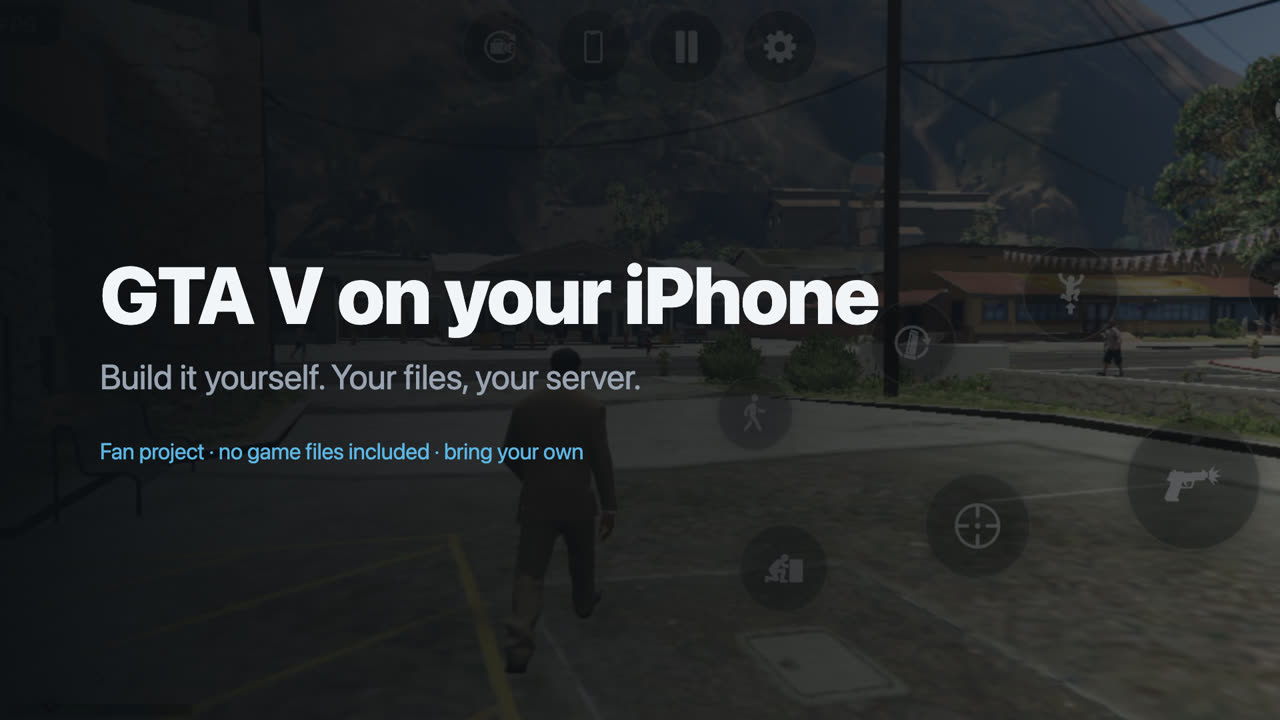
The 70-second v1.0 setup video for this route.
Serve your game files
- Install Tailscale on your computer and phone and sign in to the same account on both.
- In the Tailscale admin console, under DNS, turn on MagicDNS and HTTPS Certificates.
- On the computer, share the game folder (the one containing
data/andb/):tailscale serve --bg "/path/to/your/game-files" - Run
tailscale serve status. It shows your server address, likehttps://my-pc.tailnet-name.ts.net. Openhttps://my-pc.tailnet-name.ts.net/data/manifest.jsonin Safari on your phone; if you see text, it works.
Only devices on your own tailnet can reach it. To stop sharing: tailscale serve --https=443 off.
Build
- On this repository's page, press Use this template › Create a new repository, and choose Private. The build refuses to run in a public copy, because the finished app contains the game engine from your files.
- In the Tailscale admin console: Settings › Keys › Generate auth key. Turn on Reusable and Ephemeral, pick a short expiry such as 7 days, and copy the key.
- In your new repository: Settings › Secrets and variables › Actions › New repository secret. Add
TS_AUTHKEY(the key) andGAME_SERVER_URL(your server address, e.g.https://my-pc.tailnet-name.ts.net). - Actions › Build my IPA › Run workflow, with game files set to my server (Tailscale). Leave Ask for extra memory ticked.
- After about 25 minutes, download
GTA5Port.ipafrom your repository's Releases (or the run's artifacts).
A Mac works for this route too: ./build_ipa.sh https://my-pc.tailnet-name.ts.net.
Play. Keep Tailscale connected; the app opens with your server filled in. The first launch downloads about 4 GB into the app; later launches start much faster. Settings › Game files › Download all game files copies the whole game (about 21 GB) onto the phone so it stops streaming.
Build minutes and billing
Private repositories get free GitHub Actions minutes every month (2,000 on the free plan). Mac minutes count ten times, so one 25-minute build uses about 250 of them: roughly eight builds a month for free. GitHub only charges if you raise your spending limit above zero. If your account has an old billing problem, every run fails instantly with startup_failure; fix it in GitHub's billing settings.
Free vs paid Apple account
| Free Apple ID | Paid Apple Developer account (99 USD/year) | |
|---|---|---|
| Works | yes | yes |
| Memory iOS allows the app | normal limit (about 3,000 MB on a 6 GB iPhone) | Increased Memory Limit + Extended Virtual Addressing (about 4,000 MB) |
| Experience | smooth on the lighter presets: about 25 to 31 FPS on an iPhone 13 Pro Max | the same, plus room for higher presets |
| Re-sign | every 7 days | once a year |
Settings shows the memory limit iOS gave the app at the bottom.
Using a paid account: the builder, the workflow and the Mac script all ask for the memory entitlements by default, so just sign with your paid team. On a Mac (most reliable): open app/PlayGTA5Native.xcodeproj, pick your paid team under Signing & Capabilities, change the bundle identifier to something unique (e.g. com.yourname.gta5port), check that Increased Memory Limit and Extended Virtual Addressing are listed, choose your iPhone and press Run. If an IPA signed by SideStore or AltStore with a paid Apple ID shows the free limit, the tool dropped the entitlements; use the Mac route.
How it works
- The engine (
game.wasmfrom your files) is translated to C with wasm2c and compiled to ARM64 at build time; iOS does not allow compiling code on the phone. - Graphics use this project's own Metal renderer (
app/Source/MetalRenderer). It runs the game's Direct3D 11-style command stream directly on Metal. At build time, the game's shaders from your files are translated to Metal withapp/ShaderTool(built on Google's Tint, BSD-3-Clause/Apache-2.0, prebuilt in this project's releases) and precompiled into the app, so nothing is compiled on the phone while you play. - Touch input feeds the engine's own controller code, so GTA's controller features (assisted aim, analog driving) work.
- Game files are read straight from the folder on your phone, or streamed from your server into a block cache.
- The website builder runs in your browser with your own GitHub sign-in: it uploads the three build files to your private repository and starts this repository's workflow there. Its server stores nothing.
License
The code written for this project is MIT licensed (see LICENSE). It does not cover the game, its data, or the third-party files fetched at build time. Those keep their own licenses: WABT and SIMDe (Apache-2.0, MIT), bcdec (MIT), libarchive (app/Vendor/LICENSE-libarchive.txt) and libopus (app/Vendor/LICENSE-libopus.txt), both BSD.
Thanks
This port is better because of people outside the project:
- @k49kg9xmsd-prog: the app in 13 languages and swipe-to-look (#4).
- @ITSUPERVISOR: the story cheats in Settings (#9).
- @TomerGamerTV: the ideas behind the v1.3.2 fixes for pedestrian spawning crashes, the Replay editor's free space check and flickering props.
- @m1337v: the airplane right stick (#12) and retrying interrupted game-file reads (#13).
- Players who opened issues that shaped v1.3.4: @aliiscoding2122 (Story money reset to $0, #10), @k49kg9xmsd-prog (pause when leaving the app, #11) and @phakamaec (the builder handing out the old version, #14).
- Everyone who sent logs from Settings › Send log to the developer, especially those who described exactly what failed and added their own analysis. Those reports found the Story mode bugs fixed in v1.3.3: the crash at the end of Marriage Counseling, the lock-ups after long sessions, and the lag with stuck buttons.