pitupitu
Talk to your coding agents, on any of your machines.
Start, check on and unblock Claude Code and Codex by voice, from your phone or any browser.
This is the open-source agent that links each of your machines to pitupitu.






Website · Install · How it works · Commands · Protocol · Privacy · Security
You say what you want done and where. pitupitu starts the agent session on that machine, keeps an eye on it, answers what it can, and tells you when it is done or needs you. In the car, on a walk, at the desk: the same sessions, from your phone or any browser.
pitupitu runs your agents in herdr, a terminal workspace manager for coding agents. Open herdr on that machine and you see exactly what your phone sees: the same sessions, live, to watch or type into at the desk. If herdr is not installed, pitupitu installs it.
This repository is the part that runs on each of your machines: a small Rust agent that links the machine to pitupitu cloud over one outbound WebSocket. The conversation, the voice and the page at pitupitu.chat are the hosted service.
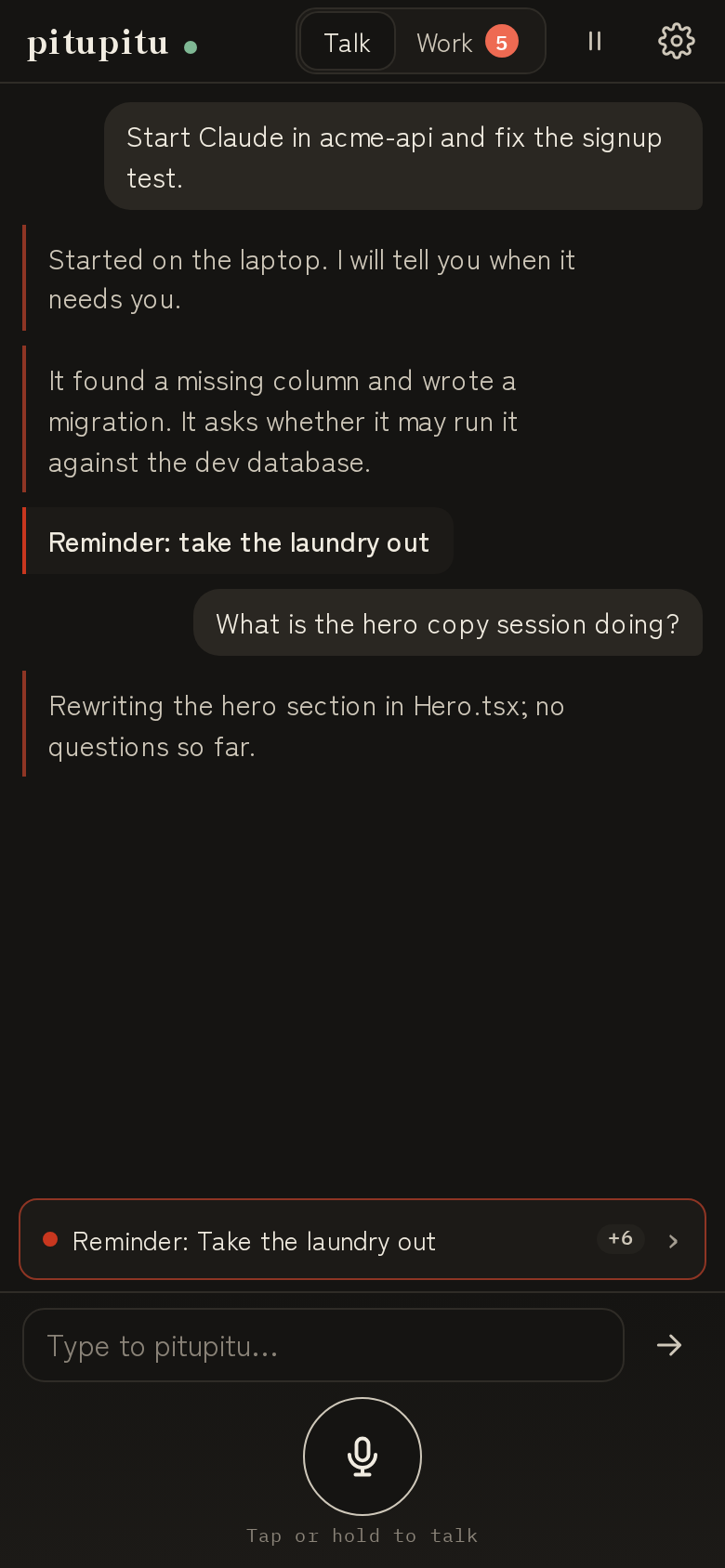 | 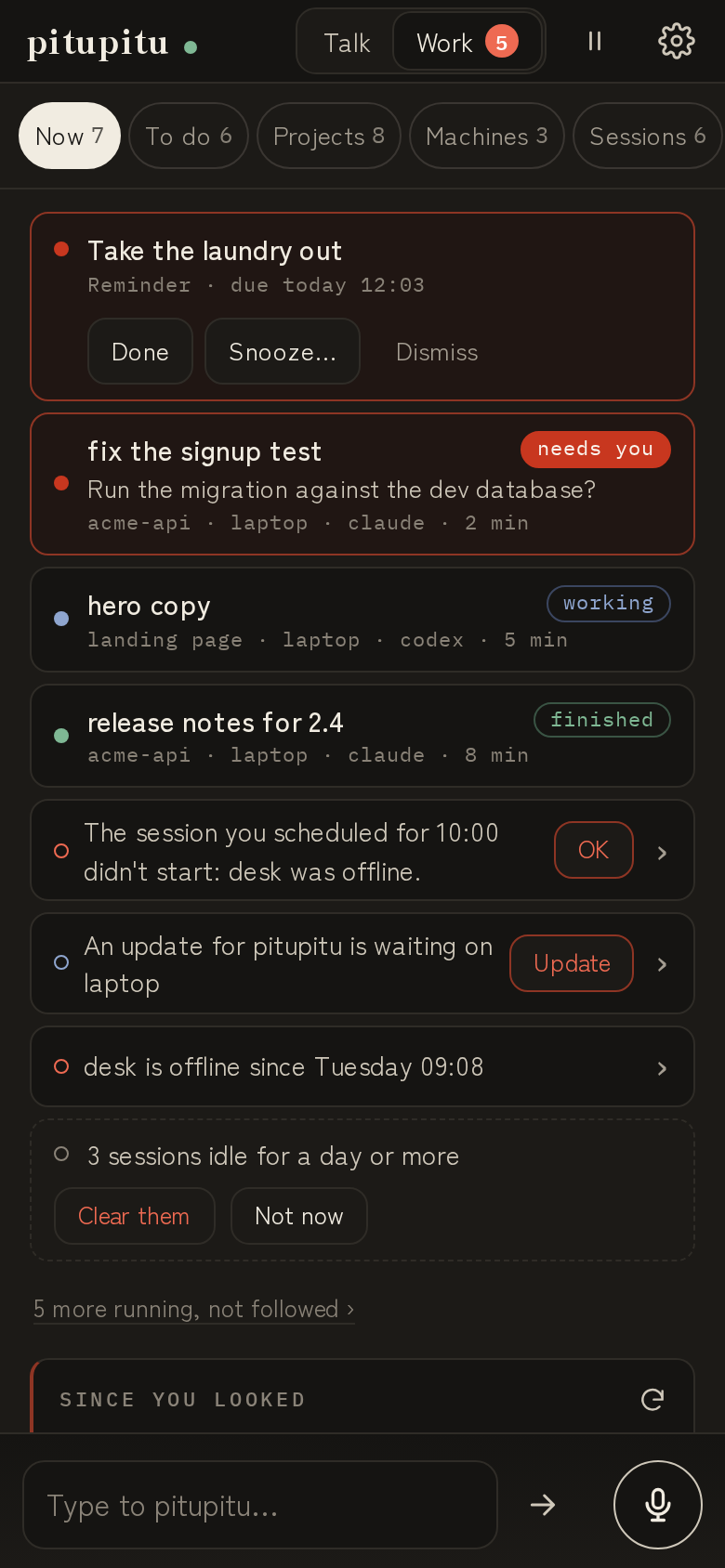 | 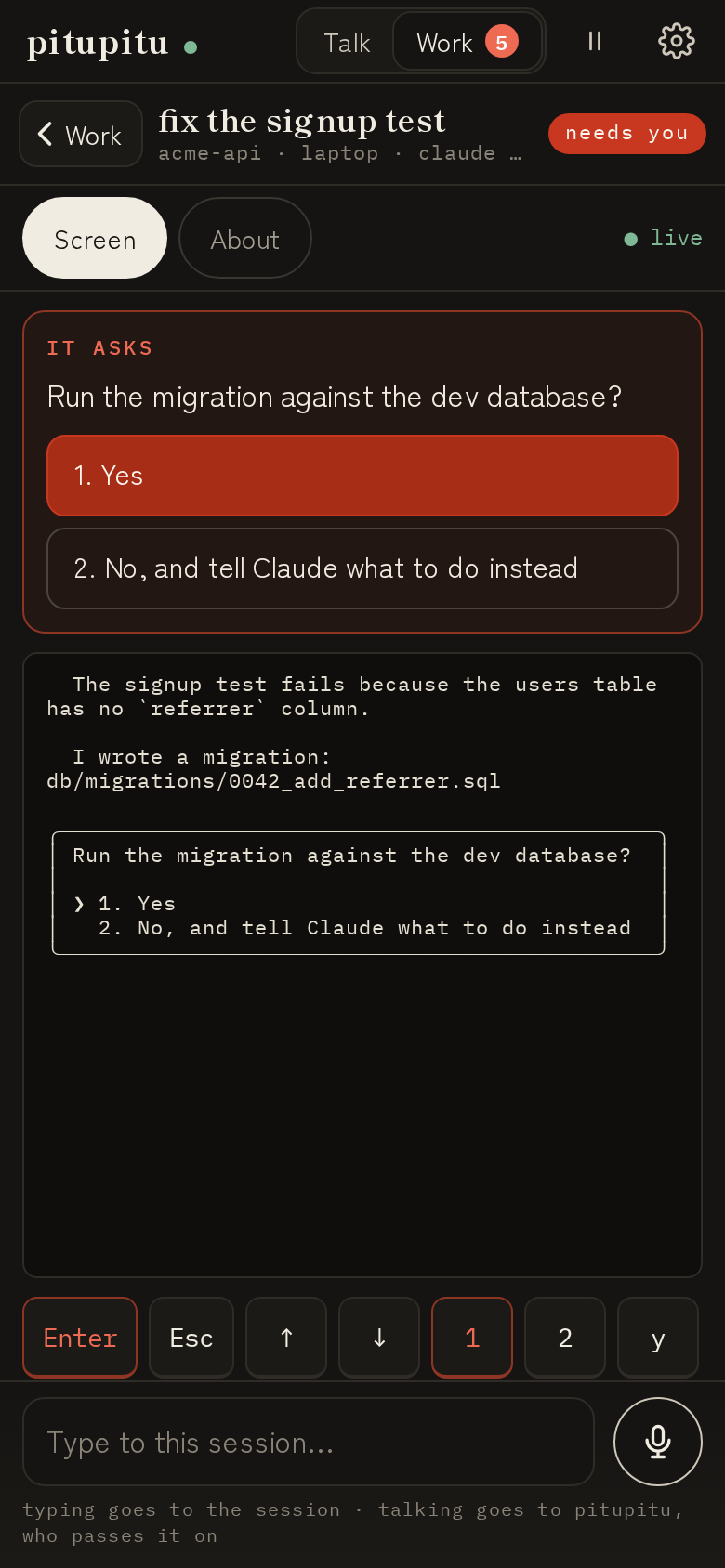 |
| Talk. Say it; it starts. The line above the microphone names what needs you. | Work. What needs you first, then what runs, on every machine. | A session that asks. The question at the top, the answers as buttons, the terminal under it. |
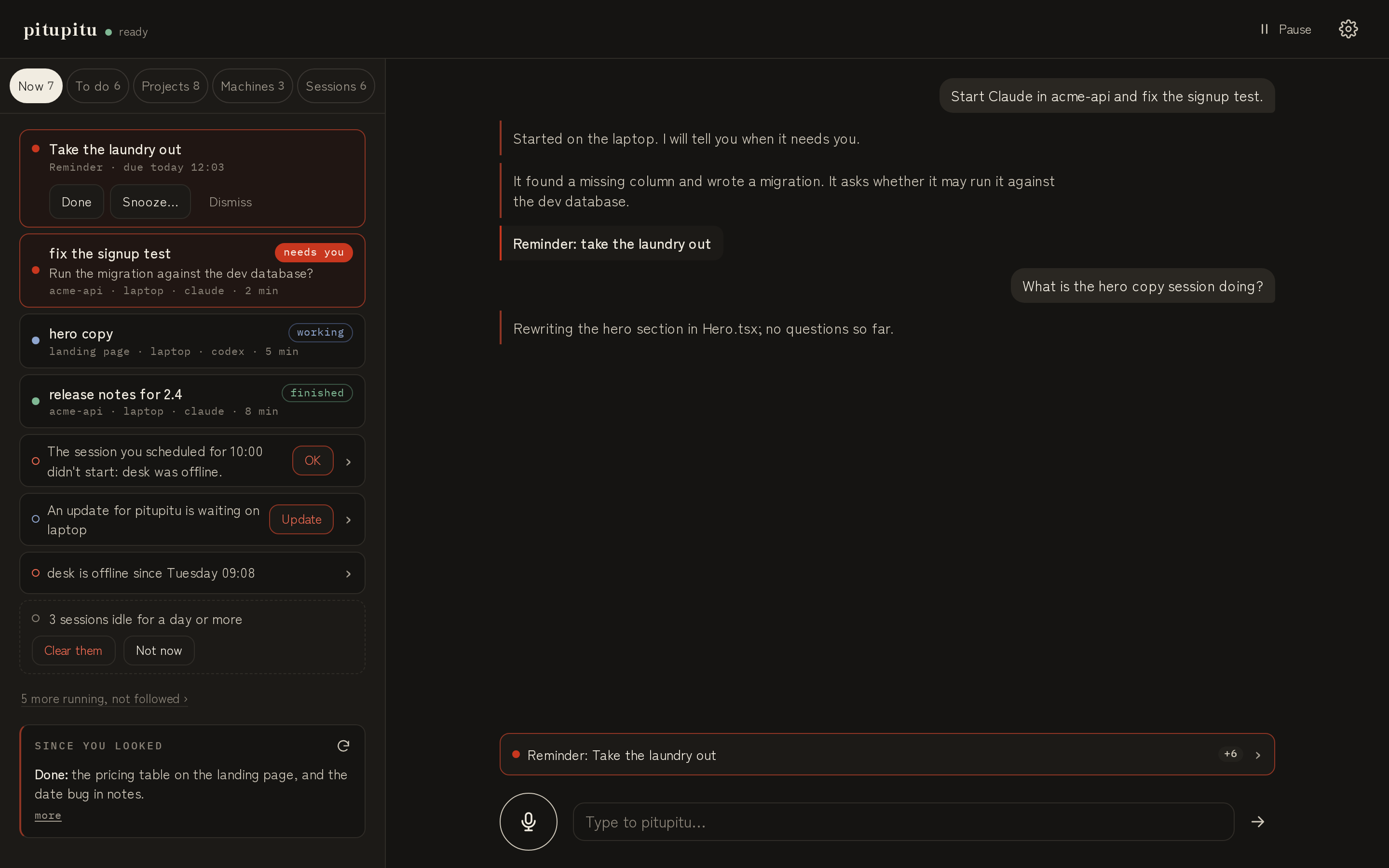
On a wide screen. The work beside the conversation; open herdr on the machine for the same sessions in your terminal.
Quick start
curl -fsSL https://pitupitu.chat/install | sh   # or: brew install klarluft/tap/pitupitu
pitupitu setup                                  # sign in with a code, pick a folder, start the service
Then open pitupitu.chat/app on your phone and say what you want done. You need claude and/or codex (or another agent herdr knows) installed and signed in on that machine; pitupitu never touches their logins.
How it works
phone / browser ──▶ pitupitu.chat (cloud) ◀── box link (outbound WebSocket) ── pitupitu ──▶ herdr ──▶ your agents
                                                                                              ▲
                                                                   you, at the desk: `herdr` ─┘
- The box agent dials out to
wss://api.pitupitu.chat/v1/box. Nothing connects in: no open port, no VPN, no certificate on your machine. - The cloud can ask for a fixed set of operations only, served through herdr: list, open and close workspaces and tabs, stop a session you asked it to stop, start an agent in a pane, send it a prompt or keys, read its screen, wait for it; and update this agent or herdr when you say so. There is no shell and no arbitrary command. The full list is in docs/box-link.md and in
calls.rs. - Your agents run as they always do, your own unmodified
claudeandcodex(or any agent herdr supports) signed in by you, on your own subscriptions or keys, in your own permission mode. pitupitu never reads, sees or uses their credentials. - herdr's server: the box agent starts
herdr serverwhen none is running (at its own start, and whenever herdr stops answering) and never stops it. It runs on its own, so restarting or updating the box agent leaves your sessions running. Openherdrand you attach to that same server; if you openedherdrfirst, pitupitu uses yours. - Where sessions go: a project gets a herdr workspace labelled after it, as you would make one; quick work in the pitupitu home folder (a lookup, a question) goes into tabs of one
pitupituworkspace, so yours are not littered with them. - From your files, only
skills/*/SKILL.mdin the pitupitu home folder are sent, plus what the box reports about itself: its version and herdr's (and whether newer ones exist), which agent CLIs are installed (with their versions), and the folders your agents worked in recently (only the folder paths and when, read from the agents' own session history; nothing else from those files). With history on, which it is unless you switch it off, more of that history is sent: see History.
Install
curl -fsSL https://pitupitu.chat/install | shor with Homebrew (macOS and Linux):
brew install klarluft/tap/pitupitu
pitupitu setup
or build from source with a recent stable Rust:
cargo install --git https://github.com/klarluft/pitupitu pitupituRelease binaries are built for Linux (x86_64, arm64, static musl) and macOS (Intel, Apple silicon) and come with SHA-256 checksums on the releases page.
The install script and pitupitu setup install herdr with its own installer when it is not on your PATH. A herdr you installed with Homebrew, mise or Nix is used as it is. You need claude and/or codex (or another agent herdr knows) installed and signed in.
Set up
pitupitu setupIt asks a few plain questions; pressing Enter takes the suggested answer.
- Sign in: it shows a code; approve it on any screen at pitupitu.chat. To sign in from your phone, scan the QR code setup shows with its camera (
--no-qrleaves it out). The box gets its own key, stored in~/.config/pitupitu/pitupitu.toml(readable only by you). An account can have many boxes, each named (the hostname by default,--boxto choose); setting up the same box again replaces its old key. - pitupitu's folder (the home folder):
~/pitupituby default. Requests that belong to no project run there, andskills/<name>/SKILL.mdholds routines you name by voice. What pitupitu should know about you ("client work goes on the work laptop", "I use Codex for reviews") is your preferences, kept in your account:pitupitu prefs edit, the page, or just tell pitupitu "remember that …". (APITUPITU.mdfrom 0.1 is no longer read; copy anything useful intopitupitu prefs.) - Your agents can change pitupitu's settings (asked once, yes by default): installs a skill that teaches Claude Code and Codex how, so you can ask your own agent to do it. pitupitu keeps its copies up to date as it updates.
- History (not asked, on by default): setup says in one line that pitupitu keeps track of your projects by reading what your agents did on this machine, and where to switch it off. See History.
- herdr, the small program your agents run inside: installed if missing (said in one line, not asked). Then, for the agents it finds, their sessions are set to come back after herdr restarts (
herdr integration install claudeandcodex). - Starting by itself: pitupitu starts now and whenever you log in (a user service running
pitupitu connect: systemd on Linux, launchd on macOS). On Linux, setup asks once whether to keep it running while you are logged out, so your phone still reaches the machine and it comes back by itself after a restart; yes by default (loginctl enable-linger).--linger/--no-lingeranswer for a script.
Then open pitupitu.chat/app.
Commands
pitupitu setup | sign in, pitupitu's folder, herdr, starting by itself (--home, --relink, --box, --no-service, --no-browser, --no-qr, --linger, --no-linger) |
pitupitu connect | hold the link open in the foreground (what the service runs) |
pitupitu status | account, home folder, herdr (version, server, newer release), agents found, service and version as this box sees them |
pitupitu settings | your preferences, default box, agent and models, updates, voice, and every box with its note, on/off, agent and history |
pitupitu prefs | show your preferences; prefs edit, prefs set <file> (- for stdin), prefs clear |
pitupitu box note <text> | one line about this box ("client work, Acme"); --clear |
pitupitu box rename <name> | what you call this machine when you talk; also on the talk page (tap the machine) |
pitupitu box history on / off | let pitupitu read what your agents did on this machine, or stop it (History); on by default |
pitupitu box on / box off | off: stays linked, but pitupitu starts nothing here and ignores its sessions until on again |
pitupitu default <box> | the box used when you don't say which; --clear and pitupitu asks |
pitupitu updates mine|all|quiet | what pitupitu brings up between turns unasked: the sessions you follow (default; its own tasks are followed from the start, yours once you pitupitu follow them), every session, or nothing unless asked |
pitupitu agent claude|codex|auto | the agent a session gets when you don't say (auto: what the machine has, Claude first); pitupitu box agent … for this machine only |
pitupitu model <agent> <model> | the model that agent runs on when you don't say (pitupitu model claude opus); --clear for its own default |
pitupitu follow [<session>] | follow a session: pitupitu tells you when it finishes or needs you. Run it in a session in herdr, or name one by its title or id; --off or pitupitu unfollow to stop. pitupitu sessions lists this machine's sessions and which are followed |
pitupitu place add <name> <path> | a folder on this machine with a name you say ("in acme, run the tests"); place rm <name>, pitupitu places lists them all |
pitupitu todo | your list: todo add <text> (--here for this repository, --project), pitupitu idea <text>, todo done|drop|reopen|rm <id or words>; pitupitu todo lists the open items (--all, --done, --ideas, --here, words) |
pitupitu remind <when> <text> | a reminder, the time first and quoted when it has spaces (pitupitu remind "tomorrow 9am" call the bank); it prints the time it understood. pitupitu when <phrase> only says what a time means |
pitupitu schedule | your reminders and schedules; schedule add <when> --place <place> -- <prompt> starts a session then (or again and again: "every weekday 9am"), schedule digest <when> a summary of your work; both ask first (--yes for a script); schedule pause|resume|rm <id>, schedule snooze <id> <when> |
pitupitu --skill | print the skill for agents; pitupitu skill install puts it in ~/.claude/skills and ~/.codex/skills, and the service keeps pitupitu's own copies up to date when it starts (a copy you wrote yourself is left alone); pitupitu skill status shows each copy |
pitupitu update [box|herdr|all] | show the newer release and what is running, ask, then install it the way it was installed; sessions keep running (--check only looks, --yes for a script, --handoff restarts herdr's server too, --no-restart) |
pitupitu uninstall | stop and remove the service; config, home folder and herdr stay |
Every settings command takes --json and never prompts without a terminal, so your agents can run them.
Logs: journalctl --user -u pitupitu -f on Linux, ~/Library/Logs/pitupitu.log on macOS. They carry what happened (connected, which call failed and why), never your prompts or agent output. PITUPITU_LOG=debug for more.
To see a session at the desk, open herdr on that machine (or herdr --remote <machine> over SSH): pitupitu's sessions are there with yours.
Environment: PITUPITU_CONFIG (config file), PITUPITU_CLOUD_URL, PITUPITU_CLOUD_API_KEY, HERDR_BIN (the herdr binary, default herdr on PATH). PITUPITU_HERDR_SESSION points the box agent at a named herdr session instead of the default one; it is for tests.
History
Reading what your agents did is how pitupitu keeps track of your projects: it can tell you what you were doing on the laptop yesterday, or what is left on a project, including the sessions you started yourself. So it is on by default, for each machine on its own, and pitupitu setup asks nothing about it; it says so in one line and links pitupitu.chat/privacy.
What is read: Claude Code's and Codex's own session logs on this machine (~/.claude/projects/*/*.jsonl, ~/.codex/sessions/**/*.jsonl), the sessions of the last 7 days, at most the newest 300, and git in the repositories they worked in. What is sent:
- each session's folder, its repository (root,
originremote without any password in it, branch), when it ran and its title; - what you typed, cut to 1000 characters, and what the agent answered, cut to 600;
- for each tool the agent used, its name and one target: the file it edited or read, or the first 120 characters of the command it ran;
- at most 32 KB per session: in a longer one the oldest turns are left out, except your first request;
- for the repositories those sessions worked in: the branch, HEAD, and the current branch's commits of the last 7 days (at most 50), with the subject line and how many files each changed.
Never read or sent: file contents, edits' text, command output and other tool results, the agents' thinking, subagents' transcripts, anything else in ~/.claude or ~/.codex, credentials, author names or emails, diffs. Anything that looks like a key or password in what is sent becomes [redacted] first (sk-…, ghp_…, Bearer …, password=… and the like).
To switch it off: pitupitu box history off (or on the page). It stops at once, and the box removes its small record of what it already sent (history.json in its state folder); what pitupitu already stored is deleted on the app page, under What pitupitu knows. pitupitu box history on switches it back on, and pitupitu settings shows which it is for every machine. The exact format is in docs/box-link.md.
Updating
pitupitu never updates itself, or herdr. pitupitu status and the page at pitupitu.chat say when a newer release of either exists (the box asks GitHub a few times a day), and pitupitu can offer it when you talk. Then:
pitupitu update          # this box agent
pitupitu update herdr    # herdr
pitupitu update all      # both
Each shows the version it would install, what is running right now, and asks before doing anything. It updates the way the thing was installed: brew upgrade for a Homebrew install; for the box agent otherwise the release binary (checked against its SHA-256) in place of this one; for herdr otherwise herdr's own herdr update. A herdr installed some other way (mise, Nix) is left to that way.
Your sessions are not touched. The box agent's update restarts only the box agent; its link to the cloud drops for a few seconds. herdr's update replaces the binary and leaves the running server and its sessions as they are; the server runs the new version after it next restarts (pitupitu status says when one is waiting). pitupitu update herdr --handoff restarts it now, keeping the sessions (herdr's live handoff, best effort).
--check only looks; --yes answers for you, for a script; --no-restart leaves the running service on the old version until you restart it. Updating from the page or by voice runs the same, after you said yes. The cloud accepts the current and the previous box protocol; an older box is told to update.
Privacy and security
- The box only dials out; nothing listens on your machine, and the cloud can only make the named calls in docs/box-link.md.
- Your agents' logins stay yours: pitupitu never reads or uses their credentials, and never adds permission flags.
- Audio is never stored. Logs carry metadata only. What is kept, and how to delete it, is at pitupitu.chat/privacy.
- Found a security problem? See SECURITY.md.
Contributing
Issues and pull requests are welcome: see CONTRIBUTING.md for the checks, the release process and the DCO sign-off, and docs/sessions.md for what every session state means. This project follows the Contributor Covenant.
Licensed under the Apache License 2.0.