runner-up





GitHub Actions runners on your own machines, one fresh container or VM per job.
You have spare machines: a Linux box, a Mac, a Windows PC. Yet your GitHub Actions jobs wait in line for hosted runners, or burn a hole in your wallet.
runner-up self-hosts GitHub Actions runners across your machines. Each job gets a Docker container or KVM virtual machine on Linux, a fresh tart clone of a macOS image or a fresh Linux guest from Apple's container tool on a Mac, or a fresh Windows account or Hyper-V virtual machine on Windows, which is removed when the job ends. A place can also run its jobs on the machine itself.
One coordinator talks to GitHub through runner scale sets and hears of every waiting job. Jobs wait at GitHub without a runner until a place is free. The first-ranked job waiting only for resources keeps room on one machine. Then the coordinator picks the job its order rules choose, acquires it, and starts a one-job runner for it. It starts the runner by running the agent on that place's machine over SSH.
- Places. Each machine has places. A place runs one job at a time and
serves one or more pools, the labels jobs ask for in
runs-on. - Budgets. A machine's places share its cores and memory, less the room kept for the machine's owner. A job takes a place only while its pool's size fits; a pool without a size keeps the place's existing share. A Mac runs at most two macOS virtual machines at once, counting ones runner-up did not start (see Macs).
- Order. When a place frees, the order rules pick which waiting job it takes, across repositories (see Order rules).
- Forks. Jobs from another repository's pull request are refused by default, on every provider (see Pull requests from forks).
- Restarts. A running job keeps its place while the coordinator restarts. A crashed place is cleaned up, and its job gets a new runner.
- Setup changes. A running coordinator applies an edited setup file about a second after it settles, with no restart and without stopping running jobs (see Changing the setup).
- Down machines. A machine whose agent cannot be reached rests until its agent answers again, and its job goes to another place (see When a machine is down).
- Sign-in. The coordinator uses the GitHub command line's sign-in. It
stores no token: it asks
gh auth tokeneach time it opens a session.
Quick start
Tell your agent
Paste this to a coding agent running on the machine that will be the coordinator:
Set up runner-up (https://github.com/kunchenguid/runner-up) so my GitHub
Actions jobs run on my own machines. Read its README first and follow it:
https://raw.githubusercontent.com/kunchenguid/runner-up/main/README.md

This machine is the coordinator. Ask me which repositories or organization
to serve, each machine to run jobs on (its SSH address and the kind of
places it should have: Docker, KVM or host on Linux; tart, Apple container
or host on a Mac; account or Hyper-V on Windows), and a pool label for each
kind of machine. A pool is the label workflows ask for in runs-on; separate
pools keep a Linux job off a Mac or a Windows machine.

1. Install runner-up here. Check that gh is signed in as an admin of each
   repository (with the admin:org scope for an organization), and that
   `ssh -o BatchMode=yes USER@MACHINE true` works for every Linux machine
   and Mac. If it does not, tell me how to fix it.
2. Over SSH, check that each Linux machine and Mac has what its places
   need, as "What you need" lists. Tell me what is missing and how to add it.
3. For each Windows machine, tell me exactly what to run there in an
   administrator PowerShell: the install command, how to put this machine's
   SSH public key there, and runner-up.exe setup with it. Once I say it is
   done, check that ssh to it works.
4. Run runner-up init, then runner-up machine add for each machine (with
   --install for a machine of another system, as "Setting up" says). Then
   edit the setup file so it lists every pool and each place serves only
   its own machine's pool. Run runner-up check-config until it passes.
5. Run runner-up serve as a service, as "Running as a service" shows for
   this machine's system, starting runner-up from where it is installed.
   Check that runner-up status lists every place.
6. Show me the runs-on line for each pool.

Ask me before you run anything with sudo.
By hand
Install runner-up (see Install) and check What you need, then:
# What to serve, and the label Linux jobs ask for.
runner-up init --repo you/app --pool my-linux

# Add machines. Each gets as many places as its cores and memory fit,
# less the room kept for its owner (1 core and 1024 MB by default).
runner-up machine add box --ssh ci@box
runner-up machine add big --ssh ci@big --provider kvm \
    --image /home/ci/noble-server-cloudimg-amd64.img --place-cores 4 --place-memory 8192
# A Mac: two tart places of 4 cores and 8 GB by default.
runner-up machine add mac --ssh you@mac --image ghcr.io/cirruslabs/macos-sequoia-base:latest
machine add has each place serve every pool the setup lists, so the Mac's
places now serve my-linux too, and a Linux job could run on macOS. Give the
Mac a pool of its own in the setup file (see Setting up for
where it is):
- Add
{"label": "my-mac"}to"pools". - In each of the Mac's places,
mac-1andmac-2, change"pools"to["my-mac"].
Then check the setup and start the coordinator:
runner-up check-config
runner-up serve
Then ask for a pool in a workflow:
jobs:
  build:
    runs-on: my-linux
  build-mac:
    runs-on: my-mac
A machine you add later serves both pools unless you add it with
--pool my-linux or --pool my-mac.
How it works
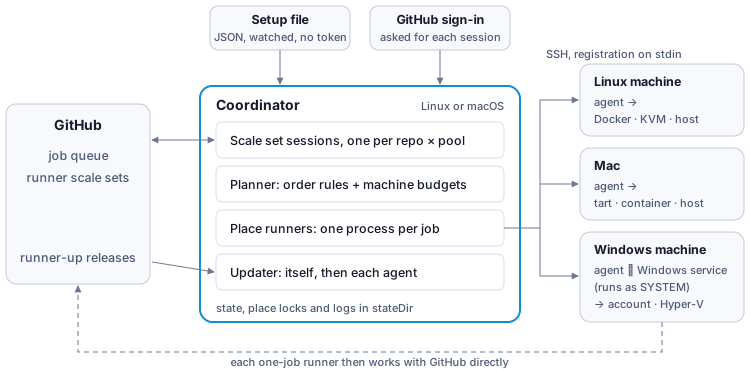
runner-up is one program. On the coordinator's machine it holds a scale set session for each repository and pool, plans which waiting job goes to which free place, and starts a place runner for each job. The place runner reaches the place's machine over SSH and runs runner-up there as the agent, which makes the fresh container, virtual machine or account and starts GitHub's runner in it. From then on the runner works with GitHub directly. On Windows the agent asks runner-up's Windows service, which runs as SYSTEM, to make job accounts and Hyper-V virtual machines.
Why the coordinator runs only on Linux and macOS. It relies on Unix process features that Windows does not offer in the same form:
- It hands each place's lock to that place's runner process as an open file. A place is busy exactly while some process holds its lock, so a running job keeps its place through a coordinator restart.
- It updates by replacing itself in the same process, so launchd or systemd keeps supervising it.
- It stops place runners with a stop signal, and stops a borrow's command with its process group.
- A borrow passes your terminal to the coordinator over a Unix socket.
The agent needs none of these, so machines may run Windows.
Compared with other ways to run your own runners
- A plain self-hosted runner stays registered and runs job after job in the same place, keeping each job's leftovers. runner-up starts a one-job runner in a fresh place for every job, and spreads jobs over several machines by their free cores and memory.
- Kubernetes-based autoscaling, such as GitHub's Actions Runner Controller, uses the same runner scale sets but needs a Kubernetes cluster and runs jobs in containers on its nodes. runner-up needs only SSH to each machine, and also runs jobs in virtual machines, in macOS virtual machines on a Mac, and on Windows.
Words used here
| Word | Meaning |
|---|---|
| setup | the setup file: a JSON file naming the repositories, pools, machines and places to serve. init and machine add write it, and you may edit it (see Setup file) |
| place | where one job runs at a time on a machine: a Docker container, a KVM, tart or Hyper-V virtual machine, an Apple container guest, a Windows account, or the machine itself (a host place). Each job gets a fresh one, except on a host place |
| pool | a label jobs ask for in runs-on. Each place serves one or more pools, and a pool may set the cores and memory each of its jobs reserves |
| room | cores and memory set aside. A machine keeps room for its owner (1 core and 1024 MB by default), and the first-ranked job waiting only for cores or memory keeps room on one machine until it fits |
| rest | a machine whose agent cannot be reached rests: its places take no job until the agent answers again (see When a machine is down) |
| borrow | reserving a tart place on a Mac for a command of your own for a while, instead of a job (see Borrowing a virtual Mac) |
| drain | pausing named places until named jobs have run there with nothing else running (see Draining places) |
Status
runner-up is young. Read this before you trust it with your jobs.
- Runner scale sets are in preview. runner-up talks to GitHub through
actions/scaleset, GitHub's client for runner scale sets, which GitHub still calls a preview. A change on GitHub's side can break runner-up until it catches up. - Proven with real jobs: Docker and KVM places on Linux, tart and host places on a Mac, a job running on through a coordinator restart, and a crashed place's cleanup.
- Proven only in part: Hyper-V places have run only a check's test jobs, not yet anyone's daily work. Apple container places have run the runner with a stand-in registration, not yet a real job. Account places on Windows pass their tests but have not yet run a real job. Changing the setup while the coordinator runs is proven by end-to-end tests with stand-ins for GitHub, ssh and Docker, not yet with real jobs.
- Order rules are proven by tests that replay GitHub's recorded scale set messages. Within one pool of one repository GitHub picks which job a runner takes, so the order there is only close (see Order rules).
- Experimental: Hyper-V places, Apple container places, Windows account places, borrowing a virtual Mac and draining places. They may still change between releases.
Install
macOS / Linux
curl -fsSL https://kunchenguid.github.io/runner-up/install.sh | shWindows (PowerShell)
irm https://kunchenguid.github.io/runner-up/install.ps1 | iexBoth scripts install the latest release only if its archive matches the
SHA-256 the release's checksums.txt lists. Release binaries are static, so
the Linux ones run on any glibc or musl distribution.
A Windows machine then needs one step as administrator (see Windows machines).
Nix
nix run github:kunchenguid/runner-up -- versionInstall into your Nix profile:
nix profile add github:kunchenguid/runner-upOr add to your flake inputs:
runner-up.url = "github:kunchenguid/runner-up";The flake exposes #default and #runner-up package outputs, plus apps for
nix run, for aarch64-darwin, aarch64-linux and x86_64-linux. It builds
with Go 1.27.3, which your own nixpkgs may not have yet, so let it keep its own
nixpkgs rather than follow yours.
Go
go install github.com/kunchenguid/runner-up@latestFrom source
git clone https://github.com/kunchenguid/runner-up.git
cd runner-up
make install
What you need
On the coordinator's machine (Linux or macOS):
gh, signed in withgh auth loginas an admin of each repository you serve. To serve an organization, the sign-in also needs theadmin:orgscope:gh auth refresh -h github.com -s admin:org.- SSH access to each machine with a key, without a password prompt
(
ssh -o BatchMode=yes ci@box truemust work). - runner-up (see Install).
On each machine (Linux on x86-64 or arm64, or a Mac), for the provider its places use:
-
Docker places: Docker, with the SSH user in the
dockergroup. -
KVM places:
/dev/kvmusable by the SSH user (thekvmgroup),qemu-system-x86_64orqemu-system-aarch64,qemu-img, and on arm64 the UEFI firmware (qemu-efi-aarch64). You also need a cloud image with cloud-init on the machine, such as Ubuntu's:curl -LO https://cloud-images.ubuntu.com/noble/current/noble-server-cloudimg-amd64.img -
tart places (a Mac with Apple silicon): tart, from its makers (
brew install cirruslabs/cli/tart), and a macOS image pulled on the Mac (see macOS images). runner-up runs the tart you install and never bundles it; tart's license is its makers' (FSL-1.1). -
Apple container places (experimental; a Mac with Apple silicon): Apple's container tool with its service started (
container system start), and a Linux image built or pulled on the Mac with/usr/bin/python3, Bash, tar, the Linux libraries GitHub's runner needs, and a user and group namedrunnerwith/home/runnerpresent. GitHub's runner itself need not be in the image; the guest downloads the pinned runner. The runner gets what the image sets in/etc/environment, as on a Hyper-V place. -
host places (Linux or a Mac): nothing more. The job runs as the SSH user (see Trade-offs).
On each Windows machine (Windows 10, 11 or Server 2019 and later, x86-64):
-
Account places (experimental): nothing more. Each job runs as a fresh standard account that runner-up's Windows service makes, contains to the place's cores and memory, and deletes afterwards.
-
Hyper-V places (experimental): Hyper-V, and a base disk for the job VMs: an Ubuntu cloud image converted to VHDX, such as with
qemu-imgon any machine:curl -LO https://cloud-images.ubuntu.com/noble/current/noble-server-cloudimg-amd64.img qemu-img convert -O vhdx -o subformat=dynamic noble-server-cloudimg-amd64.img noble.vhdxCopy
noble.vhdxto the machine, for example toC:\runner-up\noble.vhdx. A disk you build with your own tools works too, if cloud-init still runs at its boot. The runner gets the variables the disk sets in/etc/environment, as a login would: setRUNNER_TOOL_CACHEthere for tools you install in advance, as GitHub's Ubuntu images do.
runner-up installs itself on each Linux machine and Mac when you add it. A Windows machine needs one step first (see Windows machines).
Setting up
init checks that your sign-in can create runners for each repository.
machine add reaches the machine over SSH. It copies runner-up there (to
~/.local/bin) when it is missing, reads the machine's cores and memory, and
checks that its provider works: Docker by default on Linux, tart on a Mac, or
the one --provider names (docker, kvm, tart, host or, on a Mac,
container with --image). For Apple container places it checks that the
container tool is installed and its service answers, but not the image; see
What you need. It copies itself only to a
machine of its own system and architecture; for another,
download runner-up for it from the
releases and pass
--install FILE. Both commands write the setup file. By default it is
~/.config/runner-up/config.json on Linux and
~/Library/Application Support/runner-up/config.json on a Mac, or
runner-up/config.json under $XDG_CONFIG_HOME when that is set; --config FILE names another. You can edit that file by hand, and it never holds a
token. A running runner-up serve applies your edits (see
Changing the setup).
runner-up status shows each place, its running reservation and the waiting
work. runner-up usage shows finished jobs' resource readings beside their
pool sizes (see Job sizes and readings); for borrows, see
Borrowing a virtual Mac; to let some jobs run on
places with nothing else running, see Draining places.
Windows machines
Experimental. Account and Hyper-V places have not yet run anyone's daily work (see Status).
On the Windows machine, in a terminal opened with Run as administrator, run runner-up's Windows build (see Install) once:
runner-up.exe setup --user ci --ssh --ssh-key C:\path\to\coordinator-key.pub --hypervsetup installs runner-up in C:\Program Files\runner-up and on the PATH,
and installs the runner-up service, which makes and deletes the job accounts.
--user names the account the coordinator signs in as; it may be a standard
account. --ssh turns on Windows' OpenSSH server, and --ssh-key lets the
coordinator's key sign in as that account. --hyperv turns Hyper-V on and lets
the account make virtual machines; leave it out for account places only.
Restart the machine if it says so.
Running setup again is harmless and installs the runner-up it is run with.
Each version goes in a folder of its own, such as
C:\Program Files\runner-up\v0.1.11-1a2dc4c30dbf, before anything stops, so
a running job keeps its program. setup restarts the service only when its
program or account changed, and first waits, up to 30 minutes, for the
service's running Windows jobs to end, since a stop ends them; Ctrl+C while it
waits changes nothing. Whatever stops setup partway, it starts the service
again. Once the setup names a release, the service also updates itself (see
Updating runner-up).
Then, on the coordinator:
runner-up machine add pc --ssh ci@pc                       # account places
runner-up machine add pc --ssh ci@pc --provider hyperv \
    --image 'C:\runner-up\noble.vhdx' --place-cores 4 --place-memory 8192
machine add notices the machine runs Windows. Account places run the jobs of
a pool whose workflows expect Windows (shell: pwsh, Git Bash for
shell: bash when Git for Windows is installed). Hyper-V places run Linux
jobs. A Hyper-V place joins Hyper-V's Default Switch; set --switch for
another.
Running as a service
For example, as a systemd user service on the coordinator's machine. With a
release in the setup, run runner-up update once and start
stateDir/program/current instead, so the supervisor starts the version the
coordinator updated itself to (see Updating runner-up).
# ~/.config/systemd/user/runner-up.service
[Unit]
Description=runner-up coordinator
After=network-online.target

[Service]
ExecStart=%h/bin/runner-up serve
Restart=on-failure
# Stop only the coordinator: running jobs' place runners carry on.
KillMode=process

[Install]
WantedBy=default.target
systemctl --user enable --now runner-up
loginctl enable-linger "$USER" # keep it running while you are logged outOn a Mac, run it as a LaunchAgent, so it runs in your login session and gh
can read its sign-in from your keychain:
<!-- ~/Library/LaunchAgents/com.github.runner-up.plist -->
<?xml version="1.0" encoding="UTF-8"?>
<!DOCTYPE plist PUBLIC "-//Apple//DTD PLIST 1.0//EN" "http://www.apple.com/DTDs/PropertyList-1.0.dtd">
<plist version="1.0">
<dict>
  <key>Label</key><string>com.github.runner-up</string>
  <key>ProgramArguments</key>
  <array><string>/Users/you/bin/runner-up</string><string>serve</string></array>
  <key>EnvironmentVariables</key>
  <dict><key>PATH</key><string>/opt/homebrew/bin:/usr/bin:/bin:/usr/sbin:/sbin</string></dict>
  <key>RunAtLoad</key><true/>
  <key>KeepAlive</key><true/>
  <!-- Stop only the coordinator: running jobs' place runners carry on. -->
  <key>AbandonProcessGroup</key><true/>
  <key>StandardOutPath</key><string>/Users/you/Library/Logs/runner-up.log</string>
  <key>StandardErrorPath</key><string>/Users/you/Library/Logs/runner-up.log</string>
</dict>
</plist>
launchctl bootstrap "gui/$(id -u)" ~/Library/LaunchAgents/com.github.runner-up.plistWhen the coordinator stops, running jobs carry on. Each place's runner runs in its own process, which holds the place until its job ends. A runner still waiting for its job keeps waiting, and can take one, until the coordinator is back to give up on it. Waiting jobs stay queued at GitHub, and the next start picks them up again.
When a machine is down
ssh to a machine gives up after ten seconds without an answer
(ConnectTimeout=10), unless the machine's own ssh options set
ConnectTimeout. When a place's runner cannot reach its machine's agent,
because SSH was refused, timed out or dropped, the machine rests. Its places
take no job, so the coordinator acquires no job and registers no runner for
them, and the job the runner was started for goes to another place, in line
from where it was. Once a minute the coordinator asks the machine's agent its
version, which costs no call to GitHub. Once it answers, the machine's places
take jobs again. A machine still resting when the coordinator restarts is
asked at once. runner-up status shows a resting machine's places as resting.
When GitHub closes a job
When GitHub says a job was cancelled before a runner took it, the job's scale set has a runner left waiting for nothing. The coordinator removes the newest such runner from its scale set and stops it once GitHub accepts. A runner GitHub says is running a job keeps it, and one whose removal GitHub does not answer is asked about again at the next tick.
GitHub does not always tell the scale set that a job it assigned is gone, for example when a run is cancelled while one of its jobs waits for its next assignment, or when the cancellation is lost with a session. GitHub takes an assigned job back when no runner takes it in five minutes. So when GitHub has said nothing for ten minutes about a job it assigned, or for an hour about a job it took back, the coordinator reads the job's workflow run. It reads each such run again every fifteen minutes, or every hour, while the job stays quiet, and reads at most ten runs at a time and sixty an hour. If GitHub says the run is completed, the coordinator forgets the run's quiet waiting jobs and starts no runner for them. A run GitHub calls open, or a read GitHub does not answer, keeps them waiting. A job with a runner is never read about.
Setup file
Besides what init and machine add write, you can set:
| Field | Default | Meaning |
|---|---|---|
order | ["waited:60m", "shortest"] | the order rules |
allowForkPullRequests | false | let jobs from forks' pull requests run |
startTimeoutSeconds | 600 | how long a runner may wait for its job. Then the coordinator removes the runner from its scale set and stops it; a runner GitHub says is running a job keeps it |
bootTimeoutSeconds | 300 | how long a KVM, tart or Hyper-V place may take to boot |
guestCheckSeconds | 30 | how often a tart place checks its clone has not restarted |
maxJobSeconds | 21600 | the longest a job may run |
logKeepDays | 30 | how long place logs are kept |
release | none | the runner-up the coordinator and its machines run: see Updating runner-up |
Each machine's cores, memoryMB, roomCores and roomMemoryMB set its
budget. Each pool may set cores and memoryMB together: every job of that
pool reserves that size, whichever place runs it. It replaces the place's
cores and memoryMB, including the container or VM limits. A pool without a
size keeps the place's existing size. check-config rejects partial sizes
and sizes that never fit a machine serving the pool, after its owner's room.
A host job is not held to its reservation by the operating system. Jobs receive
RUNNER_UP_CORES and RUNNER_UP_MEMORY_MB; use them to set worker counts and
other resource controls. These variables describe reservations, not current
free resources. A running job keeps its launch-time reservation through a
coordinator restart or a later setup edit.
Places may share a machine without all fitting at once. They then take turns:
check-config shows the place defaults and each configured pool override.
Several host places allow small jobs to run together; the machine's budget,
not their total fallback sizes, limits the combination.
Each place may also set:
| Field | Default | Meaning |
|---|---|---|
workFolder | _work | where the runner keeps its jobs' work, relative to the runner's folder or absolute; GitHub's Ubuntu runners use /home/runner/work |
toolCache | see meaning | the runner's tool cache (RUNNER_TOOL_CACHE). A host place keeps it between jobs, in its folder under the agent's by default, so a tool such as setup-node's Node is downloaded once. For a tart place, a folder inside the clone that the image was set up with; by default the runner's own, which every job starts without |
poolImages | none | another image for some of the place's pools, by pool label. A job of a named pool runs on that image, any other job on image |
priority | its machine's | the place's priority level |
A place that serves several pools can run each on its own image. For example, the same Hyper-V places can run Ubuntu 24.04 and 26.04 jobs:
{"id": "pc-1", "provider": "hyperv", "pools": ["linux", "linux-2604"], "cores": 4, "memoryMB": 8192,
 "image": "C:\\runner-up\\noble.vhdx", "poolImages": {"linux-2604": "C:\\runner-up\\resolute.vhdx"}}
A linux-2604 job boots resolute.vhdx, and a linux job boots
noble.vhdx. Either way it is one place; its pool's size, or the place's
fallback size when the pool has none, counts against its machine's budget.
Priority levels
A job goes to a free place serving its pool on the machine with the fewest
busy places, then the first listed. To have some places take a pool's jobs
only when others cannot, give places a priority: a whole number from 0, the
default. A machine's priority is the level of its places that set none. A
job takes a free place at the lowest level that has one, and tries level 1
only once every level-0 place serving its pool is full, then level 2, and so
on; levels need not be consecutive. Within a level, the fewest busy places,
then the listed order, decide as before.
A place counts as full while it runs a job or a borrow, while its machine is unreachable, cools down after a failed start or is held by a drain, while its Mac runs as many virtual Macs as macOS allows, and while its machine lacks the room for the job. A job waiting only for room keeps it at the lowest level where it waits.
For example, to run a pool's jobs on two small Macs' guests and use a big
Mac's own place only when both are taken, set "priority": 1 on the big
Mac's place and leave the guests unset:
{"id": "big-real", "provider": "host", "pools": ["mac-check", "mac-split"], "cores": 6, "memoryMB": 16384, "priority": 1}check-config shows each place's level when set, and for each pool with
places on different levels, the levels and their places in the order tried.
It refuses a negative priority, and priorities that order nothing: levels set
but no pool with places on two of them. A setup without priority places jobs
as before; init and machine add write none. runner-up 0.1.12 and earlier
refuse a setup that names priority.
Changing the setup
runner-up serve watches its setup file. Once the file has held the same
content for a second, so a git pull or an editor that rewrites it in steps
is read whole, the coordinator checks it as check-config does and applies
it in place:
- Repositories, organizations and pools the change adds get their scale set sessions, and ones it removes have theirs closed. Every other session stays open.
- Machines, places, sizes, order rules and the other settings apply to the next job the coordinator places.
- Running jobs run on, each with the setup and reservation it started with. A place the change removes, or moves to another machine, while its job runs takes no new job, and its reservation counts against the machine its job runs on until the job ends, through a coordinator restart too.
- A job of a pool the change removes waits at GitHub until the pool comes back or GitHub gives up on the job.
The coordinator logs applied the changed setup with what changed, such as
pools=+mac-sign places=-box-2. A file it cannot read, a setup that fails the
check, or one that moves stateDir is not applied: the coordinator logs
the setup file was not applied; keeping the running setup with the reason
and runs on as before. Once you fix the file, it applies. A new stateDir
takes a restart, since running places hold their locks in the old one.
Place runners never read the setup file. Each reads the setup the coordinator
was running when it started the place, kept under stateDir/setups, so a
half-written or refused file never reaches a job. runner-up status and
runner-up usage read the setup file itself.
Updating runner-up
The setup can name the runner-up release the coordinator and its machines run,
with the SHA-256 of each platform's archive as the release's checksums.txt
lists it:
"release": {
  "version": "v0.1.11",
  "sha256": {
    "darwin-arm64": "<runner-up-v0.1.11-darwin-arm64.tar.gz's SHA-256>",
    "linux-amd64": "<runner-up-v0.1.11-linux-amd64.tar.gz's SHA-256>",
    "windows-amd64": "<runner-up-v0.1.11-windows-amd64.zip's SHA-256>"
  }
}
Name each platform your coordinator and machines run. url may name another
place to download releases from, as <url>/<version>/<archive>; by default
they come from this repository's GitHub releases.
When the setup names another version, the coordinator downloads its archive
for its own platform, checks the SHA-256, and asks the new program its version
and to check the setup. If all holds, it stops as a stop signal would, so
running jobs carry on, and replaces itself with the new version in the same
process, so launchd or systemd keeps supervising it. The new version is on
trial for a minute. If it stops sooner, the supervisor starts the version it
always starts, which sees the trial left behind, refuses that version and runs
on. A refused version stays refused, in stateDir/program/refused.json, until
the setup names another version or SHA-256. Once the new version has run for a
minute, stateDir/program/current points at it.
stateDir/program/current is what the supervisor should start. To make it
before the coordinator first runs, run runner-up update: it downloads and
checks the setup's release and points current at it.
Once the coordinator runs the setup's version, it copies it to each machine it
reaches over SSH, as the machine's agent: into .local/share/runner-up/<version>
in the SSH account's home, or %LOCALAPPDATA%\runner-up\<version> on Windows,
where the machine checks the SHA-256 before keeping it. Jobs started after that
run with the copy; running jobs keep their agent. stateDir/agents.json
records each machine's copy. A machine that cannot be reached keeps its agent
and is tried again ten minutes later. On Windows the copy's path must hold no
spaces, so the SSH account's name may not have any.
A Windows machine's runner-up service runs as SYSTEM, so it takes a release
only when the release signing key signed its checksums.txt. Whoever holds
that key's private half controls every Windows machine running the service:
it is kept as a secret of this repository's release environment, which only
main may use, and the release workflow signs each release with it into
checksums.txt.sig, after checking the signature against the public half
built into runner-up (internal/release/key.go). To update a machine's service, the coordinator holds its
account places from new jobs, waits for their jobs to end, and has the
machine's agent hand the service the Windows archive, checksums.txt and its
signature. The service checks the signature, the archive's SHA-256 and that
the release is newer than itself, installs it beside its own program, and
restarts as it. A new service that stops within a minute goes back to the
version before and refuses that version. An administrator's runner-up setup
installs any version. A service that setup installed from runner-up v0.1.10
or earlier cannot take a release: run a newer setup once.
Job sizes and readings
A pool is a job kind. For example, this setup illustrates a large check and small signing job that together fit a 14-core job budget:
"pools": [
  {"label": "mac-check", "cores": 12, "memoryMB": 32768},
  {"label": "mac-sign", "cores": 2, "memoryMB": 4096}
]
These are example sizes, not measurements or recommended defaults. Choose separate labels for jobs with different resource needs: GitHub may give a new runner any job of its pool, so every job within that pool must share one size. Borrowed tart places take their pool's size too.
When the first-ranked job has a free eligible place but waits for cores or memory, the planner holds its size on one eligible machine. Later work starts only in the remainder. It does not interrupt running jobs, reserve every machine, or hold room for a job whose places are unavailable for another reason. Once jobs already running finish, later smaller jobs cannot keep it waiting for room.
Use runner-up usage after representative jobs finish. It shows each pool's
current size, each run's original reservation, and sampled peak cores and
memory. The initial readers cover host jobs on macOS and Linux and tart jobs
in macOS guests. Other providers, interrupted readers and jobs too short to
measure show unavailable or incomplete readings, never invented zero use.
Readings sample once a second over the one-job runner's lifetime, including its idle time and overhead. These are observed samples, not hard maxima or a guarantee of available resources.
- Host readings (
process-group) cover the runner's process group, not work that detaches from it. CPU comes from changes in sampled process CPU time, so short-lived processes and peaks between samples can be missed. Memory is the sum of process RSS: it can count shared pages more than once and excludes kernel memory. - Tart readings (
guest) cover the whole guest, so simulators started by the guest's system services count too. They come from the guest's kernel: CPU is the busy share of the guest's CPUs over each second, asiostatreports it, and memory is what the guest has in use (app memory, wired and compressed, as Activity Monitor counts it), so a shared page counts once. Neither can exceed the guest's own CPUs and memory.
runner-up usage shows any tart value above its reservation, which is the
guest's size, as unavailable.
Compare several representative runs on the same machine/provider, allow
headroom, then edit the pool's size; a running coordinator applies it to the
next job of the pool. Runner-up does not automatically reduce a size or treat missing readings as evidence.
It retains one record per finished job in the coordinator's usage folder
for logKeepDays, including across restarts. The readings travel with the
runner's output and are advisory: a job can falsify its output, but cannot
change its configured reservation through a reading.
Macs
A Mac's places are tart places, a fresh clone of a macOS image per job, Apple container places, a fresh Linux guest per job, or a host place that runs jobs on the Mac itself.
For each job, a tart place's agent clones the place's image as
runner-up-PLACE, sizes the clone to the job pool's cores and memory (or the
place's defaults), and starts it with no window. The clone sees one folder of
the Mac, read-only: the runner's release archive and runner-up itself, which
collects resource readings and, unless forks are allowed, runs the fork guard. The
agent then starts the runner through tart's guest agent (tart exec), handing
it the registration on its input. When the job ends, or its place runner lets
go, the clone is stopped and deleted.
- Two macOS VMs at once. Apple's Virtualization framework runs at most two
macOS virtual machines on a Mac at once. The coordinator counts the Mac's
busy tart places (including borrows), and asks
the Mac's agent every 30 seconds which macOS VMs run there, so a VM you
start by hand takes one of the two. A tart place waits while two run. The
agent also waits for a free one before it clones, in case a VM started since
the coordinator looked.
Linux VMs do not count.
machine addgives a Mac at most two tart places; more, added with--places, take turns. - A clone that restarts. A kernel panic restarts the clone's macOS and
ends its runner, but
tart execcan go on waiting. While the job runs, the agent reads the clone's boot session everyguestCheckSeconds, and ends the job once it changes. A reading that fails counts for nothing.
Linux guests on a Mac
Experimental. Apple container places have not yet run a real job (see Status).
For each job, an Apple container place's agent starts a guest from the
place's image as runner-up-PLACE, with the job pool's cores and memory (or
the place's defaults), and --rm, so the guest is removed when it stops.
runner-up's guest program runs in it as root: the agent sends the program on
the guest's standard input, then the registration on one more line. The
registration is never in the image, a file, an argument or the container
configuration's environment, so container inspect never shows it. Inside
the guest it reaches the runner through the runner's environment. The program
checks the pinned runner's download, runs it as runner for one job with the
configured fork policy, and ends. When the place
runner lets go, the agent deletes the guest; the next job on a place first
deletes any guest an agent killed outright left.
Apple container guests share the Mac's budget like its other places, and do
not count against the two-macOS-VM limit. Linux guests reach the network
through the container tool's own network; block what they should not reach
on the Mac. Apple's tool gives a guest the cores it asks for as its CPU limit,
but a guest may list one more processor (nproc); jobs should size their
workers by RUNNER_UP_CORES.
To prioritize a Mac's own jobs over its Linux guests, see last: in
Order rules.
macOS images
A tart place's image is any macOS tart image whose guest agent runs, so
tart exec works. Cirrus Labs' images have one. Pull the image on the Mac
before you add it, since a clone of an image not yet pulled waits for the
download:
tart pull ghcr.io/cirruslabs/macos-sequoia-base:latest     # macOS only
tart pull ghcr.io/cirruslabs/macos-sequoia-xcode:latest    # with Xcode
To bake your own tools in, clone an image to a local VM, set it up, and use the VM's name as the place's image:
tart clone ghcr.io/cirruslabs/macos-sequoia-base:latest ci-base
tart run ci-base        # sign in as admin / admin, install what jobs need
tart stop ci-base
runner-up machine add mac --ssh you@mac --image ci-base
The runner runs as the guest agent's user (admin in Cirrus Labs' images) in
~/actions-runner, so tools installed for that user are found. Every job
starts from the image as it is: nothing a job changes is kept.
Borrowing a virtual Mac
Experimental. Borrowing may change between releases (see Status).
While the coordinator is running, borrow a tart place from a pool instead of holding a place by hand:
runner-up borrow --pool ru-mac --label "native check" --minutes 30 -- sh -c '
  set -eu
  tart clone my-local-image "$BORROWED_VM"
  tart set "$BORROWED_VM" --cpu "$BORROWED_CPUS" --memory "$BORROWED_MEMORY_MB"
  exec tart run --no-graphics "$BORROWED_VM"
'
Replace my-local-image with an image already on the Mac. The borrow command
never builds or downloads an image and does not start the VM for you. Your
command starts it under BORROWED_VM, the name runner-up reserves and cleans.
--pool,--label,--minutesand a command are required. Minutes must be a positive integer. As withserve, use--config FILEfor another setup.- The request waits beside jobs under the same order rules. The declared minutes supply its runtime estimate; the request's queue time breaks ties. It has no repository, pull request labels or workflow, so those rules do not give it a match. While waiting, it prints its rank and why it waits.
- Only tart places qualify, never host, Docker, KVM or Windows places.
The command runs on the coordinator's computer with your working directory,
environment and standard input/output. For a remote Mac, your command must
reach that Mac itself;
BORROWED_VMnames the VM there, not a local VM. - The granted command receives
BORROWED_PLACE,BORROWED_VM,BORROWED_CPUSandBORROWED_MEMORY_MB. Keep the command in the foreground until its work finishes; the borrow itself reserves the place for that VM. - From grant through cleanup, the place reserves its share once and one of
the Mac's two VM slots. A running VM under
BORROWED_VMis not counted a second time. VMs under other names still count as outside runner-up. - The borrow ends with the command, when the caller stops or disconnects, or after max(1 hour, declared minutes) from grant. A coordinator restart leaves it running and counted. Command descendants are stopped and the agent stops and deletes any VM left under the granted name before the place frees. As with jobs, an outright supervisor crash is cleaned at the next use of the place or coordinator startup.
- The caller returns the command's exit status (
128 + signalif a signal ends the command),124for a time limit,130for cancellation, or1for a supervisor/cleanup failure.statusnames active borrows and their labels. Separateborrow placedandborrow completedlog entries include wait time and borrowed minutes; borrowed time is not recorded as a job runtime estimate.
Draining places
Experimental. Draining may change between releases (see Status).
When some jobs must run on places with nothing else running there, drain the places for them while the coordinator keeps running, instead of stopping it or waiting for a quiet hour:
runner-up drain --place mac-1 --place mac-2 \
    --repo you/app --job "verify / mac" --job "verify / phone" \
--label "release check" --minutes 90- Draining. The places take no new job or borrow. Jobs and borrows already running there carry on; a drain never stops one.
- Admitting. Once all the places are free at the same time, they take only
the named jobs, one job for each
--job, by the job's name as GitHub shows it.--repolimits the names to one repository. Start the jobs at any time: a named job waits for the drained places while the drain lasts, rather than start elsewhere. - Done. When each named job has run and its runner has ended, the places take any job again at once, and the command exits 0.
- Places the drain does not name go on as before. To keep a whole machine quiet, name all its places. On a machine whose places share its cores and memory, the named jobs keep room ahead of other work.
- The drain ends early, and placement resumes, when its command is stopped
(exit
130) or after--minutes(exit124). Running jobs, including the named ones, carry on. - GitHub picks which of a scale set's jobs a runner takes. A runner started for a named job may take another job of the same pool and repository; the named job is then admitted again once a place frees. A named job GitHub gives a runner outside the drain counts as gone: the drain stops waiting for it.
- The command prints where the drain stands as it moves on. A coordinator
restart keeps the drain.
statusshows drained places and each drain. A place belongs to one drain at a time.
Order rules
When a place frees and several jobs it can take are waiting, the rules decide,
in order. Each rule puts the jobs it matches first, except last:, which
puts them last. Later rules order jobs tied by earlier rules, and the oldest
job breaks a final tie.
| Rule | Puts first |
|---|---|
pool:NAME | jobs asking for the pool NAME, which must be one of the setup's pools |
last:NAME | jobs not asking for pool NAME, which must be one of the setup's pools |
label:NAME | jobs from an open pull request labeled NAME, in the same repository (not from forks), including runs on its branch |
waited:DURATION | jobs that have waited at least DURATION, oldest first |
workflow:GLOB,... | jobs whose top-level workflow file (without .yml) matches, such as release or deploy-* |
shortest | jobs with shorter runtimes learned from earlier successful runs; a job never seen counts as 15 minutes |
For example, ["label:urgent", "workflow:release", "waited:60m", "shortest"].
A pool: rule matters where places serve several pools. To let short jobs that
a merge waits on go ahead of everything else, give them a pool of their own,
have the same places serve it, and list pool: first:
["pool:quick", "label:urgent", "waited:60m", "shortest"].
A last: rule matters where places of different pools share a machine's
budget. The first-ranked job waiting only for room keeps it, so ranking a pool
last lets a waiting job of another pool keep its room before that pool's jobs
take what is left. List last: first to put the pool behind even jobs that
waited an hour; a pool: rule listed before it still goes ahead:
["pool:release", "last:linux-mini", "waited:60m", "shortest"].
GitHub picks which of a scale set's jobs a new runner takes. So the order is exact between pools and repositories, but only close within one pool of one repository.
Pull requests from forks
Every runner starts with runner-up's fork guard as its job-started hook. The
guard reads the job's event. It refuses a job from another repository's pull
request, a follow-on run of one (workflow_run), and a job whose event it
cannot read. It allows every other job from the repository itself. Set
allowForkPullRequests to true only if you trust every pull request.
Trade-offs
- Docker places share the machine's kernel. A job that escapes its container reaches the machine. Use KVM places for code you trust less.
- The runner image needs
/home/runner/run.shand/bin/sh. Docker places use GitHub's runner image,ghcr.io/actions/actions-runner, by default. Another image must keep the runner at that path and a shell at/bin/sh: the container's shell reads the registration from its standard input and hands it to the runner, sodocker inspectnever shows it. - KVM places can reach the machine's loopback. A KVM place uses QEMU's user networking. Through it, a job can reach services the machine listens on at 127.0.0.1, at the address 10.0.2.2. Keep such services behind their own sign-in on machines with KVM places.
- Every place but a Docker place downloads the runner. Each machine downloads the runner release once, checks it against a pinned checksum, and keeps it; a Hyper-V VM or an Apple container guest downloads and checks it afresh for each job. The version is pinned (2.338.1), and runners never update themselves.
- Host places are not fresh. A host place runs its job as the SSH user, in a folder made for the job and removed after it, and ends every process the job started. Its tool cache is kept for the next job. Everything else is the machine's own: the job can read the user's home folder and keychain, change installed programs, and reach the network as the machine does. Use host places only for jobs you trust as you trust yourself, and keep the fork guard on. A machine gets one host place by default.
- A tart clone sees runner-up. A clone's job can read the runner-up program used for resource readings and its fork guard. It holds no secret.
- Account places share the machine. A job account is a standard account with no network access to private addresses, but it runs on the machine itself, beside its owner. Use Hyper-V places for code you trust less.
- Account places have only what the machine has. Jobs see the programs installed on the machine, not GitHub's runner image.
- Hyper-V places talk over a serial port. The registration and the runner's output travel over the VM's second serial port, which Hyper-V joins to a named pipe on the machine. Hyper-V may let only administrators open that pipe; if a Hyper-V place says it could not open the serial port, make the SSH account an administrator.
- Apple container guests are lightweight virtual machines. For their lifecycle, resource limits and network exposure, see Linux guests on a Mac.
- The coordinator does not run on Windows. Run it on Linux or macOS (see why). Agents run on Windows.
- One coordinator per pool. A second coordinator for the same pool waits until the first lets go of the scale set session.
Development
make build          # Build the binary
make test           # Run tests
make lint           # Run gofmt + go vet
make dist           # Cross-compile for all platforms
make install        # Install to $GOPATH/bin or /usr/local/bin
make clean          # Remove build artifacts
See CONTRIBUTING.md before opening a pull request.