chatgpt-imagegen
English | 中文
Generate images using your ChatGPT subscription — no OPENAI_API_KEY needed.
A tiny, zero-dependency Python CLI (and AI-agent skill) — one file, stdlib only — that generates images with your ChatGPT account, on the command line and for any AI agent.
✨ Works on a free ChatGPT account too. The default
webbackend just drives the normal ChatGPT web chat, where even free-tier users get image generation — so no paid plan, no API key, and no Codex required (subject to the free tier's daily image limit). Paid plans simply get higher limits.
chatgpt-imagegen "a watercolor cat sitting on a windowsill" -o cat.png
# -> saved: cat.png  (812,344 bytes)  size=1024x1024  quality=medium
Why this exists
OpenAI offers image generation in two completely separate ways:
| Path | What you pay | How |
|---|---|---|
Direct API (/v1/images/generations) | per-image, on top of an OPENAI_API_KEY | curl / OpenAI SDK / etc. |
| ChatGPT subscription (Plus / Pro / Team) | flat monthly fee | ChatGPT web/desktop app, or the Codex CLI's built-in image_gen |
The subscription path is invisible to people who don't use the Codex CLI. It runs on ChatGPT's internal backend-api/codex/responses endpoint as a Responses-API tool, authenticated by the OAuth token written into ~/.codex/auth.json when you run codex login.
chatgpt-imagegen exposes that capability on the command line and to any AI agent — with two backends that hit different parts of your subscription.
Backends
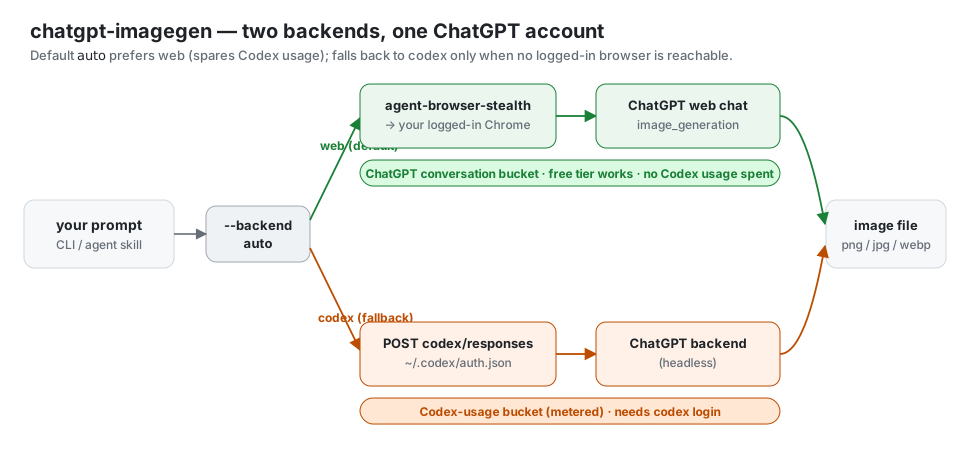
The same subscription meters two separate buckets, and which one you spend depends on where the image is generated:
| Backend | How it generates | Bucket spent | Needs |
|---|---|---|---|
web | Drives your already-logged-in ChatGPT browser (via agent-browser-stealth, the agent-browser/abs command) and generates in a normal chat — the same surface as typing in the app. The stealth fork's real-Chrome connect clears Cloudflare + the sentinel proof-of-work a plain/headless client can't. | ChatGPT conversation — does not touch your metered Codex-usage limit. | Any logged-in chatgpt.com browser (free tier works) + agent-browser-stealth. |
codex | Headless POST to backend-api/codex/responses, reusing ~/.codex/auth.json. | Codex-usage (the metered bucket). | codex login. |
Default auto tries web first (to spare Codex-usage) and falls back to codex when no logged-in browser is reachable. Force one with --backend web / --backend codex (or CHATGPT_IMAGEGEN_BACKEND).
- Laptop / desktop (Chrome open + signed in) →
web— no Codex-usage spent. - Server / headless agent box →
codex— no browser there, soautofalls back on its own.
web generates under whatever account that browser is logged into, which may differ from ~/.codex/auth.json — sign the browser into the account whose bucket you want.
Install
You need Python 3.10+, a ChatGPT subscription, and at least one backend (auto uses whichever is set up, preferring web):
codex backend — npm i -g @openai/codex then codex login (writes ~/.codex/auth.json).
web backend — agent-browser-stealth (a stealth fork of agent-browser; it drives your real logged-in Chrome via an extension, which is what passes Cloudflare + ChatGPT's anti-bot check) connected to a Chrome signed in to chatgpt.com:
curl -fsSL https://raw.githubusercontent.com/leeguooooo/agent-browser-stealth/main/install.sh | sh
agent-browser extension install
# then: add the Chrome extension → restart Chrome → sign in to chatgpt.com
Extension: Chrome Web Store.
Option A — for AI agents (recommended)
Install via skills.sh — works with Claude Code, Codex Agent, Cursor, OpenClaw, etc.:
npx skills add leeguooooo/chatgpt-imagegen -g
This drops both the agent instructions (SKILL.md) and the CLI itself into your agent's skill directory. Just ask any compatible agent: "画一张 xxx" / "generate a hero banner for the README".
Option B — standalone CLI
git clone https://github.com/leeguooooo/chatgpt-imagegen
cd chatgpt-imagegen
chmod +x chatgpt-imagegen
./chatgpt-imagegen "a tiny pixel-art mushroom"
Or put it on your $PATH:
sudo install chatgpt-imagegen /usr/local/bin/chatgpt-imagegen
That's the entire setup. No pip install, no virtualenv, no daemon.
Usage
chatgpt-imagegen "<prompt>" [options]
| Flag | Default | Notes |
|---|---|---|
--backend | auto | auto | web | codex. auto prefers web (spares Codex-usage), falls back to codex if no logged-in browser. See Backends. Also CHATGPT_IMAGEGEN_BACKEND. |
--profile | auto | (web) Which Chrome profile to drive. auto: use your open Chrome if it's logged in, else auto-switch to a profile that is (detected offline). relay: only your open Chrome. Or a name like "Profile 3". |
--session | imagegen-<pid> | (web) Reuse a named agent-browser Chrome tab group across runs. |
--keep-tab | off | (web) Leave the ChatGPT tab open after generating (default closes it). |
-o, --out PATH | assets/generated/<slug>.<ext> | Output file; parent dirs created. A warning is printed when the suffix and --format disagree (e.g. -o foo.jpg --format png). |
--size | auto | auto or any WIDTHxHEIGHT. Verified working: 1024x1024, 1024x1536, 1536x1024. Larger sizes are forwarded as-is. |
--format | png | png | jpeg | webp |
--model | gpt-5.5 | Chat model that hosts the image_generation tool |
--timeout | 300 | Total wall-clock budget (seconds) for the whole request. Large/detailed images can take 2–3 min. |
--stall-timeout | 120 | Max seconds of silence (no data from backend) before declaring a stall — caught well before the total budget. Clamped to --timeout. |
--quiet | off | Print only the saved path on stdout (perfect for agent pipelines). Progress still streams to stderr — use --no-progress to silence it. |
--no-progress | off | Suppress the stderr progress timeline (errors still print). |
-V, --version | — | Print the CLI version (chatgpt-imagegen 0.4.0) and exit. |
Examples:
# Default → assets/generated/<slugified-prompt>.png
chatgpt-imagegen "watercolor cat"

# Pick the path
chatgpt-imagegen "logo for a coffee shop, vector style" -o brand/logo.png --size 1024x1024

# Landscape hero banner
chatgpt-imagegen "moody mountain sunset" -o web/hero.png --size 1536x1024

# Use in a shell pipeline
OUT=$(chatgpt-imagegen "icon" --quiet)
echo "saved to $OUT"
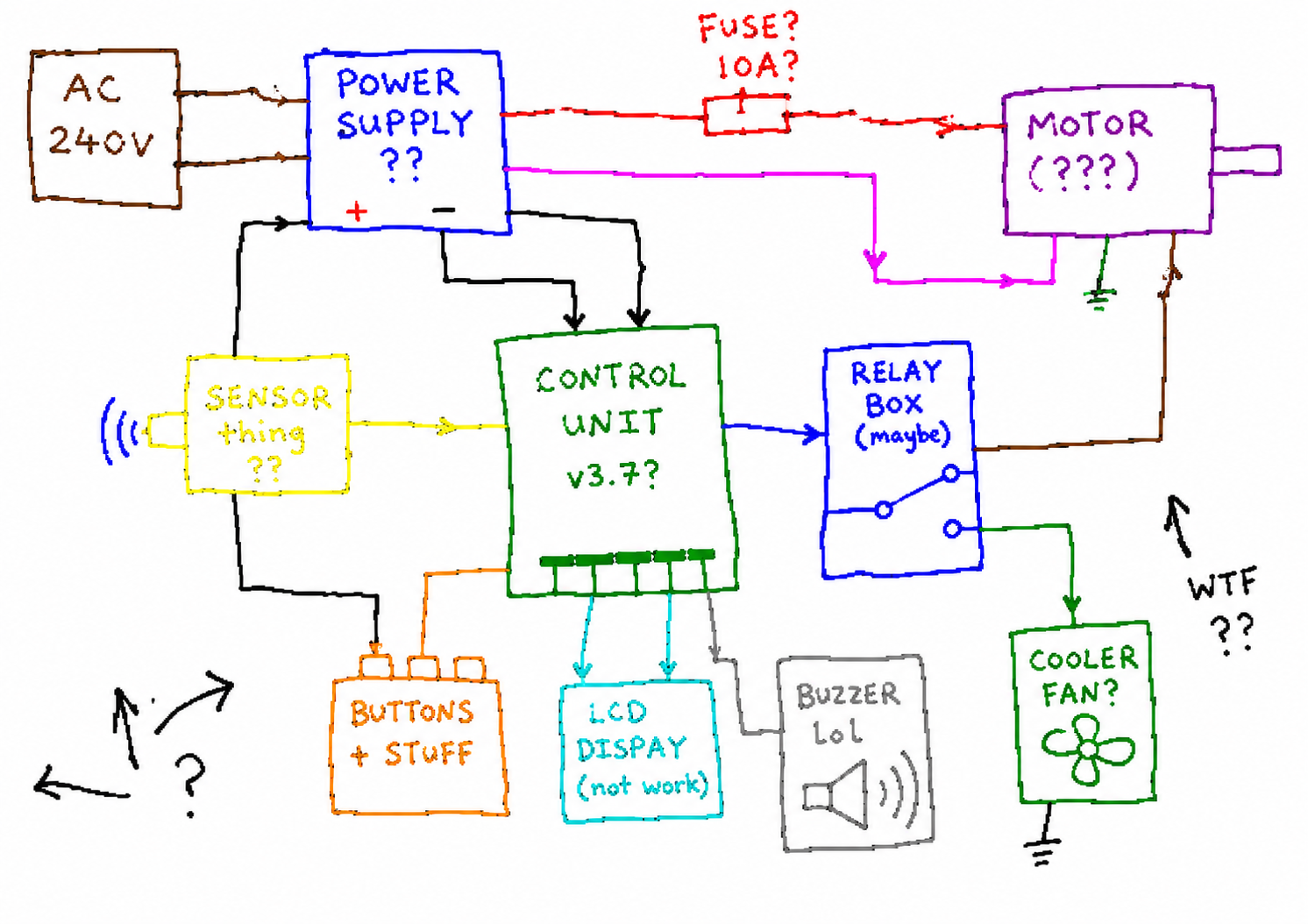
Example output — made by this tool (asked for a deliberately awful MS-Paint schematic).
What works / what doesn't
| Parameter | Subscription path | Notes |
|---|---|---|
--size | ✅ honoured | auto or any WIDTHxHEIGHT; backend rejects sizes it doesn't support. Verified working: auto, 1024x1024, 1024x1536, 1536x1024. Larger sizes (2048x*, 3840x*) are forwarded as-is — the backend may accept or reject depending on subscription tier. |
--format | ✅ honoured | png / jpeg / webp |
| Quality | ⚠️ chosen by the model | The script does not expose a --quality flag because the subscription path does not expose reliable quality control — the backend has been observed picking low or medium on its own and ignoring or downgrading any request for high. Use the official /v1/images/generations API with OPENAI_API_KEY if you need explicit quality control. |
background: transparent | ❌ not supported on subscription | needs API-key path with gpt-image-1.5 |
Image edits (/v1/images/edits) | ❌ not exposed yet | open an issue if you need this |
| Speed | typically 15–60 s, occasionally 2–3 min for large/detailed images | streamed end-to-end; a per-phase timeline prints to stderr so you can see it working |
Concurrency
You can fire multiple chatgpt-imagegen processes in parallel — the ChatGPT subscription backend handles concurrent image_generation calls fine. Measured on a Plus account, 4 simultaneous requests all returned 200, total wall time ≈ slowest single (~27s), no serialization, no 429s.
# Fire 4 in parallel from a shell:
for p in apple sky tree sun; do
  chatgpt-imagegen "a tiny $p icon, flat vector, white background" \
    -o "icons/$p.png" --quiet &
done
wait
Caveat: subscription quota is shared with the ChatGPT web app and Codex CLI. Don't run sustained batches (>10 images/min) — you'll eventually hit per-day rate limits. For bulk batches, use the official /v1/images/generations API with an OPENAI_API_KEY.
When NOT to use this — use the API instead
If any of these apply, this tool is the wrong fit:
- You want true
quality=highor native transparent backgrounds — both require the official/v1/images/generationsAPI with anOPENAI_API_KEY. - You're building a production service that serves images to end users — using your personal ChatGPT subscription for that violates OpenAI's ToS and burns the quota you use for actual ChatGPT.
- You need deterministic per-call billing that you can pass through to customers — the API has that, the subscription doesn't.
- You want >10 images per minute sustained — subscription rate limits are tighter than the API.
For those cases, just call OpenAI's official endpoint:
curl https://api.openai.com/v1/images/generations \
  -H "Authorization: Bearer $OPENAI_API_KEY" \
  -d '{"model":"gpt-image-2","prompt":"...","size":"1024x1024"}'
Related
- Need an HTTP API? agent-cli-to-api exposes the same tool as an OpenAI-compatible
/v1/chat/completionsserver — pick it for network-callable, multi-client, or team-shared use. This repo is for local / agent-driven use. - Deep dives (blog): why this exists + OAuth/SSE walkthrough · visual guide (zh; EN/JA under
/en/and/ja/).
How it works (technical)
web backend (default)
Drives your logged-in browser via agent-browser-stealth so generation runs on the consumer ChatGPT surface — which a headless client can't reach, because it sits behind Cloudflare bot-detection and a sentinel proof-of-work (backend-api/sentinel/chat-requirements + an in-page sentinel/sdk.js that computes the token). A real browser passes both transparently. The flow:
chatgpt-imagegen --backend web
   │
   ├── agent-browser open https://chatgpt.com/   (a *regular* chat — Temporary Chat disables the image tool)
   ├── type the prompt with real keystrokes        (ProseMirror/React composer ignores DOM-only `fill`)
   ├── poll the page: wait until streaming stops AND a new <img> asset is stable
   └── fetch the asset bytes in-page (credentials:'include') → base64 → save
       (the signed estuary/content URL is authorized by the browser's own cookies)
No tokens leave the browser. One chat is left in your history per run.
codex backend
The Codex CLI's built-in image_gen skill is implemented as a native Responses-API tool:
// Codex CLI's request to chatgpt.com/backend-api/codex/responses:
{
  "model": "gpt-5.5",
  "tools": [{"type": "image_generation"}],
  "input": [{"role": "user", "content": [{"type":"input_text","text":"draw a cat"}]}],
  // ...
}
The server replies with an SSE stream whose response.output_item.done events carry an item.type === "image_generation_call" payload, where item.result is base64 PNG. chatgpt-imagegen does exactly that:
chatgpt-imagegen
   │
   ├── reads ~/.codex/auth.json     (OAuth access_token, account_id, refresh_token)
   ├── reads ~/.codex/version.json  (codex CLI version → matches server expectations)
   │
   └── POST https://chatgpt.com/backend-api/codex/responses
       headers: Authorization, version, originator, session_id, …
       body:    tools: [image_generation]
       │
       └── SSE stream
           ├── response.image_generation_call.in_progress    → "queued"
           ├── response.image_generation_call.generating      → "generating"
           ├── response.image_generation_call.partial_image   → "receiving image (partial N)"
           ├── response.output_item.done  ← item.result = base64 PNG
           └── response.completed
If the OAuth token has expired the script auto-refreshes via https://auth.openai.com/oauth/token (using the refresh_token already stored by codex login) and persists the new token back to ~/.codex/auth.json.
License
MIT — see LICENSE.
Disclaimer
This tool calls ChatGPT's internal backend-api/codex endpoint, which is the same endpoint the official Codex CLI uses. It is not a documented public API. OpenAI could change or restrict it at any time. Use is at your own risk and within the OpenAI Terms of Use — in particular, do not use your ChatGPT subscription to power a public-facing image generation service.
Keywords
ChatGPT subscription image generation, free ChatGPT account image generation, use ChatGPT Plus for image API, gpt-image-2 without OPENAI_API_KEY, gpt-image-2 ChatGPT subscription, image_generation tool Responses API, ChatGPT image CLI, Codex CLI image_gen as standalone tool, DALL-E via ChatGPT Plus, OAuth-backed OpenAI image generation, no-API-key image generation, AI agent image generation skill, Claude Code image skill, OpenAI image generation without billing.
中文: 用 ChatGPT 订阅生成图片、免费 ChatGPT 账号生图、ChatGPT Plus 生图工具、不用 API key 生图、gpt-image-2 用订阅、ChatGPT 订阅生图 CLI、Codex CLI 生图能力独立工具、给 AI agent 用的生图 skill、本地生图脚本、零依赖 Python 生图工具。