🚀 MultiGen
A General-Purpose AI Agent System for Fully Private Deployment
Planner + ReAct multi-agent architecture · A2A & MCP native · Sandboxed execution · One-command deploy





English · 简体中文
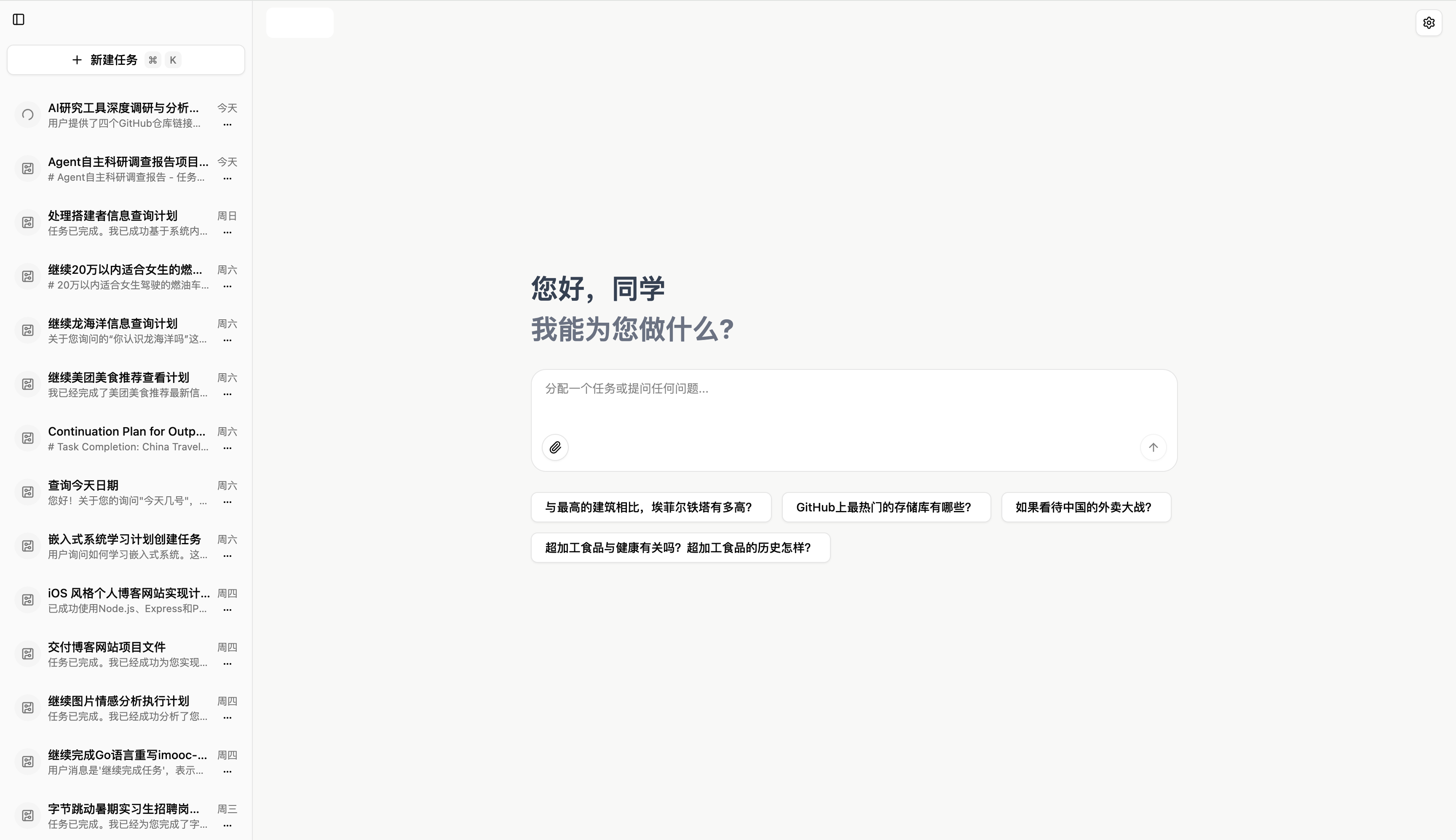
✨ What is MultiGen?
MultiGen is an open-source, general-purpose AI Agent platform designed for fully private, on-premise deployment. It pairs a Planner agent (decomposes user goals into steps) with a ReAct agent (executes each step using tools), and runs every action inside an isolated Docker sandbox — so your data never leaves your infrastructure.
Out of the box, MultiGen can browse the web, run shell commands, generate images / videos / 3D models / TTS audio, build slide decks and reports, and orchestrate other agents via A2A and external tools via MCP.
💡 Think of it as your private, self-hosted alternative to Manus / Claude Agent / GPT Agent — but you own the data, the model, and the stack.
🚨 Pick the Right Branch for Your Deployment
MultiGen ships two long-lived branches — pick the one that matches your scenario:
Scenario Branch Use it for 🖥️ Local Docker deployment masterLocal one-command Docker stack, evaluation, development, contributing 🌐 Online / production deployment onlinePublic / production environments — battle-tested, with hotfixes & deployment configs verified online Local Docker (this branch —
master):# 🖥️ Local Docker deployment — use master git clone https://github.com/LiXiaoYaoCareFree/MultiGen.git cd MultiGen docker compose up -d --buildOnline / production:
# 🌐 Online / production deployment — use online
git clone -b online https://github.com/LiXiaoYaoCareFree/MultiGen.git
cd MultiGen
docker compose up -d --build
⚠️ Never deploy
masterto a public / production environment — onlyonlineis verified for that. Keep production in sync by pulling fromonlineonly.
🎯 Key Features
| 🧠 Planner + ReAct architecture | A two-stage agent: the Planner breaks down the goal into JSON sub-steps, the ReAct agent iteratively reasons & acts on each step. |
| 🔌 MCP & A2A native | Plug in any MCP server (search, maps, code, custom tools) and delegate sub-tasks to peer agents via Agent-to-Agent protocol. |
| 🛡️ Sandboxed execution | Every shell / browser / file action runs inside an isolated Ubuntu + Chrome + VNC container. The model can't touch your host. |
| 🎨 Multimodal generation | Built-in tools for image (Volcengine / SD), video, 3D models, TTS (Qwen / podcasts), virtual anchors, audio mixing, slide decks. |
| 🌐 Any OpenAI-compatible LLM | Works with DeepSeek, Volcengine, SiliconFlow, Qwen, OpenAI, vLLM, Ollama, etc. — just edit config.yaml. |
| 🚢 One-command deploy | docker compose up -d --build brings up the full stack: UI, API, sandbox, Postgres, Redis, Nginx. |
| 📡 Real-time streaming UI | SSE-driven Next.js frontend renders plans, tool calls, intermediate results, and final answers live. |
| 🔁 Replayable sessions | Full session state in PostgreSQL; generated files mirrored locally and to Tencent COS for replay & sharing. |
📸 Showcase
🔬 End-to-End Research Workflow — Plan · Execute · Watch
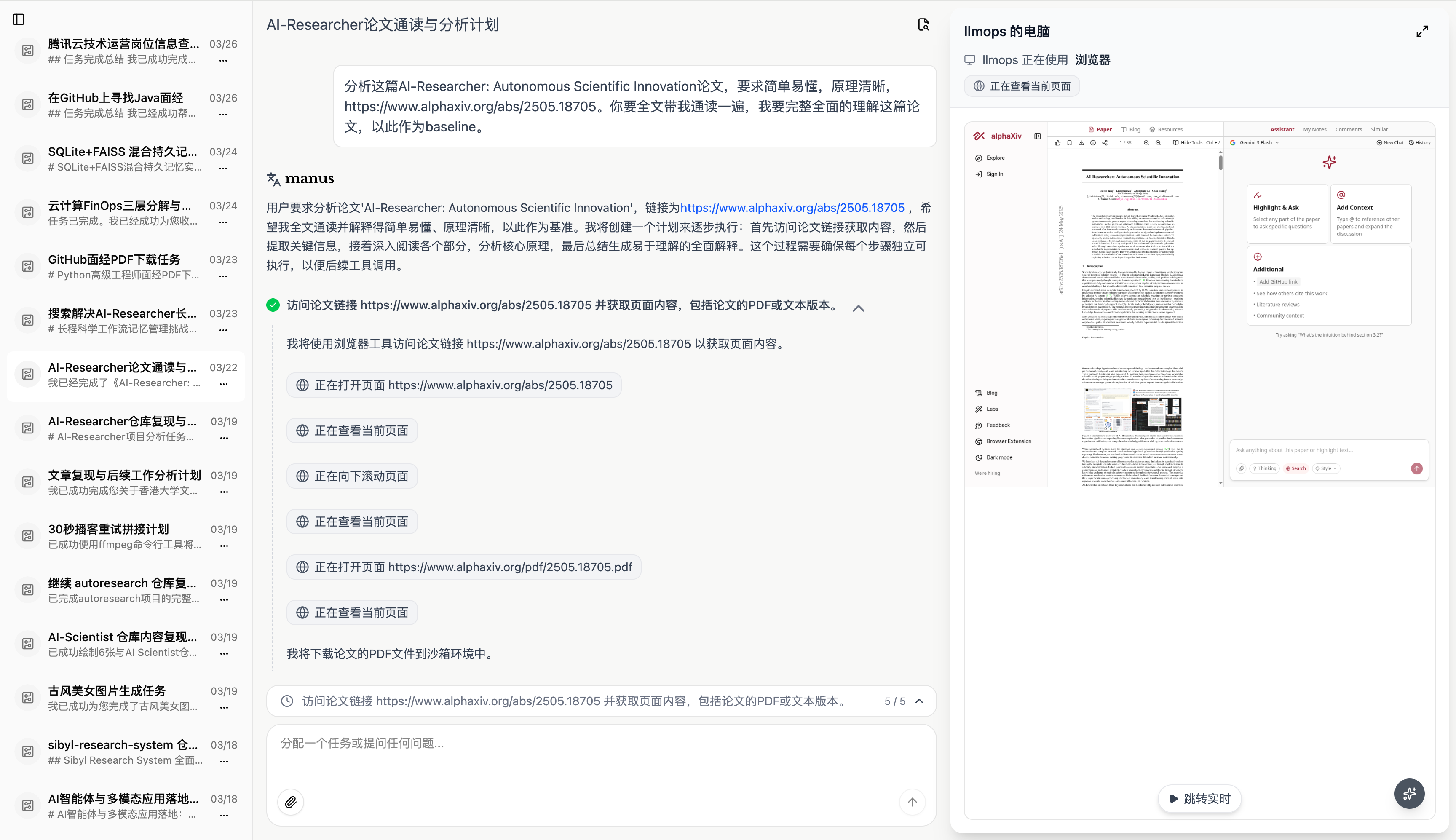
One screen, three layers of MultiGen at work: persistent session history, a live Planner+ReAct execution stream, and the agent's sandbox computer rendering the paper in real time.
The screenshot above captures MultiGen tackling a real task — "Analyze the AI-Researcher: Autonomous Scientific Innovation paper at alphaxiv.org/abs/2505.18705" — and showcases three of the platform's most distinctive capabilities in a single view:
🗂️ 1. Persistent multi-session workspace (left sidebar)
Every conversation is a fully replayable session, stored in PostgreSQL and synced to Tencent COS. The sidebar in the screenshot shows the breadth of tasks MultiGen handles out of the box:
| Visible session | Tools exercised |
|---|---|
| 📊 Baidu tech-ops weekly charts | browser · file · shell |
| 💻 GitHub Java project discovery | search · browser |
| 🧮 SQLite + FAISS data vectorization | shell · file |
| 📚 PDF batch download & merge from GitHub | browser · file · shell |
| 🏯 Late-autumn Hangzhou Faming Temple image search | search · image_generation |
| 📄 AI-Researcher paper reading (active) | browser · file · mcp |
| 🎙️ Article voice-over + song audio mixing | qwen_tts · audio_mixing |
| 🧊 3D pet model retrieval & rendering | model_3d · browser |
🧪 autoresearcher / AI-Scientist / sibyl-research-system paper deep-dives | browser · file · a2a |
| 🎬 Automated cute-video generation pipeline | volcano_image · volcano_video · video_concatenation · virtual_anchor |
Sessions persist across restarts and can be reopened, branched, or replayed step-by-step — powered by SQLAlchemy async + Alembic migrations.
🧠 2. Live Planner+ReAct execution stream (center)
The center column streams the agent's reasoning in real time over SSE. For this task you can see the two-stage architecture cleanly:
- PlannerAgent parses the user goal and emits a JSON plan — fetch URL → browse page → download PDF → extract content → summarize.
- ReActAgent picks up each step and iteratively reasons → calls a tool → observes the result → continues:
- ✅
访问论文链接—browser.goto(https://www.alphaxiv.org/abs/2505.18705) - ✅
正在打开网页—browser.snapshot()returning the page DOM - ✅
正在浏览网页— extracting title, abstract, sections - ✅
正在下载文件—browser.download()of the PDF - ✅
正在打开文件—file.read(.../2505.18705.pdf)to ingest content - 🔄 ...continues until the ReAct loop summarizes the paper
- ✅
Every green check is a discriminated event (plan · step · tool · message · done) flowing through /api/sessions/{id}/chat — defined in api/app/domain/models/event.py and produced by PlannerReActFlow in api/app/domain/services/flows/planner_react.py.
🖥️ 3. The Agent's Computer — live sandbox preview (right pane: "limpps 的电脑")
The right pane is not a static screenshot — it's a live window into the agent's isolated Docker sandbox. As the ReAct loop drives the headless Chrome inside the sandbox (Ubuntu + Chrome + VNC, port 8080), you see exactly what the agent sees:
- 🌍 The alphaxiv.org paper rendered inside the sandbox browser
- 📑 The PDF preview with "Highlight of Key Insights" section in view
- 🔍 Scroll / click / extract events mirrored frame-by-frame
This is full "computer use" transparency — your model can browse, click, type, and download, but it's all firewalled inside a disposable container. Your host machine is never touched, and every action is observable and auditable.
🛡️ Why this matters for private deployment: the model never gets a shell on your infrastructure. Every
shell,browser, andfiletool call is proxied to the sandbox container, which can be destroyed and rebuilt at will.
🌐 Web Search & Knowledge Retrieval
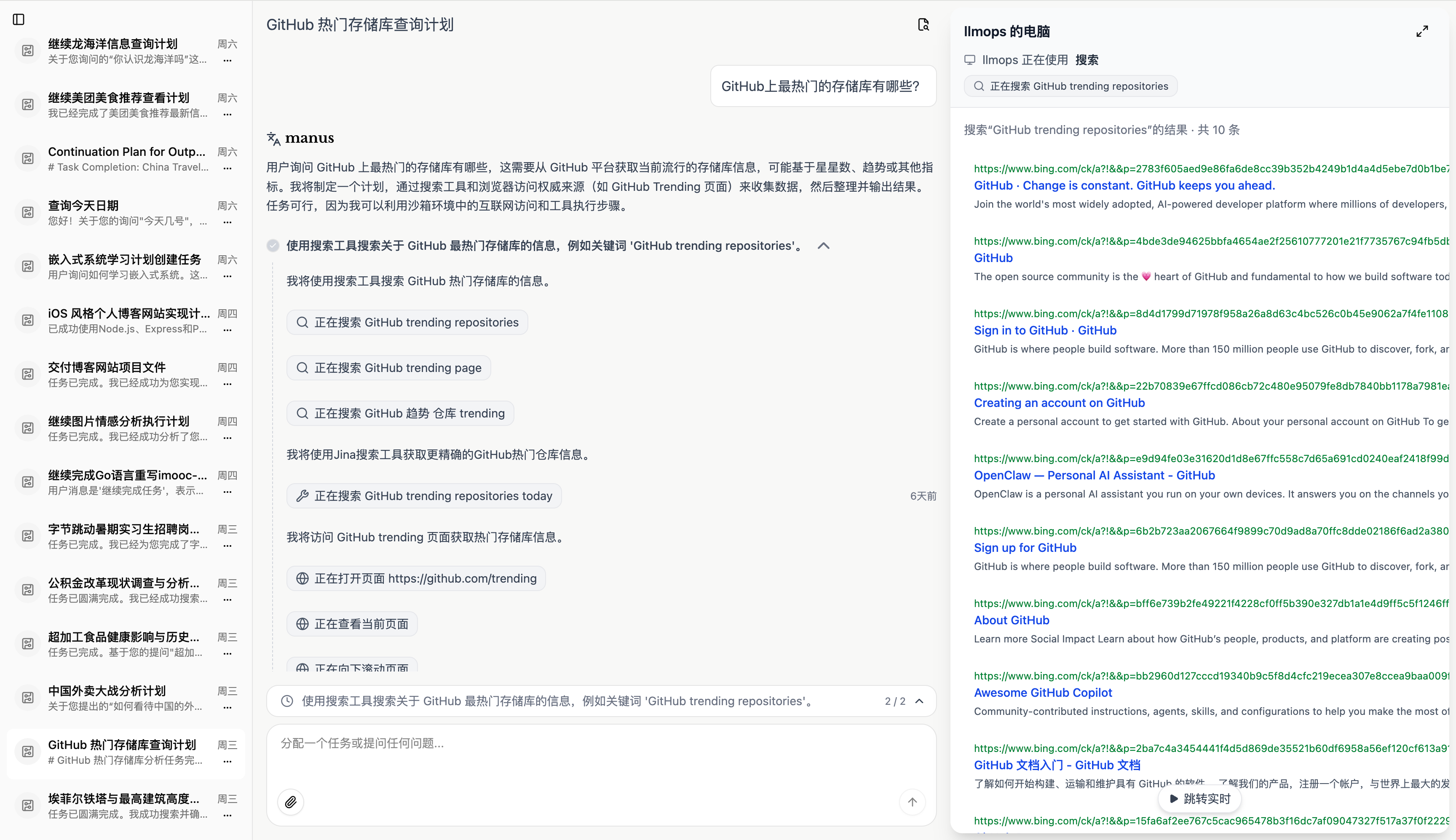
Agent plans the search, calls the right tool, and synthesizes a sourced answer.
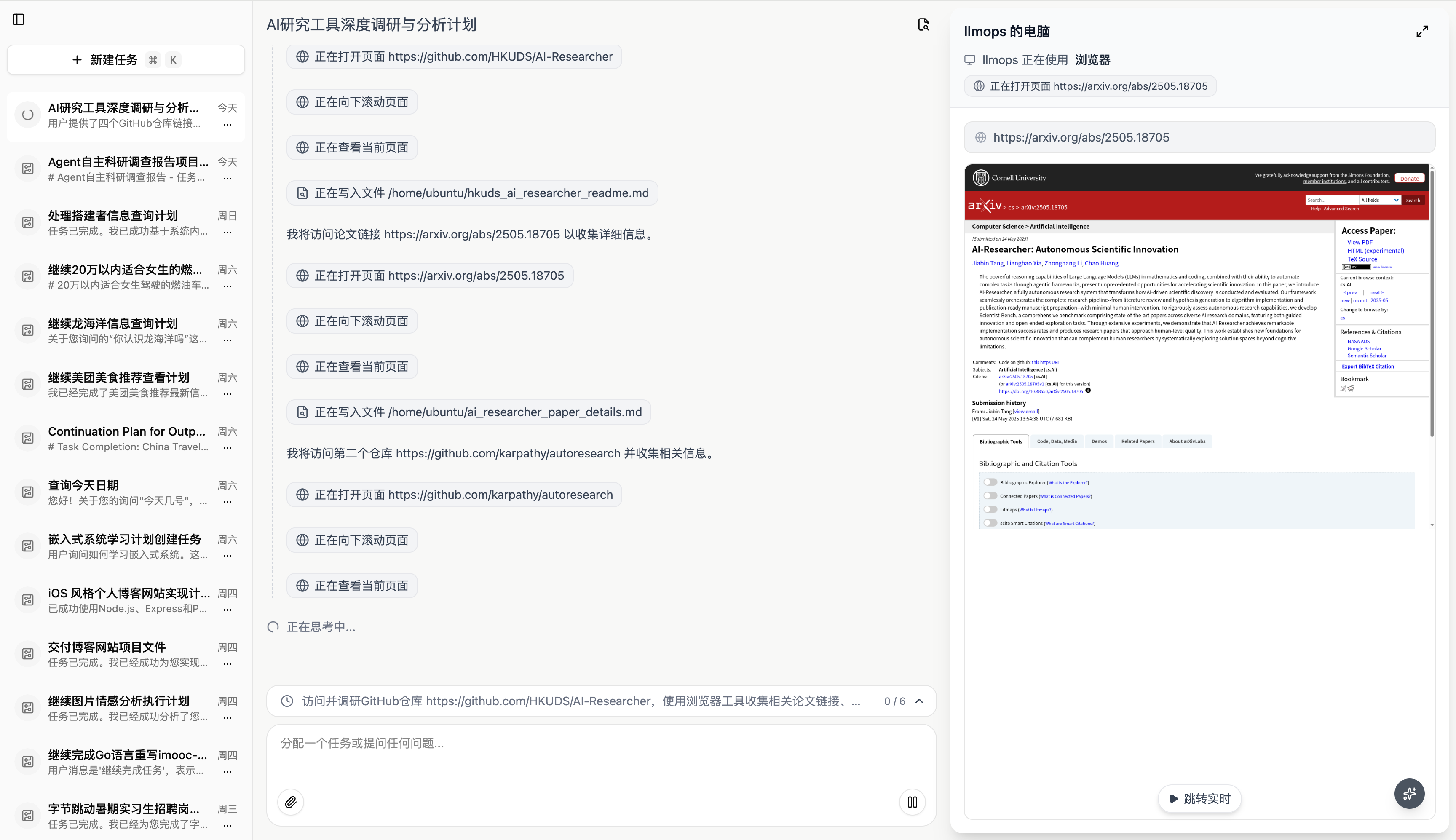
Image search and ranking, with live previews streamed back to the UI.
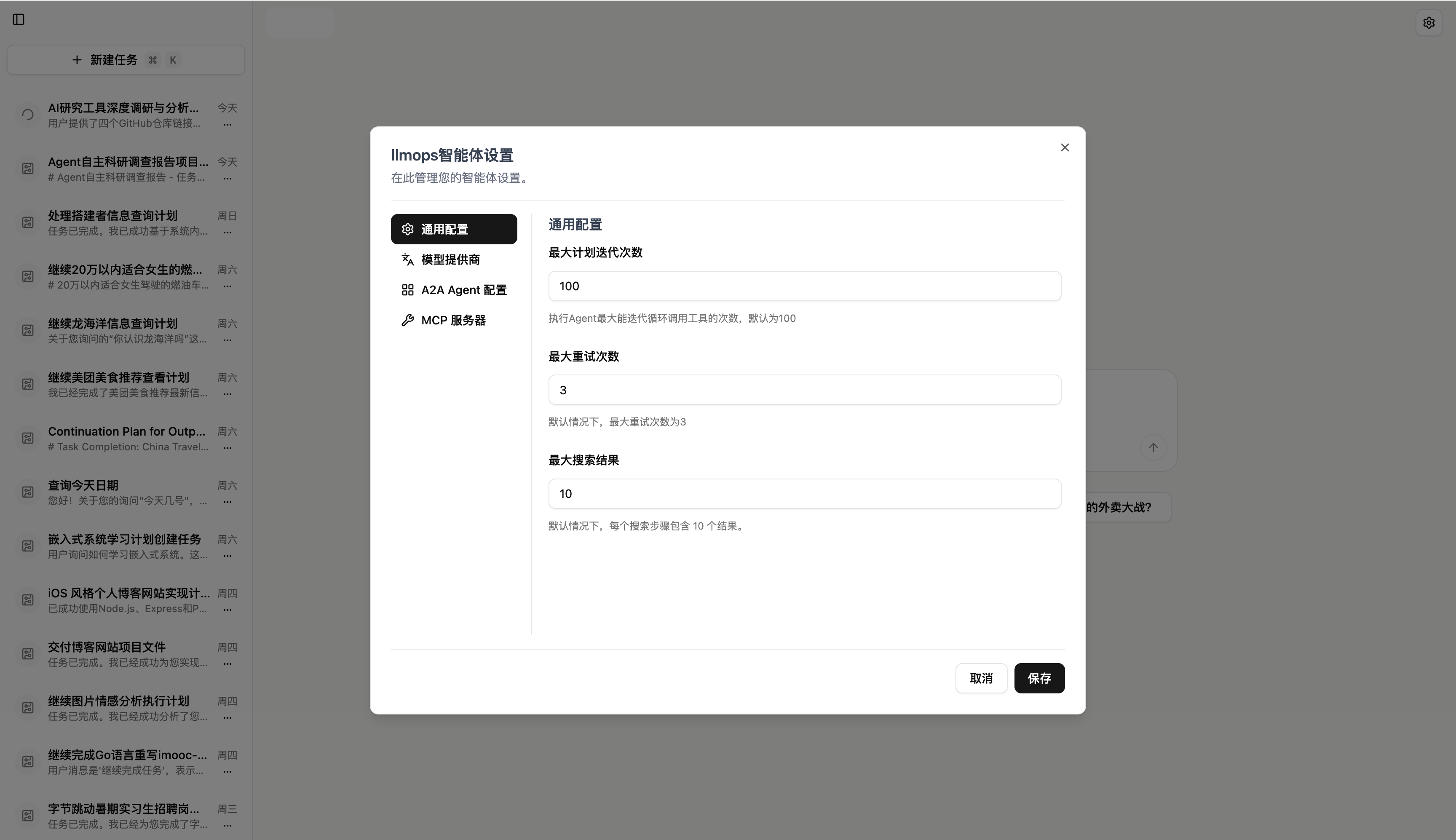
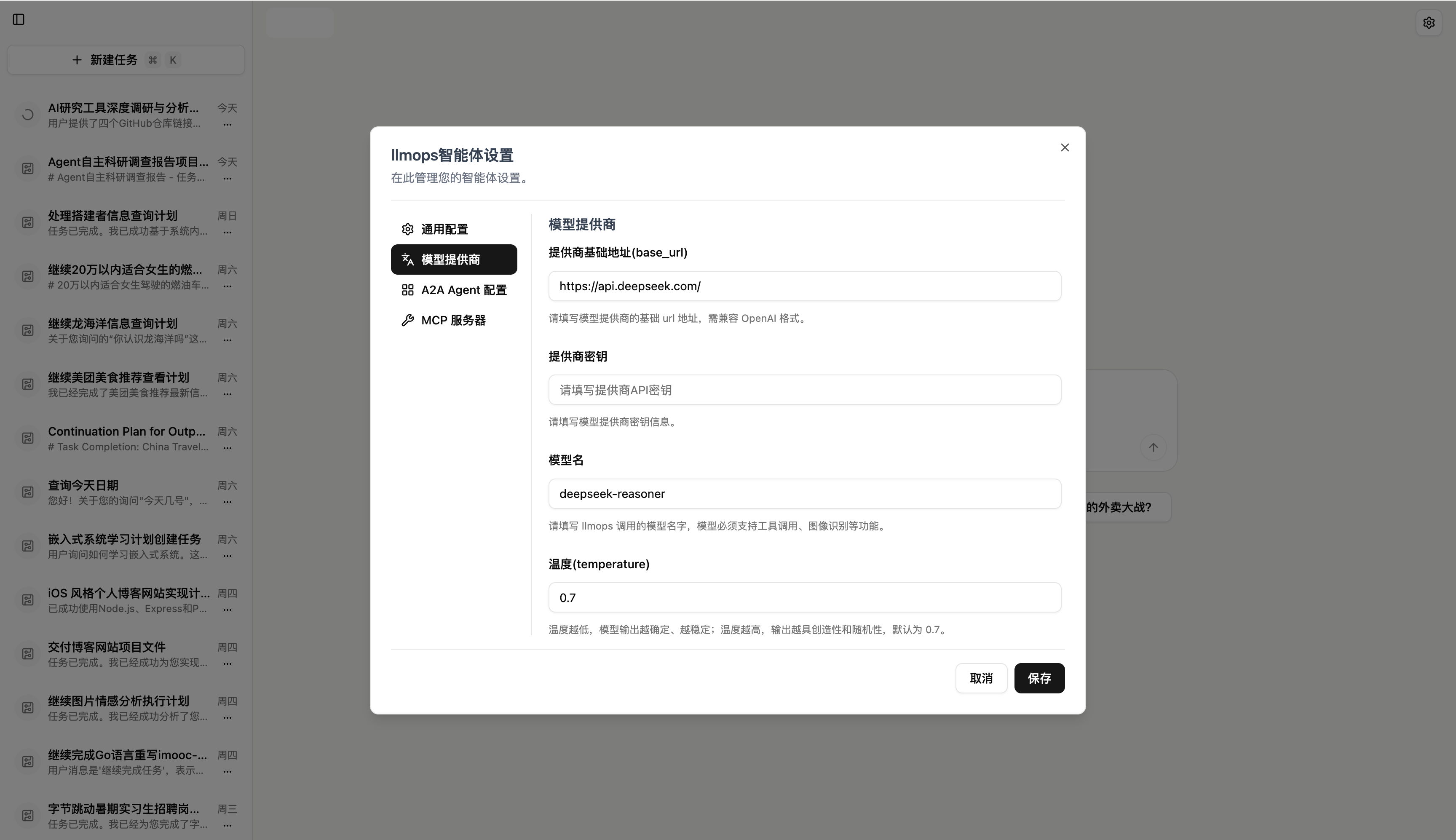
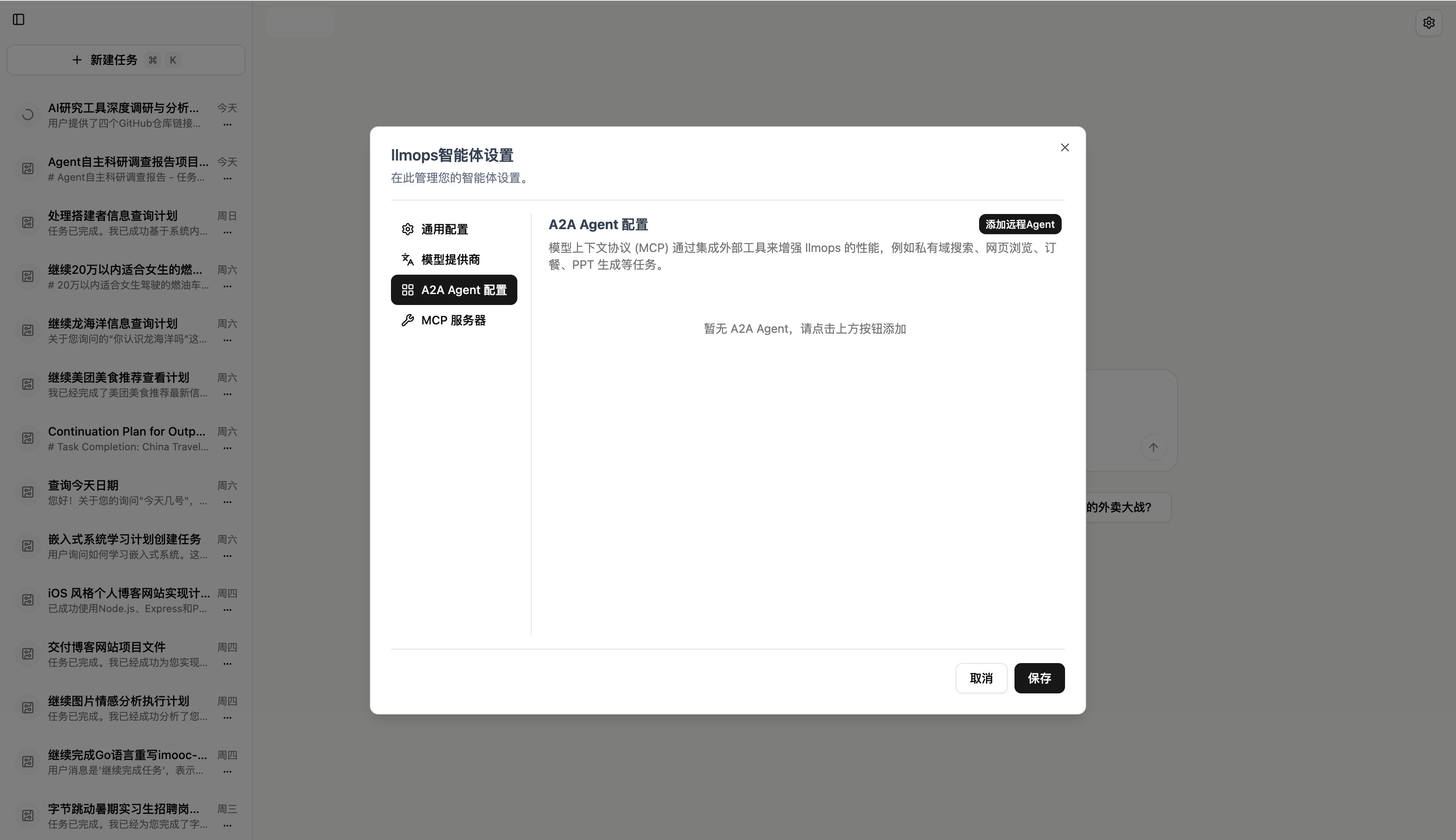
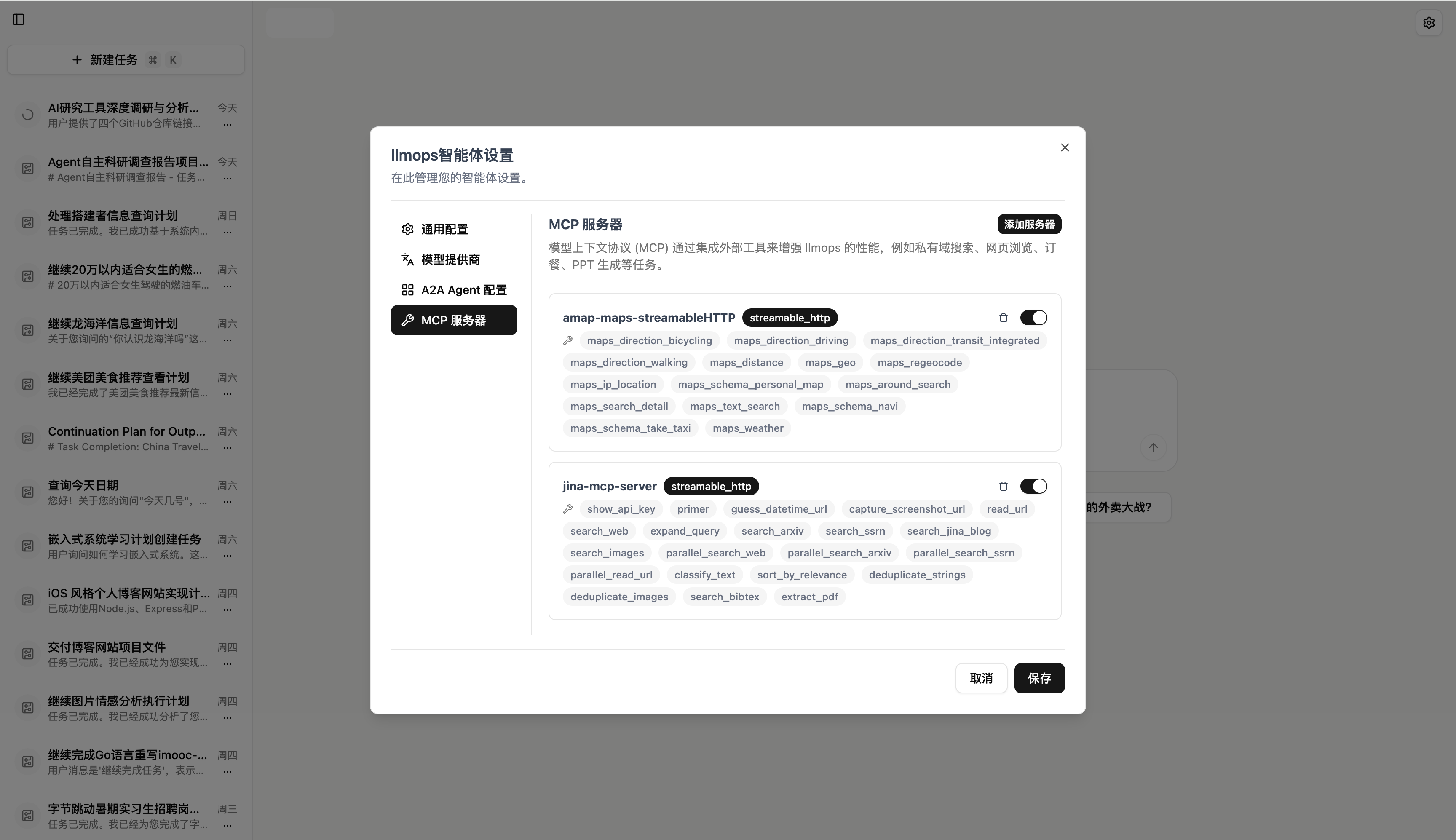
⚙️ Settings & Configuration
LLM provider — connect any OpenAI-compatible endpoint |
Agent behavior — iterations, retries, search depth |
MCP servers — plug in external tools live |
A2A agents — federate with peer agents |
🖼️ Multimodal Generation
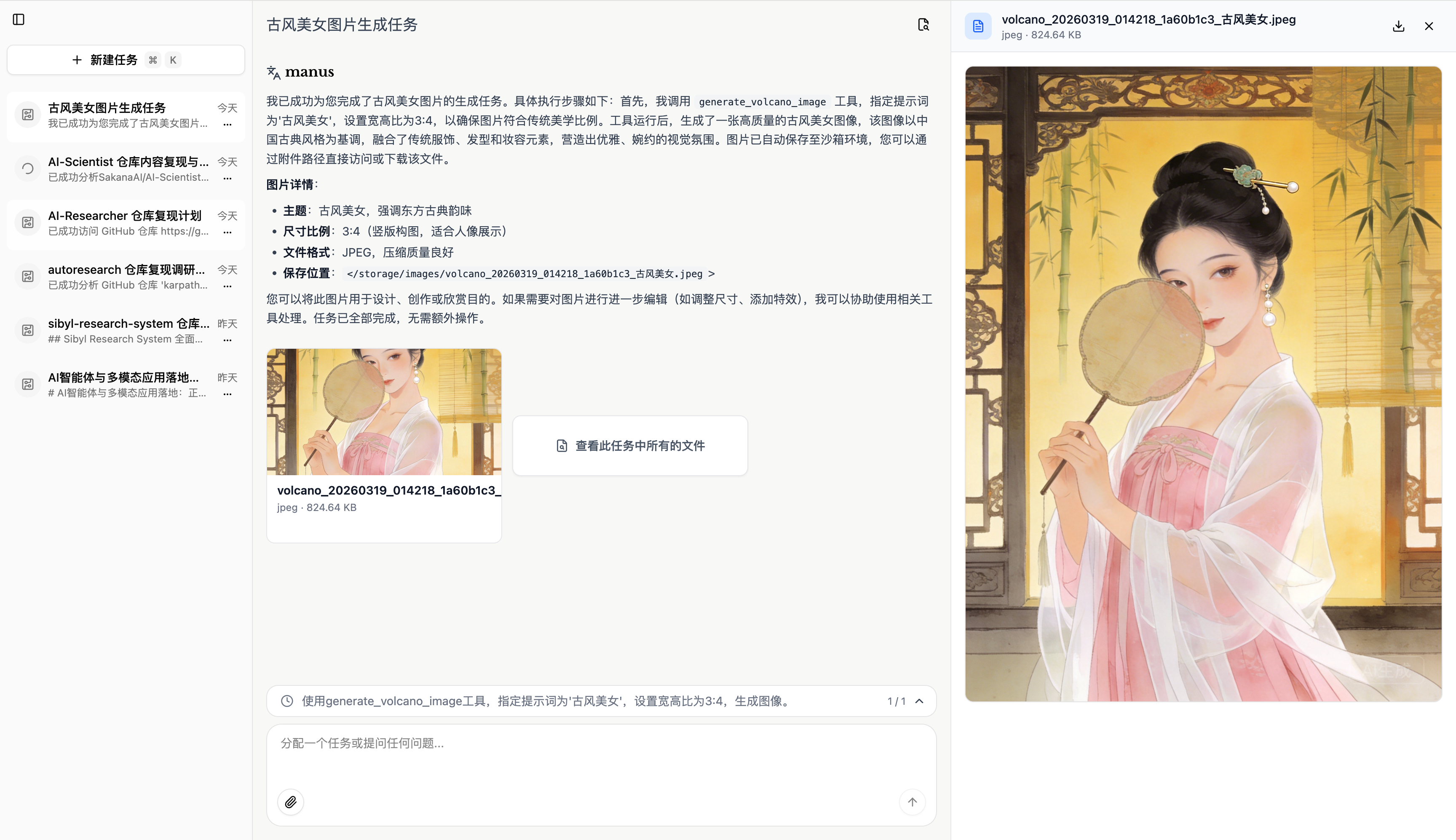
End-to-end creative workflow — from prompt, to plan, to rendered assets.

Generated portrait #1 |

Generated portrait #2 |

Generated portrait #3 |
🎙️ Podcasts & TTS
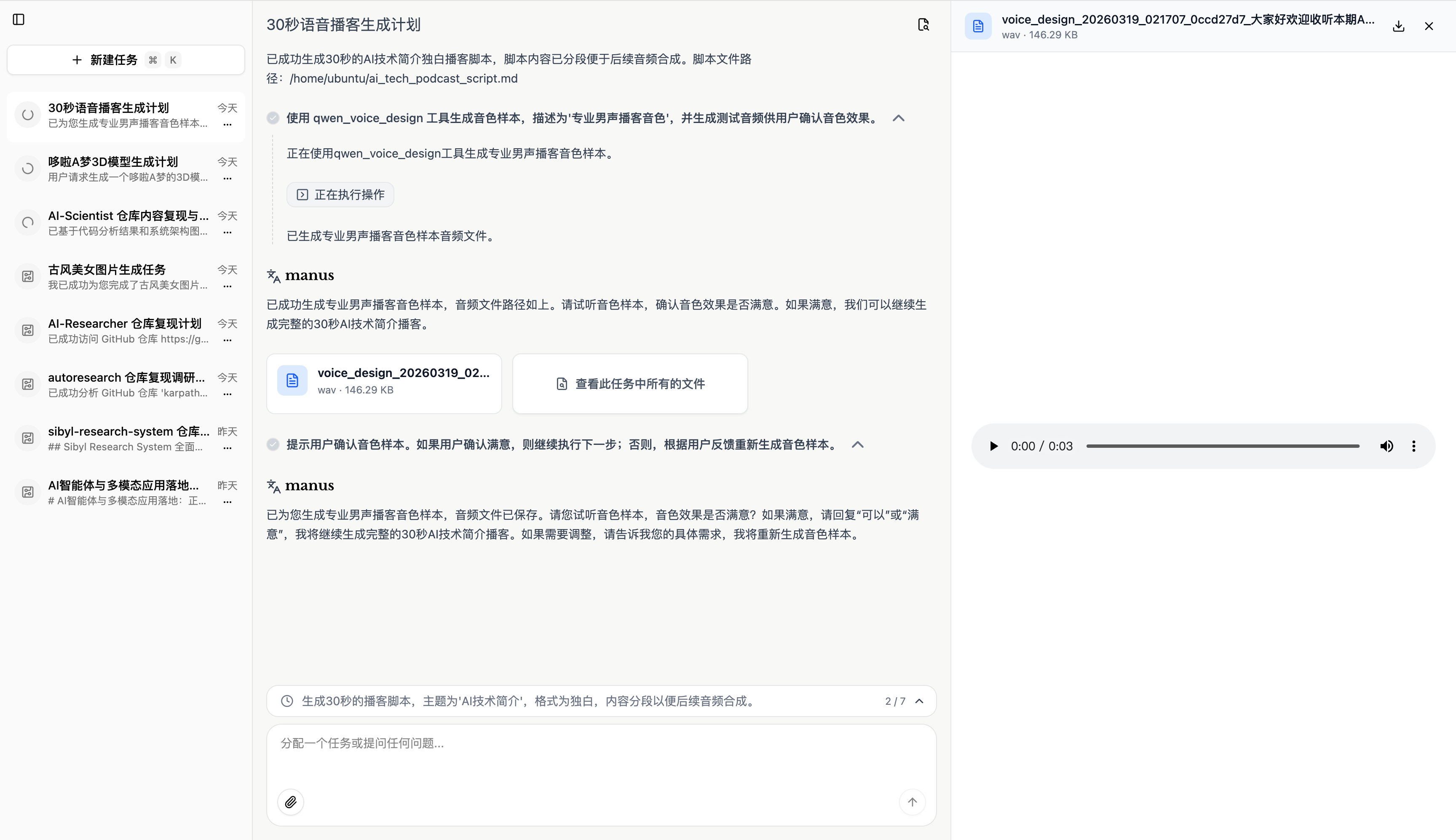
Generate full multi-speaker podcasts with Qwen-TTS, automatically mixed with background music.
🏗️ Architecture
              ┌─────────────────────────────────────────────┐
              │              Next.js UI  (3000)             │
              │   Plans · Steps · Tool calls · SSE stream   │
              └────────────────────┬────────────────────────┘
                                   │  /api  (SSE)
                                   ▼
              ┌─────────────────────────────────────────────┐
              │              FastAPI  (8000)                │
              │  ┌──────────────┐    ┌───────────────────┐  │
              │  │ AgentService │ →  │ AgentTaskRunner   │  │
              │  └──────────────┘    └────────┬──────────┘  │
              │                               ▼              │
              │              ┌────────────────────────────┐  │
              │              │   PlannerReAct Flow        │  │
              │              │  Planner ─► ReAct (loop)   │  │
              │              └─────┬──────────────────────┘  │
              │                    │ tools                   │
              │  ┌─────────────────┴──────────────────────┐  │
              │  │ file · shell · browser · search · MCP  │  │
              │  │ image · video · 3D · TTS · A2A · ...   │  │
              │  └────────────────────────────────────────┘  │
              └─────┬─────────────┬───────────────────┬─────┘
                    ▼             ▼                   ▼
              ┌──────────┐  ┌──────────┐     ┌──────────────────┐
              │PostgreSQL│  │  Redis   │     │  Docker Sandbox  │
              │ sessions │  │ streams  │     │  Ubuntu + Chrome │
              └──────────┘  └──────────┘     │     + VNC (8080) │
                                             └──────────────────┘
Agent execution flow:
AgentServicereceives a chat message → dispatches it to anAgentTaskRunnervia Redis Streams.AgentTaskRunnerrunsPlannerReActFlow:- PlannerAgent — decomposes the request into a JSON plan of sub-steps.
- ReActAgent — for each step, iteratively reasons → calls a tool → observes → continues, then summarizes.
- Events stream back via SSE (
plan·title·step·message·tool·wait·error·done).
🚀 Quick Start
Prerequisites
- 🐳 Docker
>= 20.10 - 🐙 Docker Compose
>= 2.0 - 🔑 An API key for any OpenAI-compatible LLM (DeepSeek / Volcengine / OpenAI / vLLM / Ollama…)
1. Clone
💡 Pick the right branch for your deployment scenario:
- 🖥️ Local Docker deployment → use
master(this branch)- 🌐 Online / production deployment → use
online
# 🖥️ Local Docker deployment — use master (default branch)
git clone https://github.com/LiXiaoYaoCareFree/MultiGen.git
cd MultiGen

# 🌐 Online / production deployment — use online instead
# git clone -b online https://github.com/LiXiaoYaoCareFree/MultiGen.git
# cd MultiGen
2. Configure environment
Create a .env file in the project root:
# ── Required ─────────────────────────────────────────────
COS_SECRET_ID=your_cos_secret_id_here       # Tencent COS SecretId
COS_SECRET_KEY=your_cos_secret_key_here     # Tencent COS SecretKey
COS_BUCKET=your_cos_bucket_here             # COS bucket name
OPENAI_API_KEY=your_llm_api_key_here        # LLM API key

# ── Optional ─────────────────────────────────────────────
NGINX_PORT=8088                             # public port
ADMIN_API_KEY=your_admin_api_key_here       # admin auth key
LLM_PROVIDER=volcano                        # deepseek / openai / volcano
TENCENT_AI3D_API_KEY=...                    # for 3D model generation
DASHSCOPE_API_KEY=...                       # for Qwen-TTS
3. Configure the LLM
Edit api/config.yaml:
llm_config:
  base_url: https://api.deepseek.com/
  api_key: YOUR_DEEPSEEK_API_KEY
  model_name: deepseek-reasoner
  temperature: 0.7
  max_tokens: 8192

agent_config:
  max_iterations: 100
  max_retries: 3
  max_search_results: 10

mcp_config:
  mcpServers:
    amap-maps-streamableHTTP:
      transport: streamable_http
      enabled: true
      url: https://mcp.amap.com/mcp?key=YOUR_AMAP_API_KEY
    jina-mcp-server:
      transport: streamable_http
      enabled: true
      url: https://mcp.jina.ai/v1
      headers:
        Authorization: Bearer YOUR_JINA_API_KEY
4. Launch
docker compose up -d --build5. Open
Visit http://localhost:8088 (or whichever NGINX_PORT you set). The API health probe lives at /api/status.
🧩 Built-in Tools
| Tool | Purpose |
|---|---|
file | Read / write / patch files inside the sandbox |
shell | Run shell commands in the sandbox |
browser | Headless Chrome — navigate, click, extract, screenshot |
search | Web search (Bing / Google / Jina) |
message | Ask the user a clarifying question mid-task |
image_generation · volcano_image | Text-to-image generation |
volcano_video · video_concatenation | Text-to-video & post-processing |
model_3d | Text/image-to-3D via Tencent AI3D |
virtual_anchor | Avatar / digital-human video |
qwen_tts · audio_mixing | TTS + multi-track audio mixing |
mcp | Call any registered MCP server |
a2a | Delegate a sub-task to a peer agent |
📚 To add your own tool, see CLAUDE.md → Adding a New Tool.
📦 Project Layout
MultiGen/
├── api/              # Backend API service (FastAPI)
│   ├── app/          # Domain / application / infrastructure layers
│   ├── tests/        # Pytest suite
│   └── config.yaml   # Runtime LLM / MCP / A2A config
├── ui/               # Frontend (Next.js 14, App Router)
├── sandbox/          # Sandbox runtime (Ubuntu + Chrome + VNC)
├── nginx/            # Reverse-proxy gateway
│   ├── nginx.conf
│   └── conf.d/default.conf
├── assets/           # Screenshots used in this README
├── docker-compose.yml
├── .env              # Environment variables (create your own)
└── README.md
🐳 Container Reference
| Container | Service | Description |
|---|---|---|
manus-nginx | Nginx | Reverse-proxy gateway, the only exposed entrypoint |
manus-ui | Next.js | Frontend UI |
manus-api | FastAPI | Backend API |
manus-postgres | PostgreSQL | Session & message store |
manus-redis | Redis | Task streams & cache |
manus-sandbox | Sandbox | Ubuntu + Chrome + VNC isolated runtime |
🛠️ Common Commands
# Start everything (detached) + rebuild images
docker compose up -d --build

# Check service status
docker compose ps

# Follow logs
docker compose logs -f
docker compose logs -f manus-api
docker compose logs -f manus-ui

# Restart a single service
docker compose restart manus-api

# Stop everything
docker compose down

# Stop and wipe data volumes (DANGEROUS — deletes the database)
docker compose down -v
🔒 Enable HTTPS
- Place your TLS files in
nginx/ssl/:fullchain.pemprivkey.pem
- In
nginx/conf.d/default.conf, add/enable alisten 443 sslserver block pointing at those files. - In
docker-compose.yml, enable the443:443port mapping (and mountnginx/sslif needed). - Apply changes:
docker compose restart manus-nginx
💻 Local Development
Each sub-project has its own dev guide:
- 🔧 API service — FastAPI, SQLAlchemy async, Alembic, Pytest
- 🎨 UI service — Next.js 14, App Router, SSE streaming
- 📦 Sandbox service — Ubuntu + Chrome + VNC runtime
Quickstart for the API:
cd api
python -m venv .venv && source .venv/bin/activate
pip install uv && uv pip install -r requirements.txt
playwright install
uvicorn app.main:app --host 0.0.0.0 --port 8000 --reload
🗺️ Roadmap
- Planner + ReAct dual-agent flow
- MCP & A2A integrations
- Multimodal tools (image / video / 3D / TTS)
- DeepSeek reasoning-model (v4) compatibility
- Long-term memory / RAG plugin
- Multi-user workspace permissions
- Plugin marketplace for tools & MCP servers
- Mobile-friendly UI
🤝 Contributing
Contributions are warmly welcomed — issues, PRs, tool plugins, and translations alike.
- Fork the repository
- Create your feature branch (
git checkout -b feat/amazing-thing) - Commit your changes (
git commit -m 'feat: add amazing thing') - Push to the branch (
git push origin feat/amazing-thing) - Open a Pull Request
Please read CLAUDE.md first — it documents the architecture, the agent contracts, and how to add new tools / LLM providers safely.
🙏 Acknowledgements
MultiGen stands on the shoulders of these excellent projects:
- FastAPI · Next.js · SQLAlchemy
- Model Context Protocol · A2A
- Playwright · Docker
- DeepSeek · Volcengine · SiliconFlow · Qwen — for outstanding open-source LLM endpoints
📄 License
Released under the MIT License.
If MultiGen is useful to you, please consider giving it a ⭐ — it really helps!
Made with ❤️ for builders of private AI agents.