Free your notes by converting them to Markdown.
:floppy_disk: Download: Linux | Windows | macOS

If there is an issue at download or execution, please take a look at the step-by-step instructions.
:blue_book: Documentation
:star: If Jimmy is useful for you, feel free to star it on GitHub.



Use Cases
- Migrate between note apps. Jimmy's output is compatible with Joplin, Obsidian and more.
- Save your notes in a future-proof, human-readable format.
- Prepare your notes for processing in a LLM.
- Convert folders of office documents and PDFs recursively to Markdown.
Demo
Jimmy provides two interfaces:
- The Command Line Interface (CLI) can be used for scripting and provides the full set of features.
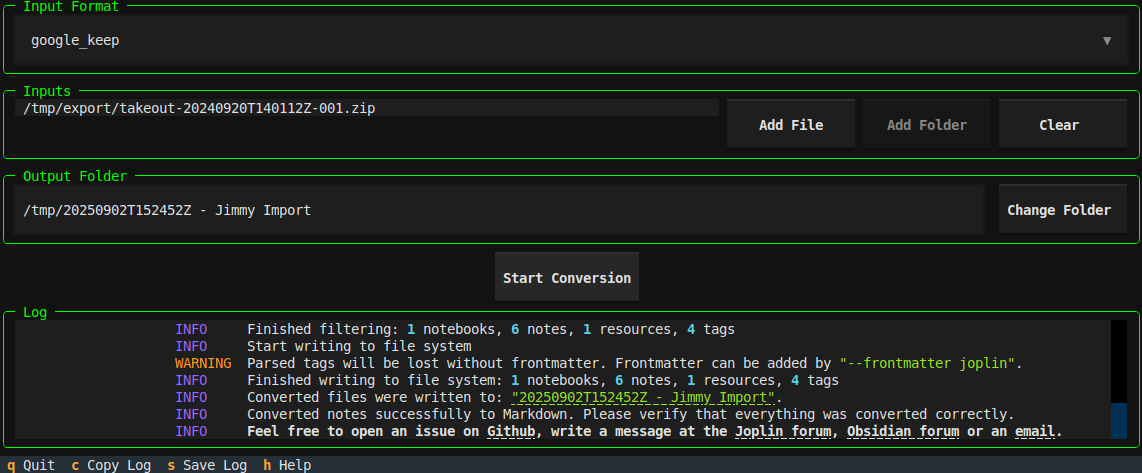
- The Terminal User Interface (TUI) can be used to do the conversion interactively. Currently it provides only a feature subset and is still in beta.
Example commands for Linux:
# do the conversion using an interactive TUI
jimmy-linux tui

# convert a single file supported by pandoc
jimmy-linux cli libre_office_document.odt

# convert all files in a folder
jimmy-linux cli path/to/folder

# convert a Google Keep export
jimmy-linux cli takeout-20240401T160516Z-001.zip --format google_keep
This is an example of a successful conversion:
| TUI | CLI |
|---|---|
If there is an issue at download or execution, please take a look at the step-by-step instructions.
Features
- ✅ Several supported input formats
- ✅ Markdown + Front matter output
- Compatible with any text editor
- Can be imported to Joplin/Obsidian/...
- Preserves resources, tags and note links when possible
- ✅ Offline
- ✅ Open Source
- ✅ Cross-platform
- ✅ Standalone (no Docker, Python or Node.js installation required)
- ❎ No AI used during conversion
Supported Apps
Export data from your app and convert it to Markdown. For details, click on the links.
A  Anki
Anki  Anytype
B  Bear
Bear
C  Cacher
  CherryTree
 ColorNote
D  Day One
Drafts
 Dynalist
E 
F  Facebook
  FuseBase / Nimbus Note
G  Google Docs
  Google Keep
J  Joplin
  jrnl
jrnl
N  Notion
O  Obsidian
  OneNote
Q  QOwnNotes
R  RedNotebook
  Reflect
  Roam Research
S  Signal
  Simplenote
 Synology Note Station
T  Telegram Textbundle / Textpack
  Tiddlywiki
  Tomboy-ng / Gnote
  Turtl
Turtl
U  UpNote
W  Wordpress
Z  Zettelkasten
  Zim
Zim  Zoho Notebook
Supported Formats
Convert a single file or a folder (recursively). Files of these formats will be converted to Markdown. The formats can be mixed. For example, you can convert a folder with two Asciidoc files and one DOCX file. The conversion result will be a folder with three Markdown files and the corresponding attachments.
A 
C  CSV
CSV
D DocBook  DOCX
DOCX
E EML  EPUB
EPUB
F  Fountain
H  HTML
HTML
J  Jupyter Notebook
M  Markdown
  MediaWiki MHTML
O  ODT
ODT  OPML
OPML
P  PDF
PDF
R reStructuredText RTF
T txt2tags
General Usage
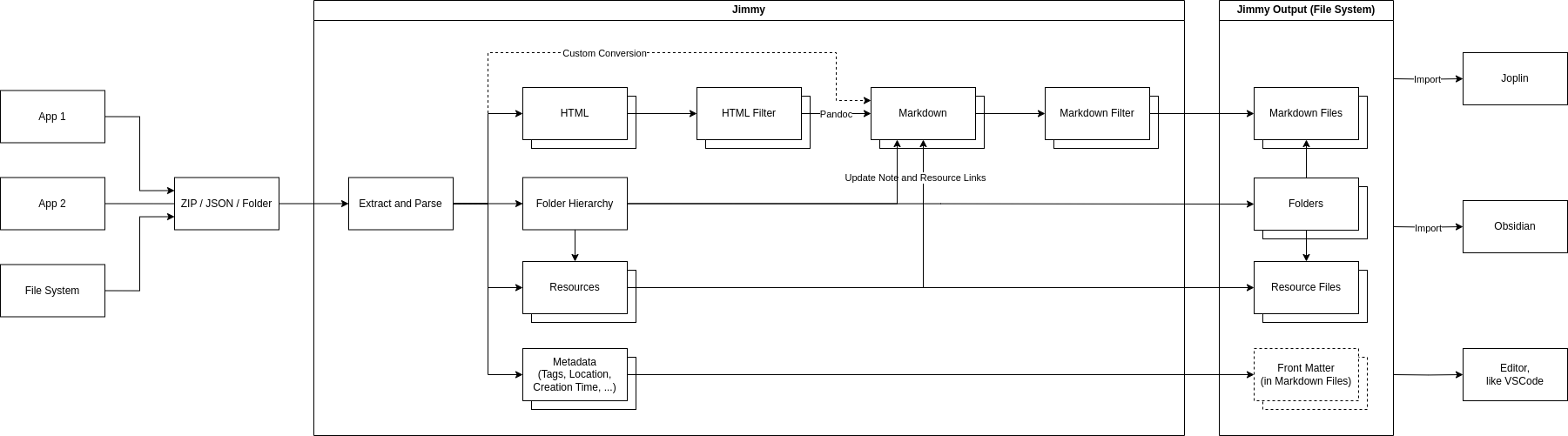
- Export/backup notes from your note application
- Run
jimmy, which converts your notes to Markdown - Import the result to Joplin/Obsidian or use any editor to view the notes
After conversion, the notes should be available in a folder named like YYYY-MM-DD HH:MM:SS - Import. Make sure your data is converted properly :exclamation:
What is converted (in most cases)?
- Note content
- Tags / Labels
- Images / Resources / Attachments
- External links and internal note links
Simplified Internal Workflow