Traffic Source
Open-source, self-hosted web analytics with conversion tracking and affiliate management. Deploy on a $4 VPS, own your data forever.
No monthly fees. No data sharing. No limits.
Built by the team behind SuperDevPro · NoCode Web Scraper · CrawlAPI · MailLayer · ClickDash
Features
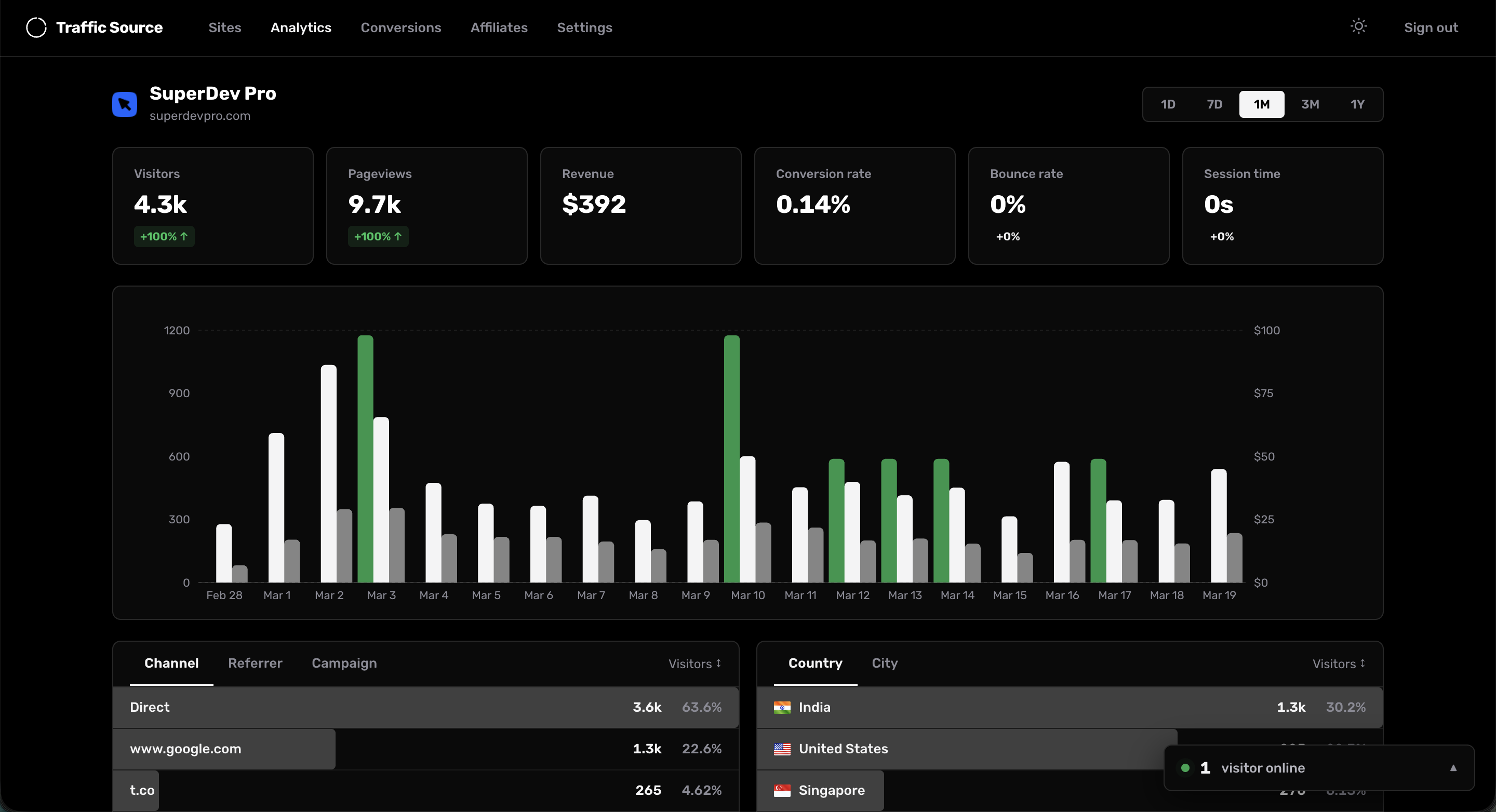
- Real-time Analytics — Live visitor count, pageviews, sessions, bounce rate, and session duration
- Traffic Sources — Referrers, UTM parameters (source, medium, campaign, term, content)
- Geo Tracking — Country and city-level visitor data via Cloudflare proxy headers
- Device & Browser — Browser, OS, device type, and screen resolution breakdowns
- Google Search Console — One-click connect, drill into any keyword to see its pages, countries, and devices on a single screen
- Conversion Tracking — Stripe integration that auto-syncs payments every 60 seconds — no webhooks needed
- Affiliate System — Create affiliates with custom commission rates, shareable referral links, and public dashboards
- Visitor Journeys — Full session replay showing every page a visitor viewed before converting
- Multi-site — Track multiple websites from a single dashboard
- Lightweight Script — ~3KB tracking snippet with SPA support (pushState/popstate)
- Privacy-first — No cookies for tracking, all data stays on your server
- SQLite — Zero-config database, no external services needed
Tech Stack
- Framework: Next.js 16 + React 19
- Database: SQLite (better-sqlite3) with WAL mode
- Payments: Stripe API (polling-based, no webhooks)
- Auth: JWT with httpOnly cookies
- Styling: SASS
- Charts: Recharts
Quick Start
Option 1: One-click deploy on Railway
No VPS setup needed — deploy in one click and you're live in under a minute.

Option 2: Self-host on a VPS
Prerequisites
- Node.js 20+
- A VPS ($4/mo on Hetzner or $6/mo on DigitalOcean works great)
- Cloudflare account (free tier) for geo data + CDN
1. Clone and install
git clone https://github.com/mddanishyusuf/traffic-source.git
cd traffic-source
npm install
2. Configure environment
cp .env.local .env.production
Edit .env.production:
JWT_SECRET=your-random-64-char-hex-string
JWT_EXPIRY=7d
NEXT_PUBLIC_APP_URL=https://your-domain.com
DATABASE_PATH=./data/analytics.db
Generate a secure JWT secret:
openssl rand -hex 32
3. Build and run
npm run build
npm start
The app runs on port 3000 by default.
4. Set up Cloudflare proxy
- Add your domain to Cloudflare (free plan)
- Point DNS A record to your VPS IP
- Enable the orange cloud (proxy) toggle
- Done — Cloudflare will now send
cf-ipcountryandcf-ipcityheaders automatically
5. First login
Visit your domain and register. Only the first user can register — after that, registration is disabled.
Production Deployment (VPS)
Using PM2 (recommended)
# Install PM2 globally
npm install -g pm2

# Start the app
pm2 start npm --name "trafficsource" -- start

# Auto-restart on reboot
pm2 startup
pm2 save
Zero-downtime deploys
The included deploy script pulls latest changes, builds in a temp directory, swaps atomically, and restarts PM2:
npm run deploy
Nginx reverse proxy
server {
    listen 80;
    server_name your-domain.com;

    location / {
        proxy_pass http://localhost:3000;
        proxy_http_version 1.1;
        proxy_set_header Upgrade $http_upgrade;
        proxy_set_header Connection 'upgrade';
        proxy_set_header Host $host;
        proxy_set_header X-Real-IP $remote_addr;
        proxy_set_header X-Forwarded-For $proxy_forwarded_for;
        proxy_set_header X-Forwarded-Proto $scheme;
        proxy_cache_bypass $http_upgrade;
    }
}
Since Cloudflare handles SSL, you can use Cloudflare's Origin CA certificate or Full (Strict) mode.
Adding the Tracking Script
After creating a site in the dashboard, add this to your website's <head>:
<script defer src="https://your-domain.com/t.js" data-site="YOUR_SITE_ID"></script>
That's it. The script automatically tracks:
- Pageviews (including SPA navigation)
- Referrers and UTM parameters
- Screen dimensions
- Affiliate referrals (
?ref=affiliate-slug)
Stripe Conversion Tracking
- Go to your site's Settings and add your Stripe Secret Key
- When creating Stripe Checkout Sessions in your app, pass the visitor tracking IDs:
const session = await stripe.checkout.sessions.create({
  // ...your checkout config
  metadata: {
    ts_visitor_id: window.__ts.vid,
    ts_session_id: window.__ts.sid(),
  },
});
Traffic Source polls Stripe every 60 seconds and automatically matches payments to visitor sessions — no webhook setup required.
Google Search Console
Connect your Google Search Console once and link any site to its property with a single click. Traffic Source keeps the last 90 days of keyword data and surfaces what's actually actionable: winners, losers, opportunities, quick wins, and a keyword explorer that shows pages, countries, and devices for any single query — something GSC's own UI doesn't surface together.
One-time setup (per Traffic Source instance)
You need a Google Cloud OAuth client. Anyone using this instance shares the same client — you only do this once.
- Create a Google Cloud project — console.cloud.google.com/projectcreate
- Enable the Search Console API — Search Console API → Enable
- Configure the OAuth consent screen — OAuth consent screen
- User type: External
- Add scope:
.../auth/webmasters.readonly - Add yourself (and any other users) under Test users
- Create OAuth credentials — Credentials → Create credentials → OAuth client ID
- Application type: Web application
- Under Authorized redirect URIs, paste the URI shown in Traffic Source → Settings → Integrations (auto-detected from your deployed domain)
- Save Client ID + Client Secret in Traffic Source — Settings → Integrations → paste both → Save
- Click "Connect Google Search Console" — authorize once, done
Credentials and refresh tokens are encrypted at rest with AES-256-GCM. The encryption key is auto-generated on first use and stored in data/.appkey (back this up alongside the database).
Linking a site
On any site → Search Console tab → pick the matching property → backfill runs in the background. From then on, sync runs hourly (each site throttled to once per 12h).
Affiliate System
- Go to your site's Affiliates page
- Create an affiliate with a name, slug, and commission rate
- Share their referral link:
https://your-site.com?ref=affiliate-slug - Affiliates can view their own public dashboard via a share link
When a visitor arrives via a referral link and later converts, the affiliate is automatically credited.
Environment Variables
| Variable | Required | Default | Description |
|---|---|---|---|
JWT_SECRET | Yes | — | Random hex string for signing auth tokens |
JWT_EXPIRY | No | 7d | Auth token expiry duration |
NEXT_PUBLIC_APP_URL | Yes | — | Public URL of your Traffic Source instance |
DATABASE_PATH | No | ./data/analytics.db | Path to SQLite database file |
CRON_SECRET | No | — | Secret for protecting cron endpoints |
Database
Traffic Source uses SQLite with WAL mode — no external database to set up or maintain. The database file lives at DATABASE_PATH and includes automatic migrations.
Backup your database:
cp ./data/analytics.db ./data/analytics-backup-$(date +%Y%m%d).db
Project Structure
├── public/
│   └── t.js                    # Tracking script (served to client sites)
├── scripts/
│   └── deploy.sh               # Zero-downtime deploy script
├── src/
│   ├── components/             # React components
│   ├── contexts/               # Auth, DateRange, Theme contexts
│   ├── hooks/                  # useAnalytics, custom hooks
│   ├── lib/
│   │   ├── db.js               # Database connection & migrations
│   │   ├── analytics.js        # Analytics query logic
│   │   ├── auth.js             # JWT & password helpers
│   │   ├── stripe-sync.js      # Stripe payment polling
│   │   └── withAuth.js         # Auth middleware for API routes
│   ├── pages/
│   │   ├── api/                # API routes (collect, auth, analytics, cron)
│   │   ├── analytics/          # Dashboard pages
│   │   └── sites/              # Site management
│   └── styles/                 # SASS stylesheets
├── data/                       # SQLite database directory
└── .env.local                  # Environment config
License
MIT