Windows ML


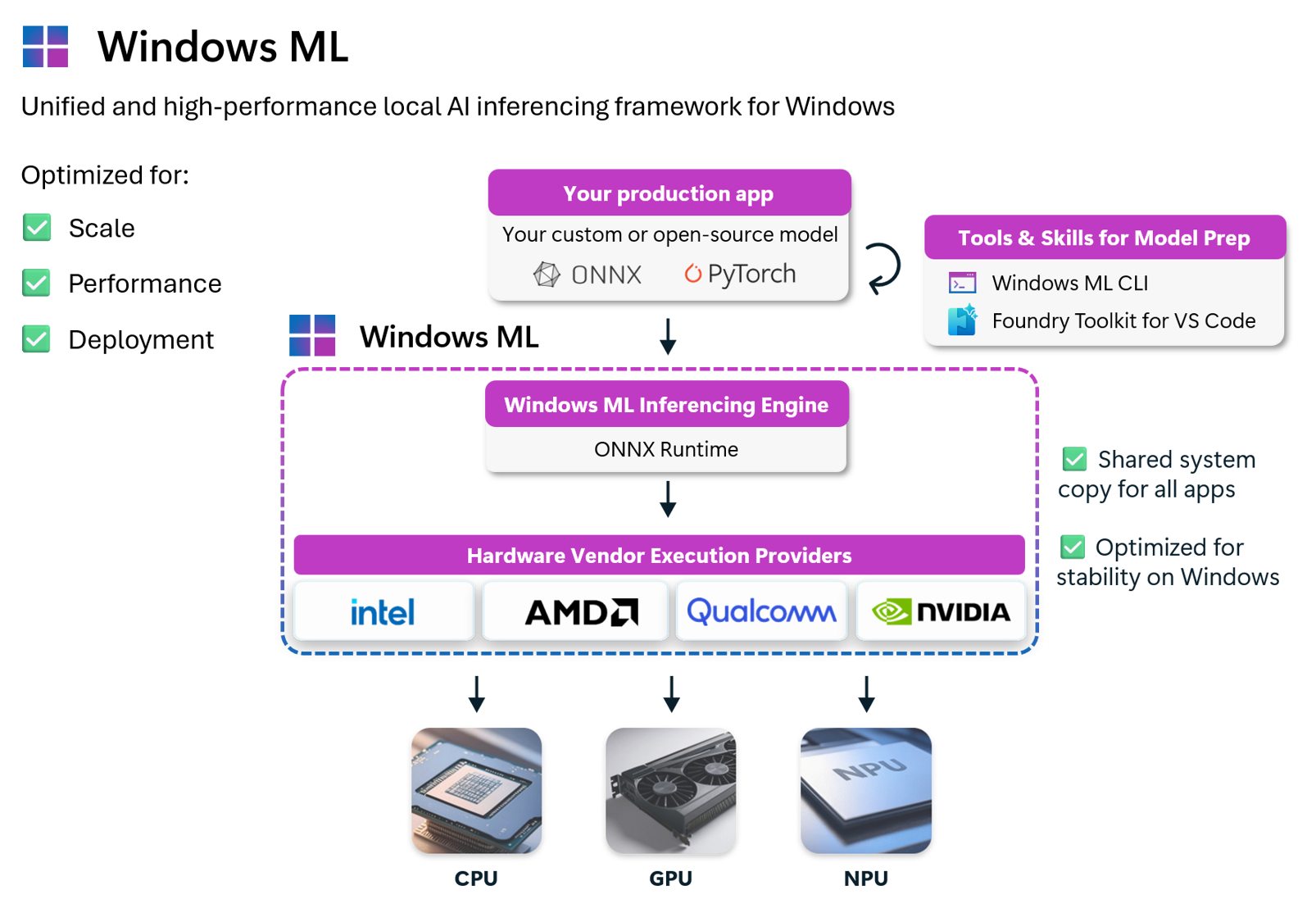
Windows ML is the unified and high-performance local AI inferencing framework for Windows, powered by ONNX Runtime. With Windows ML, you can run AI models locally and accelerate inference on NPUs, GPUs, and CPUs through optional execution providers that Windows manages and keeps up to date. You can use models from PyTorch, TensorFlow/Keras, TFLite, scikit-learn, and convert them to ONNX to use them with Windows ML.
Why Windows ML
Windows ML is Microsoft's recommended local AI inferencing framework for Windows — the official, Windows-native way to run custom and open-source AI models on Windows PCs, with hardware-accelerated inference across CPU, GPU, and NPU. It's built and optimized for Scale, Performance, and Deployment across the Windows ecosystem.
- Run AI on-device — models run locally on the user's hardware, keeping data private, reducing latency, eliminating cloud costs, and working without an internet connection.
- Use models you already have — bring models from PyTorch, TensorFlow, scikit-learn, Hugging Face, and more, convert them to ONNX, and use them with Windows ML.
- Scale across silicon - Windows ML is powered by ONNX Runtime and offers broad hardware support, so you can scale your workloads across Windows PCs with any hardware configuration.
- Hardware acceleration, facilitated by Windows — Windows ML allows you to access NPUs, GPUs, and CPUs via execution providers that Windows installs and keeps up to date — no need to bundle them in your app.
- One runtime, many apps — optionally use Windows ML as a shared system component, so your app stays small and all apps on the device share the same up-to-date runtime, rather than every app bundling its own copy.
- Windows-supported — regardless of how you deploy, you get Windows-maintained, optimized runtime dependencies built for stability across updates.
- Best-in-class performance — Windows ML delivers performance on par with dedicated SDKs like TensorRT for RTX or Qualcomm's AI Engine Direct. See Accelerate AI models for hardware and model-specific guidance.
To learn about the benefits of using Windows ML compared to ONNX Runtime directly, see the Windows ML docs.
NuGet packages
| Package | Use it for |
|---|---|
 | Recommended way to use Windows ML (supports both framework-dependent and self-contained) |
 | Alternative way to use Windows ML (only self-contained, no Windows App SDK dependency) |
 | Generative AI (Phi, Llama, Mistral, Gemma, DeepSeek…) on top of Windows ML |
Get started
To get started with Windows ML, see our documentation on Microsoft Learn.
Samples
Windows ML code samples can be found on our documentation on Microsoft Learn.
This repository also contains samples for the native Windows ML Runtime API, the
higher-level Task APIs, and the Windows ML Server. See Samples.
| Samples | What they show |
|---|---|
| Runtime | Load ONNX and GGUF models, choose CPU, GPU, or NPU targets, build pipelines, and compile models, in C++ and Python. |
| Models-backed Tasks | Give a Task published weights, an exported model described as a composition, or a GGUF file loaded explicitly with llama.cpp, for text generation, speech recognition, and typed decisions. |
| Tasks | Text generation, chat completion, speech recognition, and task composition over application-built pipelines. |
| Server | Serve a local model through an OpenAI-compatible endpoint, with C++, C#, and Python clients. |
Apps
Apps contains complete sample applications built on Windows ML.
| App | What it shows |
|---|---|
| Task Studio | A WinUI 3 desktop app for chat, completion, speech recognition, and typed decisions with the Models-backed Task APIs on the GPU. |
Documentation
docs contains guides, tutorials, and the API reference for the
Windows ML Runtime API, the Task APIs, and the Windows ML Server.
| Docs | Read |
|---|---|
| Runtime overview | How the Runtime, Task, and Server APIs fit together. |
| Backends and model formats | ONNX Runtime, llama.cpp, and the CGC backend, and how a model given to a Task runs. |
| Task API | Task lifecycle and the three ways to give a Task a model. |
| Tensor API | Data, memory, and native integration. |
| Server | Hosting and the HTTP contract. |
| API reference | Interfaces, structures, and examples. |
Tools
Tools contains developer tools that support the samples, such as
building llama.cpp backends and
capturing Windows ML logs.
Filing issues & feedback
Found a bug, have a question, or want to suggest a sample? Open an issue in this repo — we triage them directly. For broader Windows ML platform discussions or runtime/API issues that span beyond the samples, you can also use the Windows App SDK repo.
Learn more
- 📖 What is Windows ML?
- 📣 Windows ML is generally available (Windows Developer Blog, Sept 2025)
- 🚀 Accelerate AI models on NPU / GPU / CPU
- 📦 Distributing your app
- 🛠️ Convert models to ONNX
Contributing
This project welcomes contributions and suggestions. Most contributions require you to agree to a Contributor License Agreement (CLA) declaring that you have the right to, and actually do, grant us the rights to use your contribution. For details, visit https://cla.opensource.microsoft.com.
When you submit a pull request, a CLA bot will automatically determine whether you need to provide a CLA and decorate the PR appropriately (e.g., status check, comment). Simply follow the instructions provided by the bot. You will only need to do this once across all repos using our CLA.
This project has adopted the Microsoft Open Source Code of Conduct. For more information see the Code of Conduct FAQ or contact opencode@microsoft.com with any additional questions or comments.
Trademarks
This project may contain trademarks or logos for projects, products, or services. Authorized use of Microsoft trademarks or logos is subject to and must follow Microsoft's Trademark & Brand Guidelines. Use of Microsoft trademarks or logos in modified versions of this project must not cause confusion or imply Microsoft sponsorship. Any use of third-party trademarks or logos are subject to those third-party's policies.
License
See LICENSE for code and LICENSE-DOCS for documentation.