
Open-source tracing & testing for GenAI apps and agents.





A GitHub Star goes a long way.

How It Works · Quick Start · Testing · Frameworks · Integrations · Contributing
Built under the Linux Foundation AI & Data umbrella, designed to plug into your existing OpenTelemetry stack. With a few lines of code (or none at all), you get rich traces, CI-friendly tests, and deep visibility across LLMs, agents, tools, and vector stores.
How it works
At its core, Monocle is a GenAI-specific observability layer built on OpenTelemetry.
- 🧬 Metamodel — defines entities such as agents, prompts, responses, tools, and vector operations, and maps them to standardized span attributes. See the metamodel docs for details.
- 🔌 Instrumentation adapters — for GenAI frameworks automatically create spans for key operations (agent runs, tool calls, LLM invocations, retrieval queries) without you wiring them manually.
- 📤 OTLP-compatible traces — your existing collectors, backends, and dashboards just work.
Because the traces are structured and consistent, they are easy for humans, dashboards, and even SRE/QA agents to consume.
Why developers love Monocle
- 🔍 Turn black-box agents into step-by-step traces — see every model call, tool invocation, vector lookup, and intermediate state in one connected timeline.
- 🧩 Works with the GenAI stack you already use — LangChain, LlamaIndex, Haystack, Google ADK, OpenAI, Anthropic and more are supported through first-class instrumentation.
- 📡 Speaks OpenTelemetry natively — Monocle emits standard OTLP spans so you can send them to any observability backend (file, console, cloud storage, or your favorite APM).
- 🧪 Makes AI testing real, not aspirational — with
monocle-test-tools, you can assert on traces themselves — agents invoked, tools used, token costs, error states — not just input/output pairs. - 🏛️ Linux Foundation & CNCF community DNA — built and governed in the open, with contributions from the broader AI and cloud-native observability communities.
If you care about debuggability, reliability, or compliance for AI agents, Monocle is meant for you.
Who Monocle is for
- 👩💻 App developers — trace GenAI apps in any environment without decorating every function with bespoke OpenTelemetry code.
- 🏗️ Platform / infra engineers — prefer wrapping and operators over asking product teams to refactor their apps for observability.
- 🏢 Enterprises & SREs — standardized, OTel-compliant traces and CI-friendly AI tests that fit existing pipelines and dashboards.
What's in this repo
This repository contains the Python implementation of Monocle's tracing SDK and metamodel (monocle_apptrace), including:
- Core instrumentation utilities.
- A community-curated metamodel for consistent tracing of GenAI components (agents, LLM calls, tools, vector stores, etc.).
- Framework-specific adapters (e.g., LangChain, LlamaIndex, Haystack, Google ADK) so you don't have to handcraft spans.
- Export configuration for local JSON files, console, and cloud storage backends.
There is also a separate package, monocle-test-tools, which provides a testing and validation framework for AI agent tracing, built on top of pytest.
Quick Start
1. Install
pip install monocle_apptrace
2. Initialize telemetry once
from monocle_apptrace import setup_monocle_telemetry

setup_monocle_telemetry(workflow_name="simple_math_app")
This wires up OpenTelemetry, configures the Monocle metamodel, and auto-instruments supported frameworks without requiring you to manually create spans.
3. Run your app and inspect traces
By default, Monocle exports traces as JSON files under a local ./monocle directory:
monocle_trace_{workflow_name}_{trace_id}_{timestamp}.json
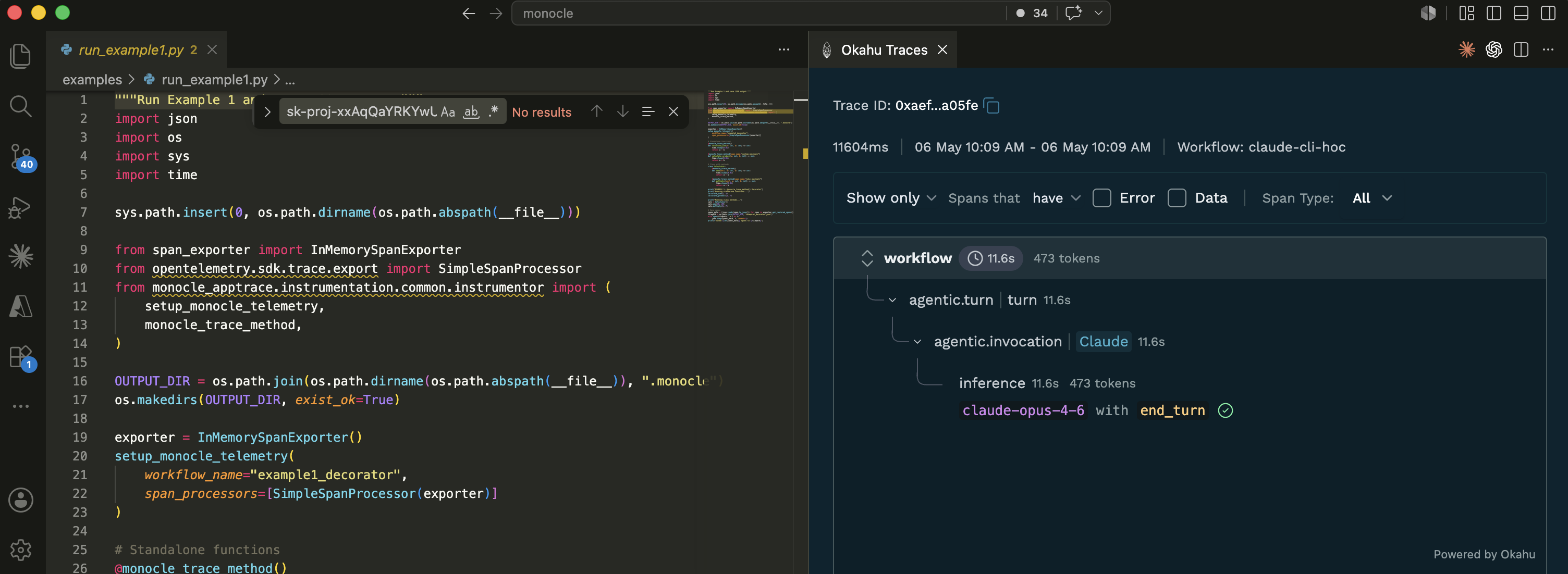
Each file contains an array of OpenTelemetry spans capturing agent runs, tool calls, and LLM interactions. Load them into any OTLP-compatible backend, or use the Okahu VS Code extension for a rich Gantt-style timeline visualization.
Example: tag traces with business context (scopes)
Use a scope to attach attributes like user_id, session_id, or tenant_id to every span created inside a block. Great for filtering traces by tenant or correlating a multi-step flow.
from monocle_apptrace.instrumentation.common.instrumentor import (
    monocle_trace_scope,
    monocle_trace_scope_method,
)

# Context manager — scope applies to every span inside the with-block
with monocle_trace_scope("user_id", "user-123"):
    result = my_agent.run("What's the weather in London?")

# Decorator — scope applies to every call of the function
@monocle_trace_scope_method("tenant_id", "acme-corp")
def handle_request(payload):
    ...
Async equivalents (amonocle_trace_scope) and full reference: Scope API docs.
Testing AI agents with monocle-test-tools
monocle-test-tools is the companion test framework that lets you write pytest-style tests that assert on traces, not just return values.
What you can validate
| Capability | Description |
|---|---|
| Agentic response | Did the agent produce the right kind of answer for a given input? |
| Agent invocation | Did the correct agent or sub-agent run, and delegate the right tasks? |
| Tool behavior | Were the intended tools called, with the expected parameters and outputs? |
| Inference quality & cost | Did responses match your schemas or rubrics, and stay within token/cost budgets? |
| E2E evaluations in CI/CD | Run eval-style tests as part of your pipeline using the same traces that power observability. |
Install
pip install monocle_test_tools
Example: validate agent behavior and tool calls
from monocle_test_tools import expected

def test_weather_agent():
    result = expected(
        input="What is the weather in London?",
        expected_output="weather report for London"
    )
    result.called_agent("weather_agent")
    result.called_tool("get_weather", agent_name="weather_agent")
    result.under_token_limit(5000)
    result.under_duration(10)
Example: assert on pre-recorded traces (offline)
Load a saved Monocle trace JSON and assert against it — no live agent run, no API keys.
from monocle_test_tools.span_loader import JSONSpanLoader

def test_from_saved_trace(monocle_trace_asserter):
    monocle_trace_asserter.load_spans(
        JSONSpanLoader.from_json("monocle/monocle_trace_my_app_abc123.json")
    )

    monocle_trace_asserter \
        .called_agent("summarizer_agent") \
        .contains_output("revenue")

    monocle_trace_asserter.does_not_call_tool("delete_record")
Example: multi-turn session evaluation
Pass a session_id so multiple turns roll up into one session, then evaluate at the agentic_sessions fact (role adherence, knowledge retention, conversation completeness across turns).
import pytest
from monocle_test_tools import MonocleValidator, TestCase

agent_test_cases = [
    {"test_input": ["Book a flight from SFO to Mumbai on 26 Nov."]},
    {"test_input": ["Now book a hotel near the airport for 4 nights."]},
]

@MonocleValidator().monocle_testcase(agent_test_cases)
async def test_multi_turn_session(test_case: TestCase):
    # Same session_id ties both turns to the same agentic session
    await MonocleValidator().test_agent_async(
        root_agent, "strands", test_case, session_id="travel_session_1"
    )

@pytest.mark.asyncio
async def test_session_quality(monocle_trace_asserter):
    # After the two turns above, evaluate the session as a whole
    monocle_trace_asserter.with_evaluation("okahu") \
        .check_eval(fact_name="agentic_sessions", eval_name="role_adherence",
                    expected=["excellent_adherence", "good_adherence"]) \
        .check_eval(fact_name="agentic_sessions", eval_name="knowledge_retention",
                    expected=["excellent_retention", "good_retention"]) \
        .check_eval(fact_name="agentic_sessions", eval_name="correctness",
                    expected="correct")
See the full test assertions reference and test tools README for detailed usage.
Zero- and low-code tracing modes
Monocle supports both in-app initialization and wrapper-style execution so you can choose how invasive you want tracing to be.
- 🟢 In-code setup — call
setup_monocle_telemetry()once at startup and let Monocle auto-instrument supported frameworks. - 🟢 Wrapper / operator mode — use CLI-like entrypoints (e.g., running your script with a
monocle_apptracemodule) to trace apps without modifying the code, making it suitable for Lambda layers and platform-level integration.
This flexibility is especially useful when platform teams want to inject tracing without touching product code, or when you ship multi-tenant AI platforms.
Instrumenting Claude CLI, Codex CLI, and GitHub Copilot
Monocle can trace the major AI coding assistants. Install once, then register hooks for the CLIs you use:
# Install the Monocle package
uv tool install monocle_apptrace

# Register hooks for whichever assistants you use
monocle-apptrace claude-setup     # Claude Code
monocle-apptrace codex-setup      # OpenAI Codex CLI
monocle-apptrace copilot-setup    # GitHub Copilot (CLI + VS Code Chat)
Each *-setup is interactive and asks two things:
-
Where to install — two options:
- Global (default) — hooks installed under your home directory (
~/.claude/,~/.codex/,~/.copilot/); applies to every session on the machine. - This project — hooks installed under the current repo (
.claude/,.codex/,.github/hooks/); only sessions started inside that project are traced. Useful for trying Monocle on one repo without affecting others.
You can also skip the prompt with
--globalor--project:monocle-apptrace claude-setup --project - Global (default) — hooks installed under your home directory (
-
How to authenticate — local storage or Okahu cloud:
- Sign in — opens a browser to sign in via GitHub (through Auth0); mints an Okahu API key so traces export to Okahu cloud in addition to local files.
- Paste an API key — if you already have one from the Okahu portal.
- Skip — local-file export only; inspect traces with the Okahu VS Code extension.
Start a new session — traces flow automatically to whatever exporter you've configured (file, console, or cloud), giving you full visibility into how these assistants interact with your codebase.
Supported frameworks and providers
| Category | Supported |
|---|---|
| Language | 🟢 Python · 🟢 Typescript |
| Agentic frameworks | 🟢 Langgraph · 🟢 LlamaIndex · 🟢 Google ADK · 🟢 OpenAI Agent SDK · 🟢 AWS Strands · 🟢 CrewAI · 🟢 Microsoft Agent Framework |
| MCP / A2A | 🟢 FastMCP · 🟢 MCP client · 🟢 A2A client |
| Web / App | 🟢 Flask · 🟢 AIO Http · 🟢 FastAPI · 🟢 Azure Function · 🟢 AWS Lambda · 🟢 Vercel (TS) · 🟢 Microsoft Teams AI SDK · 🟢 Web/REST client · 🔜 Google Function |
| LLM frameworks | 🟢 Langchain · 🟢 Llamaindex · 🟢 Haystack |
| Agent Runtime | 🟢 AWS Bedrock Agentcore |
| LLM inference | 🟢 OpenAI · 🟢 Azure OpenAI · 🟢 Azure AI · 🟢 Nvidia Triton · 🟢 AWS Bedrock · 🟢 AWS Sagemaker · 🟢 Google Vertex · 🟢 Google Gemini · 🟢 Hugging Face · 🟢 Deepseek · 🟢 Anthropic · 🟢 Mistral · 🟢 LiteLLM · 🔜 Azure ML |
| AI coding assistants | 🟢 Claude CLI · 🟢 OpenAI Codex CLI · 🟢 GitHub Copilot (CLI + VS Code Chat) |
| Vector stores | 🟢 FAISS · 🔜 OpenSearch · 🔜 Milvus |
| Exporters | 🟢 stdout · 🟢 file · 🟢 Memory · 🟢 Azure Blob Storage · 🟢 AWS S3 · 🟢 Okahu cloud · 🟢 OTEL collectors · 🟢 Google Cloud Storage |
IDEs, ADK, and ecosystem integrations
Monocle is designed to play nicely with the tools you already use.
VS Code extension
The Okahu Trace Visualizer extension reads Monocle JSON trace files and displays them in an interactive UI with timelines, JSON viewers, token counts, and error badges.
👉 Download from VS Code Marketplace
Google Agent Development Kit (ADK)
A dedicated integration automatically instruments ADK agents, tools, and runners after you call setup_monocle_telemetry, emitting spans for agent runs, tool calls, and LLM interactions. See the Google ADK docs for setup instructions.
Okahu cloud observability
Okahu uses Monocle traces as a primary signal source for debugging, evaluation, and SRE-style monitoring of agentic applications.
These integrations make it easy to go from local debug → CI/CD testing → production observability without switching tracing models.
Docs, examples, and learning resources
| Resource | Description |
|---|---|
| User Guide | Installation, configuration, and how traces are structured |
| Trace API | monocle_trace / amonocle_trace and low-level start_trace / stop_trace |
| Scope API | monocle_trace_scope helpers to attach scopes across spans |
| Test Assertions | Complete reference for all fluent API assertions in monocle-test-tools |
| Test Tools | Getting started with monocle-test-tools, conftest.py setup and examples |
| Evaluation API | LLM-based evaluation integration for test assertions |
| Contributing | Technical details for contributing to the project |
| Examples | Sample apps demonstrating Monocle with various frameworks |
Roadmap
Monocle's long-term goal is to support tracing and testing for GenAI apps built in any language, with any orchestration or agent framework, on any LLM or vector backend.
- First-class support for more languages (TypeScript and beyond).
- Deeper adapters for additional LLM hosting services and vector databases.
- Richer test assertions and evaluation hooks in
monocle-test-toolsfor complex, policy-driven AI systems.
You can track progress and proposals via the LF AI & Data Monocle project page and GitHub discussions.
Contributing & community
Monocle is a community-based open source project under the Apache 2.0 license.
- File bugs and feature requests via GitHub Issues.
- Open PRs for new framework integrations, exporters, or metamodel improvements.
- Join discussions on Discord or Slack.
Please see CONTRIBUTING, CODE_OF_CONDUCT, and SECURITY for detailed guidelines.