Fire Tools


Fire Tools is a powerful collection of tools that helps debloat and install Google services on your Fire Tablet to make it feel snappier and improve usability. Additionally, it supports custom launchers such as Nova, Lawnchair, or any .apk(m). If you need to install multiple apps quickly, there's a batch installer. It's as easy as dropping all your .apk(m)s in the Batch folder and clicking the Batch Install button! No root required!
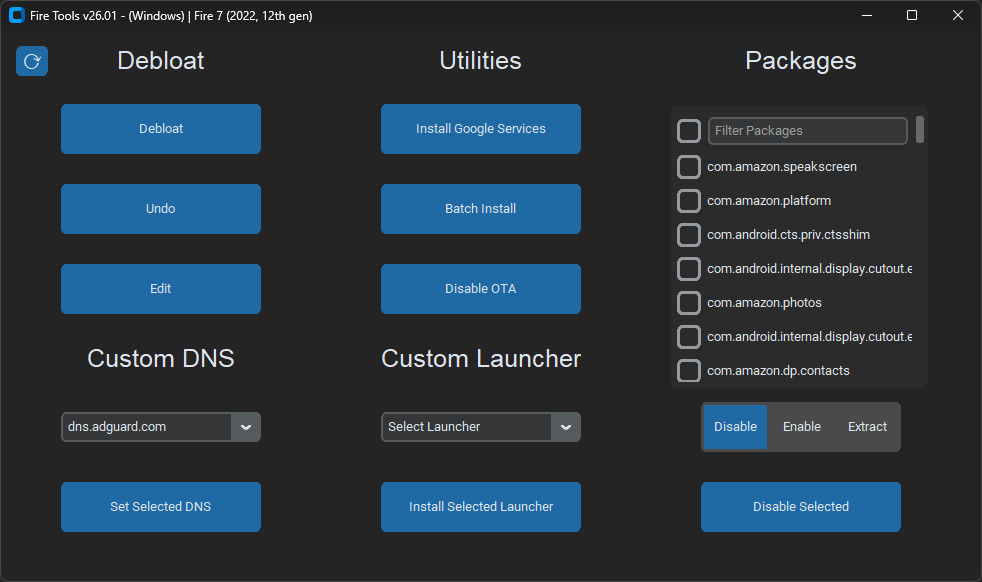
Features:
- Cross Platform (Linux, macOS, & Windows)
- Powerful Debloat Tool
- Limits Amazon Tracking & Ads
- Google Play Installer (Android 8+/Fire OS 7+)
- Custom Launcher Support (LauncherHijack on Newer Fire OS Versions)
- Disable OTA Updates
- Apk Extractor
- Batch Installer (.apk & .apkm files)
- Custom DNS Selector (AdGuard, Cloudlfare, etc.)
Installation Instructions (Python):
Follow the steps outlined in Setup-Instructions.md first! then proceed to installation instructions. After installation run update tool to get the latest version of scripts!
Linux/macOS:
# Download Latest Release & Extract, Then Run
curl -LO https://github.com/mrhaydendp/fire-tools/releases/latest/download/Fire-Tools.zip
unzip Fire-Tools.zip && rm Fire-Tools.zip
cd Fire-Tools
chmod +x Scripts/Posix/*.sh
pip3 install -r requirements.txt
python3 main.py
Windows Powershell:
# Download Latest Release & Extract, Then Run
Start-BitsTransfer "https://github.com/mrhaydendp/fire-tools/releases/latest/download/Fire-Tools.zip"
Expand-Archive .\Fire-Tools.zip .\; Remove-Item .\Fire-Tools.zip
Set-Location Fire-Tools
pip install -r requirements.txt
python main.py
Important Notes:
- Although this project has similar goals, it is not affiliated with Datastream33's Amazon Fire Toolbox
- Some features of the Fire Tools may break due to Fire OS updates but I'll try my best to keep them working.
- Set timezone settings before debloat! (re-enable
com.amazon.kindle.otter.oobeto change date & time settings) - Google Apps are downloaded from ApkMirror and are included in releases for convienence see terms. APK names and corresponding URLs can be found in Fire-Tools/Gapps/README.md
- Debloat will disable most amazon apps with the exception of:
Calculator,Camera,Clock,Files,Fire Launcher,Silk Browser, andSettings - Warranty and Reset: Using Fire Tools doesn't void your warranty and all changes can be reversed with a factory reset.
- Disclaimer: While I developed this tool, I am not responsible for any issues arising from its use.
Credits: Fire Tools thanks and acknowledges the following projects. They are included for your convenience:
- Google (GApps)
- TeslaCoil Software (Nova Launcher)
- Lawnchair (Lawnchair)
- BaronKiko (LauncherHijack)
- D0k3 (Inspired by their OneClick-for-Amazon-Fire tool)