
Describe what you want built — get a finished project.
English · Русский
Autopilot is a development framework packaged as a skill. It takes your idea, asks questions exactly where the idea forks, and then does the rest on its own: writes the spec, thinks through what you didn't, splits the work into tasks and builds the whole project. You don't have to read the spec, size the tasks or understand the code.
It works on its own: nothing else to install.
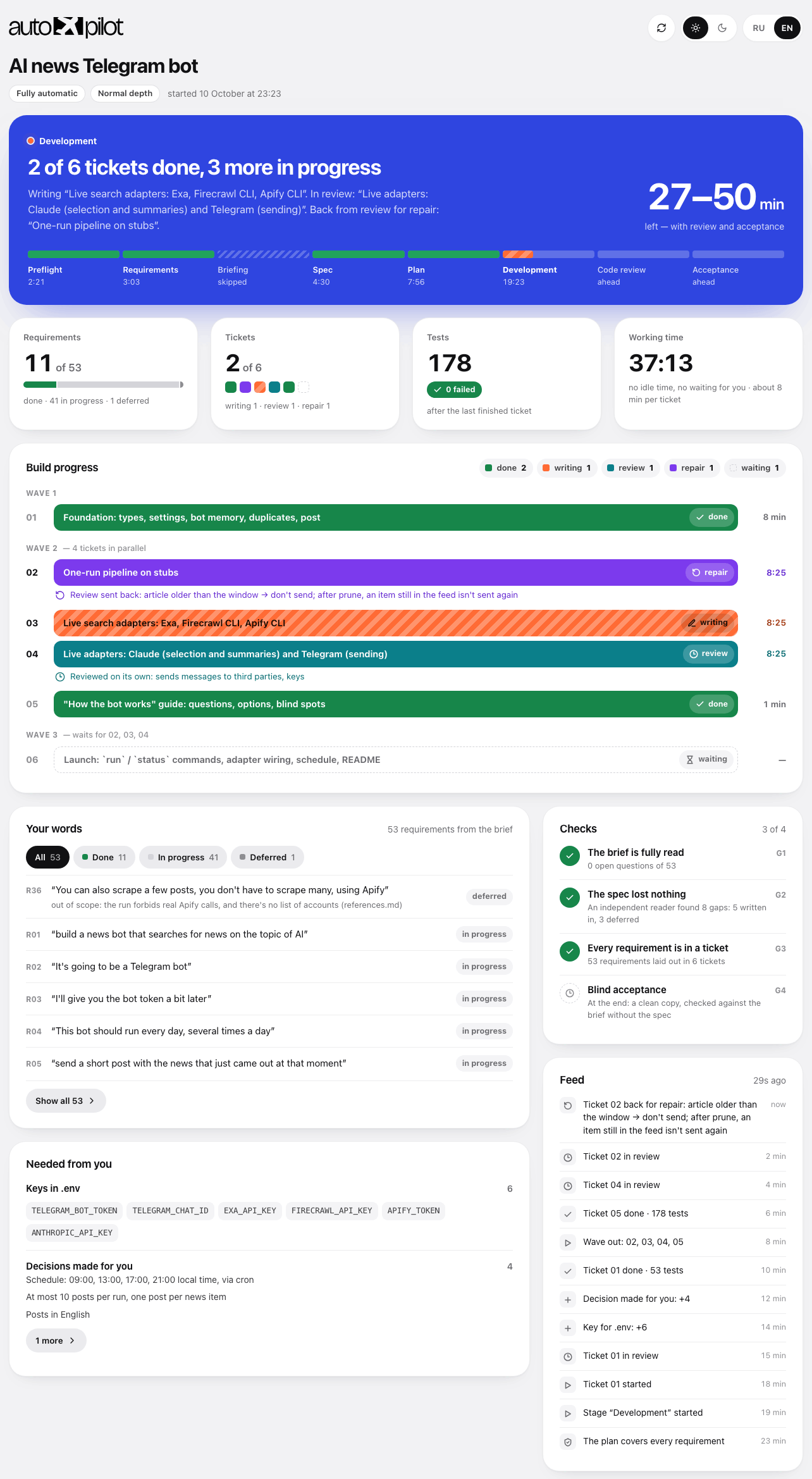
Header · build progress · the report of a finished build — open the full dashboard
And you can always see what's going on. At the start of a build the agent opens the dashboard itself — a single HTML file you never have to find or launch. The header colour tells you the state at a glance: blue — the build is running, orange — it's waiting for your answer, green — done. Below: what is happening right now, how much is left, every task as a coloured bar and every one of your requirements in your own words. Timers tick live, the page refreshes itself, no internet needed.
Installation
If you'd rather not open a terminal
Open your AI agent — Claude Code, Cursor, Codex — and paste this:
Install the Autopilot skill for me. Run in the terminal:

npx skills add nick-vels/skills --skill autopilot -g -y -a <put yourself here: claude-code, cursor, codex>

If npx is not found, give me a link to download Node.js and wait.
Don't install anything else.
When you're done, tell me in one line that it's ready and that the session needs a restart.
The agent does the rest. Then restart it — skills are loaded at startup.
This command is for the first install. Updating later is a different command.
From the terminal
Copy this line:
npx skills add nick-vels/skillsThe installer asks which skills to install and for which agents — just confirm.
One-line install, no questions
npx skills add nick-vels/skills --skill autopilot -a claude-code -g -y| Flag | What it does |
|---|---|
--skill autopilot | Installs only Autopilot |
-a claude-code | Installs for Claude Code |
-g | Globally — the skill is available in every project |
-y | Don't ask questions |
Without -g the skill is installed into the current project folder only.
Requires: Node.js (for npx) and any supported AI agent — Claude Code, Cursor, Codex and 70+ others. Nothing else.
How to use it
Open your agent in the folder of the future project and type:
/autopilot I want a Telegram bot that takes repair requests for appliances
and puts them into a Google Sheet
Autopilot starts only on this command. It never starts by itself, even if you write "just build it": it creates a repository, writes code and commits, and that should only begin when you say so.
If the task is big, put it in a file. A detailed description doesn't fit in one chat line, and you shouldn't cut it short: the more you tell, the less has to be guessed for you. Create a file next to the project — any name, brief.md, idea.txt, task.md — and describe everything in free form: what the project is, who it's for, what it must do, what you dislike about competitors, any budget and deadline constraints. Then just point to it:
/autopilot brief.md
/autopilot deep docs/idea.md but no card payments
The agent reads the file and takes its contents as the task; your file stays untouched, and a copy goes into .autopilot/ — that copy is what the result is checked against at the end. Words written after the path are added to the same task.
After that, all you do is answer a few questions at the very beginning.
The agent's first reply tells you which mode it's in and what other modes there are, and it opens the dashboard itself — no commands to remember, no files to look for:
Mode: semi-auto · depth: normal — I'll only ask what the task leaves undecided, then build the rest myself.
Dashboard is open and refreshes itself: http://localhost:52814/dashboard.html
Project memory — AGENTS.md (+ CLAUDE.md pointing to it).

You can switch at any time, just say:
• "fully automatic" — I ask nothing at all
• "interview me" — I go through the task with questions to the end, then build it myself
• "approve every step" — the same, plus you approve the spec and the task list
• "strictly as written" / "go deep" — less or more elaboration beyond what you said
Questions come in rounds: several at once, numbered, each with the answer the agent would pick itself. Agree with all — reply "ok"; disagree with one — "2 — a spreadsheet, the rest ok".
Four modes
After /autopilot you can add how closely you want to be involved. Add nothing — you get semi-auto.
| Mode | How to turn it on | What you're asked |
|---|---|---|
| Fully automatic | /autopilot full ... or "fully automatic" | Nothing. At the end — a list of decisions made for you |
| Semi-auto (default) | nothing to add | Only what the task leaves undecided: usually one or two rounds of questions. If everything is clear — none |
| Interview | /autopilot interview ..., "interview me", "ask me everything" | Every fork, plus where the idea might not work. Then it builds on its own |
| Manual | /autopilot manual ... or "approve every step" | Same as interview, then your "ok" on the spec and on the task list |
/autopilot full a landing page for pizza delivery

/autopilot A Telegram bot for booking manicure appointments

/autopilot manual CRM for a car repair shop, I want to approve the spec myself
The words full, semi, interview, manual are written without dashes. You can change the mode along the way — "switch to manual" — it applies from the next stage.
What no mode changes: the agent asks before anything irreversible — publishing, payments, messaging people, deleting data. And no mode turns off the check against your original task.
Depth
A separate dial, independent of the mode. The mode decides how much you're asked; depth decides how much is thought through for you.
| Depth | How to turn it on | What the agent does |
|---|---|---|
| Strict | /autopilot strict ... or "strictly as written" | Only what you wrote. No features of its own — not even good ones. Errors and empty states are still handled: without them a requirement simply doesn't work |
| Normal (default) | nothing to add | Works through the gaps that would clearly spoil the result. It may add things of its own, but each tied to one of your requirements |
| Maximum | /autopilot deep ... or "go deep", "think it through" | Every requirement goes through the full checklist: first run, empty screen, bad input, failure, dropped connection, growth, permissions, consequences |
/autopilot strict a feedback form, exactly as I described

/autopilot deep an online ceramics store

/autopilot full deep a marketplace for craftspeople
Word order doesn't matter, both settings are optional. Like the mode, depth can be changed along the way: "less improvising" or "think it through more".
One rule holds at every depth: anything the agent adds on its own is tied to one of your requirements and listed separately in the final report. A feature not tied to anything gets cut.
Reference — what it should look like
If there are sites, apps or texts the result should resemble, say so when the agent asks during the briefing. They go into reference.md and are handed to the agents that build what you will see: the interface is made "like that one" from the start, not adjusted afterwards. The agent never passes off its own taste as yours — a reference only ever comes from you.
Two things Autopilot does differently
Your task doesn't get lost along the way
The usual problem with building "from a description": you dictate a big brief, then come questions, a spec, tasks, code — and at the end half of what you asked for just isn't there. Not because anyone refused, but because at some step it stopped being mentioned.
Autopilot's first move is to split your text into numbered requirements and write them down word for word. From then on each requirement has a status, and every stage has a check:
- after the spec — no requirement is left without a section;
- after the split — every requirement has a task, and every task has a requirement (this catches work nobody ordered);
- at the end — blind acceptance: a separate agent gets only your original text and the finished project, not the spec. It checks the result against your words, not against a retelling. If it and the tracker disagree, you'll see that in the report.
Only you can drop a requirement. The agent may suggest deferring one — it may not strike it out. Silence doesn't count as cancelling.
What you didn't think of is thought through for you
In a brief you describe how things work when everything goes well. You don't describe what to show on an empty screen, what happens when the connection drops, what happens if someone presses "send" twice, or what a person sees on the very first run. That's not an oversight — it's just not the level at which people describe a task.
Thinking this through is a large part of Autopilot's value, and you set how much of it happens with depth. At normal depth the agent closes the gaps that would clearly spoil the result; at maximum depth it runs every requirement through the full checklist. Some things it decides itself (an error message, sensible limits); where the decision really is yours, it turns it into a question.
At maximum depth one requirement from the brief unfolds into several worked-out scenarios — as many as it really has sides. That's the difference between "works in the demo" and "works".
Progress is always visible
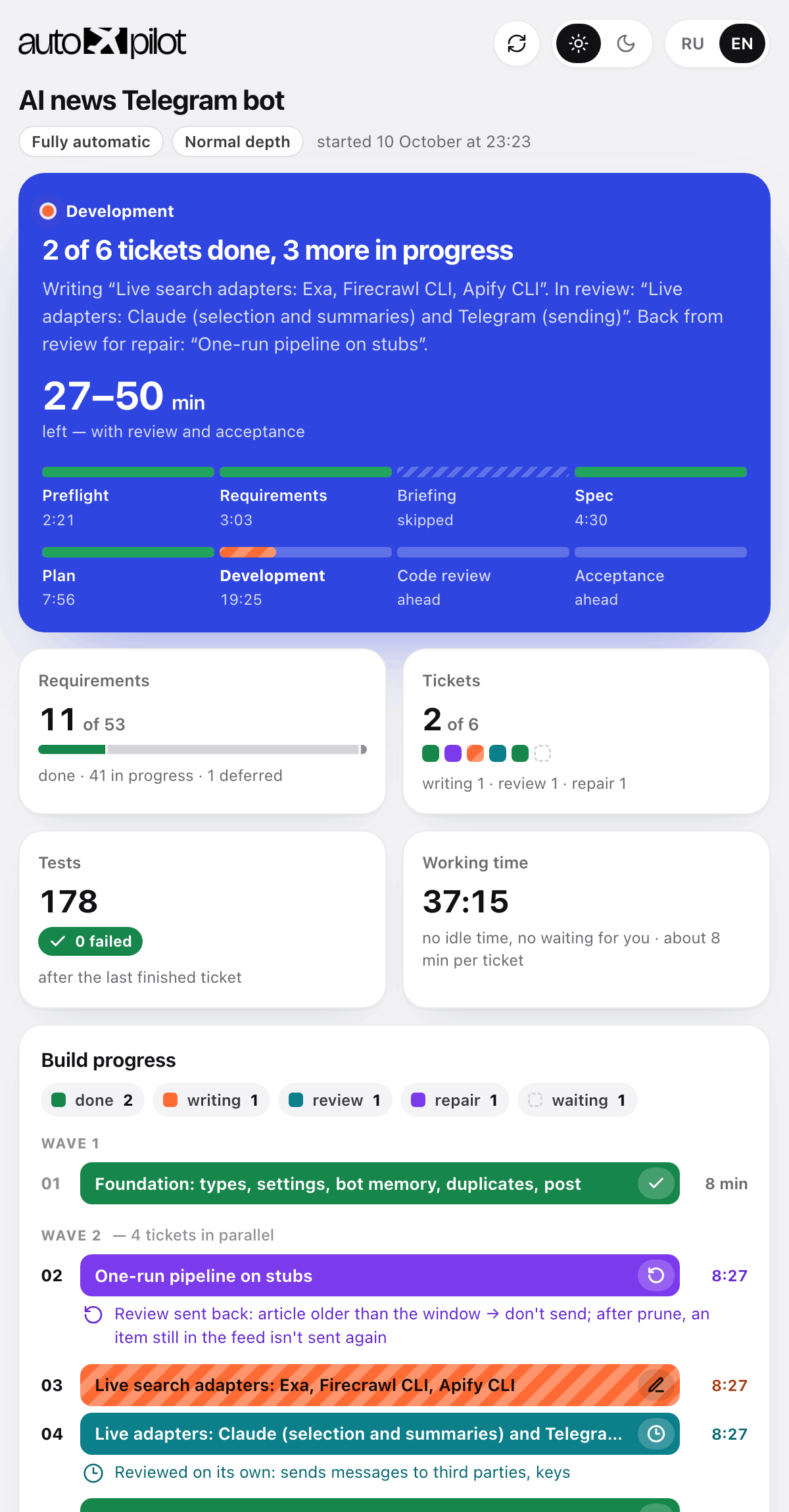
.autopilot/dashboard.html opens by itself at the very start of the build — nothing to find or launch. If the agent can show a page inside its own window (for example, the side pane in the Claude app), the dashboard opens there and everything stays in one window; otherwise in your browser. In a narrow pane next to the chat it gets denser: the same blocks, without the giant numbers. Works offline. While the build runs, the page pulls fresh numbers every ten seconds — without reloading, so your scroll position and selected text stay put; the ⟳ arrow at the top refreshes at once. Next to it are the theme (light / dark) and language (RU / EN) switches; until you touch the theme, the dashboard follows your system.
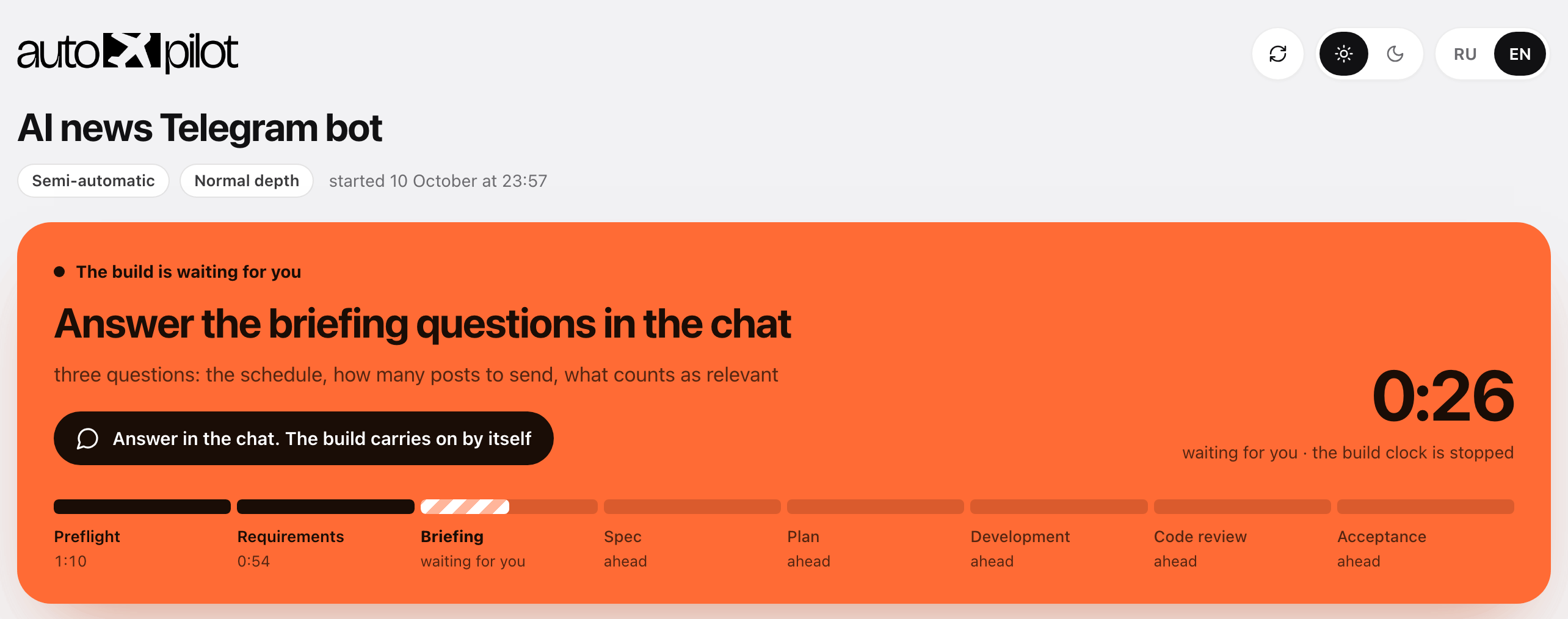
The header — what's happening, in one sentence. Blue: the build is running — "2 of 6 tickets done, 3 more in progress", which tickets are being written, which are in review, and how long until done including review and acceptance. Orange: the build is waiting for you — briefing questions, your "ok" on the spec in manual mode, a decision before an irreversible step; the browser tab says "● Waiting for you", and the build clock is stopped meanwhile. Green: done — what you now have and what you need to do to run it for real. Under the sentence — eight stages from preflight to acceptance: passed, current, skipped.
Build progress — every state has its own colour. Green — task done, striped orange — being written, teal — in review, purple — back from review for repair, red — failed, dashed — waiting its turn. Under a repair or review bar it says why. Tasks are grouped into waves: you can see what runs in parallel and what the next wave is waiting for.
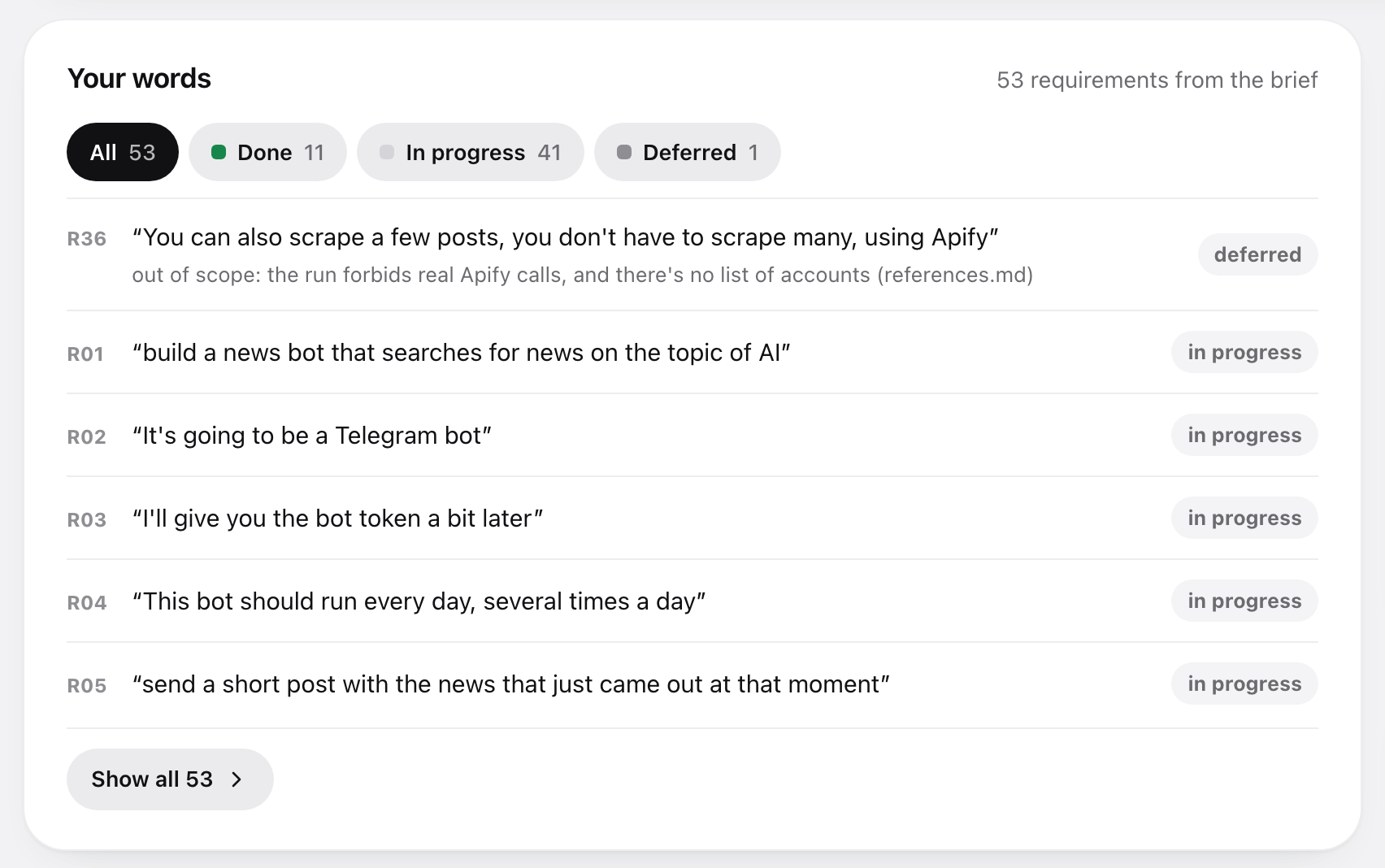
Your words. Every requirement from the brief — as your quote, with what became of it: done, in progress, needs your data, deferred, dropped by you. Deferred items and placeholders show the reason. This is Autopilot's main promise — nothing disappears quietly — and here you can check it with your own eyes.
| Block | What it shows |
|---|---|
| Requirements | How many of your requirements are closed. Tasks can be 100 % done while the brief is at 70 % |
| Checks G1–G4 | The brief is fully read · the spec lost nothing · every requirement is in a task · blind acceptance. A check gets its tick when it passes |
| Feed | The latest events in words: task done, sent to review, back for repair, the plan adds up. The best answer to "is it alive?" |
| Needed from you | Keys for .env, placeholders standing in for your data, decisions made for you |
| Tests and time | How many tests are green; working time without idle time and without waiting for your answer |
| In the report | Blind acceptance and its disagreements, open questions, review notes with their place in the code |
Even when the project is small and built as a single task, the dashboard is filled the same way: stages, requirements, tests, commit and placeholders. If the session drops, type /autopilot with no words — the agent restores the state from files and picks up where it left off.
The project remembers itself
The usual trouble with the second session: the agent opens a finished project and spends half an hour figuring out what was built here — on your money. Autopilot fixes that with a project description file at the root — AGENTS.md.
The file appears right away, before the first line of code: the name, the run commands. After that only what was actually learned along the way goes in — the real check command, pitfalls already stepped on, a new environment variable. At the very end a separate agent reads the finished code (not the spec — otherwise the description would talk about plans) and writes pointers: how to run it, where things live, where it hurts. For a big project the architecture goes into docs/architecture.md, and decisions with their reasons into docs/adr/.
| Which file | AGENTS.md — read by Claude Code, Codex, Cursor and other agents. Next to it goes a CLAUDE.md with a single line @AGENTS.md: without it Claude Code skips AGENTS.md if there's another CLAUDE.md somewhere up the folder tree |
You already have your own CLAUDE.md or AGENTS.md | Autopilot doesn't touch it. At the end it suggests what to add — new commands, variables, pitfalls — and asks whether to apply it. In fully automatic mode the suggestion just stays as a file |
| Size | Proportional to the project, and short: every line of this file is read in every future session |
| Your text | Everything you wrote is untouchable. Autopilot writes only inside its own markers |
How it works
The main principle: the order is the product. Code is written in the second-to-last phase; everything before it is finding out what exactly to build, everything after is proving that's what got built.
| Phase | What happens |
|---|---|
| Preflight | Project folder setup, .gitignore, instruments — the dashboard opens right away |
| Requirements | Your text → numbered requirements, word for word |
| Briefing | Questions in rounds, only on real forks; first come the ones the project can't be built without: payments, hosting, access |
| Spec | Requirements unfold into worked-out scenarios |
| Plan | The spec is cut into tasks — or not, if the job is small — and laid out in waves: what can be built at the same time, and what only in order |
| Development | One task = one separate agent with a clean memory, one commit; independent tasks run in parallel |
| Code review | The foundation and risky tasks (sign-in, money, deleting data) are checked before commit; at the end — the whole build: match with the brief and the spec, code quality, security |
| Acceptance | A separate agent installs the project from scratch in a clean copy, runs it and checks the result against your original task; the project description for the future; the report |
On splitting into tasks
Every task is a separate agent that has to get into the project from scratch: read the contracts, study the code, figure out the stack. That's expensive. So Autopilot splits by tiers, not by "the smaller, the safer":
| Job | How many tasks |
|---|---|
| Small — a landing page, a form, a script | one. Built in one pass by one agent |
| One coherent feature | 2–3 |
| Several features or layers | 4–8 |
| Several independent subsystems | 9–16 |
More than 16 is not allowed: the work is split into two runs. Fine-grained splitting doesn't buy reliability, it buys spend.
On development
| What Autopilot does | Why |
|---|---|
| Each task is done by a separate agent | It doesn't get confused by accumulated context and doesn't break what worked |
| Passes the contracts of earlier tasks to the next agent | Otherwise task six reinvents what task three built |
| Independent tasks run in parallel, several agents at once | Waiting in line for things that don't depend on each other is hours wasted |
| One commit per task | Your rollback points |
| Tasks sharing files run one after another | Otherwise two agents overwrite each other's work |
| A full check after every task — tests, types, linter | A regression costs a minute, not an evening |
| Routine tasks go to a cheaper model, the foundation and risky ones to a strong one | You pay for the strong model where it makes a difference |
| Review is targeted and at the end, not after every task | Review used to eat up to half the spend; the defects worth holding a task for live in the foundation and the risky parts |
| Fixes after review are made by the same agent that wrote the code | It remembers why the code is the way it is; someone else fixes the symptom and breaks the cause |
| The main conversation writes no code at all — it only hands out work and checks it | Its context is one for the whole run and never refreshes: every diff read on task two gets in the way on task eight |
| A failed task — a retry, then an attempt another way | If that fails too, the agent stops and explains in plain words |
| A plan that diverged from the code is corrected out loud | If it turns out along the way that the plan doesn't work, the agent fixes the plan and tells you in one line — instead of quietly building something else |
When to use it, and when not
A good fit if:
- you describe what you need and expect a finished result;
- you're not a programmer and won't read specs and code;
- "just build it", "build it end to end", "don't ask unnecessary questions";
- you want to approve the spec and the task list but not deal with the process — that's manual mode.
Not a fit if:
| Situation | What to do instead |
|---|---|
| You want to write code together, line by line | Work with the agent directly |
| The task is an edit in one file | Just ask for it |
| The idea is bigger than one project and the end goal is unclear | Settle on the goal first |
Keys, passwords and access
Autopilot never asks for keys, tokens or passwords — only which service you want to use and whether you have an account there.
- the question will be "do we take payments via Stripe or PayPal?", not "send me the key";
- the code gets a variable name —
STRIPE_SECRET_KEY, and you put the value into.envyourself; .envgoes into.gitignoreright away;- the report lists the variables still to fill in, by name, without values.
If you do send a key in the chat, it won't end up in any file: before anything is written, all your text goes through a filter that recognises Stripe, GitHub, AWS, Google and Slack keys, Telegram tokens, JWTs and connection strings. The file gets [REDACTED:STRIPE_SECRET_KEY] instead of the value, and you get a warning — a key that has been in a chat should be revoked and reissued.
What Autopilot never does
- writes code before there is a spec;
- strikes out your requirements — only you can;
- makes up facts about you: prices, texts and addresses stay visible placeholders, not plausible lies;
- asks you to check tasks, their size or the code;
- runs two tasks in one agent's memory;
- leaves payments, access and hosting for the finish;
- asks for or stores your keys and passwords;
- installs or downloads anything without your knowledge.
Updating and removing
Only update updates. Don't reinstall the skill with the command from "Installation" — that one is for the first install; updating has its own command:
npx skills update autopilot -gThe -g flag is for a global install. For a project install, run the command without the flag in that project's folder.
If you'd rather not open a terminal, paste this to your agent:
Update the Autopilot skill to the latest version. Run in the terminal:

npx skills update autopilot -g

If it says everything is up to date but the version is still old, reinstall:
npx skills remove autopilot -g -y && npx skills add nick-vels/skills --skill autopilot -g -y -a <put yourself here: claude-code, cursor, codex>

When you're done, tell me in one line what was updated and remind me to restart the session.
See what's installed, and remove:
npx skills listnpx skills remove autopilot -gIf the skill behaves like an old version. update compares the source version, not the files on disk: if the local copy was edited or got corrupted, it says "everything is up to date" and does nothing. The fix is a reinstall:
npx skills remove autopilot -g -y && npx skills add nick-vels/skills --skill autopilot -g -y -a claude-codeFor the agent to see the new version, restart the session — skills are loaded at startup.
How to know a new version is out
At the start of every build Autopilot compares its version with this repository and, if a new one is out, tells you in one line, with the command to update. What changed is in CHANGELOG.md. The skill never updates in the middle of a build.
The check is one request to GitHub per build, sending no data at all; without internet it stays silent. To turn it off: the environment variable AUTOPILOT_NO_UPDATE_CHECK=1.
What's in the repository
skills/autopilot/
├── SKILL.md                    ← orchestrator: phase order, gates, rules that are never broken
├── phases/                    ← phase rules, read one at a time, when the phase begins
│   ├── 0-modes.md              modes and depth, the opening message
│   ├── 0-preflight.md          repository setup
│   ├── 0-resume.md             resuming an interrupted build
│   ├── 0-instruments.md        dashboard: launch, and one command per event
│   ├── 0-memory.md             choosing the project memory file
│   ├── 1-manifest.md           brief → requirements, secrets filter
│   ├── 2-briefing.md           questions in rounds, reference
│   ├── 2-adversarial.md        where the idea might fail — in interview mode and at maximum depth
│   ├── 3-spec.md               the spec and how deep to work it out
│   ├── 4-plan.md               splitting into tasks, tiers, waves, who gets review and which model
│   ├── 5-subagents.md          executor agents and the contracts between them
│   ├── 5-repair.md             repair and failure — only when a task came back not clean
│   ├── 6-review.md             targeted review and the review of the whole build
│   ├── 8-final.md              blind acceptance and the report
│   ├── 9-memory.md             the project description and decisions
│   ├── rationalizations.md     excuses and red flags — a check, not an instruction
│   └── dashboard-template.html the ready-made dashboard with the logo built in
├── prompts/                   ← material for subagents, not for the orchestrator
│   ├── executor.md             how to write code and tests, what to return
│   └── review.md               what the reviewer judges by: three axes and security
└── tools/
    └── ap.py                   build bookkeeping: state, dashboard, server — one command per event

docs/autopilot/design.md         ← why it's built this way, with measurements
tools/measure-run.py             ← measuring a real run from Claude Code logs
CHANGELOG.md                     ← what's new, by version
The agent reads the phases/ files one at a time, only when the matching phase begins — so its memory always holds exactly what's needed right now. Everything needed only in rare cases — repair, resuming, stress-testing the idea — lives in separate files and isn't opened until that case comes up. The reasons behind the decisions live in docs/, not in the instructions: the agent doesn't need them, and paying for them would happen at every step.
It's all plain markdown. You can open it and read it: skills/autopilot/SKILL.md.
License
MIT © Nick Vels — you may use, modify and distribute it, including in commercial projects.