Macintosh Skeletal Filled

The famoussss handwriting from Apple's "hello" screen, as fonts you can type with.
macOS 27 and iOS 27 ship a font called Macintosh Skeletal for the personalized hello you see when setting up a new Mac or iPhone. On its own it only contains the centre line of each stroke. Apple's renderer thickens those strokes into tubes and joins the letters live. This project rebuilds what that renderer draws as ordinary filled fonts, with joins that follow Apple's renderer.
Fonts
| File | Family | Weights |
|---|---|---|
fonts/MacintoshSkeletalVariable.otf | Macintosh Skeletal Variable | Variable, wght 100 to 900 |
fonts/MacintoshSkeletalFilled.otf | Macintosh Skeletal Filled | Static, Apple's on-screen weight |
Both fonts have two options, off by default: Crossing o and Join every letter (see below). With both off you get Apple's design.
Variable weight
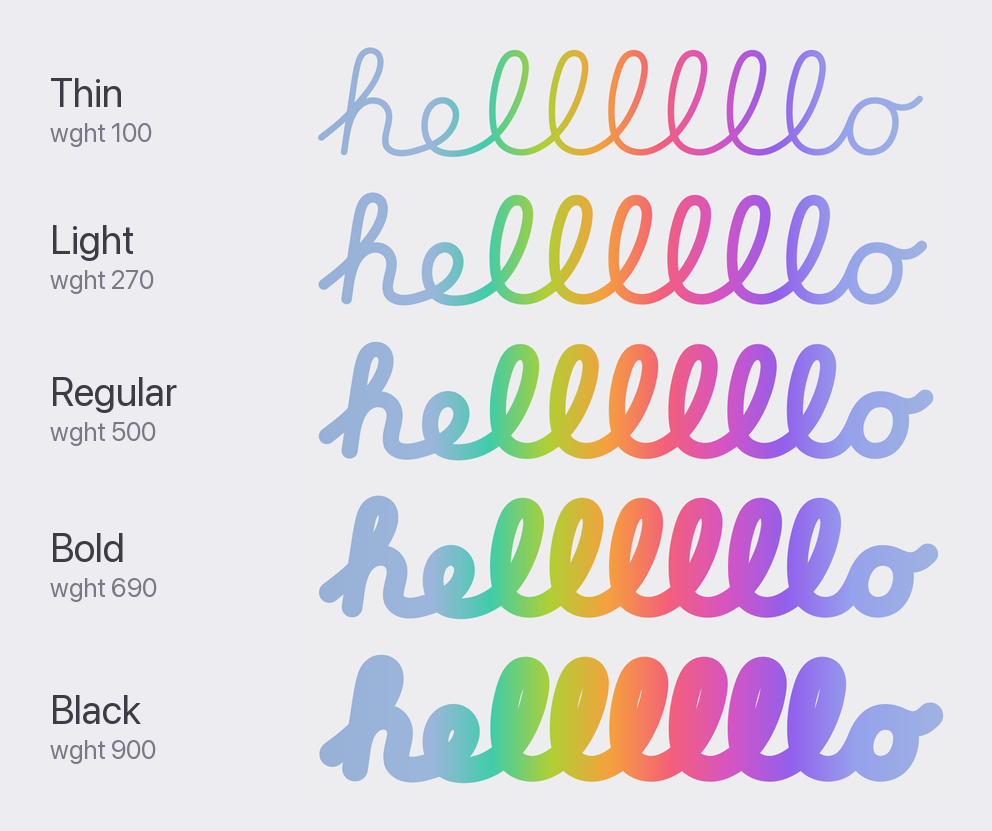
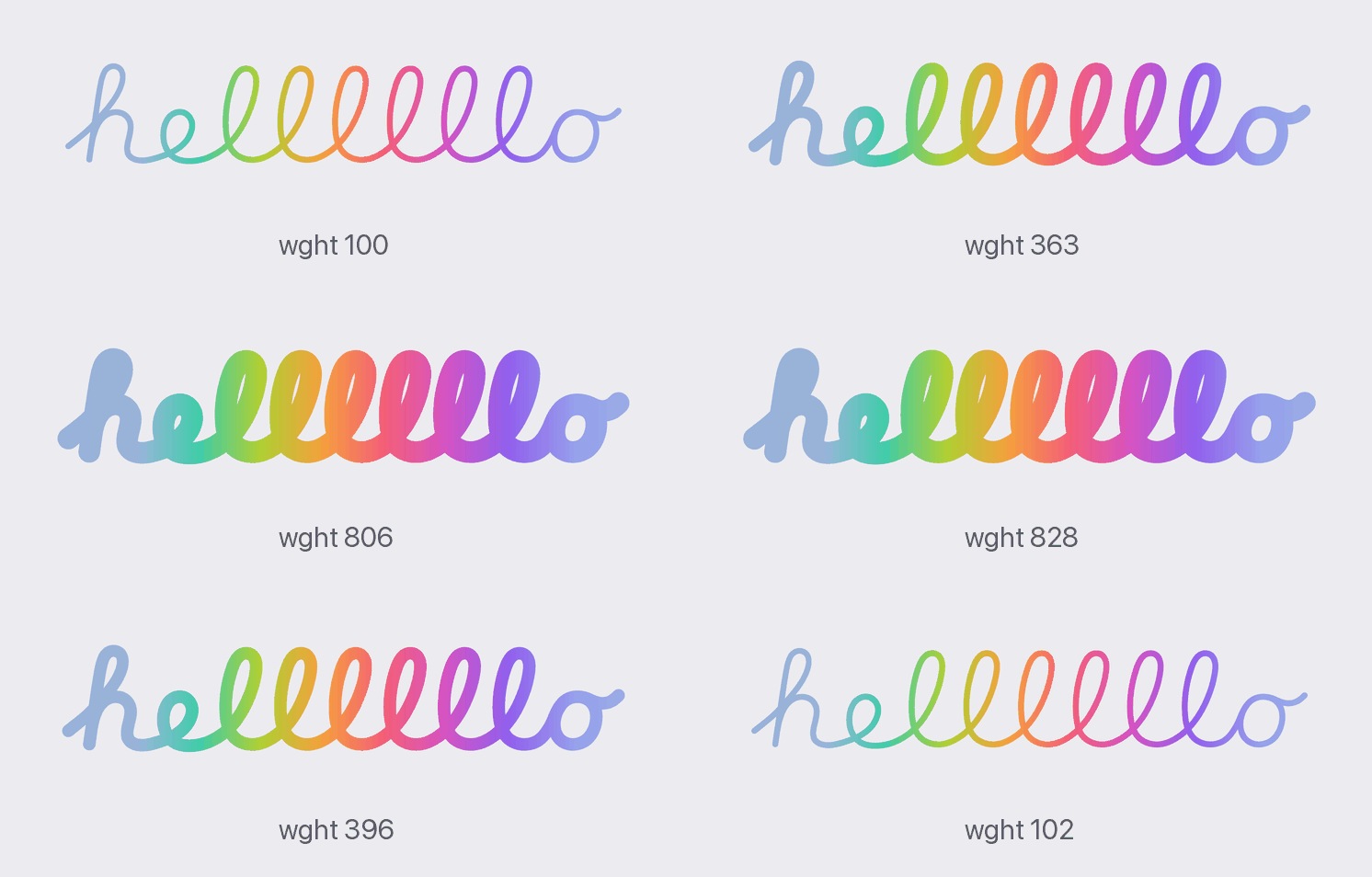
Weight is the pen thickness. Apple's renderer draws the font's strokes at 1.55× their stored radius, so that is the default (Regular).
| Style | wght | Pen thickness |
|---|---|---|
| Thin | 100 | 0.6× |
| Light | 270 | 1.0× (the raw font data) |
| Regular | 500 | 1.55× (Apple's hello screen) |
| Bold | 690 | 2.0× |
| Black | 900 | 2.5× |
Any value in between works. Thickness is linear in wght, so every app shows
the same result.
Static or variable?
- Static (Macintosh Skeletal Filled): strokes are merged into one clean outline per glyph, and where two strokes meet the corner is softly blended, the way Apple's renderer does it. Choose this for the closest look to the hello screen.
- Variable (Macintosh Skeletal Variable): any weight from Thin to Black. Each stroke is its own round tube, overlapping the others, so junctions are a plain crease rather than a soft blend.
Options
Both fonts have two options. They are off by default, and you can switch each one on or off on its own, for any part of your text.
Crossing o
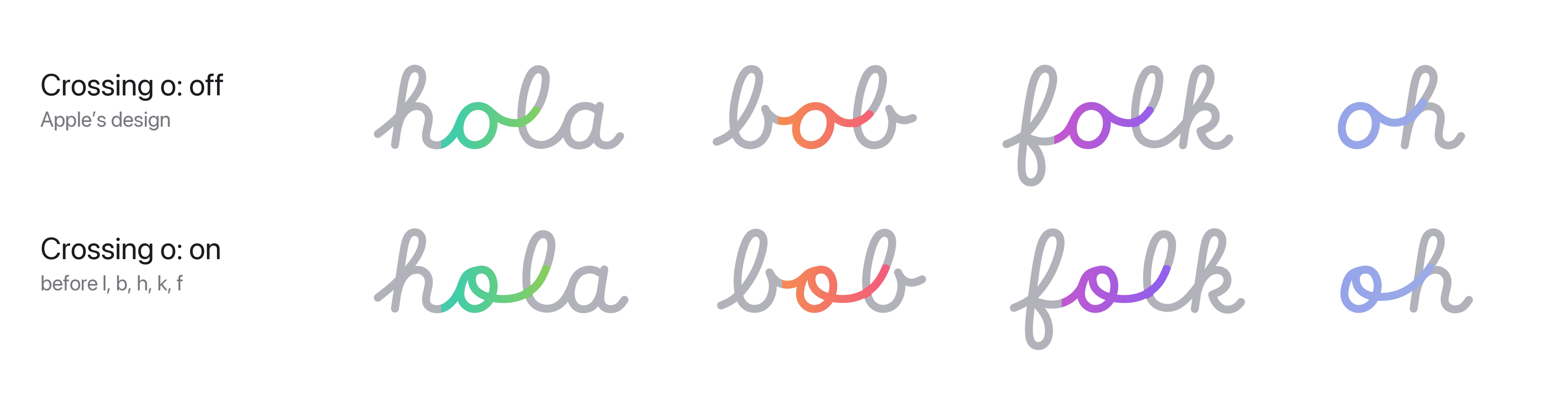
The o from Apple's 2020 hello greetings: the bowl starts at the top, and
its end curls back inside and leaves through the bowl, rising straight into
the next letter. It's used before l, b, h, k and f, where the 2020
greetings use it (hola, olá, dobar); every other o stays Apple's.
Join every letter

In Apple's design, some letters don't join the letter after them (see below). This option joins them all. It replaces the separate Macintosh Skeletal Variable Joined font: if you installed it, you can remove it in Font Book.
How to switch them on
Pages, Keynote, TextEdit: select the text, press ⌘T (Format › Font › Show Fonts), click the ⋯ button at the top left of the Fonts window and choose Typography…. Under Alternative Stylistic Sets, tick Crossing o and/or Join every letter. The weight (Thin to Black) is in the font style menu of the Format sidebar.
Figma: select the text layer, click the Type settings button (the sliders icon) in the Text section, open Details and switch on Crossing o and/or Join every letter under Stylistic sets. The Weight slider is in the same panel.
CSS:
.hello {
  font-family: "Macintosh Skeletal Variable";
  font-feature-settings: "ss01" 1;   /* Crossing o */
  /* font-feature-settings: "ss02" 1;   Join every letter */
  /* font-feature-settings: "ss01" 1, "ss02" 1;   both */
}
Keep Contextual Alternates on (it is by default): every join in these fonts depends on it. Apps that don't apply it draw each letter on its own.
The o
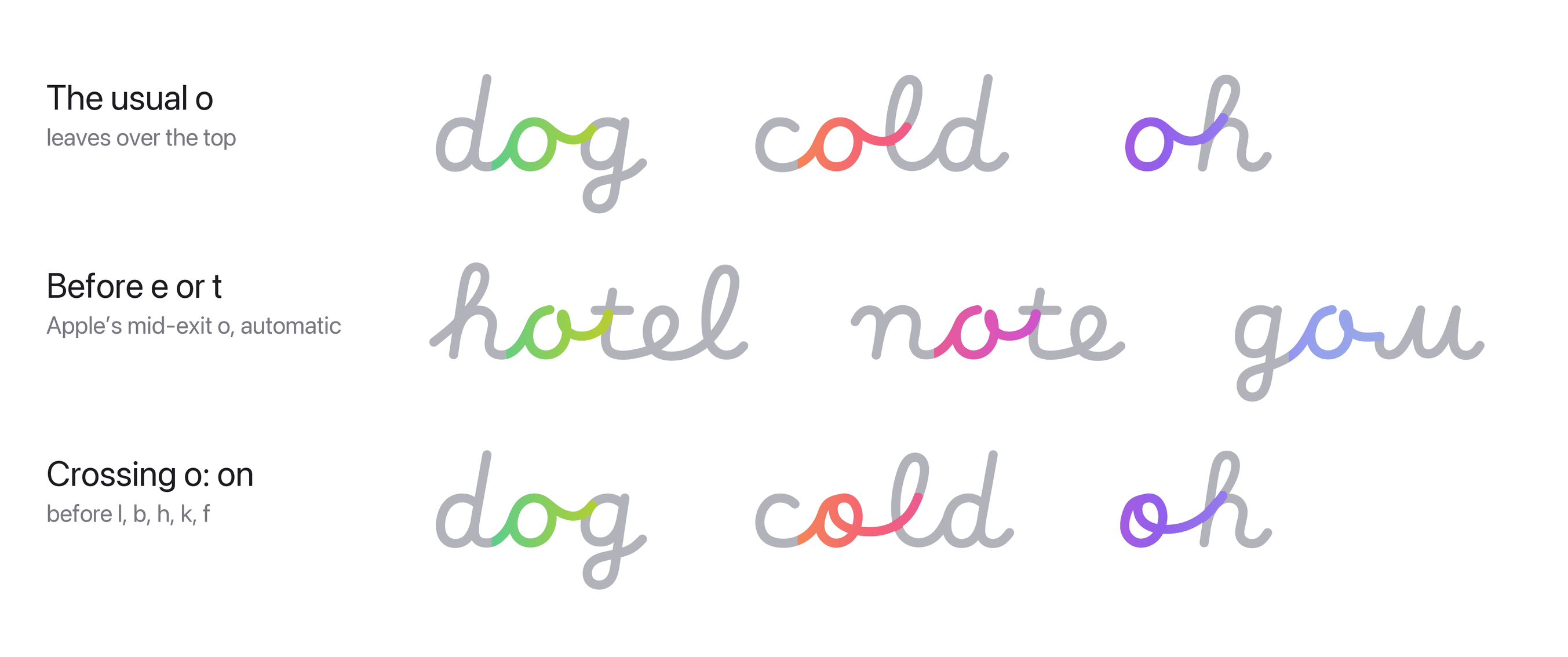
Apple's font finishes an o in two ways. Usually the pen leaves over the
top into the next letter. Before e or t (Cyrillic е, л, м, я,
ґ, љ) it curls back past the middle in a small loop and runs into the
letter at mid-height. Apple's own joining rules choose the form, and these
fonts follow the same rules, so it happens automatically. The third kind,
the crossing o, is the option above.
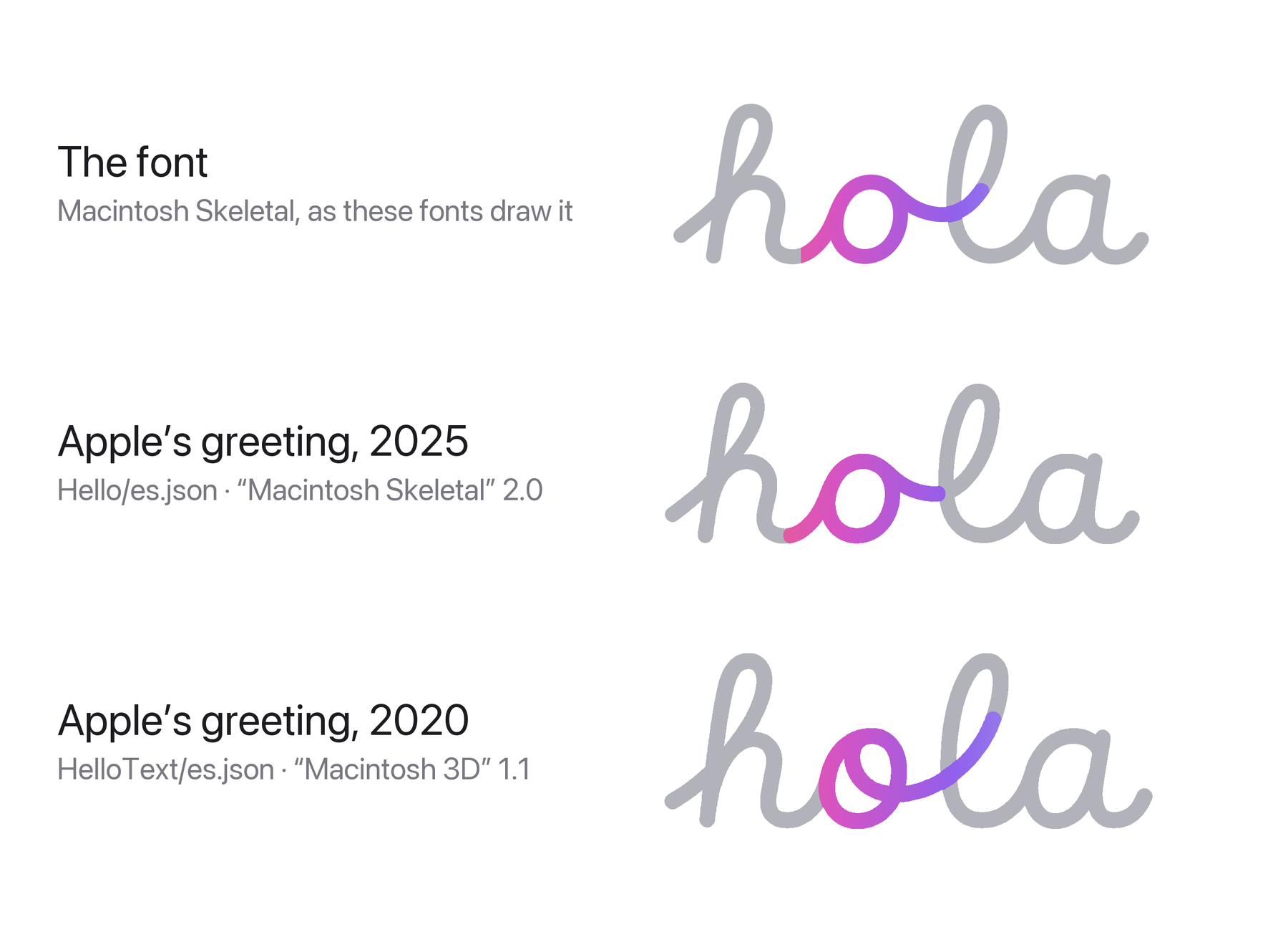
The hello-screen greetings aren't written with Apple's font. Each language
has its own pre-drawn path in macOS, made with Apple's internal versions of
the handwriting ("Macintosh Skeletal" 2.0 from 2025, and "Macintosh 3D" 1.1
from 2020), and their o is not one Apple's font has. In the 2025 "hola"
the join out of the o dips to mid-height and the l starts its loop
there. In the 2020 one the o is a stroke of its own whose end curls inside
the bowl and leaves through it. These fonts bring that 2020 o back as the
Crossing o option, drawn from Apple's greeting and joined
with the fonts' own joins.
Why some letters don't join
The coloured strokes in the image above are the joins the option changes. In Apple's design each is a short separate stroke that starts beside the letter; with the option on it sweeps out of the letter itself into the next one.
In Apple's design, some letters don't join the letter after them. The pen
lifts at the end of the letter, and the next letter starts on its own just
beside it. At Apple's weight the two only just touch; at lighter weights you
see a gap. This affects Latin p, Cyrillic р, ф, б, э and ѕ, Greek
ρ, β and δ, German ß, and a few others such as ɔ and ɓ.
Join every letter joins them all:
- For
p,р,ф,б,эandѕit uses one-stroke forms that Apple drew and included in its font but never selects. The letter's last stroke sweeps straight into the next letter. - For the others (
ρ,β,δ,ß,ɔ,ɓ, ...) a connecting stroke leaves the letter body and runs into the next letter.
Apple's renderer never draws these joins, so their shapes are modelled on Apple's other joins rather than recorded from it. Capitals and everything else stay the same.
Install
Download the .otf file you want and double-click it, then click
Install in Font Book. If you installed an earlier build, remove it in
Font Book first. Design apps such as Figma may need a restart to pick up the
new font.
How it was made
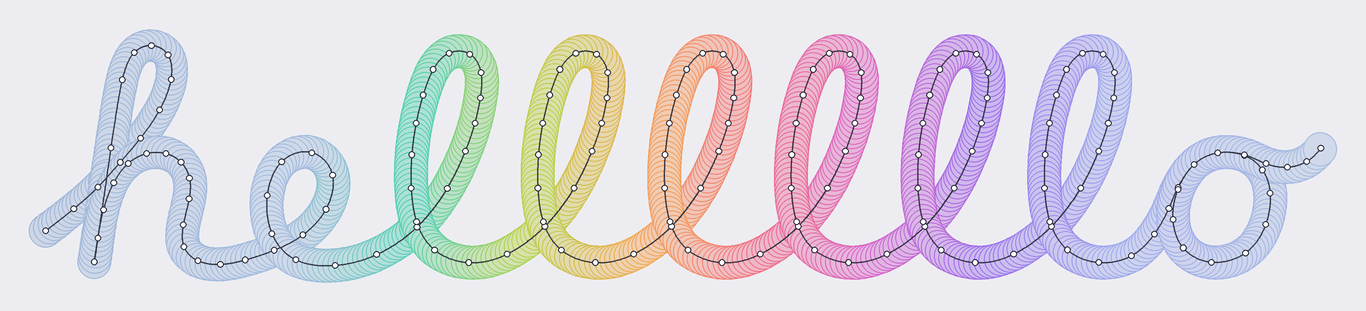
- Strokes: each letter's centre lines and pen radii come from the
private
strktable in Apple'sMacintoshSkeletal.otf. They are drawn as uniform cubic B-splines, with in-letter snapping and injection (a stroke flowing into another, like the lead-in ofa,d,gorq) following Apple's rules. - Joins: at every join Apple keeps each letter's own curve up to a fixed point and replaces the six control points around the boundary with three new ones. Those points were recorded from Apple's own renderer (in the iOS Simulator) for about 14,000 letter pairs across Latin, Greek and Cyrillic. In the font, contextual alternates insert a small zero-width bridge glyph between joined letters and swap in trimmed letter forms, so the joined curve is continuous.
- Thickness: Apple's renderer scales pen radii by 1.55, read from its shader settings.
Known limitations
- About 6% of joins (mostly letters with a slash or bar, such as
øandӫ) couldn't be read cleanly from Apple's renderer and use a fitted model instead, which is typically within a few font units. - Apple's font has no ready-made accented letters (
é,ä,й,ё, ...), only base letters and separate accents. These fonts add 606 of them, built from Apple's own base letter and accent, so they work in Pages, Keynote and other macOS apps as well as in Figma and browsers. - With Join every letter on, the extra joins (after
p,р,ρ,ß, ...) are modelled (see Why some letters don't join). So are the joins out of the Crossing o: Apple's renderer never draws them. - Apple's animation (the write-on, the glass shading) isn't part of a font.
Troubleshooting
Letters don't join, or there are blobs where they should join. Every join in these fonts comes from an OpenType feature called contextual alternates. Make sure it's on:
- Pages, Keynote, TextEdit: ⌘T › ⋯ › Typography… › Contextual Alternates should be ticked (it is by default).
- Figma: Type settings › Details › Contextual alternates should be on.
- After Effects: its default text engine doesn't apply contextual alternates. Try Preferences › Type › Text Engine › South Asian and Middle Eastern, then make a new text layer, or set the text in Figma or Illustrator and bring it in as shapes.
The font, or its options, don't show up. Check that the font is enabled in Font Book and remove any older copy first (including the old Macintosh Skeletal Variable Joined), then quit the app completely and reopen it. The options are only in the fonts from this repository, not in Apple's own Macintosh Skeletal.
Pages or Keynote shows no weights. Install the latest
MacintoshSkeletalVariable.otf from this repository; older builds were
marked italic, which hid the weight menu.
Found something weird?
Please open an issue on this repository with the text you typed, the app (and its version) and a screenshot.
License
This repository contains derivative works of Apple's font data. The letterforms, stroke data and design belong to Apple Inc. This project is not affiliated with or endorsed by Apple. It is shared for personal, non-commercial use only. See LICENSE.