GigaWorld-0: World Models as Data Engine to Empower Embodied AI





✨ Introduction
World models are emerging as a foundational paradigm for scalable, data-efficient embodied AI. In this work, we present GigaWorld-0, a unified world model framework designed explicitly as a data engine for Vision-Language-Action (VLA) learning. GigaWorld-0 integrates two synergistic components: GigaWorld-0-Video, which leverages large-scale video generation to produce diverse, texture-rich, and temporally coherent embodied sequences under fine-grained control of appearance, camera viewpoint, and action semantics; and GigaWorld-0-3D, which combines 3D generative modeling, 3D Gaussian Splatting reconstruction, physically differentiable system identification, and executable motion planning to ensure geometric consistency and physical realism.
🗺️ Architecture
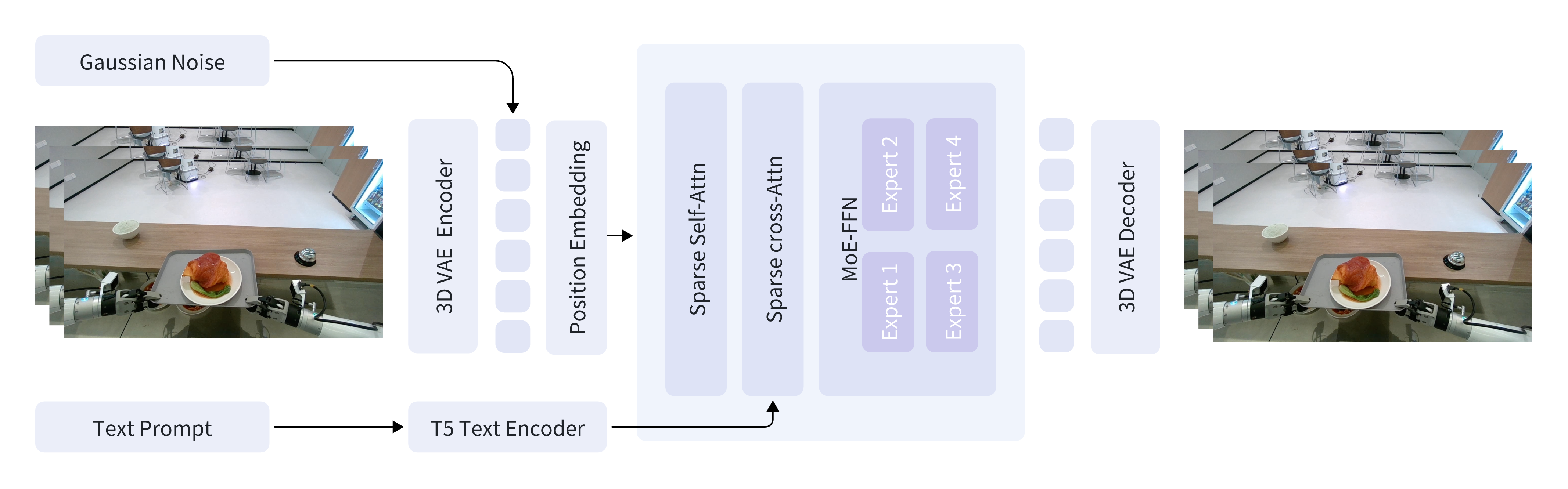
GigaWorld-0-Video-Dreamer is our foundation video generation model, capable of achieving IT2V generation.
⚡ Installation
GigaWorld-0 depends on the following three frameworks:
- GigaTrain: An Efficient and Scalable Training Framework for AI Models.
- GigaDatasets: A Unified and Lightweight Framework for Data Curation, Evaluation and Visualization.
- GigaModels: A Comprehensive Repository for Multi-modal, Generative, and Perceptual Models.
We recommend using a fresh conda environment for installation.
conda create -n giga_world_0 python=3.11.10 -y
conda activate giga_world_0

pip3 install giga-train
pip3 install giga-datasets
pip3 install natten

git clone https://github.com/open-gigaai/giga-models.git
cd giga-models
pip3 install -e .

git clone git@github.com:open-gigaai/giga-world-0.git
🚀 Quick Start
1. Download Models
| Models | Download Links | Description |
|---|---|---|
| GigaWorld-0-Video-Pretrain-2b | 🤗 Huggingface | 61x480x640, Image-text-to-video foundation model for embodied scenes. |
| GigaWorld-0-Video-GR1-2b | 🤗 Huggingface | 93x480x768, Fine-tuning GigaWorld-0-Video-Pretrain-2b model with the GR1 dataset |
You can use the following script to download the models, including the text encoder and VAE:
python scripts/download.py --model-name video_pretrain --save-dir /path/to/giga_world_0_video_pretrain/
python scripts/download.py --model-name video_gr1 --save-dir /path/to/giga_world_0_video_gr1/
2. Data Preparation
Organize your video data with corresponding text prompts:
raw_data/
├── 0.mp4                # Video file 0
├── 0.txt                # Prompt for video file 0
├── 1.mp4                # Video file 1
├── 1.txt                # Prompt for video file 1
├── ...
Pack the data and extract prompt embeddings:
python scripts/pack_data.py \
  --video-dir /path/to/raw_data/ \
  --save-dir /path/to/packed_data/
3. Training
Before starting training, ensure your video data is packed and prompt embeddings are extracted as shown in the previous steps.
python scripts/train.py --config configs.giga_world_0_video.config
LoRA Training: Set config.train_mode.train_mode='lora' and config.train_mode.lora_rank=64, then run the command above.
4. Inference
Below are example commands for running inference with GigaWorld-0-Video. You can generate videos from text prompts using either a single GPU, multiple GPUs, or with LoRA fine-tuned models. Adjust the paths and GPU IDs according to your setup.
Single GPU Inference: Use this command to run inference on a single GPU. Replace the paths with your actual model and data locations.
python scripts/inference.py \
  --data-path /path/to/packed_test_data/ \
  --save-dir /path/to/vis_results/ \
  --transformer-model-path /path/to/your_transformer/ \
  --text-encoder-model-path /path/to/giga_world_0_video/text_encoder/ \
  --vae-model-path /path/to/giga_world_0/vae/ \
  --gpu_ids 0
Multi-GPU Inference: For faster inference or larger batches, you can utilize multiple GPUs by specifying their IDs.
python scripts/inference.py \
  --data-path /path/to/packed_test_data/ \
  --save-dir /path/to/vis_results/ \
  --transformer-model-path /path/to/your_transformer/ \
  --text-encoder-model-path /path/to/giga_world_0_video/text_encoder/ \
  --vae-model-path /path/to/giga_world_0_video/vae/ \
  --gpu_ids 0 1 2 3 4 5 6 7
LoRA Inference:
If you have fine-tuned the model using LoRA, include the --lora-model-path argument to load your LoRA weights.
python scripts/inference.py \
  --data-path /path/to/packed_test_data/ \
  --save-dir /path/to/vis_results/ \
  --transformer-model-path /path/to/giga_world_0_video/transformer/ \
  --text-encoder-model-path /path/to/giga_world_0_video/text_encoder/ \
  --vae-model-path /path/to/giga_world_0_video/vae/ \
  --lora-model-path /path/to/your_lora/ \
  --gpu_ids 0
After running inference, the generated videos will be saved in the directory specified by --save-dir.
📖 Citation
If you use GigaWorld-0 in your research, please cite:
@misc{gigaai2025gigaworld0,
      title={GigaWorld-0: World Models as Data Engine to Empower Embodied AI},
      author={GigaAI},
      year={2025},
      eprint={2511.19861},
      archivePrefix={arXiv},
      primaryClass={cs.CV},
      url={https://arxiv.org/abs/2511.19861},
}