OpenCrust
The secure, lightweight open-source AI agent framework.


🇺🇸 English · 🇹🇭 ไทย · 🇨🇳 简体中文 · 🇮🇳 हिन्दी
Quick Start · Why OpenCrust? · Features · Security · Architecture · Migrate from OpenClaw · Contributing
A single 16 MB binary that runs your AI agents across Telegram, Discord, Slack, WhatsApp, WhatsApp Web, LINE, WeChat, iMessage and MQTT - with encrypted credential storage, config hot-reload, and 13 MB of RAM at idle. Built in Rust for the security and reliability that AI agents demand.
Quick Start
# Install (Linux, macOS)
curl -fsSL https://raw.githubusercontent.com/opencrust-org/opencrust/main/install.sh | sh

# Interactive setup - pick your LLM provider and channels
opencrust init

# Start - on first message, the agent will introduce itself and learn your preferences
opencrust start

# Diagnose configuration, connectivity, and database health
opencrust doctor
Build from source
# Requires Rust 1.85+
cargo build --release
./target/release/opencrust init
./target/release/opencrust start

# Optional: include WASM plugin support
cargo build --release --features plugins
Web Chat
Once the gateway is running, open your browser at:
http://127.0.0.1:3888
The built-in web UI lets you chat with your agent, switch LLM providers on the fly, manage MCP servers, and monitor connected channels — all without restarting.
Authentication — if
api_keyis set inconfig.yml, the UI will prompt for the gateway key before connecting.
Terminal Chat
Chat with your agent directly from the terminal — no browser needed.
Requires a running gateway. Run
opencrust init(first time only) thenopencrust startbefore usingopencrust chat.
# First-time setup
opencrust init
opencrust start           # or: opencrust start -d  (daemon mode)

# Open terminal chat
opencrust chat
opencrust chat --agent coder           # start with a named agent
opencrust chat --url http://host:3888  # connect to a remote gateway
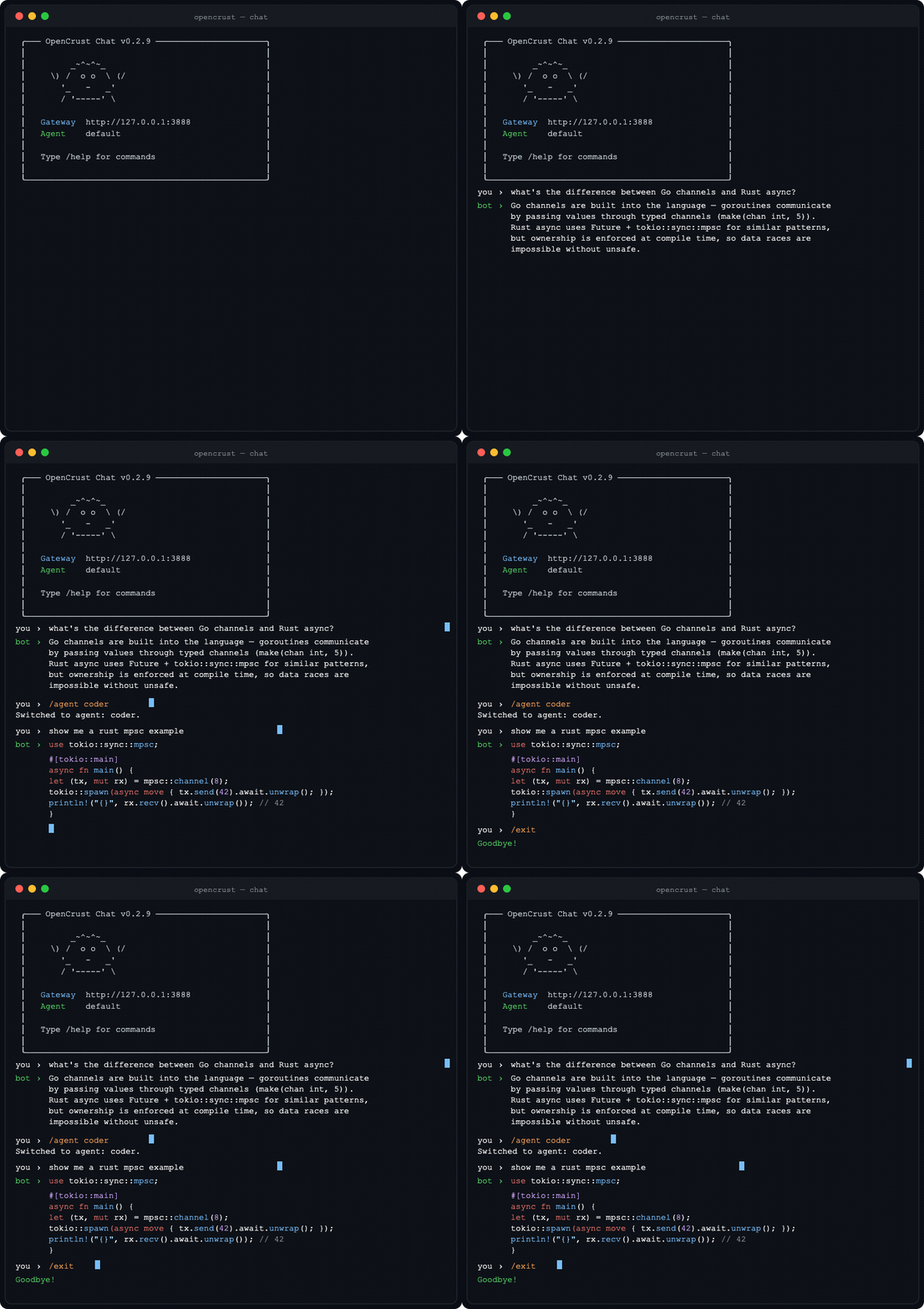
Chat commands: /help · /new (fresh session) · /agent <id> · /clear · /exit
Pre-compiled binaries for Linux (x86_64, aarch64), macOS (Intel, Apple Silicon), and Windows (x86_64) are available on GitHub Releases.
Why OpenCrust?
vs OpenClaw, ZeroClaw, Hermes, and other AI agent frameworks
| OpenCrust | OpenClaw (Node.js) | ZeroClaw (Rust) | Hermes (Python) | |
|---|---|---|---|---|
| Binary size | 16 MB | ~1.2 GB (with node_modules) | ~25 MB | source only |
| Memory at idle | 13 MB | ~388 MB | ~20 MB | — |
| Cold start | 3 ms | 13.9 s | ~50 ms | — |
| Credential storage | AES-256-GCM encrypted vault | Plaintext config file | Plaintext config file | ~/.hermes/.env (chmod 600) |
| Auth default | Enabled (WebSocket pairing) | Disabled by default | Disabled by default | Pairing codes (8-char, 1h expiry) |
| Scheduling | Cron, interval, one-shot | Yes | No | Yes (cron + natural language) |
| Multi-agent routing | Yes (named agents) | Yes (agentId) | No | Yes (delegate_task, depth 2) |
| Session orchestration | Yes | Yes | No | Yes |
| MCP support | Stdio + HTTP | Stdio + HTTP | Stdio | Stdio + HTTP + OAuth 2.1 |
| Channels | 9 | 6+ | 4 | 16 |
| LLM providers | 15 | 10+ | 22+ | 18+ |
| Pre-compiled binaries | Yes | N/A (Node.js) | Build from source | No (source install) |
| Config hot-reload | Yes | No | No | No |
| Plugin system | WASM (sandboxed) | No | No | Python plugins |
| Self-update | Yes (opencrust update) | npm | Build from source | Yes (hermes update) |
| Execution backends | local | local | local | local, Docker, SSH, Modal, Daytona |
| Security scan | ✅ skills prompt-injection | — | — | ✅ OSV + prompt-injection + supply chain |
| Self-improvement | ✅ confidence gate + CHANGELOG | — | — | ✅ RL integration + user modeling |
Benchmarks measured on a 1 vCPU, 1 GB RAM DigitalOcean droplet.
Security
OpenCrust is built for the security requirements of always-on AI agents that access private data and communicate externally.
- Encrypted credential vault - API keys and tokens stored with AES-256-GCM encryption at
~/.opencrust/credentials/vault.json. Never plaintext on disk. - Authentication by default - WebSocket gateway requires pairing codes. No unauthenticated access out of the box.
- Per-channel authorization policies - DM policies (open, pairing, allowlist) and group policies (open, mention-only, disabled) per channel. Unauthorized messages are silently dropped.
- Prompt injection detection - input validation and sanitization before content reaches the LLM.
- Rate limiting - per-user sliding-window rate limits with configurable cooldown to prevent abuse.
- Token budgets - per-session, daily, and monthly token caps to control LLM cost per user.
- Tool allowlists - restrict which tools an agent may call per session, with a per-session call budget cap.
- Log secret redaction - API keys and tokens automatically redacted from log output.
- WASM sandboxing - optional plugin sandbox via WebAssembly runtime with controlled host access (compile with
--features plugins). - Localhost-only binding - gateway binds to
127.0.0.1by default, not0.0.0.0.
Features
LLM Providers
Native providers:
- Anthropic Claude - streaming (SSE), tool use
- OpenAI - GPT-4o, Azure, any OpenAI-compatible endpoint via
base_url - Ollama - local models with streaming
OpenAI-compatible providers:
- Sansa - regional LLM via sansaml.com
- DeepSeek - DeepSeek Chat
- Mistral - Mistral Large
- Gemini - Google Gemini via OpenAI-compatible API
- Falcon - TII Falcon 180B (AI71)
- Jais - Core42 Jais 70B
- Qwen - Alibaba Qwen Plus
- Yi - 01.AI Yi Large
- Cohere - Command R Plus
- MiniMax - MiniMax Text 01
- Moonshot - Kimi K2
- vLLM - self-hosted models via vLLM's OpenAI-compatible server
Voice I/O
- TTS (Text-to-Speech) — Kokoro (self-hosted via kokoro-fastapi), OpenAI TTS (
tts-1,tts-1-hd), any OpenAI-compatible endpoint - STT (Speech-to-Text) — local Whisper (faster-whisper-server), OpenAI Whisper API
auto_reply_voice: truesynthesizes every text response as audio automaticallytts_max_charslimits synthesis length; long responses are truncated with a warning- Per-channel delivery: Discord (file attachment), WeChat (Customer Service voice API), Telegram/LINE (native audio), Slack (text fallback)
Channels
- Telegram - streaming responses, MarkdownV2, bot commands, typing indicators, user allowlist with pairing codes, photo/vision support, voice messages (Whisper STT), TTS auto-reply, document/file handling
- Discord - slash commands, event-driven message handling, session management, voice responses (TTS file attachment)
- Slack - Socket Mode, streaming responses, allowlist/pairing
- WhatsApp - Meta Cloud API webhooks, allowlist/pairing
- WhatsApp Web - QR code pairing via Baileys Node.js sidecar, no Meta Business account required, auth state persistence
- iMessage - macOS native via chat.db polling, group chats, AppleScript sending (setup guide)
- LINE - Messaging API webhooks, reply/push fallback, group/room support, allowlist/pairing, voice responses (TTS, falls back to text)
- WeChat - Official Account Platform webhooks, SHA-1 signature verification, synchronous XML reply, image/voice/video/location dispatch, Customer Service API push, voice responses (TTS), allowlist/pairing
- MQTT - native broker client (Mosquitto, EMQX, HiveMQ), Mode A (plain text, one session per channel) and Mode B (JSON
{"user_id","text"}, one session per device), auto-detection, exponential backoff reconnect, QoS 0/1/2, optional TLS (mqtts://)
MCP (Model Context Protocol)
- Connect any MCP-compatible server (filesystem, GitHub, databases, web search)
- Stdio and HTTP (Streamable HTTP) transport
- Tools appear as native agent tools with namespaced names (
server_tool) - Resource tool - LLM can list and read MCP server resources on demand
- Server instructions captured from handshake and appended to system prompt
- Health monitor with 30s ping and auto-reconnect
- Configure in
config.ymlor~/.opencrust/mcp.json(Claude Desktop compatible) - CLI:
opencrust mcp list,opencrust mcp inspect <name>,opencrust mcp resources <name>,opencrust mcp prompts <name>
Personality (DNA)
- On first message, the agent introduces itself and asks a few questions to learn your preferences
- Writes
~/.opencrust/dna.mdwith your name, communication style, guidelines, and the bot's own identity - No config files to edit, no wizard sections to fill out - just a conversation
- Hot-reloads on edit - change
dna.mdand the agent adapts immediately - Migrating from OpenClaw?
opencrust migrate openclawimports your existingSOUL.md
Agent Runtime
- Tool execution loop - bash, file_read, file_write, web_fetch, web_search (Brave or Google Custom Search), doc_search, handoff, schedule_heartbeat, cancel_heartbeat, list_heartbeats, mcp_resources (up to 10 iterations)
- SQLite-backed conversation memory with vector search (sqlite-vec + Cohere embeddings)
- Context window management - rolling conversation summarization at 75% context window
- Scheduled tasks - cron, interval, and one-shot scheduling
Skills
- Define agent skills as Markdown files (SKILL.md) with YAML frontmatter
- Auto-discovery from
~/.opencrust/skills/- injected into the system prompt - Hot-reload — skills are active immediately after
create_skillorskill install, no restart needed - CLI:
opencrust skill list,opencrust skill install <url|path>,opencrust skill remove <name> - Self-learning & self-improvement — after 3+ tool calls the agent considers saving a new workflow as a skill; when reusing an existing skill it silently self-assesses and patches it autonomously if a gap is found (confidence gate prevents low-signal patches; version is bumped and CHANGELOG.md updated on every patch)
agent.self_learning: falseinconfig.ymlto disable- 3-layer quality control: prompt guidance, mechanical limits (max 30 skills, min body length, duplicate guard), and required
rationalefield stored in the skill file for auditability - agentskills.io compatible — install community skills from any public hub with
opencrust skill install <url>; flat (skill-name.md) and folder (skill-name/SKILL.md) layouts coexist automatically, no migration needed - Security scan — every skill is scanned for prompt-injection patterns before installation, whether from a URL, local file, or agent-created
- Agent skill editing — agent can
patchan existing skill (update body, description, or triggers) andwrite_fileto add supplementary.mdfiles inside a skill folder
Multi-Agent Orchestration
Define named agents in config.yml and route tasks between them using the built-in handoff tool:
agents:
  router:
    provider: main                    # which llm: key to use
    system_prompt: |
      Analyse the user's request and delegate using the handoff tool:
      - handoff(agent_id='coder')     for code, scripts, programming
      - handoff(agent_id='assistant') for general questions
      Always use handoff — never answer directly.

  coder:
    provider: main
    system_prompt: You are a specialist coding agent. Be concise.
    tools: [bash, file_read, file_write]  # restrict which tools this agent may call
    dna_file: dna-coder.md               # optional: agent-specific persona
    skills_dir: skills/coder/            # optional: agent-specific skill set

  assistant:
    provider: main
    system_prompt: You are a helpful general-purpose assistant.
    max_tokens: 2048
    max_context_tokens: 32000
agents: config fields:
| Field | Type | Description |
|---|---|---|
provider | string | Which llm: key to use (e.g. main, claude). Defaults to the first registered provider. |
model | string | Model override for this agent only. |
system_prompt | string | Agent-specific system prompt (replaces the global one). |
max_tokens | int | Max response tokens for this agent. |
max_context_tokens | int | Context window cap for this agent. |
tools | list | Tool allowlist. Empty list = all tools permitted. |
dna_file | path | Path to an agent-specific DNA/persona file (overrides global dna.md). |
skills_dir | path | Path to an agent-specific skills directory (overrides global skills/). |
Handoff tool:
The handoff tool is automatically available to all agents. When called, it runs the target agent in an isolated ephemeral session and returns its response:
handoff(agent_id="coder", message="Write a fibonacci function in Python")
# → "[coder]: Here's the implementation…"
- Depth limit of 3 prevents infinite A→B→A loops
- Each handoff session is isolated — no history bleed between agents
- The target agent inherits its own tools, DNA, and skills overrides
API usage:
Create a session pinned to a specific agent; subsequent messages use that agent automatically:
# Create a session bound to the "router" agent
SESSION=$(curl -s -X POST http://localhost:3888/api/sessions \
  -H "X-API-Key: your-key" \
  -H "Content-Type: application/json" \
  -d '{"agent_id": "router"}' | jq -r '.session_id')

# All messages in this session go through the router
curl -X POST "http://localhost:3888/api/sessions/$SESSION/messages" \
  -H "X-API-Key: your-key" \
  -H "Content-Type: application/json" \
  -d '{"content": "Write hello world in Python"}'

# Override per-message if needed
curl -X POST "http://localhost:3888/api/sessions/$SESSION/messages" \
  -H "X-API-Key: your-key" \
  -H "Content-Type: application/json" \
  -d '{"content": "...", "agent_id": "coder"}'
Infrastructure
- Config hot-reload - edit
config.yml, changes apply without restart - Daemonization -
opencrust start --daemonwith PID management - Self-update -
opencrust updatedownloads the latest release with SHA-256 verification,opencrust rollbackto revert - Restart -
opencrust restartgracefully stops and starts the daemon - Runtime provider switching - add or switch LLM providers via the webchat UI or REST API without restarting
- Migration tool -
opencrust migrate openclawimports skills, channels, and credentials - Conversation summarization - rolling summary at 75% context window, session summaries persisted across restarts
- Interactive setup -
opencrust initwizard for provider and channel configuration - Diagnostics -
opencrust doctorchecks config, data directory, credential vault, LLM provider reachability, channel credentials, MCP server connectivity, and database integrity
Migrating from OpenClaw?
One command imports your skills, channel configs, credentials (encrypted into the vault), and personality (SOUL.md as dna.md):
opencrust migrate openclaw
Use --dry-run to preview changes before committing. Use --source /path/to/openclaw to specify a custom OpenClaw config directory.
Configuration
OpenCrust looks for config at ~/.opencrust/config.yml:
gateway:
  host: "127.0.0.1"
  port: 3888
  # api_key: "your-secret-key"  # optional: protects /api/* endpoints when exposed publicly
                                 # generate with: openssl rand -hex 32

llm:
  claude:
    provider: anthropic
    model: claude-sonnet-4-5-20250929
    # api_key resolved from: vault > config > ANTHROPIC_API_KEY env var

  ollama-local:
    provider: ollama
    model: llama3.1
    base_url: "http://localhost:11434"

channels:
  telegram:
    type: telegram
    enabled: true
    bot_token: "your-bot-token"  # or TELEGRAM_BOT_TOKEN env var

  line:
    type: line
    enabled: true
    channel_access_token: "your-access-token"  # or LINE_CHANNEL_ACCESS_TOKEN env var
    channel_secret: "your-secret"              # or LINE_CHANNEL_SECRET env var
    dm_policy: pairing     # open | pairing | allowlist (default: pairing)
    group_policy: mention  # open | mention | disabled (default: open)

agent:
  # Personality is configured via ~/.opencrust/dna.md (auto-created on first message)
  max_tokens: 4096
  max_context_tokens: 100000

guardrails:
  max_input_chars: 16000            # reject messages longer than this (default: 16000)
  max_output_chars: 32000           # truncate responses longer than this (default: 32000)
  token_budget_session: 10000       # max input+output tokens per session
  token_budget_user_daily: 100000   # max tokens per user per day
  token_budget_user_monthly: 500000 # max tokens per user per month
  allowed_tools:                    # null = all tools allowed; [] = no tools allowed
    - web_search
    - file_read
  session_tool_call_budget: 15      # max tool calls per session

gateway:
  rate_limit:
    per_user_per_minute: 10         # per-user message rate limit
    cooldown_secs: 30               # cooldown period after limit is exceeded

memory:
  enabled: true

# MCP servers for external tools
mcp:
  filesystem:
    command: npx
    args: ["-y", "@modelcontextprotocol/server-filesystem", "/tmp"]
  remote-server:
    transport: http
    url: "https://mcp.example.com/sse"
See the full configuration reference for all options including Discord, Slack, WhatsApp, WhatsApp Web, iMessage, embeddings, and MCP server setup.
Architecture
crates/
  opencrust-cli/        # CLI, init wizard, daemon management
  opencrust-gateway/    # WebSocket gateway, HTTP API, sessions
  opencrust-config/     # YAML/TOML loading, hot-reload, MCP config
  opencrust-channels/   # Discord, Telegram, Slack, WhatsApp, WhatsApp Web, iMessage, LINE, WeChat, MQTT
  opencrust-agents/     # LLM providers, tools, MCP client, agent runtime
  opencrust-db/         # SQLite memory, vector search (sqlite-vec)
  opencrust-plugins/    # WASM plugin sandbox (wasmtime)
  opencrust-media/      # TTS (Kokoro, OpenAI), STT (Whisper), media processing
  opencrust-security/   # Credential vault, allowlists, pairing, validation
  opencrust-skills/     # SKILL.md parser, scanner, installer
  opencrust-common/     # Shared types, errors, utilities
| Component | Status |
|---|---|
| Gateway (WebSocket, HTTP, sessions) | Working |
| Telegram (streaming, commands, pairing, photos, voice, documents) | Working |
| Discord (slash commands, sessions) | Working |
| Slack (Socket Mode, streaming) | Working |
| WhatsApp (webhooks) | Working |
| WhatsApp Web (QR code, Baileys sidecar) | Working |
| iMessage (macOS, group chats) | Working |
| LINE (webhooks, reply/push fallback) | Working |
| WeChat (Official Account webhooks, media dispatch) | Working |
| MQTT (broker client, Mode A/B auto-detect, reconnect, QoS 0/1/2) | Working |
| LLM providers (15: Anthropic, OpenAI, Ollama + 12 OpenAI-compatible) | Working |
| Agent tools (bash, file_read, file_write, web_fetch, web_search, doc_search, schedule_heartbeat, cancel_heartbeat, list_heartbeats, mcp_resources) | Working |
| MCP client (stdio, HTTP, tool bridging, resources, instructions) | Working |
| A2A protocol (Agent-to-Agent) | Working |
| Multi-agent routing (named agents) | Working |
| Skills (SKILL.md, auto-discovery) | Working |
| Config (YAML/TOML, hot-reload) | Working |
| Personality (DNA bootstrap, hot-reload) | Working |
| Memory (SQLite, vector search, summarization) | Working |
| Security (vault, allowlist, pairing, per-channel policies, log redaction) | Working |
| Scheduling (cron, interval, one-shot) | Working |
| CLI (init, start/stop/restart, update, migrate, mcp, skills, doctor) | Working |
| Plugin system (WASM sandbox) | Scaffolded |
| TTS (Kokoro, OpenAI) + STT (Whisper, OpenAI) | Working |
Contributing
OpenCrust is open source under the MIT license. Join the Discord to chat with contributors, ask questions, or share what you're building. See CONTRIBUTING.md for setup instructions, code guidelines, and the crate overview.
Current priorities
| Priority | Issue | Description |
|---|---|---|
| P0 | #99 | Brand facelift: logo, images, visual identity |
| P1 | #150 | Fallback model chain: auto-retry with backup providers |
| P1 | #152 | Token usage tracking and cost reporting |
| P1 | #153 | opencrust doctor diagnostic command |
| P1 | #146 | Guardrails: safety, rate limits, and cost controls |
| P2 | #185 | MCP: Apps support (interactive HTML interfaces) |
| P2 | #158 | Auto-backup config files before changes |
| P2 | #142 | Web-based setup wizard at /setup |
Browse all open issues or filter by good-first-issue to find a place to start.
Contributors
License
MIT