data-table-filters
Data tables for React and shadcn/ui: faceted filters, sorting, infinite scroll, and a row detail sheet. Installed as source with the shadcn CLI, so the code is yours to change.
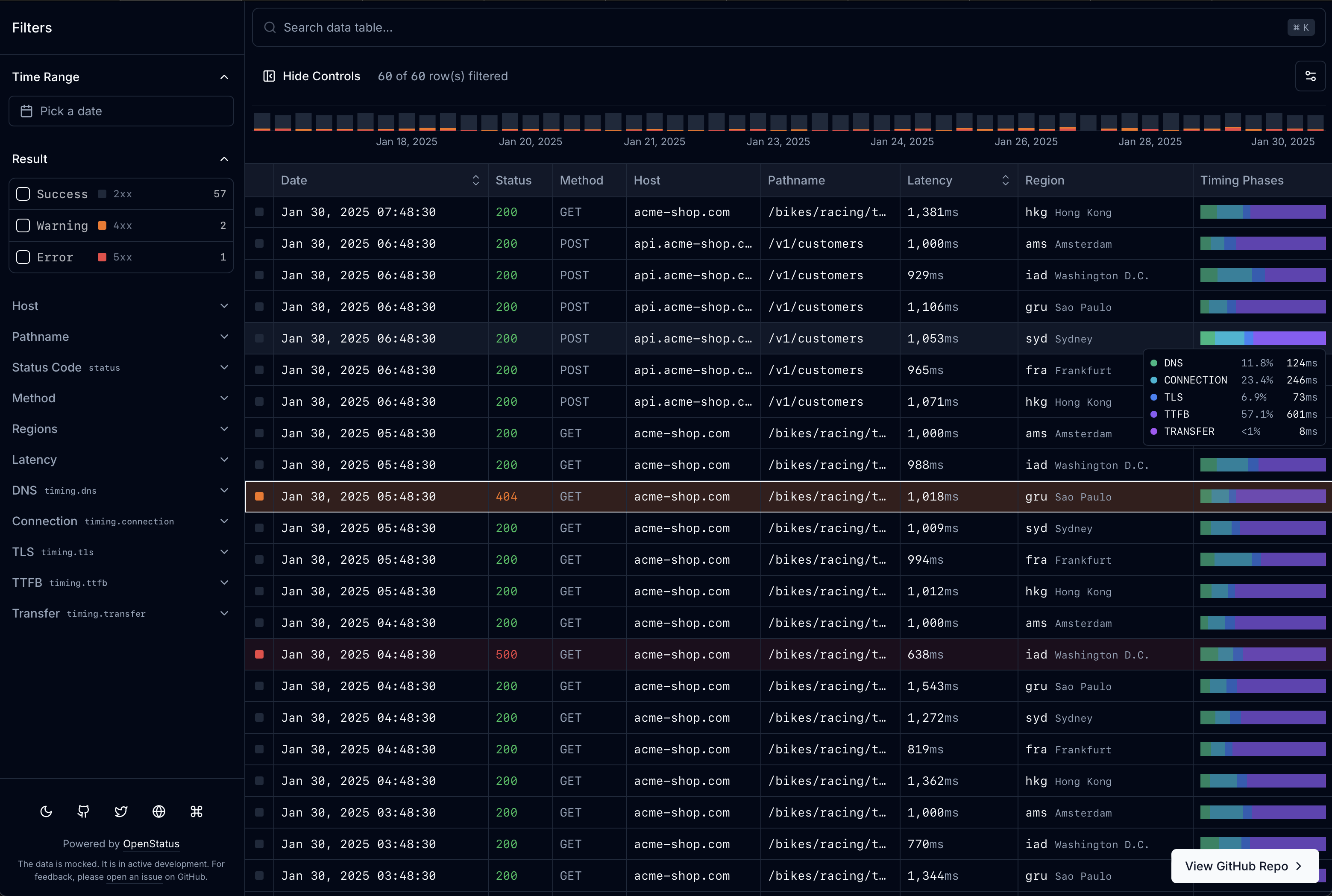
One createTableSchema definition drives the columns, the filter controls, the row sheet, the Drizzle route handler, and the MCP tool schema. When the rows live in Postgres, filtering, faceted counts, and cursor pagination run in SQL. Built for the openstatus dashboard and used there in production.
Visit data-table.openstatus.dev to learn more. Read the Docs for full documentation.
Install
 — the Quick Start below is installed into a fresh Next.js app on each shadcn library, Base UI and Radix, and typechecked nightly against the latest shadcn CLI.
Prerequisite. Works on either shadcn library: the CLI default, Base UI (
npx shadcn@latest init -d), or Radix (npx shadcn@latest init -b radix -p nova). CI installs into both and typechecks them on every registry change and nightly.
One command installs the core block and the schema system:
npx shadcn@latest add @data-table-filters/data-table @data-table-filters/data-table-schemaThen render a table from any array of objects — columns, filters, and cell renderers are inferred:
import { DataTableAuto } from "@/components/data-table/data-table-auto";

const data = [
  {
    name: "Alice",
    role: "admin",
    rating: 5,
    created_at: "2026-01-15T10:00:00Z",
  },
  { name: "Bob", role: "user", rating: 3, created_at: "2026-02-20T14:30:00Z" },
];

export default function Page() {
  return <DataTableAuto data={data} />;
}
Starting from nothing? One command creates the Next.js app, initializes shadcn, and installs a working example with every block it needs (add -b radix before -p nova for Radix). Run cd data-table-app && npm run dev and open localhost:3000/example:
npx shadcn@latest init @data-table-filters/data-table-example-infinite --name data-table-app --template next -p novaFrom create-next-app to a green next build this takes about 30 seconds on a clean machine. See the Quick Start for the full walkthrough, and add any block below as you need it.
| Block | Install | What it adds |
|---|---|---|
data-table | @data-table-filters/data-table | Core: table engine, store, 4 filter types, memory adapter |
data-table-filter-command | @data-table-filters/data-table-filter-command | Command palette with history + keyboard shortcuts |
data-table-cell | @data-table-filters/data-table-cell | 12 cell renderers (text, code, number, bar, heatmap, gauge, badge, boolean, star, status-code, level-indicator, timestamp) |
data-table-sheet | @data-table-filters/data-table-sheet | Row detail side panel |
data-table-nuqs | @data-table-filters/data-table-nuqs | nuqs URL state adapter |
data-table-zustand | @data-table-filters/data-table-zustand | zustand state adapter |
data-table-schema | @data-table-filters/data-table-schema | Declarative schema system with col.* factories |
data-table-drizzle | @data-table-filters/data-table-drizzle | Drizzle ORM server-side helpers |
data-table-query | @data-table-filters/data-table-query | React Query infinite query integration |
data-table-filter-command-ai | @data-table-filters/data-table-filter-command-ai | AI-powered natural language → filter inference |
data-table-mcp | @data-table-filters/data-table-mcp | MCP server endpoint for AI agents |
data-table-actions | @data-table-filters/data-table-actions | Row and bulk actions rendered from server metadata |
data-table-remote | @data-table-filters/data-table-remote | Headless table that renders from an API endpoint's manifest |
data-table-chart | @data-table-filters/data-table-chart | Timeline chart over the table: stacked buckets per level, drag to zoom the time filter |
data-table-example-infinite | @data-table-filters/data-table-example-infinite | Ready-to-run /example route: schema, mock API, infinite table with URL state |
Blocks install by name from the shadcn registry directory; the JSON form https://data-table.openstatus.dev/r/<block>.json works too.
For AI Agents
Install the plugin in Claude Code:
/plugin marketplace add openstatushq/data-table-filters
/plugin install data-table-filters@openstatus
Or install the skill with any agent that supports the skills CLI:
npx skills add https://github.com/openstatushq/data-table-filters --skill data-table-filtersThen just say "add a filterable data table" — the skill detects your stack, installs the right blocks, generates a schema, and wires everything up.
Or point any MCP client at the docs and let the agent ask them questions —
search_docs, get_doc, list_blocks, get_install_plan:
claude mcp add --transport http data-table-filters https://data-table.openstatus.dev/api/mcpMachine-readable docs, for agents without the skill:
| Endpoint | What it is |
|---|---|
/api/mcp | These docs as an MCP server (Streamable HTTP) |
/llms.txt | Index: blocks, install recipes, docs links |
/llms-full.txt | Every documentation page in one file |
/r/index.md | Block catalog with install commands and dependencies |
/docs/<page>.md | Any docs page as raw markdown |
Cursor users can copy .cursor/rules/data-table-filters.mdc into their project; AGENTS.md covers every other agent. See the For AI Agents docs page for the full rundown.
Table Schema
Define your entire table — columns, filters, display, sorting, row details — in one place with createTableSchema and col.* factories.
import {
  col,
  createTableSchema,
  type InferTableType,
} from "@/lib/table-schema";

const LEVELS = ["error", "warn", "info", "debug"] as const;

export const tableSchema = createTableSchema({
  level: col.presets.logLevel(LEVELS),
  date: col.presets.timestamp().label("Date").size(200).sheet(),
  latency: col.presets
    .duration("ms")
    .label("Latency")
    .sortable()
    .size(110)
    .sheet(),
  status: col.presets.httpStatus().label("Status").size(60),
  host: col.string().label("Host").size(125).sheet(),
});

export type ColumnSchema = InferTableType<typeof tableSchema.definition>;
Generators produce everything the table components need from a single schema:
const columns = generateColumns<ColumnSchema>(tableSchema.definition);
const filterFields = generateFilterFields<ColumnSchema>(tableSchema.definition);
const sheetFields = generateSheetFields<ColumnSchema>(tableSchema.definition);
Presets cover common patterns: logLevel, httpStatus, httpMethod, duration, timestamp, traceId, pathname.
Examples
/default— client-side pagination (nuqs or zustand)/infinite— infinite scroll with server-side filtering, live mode, row details/drizzle— Drizzle ORM + Supabase PostgreSQL with cursor-based pagination, faceted search, and live data via Vercel cron/light— OpenStatus Light Viewer (UI forvercel-edge-ping)/builder— interactive schema builder (paste JSON/CSV, live table preview, export TS)
BYOS (Bring Your Own Store)
A pluggable adapter pattern for filter state management. Three built-in adapters:
- nuqs — URL-based state (shareable URLs, browser history)
- zustand — client-side state (existing store integration)
- memory — ephemeral in-memory state (embedded tables, builder)
Or implement the StoreAdapter interface for a custom solution. See the Docs for details.
Built With
- nextjs
- tanstack-query
- tanstack-table
- shadcn/ui
- cmdk
- nuqs
- zustand
- drizzle-orm
- zod
- superjson
- date-fns
- recharts
- dnd-kit
Getting Started
No environment variable required for the default examples. For the Drizzle example, set DATABASE_URL to a PostgreSQL connection string.
pnpm install
pnpm dev
Open http://localhost:3000 with your browser to see the result.
Want more?
If you are looking for specific use-cases or like what we are building and want to hire us, feel free write us to hire@openstatus.dev or book a call via cal.com.
Credits
- sadmann17 for the dope
<Sortable />component around@dnd-kit(see sortable.sadmn.com) - shelwin_ for the draggable chart inspiration (see zoom-chart-demo.vercel.app)