OpenStory
An open-source AI film studio that runs on your own machine.
Paste a script. Get a film with the same characters in every shot, their voices, and a score.
Run it · Your first film · Use with your agent · Gallery · Hosted version


 | 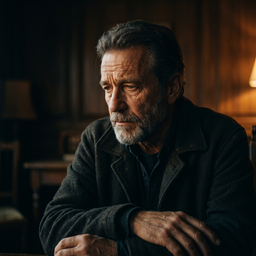 | 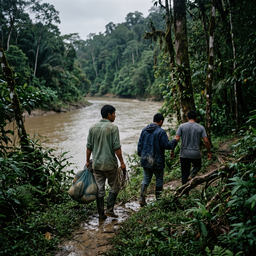 |
| ▶ Action | ▶ Award Season | ▶ Documentary |
Each one was made in OpenStory from a one-line brief. More in the gallery.
Run it on your machine
git clone https://github.com/openstory-so/openstory.git
cd openstory
bun install
bun dev
Open http://localhost:3000.
The only thing to install first is Bun 1.3.9 or newer. No Docker, no database to set up, no cloud account. bun dev writes its own config, creates the local database, and starts the app.
Add your keys
You pay each provider directly. OpenStory adds nothing on top. There are two ways to add a key:
- In the app. Settings → API Keys takes a fal, OpenRouter, Google or xAI key, the same as on openstory.so.
- In
.env.local.bun setupasks for the fal, OpenRouter, ElevenLabs and BytePlus keys and writes them there. Press Enter to skip any of them. ElevenLabs and BytePlus keys can only be set this way.
| Key | Where to get it | What it turns on | In the app |
|---|---|---|---|
FAL_KEY | fal.ai | Script breakdown, stills, video, music. This one key is enough to start. | Yes |
ELEVENLABS_API_KEY | elevenlabs.io | Character voices, spoken dialogue, ElevenLabs music | No |
OPENROUTER_KEY | openrouter.ai | Optional. Script breakdown through OpenRouter instead of fal | Yes |
GEMINI_API_KEY | aistudio.google.com | Optional. Gemini and Omni Flash direct from Google | Yes |
XAI_API_KEY | console.x.ai | Optional. Grok direct from xAI | Yes |
ARK_API_KEY | console.byteplus.com | Optional. Seedance and Seedream direct from BytePlus instead of through fal. Realistic faces on Seedance 2.5 also need the two BytePlus IAM keys; bun setup asks for them. | No |
Every other setting is in .env.example.
Your first film
Paste this into the box on the front page, pick a style, and press Generate. The button shows the price before anything is spent.
INT. LAUNDROMAT - NIGHT

MARLOWE (50s, grey overcoat) feeds coins into the last working dryer.
DOT (19, bike courier, yellow jacket) drops a wet envelope on the folding table.

DOT
You're Marlowe. This is yours.

MARLOWE
I didn't order anything.

DOT
Nobody ever does.

She leaves. Marlowe opens the envelope. Inside is a photograph of himself,
asleep, in this laundromat.
A single line works too ("a bike courier delivers a letter nobody ordered"). OpenStory writes the script from it.
With only a fal key you get the stills, the clips and music. For Marlowe and Dot to speak in their own voices, add the ElevenLabs key.
What you get
- The same character in every shot. Each character gets a reference sheet, and every shot is drawn from it. Change their clothes per scene with looks.
- Places that stay the same. Locations get a sheet too, and are shared across all your films.
- Voices and dialogue. Each character has a voice. Lines are recorded per scene and lip-synced to the clip.
- Music. A score written for the film.
- Any model, per shot. Seedance, Kling, Grok, Nano Banana and more. Switch model on one shot without touching the rest.
- Nothing is lost. Every still, clip, voice take and prompt is kept as a version. Go back to any of them.
- It tells you what is out of date. Edit a character and the shots that used the old version are marked.
- Export. Play the cut in the browser, or download every file.
Your films are files
Everything you make is kept in ~/openstory, outside the repo, so deleting the clone does not delete your work. Run npx @openstory/cli@latest login --origin http://localhost:3000 once and bun dev keeps a readable copy there as you work:
~/openstory/personal/the-laundromat/
  scenes/01-the-envelope/shots/01-wide-marlowe-at-dryer/still.png
  cast/marlowe/looks/default/sheet.png
  locations/laundromat/sheet.png
Open them in any editor.
Drive it from your agent
OpenStory is also an MCP server. Point Claude, Cursor, Codex or any MCP client at http://localhost:3000/mcp and it can read a whole production, edit scenes, plan and run generation, and export. See Use OpenStory from an agent.
Install the OpenStory plugin for the agent skills:
npx skills add openstory-so/skillsThat install includes setup, create-style, create-sequence, stitch (/stitch) and stitch-player, the contract for embedding the React player. Grok, Claude Code, Codex, and the ChatGPT desktop app can add openstory-so/skills as a marketplace and install the plugin. The per-client commands are in that repo. The skills are written in this repo (skills/ and packages/stitch/skills/) and published to the plugin on merge.
Stitch
The player is its own package, @openstory/stitch, in packages/stitch. It plays local stills, dialogue, music and video as one cut, with no OpenStory server:
npx @openstory/stitch --music score.mp3 shot.mp4It prints an http://127.0.0.1 URL, opens that page, and runs until Ctrl+C. npx @openstory/stitch skill copies only /stitch and stitch-player. The flags and the player API are in packages/stitch/README.md, also in 中文, français, and español.
Don't want to run it?
openstory.so is the same app, hosted. No subscription: buy credits, or add your own keys in Settings and pay the providers directly.
Deploy your own
The button clones the repo into your Cloudflare account, creates the resources in wrangler.jsonc, and deploys on every push to main. From your own clone, bun setup --prod walks you through it. Details: docs/deployment/cloudflare.md.
Contributing
Bug fixes, features, docs and ideas are all welcome. Issues labelled good first issue are a good place to start.
CONTRIBUTING.md has the setup, the tech stack, the commands and the pull request process. AGENTS.md has the architecture.