Raven
A lightweight, multithreaded GUI library in C for editors and tools.
Disclaimer : This project is still in active development and public API is subject to change.
Build from source
Raven builds with CMake and a C11 compiler, and has no dependency to install besides the X11 development package on Linux. The Vulkan headers are downloaded automatically during the configuration (git and an internet connection are needed for that), unless the Vulkan SDK is installed. No Vulkan library is linked.
Each build below gives the library, ravenc (the XMLC compiler), the
designer, the examples and the tests. Add -DRAVEN_BUILD_SHARED=ON to the
configure command for a shared library (raven.dll, libraven.so,
libraven.dylib) instead of a static one.
Windows (Visual Studio)
- Install Visual Studio 2022 (Community is fine) with the Desktop development with C++ workload; it includes CMake. Install Git.
- Open the Developer PowerShell for VS 2022 and run:
git clone https://github.com/oscar-soirey/Raven.git
cd Raven
cmake -S . -B build
cmake --build build --config Release --parallel
ctest --test-dir build -C Release --output-on-failure   # optional: the tests
cmake --install build --config Release --prefix install
The programs are in build\bin\Release (start raven_editor.exe or
raven_designer.exe); the library, its headers and the CMake package are in
install\. Shortcuts: build.bat does the configure and the build in one
command, generate-cmake.bat --open opens the solution in Visual Studio (see
Build options and scripts).
Windows (MinGW-w64)
- Install MSYS2, then in the MSYS2 MINGW64 shell:
pacman -S --needed git mingw-w64-x86_64-gcc mingw-w64-x86_64-cmake mingw-w64-x86_64-ninja
git clone https://github.com/oscar-soirey/Raven.git
cd Raven
cmake -S . -B build -G Ninja -DCMAKE_BUILD_TYPE=Release
cmake --build build --parallel
cmake --install build --prefix install
This gives libraven.a (or raven.dll and libraven.dll.a in a shared
build). A MinGW library is for programs built with MinGW, not with Visual C++.
Linux
- Install a compiler, CMake, Git and the X11 headers:
sudo apt install build-essential cmake git libx11-dev ninja-build   # Debian, Ubuntu
sudo dnf install gcc cmake git libX11-devel ninja-build             # Fedora
sudo pacman -S base-devel cmake git libx11 ninja # Arch- Build:
git clone https://github.com/oscar-soirey/Raven.git
cd Raven
cmake -S . -B build -G Ninja -DCMAKE_BUILD_TYPE=Release
cmake --build build --parallel
ctest --test-dir build --output-on-failure   # optional: the tests
cmake --install build --prefix install       # or: sudo cmake --install build
The programs are in build/bin (./build/bin/raven_editor,
./build/bin/raven_designer). At run time the Vulkan driver of the system
is used (libvulkan.so.1, from the libvulkan1 / vulkan-loader package).
macOS
- Install the Xcode command line tools (
xcode-select --install) and CMake (brew install cmake, or the app from cmake.org). - Build:
git clone https://github.com/oscar-soirey/Raven.git
cd Raven
cmake -S . -B build -DCMAKE_BUILD_TYPE=Release
cmake --build build --parallel
ctest --test-dir build --output-on-failure   # optional: the tests
cmake --install build --prefix install
Add -DCMAKE_OSX_ARCHITECTURES="arm64;x86_64" for a universal library.
Raven draws with Vulkan, which runs on macOS through
MoltenVK (brew install molten-vk,
or the Vulkan SDK for macOS).
Using the built library
install/ is a CMake package. In your project:
find_package(raven REQUIRED)          # configure with -DCMAKE_PREFIX_PATH=<path to install>
target_link_libraries(app PRIVATE raven::raven)
or, without installing, add_subdirectory(Raven) before the same
target_link_libraries. Prebuilt packages for every platform are attached to
the releases.
- The interface and its code in one file, in your language. Write the
window in XML and its code in
<script>beside it:.xmlc(C),.xmlc++,.xmlrs(Rust),.xmlpy,.xmlgo,.xmlcs(C#),.xmlzig,.xmllua.ravenccompiles the XML into your language, so everything is checked by your compiler and built by your usual tools (CMake, Cargo,go generate, MSBuild,zig build, a Python or Lua import). See XMLC. - The official IDE (
raven_designer): new projects in all eight languages, interfaces edited visually next to their code, completion of the Raven API, translations in a table, build, run and compiler errors at their line in the.xml…file. See The IDE. - C11, no dependency. Raven opens its own native windows (Win32, X11, Cocoa on macOS), loads Vulkan at run time and has its own memory allocator. A stripped shared library is about 1.3 MB, two fonts included.
- Slate-style layout. Boxes, grid, overlay, border, canvas, scroll box, splitter, wrap box, switcher, tabs, expander. Each child carries a slot (padding, alignment, auto or fill size) read by its parent.
- Windows written in XML, or built with the C API, or both. A document
can declare its own tags (
<Widget Name="Card">), with parameters. - Everything moves. Animations are springs, as on iOS: buttons squash and
bounce back, popups pop out of what opened them, panels fly to their place,
lists stretch at their ends. Widgets arrive with transitions (
Appear="Drop"). - What a tool needs: a multi-line text editor with languages (colors, proposals, brackets, indentation), a header bar that replaces the title bar of the system, docking, the file dialogs of the system and a file browser widget, drag and drop from other applications.
- Materials. Solid, or three kinds of glass (clear, frosted, tinted) that blur and bend what is behind them, for one widget or for everything; panels that only blur what is behind; windows that are seen through, with the blur of the system behind them; an island that unfolds at the top of the window.
- Tools of the trade. A graph of nodes whose wires hang and swing, a timeline (tracks, clips, keys, markers), a complete color picker.
- Themes you write. Theme files, styles for a type of widget or for a class, a theme for a part of a window. Markdown in labels and in the text editor. Interface and theme files are loaded again while the application runs when they are saved.
- Web pages (
raven_web.h, built into the same library) shown by driving a browser already installed. - Every language. Translations in CSV tables, read with
Rtr("key")in C orText="@key"in XML, with plurals, arguments and numbers in the conventions of each language. Right-to-left layouts that mirror themselves, bidirectional text, Arabic shaping, emoji in color and the fonts of the system for the scripts the bundled font lacks. - Accessible. Native screen readers (Narrator and NVDA through UI Automation, VoiceOver, Orca through AT-SPI), a text scale, high-contrast themes, color filters for color blindness, a focus ring that stays visible, less motion.
- Viewports for content rendered by the application: a texture (zero-copy Vulkan image, shared memory for OpenGL, or CPU pixels), a draw callback inside the render pass of Raven, or a native child window for any API.
- Multithreaded. A render thread owns the GPU, a job system paints large trees in parallel and runs your asynchronous work.
- Your loop. Raven draws one frame per call:
while (Rdraw_frame()) { ... }. - Vulkan renderer behind an interface: another backend is a table of functions.
- Opaque handles in the style of HRL: every object is a
Rid, validated on every call, with errors reported through a callback. - One header:
#include <Raven.h>.
Raven is open source under the Apache License 2.0. Use it for anything, commercial included; what you make with it is yours. No watermark, no paid edition, no royalties.
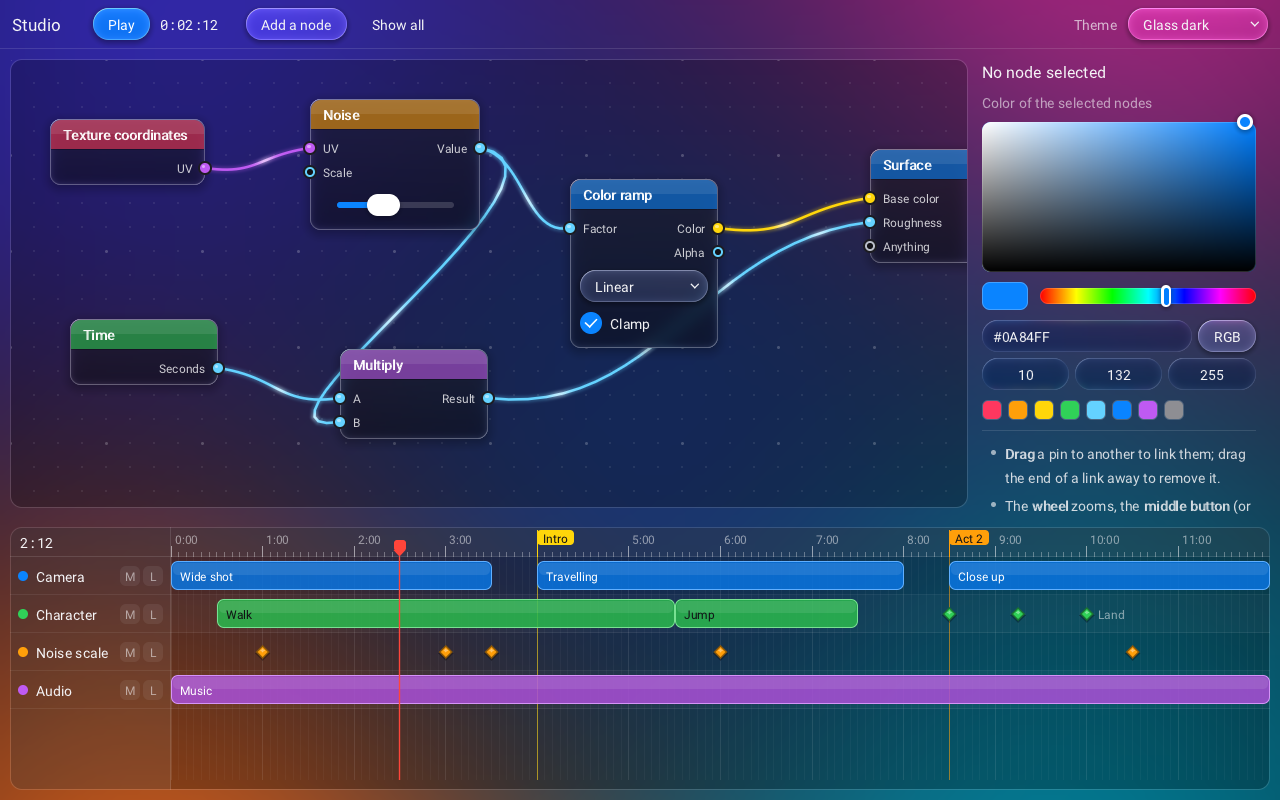
examples/studio: a graph of nodes with widgets inside them, a color picker and a timeline, with the dark glass theme.
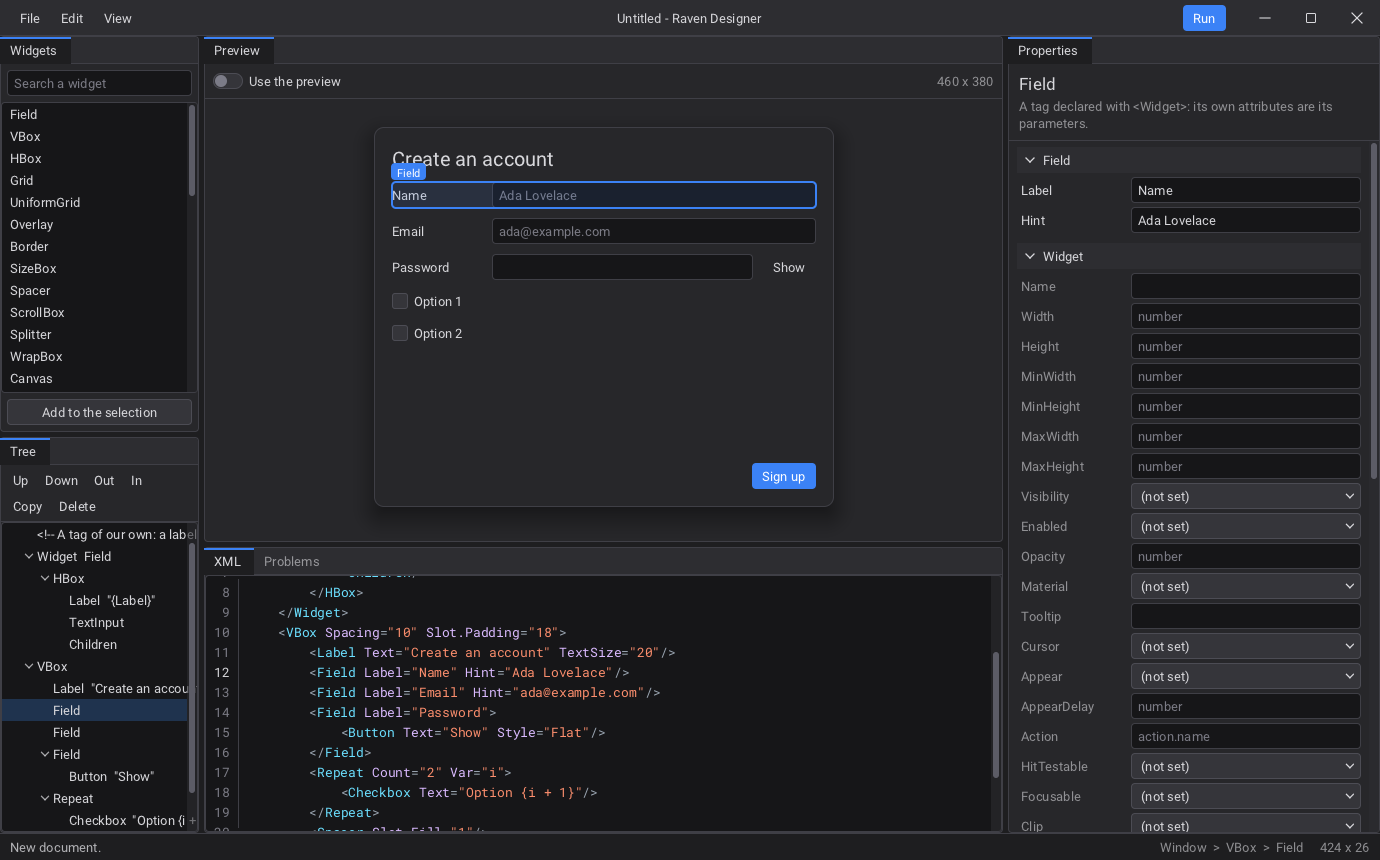
raven_designer: the widgets that can be added, the tree, the interface built for real, the attributes of the selected element, and the XML.
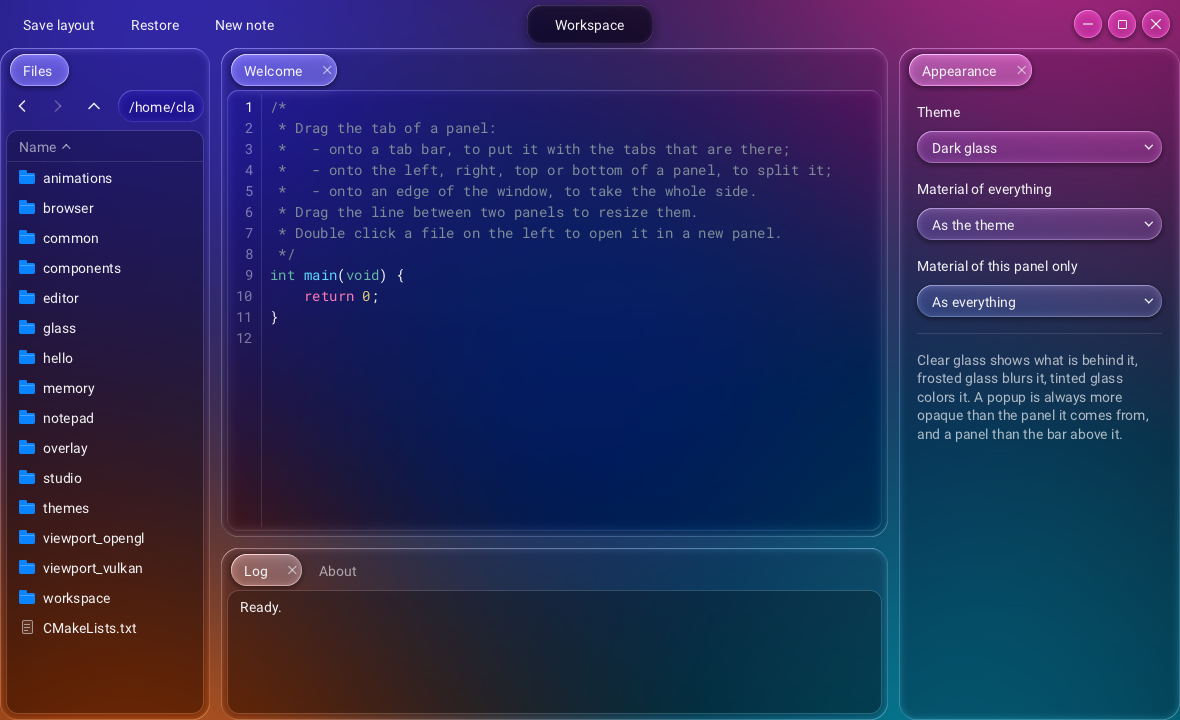
examples/workspace: docked panels, a file browser and an island, with the dark glass theme and a custom header bar.
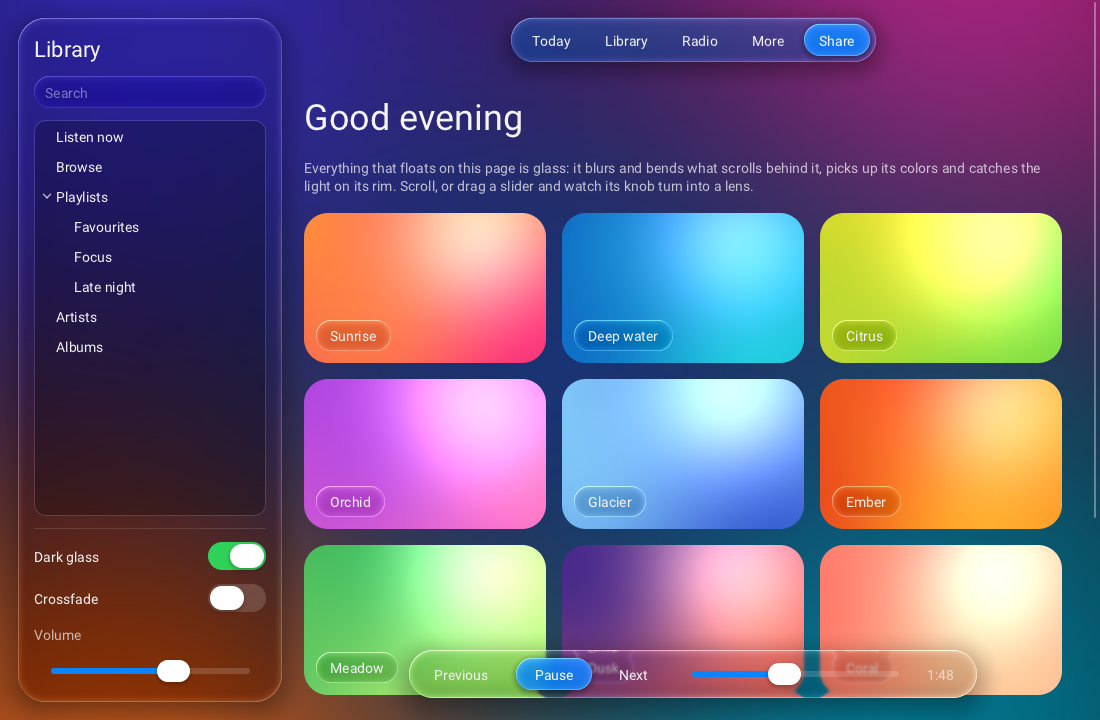
examples/glass: a frosted side bar, a tinted tool bar and a clear player bar over a page that scrolls under them.
#include <Raven.h>

static void on_clicked(Rid button, void* user) { Rquit(0); }

int main(void) {
    Rinit(R_BACKEND_VULKAN);

    Rid window = Rwindow_create("Hello", 420, 220, R_WINDOW_DEFAULT);
    Rid box = Rwidget_create(R_WIDGET_VBOX);
    Rpanel_set_spacing(box, 12);
    Rslot_set_halign(box, R_HALIGN_CENTER);
    Rslot_set_valign(box, R_VALIGN_CENTER);
    Rwindow_set_content(window, box);

    Rwidget_add_child(box, Rlabel_create("Hello from Raven"));
    Rid button = Rwidget_add_child(box, Rbutton_create("Quit"));
    Rbutton_set_clicked_callback(button, on_clicked, NULL);

    while (Rwait_frame(-1.0)) {}     /* the loop is yours: see "The loop" */
    Rshutdown();
    return 0;
}
The same window in XML (Rwindow_create_from_xml_file("hello.xml")):
<Window Title="Hello" Width="420" Height="220">
    <VBox Spacing="12" Slot.HAlign="Center" Slot.VAlign="Center">
        <Label>Hello from Raven</Label>
        <Button Text="Quit" OnClicked="app.quit"/>
    </VBox>
</Window>
One file, any language: XMLC
The interface in XML, the code that goes with it in <script>, in one file.
ravenc turns the whole file into a source of your language: the scripts are
copied as they are, the XML becomes tables built by Rwindow_create_from_compiled
(no XML is read at run time). OnClicked="{on_save}" calls the function
on_save of the scripts, ui().status is the widget named status, and the
compiler of the language checks all of it.
<!-- src/main.xmlrs: a whole Rust program -->
<script>
use raven::*;
use std::sync::atomic::{AtomicI32, Ordering};

static CLICKS: AtomicI32 = AtomicI32::new(0);

fn on_hello(_sender: Rid, _action: &str) {           // OnClicked="{on_hello}" below
    let n = CLICKS.fetch_add(1, Ordering::SeqCst) + 1;
    let text = cstr(&format!("{} clicks", n));
    unsafe { Rlabel_set_text(ui().status, text.as_ptr()) };   // the widget Name="status"
}

fn main() {
    unsafe { Rinit(R_BACKEND_VULKAN) };
    main_create();                                     // made by ravenc from the file name
    unsafe { while Rdraw_frame() != 0 {} Rshutdown() };
}
</script>
<Window Title="Hello" Width="400" Height="200">
    <VBox Spacing="12" Slot.Padding="24">
        <Label Name="status">Not clicked yet</Label>
        <Button Text="Click me" Style="Primary" OnClicked="{on_hello}"/>
    </VBox>
</Window>
// build.rs: ravenc turns src/main.xmlrs into $OUT_DIR/main.xmlrs.rs
fn main() { raven_build::compile("src/main.xmlrs"); }
// src/main.rs: the program is the .xmlrs
include!(concat!(env!("OUT_DIR"), "/main.xmlrs.rs"));Each language is built by its own tools:
| File | Language | Built by | {f} | Widgets |
|---|---|---|---|---|
.xmlc | C | CMake: raven_target_xmlc | void f(Rid, const char*, void*) | ui.x |
.xmlc++ .xmlcpp | C++ | CMake: raven_target_xmlc | the same, void f(Rid, const char*), or a lambda | ui.x |
.xmlrs | Rust | Cargo: raven_build::compile in build.rs (bindings/rust-build) | fn f(Rid, &str) | ui().x |
.xmlpy | Python | import raven_xmlpy, then import main or python -m raven_xmlpy main.xmlpy | def f(sender, action) | ui.x |
.xmlgo | Go | //go:generate ravenc main.xmlgo -o main.xmlgo.go | func f(raven.ID, string) | ui.x |
.xmlcs | C# | MSBuild: bindings/csharp/Raven.XmlCs.targets | static void F(uint, string) | MainUi.x |
.xmlzig | Zig | build.zig: xmlzig.compile (bindings/zig/xmlzig.zig) | fn f(Rid, ?[*:0]const u8, ?*anyopaque) callconv(.C) void | ui.x |
.xmllua | LuaJIT | require("raven_xmllua"), then require("main") | function f(sender, action) (global) | ui.x |
- The scripts are plain code: any header, crate, package or module; no XML
escaping (
a < b && cis written as is). As many<script>as wanted. - Errors point into your file. In Rust, Go, C# and Zig the scripts keep
their line numbers in the generated file; C and C++ get
#line. The compiler reportsmain.xmlrs:12, and the IDE opens it at that line. - No header, no glue. Nothing is generated next to your file: in C, another
file only declares
Rid main_create(void);. - Everything the XML of Raven does works the same compiled: declared tags
(
<Widget>),@keysof the translations, themes,Slot.*... - Plain
.xmlfiles are still read at run time, with live reload: use them while designing,.xml…to ship. examples/languages/holds the same small program in the eight languages, andexamples/bevy_editor/a complete 3D scene editor whose interface is one.xmlrsof about 1,450 lines (see Examples).
# C and C++: CMake
find_package(raven REQUIRED)
add_executable(hello main.xmlc)          # or main.xmlc++
target_link_libraries(hello PRIVATE raven::raven)
raven_target_xmlc(hello)                 # ravenc runs on every .xmlc / .xmlc++ of the target
The IDE
raven_designer [project folder | file.xml | file.xml…] is the official IDE
of Raven, built on the library itself.
Projects in eight languages. Project > New project asks a name and a
language (C, C++, Rust, Python, Go, C#, Zig, Lua) and writes a project that
builds as it is: the interface and its code in one main.xml…, the files of
the language's own tools (CMakeLists.txt, Cargo.toml and build.rs,
go.mod, .csproj, build.zig) and strings.csv. The Explorer shows
the files; a double click opens each one where it belongs.
Interfaces, visually, next to their code. A .xml, or the interface of a
.xml…, opens in the visual editor, the same document shown five ways and
kept in step:
- Widgets: what can be added, the tags of the library and those the
document declares with
<Widget>. A double click adds inside the selection. - Tree: the elements. Move up, down, out, in; duplicate; delete; wrap in a panel or unwrap; copy and paste as XML.
- Preview: the interface, built for real, in the language chosen above it (right to left included). A click selects an element; with Use the preview on, it reacts as the interface will.
- Properties: every attribute of the selected element, by kind of value.
- XML: the text, colored, with completion of the tags, the attributes and
the
@keys; typing in it updates the rest, a mistake is underlined and listed in Problems while the last good version stays shown.
Each <script> opens in a code tab of its language next to the preview;
saving writes the file back with its scripts, its comments and its layout.
Code. Any other file opens in a code editor tab (C, C++, Rust, Python,
Go, C#, Zig, Lua, CMake, CSV...), with completion of the Raven API (read from
its headers), of the widgets of the interface (ui.<Name>) and of the keys
in Rtr("...").
Translations. The CSV tables of the project as a grid: one row per key, one column per language; add keys and languages, search, delete. An empty cell is marked (the first language shows instead). What is typed shows in the preview at once.
Build and run with the tools of the language. Ctrl+B builds, F5
builds and runs, Ctrl+F5 stops: CMake and the compiler for C and C++,
Cargo for Rust, go generate and go build, dotnet, zig build, Python
and LuaJIT, with the environment set from the Raven package (RAVENC,
RAVEN_LIB_DIR...). What they write goes to Output; the errors and
warnings of GCC, Clang, MSVC, rustc, Go, CMake and ravenc go to Build and
on the lines of the editors, brought back from the generated file to the
line of the .xml…; a double click opens the file at that line. Project >
Build settings sets the build type, the folder of the Raven package (found
by itself when the IDE runs from one) and the generator,
kept in .raven-ide in the project.
Undo and redo cover the interface; F7 opens it in a window of its own; the
View menu switches the theme; a folder dropped on the window opens it as a
project. The visual editor uses the public API only. The files are in
tools/designer/ (ide.h says what each one does).
License
Raven is open source, under the Apache License 2.0 (see also NOTICE). All of its source code is in this repository.
Use it for anything: whatever you build with Raven is yours. Sell it, ship it to clients, keep its source closed, use it at work. No watermark, no paid edition, no license file, no royalties, no permission to ask.
Raven itself is yours to study, fork and change. When you redistribute Raven or a modified copy of it, keep its license and copyright notices and say what you changed. Contributions (issues, pull requests) are welcome on GitHub.
Questions: oscarsoirey.contact@gmail.com.
Status
Version 0.1. Everything in this README has been tested: the headless test
programs (layout, widgets, XML, threads, memory, animations, text editor,
shell, dialogs, themes, Markdown, tools, locales and accessibility, clean
under AddressSanitizer, UBSan and ThreadSanitizer), the renderer and glass on
real GPUs, Windows, macOS and Linux (X11), the screen readers of each system,
raven_web, the designer, the build scripts, dist.sh/dist.bat, the CMake
package and every binding (C++, Python, Rust, Go, C#, Zig, LuaJIT).
Build options and scripts
Requirements: CMake 3.16+, a C11 compiler. Linux also needs the X11
development package (libx11-dev). The Vulkan headers are needed to build;
they come from the Vulkan SDK when it is installed and are downloaded
otherwise. No Vulkan library is linked.
cmake -S . -B build -DCMAKE_BUILD_TYPE=Release
cmake --build build --config Release
cd build && ctest -C Release --output-on-failure
The programs are written to build/bin (build\bin\Release with Visual
Studio), next to raven.dll in a shared build.
With CMake 3.21 or newer, presets do the same: cmake --preset linux (or
msvc, msvc-shared, mingw, mingw-shared, linux-shared, dev), then
cmake --build --preset linux and ctest --preset linux.
On Windows, two scripts work from the folder of Raven:
generate-cmake.bat            :: creates build\raven.sln (the newest Visual Studio installed)
generate-cmake.bat --open     :: ... and opens it; F5 starts the editor example
build.bat                     :: Release build (generates the build tree if needed)
build.bat debug --test        :: Debug build, then the tests
build.bat --run glass         :: builds, then starts an example
generate-cmake.bat --help and build.bat --help list their options
(--shared, --generator Ninja, --build-dir, --fresh, ...). CMake
options go after --: generate-cmake.bat -- -DRAVEN_WARNINGS_AS_ERRORS=ON.
| Option | Default | |
|---|---|---|
RAVEN_BUILD_SHARED | OFF | shared library instead of static |
RAVEN_BUILD_EXAMPLES | ON when top level | |
RAVEN_BUILD_TESTS | ON when top level | tests, tests of the bindings, raven_benchmark |
RAVEN_BUILD_TOOLS | ON when top level | raven_designer |
RAVEN_BUILD_WEB | ON | web pages (raven_web.h, docs/WEB.md), compiled into the Raven library itself; it needs nothing more to build |
RAVEN_BACKEND_VULKAN | ON | OFF builds without any GPU code (custom backend or headless) |
RAVEN_PLATFORM | auto | win32, x11, cocoa (macOS) or null |
RAVEN_WITH_STB_IMAGE | ON | PNG / JPEG / BMP / TGA decoding |
RAVEN_FETCH_VULKAN_HEADERS | ON | download the Khronos headers when no SDK is found |
RAVEN_VULKAN_INCLUDE_DIR | folder containing vulkan/vulkan.h, to skip the search | |
RAVEN_REBUILD_SHADERS | OFF | recompile the GLSL (needs glslangValidator or glslc); the SPIR-V is committed |
RAVEN_MSVC_STATIC_RUNTIME | OFF | Visual C++: /MT instead of /MD |
RAVEN_WARNINGS_AS_ERRORS | OFF |
Using it from another CMake project:
add_subdirectory(raven)                       # or find_package(raven) after an install
target_link_libraries(app PRIVATE raven::raven)
Packages to give away
dist.bat (Windows) builds what is given to people who use Raven without
building it, the way build.bat builds (generate-cmake.bat, then
build.bat, then cmake --install): one folder and one zip, with the
library of Visual C++ and of MinGW-w64, static and shared.
dist.bat              :: Visual C++ and MinGW-w64 (one not installed is skipped)
dist.bat msvc         :: Visual C++ only
dist.bat --test       :: also runs the tests of each build
dist\raven-0.1.0\
msvc-static\ include\, lib\raven.lib, lib\cmake\raven, bin\raven_designer.exe, bin\ravenc.exe, share\raven\
msvc-shared\ bin\raven.dll, lib\raven.lib (to link with the DLL), the rest as above
mingw-static\ lib\libraven.a, the rest as above
mingw-shared\ bin\raven.dll, lib\libraven.dll.a (to link with the DLL), the rest as above
For a release on GitHub, dist.bat also writes one archive per library in
dist-release\, to attach as they are: windows-x64-msvc-static.zip,
windows-x64-msvc-shared.zip, windows-x64-mingw-static.zip,
windows-x64-mingw-shared.zip and SHA256SUMS.txt.
Each of the four folders is an install prefix: find_package(raven) finds it
through CMAKE_PREFIX_PATH. The libraries of one compiler are not for the
other; raven.dll itself can be loaded by anything. MinGW-w64 needs gcc,
and ninja or mingw32-make, in the PATH; its DLL is linked with
-static-libgcc, so that it does not need the DLLs of the compiler beside it.
The build trees are in build\dist\.
./dist.sh makes the Linux packages. cmake --build build --target package makes a simpler archive (one library) with CPack.
Examples
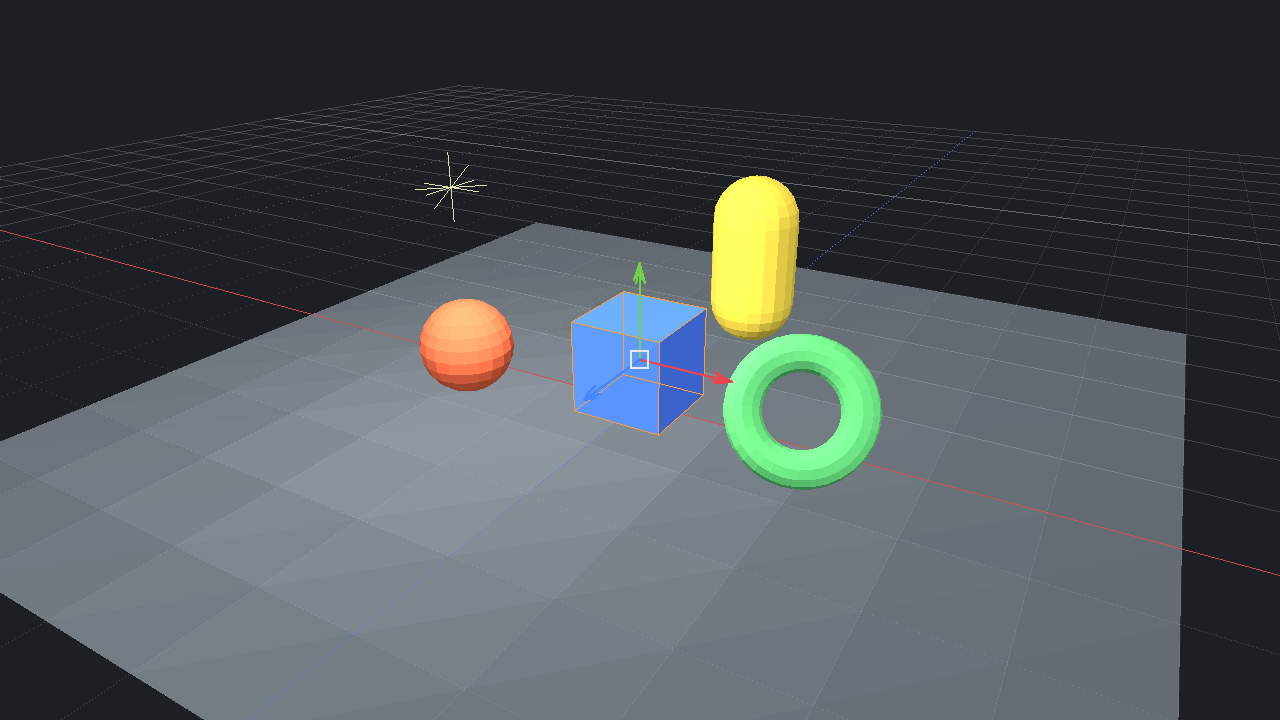
examples/bevy_editor: the viewport of the scene editor written in .xmlrs, with the move gizmo on the selected cube (here drawn by its software renderer).
examples/hello | a window with the C API |
examples/editor | a scene editor described in editor.xml: menus, splitters, tree, tabs, property grid, a viewport rendered in software on the job system, a custom-drawn graph, a virtual list. Its View menu switches between the four themes |
examples/notepad | a text editor: custom header bar, languages chosen from the name of the file, a language declared by the application, proposals from a callback, markers, the file dialogs of the system, files dropped on the window |
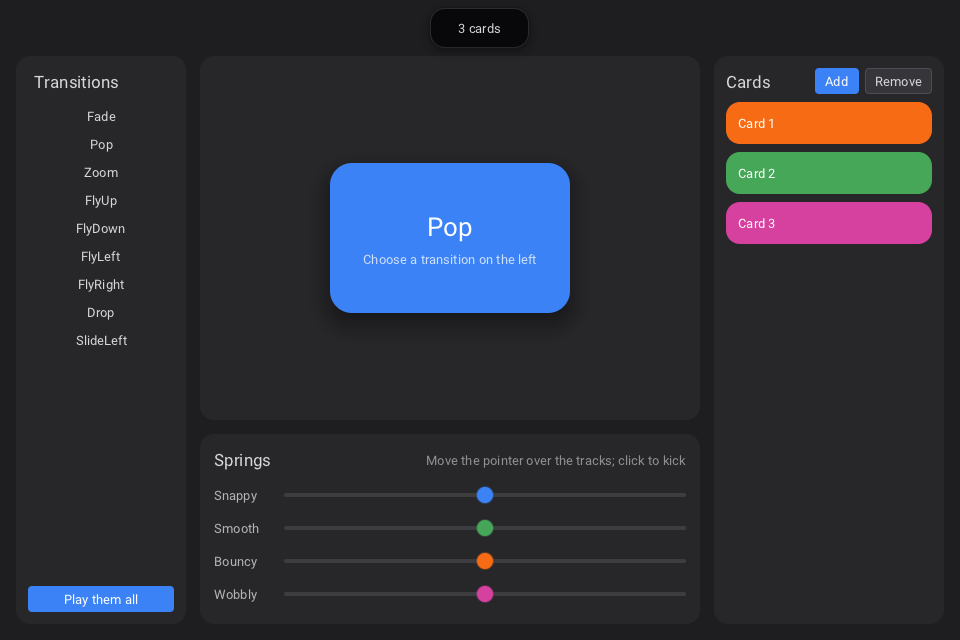
examples/animations | transitions played on demand, four springs in a custom widget, cards that pop in and out, an island, speed and "reduce motion" |
examples/workspace | panels that dock, a file browser that opens files in new panels, the three kinds of glass for everything or for one panel, saving and restoring the arrangement |
examples/components | tags declared with <Widget>, <Repeat>, <ForEach>, <Include>, and a piece of interface built from C as a document |
examples/memory | an allocator given by the application, the statistics of the library, the heap check |
examples/studio | a graph of nodes (widgets inside the nodes, links the application can refuse, nodes added from code), a timeline that plays, a color picker that colors the selected nodes; its XML is loaded again when saved |
examples/themes | two theme files, styles and classes, a card that keeps its own theme, Markdown in a label and in an editor; every file of the example is watched |
examples/overlay | a window that is seen through, the backdrops of the system, and the four ways to blur what is behind a panel |
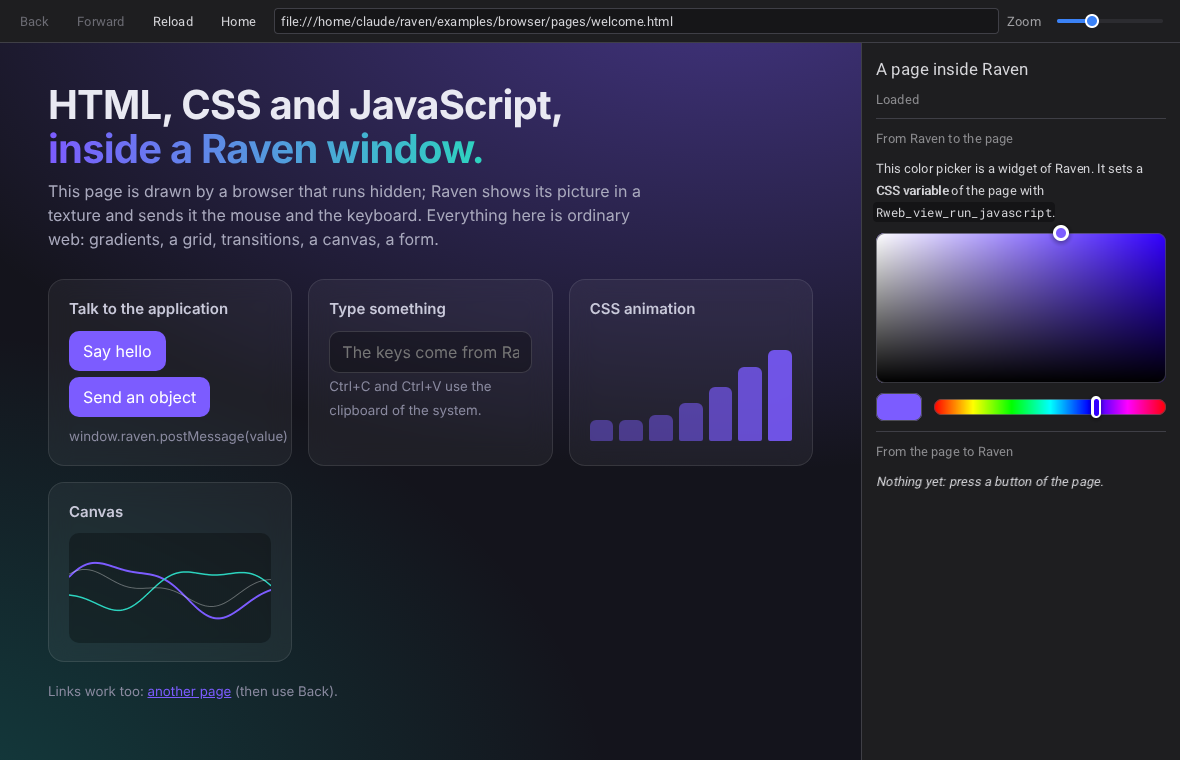
examples/browser | web pages with raven_web: an address bar, the history, a color picker of Raven that drives the CSS of the page, messages from the page |
examples/glass | the glass themes and the three glass materials. raven_glass light starts with the light glass |
examples/viewport_vulkan | a Vulkan scene in the UI, twice: offscreen image wrapped as a texture, and drawn in the render pass of Raven. Needs the Vulkan library |
examples/viewport_opengl | an OpenGL scene in a native child window (WGL / GLX) |
examples/bevy_editor | a 3D scene editor in Rust, its whole interface in one .xmlrs: hierarchy, inspector, gizmos to move, rotate and scale, undo, scene files. Bevy draws the scene into the viewport; without Bevy, a software renderer does. See its README |
examples/languages | the same program in C, C++, Rust, Python, Go, C#, Zig and Lua, one main.xml… each, as the IDE creates them, built by the tools of each language |
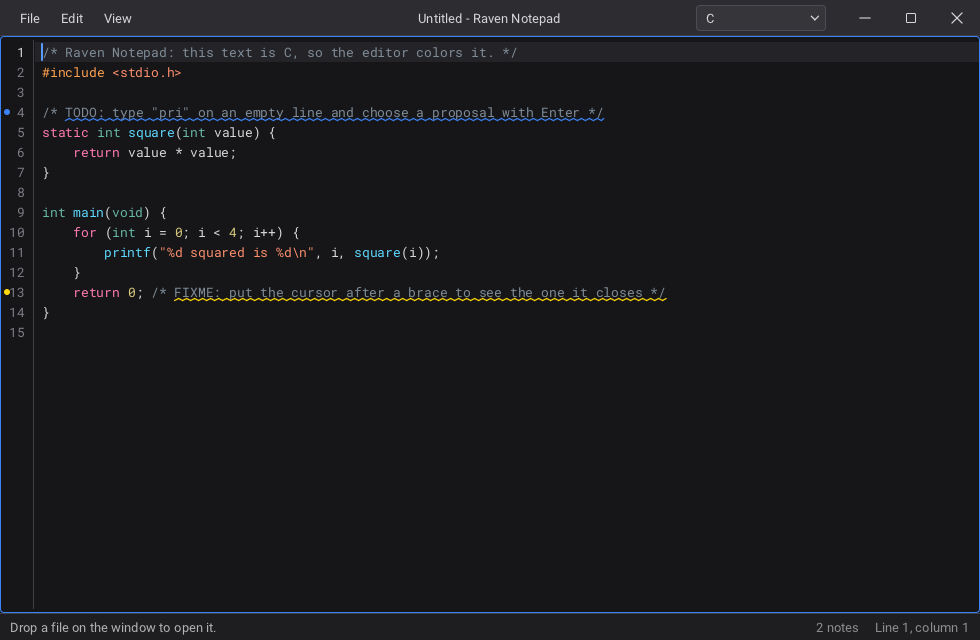
examples/notepad: the title bar is a widget; the lines that say TODO and FIXME are marked.
Other languages
bindings/ holds bindings generated from the headers by tools/bindgen:
C++ (classes and lambdas), Python (ctypes), Rust (a crate), Go (cgo), C#
(P/Invoke), Zig and LuaJIT. all of them are tested. See
bindings/README.md. They cover everything in
Raven.h; raven_web.h is C only.
import raven as r
r.Rinit(r.R_BACKEND_VULKAN)
window = r.Rwindow_create_from_xml('<Window Title="Hi"><Button Text="Quit" OnClicked="quit"/></Window>')
r.Raction_bind("quit", lambda sender, action, user: r.Rquit(0))
while r.Rwait_frame(-1.0):
    pass
r.Rshutdown()
Concepts
Names
#include <Raven.h> gives the whole API; the headers it includes
(raven/raven_window.h, raven/raven_controls.h...) can also be included
one by one.
| functions | R<object>_<action> | Rwindow_create, Rwindow_get_size, Rbutton_set_text, Rslot_set_padding |
| library functions | R<action> | Rinit, Rdraw_frame, Rwait_frame, Rquit, Rshutdown |
| types | R<Name> | Rid, REvent, RInitDesc, RPainter; callbacks end with Callback |
| constants | R_<NAME> | R_INVALID_ID, R_WIDGET_VBOX, R_KEY_ESCAPE, R_THEME_GLASS_DARK |
| build options and macros | RAVEN_<NAME> | RAVEN_BUILD_SHARED, RAVEN_API, RAVEN_VERSION_MAJOR |
Names that do not start this way (rvn_..., RVN_...) are internal to the
library and are not exported.
Handles and errors
Every object is a Rid. Handles carry a generation, so using a deleted
object is detected and reported instead of crashing. Deleting a widget
deletes its children; deleting a window deletes its content.
static void on_error(RError code, RSeverity severity, const char* detail) {
    fprintf(stderr, "%s: %s\n", Rerror_to_string(code), detail);
}
Rerror_set_callback(on_error);
The loop
Raven has no loop of its own. The application asks for one frame at a time:
while (Rdraw_frame()) {            /* a game or an engine: never waits      */
    update_and_render_my_scene();
}

while (Rwait_frame(-1.0)) {}       /* a tool: sleeps until something happens */
Rdraw_frame processes the events, runs the timers and the posted tasks,
then lays out, paints and submits the windows that changed; a window in which
nothing changed is not drawn again. Rwait_frame first sleeps until there is
something to do (an event, a timer, an animation still moving). Both return
false once Rquit was called or the last window is closed.
Layout
Layout is the two passes of Slate: each widget computes the size it would like, bottom-up, then each panel gives a rectangle to its children, top-down. How a child is placed is stored on the child, in its slot:
Rid row = Rwidget_add_child(parent, Rwidget_create(R_WIDGET_HBOX));
Rid name = Rwidget_add_child(row, Rwidget_create(R_WIDGET_TEXT_INPUT));
Rslot_set_fill(name, 1.0f);                   /* takes the free width          */
Rid ok = Rwidget_add_child(row, Rbutton_create("OK"));
Rslot_set_valign(ok, R_VALIGN_CENTER);      /* its own height, centered      */
Rslot_set_padding(ok, 8, 0, 0, 0);
Sizes are logical units, multiplied by the scale of the monitor. Only the part of the tree that changed is measured and arranged again.
XML
Tags are widget types, attributes are properties, Slot.* attributes are
the slot. On... attributes name actions, bound from C with
Raction_bind. The full reference is docs/XML.md.
A document can declare its own tags, with parameters:
<Widget Name="Field" Label="Name" Hint="" Wide="false">
    <HBox Spacing="8">
        <Label Text="{Label}:" Width="{Wide ? 140 : 90}"/>
        <TextInput Placeholder="{Hint}" Slot.Fill="1"/>
        <Children/>
    </HBox>
</Widget>

<Field Label="Email" Hint="you@example.com" Name="email"/>
<Field Label="Password" Wide="true"><Button Text="Show"/></Field>
The attributes of <Widget> other than Name are its parameters and their
default values; {...} is an expression of them (arithmetic, comparisons,
a ? b : c, a few functions); <Children/> is where the children given to
the tag go. If="...", <Repeat Count="3" Var="i">, <ForEach Items="a|b" Var="x"> and <Include Source="file.xml"/> complete it. From C,
Rxml_register_widgets reads declarations ahead of the documents that use them.
For tools, Rxml_document_parse gives a document as a tree of nodes that can
be changed, written back and built, each widget knowing its node
(raven_xml.h); Rxml_get_attribute_info lists what can be written.
Animations
Nothing has to be done for the controls: they move by themselves, with springs. What an application decides:
Rwidget_set_transition(card, R_TRANSITION_FLY_UP, 0.1f);   /* each time it appears; Appear="FlyUp" in XML */
Rwidget_play_transition(card, R_TRANSITION_DROP, 0.0f);    /* once, now                                  */

/* in the paint callback of a custom widget: a value pulled to its target */
float s = Rdraw_spring(painter, &state->size, hovered ? 1.0f : 0.0f, R_MOTION_BOUNCY);

Rset_animation_speed(0.25f);          /* slow motion        */
Rset_animations_enabled(R_FALSE);     /* "reduce motion"    */
Transitions: Fade, Pop, Zoom, FlyUp/Down/Left/Right, Drop,
SlideLeft/Right. Motions: SNAPPY, SMOOTH, BOUNCY, WOBBLY. While
something moves the window keeps drawing by itself; Rwait_frame sleeps
again when everything is at rest.
Text editor
R_WIDGET_TEXT_EDITOR (<TextEditor>) edits text of any number of lines:
selection, clipboard, undo, line numbers, word wrap. With a language it
colors the text, proposes words while typing (those of the language and the
names already in the text; Ctrl+Space asks), shows which bracket closes
which, closes brackets and quotes, indents, and comments lines out (Ctrl+/).
Rtext_editor_set_language(editor, Rlanguage_for_file(path)); /* "main.rs" -> "Rust" */C, C++, C#, Java, JavaScript, TypeScript, Python, Rust, GLSL, JSON, CSS, XML
and HTML (with the JavaScript and the CSS inside it) are built in. Any of
them can be changed and others declared with Rlanguage_register: a language
is a description (its words, its comments, its quotes), not code.
This is what an editor knows from the text alone: it is not a language
server. What needs to understand a whole program comes from outside,
through two doors made for it: Rtext_editor_set_completion_callback (your
proposals, listed first) and Rtext_editor_add_marker (underline a part of
the text with a message: the errors of a compiler). An LSP client would plug
in there; Raven does not include one.
Header bar
<Window Title="Tool" CustomHeader="true">
    <VBox>
        <HeaderBar>
            <MenuBar>...</MenuBar>
            <Button Text="Run" Slot.HAlign="Right"/>
        </HeaderBar>
        ...
CustomHeader (R_WINDOW_CUSTOM_HEADER) removes the title bar of the
system; the HeaderBar draws the title and the window buttons and holds any
widgets. Dragging it moves the window, a double click maximizes it, the edges
of the window resize it. On Windows this is done with the hit test of the
system, so snapping to the sides of the screen keeps working. Any widget can
play the same role (Rwidget_set_window_drag).
Docking
A DockArea arranges its children as panels with tabs. The user drags a tab
onto another tab bar, onto a side of a panel or onto an edge of the area; the
panels fly to their new place. Slot.Dock, Slot.DockTo and Slot.DockSize
give the starting arrangement in XML; Rdock_area_add_panel adds panels from
C, and Rdock_area_save_layout / Rdock_area_load_layout turn the
arrangement into a short text and back. Panels stay inside their window:
tearing one off into a window of its own is not implemented.
Dialogs and files
RFileDialogDesc desc = { .parent = window, .title = "Open", .filters = filters, .filter_count = 2 };
const char* path = Rfile_dialog_open(&desc);          /* the dialog of the system; NULL when cancelled */

if (Rmessage_box(window, "Quit", "Discard the changes?", R_MESSAGE_OK_CANCEL) == R_MESSAGE_RESULT_OK) ...
File dialogs are those of the system (Windows: the common dialogs; Linux:
zenity or kdialog when installed), and otherwise a dialog of Raven built
on the FileBrowser widget, which can also be put in any window. Any widget
can be shown as a dialog of a window (Rdialog_open, Rdialog_run).
Rfile_read and Rfile_write take UTF-8 paths on every platform.
Drag and drop
static int on_drop(Rid target, const RDropEvent* event, void* user) {
    if (event->phase == R_DROP_DROPPED && event->path_count > 0) open(event->paths[0]);
    return R_TRUE;                    /* "I take it": the target is highlighted while it hovers */
}
Rwindow_set_drop_callback(window, on_drop, NULL);     /* or Rwidget_set_drop_callback for one widget */
Files and text dragged from other applications. Dragging out of a Raven window to another application is not implemented.
Materials and glass
A material is what the surface of a widget is made of:
Solid | filled with the colors of the theme |
Glass | clear glass: what is behind shows through, bent at the rim |
FrostedGlass | blurred: the colors behind, without their shapes |
TintedGlass | blurred and colored by the theme: the easiest to read on |
Rtheme_apply(R_THEME_GLASS_DARK);                     /* a theme comes with its material          */
Rtheme_set_material(R_MATERIAL_FROSTED_GLASS);        /* every widget that was not given its own  */
Rwidget_set_material(panel, R_MATERIAL_GLASS);        /* this widget and what it contains         */
In XML: Material="TintedGlass" on any widget. Whatever the material, a
popup is more opaque than the panel it comes from, and a panel than the bar
above it, so that what is on top stays readable.
With glass, controls are capsules that show a blurred, more vivid version of
what is behind them; their rim bends it like a lens and catches a light
placed at the top left; the knob of a slider turns into a clear lens while it
is dragged. Glass needs something behind it: the glass themes put every
window on a plain dark grey (dark) or plain white (light); Rwindow_set_background
puts an image behind it instead, and a theme file can give colored blobs
(Wallpaper="#101020, #3040C0, #C02080"). A custom widget draws glass with Rdraw_glass.
How it is rendered: a frame that contains glass is drawn into an offscreen image; where glass begins, what has been drawn so far is copied and blurred, and the glass primitives sample both the sharp and the blurred copy. Glass over glass works. A frame without glass is drawn straight to the window: the solid themes cost nothing more. docs/ARCHITECTURE.md has the details.
Blur, and windows that are seen through
BackgroundBlur is a panel that shows what is behind it out of focus,
without the bending and the rim of glass. Four styles:
Plain | only blurred |
Frosted | blurred, a little veiled, with a fine grain (the default) |
Glass | blurred and bent at its rim, like the glass material |
Native | opens the window: the system blurs the desktop behind it |
<Window Transparent="true" Backdrop="Blur" Borderless="true">
    <BackgroundBlur Style="Native" CornerRadius="24" Padding="22" Tint="#10141C99">
        ...
    </BackgroundBlur>
</Window>
A window created with Transparent="true" (R_WINDOW_TRANSPARENT) is not
filled: where no widget draws, what is behind it on the screen shows.
Backdrop (Rwindow_set_backdrop) asks the system for what it puts there:
nothing, a blur, or the acrylic and mica materials of Windows 11;
Rwindow_set_opacity fades the whole window. All of it depends on the
window system (Windows 10 and 11; X11 with a compositor, and KWin for the
blur): Rwindow_get_backdrop tells what was obtained, and where nothing is
available the same interface shows on a plain background.
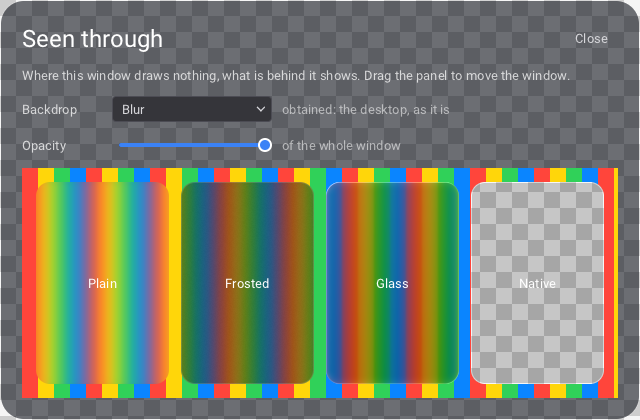
examples/overlay as the window system receives it, shown here over a
checkerboard (the machine it was captured on has no compositor): the panel is
translucent, its corners are empty, and the Native panel is a hole through
the stripes.
Color picker, timeline, node graph
raven_tools.h. Each holds a small model that the application fills and
reads, or writes in XML (docs/XML.md).
Rid picker = Rcolor_picker_create();                 /* square, hues, opacity, code, numbers, swatches */
Rcolor_picker_set_changed_callback(picker, on_color, NULL);
Rcolor_picker_set_popup(picker, R_TRUE);             /* a swatch that opens it */

Rid timeline = Rtimeline_create();
int track = Rtimeline_add_track(timeline, "Camera");
int clip  = Rtimeline_add_clip(timeline, track, 0.0, 3.5, "Wide shot");
Rtimeline_add_key(timeline, track, 6.0);
Rtimeline_set_time_callback(timeline, on_time, NULL);       /* scrubbed, or playing */
Rtimeline_set_changed_callback(timeline, on_item, NULL);    /* moved, stretched     */

Rid graph = Rnode_graph_create();
int noise = Rnode_graph_add_node(graph, "Noise", 40, 60);
int out   = Rnode_graph_add_output(graph, noise, "Value", "number");
int blend = Rnode_graph_add_node(graph, "Blend", 320, 90);
int in    = Rnode_graph_add_input(graph, blend, "A", "number");
Rnode_graph_connect(graph, out, in);
Rnode_graph_set_node_content(graph, noise, Rwidget_create(R_WIDGET_SLIDER));   /* any widget inside a node */
Rnode_graph_set_connect_callback(graph, may_link, NULL);                       /* refuse loops, apply rules */
The timeline snaps to frames, to the playhead and to the other items,
moves several items at once, stretches clips by their ends, selects with a
rectangle, zooms with Ctrl + wheel and plays. The graph pans (middle
button, or Alt + drag) and zooms around the pointer; pins have types, a
color per type, and only link to pins they fit; a wire is pulled from a pin,
is attracted by the pins it can go to, and can be dropped on a node; taken
by its end, a link is plugged elsewhere or let go. Wires hang like cables and
swing when their nodes move, nodes lift while they are carried, and pulses
run along the links while the pointer is over the graph
(Rnode_graph_set_flow_visible). Widgets inside nodes are ordinary widgets
and work at any zoom.
Markdown
<Label Markdown="true" Wrap="true">
    ## Notes
    Some **strong** and *emphasized* text, `code`, a [link](https://example.org),
    - a list
    - [x] with a box
</Label>
<TextEditor Markdown="true"/>
On a label the text is rendered (headings, lists, quotes, code blocks, tables, links that open or fire actions); on the text editor it stays as typed and is styled where it stands.
Files that are loaded again
An interface created from a file is watched while the application runs:
save editor.xml and the window follows, keeping the widgets the file did
not change (their handles, their callbacks, what was typed or scrolled).
Theme files and the files of declared tags are watched too.
Rxml_set_reload_callback tells when it happened;
Rxml_set_live_reload(R_FALSE) or RAVEN_LIVE_RELOAD=0 turns it off.
Translations
key,en,fr,ar
menu.file,File,Fichier,ملف
greeting,"Hello, {0}!","Bonjour, {0} !",مرحبا {0}
files.one,{n} file,{n} fichier,ملف واحد
files.other,{n} files,{n} fichiers,{n} ملفات
Rlocale_load_csv("strings.csv");
Rlocale_set_language(Rlocale_get_system_language());
Rlabel_set_text(label, Rtr("menu.file"));
const char* args[] = { "Ada" };
Rlabel_set_text(hello, Rtr_format("greeting", args, 1));
Rlabel_set_text(count, Rtr_plural("files", 3)); /* "3 fichiers" */
Rlabel_set_text(size, Rlocale_format_number(1234.5, 1)); /* "1 234,5" */<Strings Source="strings.csv"/>
<Button Text="@menu.file" Tooltip="@menu.file.tip"/>A text that starts with @ is a key: the widget follows the language when it
changes. One column per language, any number of tables, plurals with the
CLDR rules, and the tables are read again when they are saved (live reload).
raven_locale.h has the rest.
Right to left, scripts and emoji
A language written from right to left (Arabic, Hebrew, Persian, Urdu...)
mirrors the layouts: boxes, grids, menus, scroll bars and alignments start on
the right. Rset_layout_direction(R_DIRECTION_RTL) forces it for every
window, Rwidget_set_direction or Direction="RightToLeft" for one part.
Text with both directions is ordered with the Unicode bidirectional
algorithm and Arabic letters take their joined forms. A character the
bundled font does not have is drawn with a font of the system (Segoe UI,
Noto, the CJK fonts...), and color emoji are drawn in color.
Accessibility
Raccessibility_follow_system();                  /* text size, contrast, motion of the OS */
Raccessibility_set_text_scale(1.5f);             /* every text and control 50 % larger */
Raccessibility_set_high_contrast(R_TRUE);        /* High Contrast Dark / Light themes */
Raccessibility_set_color_filter(R_COLOR_FILTER_DEUTERANOPIA);
Rwidget_set_accessible_name(close_button, "Close");
Raccessibility_announce("File saved", R_FALSE);
<Button Icon="close.png" AccessibleName="Close" AccessibleDescription="Closes the document"/>Every widget is seen by the screen reader of the system with its role, name, value and state, and can be used from it (press, toggle, set a value, edit text, move the focus): UI Automation on Windows (Narrator, NVDA, JAWS), NSAccessibility on macOS (VoiceOver), AT-SPI on Linux (Orca). Nothing has to be added: names come from the texts and from the label in front of a field. The color filters correct (or, for designers, simulate) protanopia, deuteranopia, tritanopia and achromatopsia.
Web pages
#include <raven_web.h>                      /* part of the Raven library (raven::web is kept as an alias) */
Rweb_register_xml();                        /* <WebView Url="https://..."/> */
Rid view = Rweb_view_create();
Rweb_view_load_url(view, "https://example.org");
Rweb_view_run_javascript(view, "document.title", on_result, NULL);
raven_web shows real web pages by driving a browser of the Chromium family
that is already installed (Edge on Windows): the page arrives as pictures in
a texture, the input goes back. It contains no browser and nothing is
needed to build it; without a browser, a web view only shows that it has none. What it can and cannot do is in docs/WEB.md.
Island
<Window ...>
    <Island>
        <Label Text="3 messages"/>                      <!-- folded   -->
        <VBox> ... anything ... </VBox>                 <!-- unfolded -->
    </Island>
    <VBox> ... the content of the window ... </VBox>
</Window>
A pill at the top of the window that unfolds under the pointer, on a click,
or from C (Risland_set_expanded, Risland_expand_for(island, 2.0) to say
something and fold back). Its two contents cross-fade while it changes size,
a click pins it open and a click elsewhere closes it. It is dark whatever
the theme, as the notch of a phone is (Theme="Default" gives it the theme
of the window). It is optional, and an Island can also be used as an
ordinary widget anywhere.
Memory
Raven does not call malloc. It takes memory from the system by regions of
4 MB and hands it out with its own heap (TLSF: constant time, neighbours
merged when freed); the bundled font and image decoders use it too.
RAllocator mine = { my_alloc, my_realloc, my_free, my_data };
Rset_allocator(&mine);                 /* before Rinit: every block goes through your functions */

RMemoryStats stats;
Rmemory_get_stats(&stats); /* blocks, bytes in use, peak, taken from the system */Rset_allocator(Rallocator_get_system()), or the environment variable
RAVEN_ALLOCATOR=system, selects malloc (what Valgrind and heap profilers
follow; it is the default in a build with AddressSanitizer). Rmemory_check
verifies the heap, and the tests fail on a block left allocated after
Rshutdown.
Threads
- The thread that calls
Rinitis the UI thread. Every function is called from it, except the few documented as thread-safe (Rtask_post,Rtask_run_async,Rwake_up,Rquit,Rwindow_request_redraw,Rget_time,Rmemory_alloc/Rmemory_realloc/Rmemory_free). - From another thread, change the UI by posting a task:
Rtask_post(function, data)runsfunctionon the UI thread. Rtask_run_asyncandRparallel_forrun your work on the worker threads.Rtexture_create_from_file_asyncdecodes in the background; the widgets that use the texture update when it is ready.- Viewport draw callbacks run on the render thread.
Viewports
/* 1. texture: any image, shown like a widget (clipped, UI on top) */
Rviewport_set_texture(viewport, texture);
/*    Vulkan, zero copy:   Rvulkan_texture_create_from_image_view(view, 0, w, h)
      OpenGL, zero copy:   Rvulkan_texture_create_shared + GL_EXT_memory_object
      anything, one copy:  Rtexture_update(texture, rgba, w, h)             */

/* 2. draw callback: your Vulkan draw calls in the render pass of the window */
Rviewport_set_draw_callback(viewport, on_draw, user);

/* 3. native child window: a HWND / X11 Window for OpenGL, Direct3D, anything */
Rviewport_set_native(viewport, R_TRUE);
Rviewport_get_native_handle(viewport, &native);
To render the UI with the device of an engine instead of a device created
by Raven, call Rvulkan_set_external_device (and
Rvulkan_set_queue_lock_callbacks) before Rinit: see raven_vulkan.h.
Themes
Rtheme_apply chooses one of four themes: R_THEME_DARK, R_THEME_LIGHT,
R_THEME_GLASS_DARK, R_THEME_GLASS_LIGHT. From there:
Rtheme_set_accent(0.13f, 0.83f, 0.93f);                                 /* one color, and the shades that follow */
Rtheme_set_color(R_COLOR_PANEL, 0.07f, 0.10f, 0.17f, 1.0f);             /* any color or metric of the theme      */
Rtheme_set_style_metric("Button", NULL, R_METRIC_CORNER_RADIUS, 16);    /* a style for a type of widget          */
Rtheme_set_style_color(NULL, "danger", R_COLOR_ACCENT, 1, 0.3f, 0.4f, 1); /* ... or for a class: Class="danger" */
Rtheme_load("themes/ocean.xml");  Rtheme_use("Ocean");                  /* a theme file                          */
<Theme Name="Ocean" Base="Dark" Accent="#22D3EE" CornerRadius="10">
<Colors Panel="#111A2C" Text="#DCE7F5"/>
<Style Widget="Button" CornerRadius="16"/>
<Style Class="danger" Accent="#FB7185"/>
</Theme>Theme="Ocean" (or Theme="themes/ocean.xml") on a widget or on a window
gives a theme to that part of the interface only. Colors and metrics can
still be set on one widget (Rwidget_set_color, Color.Accent="...").
docs/THEMES.md is the guide.
Fonts are TrueType files (Rfont_create_from_file, Rtheme_set_font,
Rfont_set_fallback, Rfont_set_variant for real bold and italic faces);
subsets of Roboto and of Roboto Mono covering Latin-1 and Latin Extended-A
are embedded.
Custom widgets and custom backends
A R_WIDGET_CUSTOM widget is measured and painted by two callbacks using
the Rdraw_... functions (raven_draw.h), and receives its events through
Rwidget_set_event_callback. Rxml_register_tag gives it a tag of its own
in XML, with its attributes, and Rwidget_set_destroy_callback tells when
it is gone. A rendering backend is a RBackendVTable
(raven_backend.h) given to Rbackend_register;
src/render/null/null_backend.c is a template.
Performance
raven_benchmark (built with the tests) measures a large tree without a GPU.
On the 2-core virtual machine used for development, release build:
| 12 000 widgets, 27 800 primitives | |
|---|---|
| first layout | 2 to 3 ms |
| full repaint | 1.3 to 2.3 ms, one draw call |
| layout after changing one label | 0.03 to 0.05 ms |
Parallel painting made little difference on that machine (two cores shared
with the render thread); measure on yours with raven_benchmark 160 0 against
raven_benchmark 160 -1. Nothing is recomputed or drawn while nothing changes.
The glass materials were only run on a software Vulkan driver (SwiftShader,
two cores), where a frame of the glass example takes about 250 ms at
1100 x 720. That measures the CPU rasterizer, not the design: on a GPU the
cost is the blur passes, but it has not been measured. Read
RFrameStats::render_ms and backdrop_count on your machine.
Layout of the repository
include/Raven.h      the whole public API in one include
include/raven/       ... one header per area
src/core/            allocator, handles, threads, job system, files, main loop
src/platform/        window systems behind one interface: win32/, x11/, null/
src/render/          draw lists, fonts and glyph atlas, textures, render thread
src/render/vulkan/   the Vulkan backend and its shaders (vk_glass.c: backdrop blur)
src/widget/          widget base: tree, layout, events, painting, animation, windows, style, themes
src/widgets/         one file per widget type (text_editor.c, markdown.c, node_graph.c, timeline.c, dialogs.c...)
src/xml/             parser, loader, declared widgets, documents, watched files, the list of tags and attributes
web/                 web pages (raven_web.h), compiled into the Raven library
examples/            sixteen programs (bevy_editor: a scene editor in .xmlrs; languages: one program in eight languages)
tools/designer/      raven_designer, the IDE (main.c: the visual editor; project, editors, xmlc, build, strings, os)
tools/bindgen/       writes bindings/ from the headers
tools/ravenc/        ravenc, the XMLC compiler (cmake/RavenXMLC.cmake: raven_target_xmlc)
bindings/            C++, Python, Rust, Go, C#, Zig, LuaJIT
tests/  docs/  cmake/  third_party/
build.bat  generate-cmake.bat  dist.bat  dist.sh  CMakePresets.json
docs/ARCHITECTURE.md explains how the pieces work and how to add a widget, a window system or a backend.
Not implemented yet
What Raven does not do yet, by area. Contributions are welcome.
Platforms
- Native Wayland (Wayland sessions work through XWayland and the X11 platform).
- Embedding the system web view (WebView2, WebKitGTK);
raven_webdrives an installed Chromium-based browser instead.
Text
- Full OpenType shaping of complex scripts (Indic scripts, kerning); Arabic joining is done.
- Placement of the IME composition window.
- In the text editor: multiple cursors, search and replace, code folding, a language server client.
Windows and docking
- Tearing a docked panel off into its own window.
- Dragging from a Raven window to another application.
- Glass over a native child window.
Rendering
- Mipmaps for scaled-down images.
- A GPU memory sub-allocator.
- Presenting several windows in one call.
- Recovery from a lost Vulkan device.
Widgets
- Node graph: knots on links, groups and comments, a minimap, undo (for now the application holds the model and its history).
- Timeline: nested tracks, curves between keys.
- Markdown: images from the network, HTML, footnotes.
Third-party code
stb_truetype and stb_image (public domain / MIT, Sean Barrett), a subset
of the Roboto font (Apache 2.0, Google) and a subset of Roboto Mono (SIL Open
Font License 1.1) are included under third_party/; see
THIRD_PARTY.md. The Vulkan headers (Apache 2.0 / MIT,
Khronos) are needed to build but are not part of this repository.