Google AI Mode Scraper


Google AI Mode scraper lets you send prompts and reliably extract AI responses at scale without blocks. Built on the Web Scraper API, it delivers parsed data in JSON format while handling proxies, headless browsers, and automated request systems for you. You can use scraped Google AI Mode data to power SEO and GEO projects, build training datasets, or support other data tasks.
How it works
Scrape Google AI Mode responses by sending a POST request with your prompt and authentication credentials. See the Python example below, or explore more language samples here.
[!TIP] Get a free trial by registering on the dashboard.
Request sample (Python)
First, install the requests library in your Python environment:
pip install requestsThen, create the following .py file. Make sure to use your Web Scraper API USERNAME and PASSWORD:
import json
import requests


# API parameters.
payload = {
    'source': 'google_ai_mode',
    'query': 'best health trackers under $200',
    'render': 'html',
    'parse': True,
    'geo_location': 'United States'
}

# Get a response.
response = requests.post(
    'https://realtime.oxylabs.io/v1/queries',
    # Replace with your credentials.
    auth=('USERNAME', 'PASSWORD'),
    json=payload,
)

# Print the response to stdout.
print(response.json())

# Save the response to a JSON file.
with open('response.json', 'w') as file:
    json.dump(response.json(), file, indent=2)
Request parameters
| Parameter | Description | Default Value |
|---|---|---|
source (mandatory) | Sets the scraper. | google_ai_mode |
query (mandatory) | The prompt or question to submit to Google AI Mode. Cannot exceed 400 characters. | – |
render (mandatory) | Setting to html is required for this source. | – |
parse | Returns parsed data when set to true. | false |
geo_location | Specify a country to send the prompt from. More info. | - |
callback_url | URL to your callback endpoint. More info. | – |
Check out documentation to learn more.
Output samples
JSON example
Below is a trimmed JSON output sample. See the full JSON output here.
{
  "results": [
    {
      "content": {
        "links": [
          {
            "url": "https://www.tomsguide.com/best-picks/best-cheap-fitness-trackers",
            "text": "We've tested the best cheap fitness trackers available right now"
          },
          {
            "url": "https://www.garagegymreviews.com/best-budget-fitness-tracker",
            "text": "Expert-Tested: Best Budget Fitness Tracker (2025)"
          },
          {"url": "...", "text": "..."}
        ],
        "prompt": "best health trackers under $200",
        "citations": [
          {
            "url": "https://www.garagegymreviews.com/best-budget-fitness-tracker",
            "text": "For the best health trackers under $200, the top contenders are the Fitbit Charge 6 , Fitbit Inspire 3 , and..."
          },
          {
            "url": "https://www.techradar.com/best/best-cheap-fitness-trackers",
            "text": "For the best health trackers under $200, the top contenders are the Fitbit Charge 6 , Fitbit Inspire 3 , and..."
          },
          {"url": "...", "text": "..."}
        ],
        "response_text": "For the best health trackers under $200, the top contenders are the Fitbit Charge 6 , Fitbit Inspire 3 , and...",
        "parse_status_code": 12000
      },
      "created_at": "2025-09-03 10:13:11",
      "updated_at": "2025-09-03 10:13:26",
      "page": 1,
      "url": "https://www.google.com/search?udm=50&q=best+health+trackers+under+$200&uule=w+CAIQICINdW5pdGVkIHN0YXRlcw&gl=us&hl=en&sei=vRS4aPrAL9K55OUPhfvBsAM",
      "job_id": "7368949174630367233",
      "is_render_forced": false,
      "status_code": 200,
      "parser_type": "",
      "parser_preset": null
    }
  ]
}
Alternatively, you can extract the data in Markdown format to streamline integration with AI tools. Find more details here.
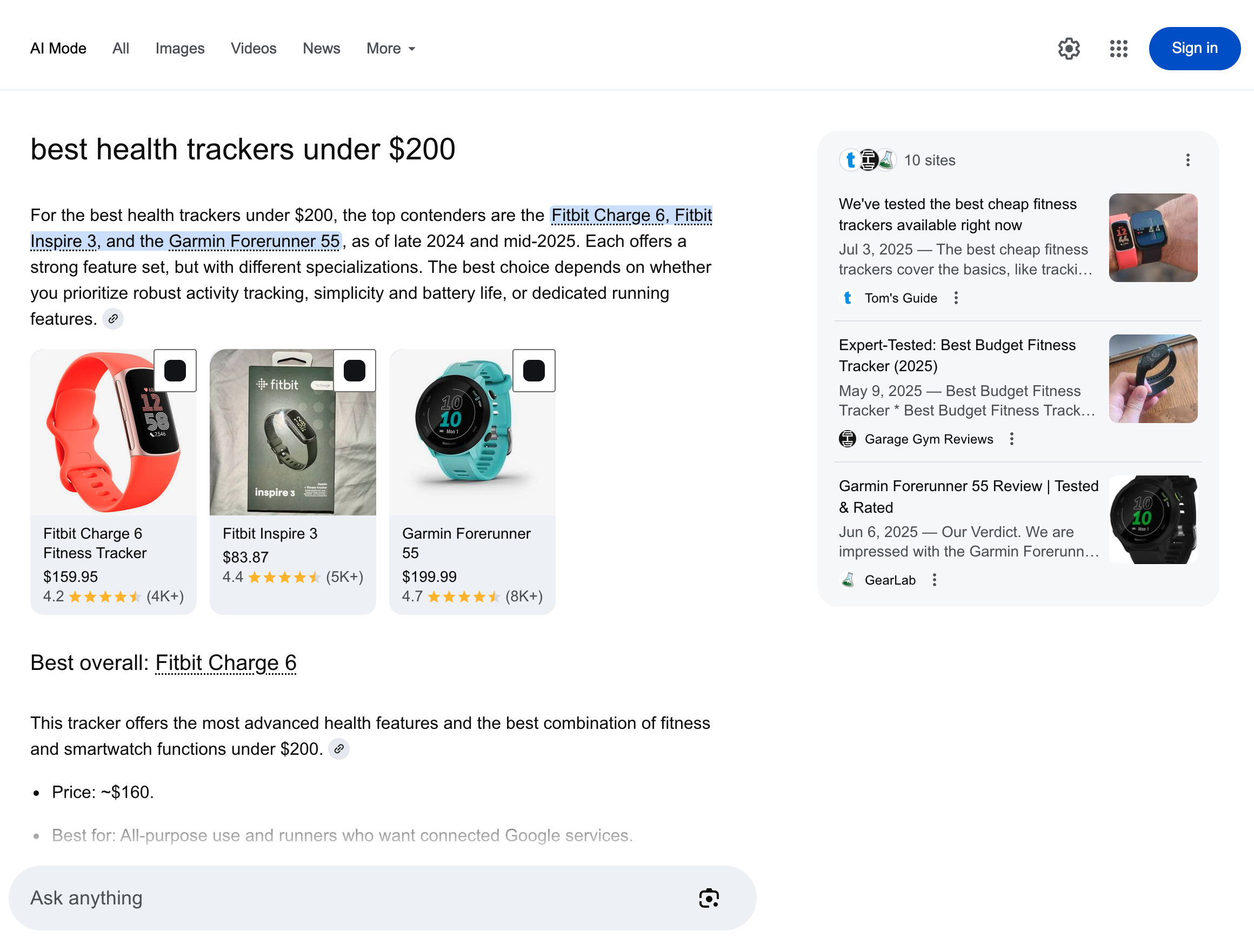
HTML example
JSON structure
google_ai_mode returns structured output with fields such as URL, page, and results. The table below explains each element in detail, outlining its description and data type.
Depending on the search query, both the number of items and the fields included can change.
| Key Name | Description | Type |
|---|---|---|
url | The URL of Google AI Mode. | string |
page | Page number. | integer |
content | An object containing the parsed Google AI Mode response data. | object |
content.links | List of external links referenced in the response. Displayed in the box on the right side of the page. | array |
| content.prompt | Original prompt submitted to Google AI Mode. | string |
content.citations | List of citation links with URLs and associated texts, as shown in the main block of the Google AI Mode response. | array |
content.response_text | Complete response text from Google AI Mode. | string |
content.markdown_text | Complete Markdown text from Google AI Mode. | string |
content.parse_status_code | Status code of the parsing operation. | integer |
created_at | Timestamp when the scraping job was created. | timestamp |
updated_at | Timestamp when the scraping job was finished. | timestamp |
job_id | ID of the job associated with the scraping job. | string |
status_code | Status code of the scraping job. You can see the scraper status codes described here. | integer |
Use cases
Scraping Google AI Mode unlocks powerful applications across SEO and GEO analysis, as well as dataset development:
- Monitor brand presence: track how brands appear in Google AI Mode results to strengthen visibility and reputation.
- Optimize content for AI: refine and adapt content strategies to perform better in AI-driven search interfaces.
- Build training datasets: gather diverse, real-world responses to create high-quality datasets for model training or fine-tuning.
Why choose Oxylabs?
- No upkeep needed: all infrastructure handled for you (proxies, IP rotation, automated request management measures). No engineering time wasted on fixes or site changes.
- Reliable performance: consistent, high success rates powered by enterprise-level infrastructure.
- Smart capabilities: Custom Browser Instruction with a headless browser for real-user simulation, CAPTCHA handling, and geo-targeting for localized results.
FAQs
Is it allowed to scrape AI-generated content from Google?
The legality of scraping AI-generated content depends on factors like Google’s terms of service, your use case, and applicable laws. We recommend consulting a legal expert before proceeding.
Are there any limitations of Google AI Mode scraper?
Yes. The main limitation is prompt size – requests sent to the API cannot exceed 400 characters. Longer prompts need to be shortened before submitting.
Learn more
For detailed information on API features, integrations, and more examples, see the Web Scraper API documentation.
Contact us
If you have questions or need support, reach out to us at support@oxylabs.io, or through live chat, accessible via Oxylabs Dashboard, or join our Discord community. For enterprise-related inquiries, contact your dedicated account manager.