How to Scrape Google Finance with Python


Follow this Python tutorial to learn how to scrape public data from Google Finance, such as stock titles, pricing, and price changes in percentages. We'll show how you can use Oxylabs' Web Scraper API for this task, which requires a subscription or a free trial. You can claim a 1-week free trial by registering on the Oxylabs dashboard.
- Step 1: Install prerequisite libraries
- Step 2: Build the core structure
- Step 3: Create a parsing logic
- Complete code sample
Step 1: Install prerequisite libraries
In your terminal, run this pip command:
pip install requests bs4You may skip Beautiful Soup altogether and instead use Custom Parser, which is built into the API.
Step 2: Build the core structure
Next, let's define the general logic for the finance data scraper. We’ll create functionality for defining multiple Google Finance URLs that we’d like to scrape. Afterwards, we’ll take these URLs one by one, collect the information we need and save it as a JSON file. The following function will return the scraped Google Finance HTML page:
import requests
from bs4 import BeautifulSoup


def get_finance_html(url):
   payload = {
       'source': 'google',
       'render': 'html',
       'url': url,
   }

   response = requests.request(
       'POST',
       'https://realtime.oxylabs.io/v1/queries',
       auth=('username', 'password'), # User your API credentials here.
       json=payload,
   )

   response_json = response.json()

   html = response_json['results'][0]['content']

   return html
[!NOTE] Don’t forget to replace the USERNAME and PASSWORD with your own Oxylabs API credentials.
For the next step, we’ll be creating a function that accepts a BeautifulSoup object created from the HTML of the whole page. This function will create and return an object containing stock information. Let’s try to form the function in a way that makes it easy to extend (in case we need to.)
def extract_finance_information_from_soup(soup_of_the_whole_page):
# Put data extraction here.

   listing = {}

   return listing
Since we can now get the HTML and have a function to hold our information extraction, we can combine both of those into one:
def extract_finance_data_from_urls(urls):
   constructed_finance_results = []

   for url in urls:
       html = get_finance_html(url)

       soup = BeautifulSoup(html,'html.parser')

       finance = extract_finance_information_from_soup(soup)

       constructed_finance_results.append({
           'url': url,
           'data': finance
       })

   return constructed_finance_results
This function will take an array of URLs as a parameter and return an object of extracted financial data.
Last but not least, we need a function that takes this data and saves it as a file:
def save_results(results, filepath):
    with open(filepath, 'w', encoding='utf-8') as file:
        json.dump(results, file, ensure_ascii=False, indent=4)

    return
To wrap this up, we’ll create a simple main() function that invokes all that we’ve built so far:
def main():
   results_file = 'data.json'

   urls = [
       'https://www.google.com/finance/quote/BNP:EPA?hl=en',
       'https://www.google.com/finance/quote/.DJI:INDEXDJX?hl=en',
       'https://www.google.com/finance/quote/.INX:INDEXSP?hl=en'
   ]

   constructed_finance_results = extract_finance_data_from_urls(urls)

   save_results(constructed_finance_results, results_file)
We’ve successfully built the core of the application. Now, let’s move on to creating functions for extracting specific data from Google Finance.
Step 3: Create a parsing logic
1) Collect prices
First on the list is the pricing data. Navigating the HTML of Google Finance can get tricky (it seems to be quite dynamic), so let’s see how we can pinpoint the price.
We can see that most of the information about the stock is located inside a container named main.
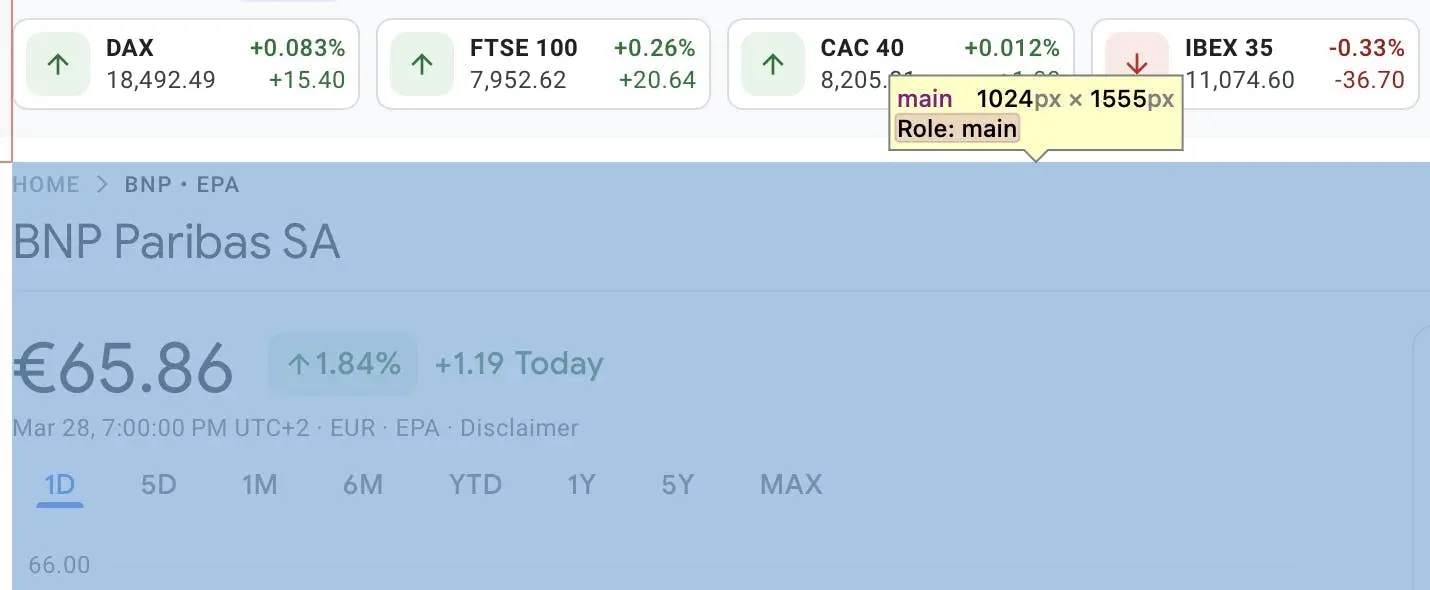
Then, we’ll specify the div with the price itself – AHmHk.
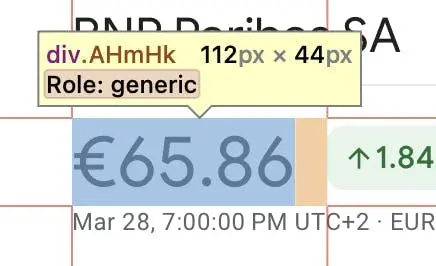
Now that we’ve gathered everything, let’s write the function itself:
def get_price(soup_element):
   price = soup_element.find('main').find('div','AHmHk').get_text()

   return price
2) Get the stock price change in percentages
Another important piece of information is the historical data for price changes. We’ll begin with the same main container that we’ve found earlier and specify an inner div that will contain only the price change – JwB6zf.
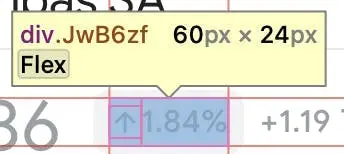
We’ve got all of the needed CSS information, so let’s extract the stock price change.
def get_change(soup_element):
   change = soup_element.find('main').find('div','JwB6zf').get_text()

   return change
3) Retrieve the stock title
For the last piece of information, we’ll need the name of the stock.
Again, we begin with the same main container. Then, we can specify an inner div that contains the name, which is zzDege.
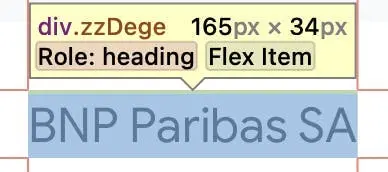
The final step is to put this into a function for extraction.
def get_name(soup_element):
   name = soup_element.find('main').find('div','zzDege').get_text()

   return name
Having all of these functions for financial data extraction, we just need to add them to the place we designated earlier to finish up our code:
def extract_finance_information_from_soup(soup_of_the_whole_page):
   price = get_price(soup_of_the_whole_page)
   change = get_change(soup_of_the_whole_page)
   name = get_name(soup_of_the_whole_page)

   listing = {
       "name": name,
       "change": change,
       "price": price
   }

   return listing
Complete code sample
from bs4 import BeautifulSoup
import requests
import json

def get_price(soup_element):
   price = soup_element.find('main').find('div','AHmHk').get_text()

   return price


def get_change(soup_element):
   change = soup_element.find('main').find('div','JwB6zf').get_text()

   return change


def get_name(soup_element):
   name = soup_element.find('main').find('div','zzDege').get_text()

   return name


def save_results(results, filepath):
   with open(filepath, 'w', encoding='utf-8') as file:
       json.dump(results, file, ensure_ascii=False, indent=4)

   return


def get_finance_html(url):
   payload = {
       'source': 'google',
       'render': 'html',
       'url': url,
   }

   response = requests.request(
       'POST',
       'https://realtime.oxylabs.io/v1/queries',
       auth=('username', 'password'),
       json=payload,
   )

   response_json = response.json()

   html = response_json['results'][0]['content']

   return html


def extract_finance_information_from_soup(soup_of_the_whole_page):
   price = get_price(soup_of_the_whole_page)
   change = get_change(soup_of_the_whole_page)
   name = get_name(soup_of_the_whole_page)

   listing = {
       "name": name,
       "change": change,
       "price": price
   }

   return listing


def extract_finance_data_from_urls(urls):
   constructed_finance_results = []

   for url in urls:
       html = get_finance_html(url)

       soup = BeautifulSoup(html,'html.parser')

       finance = extract_finance_information_from_soup(soup)

       constructed_finance_results.append({
           'url': url,
           'data': finance
       })

   return constructed_finance_results


def main():
   results_file = 'data.json'

   urls = [
       'https://www.google.com/finance/quote/BNP:EPA?hl=en',
       'https://www.google.com/finance/quote/.DJI:INDEXDJX?hl=en',
       'https://www.google.com/finance/quote/.INX:INDEXSP?hl=en'
   ]

   constructed_finance_results = extract_finance_data_from_urls(urls)

   save_results(constructed_finance_results, results_file)


if __name__ == "__main__":
   main()
Looking to scrape data from other Google sources? Google Search Results, Google Sheets for Basic Web Scraping, How to Scrape Google Shopping Results, Google Play Scraper, How To Scrape Google Jobs, Google News Scrpaer, How to Scrape Google Scholar, How to Scrape Google Flights with Python, Scrape Google Trends