Claude Office Visualizer






Table of Contents
- Screenshots
- About
- What's New
- Features
- Quick Start
- Prerequisites
- Installation
- Development
- Project Structure
- Troubleshooting
- Contributing
- Related Documentation
Screenshots
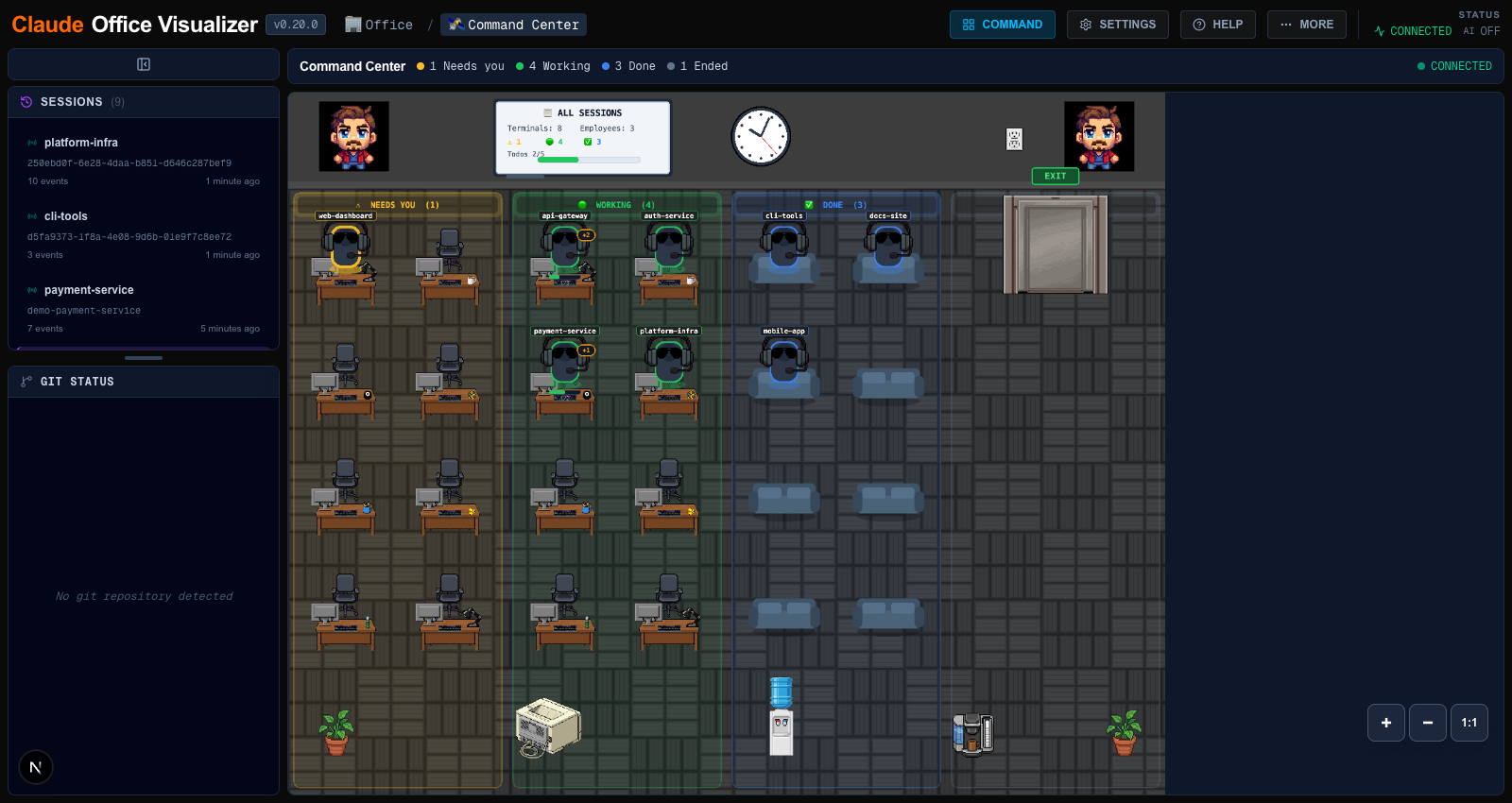
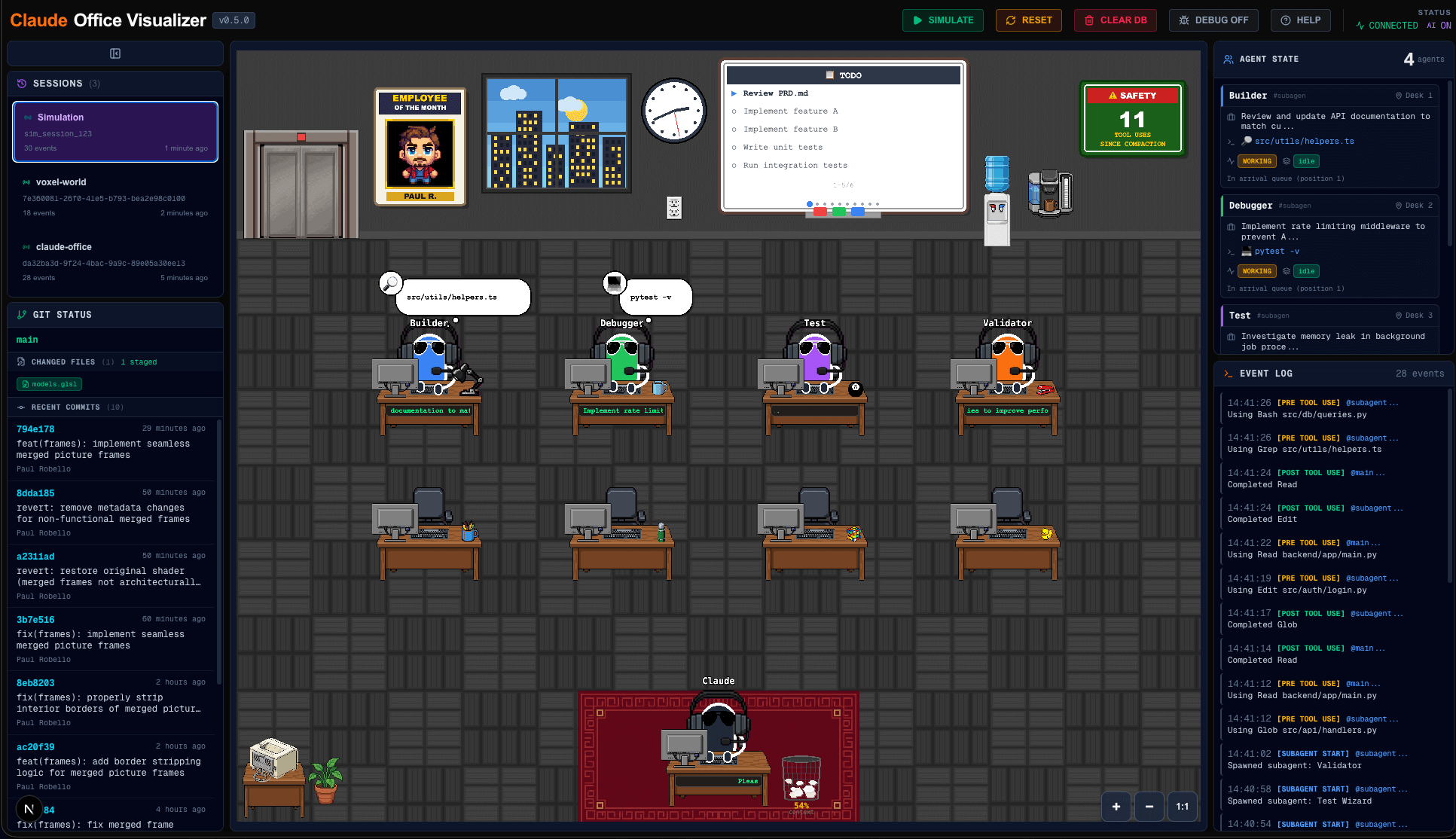
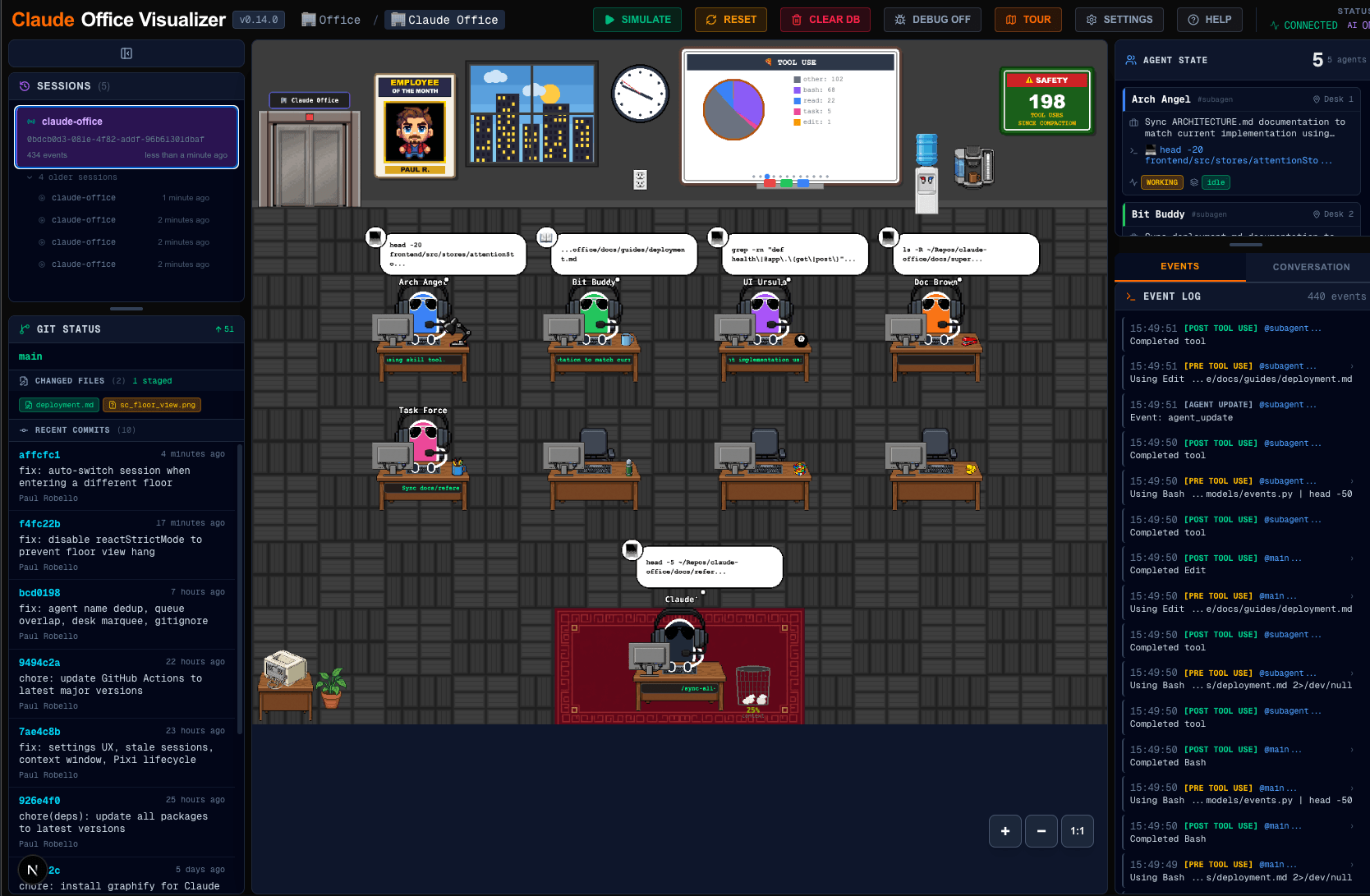
The Command Center gathers the boss of every live terminal into one cross-session office — at a glance you can see which terminals need you, which are working, and which are done:
 |  |
 |  |
About
Claude Office Visualizer is a real-time pixel art office simulation that visualizes Claude Code operations. Watch as a "boss" character (main Claude agent) manages work, spawns "employee" agents (subagents), and orchestrates tasks in an animated office environment.
The application was built with Next.js, PixiJS, FastAPI, and Zustand.

What's New
v0.24.1 (July 2026)
- Bug fix — API URL env vars now respected everywhere. The floor-config hook (
useFloorConfig.ts) and the simulation scripts (scripts/scenarios/_base.py) hardcodedhttp://localhost:8000, so they silently broke when the backend ran on another port (e.g. 8000 was already in use). They now readNEXT_PUBLIC_API_URLandCLAUDE_OFFICE_API_URLlike the rest of the stack; standard-port defaults are unchanged. Thanks @rasulboliev (PR #55).
v0.24.0 (July 2026)
- ⚠ Breaking — OpenCode plugin remote backend is now opt-in: a non-localhost
CLAUDE_OFFICE_API_URLis clamped to the local default unlessCLAUDE_OFFICE_ALLOW_REMOTE=1is set (matching the Claude Code hooks; event payloads carry tool I/O and file paths). If you point the plugin at a remote server, setCLAUDE_OFFICE_ALLOW_REMOTE=1or events silently post to localhost. - Pluggable summary backend: summaries now come from
SUMMARY_BACKEND=claude-cli(default), anyopenai-compatible endpoint, ordisabled—CLAUDE_CODE_OAUTH_TOKENno longer required. - Performance & architecture: per-frame agent writes batched into one store update per tick (header/sidebar/modals stop re-rendering at 60fps during movement);
gameStoresplit into 9 Zustand slices; single-writer agent-state ownership retires the 3-second "stuck boss" watchdog. 67 of 69 audit findings resolved.
v0.23.0 (July 2026)
- Audit remediation (60 findings): Full security hardening (API key no longer disclosed over HTTP — delivered via
?token=launch URL,focus/clipboard gated behind the key, git invocation hardening against hostile repos, Docker bound to loopback), a real CI workflow runningmake checkallacross all four components, and the entire backend structural chain consolidated (single event-dispatch table,ConnectionManagermoved to the domain layer with functional DI seams,EventDatadiscriminated union,BasePollerframework,main.pysplit into middleware/migrate/websockets, bounded growth with idle eviction + replay pagination). +489 tests. SeeCHANGELOG.mdandAUDIT-REMEDIATION.md - Code quality & docs: 76 frontend characterization tests,
useWebSocketEventsdecomposed into pure transport + domain modules, the OpenCode plugin's session-tracking extracted into a testedSessionTrackerwith real ESLint, atomicgameStoredequeue, named constants, a fail-safe hooks installer that preserves user edits,VERSION/__version__derived viaimportlib.metadata, andmake bump-versionautomation. API authentication, theSERVE_STATICgate, Command Center architecture, and complete env-var tables documented
v0.22.0 (June 2026)
- Schedule editor cron helpers: New pure
src/utils/cron.tsutilities that round-trip between a friendly schedule editor and 5-field cron expressions (timesToCron,intervalToCron,cronToEditor) - Bug fixes: Attention toast dismiss glyph rendered as raw source text instead of ✕ (#54), a Windows hook crash caused by a conflicting system OpenSSL, and dropped proxy/redirect support for remote
http://backends (#53)
v0.21.0 (June 2026)
- Dependency refresh: All packages across backend, frontend, hooks, and the OpenCode plugin bumped to latest (FastAPI 0.137, Starlette 1.3, Next 16.2.9, React 19.2.7, pixi.js 8.19, and tooling) — supersedes dependabot PRs #47/#50
- Bug fixes: Command Center exit-loop (#49), a Starlette 1.3 type-check regression (added
httpx2), and a latent hooks logging bug
v0.20.0 (June 2026)
- Command Center: New cross-terminal overview that gathers the boss (main agent) of every live session into a single pixel office — see at a glance what's finished, still running, or needs your attention. Reachable from the header (when ≥2 sessions are active) or the Building view's penthouse tile
- Scrollable Building View: The building cross-section now scrolls when the floor list is taller than the viewport
- Full-system QA + security hardening: 41 bug fixes (including a polling deadlock, a Docker blank-page fix, and a CORS preflight fix) plus per-session authorization guards and event-payload validation
v0.15.0 (May 2026)
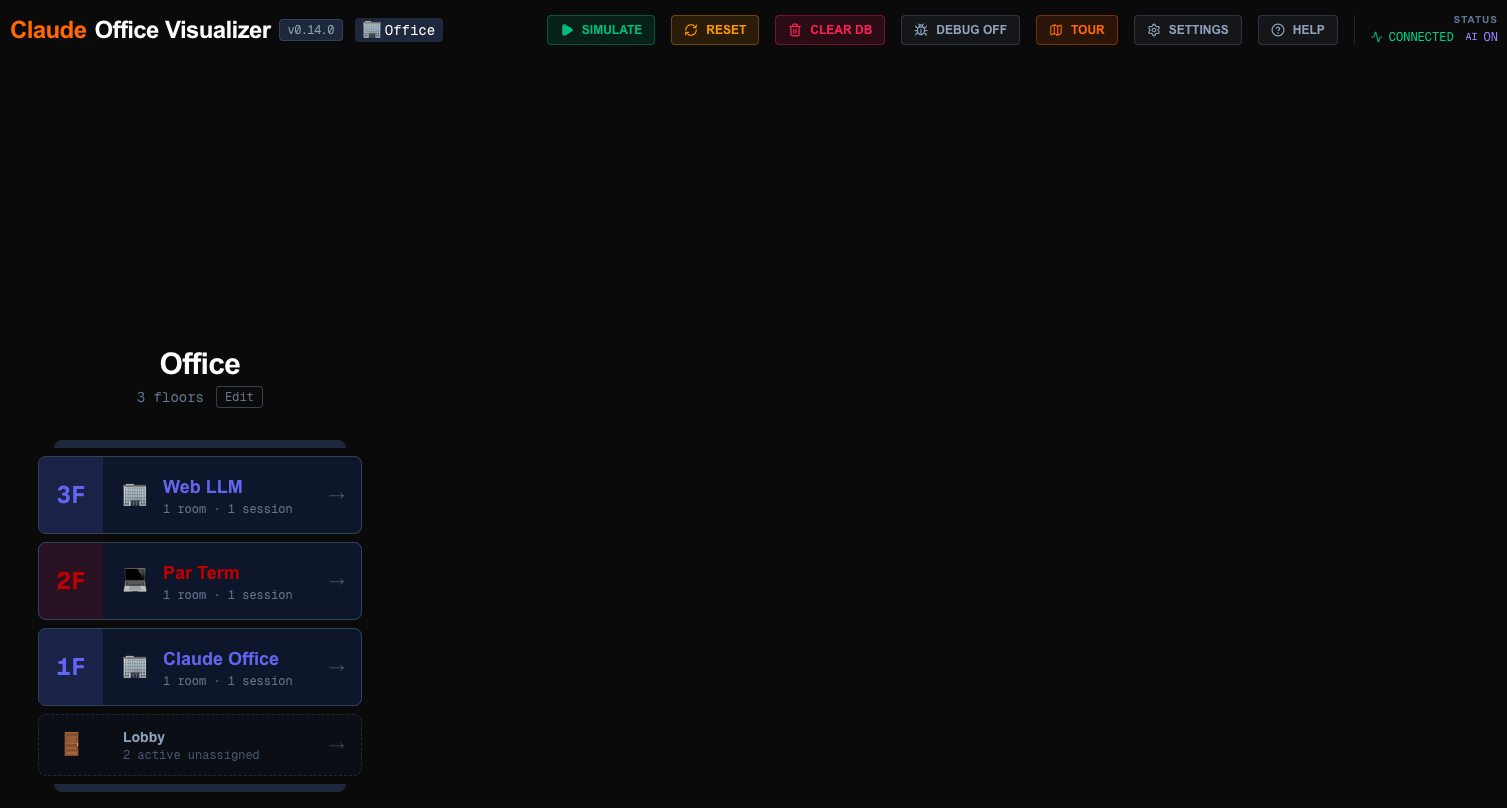
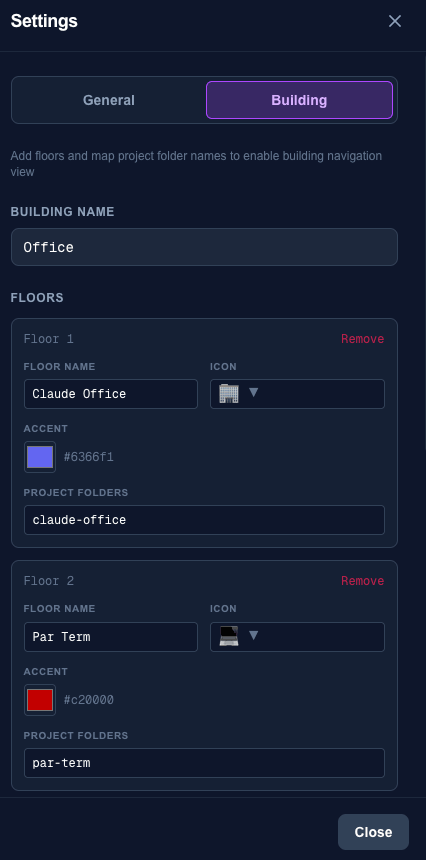
- Multi-Floor Building Navigation: Browse a multi-story building with floor-level views, each with its own office layout and agents
- Settings Overhaul: New building configuration and consolidated general settings tabs
- Kanban Whiteboard Mode: 12th whiteboard mode showing task workflow in columns
Special thanks to @mjcadile (PR #20) for the multi-floor building navigation, floor/room routing, and live session counts that power this release.
v0.14.0 (April 2026)
- Pluralization Support (i18n): Count-based translations now correctly display singular/plural forms (e.g., "1 event" vs "5 events") in all supported languages
- Star History Chart: Repository growth visualization added to README
For the full release history, see CHANGELOG.md.
Features
Core Capabilities
- Real-time Visualization: Watch Claude Code operations as they happen in an animated office
- Boss & Employee Agents: Main Claude agent as boss, subagents as employees
- Multi-Floor Building: Navigate a multi-story building with independent offices per floor, breadcrumb navigation, and automatic session switching
- Visual State Indicators: Working, delegating, waiting states clearly displayed
- Thought/Speech Bubbles: See agent activities and communications
Advanced Features
- Command Center: Cross-terminal overview that gathers every live session's boss into one pixel office, with status columns (Needs-you, Working, Done, Ended) and A* pathfinding to free seats
- Multi-Mode Whiteboard: 12 display modes with keyboard shortcuts (0-9, T, B, K) - todo list, remote workers, tool usage pie chart, org chart, stonks, weather, safety board, timeline, news ticker, coffee tracker, heat map, kanban
- Background Task Tracking: Remote Workers display shows background task status in video-call-style tiles
- Context Window Tracking: Animated trashcan fills with paper as context increases
- Compaction Animation: Boss stomps on trashcan to compact context
- City Skyline Window: Real-time day/night cycle based on local time with animated drifting clouds
- Wall Clock: Click to cycle between analog and digital (12h/24h) display modes
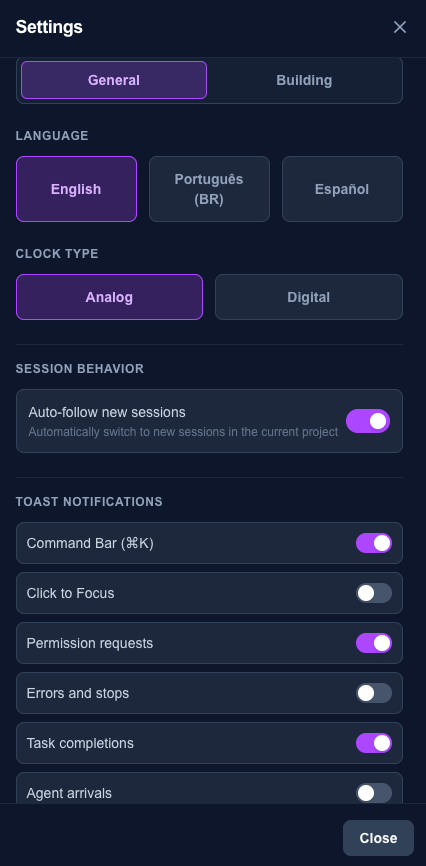
- User Preferences: Settings persist across sessions via backend database
- Git Status Panel: See repository status in real-time
- Printer Station: Printer animates when Claude completes work that produces a report or document
- Random Quotes: Agents display random acceptance/completion quotes when receiving or turning in work
- Safety Sign: Tool counter tracks uses since last context compaction
Technical Excellence
- WebSocket Architecture: Real-time state updates from backend to frontend
- Extensible Design: Easy to add new visualizations and features
- Cross-Platform: Runs on Windows, macOS, and Linux
Quick Start
For the fastest setup, see the Quick Start Guide.
git clone https://github.com/paulrobello/claude-office.git
cd claude-office
make install-all
make dev-tmux
Then open http://localhost:3000 and run any Claude Code command to see it visualized.
Prerequisites
- Python 3.13+
- Node.js 20+ (Bun auto-detected if available)
- uv (Python package manager)
- Claude Code CLI installed and configured, or OpenCode with Bun
Installation
Quick Start
# Clone the repository
git clone https://github.com/paulrobello/claude-office.git
cd claude-office

# Install all components (backend, frontend, hooks)
make install-all
Manual Installation
# Install backend dependencies
cd backend && uv sync && cd ..

# Install frontend dependencies
cd frontend && bun install && cd ..

# Install hooks into Claude Code
make hooks-install
Enable AI Enhancements (Optional)
For AI-powered features like agent name generation and task summaries, create a .env file in the backend/ folder with your Claude Code OAuth token:
# Set up a long-lived authentication token (requires Claude subscription)
# This will prompt you to authenticate and display your token
claude setup-token

# Create the .env file with the token
echo "CLAUDE_CODE_OAUTH_TOKEN=your-token-here" > backend/.env
Without this token, the visualizer works fully but displays raw agent IDs instead of friendly generated names, and tool names instead of summarized tasks. The frontend displays AI status in the top right corner so you can verify if it's properly configured.
Development
Starting the Development Servers
Recommended: Using tmux
make dev-tmuxNavigate between windows with Ctrl-b n (next) and Ctrl-b p (previous).
Alternative: Basic parallel mode
make devAvailable Commands
| Command | Description |
|---|---|
make dev | Start backend and frontend in parallel |
make dev-tmux | Start in tmux with separate windows (recommended) |
make dev-tmux-kill | Kill the tmux session |
make checkall | Run format, lint, typecheck, and tests |
make test | Run all test suites without the other checks |
make simulate | Run event simulation script |
make build-static | Build frontend and copy to backend for standalone deployment |
make clean-all | Remove all build artifacts and data |
Hook Management
| Command | Description |
|---|---|
make hooks-install | Install hooks into Claude Code |
make hooks-uninstall | Remove hooks from Claude Code |
make hooks-status | Show installed hooks and config |
make hooks-logs | View recent hook logs |
make hooks-debug-on | Enable debug logging |
make hooks-debug-off | Disable debug logging |
OpenCode Integration
This fork adds support for OpenCode as an alternative to Claude Code CLI. The opencode-plugin/ directory contains a plugin that sends OpenCode lifecycle events to the same backend API.
⚠ Breaking in v0.24.0: a non-localhost
CLAUDE_OFFICE_API_URLis now clamped to the local default unlessCLAUDE_OFFICE_ALLOW_REMOTE=1is set (the Claude Code hooks always did this). If your backend runs on another host, setCLAUDE_OFFICE_ALLOW_REMOTE=1or events will silently post to localhost.
Install
make opencode-installThis builds the plugin, links it globally, and registers it in your ~/.config/opencode/opencode.json.
Uninstall
make opencode-uninstallOpenCode Plugin Commands
| Command | Description |
|---|---|
make opencode-install | Build and register plugin with OpenCode |
make opencode-uninstall | Remove plugin from OpenCode |
make opencode-reinstall | Uninstall and reinstall plugin |
make opencode-build | Build plugin without registering |
Environment Variables
| Variable | Default | Description |
|---|---|---|
CLAUDE_OFFICE_API_URL | http://localhost:8000/api/v1/events | Backend API endpoint. Non-localhost values are reset to the default unless CLAUDE_OFFICE_ALLOW_REMOTE=1 |
CLAUDE_OFFICE_ALLOW_REMOTE | 0 | Set to 1 to permit a non-localhost backend (hooks + OpenCode plugin; opt-in since payloads carry tool I/O and file paths) |
CLAUDE_OFFICE_TIMEOUT_MS | 1500 | HTTP request timeout |
CLAUDE_OFFICE_DEBUG | 0 | Set to 1 to log events to stderr |
Event Mapping
The plugin maps OpenCode events to claude-office backend events:
| OpenCode Event | Backend Event |
|---|---|
session.created | session_start |
session.deleted | session_end |
session.idle | stop |
session.compacted | context_compaction |
chat.message hook | user_prompt_submit |
tool.execute.before | pre_tool_use / subagent_start |
tool.execute.after | post_tool_use / subagent_stop |
permission.ask | permission_request |
step-finish part | reporting (token usage) |
message.updated (assistant) | reporting (token usage) |
Docker Deployment
| Command | Description |
|---|---|
make docker-build | Build Docker image |
make docker-up | Start container in background |
make docker-down | Stop container |
make docker-logs | View container logs |
See Docker Guide for detailed configuration.
Accessing the Visualizer
Once running, open http://localhost:3000 in your browser.
Project Structure
claude-office/
├── backend/               # FastAPI backend
│   ├── app/
│   │   ├── api/          # REST and WebSocket endpoints
│   │   ├── core/         # State machine, event processor
│   │   └── models/       # Pydantic models
│   └── pyproject.toml
├── frontend/             # Next.js + PixiJS frontend
│   ├── src/
│   │   ├── components/   # React/PixiJS components
│   │   ├── hooks/        # Custom React hooks
│   │   ├── stores/       # Zustand state stores
│   │   └── systems/      # Animation, pathfinding
│   └── package.json
├── hooks/                # Claude Code integration
│   ├── src/              # Hook implementation
│   ├── install.sh        # Hook installer
│   └── uninstall.sh      # Hook uninstaller
├── opencode-plugin/      # OpenCode integration
│   ├── src/              # Plugin TypeScript source
│   ├── install.sh        # Plugin installer
│   └── uninstall.sh      # Plugin uninstaller
├── scripts/              # Utility scripts
├── docs/                 # Documentation
└── Makefile              # Project orchestration
Troubleshooting
Hooks Not Firing
- Check hooks are installed:
make hooks-status - Enable debug logging:
make hooks-debug-on - Watch logs:
make hooks-logs-follow
Frontend Not Updating
- Check WebSocket connection in browser dev tools (Network > WS)
- Verify backend is running: http://localhost:8000/health
- Check browser console for errors
Backend Errors
- Check backend logs in tmux window or terminal
- Clear database and restart:
make clean-db && make dev
Common Issues
| Issue | Solution |
|---|---|
| "Session already exists" | Run make dev-tmux-kill first |
| Port 8000 in use | Stop other services on that port |
| Port 3000 in use | Stop other services on that port |
| Hooks not detected | Restart Claude Code after installing hooks |
Contributing
Contributions are welcome! Please ensure that all pull requests:
- Pass all checks:
make checkall - Follow the existing code style
- Include appropriate tests for new features
- Update documentation as needed
Related Documentation
- Quick Start Guide - Get running in under 5 minutes
- Architecture - System design, data flow, component details
- Whiteboard Modes - 12 display modes with keyboard shortcuts
- Docker Guide - Docker deployment and configuration
- AI Summary - AI-powered summary service documentation
- Backend README - Backend-specific setup
- Frontend README - Frontend-specific setup
- Hooks README - Hook installation details
- OpenCode Plugin - OpenCode integration plugin
- Scripts README - Testing and simulation scripts
- CLAUDE.md - AI assistant instructions for this project