Video Short
Turn a raw recording into a polished video short, complete with B-roll, motion graphics, captions, music, and more using Claude, ChatGPT, Gemini, or your favorite agent.
https://github.com/user-attachments/assets/51b8decf-d719-4f4b-9824-5686b3a97ac7
Watch the full tutorial to see how I use this skill with a real example.
Problem
Shorts average 200 billion daily views on YouTube alone, but making a great one by hand still takes hours. And when you ask AI to help, giving feedback in chat is painful because you can't point at the exact frame you want to fix.
What video short can do
/video-short makes it easy for you to iterate with AI to create compelling shorts. The best part of the skill is it gives you a review page to give feedback to your AI agent on any frame until the short feels right:

The skill supports making shorts with 4 different layouts:
- A-roll: You, full screen.
- Punch: A tighter shot of you for emphasis.
- Split: A visual on top, you below.
- B-roll: A visual full screen while you keep talking.
It can also add the following automatically:
- Captions that match what you say, word for word.
- Motion graphics written in HTML to bring the short to life.
- B-roll footage found online that's relevant to what you're saying.
- AI video and music (optional) generated with Gemini Omni Flash and Lyria. This step needs a Gemini API key with billing enabled. You can also add your own video and music.
How to install video short
To install the skill, just paste this into Claude Code, ChatGPT Desktop, or your favorite agent:
Install the /video-short skill globally from https://github.com/petergyang/video-shortYou can also install it with npx:
npx skills add petergyang/video-short --skill video-short --global --yesThe first time you run the skill, it'll check if you have the following installed and offer to install what's missing. Plan for around 1 GB of disk space, mostly for the speech model:
- ffmpeg to cut and encode video.
- yt-dlp to pull B-roll from YouTube, X, and other sites.
- Python 3.10 or newer to run the editing scripts.
- Node.js 22 or newer for HyperFrames, the free, open-source tool that transcribes your recording on your computer with the Parakeet speech model and renders the edit into video.
- Optional: A Gemini API key with billing enabled, to generate images with Nano Banana, video clips with Omni Flash, and music with Lyria. Get a key at Google AI Studio and set
GEMINI_API_KEY.
How to use video short
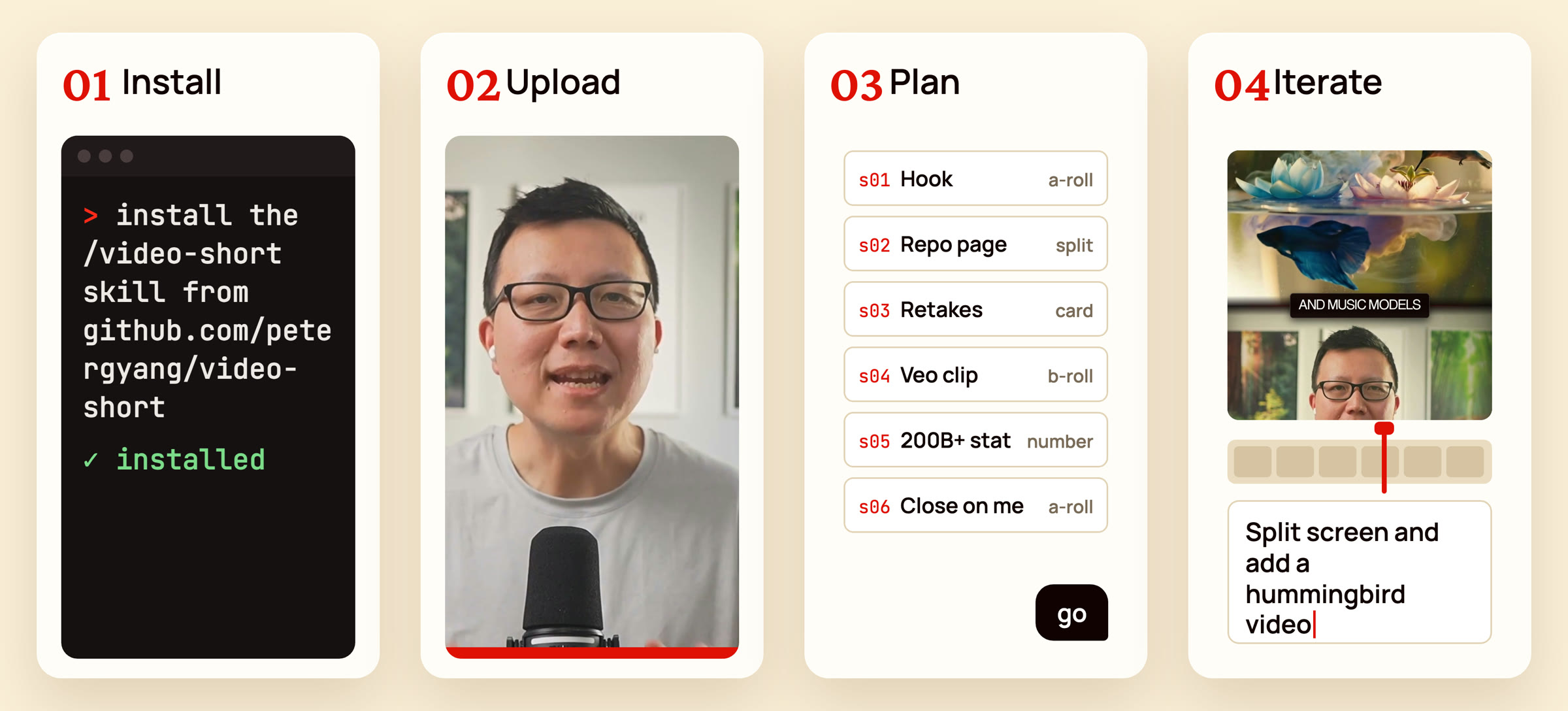
I've made this skill as simple as possible to use, just follow these 4 steps:
-
Install. Paste the install prompt above into Claude Code, ChatGPT, or your favorite AI agent. You only do this once.
-
Upload. Record yourself talking, then run the skill and point it at your raw video:
/video-short edit my video at [path/to/video.mp4]It'll transcribe the recording and cut retakes, false starts, and dead air.
-
Plan. It researches the topic, finds B-roll from your footage and the web, and shows you a scene-by-scene plan in chat: what's on screen, the words spoken, and anything it wants to generate. Reply "go" or ask for changes.
-
Iterate. Once your agent is done with a draft edit, it'll open the review page for you to play the short, pause on any frame, and leave feedback. The agent will then apply your feedback before reloading the review page with a new version of the short.
Each render saves a new version, so you can compare v1 and v2, plus a small 720p copy in renders/share/ to send from your phone or email.
Make it yours
Fonts, colors, and caption style come from a small style.json. Save yours at ~/.config/video-short/style.json and every short uses it. The keys are in reference.md.
What's inside
SKILL.mdcontains the editing rules and workflow.reference.mdcontains the commands, theedit.mdformat, graphics, and style options.eval.mdcontains the checks the skill runs before handing back a video.scripts/contains the scripts for setup, transcription, cutting, generation, rendering, the review page, and QA.
Want more great AI skills?
Become a paid member at Behind the Craft to get all my AI skills, $600+ in AI tool discounts, and my personal AI course.
Subscribe to my YouTube channel and newsletter for practical AI tutorials and interviews.
License
MIT. The bundled Inter font is under the SIL Open Font License.