CrewMeld
🌐 English | 简体中文
Enterprise AI Digital Employee Platform. Provides orchestration, deployment, and runtime capabilities for AI Agents, with support for on-premise deployment.
- Website: https://crewmeld.ai/
- User Manual: https://proinsight.gitbook.io/crewmeld
Table of Contents
Product Features
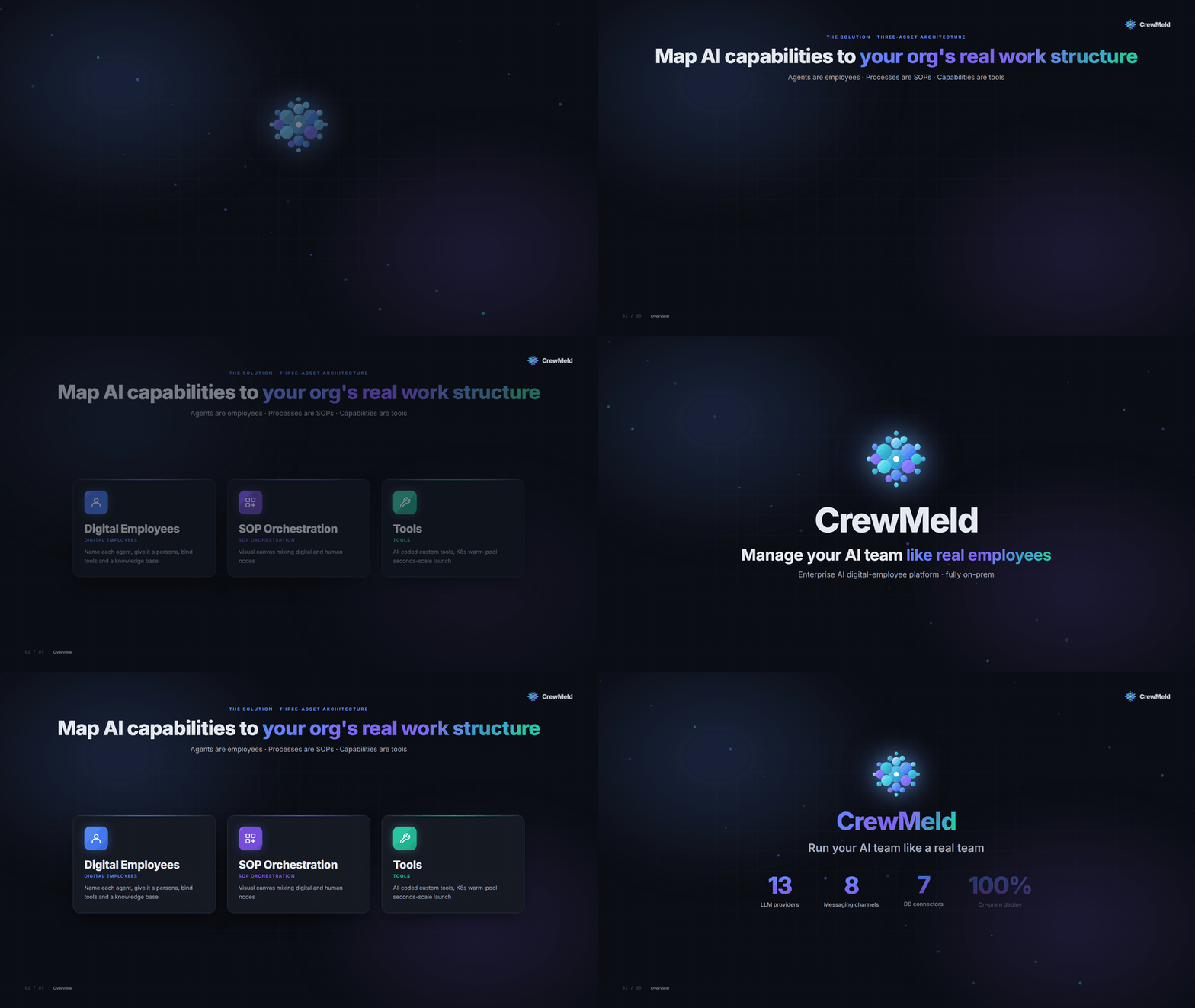
The platform organizes AI capabilities around three asset categories: Digital Employees, SOPs, and Tools.
Asset Model: Employee · SOP · Tool
| Asset | Responsibility | Orchestration Granularity | Creation |
|---|---|---|---|
| Digital Employee | Task execution entity | — | Onboarding wizard |
| SOP | Multi-role collaboration flow, supports cross-hour / cross-day execution | Step level | Visual canvas |
| Tool | Atomic capability, ms-to-second scale | Operation level | Template instantiation / OpenAPI import |
Dependency relationship: Tools are bound to and invoked on demand by digital employees; digital employees and human employees are orchestrated by SOPs into multi-role collaboration flows.
1. Digital Employee Management
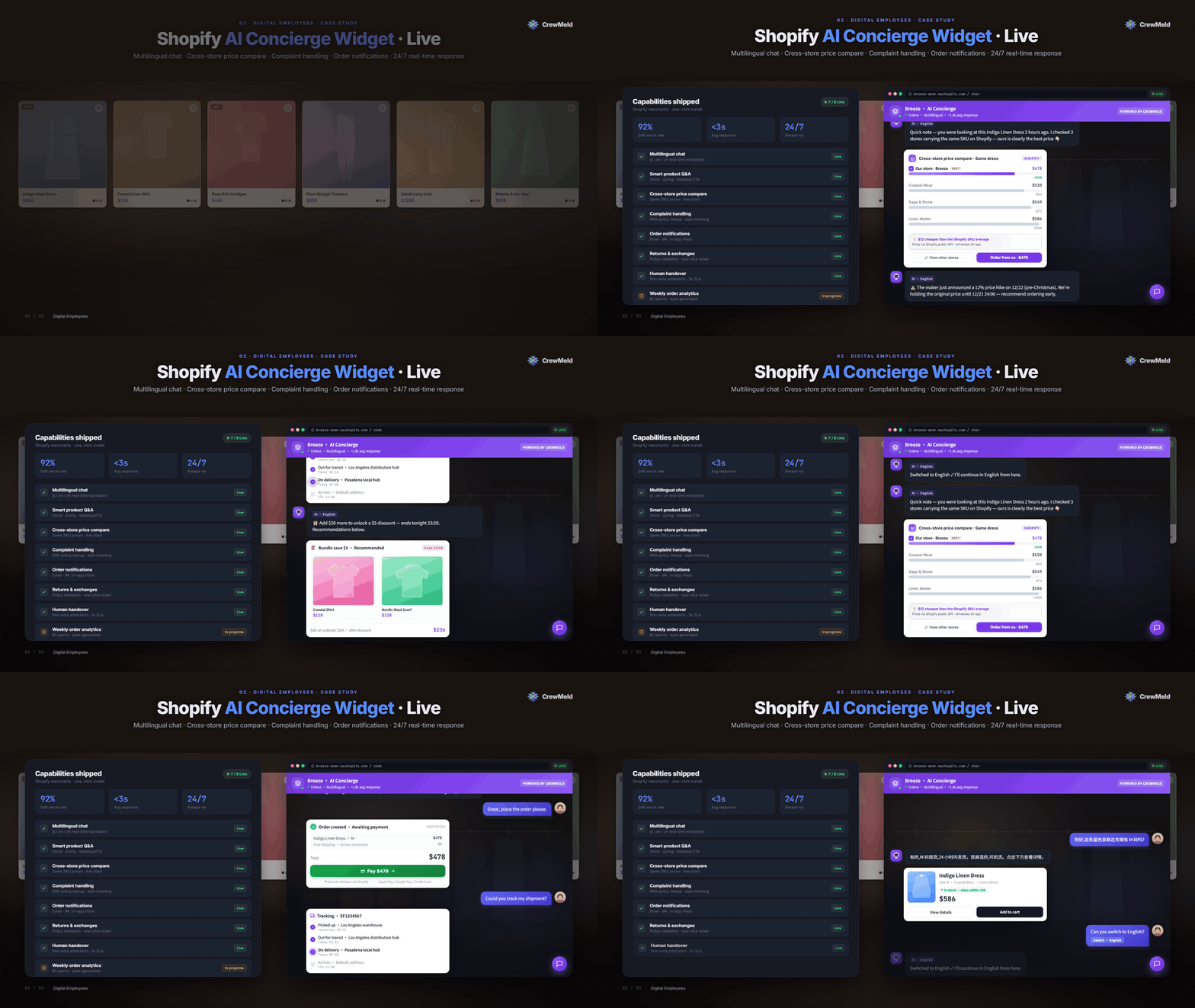
A digital employee comprises identity information (name, avatar, role type, persona), tool instances, LLM model configuration, knowledge base bindings, system connections, runtime status (standby / active / paused / error), and operational metrics (tasks completed, success rate, average duration).
Onboarding flow:
- Choose a role or create directly — pick a preset role from the role library, or skip and fill in basic info directly
- Basic info — name, description, persona (auto-prefilled from the chosen role)
- Tool binding — attach the tools the employee needs (only deployed instances are bindable)
- Knowledge base binding — associate document knowledge bases (many-to-many)
- Model configuration — select LLM vendor and model
- Confirm onboarding — review and confirm; initial status is "standby"
2. SOP Collaboration Orchestration
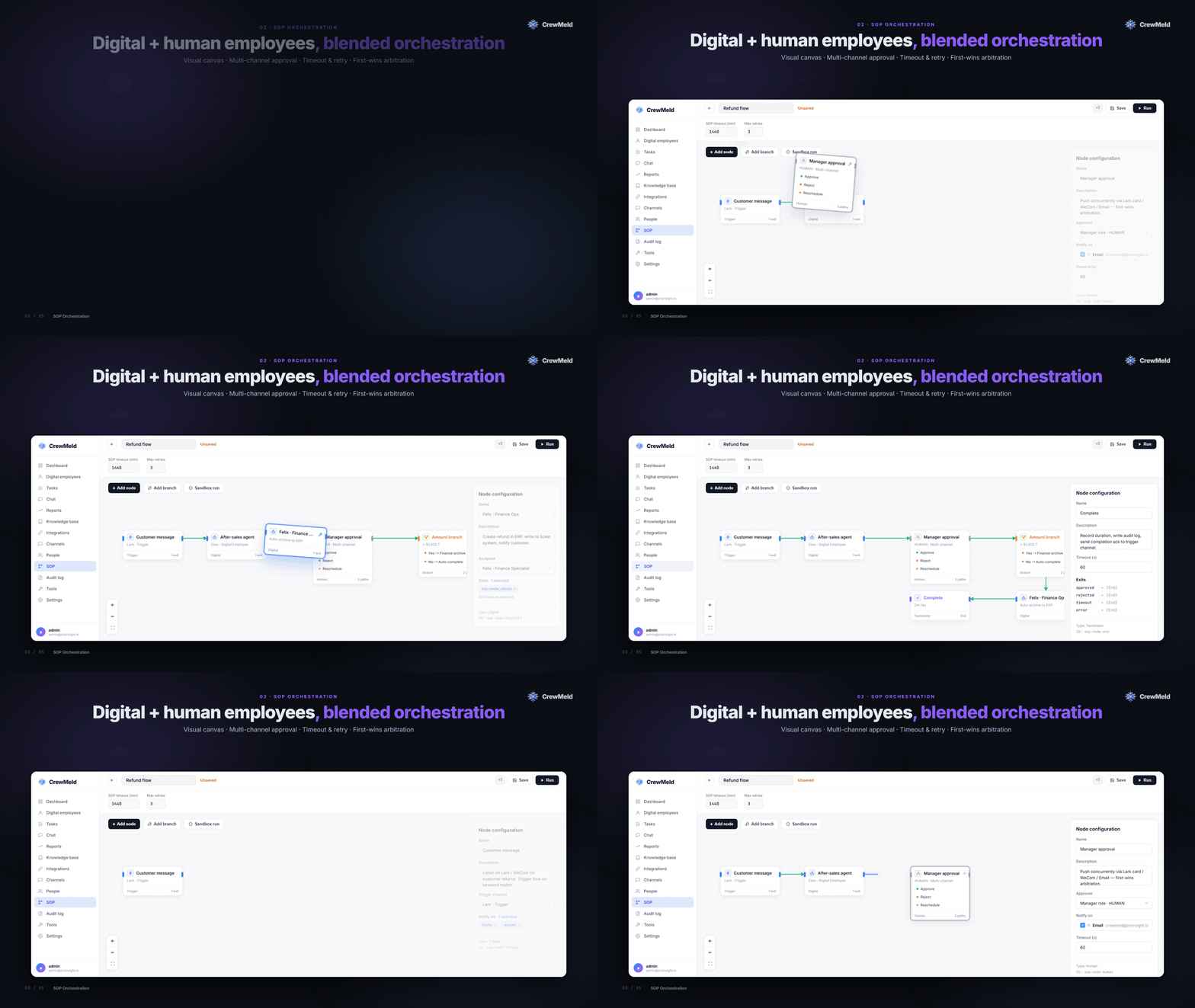
SOPs cover three responsibilities: multi-role collaboration flow, triggering and scheduling, and human approval steps.
Step types:
| Type | Executor | Description |
|---|---|---|
| Digital Employee | Digital Employee | Invokes a digital employee, using its tools and knowledge base to execute the task |
| Human Employee | Human Employee | Performed by a human |
| Human Approval | Human Employee | Flow pauses until approval is granted, then resumes |
| Conditional Branch | — | Multi-way routing |
The execution state machine has 8 states: pending, running, completed, plus human-waiting (resume from breakpoint), timeout, error, failed, cancelled. All state transitions are validated; illegal transitions are rejected.
Trigger types:
| Type | Implementation |
|---|---|
| Scheduled | Cron expression + queue scheduling |
| Event-driven | Channel messages / webhook callbacks |
| Manual | Admin console "Run" button / Open API |
Breakpoint resume (human approval scenario): when the flow reaches a human approval node, the engine pauses and a full state snapshot is persisted to the database; notifications are sent through approver-configured channels (Feishu / WeCom / DingTalk approval cards, email HTML cards); approvers make decisions via login-free links; the engine resumes from the breakpoint, with first-come-first-served concurrency control.
Timeout mechanism: step-level timeouts automatically add a "timeout" exit; the SOP-level maximum execution duration defaults to 24 hours and is configurable.
Visual canvas editor: drag-and-drop node orchestration, edges defining flow, node property panel (executor / timeout / retry), and version management (each save creates a new version).
Execution tracking: execution record list (filterable by SOP type / time / status), step-level timeline, streaming logs, and pending approval queue.
3. Tool Template, Instance & Service Publishing
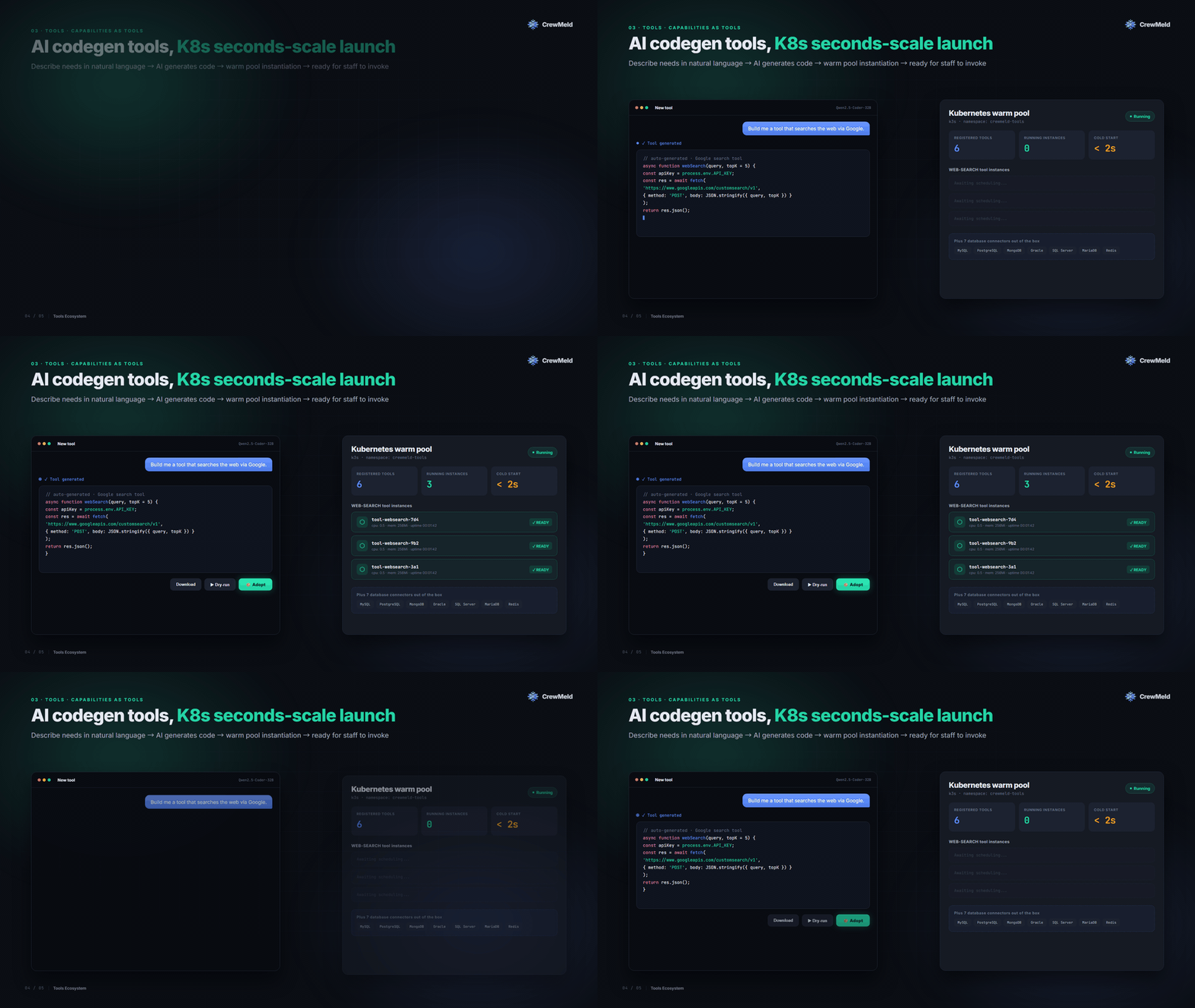
Tools follow a two-tier template-and-instance model that separates code from configuration: a single template can spawn multiple instances, each with its own parameters and credentials, deployed and run independently.
Template sources:
- Official preset — bundled with the platform
- User-installed — user-created or imported via ZIP package
ZIP import/export (cross-environment migration): environment variables marked as "secret" are cleared on export and must be filled in manually after import to prevent credential leakage.
OpenSandbox deployment: tool instance code runs in isolated OpenSandbox containers (Docker or Kubernetes runtime), separated from the main platform process; supports JavaScript and Python; sandbox failures do not affect platform stability.
Dev Studio can now build and test three service types declared by service.type in the tool manifest:
| Type | Use Case | Test & Invocation Behavior |
|---|---|---|
json | Structured tool / API | JSON request and response, published through the tool invocation API |
http | Web pages or general HTTP services | Interactive HTML preview; methods, query strings, redirects, and relative static assets are proxied intact |
sse | Streaming HTTP services | Event-stream preview and transparent streaming with proxy buffering disabled |
Service publishing separates development from runtime delivery:
- Authentication — choose API Key or anonymous access; invocation documentation is available for both modes
- Network exposure — internal by default at
/services/{instanceId}/; optionally publish through a shared public origin or a service-specific domain and reverse proxy - Web entry links — published HTTP pages expose a clickable service link to bound digital employees, preferring the public URL and falling back to the internal URL
- Horizontal scaling — set or change 1–20 OpenSandbox replicas (
instance-0...instance-n); only ready replicas receive traffic - Load balancing — the CrewMeld service gateway uses Redis-backed round robin across application replicas, with a local fallback and browser-session affinity
4. Channel Integration
The platform integrates the following messaging platforms via a unified channel plugin system. New channels can be added through the adapter / card-builder / sender trio.
| Channel | Capability Coverage |
|---|---|
| WeCom | Message I/O + encryption + rich card + approval notifications |
| DingTalk | Message I/O + bot push + approval cards |
| Feishu | Message I/O + AES encryption + cards + per-employee routing |
| WeChat Official Account | Standard official account messaging |
| SMTP send + IMAP receive + HTML approval cards | |
| SMS | Integrated via the unified plugin interface |
| Telegram | Bot message I/O |
| Discord | Bot message I/O |
5. Conversation System
The interaction channel between users and digital employees:
- Multi-channel unification — Web, the 8 channels above, and Open API share a single conversation engine entry point
- Multi-turn conversation — session context is persisted, supporting multi-turn follow-ups and parameter collection
- SOP triggering — trigger SOP execution directly from a conversation
- Streaming responses — real-time push via SSE and WebSocket dual channels
- Token statistics — token usage is recorded per message
- History browsing — dual-pane layout (conversation list + channel tag on the left, message details on the right), filterable by channel
- Soft delete — conversation deletion is logical (soft delete), preserving traceability
- Automatic language adaptation — based on automatic detection of the message language; LLM replies use the language of the user's message
- Customer-service mode — restrict a digital employee to scoped knowledge retrieval without executing SOPs or external tools
- Multimodal input — files, images, and PDFs can be processed by a vision model or Baidu AI Cloud OCR before answering
- Human handoff — the original conversation can move to the human-service workbench without losing message history
6. Knowledge Base (RAGFlow)
The platform's knowledge base management UI integrates with RAGFlow (a standalone Docker service, version v0.23.1), providing document parsing, retrieval, OCR, and employee binding capabilities.
Integrated capabilities:
- Multi-format document upload — PDF, Word, Excel, PPT, scanned files
- Real-time parse progress — not-started / parsing / completed / failed + percentage + chunk count
- Parse control — stop / restart parsing
- Hybrid retrieval — vector search (powered by the built-in bge-m3 Chinese model) fused with BM25 keyword search
- Many-to-many binding — one employee can bind multiple knowledge bases; one knowledge base can be used by multiple employees
- Search logs — search behavior is persisted, serving as foundational data for citation analysis and recall optimization
- QA operations — manage question-answer entries, preview imports, import/export CSV, and synchronize changes to RAGFlow
- Question analytics — aggregate real user questions, classify or merge similar questions, promote them into QA, and surface per-category Top 3 questions
- Knowledge-gap tracking — record unanswered or low-similarity questions with occurrence counts for continuous knowledge-base improvement
- Rich document delivery — extract and bind document images so customer-service answers can return relevant visual content
7. LLM Providers
The platform supports the following LLM providers, selectable and switchable directly from the admin console:
OpenAI, Anthropic, Google, Tongyi Qianwen, DeepSeek, ERNIE, Hunyuan, Moonshot (Kimi), Zhipu, Doubao, MiniMax, Ollama (local inference), vLLM (self-hosted high-performance inference).
Coding models — dedicated to the tool dev-studio's Claude Code–style authoring: Claude Coding, Kimi Coding, Tongyi (Qwen) Coding, Qianfan Coding.
Credentials are stored encrypted; different employees can be assigned different models and different accounts.
8. Scheduled Jobs
Visual scheduled-job management with configurable timezones.
- Create / edit — pick the target SOP, set the cron expression, set the timezone; the system automatically registers the queue job and displays "next run time"
- Manual trigger — one-click run from the admin console without waiting for the cron schedule
- Delete — synchronously removes the job from the schedule queue with no residual entries
9. Compliance & Audit
- RBAC three-tier roles — super_admin / admin / member; all mutating operations go through permission checks
- Audit log — all mutating operations automatically record actor, timestamp, and before/after values
- Encrypted storage — LLM credentials and system connection secrets are encrypted with the platform-level key
- Structured logging — outputs structured logs for external aggregation
- Multi-language UI — supports Simplified Chinese and English, switching automatically based on browser / cookie
10. AI Customer Service
CrewMeld can turn a digital employee into a knowledge-grounded customer-service agent while keeping the same conversation runtime used by the admin console, public APIs, the standalone H5 client, and messaging channels.
- Service persona — enable customer-service mode and configure a greeting with identity variables such as
{{user.name}}and{{user.email}} - Category-scoped support — customers can select a product or business knowledge base; retrieval and suggested questions remain within that category
- Top questions — each category displays up to three frequently asked questions ranked from real consultation history
- Multimodal understanding — process uploaded files and safe HTTPS attachments through a configured vision model or Baidu OCR, with an optional source-domain allowlist
- Knowledge operations — maintain document and QA knowledge bases, analyze repeated questions, and review questions that the AI could not answer reliably
- Human support — handoffs move through open, assigned, and resolved states; authorized support users can claim, reply to, and close a conversation
- Standalone H5 client — supports conversation creation, history, file upload, knowledge-category selection, and SSE streaming replies
- Digital employee API — publish the complete conversation capability with per-key identity, allowed origins, support-user allowlists, OpenAPI, and Swagger documentation
Technical Architecture
Five-Layer Product Architecture
┌─────────────────────────────────────────────────────────────┐
│  Trigger Layer │ 8 channels (WeCom / DingTalk / Feishu /    │
│                │ WxOA / Email / SMS / Telegram / Discord)   │
│                │ + CRON schedule + manual trigger / Open API│
└─────────────────────────────────────────────────────────────┘
                          ↓ messages / trigger events
┌─────────────────────────────────────────────────────────────┐
│  SOP Orchestration Layer │ Digital employee + human         │
│  employee + human approval + conditional branch              │
└─────────────────────────────────────────────────────────────┘
                          ↓ schedules digital-employee nodes
┌─────────────────────────────────────────────────────────────┐
│  Digital Employee Layer │ Conversation management +         │
│  intent routing + tool dispatching                           │
└─────────────────────────────────────────────────────────────┘
                          ↓ LLM decides + invokes tools
┌─────────────────────────────────────────────────────────────┐
│  Tool & Service Layer │ OpenSandbox-isolated Node.js /      │
│                       │ Python processes; JSON tools and     │
│                       │ HTTP/SSE services use connections    │
│                       │ to operate external systems          │
└─────────────────────────────────────────────────────────────┘
                          ↓ accessed via user-added connections
┌─────────────────────────────────────────────────────────────┐
│  External Systems │ Mainstream databases + custom APIs      │
│                   │ User databases / CRM / Shopify / ERP /  │
│                   │ OA ...                                  │
└─────────────────────────────────────────────────────────────┘
                          ↓ platform's own dependencies
┌─────────────────────────────────────────────────────────────┐
│  Infrastructure │ PostgreSQL + Redis + MinIO + RAGFlow + LLM│
└─────────────────────────────────────────────────────────────┘
AI Customer Service Architecture
Web / Customer-service H5 / Channels / Digital Employee API
                              │
                              ▼
               Identity + API Key + Origin Policy
                              │
                              ▼
                    Shared Conversation Runtime
                 ┌────────────┼──────────────┐
                 ▼            ▼              ▼
        Scoped RAG/QA     OCR & files     Human handoff
                 │            │              │
                 ▼            ▼              ▼
         RAGFlow + DB   Vision/Baidu OCR  Support workbench
                 └────────────┼──────────────┘
                              ▼
          SSE response + persisted conversation history
                              │
                              ▼
       Top questions + unanswered-question operations
All entry points share the same conversation runtime. Customer-service mode applies a runtime guard that allows grounded knowledge retrieval but skips SOP and tool execution. PostgreSQL is the management source for QA entries, question analytics, and handoff state, while RAGFlow handles document parsing and retrieval.
Published Service Architecture
Browser / API client
          │
          ▼
Public reverse proxy (optional) or internal service URL
          │
          ▼
CrewMeld Service Gateway
  authentication · path forwarding · session affinity
          │
          ▼
Redis-backed round-robin selector
       ┌──┴──────────┐
       ▼             ▼
instance-0       instance-1 ... instance-n
       │             │
       └──────┬──────┘
              ▼
       OpenSandbox runtimes
CrewMeld performs service-level load balancing in its application gateway; Nginx or an Ingress is only needed when exposing a public domain. Scaling reconciles independent OpenSandbox runtimes, routes traffic only to ready replicas, and preserves HTTP paths, query strings, response bodies, redirects, and SSE streams.
Core Tech Stack
| Layer | Technology |
|---|---|
| Language | TypeScript 5.7 (full-stack, strict mode) |
| Runtime | Bun 1.3.9 / Node.js >= 20 |
| Framework | Next.js 16 App Router + React 19 |
| UI | Tailwind CSS + shadcn/ui + Radix UI + ReactFlow |
| Database | PostgreSQL 17 |
| Cache & Messaging | Redis (>= 5, 7 recommended) |
| Job Queue | BullMQ + Croner cron scheduling |
| Real-time | Socket.IO + Redis Adapter |
| Object Storage | MinIO (S3-compatible) |
| Knowledge Base | RAGFlow v0.23.1 (standalone service) |
| Tool & Service Runtime | OpenSandbox (Docker / Kubernetes runtime) |
| Service Gateway | Next.js transparent HTTP/SSE proxy + Redis round robin |
| Customer Service | Shared conversation runtime + H5 client + human handoff workbench |
| OCR | Multimodal LLM or Baidu AI Cloud OCR |
| Auth | better-auth |
| Deployment | Docker Compose / Helm / Kubernetes |
| Testing | Vitest unit tests + Playwright E2E |
| Code Quality | Biome + lint-staged + Husky |
Directory Layout
crewmeld/
├── apps/crewmeld/            # Main app (Next.js)
│   ├── app/(employee)/       # Digital-employee admin UI
│   ├── app/api/employee/     # BFF routes
│   ├── providers/            # LLM adapters
│   ├── tools/                # HTTP tool implementations
│   └── lib/                  # SOP / conversation / customer service / tool gateway / channels / k8s / i18n
├── apps/customer-service-h5/ # Standalone customer-service Web client
├── packages/
│   ├── db/                   # Database schema + migrations
│   └── logger/               # Structured logging
├── helm/crewmeld/            # K8s Helm chart
├── scripts/                  # Ops + CI scripts
├── tests/e2e/                # Playwright E2E tests
├── build.{sh,bat,ps1}        # Cross-platform image build scripts
├── start.{sh,bat,ps1}        # Cross-platform launch scripts
└── docker-compose*.yml       # 4 compose files
Quick Start
One-shot launch (Docker bundle + app)
./start.sh --profile opensandbox-docker --profile minio --profile ragflow --profile ollama
# Windows cmd:  start.bat --profile opensandbox-docker --profile minio --profile ragflow --profile ollama
# PowerShell:   .\start.ps1 --profile opensandbox-docker --profile minio --profile ragflow --profile ollama
The start script handles .env initialization, secret generation, and docker compose up automatically. Profiles can be combined freely.
Local development (without Docker for the main app)
# 1. Install dependencies (requires Bun 1.3.9+)
bun install

# 2. Start base services (PostgreSQL 17 + Redis 7)
docker compose up -d db redis

# 3. Start dev server (Next.js + Socket.IO + background jobs)
bun run dev:full
Visit http://localhost:6100. On first launch, run the /setup wizard to create a super-admin account, or run the seed (see below).
Environment Variables
Required (no defaults — must be set explicitly):
| Variable | Description |
|---|---|
DATABASE_URL | PostgreSQL connection string |
NEXT_PUBLIC_APP_URL | App base URL (defaults to http://localhost:6100) |
REDIS_URL | Required for queues and real-time clustering |
Optional published-service configuration:
| Variable | Description |
|---|---|
CREWMELD_SERVICE_PUBLIC_BASE_URL | Shared public origin for published services, such as https://services.example.com; proxy /services/{instanceId}/ to CrewMeld |
Secrets (auto-generated and written to .env when launching via start.sh / start.bat / start.ps1):
POSTGRES_PASSWORD / BETTER_AUTH_SECRET / ENCRYPTION_KEY / INTERNAL_API_SECRET
Tool sandbox dependencies (only required when the OpenSandbox tool sandbox is enabled):
| Variable | Description |
|---|---|
OPENSANDBOX_SERVER_URL | OpenSandbox server address (e.g. http://opensandbox-server:30080) |
OPENSANDBOX_API_KEY | OpenSandbox API key |
CREWMELD_SANDBOX_IMAGE | Sandbox image (default proinsight/crewmeld-coder:latest) |
CREWMELD_SANDBOX_VOLUME_ROOT / CREWMELD_BFF_VOLUME_ROOT | Shared sandbox volume roots |
DEV_STUDIO_ENABLED | Enable tool dev-studio startup validation |
Test Users (E2E seed)
The platform comes with 3 preset RBAC role users for E2E testing and local verification.
| Password | Platform Role | |
|---|---|---|
admin@crewmeld.local | Crewmeld@2026 | super_admin |
ops@crewmeld.local | Ops@2026 | admin |
viewer@crewmeld.local | Viewer@2026 | member |
Auto-inserted during E2E runs. Manual insert in two scenarios:
Scenario A: local dev stack (database mapped to host port 5432)
DATABASE_URL="postgresql://postgres:postgres@localhost:5432/crewmeld" \
  bun run --cwd packages/db seed/e2e-seed.ts
Scenario B: full bundle (database is internal-network only)
# Run inside the app container
# Note: first run must remove broken symlinks (Dockerfile build leftover, Windows path issue)
docker exec -u root crewmeld-crewmeld-1 rm -rf /app/packages/db/node_modules
docker exec -w /app/packages/db crewmeld-crewmeld-1 bun run seed/e2e-seed.ts
For dev/test environments only — never seed these users in production.
Common Commands
| Command | Purpose |
|---|---|
bun run dev:full | Start dev server (port 6100) + Socket.IO |
bun run build | Build production bundle (requires real .env) |
bun run test | Run unit tests (Vitest) |
bunx playwright test | Run mock-mode E2E tests |
E2E_LIVE=1 bunx playwright test --project=chromium-live | Run live-mode E2E (requires keys/k3s) |
bunx drizzle-kit generate | Generate database migration |
bunx drizzle-kit studio | Open database visualizer |
bun run lint:helm | Helm chart lint --strict |
./build.sh <version> | Build and tag image (add --push to publish) |
./start.sh --profile <p>... | Launch docker compose |
Deployment
Two deployment shapes are provided: Docker Compose (suited to development and small-scale) and Helm (suited to production Kubernetes).
Docker Compose
The start.sh / start.bat / start.ps1 wrapper scripts auto-generate secrets and bring services up:
./start.sh                                                                    # Minimal stack (default profile)
./start.sh --profile opensandbox-docker --profile minio                       # Add tool sandbox
./start.sh --profile ragflow                                                  # Add knowledge base
./start.sh --profile opensandbox-docker --profile minio --profile ragflow     # All components
On Windows, swap ./start.sh for start.bat (cmd) or .\start.ps1 (PowerShell).
Direct docker compose (skip the wrapper):
# Minimal stack (default profile)
docker compose up -d

# Full bundle (MinIO + RAGFlow + OpenSandbox tool sandbox, docker runtime)
docker compose --profile minio --profile ragflow --profile opensandbox-docker up -d
# OpenSandbox also ships a k3s runtime — swap in --profile opensandbox

# Add local Ollama (combinable with the full bundle)
docker compose --profile ollama up -d                  # NVIDIA GPU (default)
docker compose --profile ollama-cpu up -d              # CPU-only
docker compose --profile ollama-setup up model-setup   # One-shot pull of gemma4:e2b (smallest Gemma 4, multimodal ~7.2GB)
Compose File Matrix
| File | Purpose |
|---|---|
docker-compose.yml | Main orchestration file (profiles control the full stack) |
docker-compose.dev.yml | Development overlay (source mount + debug ports) |
docker-compose.local.yml | Local integration testing |
docker-compose.prod.yml | Production overlay (TLS + resource limits) |
Profile Combination Matrix
Minimum memory measured 2026-04-23 (app image 510MB, idle). Real production usage scales with concurrency and model loading.
| Scenario | Command | Min Memory |
|---|---|---|
| Minimal (app + DB + Redis only) | docker compose up -d | ~500 MB |
| With tool sandbox | --profile opensandbox-docker --profile minio | ~1.5 GB |
| With knowledge base | --profile ragflow | ~6 GB |
| All components | --profile opensandbox-docker --profile minio --profile ragflow | ~7 GB |
| All components + local Ollama | above + --profile ollama or --profile ollama-cpu | ~7 GB + model size |
Helm
helm install crewmeld ./helm/crewmeld \
  --values ./helm/crewmeld/examples/production.yaml \
  --namespace crewmeld --create-namespace
The Helm chart passes helm lint --strict and covers:
- App Deployment + Service + Ingress
- Built-in PostgreSQL 17 + Redis 7
- MinIO object storage (S3-compatible) + auto-creation of 6 business buckets
- RAGFlow and Ollama as optional components
- Secrets templates (database connection string, auth secret, encryption key, model API keys)
- nginx reverse proxy + SSL (production overlay)
License
CrewMeld is released under a modified Apache License 2.0 with the following additional conditions:
-
Commercial use restrictions: commercial use is permitted, including as a backend service or as an enterprise application development platform. The following cases require a commercial license:
- Multi-tenant service: operating a multi-tenant environment using CrewMeld source code requires written authorization (one tenant = one workspace)
- LOGO and copyright information: when using the CrewMeld frontend, the LOGO or copyright information in the console / app must not be removed or modified
-
Contributor terms: as a contributor, you agree that:
- The producer may adjust the open-source license to be more strict or more permissive as needed
- Contributed code may be used for commercial purposes, including but not limited to cloud business
Other rights and restrictions follow Apache License 2.0 except for the additional conditions above.
For the full license text, see the LICENSE file in the repository root. Third-party dependency notices are listed in NOTICE.md (Chinese version: NOTICE.zh-CN.md).