Native Subtitle Quote Image: a hand-drawn banner with filmstrip, subtitle bars, timeline, and quote-image frame around the title

Turn real video frames into native or scripted subtitle quote images
Native subtitles stay untouched · Scripted subtitles are clearly identified

Quick start  ·  What it does  ·  Gallery  ·  Two modes  ·  中文  ·  한국어

Latest release Test status GitHub stars MIT License

## What it does - **Video in, images out**: start from a local file or a YouTube URL. The Skill finds quotes, extracts exact frames, lays out the collage, and checks every image before delivering native or scripted subtitle JPGs, with content-driven or explicit aspect ratios. - **Two subtitle modes, never mixed**: native mode only crops subtitles already burned into the frame; scripted mode draws your reviewed copy onto real frames and labels it as post-produced. - **Compact layout**: native subtitles are stacked as source pixels and scaled together, without enlarging the first line separately. Scripted fixed layouts keep about 70% for the hero. Strips sit flush with no gaps. - **Agent-first, script-friendly**: call it with one sentence in Codex, Claude Code, or another agent, or run the Python scripts directly. ## Gallery English-subtitle examples only, all 3:4 with 5 lines. Chinese and Korean examples live in the [中文](README.md#成品案例) and [한국어](README_KO.md#완성-예시) READMEs. Click any image for full size.
Mikayla Johnson
Scripted · Define the outcome first
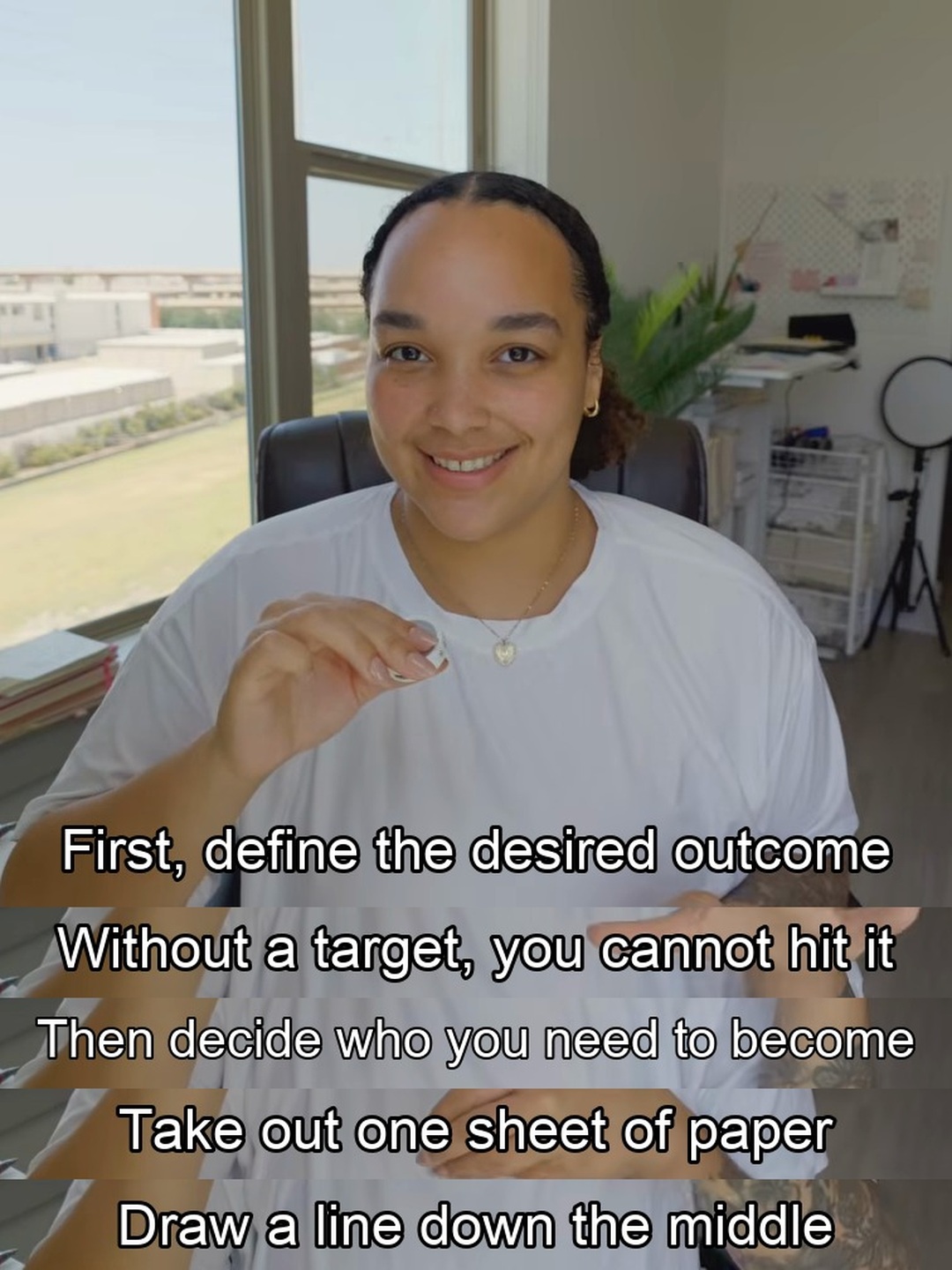
Scripted mode: YouTube creator Mikayla Johnson in a bright home office, with five post-rendered English subtitle lines about defining the outcome before building discipline
Rick Rubin
Scripted · Be yourself, not a mask
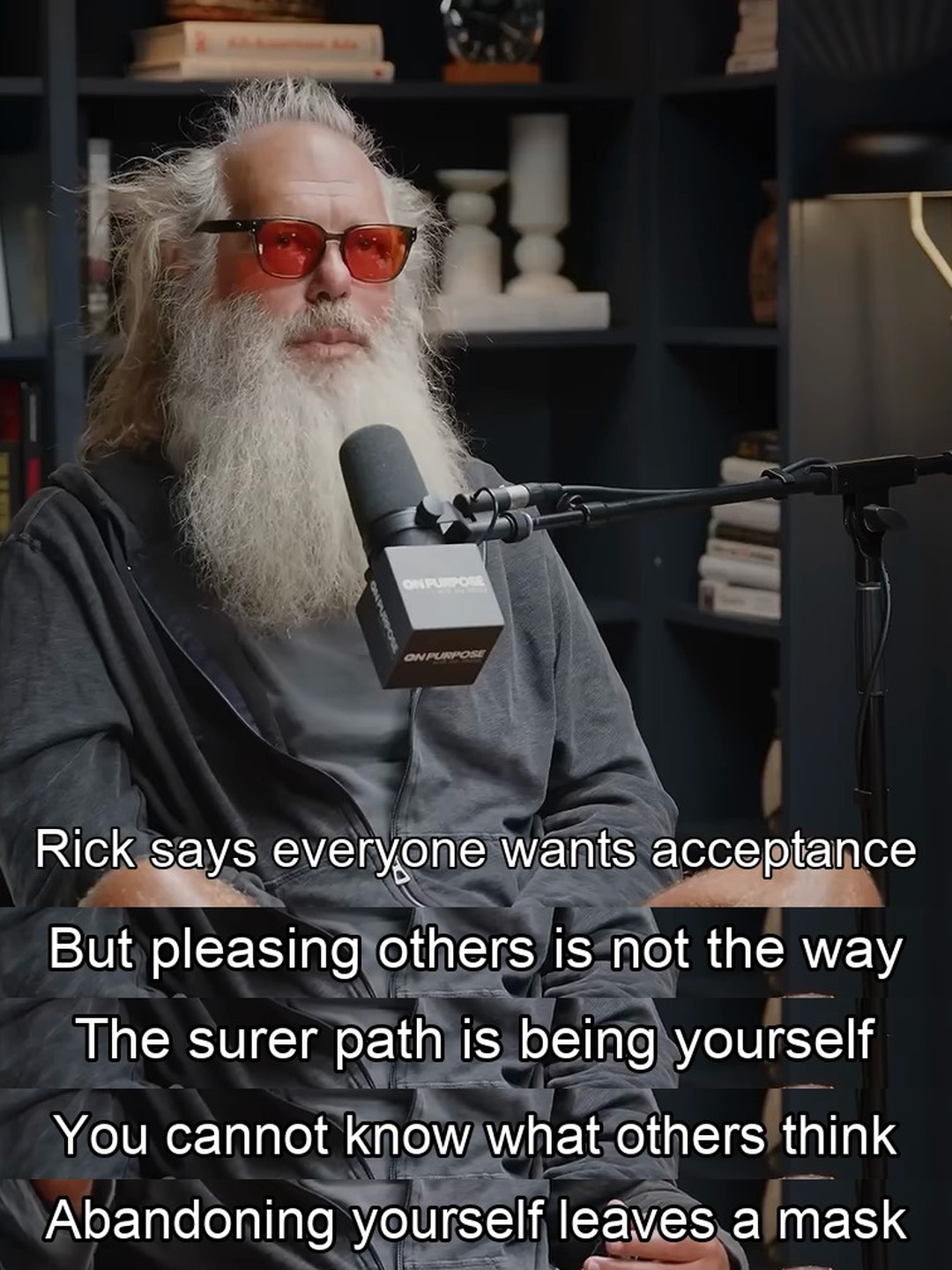
Scripted mode: Rick Rubin on a podcast set, with five post-rendered English subtitle lines summarizing his point about being yourself instead of pleasing others
Darby Saxbe
Scripted · Share the load early
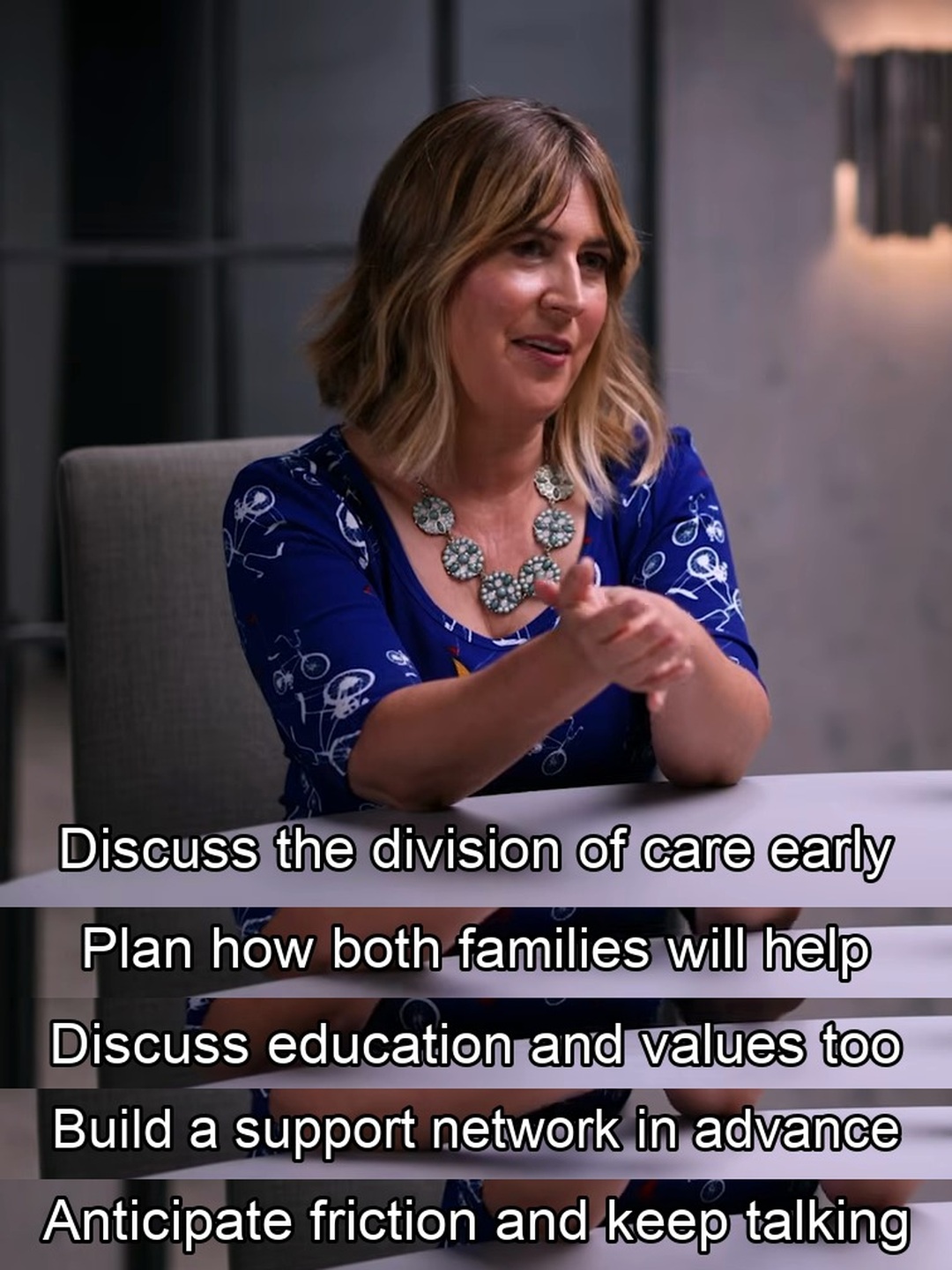
Scripted mode: psychology professor Darby Saxbe in a studio interview, with five post-rendered English subtitle lines about planning shared care before a baby arrives
All three use **scripted subtitles**: edited English copy drawn onto real frames. They are not the videos' original captions and not verbatim quotations. For a native (burned-in) subtitle example, see the Chinese README. [Sources, lines, and timestamps](examples/README.md#english-examples)
↑ Back to top
## Quick start **1. Install the Skill** ```bash git clone https://github.com/chengyi-ai/native-subtitle-quote-image.git cd native-subtitle-quote-image mkdir -p ~/.codex/skills && cp -R skills/native-subtitle-quote-image ~/.codex/skills/ ```
Using Claude Code, the Codex Skill Installer, or another agent?
**Claude Code**: copy the Skill into Claude Code's Skills directory. ```bash mkdir -p ~/.claude/skills && cp -R skills/native-subtitle-quote-image ~/.claude/skills/ ``` **Codex Skill Installer**: ask `$skill-installer` in Codex to install this directory: ```text https://github.com/chengyi-ai/native-subtitle-quote-image/tree/main/skills/native-subtitle-quote-image ``` **Other agents**: the Skill uses the open Agent Skills directory format. Copy `skills/native-subtitle-quote-image/` into your agent's Skills directory and follow that agent's activation instructions.
**2. Install dependencies and run the self-check** ```bash python3 -m pip install -r skills/native-subtitle-quote-image/requirements.txt python3 skills/native-subtitle-quote-image/scripts/check_environment.py ``` For YouTube URLs, also install `yt-dlp`: ```bash python3 -m pip install -U "yt-dlp[default]" python3 skills/native-subtitle-quote-image/scripts/check_environment.py --url-mode ``` To draw Chinese, Japanese, or Korean copy, check fonts with `--script-mode`. The checker is read-only and never installs or changes software; when something is missing, the agent explains why it is needed and asks before installing it. **3. Open a new agent task and ask** ```text Use $native-subtitle-quote-image to turn this video with burned-in subtitles into native subtitle quote images. ```
↑ Back to top
## Two subtitle modes If you have not chosen a mode, the agent first asks whether you want native or scripted subtitles, briefly explains the difference, and waits for your choice. | | Native subtitles | Scripted subtitles | |---|---|---| | **Use it when** | Subtitles stay in the frame after the player's CC is turned off | You want reviewed quotes, translations, or points drawn onto real frames | | **Where the text comes from** | Video pixels only; no OCR redraw, translation, or rewriting | Your reviewed `lines[].text`, clearly labeled as post-produced | | **Command** | `render` | `render-script` | > [!IMPORTANT] > Native-mode text comes only from video pixels. Scripted-mode text comes only from reviewed JSON and is never presented as native. > If you ask for native subtitles but the video only has a switchable track, the agent explains the limitation and switches to scripted mode only after you agree. ### Workflow ```mermaid flowchart LR A[Local video
or YouTube URL] --> B[Fetch video
and subtitle tracks] B --> C[Inspect real frames
find burned-in text] C --> D[Pick topics and
quotes from transcript] D --> E{Lock mode} E -->|Native| F[Crop subtitle
strips from frames] E -->|Scripted| G[Draw reviewed
copy] F --> H[Render by mode
QA every image] G --> H ``` Three ways to work: 1. **Local video**: pick quotes, extract frames, and render from a local file. No `yt-dlp` needed. 2. **Full URL flow**: use `yt-dlp` to fetch a video you have the right to process, with metadata and auxiliary subtitle tracks, then choose a subtitle mode. 3. **Content production**: read the video, pick topics, write an article or post, and finish with subtitle images. Upstream content Skills handle analysis; this Skill owns timestamps, real frames, subtitle-source labels, and QA.
↑ Back to top
## One prompt away | Situation | Say to your agent | |---|---| | Video has burned-in subtitles | Use $native-subtitle-quote-image to turn this video with burned-in subtitles into native subtitle quote images. | | You have a URL | Use $native-subtitle-quote-image with this YouTube URL. Check download rights and burned-in subtitles first, then select three useful themes, create native subtitle collages, and inspect every image. | | Article and images together | Use the timestamped transcript to choose topics and draft the article, then use $native-subtitle-quote-image to select real frames for each core point. Choose native or scripted subtitle mode explicitly and do not mix them. | | Your own reviewed English copy | Use $native-subtitle-quote-image in scripted-subtitle mode. Draw this reviewed timestamped English copy onto real video frames, create compact 3:4 images, and visually inspect every result. | > [!TIP] > `$native-subtitle-quote-image` is Codex syntax. In Claude Code, use `/native-subtitle-quote-image` or simply describe what you want. The agent checks the source, subtitle type, and candidate frames, locks the mode, then delivers: - JPG files matching the selected layout; - `原生字幕时间点.json` for native mode, or a `lines` JSON for scripted mode; - `final_contact_sheet.jpg` for multi-image deliveries.
↑ Back to top
## Command line You can also run the scripts without an agent. Replace `VIDEO` with your video path. **Pick frames**: build a timestamped candidate sheet instead of guessing timestamps. ```bash python3 skills/native-subtitle-quote-image/scripts/native_subtitle_stitch.py sample VIDEO \ --start 30 --end 120 --interval 5 --out candidate-contact-sheet.jpg ``` Without `--start`, `--end`, and `--interval`, it samples up to 24 frames evenly across the video. If you already know rough timestamps, grab before/middle/after frames around each one to avoid catching a subtitle mid-transition: ```bash python3 skills/native-subtitle-quote-image/scripts/native_subtitle_stitch.py sample VIDEO \ -t 61.2 -t 68.9 -t 74.5 -t 82.0 -t 88.4 \ --around 0.8 --out focused-candidates.jpg ``` **Native subtitles**: confirm the subtitle crop with `band`, then render from a manifest. ```bash python3 skills/native-subtitle-quote-image/scripts/native_subtitle_stitch.py band VIDEO \ -t 61.2 --band-top 0.78 --band-bottom 0.96 --out band-preview.jpg python3 skills/native-subtitle-quote-image/scripts/native_subtitle_stitch.py render VIDEO \ --manifest manifest.json --out-dir output-v1 \ --band-top 0.78 --band-bottom 0.96 ``` **Scripted subtitles**: prepare `script.json`, then render. ```bash python3 skills/native-subtitle-quote-image/scripts/native_subtitle_stitch.py render-script VIDEO \ --script script.json --out output.jpg --aspect 3:4 --width 1440 ``` **Preserve source proportions and the wide composition (v2.2.0)**: both subtitle modes support `--layout natural`. Without `--width`, the source width is retained and the height follows the stacked content instead of a forced 3:4 canvas. An explicit width uses proportional scaling only. ```bash # Native subtitles: retain frame pixels, without redrawing text python3 skills/native-subtitle-quote-image/scripts/native_subtitle_stitch.py render VIDEO \ --manifest manifest.json --out-dir output-natural --layout natural # Scripted subtitles: crop the unwanted bottom region, without stretching it back python3 skills/native-subtitle-quote-image/scripts/native_subtitle_stitch.py render-script VIDEO \ --script script.json --out natural.jpg --layout natural --frame-bottom 0.72 ``` `0.72` is an example crop boundary, not a universal preset. The defaults `--frame-top 0 --frame-bottom 1` keep the full frame. `--band-center` refers to the cropped frame. Natural layout cannot be combined with `--aspect` or `--hero-fraction`. Source proportions describe geometry, not subtitle provenance: scripted subtitles remain post-rendered. **Native default layout fix (v2.2.2)**: `render` now defaults to content-driven height and source width when neither layout nor aspect is supplied. Explicit `--aspect 3:4 --width 1440` still produces 1440×1920, but the entire collage is scaled as one image instead of independently filling each panel (v2.2.2 fits the canvas with black borders; v2.3.0 crops both sides first by default, see below). This preserves complete subtitles and their relative size. Native `--hero-fraction` only adjusts the source hero crop, bounded by available pixels. Scripted rendering still defaults to fixed 3:4. Never force the output ratio with non-proportional resizing. **Fewer black bars for wide video in 3:4 (v2.3.0)**: the native fixed canvas now defaults to `--fit crop`. The renderer detects the left and right edges of every subtitle, crops both sides of the whole collage uniformly up to the subtitle safety margin, and pads only what remains. All subtitles keep one scale factor. If any subtitle's edges cannot be detected, nothing is cropped and the collage is padded as before. When the speaker sits off-center, shift the crop window with a value such as `--crop-center 0.4`; the window always keeps every subtitle. Use `--fit pad` for the v2.2.2 padding-only result. Still inspect both ends of every subtitle after cropping.
script.json format
Every `text` value must be reviewed, single-line copy, and every `t` must be a strictly increasing real timestamp: ```json { "lines": [ {"t": 61.6, "text": "First reviewed line"}, {"t": 69.3, "text": "Second reviewed line"}, {"t": 75.0, "text": "Third reviewed line"}, {"t": 82.4, "text": "Fourth reviewed line"}, {"t": 88.8, "text": "Fifth reviewed line"} ] } ``` The script tries common system CJK fonts. If none is found, pass `--font /path/to/font.ttc`. Split overly long copy instead of forcing it into an unreadably small font.
Defaults worth knowing: - Both renderers adjust hero height to the number of subtitle strips. See the [compact visual style guide](skills/native-subtitle-quote-image/references/visual-style.md). - Native one-line subtitles are previewed from the `0.78–0.96` band of the source height. - Each image takes at most 7 timestamps (1 hero + 6 strips) in both modes; split longer passages into several images. - Existing images are never overwritten unless you pass `--overwrite`. - Before rendering, both modes check for duplicate frames. If every timestamp yields nearly the same picture (for example, the source is a static cover image) or, in native mode, two adjacent subtitle strips are nearly identical, the command stops without writing images. Pass `--allow-duplicate-frames` once you have confirmed it is intended. - Run `--help` for all options.
↑ Back to top
## Scope | Good fit | Not a fit | |---|---| | Subtitles stay in the frame after CC is off, and you want them as-is | You want native subtitles, but the video only has a switchable or downloadable track | | You have verifiable timestamps and reviewed copy to draw onto real frames | The copy or translation is unreviewed, or you want quotes the source never said | | You have the right to process and publish the video and generated frames | You want low-resolution footage "enhanced" into genuinely high-resolution footage | Prefer footage you created and subtitled, licensed material, or public video that clearly permits reuse. Confirm usage rights again before publishing.
Can't find videos with burned-in subtitles?
Many videos carry subtitles as a switchable player track (CC). The downloaded frames are clean, so native mode can't use them. **Check first**: turn off player captions and look at the frame, or download the video and run `sample` for a contact sheet. Only subtitles that remain in the pixels are burned in. Getting a VTT/SRT file does not mean the frames contain subtitles. **Where they are easier to find**: - Your own edits: export from CapCut, Premiere, or similar with subtitles burned in. Most reliable, and no rights questions. - Interviews, shows, or launch videos where the publisher added subtitles themselves. - Interview or podcast clips with hard-coded subtitles on video platforms. These are often re-uploads, so confirm usage rights before publishing. **Still nothing?** Switch to script mode. Use the video's subtitle track or a Whisper transcript to locate timestamps, write reviewed copy into `script.json`, and run `render-script`. The output is labeled as added subtitles and never passes as the original.
↑ Back to top
## More details
Project status and tech details

Python 3.10+ Open Agent Skills format Codex plugin Release date Last commit GitHub forks GitHub issues

Components
| Component | Local mode | URL mode | Role | |---|:---:|:---:|---| | `native-subtitle-quote-image` | Required | Required | Frame selection, cropping, collage rendering, and final QA | | Python 3.10+ | Required | Required | Runs the Skill scripts | | Pillow | Required | Required | Cropping, collage composition, and JPG export | | `imageio-ffmpeg` or FFmpeg | Required | Required | Video decoding and exact frame extraction | | `yt-dlp` | — | Required | Online video, metadata, and subtitle-track acquisition | | Deno, or explicitly enabled Node.js | — | Required for YouTube | Full YouTube format extraction | | Whisper / speech-to-text Skill | Optional | Optional | Builds a timeline when no subtitle track is available | | CJK font | Required for CJK scripted copy | Required for CJK scripted copy | Draws Chinese, Japanese, or Korean copy; not needed in native mode | | Topic, writing, or video-understanding Skill | Optional | Optional | Proposes themes and produces companion content |
YouTube says "Sign in to confirm you're not a bot"
URL mode starts with a public request. If YouTube responds with a login check, an age check, or an access check for your own non-public video, the agent will not misdiagnose the Skill as local-only. It explains the error and asks whether `yt-dlp` may temporarily read your signed-in Chrome session. After you approve, metadata, subtitle, and video commands for that URL all keep `--cookies-from-browser chrome`: ```bash yt-dlp --cookies-from-browser chrome --js-runtimes node \ --no-playlist --skip-download \ --print "%(id)s | %(title)s | %(duration_string)s" \ "URL" ``` Cookies are never exported, saved, uploaded, or committed. yt-dlp currently recommends Deno as its JavaScript runtime; an existing Node.js install also works with `--js-runtimes node`. See the [URL acquisition guide](skills/native-subtitle-quote-image/references/yt-dlp-and-transcripts.md#chrome-cookie-授权流程) for the permission boundary and failure handling.
Update reminders
At the start of each new task, the Skill runs a non-blocking version check. It reads the Skill's own `VERSION` file and compares it with this project's latest GitHub Release: ```bash python3 skills/native-subtitle-quote-image/scripts/check_update.py --json ``` - A successful check is cached for 24 hours, so normal use does not contact GitHub every time. - When a newer release exists, the agent only reports the versions and Release link. It never overwrites your installed Skill. - Network failures, GitHub outages, or denied network access never block the video task. - The cache stores only the check time, latest version, and Release link—never account details, source media, or usage history. To bypass the cache and check immediately: ```bash python3 skills/native-subtitle-quote-image/scripts/check_update.py --force --verbose ```
Editing the banner
The header banners are generated by `scripts/render_banners.py`: one WebP each for Chinese, English, and Korean, stored in `assets/`. They carry their own dark background, so GitHub's light and dark themes share them. To change the titles, edit `COPY` at the top of the script; to change the edge illustrations, replace `assets/banner-ornaments.png`. Then run: ```bash python3 scripts/render_banners.py ``` This needs Chrome or Chromium installed locally and loads fonts from Google Fonts. If the browser isn't found, pass `--chrome /path/to/chrome`.
Validation
```bash python3 scripts/validate_repo.py python3 -m unittest discover -s tests -v python3 skills/native-subtitle-quote-image/scripts/check_environment.py python3 skills/native-subtitle-quote-image/scripts/native_subtitle_stitch.py --help python3 skills/native-subtitle-quote-image/scripts/native_subtitle_stitch.py render-script --help ``` GitHub Actions runs these checks on Python 3.10 and 3.13 for every push and pull request.
**In-depth guides** (Chinese; the commands are language-independent) - [URL acquisition, yt-dlp, Deno/Node, and timelines](skills/native-subtitle-quote-image/references/yt-dlp-and-transcripts.md) - [End-to-end topic selection, frame calibration, rendering, and QA](skills/native-subtitle-quote-image/references/end-to-end-workflow.md) - [Compact hero, subtitle-strip density, and visual QA rules](skills/native-subtitle-quote-image/references/visual-style.md) ## Star History Star History Chart

chengyi-ai%2Fnative-subtitle-quote-image | Trendshift

## About the author | Platform | Account | | --- | --- | | 𝕏 Twitter | [@ChengYi3629](https://x.com/ChengYi3629) | | 📕 Xiaohongshu (RED) | [程意 Cheng Yi](https://www.xiaohongshu.com/user/profile/648c0e99000000001001f148) | ## License Code and Skill instructions are released under the [MIT License](LICENSE). The demo images only illustrate the Skill's output; no additional rights are granted for input videos, generated images, or third-party content appearing in them.
↑ Back to top

