
Desktop GIFs
Post GIFs in YouTube comments and replies from a desktop browser.





Install · Use · Troubleshooting · Limits · How it works · Privacy
[!WARNING] Posting GIFs is broken right now. Since 14 October 2026 YouTube refuses GIF comments sent from desktop. For most people every try fails, whether it has text or not, and whether it is a comment or a reply. The cause is on YouTube's side. Reinstalling, updating or picking another GIF will not fix it. Searching and the picker still work.
I have not found a way around it yet. If you find one, open a pull request and I will review and merge it. What is known so far, and where to report, is in #93. Please add to that issue instead of opening a new one.
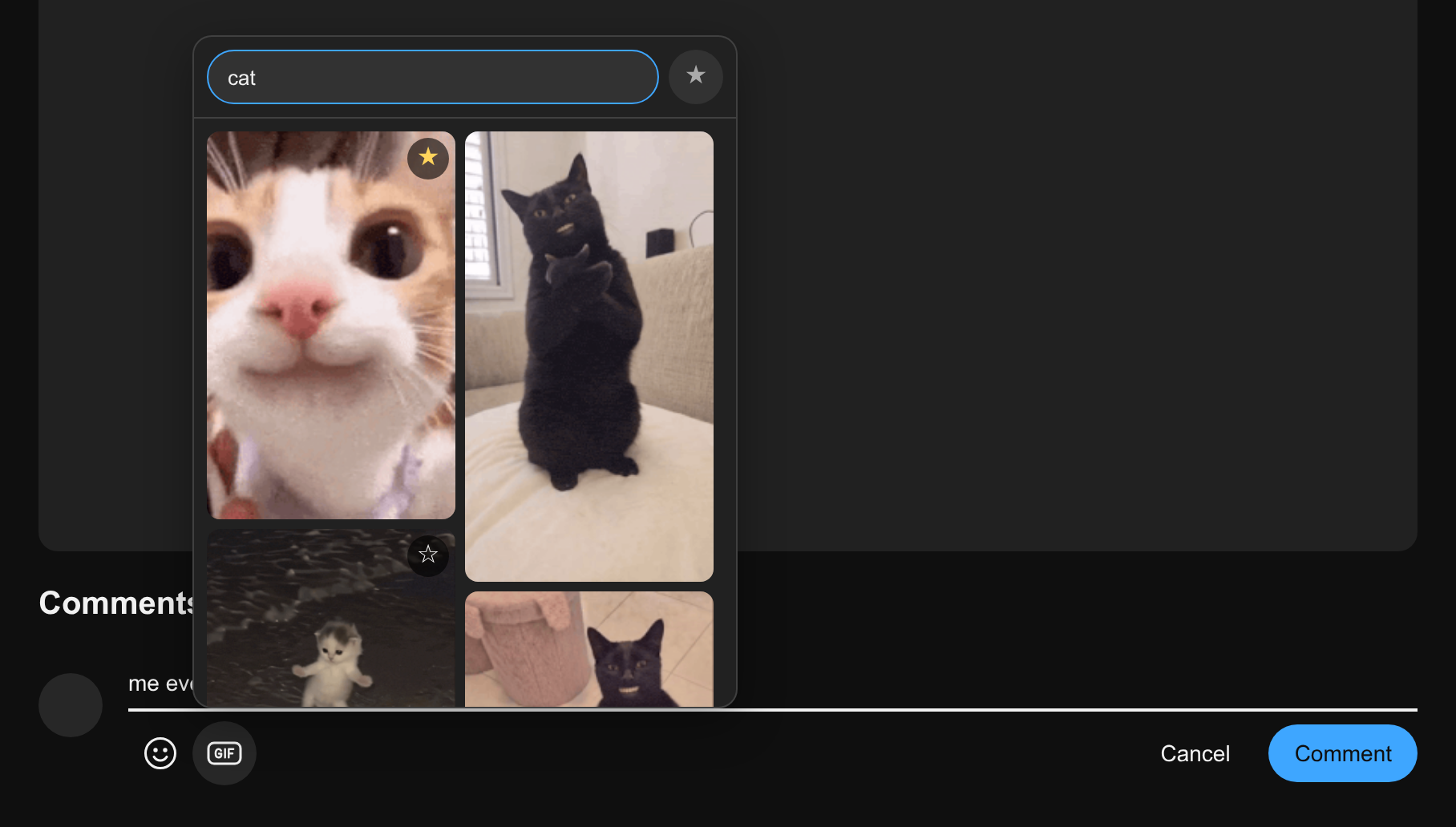
YouTube's mobile app can attach a GIF to a comment; the desktop site has no button for it. Desktop GIFs adds one, next to the emoji button:

- Everyone sees your GIF. It is posted as an ordinary YouTube GIF comment, so viewers do not need the extension.
- Write around it. Pick a GIF, keep typing, then post with YouTube's own Comment button.
- Search or paste. Search Tenor, or paste a Tenor link.
- Favorites. Star the GIFs you use often and find them behind one button.
- Nothing to set up. No account, no API key, no tracking.
The screenshots show the extension's own interface on a test page that stands in for YouTube's comment box.
Install
Desktop GIFs is not on the Chrome Web Store or addons.mozilla.org yet, so it is loaded from a ZIP. There is one for each browser on the latest release.


Chrome, Edge, Brave
- Download
desktop-gifs-chromium.zipand unzip it. - Open
chrome://extensionsand turn on Developer mode. - Click Load unpacked and choose the unzipped folder, the one that has
manifest.jsondirectly inside it.
YouTube tabs that are already open get the button without a refresh.
Only Chrome is tested. Edge, Brave and other Chromium browsers should work the same way.
Firefox
- Download
desktop-gifs-firefox.zip. There is no need to unzip it. - Open
about:debugging#/runtime/this-firefox. - Click Load Temporary Add-on… and choose the ZIP.
YouTube tabs that are already open get the button without a refresh.
[!NOTE] Firefox removes an add-on loaded this way when it closes. That is how Firefox treats every temporary add-on. Repeat steps 2 and 3 after a restart.
From the source
The extension folder of this repository is the extension, and it loads in both browsers as it is: choose that folder in Chrome, or the manifest.json inside it in Firefox. Chromium browsers then list one harmless error about background.scripts; see Troubleshooting.
Updating
An extension loaded from a ZIP cannot update itself, so the GIF picker says when a new version is out, with a Download link to its release. To install it:
- Chrome, Edge, Brave: unzip the new ZIP over the old folder, replacing its files, then click the reload button on the extension's card in
chrome://extensions. Your favorites are kept. - Firefox: load the new ZIP as in step 3 above.
YouTube tabs that are already open switch to the new version without a refresh, and keep what you typed and the GIF attached to a comment box. Coming from 0.1.5 or older, a GIF that was already attached is still posted by the old version; refresh the tab once if anything acts up. The × on the notice hides it until the next version.
Use
- On a video or a Short, click Add a comment… or Reply.
- Click the GIF button next to the emoji button.
- Click a GIF. It is attached to the comment box, below your text.
- Write or edit your text, then click Comment (or press Ctrl+Enter).
The text in the comment box is posted together with the GIF. A comment can also be just the GIF. To take the GIF off, click the × in its corner; picking another GIF replaces it.
The picker opens with Tenor's featured GIFs. To find another one:
- type to search Tenor, or
- paste a Tenor link: a
tenor.com/view/…page, amedia.tenor.comfile, or a bare Tenor ID.
To keep a GIF, point at it and click the star in its corner. The ★ button next to the search field shows your favorites; click it again to go back to the search. Click a favorite's star to remove it. Favorites are shared by all your YouTube tabs and are still there after a browser restart, in Firefox too, once the add-on is loaded again. Removing the extension from the browser deletes them.
| Key | What it does |
|---|---|
| Enter | In the search field, attaches the GIF when the picker shows exactly one, as it does after pasting a link |
| Ctrl+Enter | In a comment box with a GIF attached, posts the comment |
| Esc | Closes the picker |
Troubleshooting
| What you see | What to do |
|---|---|
| No GIF button in the comment box | Refresh the YouTube tab. |
| "Not ready in this tab yet" | The tab was open before the install and the extension is still checking that it can post from it. Try again in a few seconds, or refresh the tab. |
| "The page hook is not running" or "The extension was reloaded" | Refresh the YouTube tab. |
| "The GIF was not sent" | YouTube did not send the comment. Press its Comment button again. |
| The post fails | Nothing is published, and your text and the GIF stay in the box. Try again. |
| "YouTube is refusing GIF comments sent from desktop" | Since 14 October 2026 YouTube turns down GIF comments sent from desktop. At first it refused some at random; now, for many people, it refuses every one, GIF only or with text, comment or reply. People report that it depends on where they connect from. The extension already tried up to twelve times. The GIF is not the cause, so picking another one will not help. Your text and the GIF stay in the box. The YouTube phone app may still post GIFs from the same account. |
| "YouTube turned it down. Trying again…" | YouTube blocked the comment and the extension is retrying on its own. Wait for it to finish; there is no need to click again. |
| "Either Tenor does not rate the GIF G, or YouTube is refusing GIF comments" | Tenor could not be asked for the GIF's rating, so the extension does not know which one it is. Try a GIF from the picker's search results: those are rated G. |
| "YouTube does not accept this GIF" | YouTube looked the GIF up and will not take it. Pick a different GIF. |
| "YouTube only takes GIFs that Tenor rates G" | The GIF has another rating on Tenor. The extension checks a pasted link when you pick it, and a favorite or a GIF without a rating just before posting. Pick a different GIF. |
| "Checking the GIF…" | The GIF was picked without a rating, so the extension asks Tenor for it before posting. This takes at most five seconds; if Tenor does not answer, the comment is posted anyway. |
| "YouTube rejected this GIF comment" | YouTube refused the comment for another reason. Its own explanation, if it gave one, follows the HTTP status. Nothing was posted. |
| "YouTube did not confirm this GIF comment" | YouTube's answer could not be read, so the comment may or may not be up. Check the comments before posting again. |
| "This browser could not reach tenor.com" | Open tenor.com in a tab. If it does not load there either, something on your network or computer blocks it: a firewall, a DNS filter, a VPN, or a school or work network. Once the extension has reached tenor.com one time, search keeps working through Tenor's API even when tenor.com itself is blocked. |
| "Desktop GIFs is not allowed to reach tenor.com" | In Chrome, Edge or Brave, open the extension's Details in chrome://extensions and set Site access to On all sites, or add tenor.com. In Firefox, open about:addons, select Desktop GIFs, and turn on access to tenor.com under Permissions. |
| Search finds nothing in Firefox | Open about:addons, select Desktop GIFs, and check under Permissions that access to tenor.com is on. |
| "Manifest file is missing or unreadable" | The wrong folder was chosen. Choose the folder that has manifest.json directly inside it. |
Chrome, Edge or Brave lists the error 'background.scripts' requires manifest version of 2 or lower | The extension is installed and works. The message appears when the extension folder is loaded from the source; that key is there for Firefox. desktop-gifs-chromium.zip does not have it. |
| Clicking GIF does nothing in Firefox | Update to 0.1.1 or newer. |
If posting keeps failing, open the browser's developer tools and look for Desktop GIFs: comment not confirmed in the YouTube tab's Console; Chromium also lists it among the extension's errors. It gives the endpoint, the Tenor ID, whether the GIF was rated G, whether there was text, how YouTube answered (kind), how many tries were made, the HTTP and API status and YouTube's own message. It holds no comment text, headers, cookies or response body, so it can be pasted into a bug report as it is.
Limits
- Unofficial. This project is not affiliated with YouTube, Google or Tenor. It sends a field that YouTube's desktop site does not use itself, so it can stop working whenever YouTube changes something, and using it is at your own risk under YouTube's Terms of Service.
- Tenor only. YouTube's GIF comments take Tenor GIFs, so a GIF file from your computer cannot be posted.
- YouTube is blocking GIF comments from desktop. Since 14 October 2026 YouTube refuses GIF comments sent from desktop. At first it refused some at random and a second try often went through; now, for most people, it refuses every one. See #93. When it blocks a G-rated GIF, the extension tries up to twelve times in about half a minute, then stops, so posting can take a while. A blocked try posts nothing, so a retry never posts twice. Some people also report GIF comments posted from desktop being removed a few seconds later.
- G-rated GIFs only. YouTube turns down every GIF that Tenor does not rate G, so the picker shows only those, and a pasted link to any other GIF is not offered.
- Search depends on Tenor's website. Tenor closed its public API in June 2026. Search and ratings come from the API that tenor.com itself uses, with the key its pages carry, and fall back to the results in Tenor's web pages, which have no ratings. Either can break when Tenor changes its site.
- GIFs only. Stickers and still images are left out of the results.
- New comments and replies only. You cannot add a GIF while editing a comment or writing a channel post.
How it works
When you pick a GIF, the content script attaches it to the comment box. When you press Comment, it adds a one-time marker to the end of your text and lets YouTube's own Comment button go through. YouTube builds and signs the request as usual. The main-world script catches that request, removes the marker and adds the GIF's Tenor ID. A marker that cannot be turned into a GIF is blocked, so it never appears as comment text.
| File | Runs in | Job |
|---|---|---|
src/content.js, src/content.css | YouTube page, isolated world | Adds the GIF button and the picker |
src/main.js | YouTube page, main world | Rewrites the comment request so it carries the GIF |
src/sw.js | Service worker (background script in Firefox) | Fetches G-rated search results from Tenor; checks GitHub for a newer release; on install, update or reload, adds the two scripts above to YouTube tabs that are already open, where they take over from the old copies |
There is no build step and there are no dependencies: the extension folder is the extension. python3 tools/package.py writes the two release ZIPs, which are that folder with the other browser's background key taken out of the manifest.
node --test tests/main.test.cjs tests/sw.test.cjs (Node.js 22 or newer) checks how comment requests are rewritten, how YouTube's answers are read and retried, and the Tenor rating check, against simulated responses. python3 tests/picker.browser.py drives the real content script in Chromium and Firefox on a local page that imitates YouTube's comment boxes and a notification reply dialog; it needs Python's playwright package and its browsers (python3 -m playwright install chromium firefox). Neither posts anything to YouTube.
Privacy
- YouTube, Tenor and GitHub, nothing else:
youtube.com, where it adds the button; for searchtenor.comand Tenor's API attenor.googleapis.com; and, at most once a day when the picker opens, this repository's latest release atapi.github.com, to say when a new version is out. - Nothing collected. No analytics, no account.
- Favorites stay in your browser. They are kept in the extension's own local storage and are not sent anywhere. So are the key Tenor's pages give out for its API, and the last release version seen.
- Search goes to Tenor without your cookies, and GIF previews load from Tenor's media servers. The release check goes to GitHub without cookies too.
- Your YouTube credentials are never read. YouTube's own page sends the comment.
License
Copyright (C) 2026 rayytor
This program is free software: you can redistribute it and/or modify it under the terms of the GNU General Public License as published by the Free Software Foundation, version 3. It is distributed without any warranty. See LICENSE.