critique
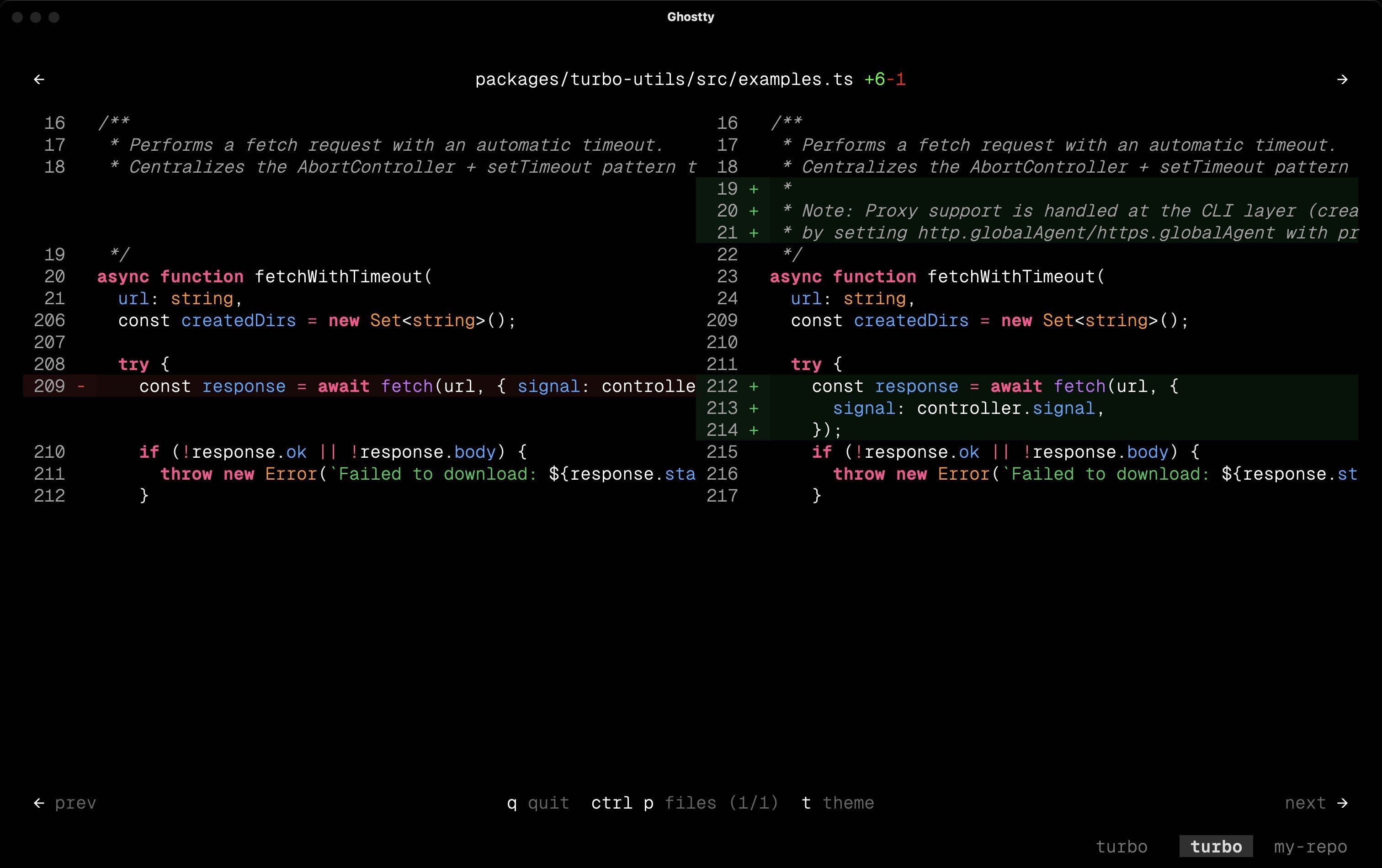
Beautiful diff viewer for terminals, web previews, and agents.
Installation
critique requires Bun. It does not run under Node.js.
# Run directly without installing
bunx critique

# Or install globally
bun install -g critique
Quick Start
Open the current working tree diff in the terminal:
critiqueUpload the same diff and get a shareable URL:
critique --web "Current working tree"Review staged changes:
critique --staged
critique --staged --web "Staged changes"
Core Diff Commands
critique follows the same mental model as git diff.
# View unstaged changes, including untracked files
critique

# View staged changes
critique --staged

# View changes since a ref
critique HEAD~1
critique main

# View one commit only
critique --commit HEAD~1
critique --commit abc1234

# Compare two refs, PR style
critique main HEAD
critique main feature-branch

# Watch the working tree and refresh on changes
critique --watch

# Add experimental call-stack changes to the file tree
critique --calldiff

# Filter files by glob pattern
critique --filter "src/**/*.ts"
critique --filter "src/**/*.ts" --filter "lib/**/*.js"
Which Commits a Diff Contains
Whenever a diff spans commits, critique lists them before the diff or the URL.
3 commits, 22 files, +1573 -311

  2a09302  Correct the identity docs, and mark the release minor
  1fb8af7  Give every element a stable GPUI identity
  7998490  Launch a window without stealing focus
  base: f948f50  Reclaim the style table when the tree shrinks

  + uncommitted working tree changes
This matters because a rebased branch can carry commits replayed from another branch. The merge base is then too far back, and a shared link silently includes work you did not write. If a listed commit is not yours, pass the first commit of your own work as the base:
# Wrong: the merge base pulls in a commit a rebase replayed onto the branch
critique f948f50 --web "Element identity"

# Right: start from your own first commit
critique 7998490 --web "Element identity"
Long ranges are truncated, but the oldest commits are always kept, because a rebase
replays a foreign commit right above the base. Silence the list in scripts with
--no-commit-list. With --json it goes to stderr and the commits are added to the
JSON payload instead.
Diverged Branches
critique A..B and critique <ref> compare two trees directly. On diverged
branches such a diff also undoes every commit that exists only on the base side.
Those commits are part of the diff, so critique lists them too:
1 commit added, 1 commit reversed, 2 files, +1 -1

  added by right:
    a279fbe  Only on right

  reversed from left:
    d395611  Only on left

  ! left and right have diverged, so this diff also undoes the commits above.
critique A...B and critique A B start at the merge base instead, so they never
reverse anything, and the base: line names the merge base rather than the ref.
Plain unstaged and --staged diffs contain no commits, so nothing is printed.
Call-stack Diffs
--calldiff uses calldiff to show how function calls changed. Each changed call tree appears below its source file in the top file tree.
# Working tree call changes
critique --calldiff

# Changes since a ref
critique main --calldiff

# PR-style comparison and web preview
critique main HEAD --calldiff --web "Call flow changes"

# One commit
critique --commit HEAD --calldiff
The feature is experimental. calldiff uses Tree-sitter and can install a language grammar through npm on first use. --staged, --stdin, and --watch are not supported with --calldiff.
Set CRITIQUE_CALLDIFF=1 to enable call-stack diffs by default:
export CRITIQUE_CALLDIFF=1
critique
Navigation
| Key | Action |
|---|---|
↑ / ↓ | Scroll up and down |
p | Open file selector dropdown |
t | Open theme picker |
Option held | Fast scroll at 10x speed |
g g / G | Jump to top / bottom |
Ctrl+D / Ctrl+U | Half page down / up |
q / Esc | Quit / close overlay |
Web Previews
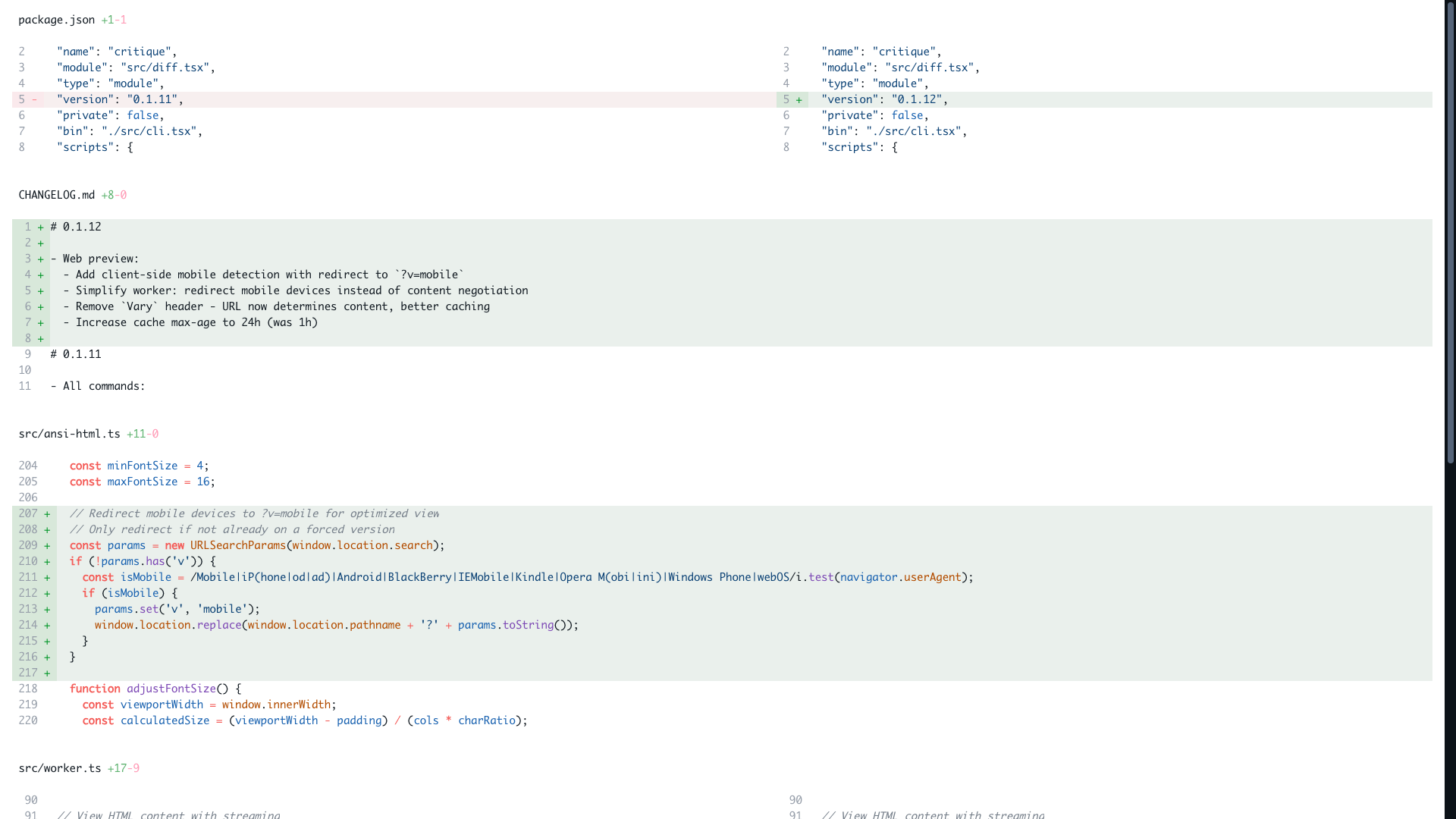
--web renders the diff with the same terminal renderer, uploads it to critique.work, and prints a shareable URL.
# Working tree changes
critique --web "Fix auth retry"

# Staged changes
critique --staged --web "Release notes"

# Changes since a ref
critique main --web "Branch changes"

# One commit
critique --commit HEAD --web "Latest commit"

# PR-style branch diff
critique main HEAD --web "Current branch"

# JSON output for scripts
critique --web "Deploy changes" --json
Generated URLs look like critique.work/v/<id>.
Web Preview Options
| Flag | Description | Default |
|---|---|---|
--web [title] | Generate and upload a web preview | Critique Diff |
--staged | Show staged changes | none |
--commit <ref> | Show changes from a specific commit | none |
--calldiff | Add experimental call-stack changes to the file tree | off |
--cols <n> | Desktop render width | 240 |
--mobile-cols <n> | Mobile render width | 100 |
--filter <pattern> | Filter files by glob, can be repeated | none |
--theme <name> | Use a fixed theme instead of auto light and dark mode | none |
--no-commit-list | Do not list the commits contained in the range | off |
--open | Open the URL in your browser | none |
--json | Print { url, id, files, commits } for scripts | none |
How Web Uploads Work
┌─────────────────────────────────────┐
│ git diff                            │
└─────────────────────────────────────┘
                   │
                   ▼
┌─────────────────────────────────────┐
│ opentui test renderer               │
└─────────────────────────────────────┘
                   │
                   ▼
┌─────────────────────────────────────┐
│ HTML variants and raw patch         │
└─────────────────────────────────────┘
                   │
                   ▼
┌─────────────────────────────────────┐
│ critique.work upload                │
└─────────────────────────────────────┘
                   │
                   ▼
┌─────────────────────────────────────┐
│ shareable URL, optional .patch      │
└─────────────────────────────────────┘
The CLI does not generate a local HTML file. It uploads to critique.work. Local HTML export is tracked separately in issue #42.
Uploaded diffs expire after 7 days unless you use a license key. Identical diffs reuse the same content hash URL.
Raw Patch Access
Every --web upload also stores the raw unified diff. Append .patch to any critique URL to fetch it.
CRITIQUE_URL='https://critique.work/v/<id>'

# View the patch in your terminal
curl "$CRITIQUE_URL.patch"

# Apply the patch directly to your repo
curl -s "$CRITIQUE_URL.patch" | git apply

# Reverse the patch
curl -s "$CRITIQUE_URL.patch" | git apply --reverse
Git Difftool Integration
Configure critique as your git difftool:
git config --global diff.tool critique
git config --global difftool.critique.cmd 'critique difftool "$LOCAL" "$REMOTE"'
Then run:
git difftool HEAD~1Lazygit Integration
Use critique as a custom pager in lazygit:
# ~/.config/lazygit/config.yml
git:
  pagers:
    - pager: critique --stdin
For details, see lazygit's Custom Pagers documentation.
Pick Files from Another Branch
critique pick lets you apply selected files from another branch to the current checkout.
critique pick feature-branchSelected files are applied as patches. Deselected files are restored.
Selective Hunk Staging
critique hunks gives scripts and agents a stable alternative to git add -p.
# List unstaged hunks with stable IDs
critique hunks list

# List staged hunks
critique hunks list --staged

# Filter by file pattern
critique hunks list --filter "src/**/*.ts"

# Stage one hunk by ID
critique hunks add 'src/main.ts:@a1b2c3d4e5f6'

# Stage multiple hunks
critique hunks add 'src/main.ts:@a1b2c3d4e5f6' 'src/utils.ts:@f6e5d4c3b2a1'
Hunk IDs use this format:
file:@<hash>
file:@<hash>.1
file:@<hash>.2
The hash is from the hunk's added and removed lines, not the @@ line numbers. Unrelated edits above or below the hunk do not change the ID. Duplicate payloads in the same file get .1, .2, and so on. Old file:@-oldStart,... IDs are no longer accepted.
critique hunks list still prints the @@ header under each ID, so you can see where the hunk sits in the file.
E-Ink Reading
Generate PDFs from diffs to read on Kindle or Boox e-readers.
critique --pdf
critique main --pdf --open
The PDF preserves syntax highlighting and diff formatting. Email it to your Kindle, drop it in BooxDrop, or save it to a synced Google Drive folder. See docs/e-reader-guide.md for setup details.
Agent Skill
This package ships a skill file that teaches AI coding agents how to use critique for diff URLs, PDFs, images, and selective hunk staging.
npx -y skills add remorses/critiqueFeatures
- Syntax highlighting: powered by Tree-sitter via opentui
- Split view: side-by-side comparison for wide terminals, unified view on narrow terminals
- Word-level diff: highlights exact word changes inside modified lines
- File navigation: quick file switcher with fuzzy search
- Click to open: click line numbers to open in your editor with
REACT_EDITOR - Watch mode: refreshes as you edit files
- Web previews: hosted shareable URLs on critique.work
- Raw patches: every web preview has a
.patchendpoint - PDF output: optimized for code review away from the terminal
Supported Languages
TypeScript, JavaScript, TSX, JSX, JSON, Markdown, HTML, CSS, Python, Rust, Go, Java, C, C++, C#, Ruby, PHP, Scala, Haskell, Julia, OCaml, Clojure, Swift, Nix, YAML, and Bash.
Configuration
| Environment Variable | Description | Default |
|---|---|---|
REACT_EDITOR | Editor command for click-to-open | zed |
CRITIQUE_WORKER_URL | Custom worker URL for web previews | https://critique.work |
Ignored Files
Lock files are automatically hidden from diffs:
pnpm-lock.yamlpackage-lock.jsonyarn.lockbun.lockbbun.lockCargo.lockpoetry.lockGemfile.lockcomposer.lock
Files with more than 6000 lines of diff are also hidden for performance.
Built With
- opentui: React-based terminal UI framework
- Tree-sitter: syntax highlighting
- diff: diff algorithm
- Hono: web framework for the preview worker
Sponsors

Sponsored by CodeRabbit.
License
MIT