ParseBench




Related: For schema-guided enterprise document extraction, see our companion benchmark ExtractBench.
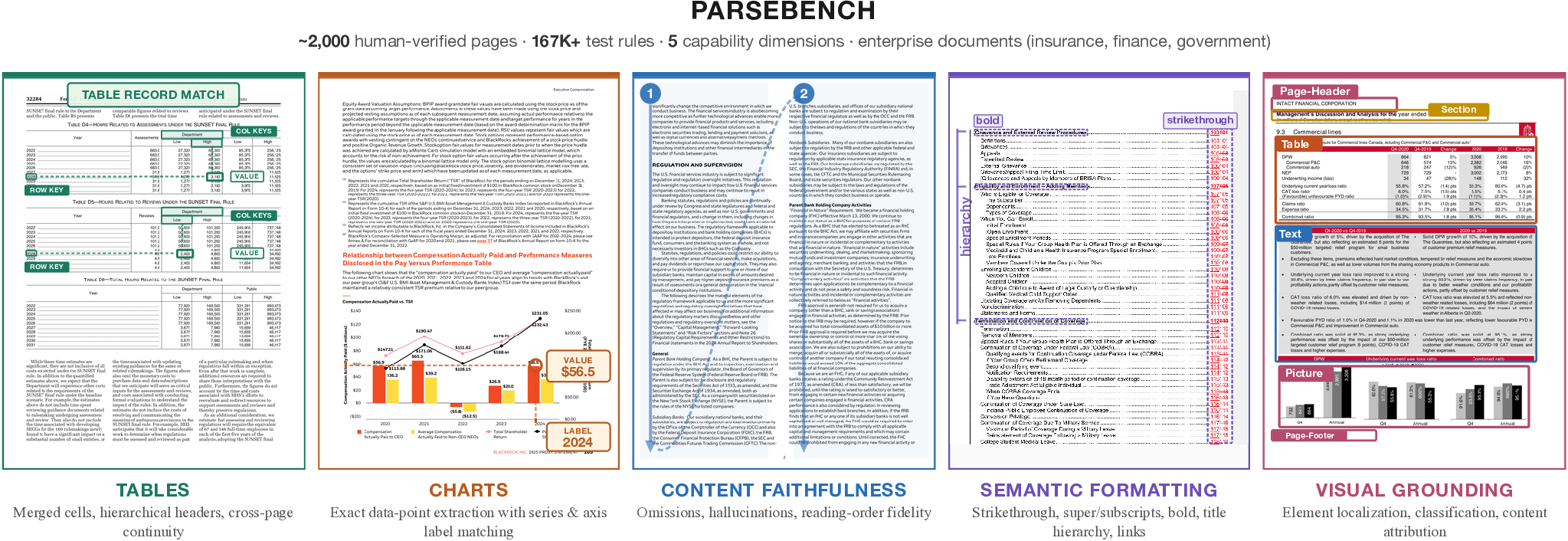
ParseBench is a benchmark for evaluating how well document parsing tools convert PDFs into structured output that AI agents can reliably act on. It tests whether parsed output preserves the structure and meaning needed for autonomous decisions — not just whether it looks similar to a reference text.
The benchmark covers ~2,000 human-verified pages from real enterprise documents (insurance, finance, government), organized around five capability dimensions, each targeting a failure mode that breaks production agent workflows.
Leaderboard
Top 10 by Overall score. For the full sortable, filterable leaderboard, see parsebench.ai; for raw data, see leaderboard.csv.
| Rank | Provider | Category | Overall | Tables | Charts | Content Faith. | Sem. Format. | Visual Ground. | ¢ / Page |
|---|---|---|---|---|---|---|---|---|---|
| 1 | LlamaParse Agentic Plus | LlamaParse | 90.20 | 93.37 | 94.18 | 92.25 | 87.12 | 84.09 | 5.62¢ |
| 2 | LlamaParse Agentic | LlamaParse | 87.01 | 88.88 | 88.68 | 91.78 | 81.44 | 84.25 | 1.25¢ |
| 3 | Pulse Ultra 2 | Commercial - Startup APIs | 81.60 | 90.35 | 89.70 | 87.63 | 73.97 | 66.35 | 1.50¢ |
| 4 | LlamaParse Cost Effective | LlamaParse | 80.61 | 84.19 | 77.91 | 89.87 | 67.29 | 83.77 | 0.38¢ |
| 5 | anyformat (Standard) | Commercial - Startup APIs | 80.30 | 86.46 | 85.56 | 87.35 | 79.04 | 63.07 | 4.30¢ |
| 6 | Anthropic Opus 5.5 (Effort High) | VLM - Proprietary | 79.85 | 94.25 | 70.89 | 91.72 | 77.04 | 65.33 | 6.13¢ |
| 7 | Anthropic Fable 5.1 | VLM - Proprietary | 78.92 | 91.52 | 67.06 | 91.19 | 76.52 | 68.3 | 16.05¢ |
| 8 | oi-parser | Commercial - Startup APIs | 78.30 | 92.62 | 78.28 | 86.17 | 66.88 | 67.53 | — |
| 9 | Anthropic Opus 5.5 | VLM - Proprietary | 78.01 | 93.86 | 64.12 | 91.81 | 77.04 | 63.2 | 5.79¢ |
| 10 | rakedoc-nano | VLM - Open Weight | 77.23 | 86.44 | 64.89 | 88.84 | 71.68 | 74.28 | — |
Inclusion criteria:
- The model or API needs to be publicly accessible, either via open weights or a self-serve API that any user can sign up for.
- The benchmark run needs to finish within a reasonable time (roughly single-digit hours).
- We can adjust concurrency based on the provider's recommended settings, but providers should not require custom framework changes, so the evaluation stays fair across models.
Quick Start
Prerequisites: Create a .env file with the API key for the parsing tool you want to evaluate (see Configuration for details).
# Install from PyPI (pick the extras for the providers you want to run)
pip install "parse-bench[runners]"          # every provider SDK
pip install "parse-bench[llamaparse]"       # or just one, e.g. llamaparse / openai / anthropic / google

# Or, from a checkout of this repo
uv sync --extra runners

# Optional: add the `fast` extra for a JIT-accelerated TEDS table metric (numba).
# Scores are identical to the default path — just faster on large tables.
pip install "parse-bench[runners,fast]"

# Quick test run (small dataset, 3 files per category — good for trying things out)
# (drop the `uv run` prefix if you installed from PyPI)
uv run parse-bench run llamaparse_agentic --test

# Full benchmark run (replace llamaparse_agentic with any pipeline name, see "Available Pipelines" below)
uv run parse-bench run llamaparse_agentic

# View interactive reports in your browser
uv run parse-bench serve llamaparse_agentic
Available Pipelines
A pipeline is a document parsing tool or configuration that you want to evaluate. There are 180+ pipelines available -- see docs/pipelines.md for the full list, or run uv run parse-bench pipelines. To add your own providers, pipelines, products or rule types from another package, see docs/extending.md.
Paper baselines (21 pipelines)
| Pipeline name | Name in paper |
|---|---|
llamaparse_agentic | LlamaParse Agentic |
llamaparse_cost_effective | LlamaParse Cost Effective |
openai_gpt5_mini_reasoning_medium_parse_with_layout_file | OpenAI GPT-5 Mini (Reasoning Medium) |
openai_gpt5_mini_reasoning_minimal_parse_with_layout_file | OpenAI GPT-5 Mini (Reasoning Minimal) |
openai_gpt_5_4_parse_with_layout_file | OpenAI GPT-5.4 |
anthropic_haiku_parse_with_layout_file | Anthropic Haiku 4.5 (Disable Thinking) |
anthropic_haiku_thinking_parse_with_layout_file | Anthropic Haiku 4.5 (Thinking) |
anthropic_opus_4_6_parse_with_layout_file | Anthropic Opus 4.6 |
google_gemini_3_flash_thinking_minimal_parse_with_layout_file | Google Gemini 3 Flash (Thinking Minimal) |
google_gemini_3_flash_thinking_high_parse_with_layout_file | Google Gemini 3 Flash (Thinking High) |
google_gemini_3_1_pro_parse_with_layout_file | Google Gemini 3.1 Pro |
azure_di_layout | Azure Document Intelligence |
aws_textract | AWS Textract |
google_docai_layout | Google Cloud Document AI |
reducto | Reducto |
reducto_agentic | Reducto (Agentic) |
extend_parse | Extend |
landingai_parse | LandingAI |
qwen3_5_4b_vllm_parse | Qwen 3 VL |
dots_ocr_1_5_parse | Dots OCR 1.5 |
docling_parse | Docling |
Dataset
Hosted on HuggingFace: llamaindex/ParseBench
The dataset is stratified into five capability dimensions, each with its own ground-truth format and evaluation metric:
| Dimension | File(s) | Metric | Pages | Docs | Rules |
|---|---|---|---|---|---|
| Tables | table.jsonl | GTRM (GriTS + TableRecordMatch) | 503 | 284 | --- |
| Charts | chart.jsonl | ChartDataPointMatch | 568 | 99 | 4,864 |
| Content Faithfulness | text_content.jsonl | Content Faithfulness Score | 506 | 506 | 141,322 |
| Semantic Formatting | text_formatting.jsonl | Semantic Formatting Score | 476 | 476 | 5,997 |
| Visual Grounding | layout.jsonl | Element Pass Rate | 500 | 321 | 16,325 |
| Total (unique) | 2,078 | 1,211 | 169,011 |
Content Faithfulness and Semantic Formatting share the same 507 underlying text documents, evaluated with different rule sets. Totals reflect unique pages and documents. Tables uses a continuous metric (no discrete rules).
What each dimension tests and why it matters for agents:
- Tables — Structural fidelity of merged cells and hierarchical headers. A misaligned header means the agent reads the wrong column when looking up a value.
- Charts — Exact data point extraction with correct series and axis labels from bar, line, pie, and compound charts. Most parsers return raw text instead of structured data, leaving agents unable to extract precise values.
- Content Faithfulness — Omissions, hallucinations, and reading-order violations. If the agent's context is incomplete or contains fabricated content, every downstream decision is compromised.
- Semantic Formatting — Preservation of formatting that carries meaning: strikethrough (marks superseded content), superscript/subscript (footnotes, formulas), bold (defined terms, key values), and title hierarchy. A strikethrough price is not the current price. Italic, underline, and mark/highlight are evaluated as rule-level metrics but intentionally excluded from the headline Semantic Formatting score.
- Visual Grounding — Tracing every extracted element back to its source location on the page. Required for auditability in regulated workflows where every value must be traceable.
The dataset is automatically downloaded when you run a pipeline. To manage it manually:
# Download the full dataset
uv run parse-bench download

# Download a small test dataset (3 files per category, good for trying things out)
uv run parse-bench download --test

# Check whether the dataset has been downloaded and show summary statistics
uv run parse-bench status
Usage
Running the Benchmark
The run command runs inference (calls the parsing tool), evaluates the results against ground truth, and generates reports:
# Evaluate a parsing tool on all five dimensions
uv run parse-bench run <pipeline_name>

# Evaluate on a single dimension only (e.g., chart, table, layout, text_content, text_formatting)
uv run parse-bench run <pipeline_name> --group chart

# Skip calling the parsing tool — just re-evaluate existing results
uv run parse-bench run <pipeline_name> --skip_inference

# Control how many pages are processed in parallel
uv run parse-bench run <pipeline_name> --max_concurrent 10

# Run on the small test dataset only (3 files per category, good for trying things out)
uv run parse-bench run <pipeline_name> --test
When running all dimensions, the benchmark produces:
- Per-dimension detailed HTML reports with drill-down per test case
- An aggregation dashboard showing all dimensions side-by-side
- A leaderboard comparing all evaluated tools in the output directory
- CSV, Markdown, and JSON exports per dimension
Viewing & Comparing Results
# View reports in your browser (needed because browsers block PDF rendering from file:// URLs)
uv run parse-bench serve <pipeline_name>

# Compare two parsing tools side-by-side
uv run parse-bench compare <pipeline_a> <pipeline_b>

# Generate a leaderboard across all evaluated tools
uv run parse-bench leaderboard

# Leaderboard for specific tools only
uv run parse-bench leaderboard llamaparse_agentic llamaparse_cost_effective
Advanced Subcommands
For fine-grained control over individual steps:
# Run inference only (call the parsing tool, don't evaluate)
uv run parse-bench inference run <pipeline_name>

# Run evaluation only (on existing inference results)
uv run parse-bench evaluation run --output_dir ./output/<pipeline_name>

# Generate detailed HTML report from evaluation results
uv run parse-bench analysis generate_report --evaluation_dir ./output/<pipeline_name>

# Regenerate the aggregation dashboard
uv run parse-bench analysis generate_dashboard --evaluation_dir ./output/<pipeline_name>
Evaluating Your Own Tool
To add a new parsing tool to ParseBench, use Claude Code:
/integrate-pipeline <name> <API docs or SDK link>This creates the provider, registers the pipeline, and updates docs. The skill definition lives in .claude/commands/integrate-pipeline.md and can be adapted for other AI coding agents.
Configuration
API Keys
Each pipeline calls a specific parsing tool's API. You only need the API key for the tool you want to evaluate — add it to a .env file at the project root:
# Only add the keys you need. For example, to evaluate LlamaParse:
LLAMA_CLOUD_API_KEY=...

# Optional: point LlamaParse at a custom API base URL,
# e.g. http://localhost:8000. Takes precedence over staging/EU/prod selection.
LLAMA_CLOUD_BASE_URL=...

# To evaluate OpenAI-based pipelines:
OPENAI_API_KEY=...

# To evaluate Anthropic-based pipelines:
ANTHROPIC_API_KEY=...

# To evaluate Google-based pipelines:
GOOGLE_API_KEY=...
By default ParseBench does not use LLM-as-a-judge — all evaluation is deterministic and rule-based, and API keys are only used to call the parsing tool being evaluated. (An opt-in chart normalization mode exists but is off by default — see LLAMACLOUD_BENCH_LLM_NORMALIZATION.)
Environment Variables
| Variable | Default | Description |
|---|---|---|
PARSEBENCH_FAST_TEDS | 1 | Fast Zhang-Shasha TEDS table metric (uses the numba JIT when the fast extra is installed, otherwise an exact pure-Python fallback). Set to 0 to force the original APTED implementation — scores are identical either way, so this is only needed for debugging or benchmarking. |
LLAMACLOUD_BENCH_LLM_NORMALIZATION | off | Set to judge to opt into LLM-as-judge chart normalization (non-deterministic, needs ANTHROPIC_API_KEY). |
CLI Reference
| Command | Description |
|---|---|
parse-bench run | Evaluate a parsing tool end-to-end (inference + evaluation + reports) |
parse-bench download | Download the benchmark dataset from HuggingFace |
parse-bench status | Check whether the dataset has been downloaded |
parse-bench pipelines | List all available parsing tools / pipeline configurations |
parse-bench compare | Compare results from two parsing tools side-by-side |
parse-bench leaderboard | Generate a leaderboard across all evaluated tools |
parse-bench serve | View HTML reports in your browser (with PDF rendering support) |
Advanced subcommands: inference, evaluation, analysis, pipeline, data
Output Structure
output/
├── _leaderboard.html                       # Cross-pipeline leaderboard
└── <pipeline_name>/
    ├── chart/
    │   ├── *.result.json                    # Inference results
    │   ├── _evaluation_report.json          # Evaluation summary
    │   ├── _evaluation_report_detailed.html # Interactive detailed report
    │   ├── _evaluation_results.csv          # Per-example CSV
    │   └── _evaluation_report.md            # Markdown summary
    ├── layout/   (same structure)
    ├── table/    (same structure)
    ├── text_content/   (same structure)
    ├── text_formatting/ (same structure)
    ├── _evaluation_report_dashboard.html    # Aggregation dashboard
    └── _metadata.json                       # Run metadata
Project Structure
src/parse_bench/
├── cli.py                           # Fire CLI entry point
├── pipeline/cli.py                  # End-to-end pipeline orchestration
├── data/
│   ├── download.py                  # HuggingFace dataset download
│   └── cli.py                       # Data management CLI
├── inference/
│   ├── runner.py                    # Batch inference with concurrency
│   ├── pipelines/                   # Pipeline registry (parse, extract, layout)
│   └── providers/                   # Provider implementations per product type
├── evaluation/
│   ├── runner.py                    # Parallel evaluation
│   ├── evaluators/                  # Product-specific evaluators (parse, extract, layout)
│   ├── metrics/                     # Metric implementations (TEDS, GriTS, rules, IoU)
│   └── reports/                     # CSV, HTML, markdown export
├── analysis/
│   ├── aggregation_report.py        # Multi-category dashboard
│   ├── detailed_report.py           # Interactive per-category HTML report
│   ├── comparison.py                # Pipeline comparison
│   └── comparison_report.py         # Comparison HTML report
├── test_cases/
│   ├── loader.py                    # Load test cases (JSONL or sidecar .test.json)
│   └── schema.py                    # TestCase types (Parse, Extract, LayoutDetection)
└── schemas/
    ├── pipeline_io.py               # InferenceRequest, InferenceResult
    ├── evaluation.py                # EvaluationResult, EvaluationSummary
    └── product.py                   # ProductType enum (PARSE, EXTRACT, LAYOUT_DETECTION)
Citation
@misc{zhang2026parsebench,
  title={ParseBench: A Document Parsing Benchmark for AI Agents},
  author={Boyang Zhang and Sebastián G. Acosta and Preston Carlson and Sacha Bron and Pierre-Loïc Doulcet and Daniel B. Ospina and Simon Suo},
  year={2026},
  eprint={2604.08538},
  archivePrefix={arXiv},
  primaryClass={cs.CV},
  url={https://arxiv.org/abs/2604.08538},
}
Links
- Paper: arXiv:2604.08538
- HuggingFace Dataset: llamaindex/ParseBench
- Code: run-llama/ParseBench
- ExtractBench: run-llama/ExtractBench - A Benchmark for Schema-Guided Enterprise Document Extraction