
MinMinGuard Next
MinMinGuard Next is the actively maintained successor of the original MinMinGuard Xposed module. It is a separate project: rebuilt with a modern Material 3 UI, a fresh package id (
tw.fatminmin.xposed.minminguard.next), and support for today's Xposed runtimes (LSPosed / Vector).
- Introduction
- Compatibility
- Installation
- Discussion and Supports
- Developing and Contributing
- Building
- Legal and Licensing
Introduction
MinMinGuard Next is an ad-remover made with the Xposed Framework for Android. It can completely remove both the ads inside apps and the empty space caused by those ads. Conventional ads-removing apps are only able to block the ad content, but the space taken by the ad will still remain unused (black). MinMinGuard Next successfully removes that black space, which extends the app window and makes your user-experience better!
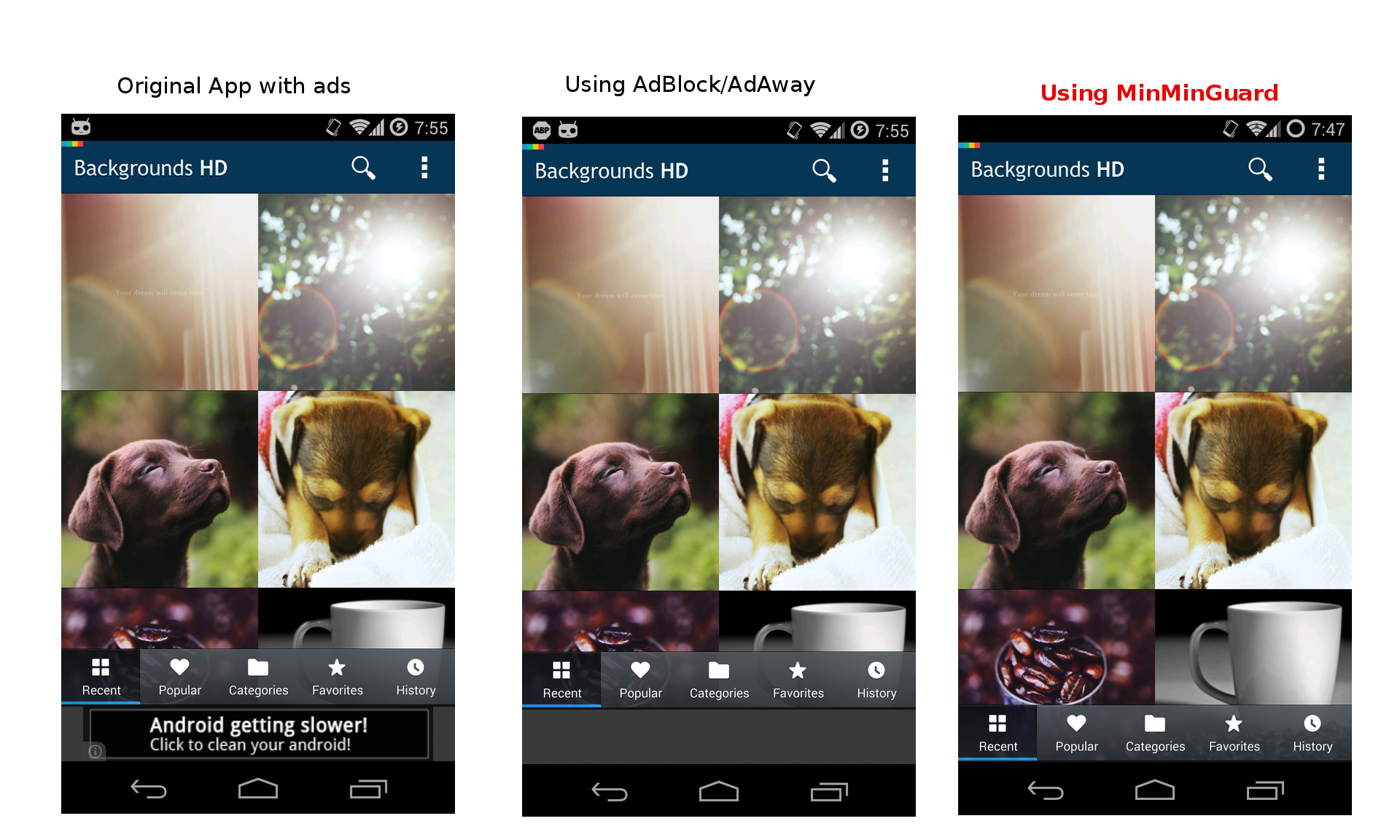
How it works:
- API-based blocking – intercepts the ad SDK calls (
loadAd,displayAd,showInterstitial, ...) of 50+ ad networks and returns empty results / removes the banner views. - Name-based blocking – watches
ViewGroup.addView()/LayoutInflater.inflate()for known ad view classes and collapses them. - URL filtering – optional per-app WebView filtering using the bundled host/pattern lists.
- Per-app control – Auto / Blacklist / Whitelist modes with per-app toggles and blocking statistics.
Compatibility
- Android 5.0 – 17 (API 21 – 37), built against Android 17 (compileSdk 37, targetSdk 36).
- Framework: any Xposed-compatible runtime:
- LSPosed (API 93+) – recommended
- Vector (the actively maintained LSPosed successor by JingMatrix, API 93+)
- Legacy Xposed (API 82+) and EdXposed
- Root managers: Magisk, KernelSU and APatch.
KernelSU / APatch notes
MinMinGuard Next itself needs no special support code to run on KernelSU or APatch – it is a regular LSPosed module. KernelSU/APatch do not include a Zygisk environment, so install a Zygisk provider first and then an LSPosed-compatible framework:
- Install a Zygisk provider module: ZygiskNext or NeoZygisk (open-source alternative).
- Install LSPosed or Vector (the framework runs on top of the Zygisk provider).
- Install the MinMinGuard Next APK and enable it in the framework's manager app, with the "Android" system framework checked in the module scope (required for the Android 11+ package-visibility workaround).
- Reboot and enable MinMinGuard Next for the apps you want.
The main screen shows the detected framework (LSPosed / Vector / EdXposed, API version) and root manager (Magisk / KernelSU / APatch) in the status bar.
Installation
- Download the latest APK from the Releases page.
- Install it as a normal app.
- Enable the module in your Xposed framework's manager (LSPosed / Vector / Xposed Installer) and include the Android system framework in the module's scope, then reboot.
- Open MinMinGuard Next and pick a mode:
- Auto: block ads in every app.
- Blacklist: only block in apps you toggle on.
- Whitelist: block everywhere except apps you toggle on.
Discussion and Supports
If you have any idea or need some support, you are welcome to open an issue on the GitHub repository. For the original (discontinued) MinMinGuard project, see the Xda Developers forum.
Developing and Contributing
Adding a new ad network into support
You may find some apps' ads are not blocked by MinMinGuard Next. This usually happens because the app uses an ad SDK that is not yet supported (e.g. a local ad provider, or a new SDK). Adding support for a new network is a small, self-contained task:
- Find the ad SDK inside a real app. Install an app that still shows ads and pull its APK
(
adb pullor an APK extractor). Open the classes with a decompiler (jadx / APKTool) and look for the SDK's package root (e.g.com.something.sdk.ads). Identify the banner view class (e.g....AdView) and the loading/showing methods (loadAd,showInterstitial, ...). - Create a blocker class in
app/src/main/java/tw/fatminmin/xposed/minminguard.next/blocker/adnetwork/, extendingBlocker. - Register it in the
blockersarray inMain.java. - Build, install, enable, and test in LSPosed (see below).
The Blocker contract
public abstract class Blocker {
    abstract public boolean handleLoadPackage(final String packageName, XC_LoadPackage.LoadPackageParam lpparam);
    abstract public String getBanner();
    abstract public String getBannerPrefix();
    public String getName() { return getClass().getSimpleName(); }
}handleLoadPackage– API-based blocking. Hook the SDK's ad-loading methods and neuter them.getBanner/getBannerPrefix– name-based blocking. Return the banner view class name and its package prefix so theViewGroup.addView()/LayoutInflater.inflate()hooks can collapse the ad's empty space. Returnnull/nullto skip name-based blocking.
The ApiBlocking helpers
All helpers return true when the target class/method was actually hooked:
| Helper | What it does |
|---|---|
removeBanner(pkg, cls, func, lp) | Hooks a banner method and makes it a no-op so the view collapses |
removeBannerWithResult(pkg, cls, func, result, lp) | Same, but the method returns result |
blockAdFunction(pkg, cls, func, lp) | Blocks a method by short-circuiting it |
blockAdFunctionExact(pkg, cls, func, param..., lp) | Blocks only the overload matching the given parameters |
blockAdFunctionWithResult(pkg, cls, func, result, lp) | Blocks and returns result instead of executing |
blockAdFunctionWithResultExact(pkg, cls, func, params..., result, lp) | Same, with exact-parameter matching |
Util.log(pkg, msg) writes to the Xposed log – use it to debug whether a hook fired.
Example: the current Flurry blocker
public class Flurry extends Blocker {
  public static final String BANNER = "com.flurry.android.FlurryAds";
  public static final String BANNER_PREFIX = "com.flurry.android";
  public static final String NATIVE_AD = "com.flurry.android.ads.FlurryAdNative";

  @Override public String getBannerPrefix() { return BANNER_PREFIX; }
  @Override public String getBanner() { return BANNER; }

  public boolean handleLoadPackage(final String packageName, LoadPackageParam lpparam) {
    boolean result = false;
    result |= ApiBlocking.removeBanner(packageName, BANNER, "displayAd", lpparam);
    result |= ApiBlocking.blockAdFunction(packageName, BANNER, "fetchAd", lpparam);
    result |= ApiBlocking.blockAdFunction(packageName, NATIVE_AD, "fetchAd", lpparam);
    return result;
  }
}
Activating your blocker
Add it to the blockers array in Main.java – this is the ONLY registration point:
public static Blocker[] blockers = {
        new Ad2iction(), new Adbert(), new Adcolony(), new Adfurikun(), new AdMarvel(), new AppodealMRAID(), new GoogleAdmob(), new GoogleGms(), new Adtech(), new Amazon(), new Amobee(),
        new Aotter(), new AppBrain(), new Applovin(), new Appnext(), new Avocarrot(), new Bonzai(), new Chartboost(), new Clickforce(), new Domob(), new Facebook(),
        new Freewheel(), new Flurry(), new GoogleGmsDoubleClick(), new Hodo(), new Inmobi(), new Intowow(), new Ironsource(), new KuAd(), new mAdserve(), new Madvertise(),
        new MasAd(), new MdotM(), new Millennial(), new Mobclix(), new MobFox(), new MoPub(), new Nend(), new Og(), new Onelouder(), new OpenX(), new SmartAdserver(), new SourcekitMRAID(),
        new Startapp(), new Tapfortap(), new TWMads(), new UnityAds(), new Vpadn(), new Vpon(), new Vungle(), new Waystorm(), new Yandex(),
        // new MyNewNetwork()  <-- add yours here
};
Testing
- Build and install the debug APK.
- In LSPosed, enable the module and add the test app to its scope (or use Auto mode).
- Reboot, open the test app, and check
LSPosed logfor yourUtil.logmessages. - If the ad is gone and the empty space collapses, your blocker works. If only the ad content
is gone but the space remains, your
getBanner()/getBannerPrefix()need fixing (name-based blocking is what removes the empty banner space).
Building
Requirements: JDK 17, Android SDK with platform android-37 (Android 17).
./gradlew assembleDebug          # debug APK
./gradlew assembleRelease        # release APK (unsigned, sign with uber-apk-signer)
The Xposed API (de.robv.android.xposed, API 93) is compiled from the
XposedBridge sources and vendored at
app/libs/api-93.jar – the api.lsposed.org maven is frequently offline, so the jar is checked in
to keep the build hermetic. It is a compile-time stub; the real implementation comes from the
framework at runtime.
Legal and Licensing
MinMinGuard Next is licensed under the GPL-3.0 license. It is a continuation of the original MinMinGuard project by fatminmin, which was also GPL-3.0.