A website template for academics
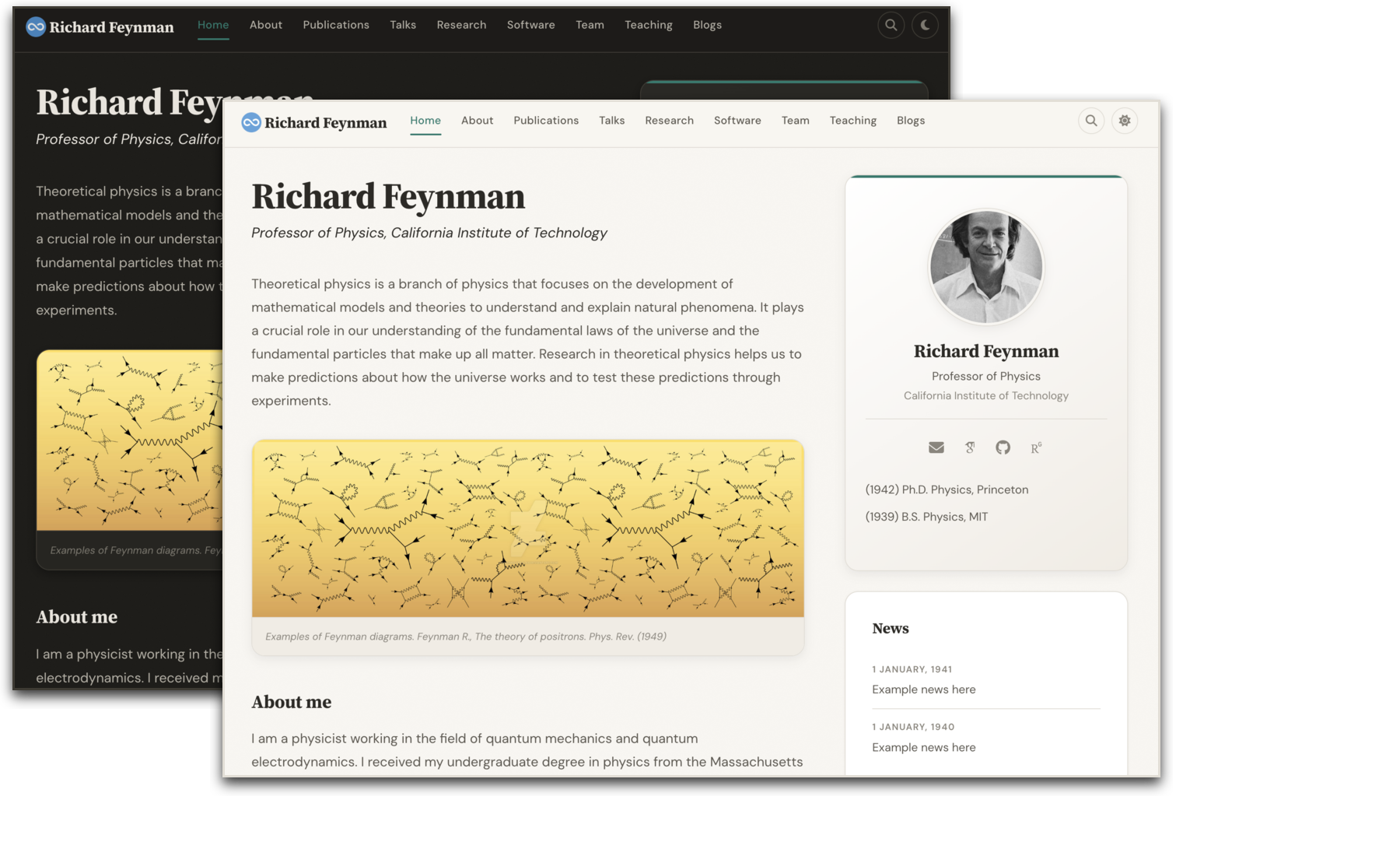
A beautiful, production-ready Jekyll website for academics and research groups.
Fork it. Fill in your info. Publish.
See the live demo →
Quick Start · Features · Customization · Publications · Hosting
Used by 200+ academics worldwide
★ ★ ★ ★ ★ ★ ★ ★ ★ ★ ★ ★ ★ ★ ★ ★ ★ ★ ★ ★ ★ ★ ★ ★ ★ ★ ★ ★ ★ ★ ★ ★ ★ ★ ★ ★ ★ ★ ★ ★ ★ ★ ★ ★ ★ ★ ★ ★ ★ ★ ★ ★ ★ ★ ★ ★ ★ ★ ★ ★ ★ ★ ★ ★ ★ ★ ★ ★ ★ ★ ★ ★ ★ ★ ★ ★ ★ ★ ★ ★ ★ ★ ★ ★ ★ ★ ★ ★ ★ ★ ★ ★ ★ ★ ★ ★ ★ ★ ★ ★ ★ ★ ★ ★ ★ ★ ★ ★ ★ ★ ★ ★ ★ ★ ★ ★ ★ ★ ★ ★ ★ ★ ★ ★ ★ ★ ★ ★ ★ ★ ★ ★ ★ ★ ★ ★ ★ ★ ★ ★ ★ ★ ★ ★ ★ ★ ★ ★ ★ ★ ★ ★ ★ ★ ★ ★ ★ ★ ★ ★ ★ ★ ★ ★ ★ ★ ★ ★ ★ ★ ★ ★ ★ ★ ★ ★ ★ ★ ★ ★ ★ ★ ★ ★ ★ ★ ★ ★ ★ ★ ★ ★ ★ ★ ★ ★ ★ ★ ★ ★ ★ ★ ★ ★ ★
Using this template? Share your site and I'll add it here!
Features
Design
- Source Serif 4 + DM Sans typography — elegant serif headings paired with a clean geometric sans body
- Warm parchment palette with subtle noise texture for depth, not flat generic whites
- Dark mode — toggle in navbar, auto-detects system preference, persists across visits
- Frosted glass navbar with backdrop blur, active page indicator, and scroll shadow
- Dynamic SVG favicon — auto-generated from your initials + accent color
- Responsive — CSS Grid layouts that adapt from desktop to tablet to mobile
Interactions
- Site-wide search — press
Cmd+K(orCtrl+K) to instantly search all pages - Copy BibTeX — hover any bibtex block to reveal a one-click copy button
- Animated link underlines — smooth gradient underlines that grow on hover
- Card hover effects — lift + shadow on team cards, research cards, and profile photo
- Image zoom — subtle scale on hover for team photos, research thumbnails, and the banner
- Back-to-top button — appears on scroll, smooth scrolls up
- Smooth expand/collapse — CSS transitions on publication abstracts and BibTeX entries
Publications
- Auto-generated from BibTeX via Jekyll Scholar — just edit
assets/ref.bib - Search bar — filter publications by title, author, or year
- Year badges — small accent-colored pills for quick scanning
- Pill buttons — PDF, DOI, arXiv, BIB, Abstract
For New Users
- Interactive setup script — run
./setup.shto fill in your name, title, and institution - 4-step
_config.yml— numbered sections with inline comments guide you through setup - Well-commented data files — every field in
_data/*.ymlis explained with examples - Smart link handling — empty links in config are automatically hidden (no broken icons)
Technical
- Modular SASS — organized into
base/,components/,layouts/,utilities/ - Selective Bootstrap 5.3.3 — only imports the modules used, not the full bundle
- Single JS file (4KB minified) — dark mode, search, toggles, scroll effects, copy button
- Auto-generated sitemap via
jekyll-sitemap - Open Graph + Twitter Cards — links look good when shared on social media
- MathJax 3 — LaTeX formula rendering out of the box
Screenshots
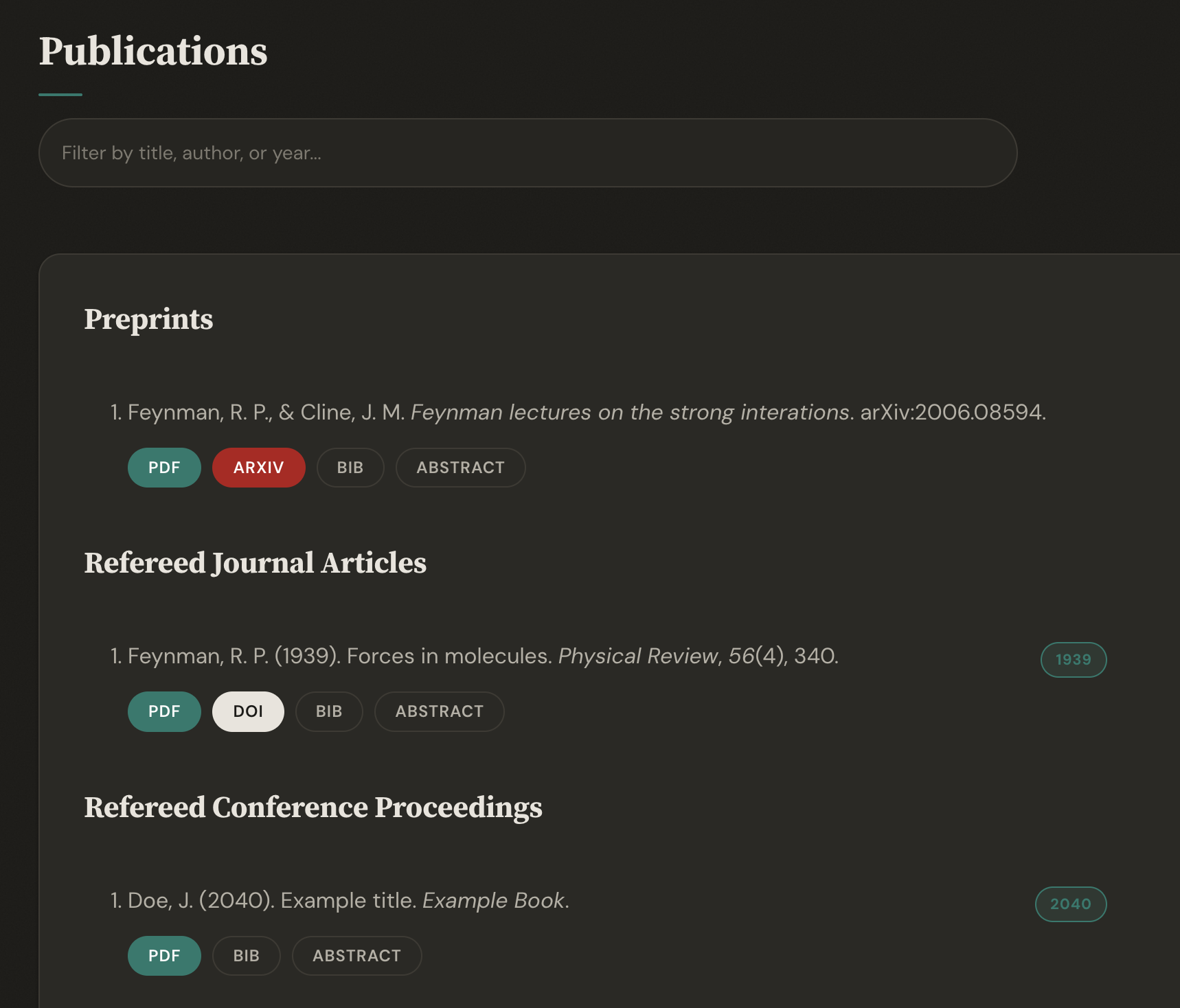 |  |
| Publications with search & year badges | Team page with card grid |
 | |
| Site-wide search (Cmd+K) |
Quick Start
- Fork this repository
- Delete
_config_demo.yml(it's only for the demo site) - Install Jekyll and run
bundle install - Configure your site:
./setup.sh # interactive setup, or vim _config.yml # edit Steps 1-4 directly - Add your publications to
assets/ref.bib - Customize data files in
_data/(team members, news, awards, etc.) - Preview your site:
bundle exec jekyll serve
# open http://localhost:4000
Detailed How-To Guide
Step 1: Fork and Clone
# Fork the repo on GitHub, then clone your fork
git clone https://github.com/YOUR_USERNAME/YOUR_USERNAME.github.io.git
cd YOUR_USERNAME.github.io
Step 2: Install Dependencies
You need Ruby and Jekyll installed. See Jekyll's installation guide.
# Install Ruby gems
bundle install

# Optional: install Node.js dependencies (only needed if you want to edit JS)
npm install
Step 3: Configure Your Identity
Open _config.yml and fill in your information. The file is organized into numbered steps:
# STEP 1: Your Identity
name: "Jane Smith"
title: "Assistant Professor of Computer Science"
institution: "Stanford University"
email: jsmith@stanford.edu
photo: headshot.jpg   # place your photo in images/
Or run the interactive setup script:
./setup.sh
Step 4: Add Your Links
Still in _config.yml, add your academic profiles. Delete any you don't use:
# STEP 2: Your Links
links:
  google_scholar: "https://scholar.google.com/citations?user=YOUR_ID"
  github: "https://github.com/yourusername"
  orcid: "https://orcid.org/0000-0000-0000-0000"
  cv: "papers/cv.pdf"        # place your CV in the papers/ directory
  twitter: ""                # leave blank to hide
  linkedin: ""
Step 5: Add Your Photo
Place your profile photo in the images/ directory. Update the photo field in _config.yml to match the filename.
Step 6: Add Publications
Edit assets/ref.bib with your BibTeX entries. The publications page is auto-generated. Example:
@article{smith2024,
  author = {Smith, Jane and Doe, John},
  title = {A Novel Approach to Machine Learning},
  journal = {Nature},
  year = {2024},
  volume = {42},
  pages = {1--10},
  doi = {10.1234/example},
  file = {smith2024.pdf},       % place PDF in papers/
  abstract = {We present...}
}
To bold your name in the publication list, update the scholar settings in _config.yml:
scholar:
  last_name: Smith
  first_name: [Jane, J.]
Then uncomment the name-bolding line in _layouts/bibtemplate.html.
Step 7: Add Team Members
Edit _data/team_members.yml:
- name: Alice Johnson
  photo: alice.jpg          # place in images/ or images/team/
  info: PhD Student, started Fall 2023
  email: alice@university.edu
  website: https://alice.dev
  github: https://github.com/alice
Step 8: Add News
Edit _data/news.yml (newest first):
- date: 15 March, 2024
  headline: "Our paper on X was accepted to NeurIPS!"

- date: 1 January, 2024
  headline: "Welcome to new PhD student Alice Johnson"
Step 9: Customize Pages
Each page in _pages/ is a Markdown file. Edit the content directly:
home.md— your welcome text and bioresearch.md— describe your research areassoftware.md— list your software projectsteaching.md— list your courses
To remove a page from the navbar, comment it out in _config.yml:
nav_pages:
  - name: about
  - name: publications
  # - name: talks        # hidden from navbar
  - name: research
Step 10: Preview and Deploy
# Preview locally
bundle exec jekyll serve
# Visit http://localhost:4000

# When ready, push to GitHub
git add -A
git commit -m "My academic website"
git push
A GitHub Actions workflow automatically builds and deploys your site on every push. Make sure to go to Settings > Pages > Source in your repo and select GitHub Actions.
Your site will be live at https://YOUR_USERNAME.github.io within a few minutes.
Customization
_config.yml
The config file is organized into 4 numbered steps:
| Step | Section | What to fill in |
|---|---|---|
| 1 | Your Identity | Name, title, institution, email, photo |
| 2 | Your Links | Google Scholar, GitHub, ORCID, Twitter, LinkedIn, CV |
| 3 | Site Settings | Accent color, dark mode toggle, analytics |
| 4 | Your Pages | Comment out any pages you don't need |
Data Files
| File | Purpose |
|---|---|
_data/team_members.yml | Current students and postdocs |
_data/alumni.yml | Former lab members |
_data/news.yml | News items (3 most recent shown on home) |
_data/awards.yml | Awards and honors |
_data/grants.yml | Grants and funding |
_data/funders.yml | Funder logos |
_data/people.yml | Students and mentees |
_data/pi.yml | Optional: detailed education for About page |
Each file has inline comments explaining every field. Entries marked # EXAMPLE should be replaced or deleted.
Pages
All pages are in _pages/. Edit the Markdown content directly. Pages use the gridlay layout by default.
Accent Color & Dark Mode
Set accent_color in _config.yml to change the theme color across the entire site (links, buttons, highlights, favicon). Set dark_mode: false to disable the dark mode toggle entirely.
CSS & JS Customization
The site uses modular SASS in _sass/:
_sass/
  base/          # variables, typography, reset
  components/    # card, navbar, buttons, footer, profile, publication, search
  layouts/       # home grid, team grid, research grid
  utilities/     # dark mode, animations
For JavaScript, edit assets/js/site.js then run npm run build to minify. Pre-built JS is committed, so npm is only needed if you modify the source.
Publications
Publications are managed via Jekyll Scholar using BibTeX. Edit assets/ref.bib with your references.
Update scholar.last_name and scholar.first_name in _config.yml to auto-bold your name in the publication list.
Hosting
GitHub Pages
Fork this repo as your_username.github.io and push. A GitHub Actions workflow is included (.github/workflows/deploy.yml) that automatically builds the site with Jekyll Scholar and deploys to GitHub Pages on every push to source.
To enable it: go to your repo's Settings > Pages > Source and select GitHub Actions instead of "Deploy from a branch".
Custom Domain
Purchase a domain, update the CNAME file, and configure DNS. See GitHub's guide.
Self-Hosting
Build with bundle exec jekyll serve, then upload _site/ to your server. Set url and baseurl in _config.yml accordingly.
Upgrading
Coming from the previous version? See UPGRADING.md.
Alternatives
Acknowledgment
I credit the Allen Lab for creating a beautiful academic research group webpage. Many parts of this site were adopted or copied from their laboratory webpage.
License
MIT