



MATE Wayland Desktop
A Linux distribution built around the two-panel MATE desktop, the continuation of GNOME 2, running on Wayland. MATE's panel, menus, file manager and settings run on the labwc compositor in place of MATE's X11-only window manager.
The source is the whole project: the session, the settings, the package builds, the artwork, and the build system that produces the live, installable ISO.
An independent project. Not affiliated with or endorsed by the MATE or GNOME projects, or by Canonical. Based on Ubuntu.
Get it
Download the ISO, with its checksum and the installation steps, from https://mate-wayland.org/download/. Guides for NVIDIA graphics and for screens and scaling are at https://mate-wayland.org/guides/.
What you get
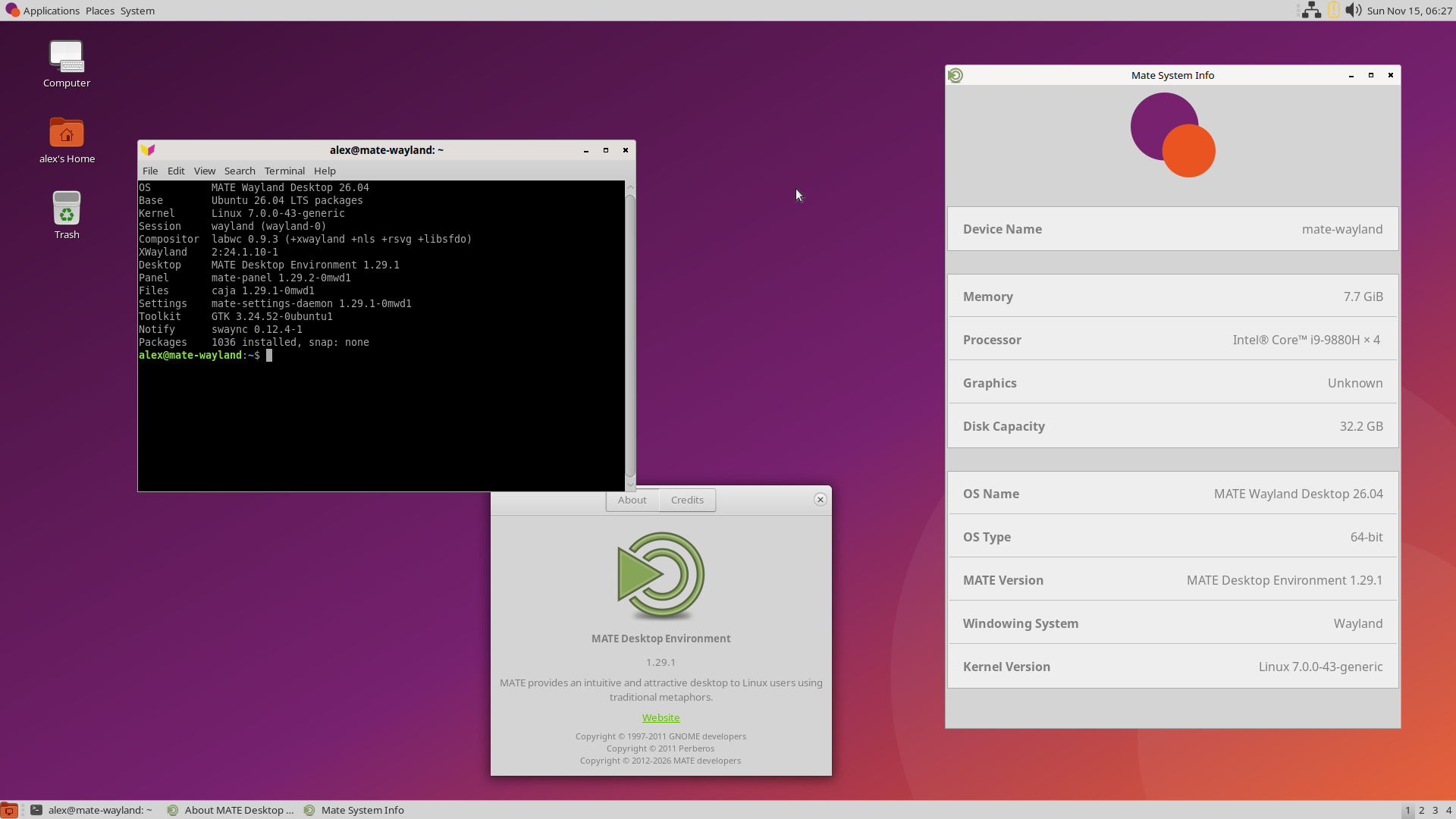
- The classic layout: Applications, Places and System menus, notification area, battery, volume and clock at the top; window list and workspace switcher at the bottom; desktop icons.
- Caja file manager, MATE Control Center, Firefox with uBlock Origin.
- Menta theme, Noto Sans, Yaru icons, the project's own wallpaper, logo, login screen, lock screen and boot splash.
- Multiple monitors, each at its own resolution, with the wallpaper on all.
- A live ISO for USB or DVD (UEFI) with the Calamares installer and
optional disk encryption (LUKS2;
/bootstays unencrypted, as with Ubuntu's own installer).
Technical summary
| Base | Ubuntu 26.04 LTS packages, Linux 7.0, no GNOME Shell, no snap |
| Display | Wayland, labwc 0.9 (wlroots); XWayland for X11-only programs, with a launcher that runs them sharp on scaled screens |
| Desktop | MATE 1.29: panel, Caja, Control Center, settings daemon, media; mate-applets 1.28 |
| Login / installer | LightDM, Calamares 3.3 (LUKS2 option) |
| Wayland tools | gtklock, swayidle, grim, slurp, satty, wdisplays, kanshi, wlr-randr |
| Browser | Firefox from Mozilla's APT repository |
Build it
On a Debian-family Linux machine with debootstrap, apt, sudo, curl
and a C compiler
(nothing is installed on the build machine):
./build.sh --packages     # first time: build the MATE packages, then the ISO
./build.sh                # afterwards: just the ISO
The ISO is written to iso/out/. The first build from an empty clone takes
about 35 minutes (it downloads everything). After that a full ISO rebuild
takes about 8 minutes, and a rebuild after changing only this project's own
files about a minute.
NVIDIA graphics
The ISO starts every machine on the open drivers that come with the kernel.
For an NVIDIA card that is nouveau, which shows a picture but cannot do GPU
computing (CUDA, OpenCL). NVIDIA's own driver is installed after the system
is installed, with a tool that is already on it. You need an internet
connection.
1. See which card you have and which driver is recommended
sudo apt update
ubuntu-drivers devices
Look for the line ending in recommended, for example
nvidia-driver-595-open - distro non-free recommended. ("open" is about the
kernel part of the driver only; CUDA and OpenCL are the same in both kinds.)
2. Install it
sudo ubuntu-drivers installThat installs the recommended driver. To choose one yourself, name it:
sudo ubuntu-drivers install nvidia:595-open. It takes a few minutes and
switches off nouveau. On a laptop with two graphics cards it selects the
"on-demand" mode: the built-in card draws the desktop and the NVIDIA card
is used by programs that ask for it.
3. Restart the computer
4. Check that it works
nvidia-smiIt should show your card and the driver version. If the desktop looks
normal and ~/.local/state/mate-wayland-desktop/labwc-software.log does
not exist, the desktop is running with graphics acceleration.
GPU computing, for example hashcat
sudo apt install hashcat
hashcat -I        # lists the card
hashcat -b -m 0   # a short benchmark
hashcat says "CUDA SDK Toolkit not installed" and continues with OpenCL, which works.
If the desktop does not start after the restart
Press Ctrl+Alt+F3, log in with your user name and password, and remove the driver:
sudo apt purge '*nvidia*'
sudo reboot
The system is then back on nouveau.
Documentation
Guides and downloads are on the project's website,
https://mate-wayland.org/. CUSTOMISATIONS.md in the source lists every
difference from stock Ubuntu and MATE, and why.
Reporting problems and contributing
Problems and suggestions:
https://github.com/scottsturrock/mate-wayland-desktop/issues. How to
report, build and send changes is in CONTRIBUTING.md; security problems
are reported privately, see SECURITY.md.
Credits
Built on the work of the MATE project, the labwc compositor, Ubuntu and the Yaru icon theme. Fixes to upstream components are meant to go back upstream.
Licence
GPL-3.0; see LICENSE. Components taken from other projects keep their own licences.