CLI Proxy API Management Center
A single-file Web UI for CLI Proxy API (CPA) plus an optional Usage Service for persistent usage analytics.
Since v6.10.0, CPA no longer includes built-in usage statistics. This project now supports usage analytics through a long-running Usage Service that consumes the CPA usage queue, persists request events to SQLite, and exposes panel-compatible usage APIs.
- CPA Main project: https://github.com/router-for-me/CLIProxyAPI
- Recommended CPA version: >= v6.10.8
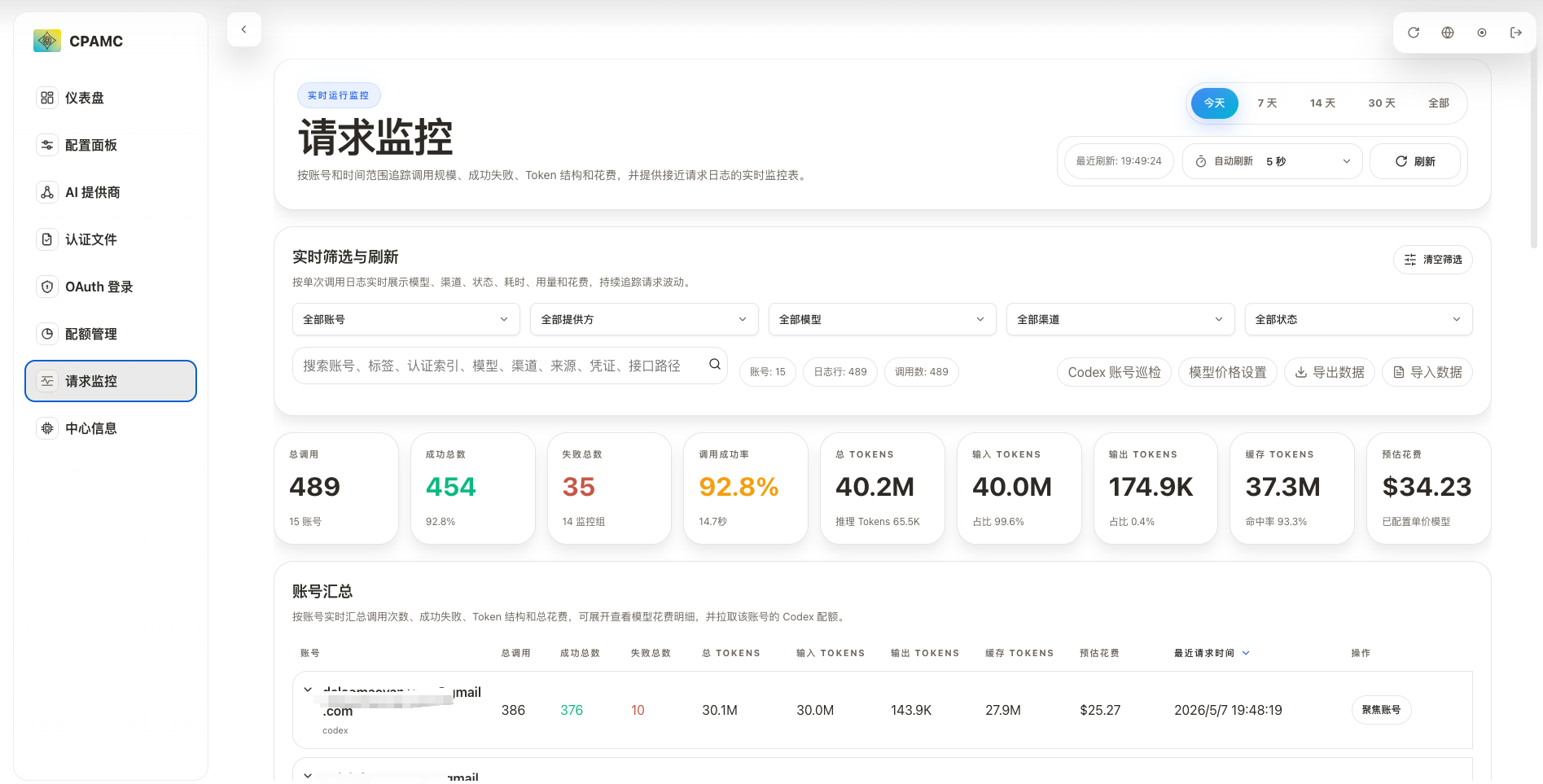
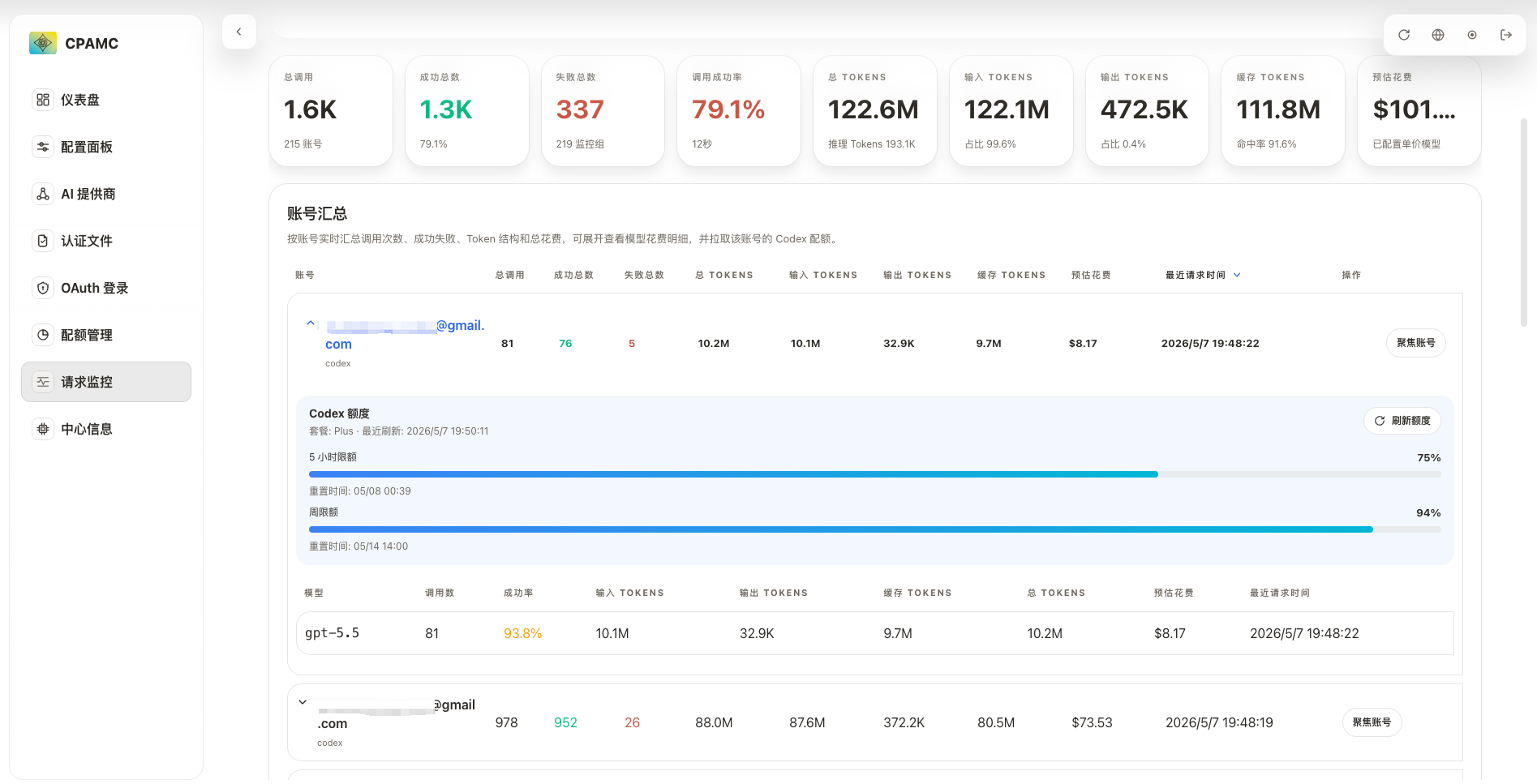
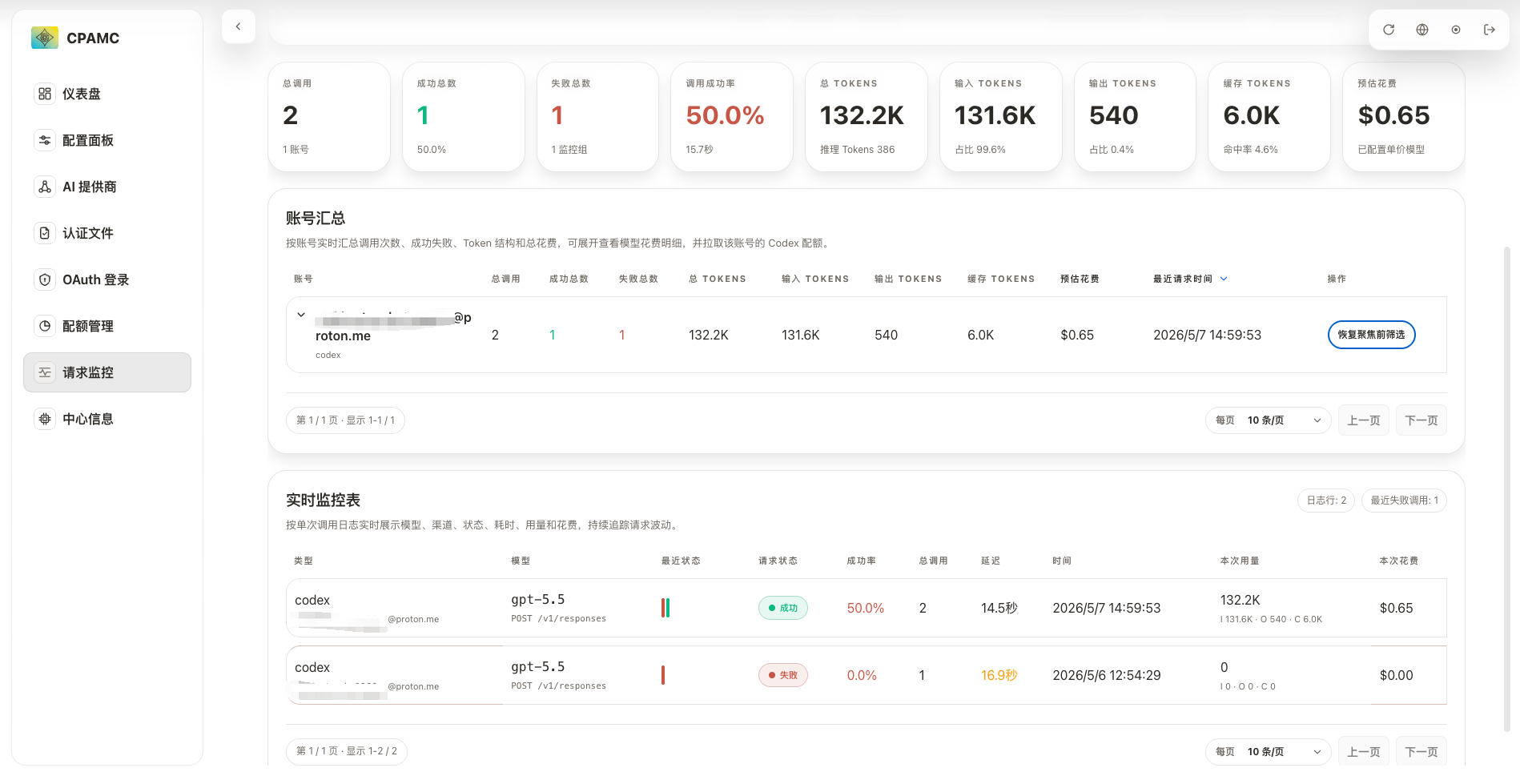
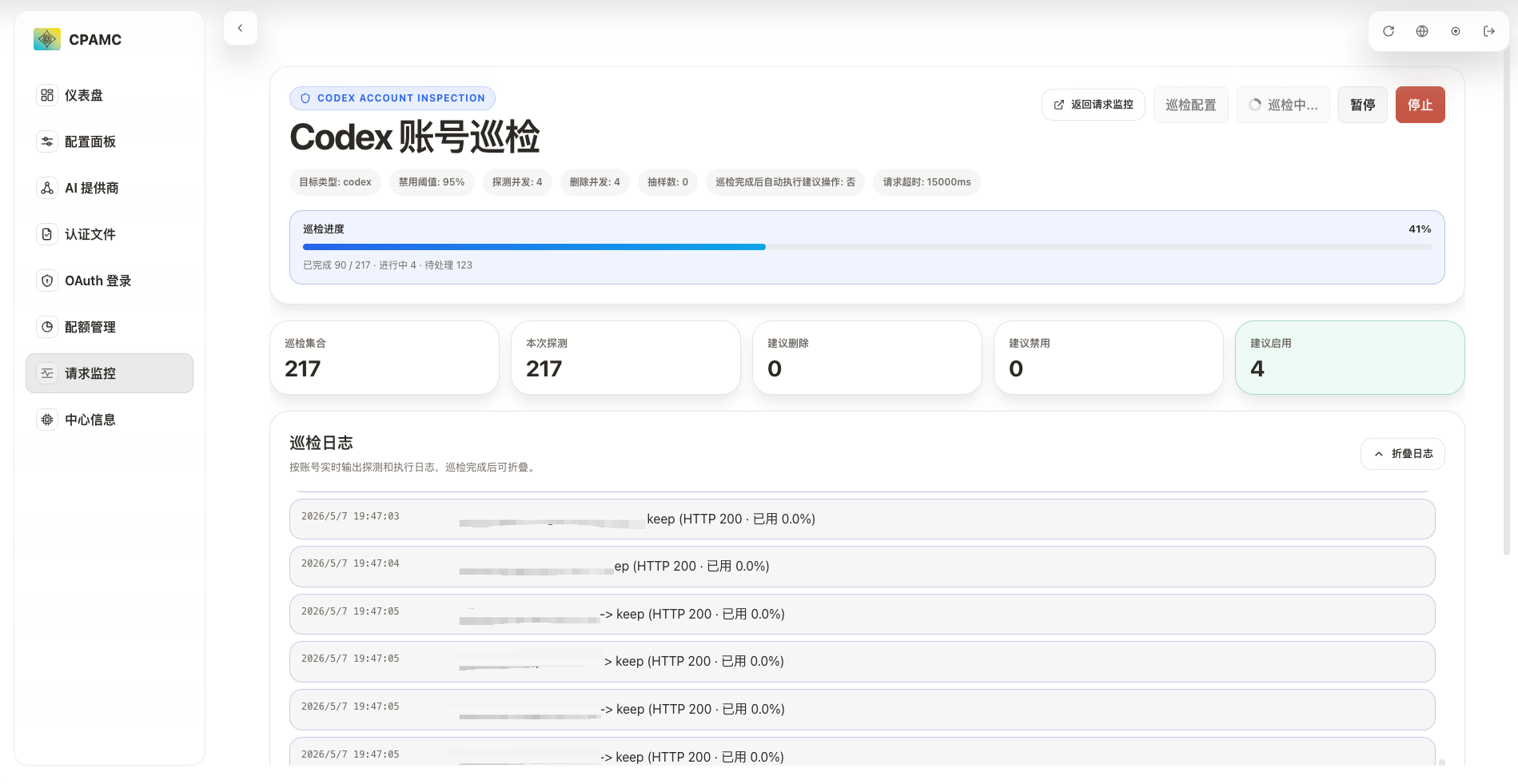
Panel Preview
What This Provides
- A single-file React management panel for CPA Management API (
/v0/management) - A Dockerized Usage Service for SQLite-backed usage persistence
- Native
amd64andarm64packages for Windows, macOS, and Linux with the panel embedded - Two deployment modes:
- Full Docker mode: open the built-in panel from Usage Service and only enter the CPA URL + Management Key
- CPA panel mode: keep using CPA's
/management.html, then configure a separately deployed Usage Service inside the panel
- Runtime monitoring, account/model/channel breakdowns, model pricing, estimated token cost, imports/exports, auth-file operations, quota views, logs, config editing, and system utilities
Choose a Deployment Mode
| Mode | Entry URL | What the user configures | Best for |
|---|---|---|---|
| Full Docker mode | http://<host>:18317/management.html | CPA URL + Management Key on login | New deployments, one entry point, least browser/CORS complexity |
| CPA panel mode | http://<cpa-host>:8317/management.html | Usage Service URL under Management Center Info -> External Usage Service | Existing CPA automatic panel loading |
| Frontend only | Vite dev server or dist/index.html | CPA URL, optionally Usage Service URL | Development |
Full Docker mode does not bundle CPA itself. CPA still runs as the upstream service; the Docker image provides the Usage Service plus an embedded copy of this management panel.
CPA Prerequisites
Request statistics require the CPA usage queue:
- CPA Management must be enabled because the usage queue uses the same availability and Management Key as
/v0/management. - Enable usage publishing in CPA with
usage-statistics-enabled: true, or throughPUT /usage-statistics-enabledwith{ "value": true }. - CPA
v6.10.8+is preferred because it exposes the HTTP usage queue endpoint/v0/management/usage-queue, which can pass through regular HTTP reverse proxies. - Older CPA versions use the RESP queue protocol. Usage Service falls back to RESP in
automode when the HTTP queue endpoint is unavailable. RESP listens on the CPA API port, usually8317, and cannot pass through a regular HTTP reverse proxy. - CPA keeps queue items in memory for
redis-usage-queue-retention-seconds, default60seconds and maximum3600seconds. Keep Usage Service running continuously. - Exactly one Usage Service should consume the same CPA usage queue.
Architecture
Full Docker Mode
Browser
  -> Usage Service :18317
      -> built-in management.html
      -> /v0/management/usage and /v0/management/model-prices from SQLite
      -> other /v0/management/* proxied to CPA
      -> HTTP/RESP consumer -> CPA API port
      -> SQLite /data/usage.sqlite
The login page detects that it is hosted by Usage Service. You enter the CPA URL and Management Key. Usage Service validates the CPA Management API, stores the setup in SQLite, starts the collector with the configured mode (auto by default: HTTP queue first, RESP fallback), and serves the panel from the same origin.
CPA Panel Mode
Browser
  -> CPA /management.html
      -> normal CPA Management API calls stay on CPA
      -> usage calls go to configured Usage Service URL

Usage Service
  -> HTTP/RESP consumer -> CPA API port
  -> SQLite /data/usage.sqlite
Use this when CPA still auto-downloads and serves the panel. Deploy Usage Service separately, then open Management Center Info -> External Usage Service, enable it, enter the Usage Service URL, and save.
Quick Start: Full Docker Mode
Docker Hub Image
docker run -d \
  --name cpa-manager \
  --restart unless-stopped \
  -p 18317:18317 \
  -v cpa-manager-data:/data \
  seakee/cpa-manager:latest
Open:
http://<host>:18317/management.html
Enter:
- CPA URL:
- Docker Desktop host CPA:
http://host.docker.internal:8317 - Same compose network:
http://cli-proxy-api:8317 - Remote CPA:
https://your-cpa.example.com
- Docker Desktop host CPA:
- Management Key
The published image supports linux/amd64 and linux/arm64. If your image is published under another Docker Hub namespace, replace seakee/cpa-manager:latest.
Native Packages
GitHub Releases also provide native packages with the panel embedded:
cpa-manager_<version>_linux_amd64.tar.gzcpa-manager_<version>_linux_arm64.tar.gzcpa-manager_<version>_darwin_amd64.tar.gzcpa-manager_<version>_darwin_arm64.tar.gzcpa-manager_<version>_windows_amd64.zipcpa-manager_<version>_windows_arm64.zip
macOS/Linux:
tar -xzf cpa-manager_vX.Y.Z_linux_amd64.tar.gz
cd cpa-manager_vX.Y.Z_linux_amd64
./cpa-manager
The tar archives preserve execute permissions, so no extra chmod +x is normally required after extraction. If macOS blocks the unsigned binary, run xattr -dr com.apple.quarantine . in the extracted directory and start it again.
Windows PowerShell:
Expand-Archive .\cpa-manager_vX.Y.Z_windows_amd64.zip -DestinationPath .
cd .\cpa-manager_vX.Y.Z_windows_amd64
.\cpa-manager.exe
You can double-click cpa-manager.exe on Windows, but PowerShell is recommended because it keeps logs and startup errors visible.
Then open:
http://<host>:18317/management.html
Native packages do not include CPA itself. Run CPA separately, then enter the CPA URL and Management Key on the login page. Set USAGE_DATA_DIR or USAGE_DB_PATH only when you want to override the default data location.
On first start, if USAGE_DATA_DIR and USAGE_DB_PATH are not set, the native package creates config.json next to the binary and writes SQLite data to data/usage.sqlite in the same directory. The extracted package directory therefore contains both the program and its user data.
Docker Compose
services:
  cpa-manager:
    image: seakee/cpa-manager:latest
    restart: unless-stopped
    ports:
      - "18317:18317"
    volumes:
      - cpa-manager-data:/data

volumes:
  cpa-manager-data:
Start:
docker compose up -d
Linux Host CPA
If CPA runs directly on a Linux host and Usage Service runs in Docker, add a host gateway:
docker run -d \
  --name cpa-manager \
  --restart unless-stopped \
  --add-host=host.docker.internal:host-gateway \
  -p 18317:18317 \
  -v cpa-manager-data:/data \
  seakee/cpa-manager:latest
Then enter http://host.docker.internal:8317 as the CPA URL.
Quick Start: CPA Panel Mode
-
Start CPA as usual and open:
http://<cpa-host>:8317/management.html -
Deploy Usage Service:
docker run -d \ --name cpa-manager \ --restart unless-stopped \ -p 18317:18317 \ -v cpa-manager-data:/data \ seakee/cpa-manager:latest -
In the CPA panel, go to:
Management Center Info -> External Usage Service -
Enable it and enter:
http://<usage-service-host>:18317 -
Click Save and connect.
The panel sends the current CPA URL and Management Key to Usage Service. After that, monitoring reads usage data from Usage Service while other management calls continue to use CPA.
Build Locally
docker compose -f docker-compose.usage.yml up --build
This builds the React panel and embeds it into the Go Usage Service binary.
Usage Service Configuration
Most users can configure CPA URL and Management Key from the panel. Environment variables are useful for automated deployments.
| Variable | Default | Description |
|---|---|---|
CPA_MANAGER_CONFIG | empty | Optional config file path. When empty, native packages use config.json next to the binary |
HTTP_ADDR | 0.0.0.0:18317 | Usage Service HTTP listen address |
USAGE_DB_PATH | Docker: /data/usage.sqlite; native: ./data/usage.sqlite | SQLite database path |
USAGE_DATA_DIR | Docker: /data; native: ./data | Base data directory when USAGE_DB_PATH is not overridden |
CPA_UPSTREAM_URL | empty | Optional CPA base URL for unattended startup |
CPA_MANAGEMENT_KEY | empty | Optional CPA Management Key for unattended startup |
CPA_MANAGEMENT_KEY_FILE | /run/secrets/cpa_management_key | Optional file containing the Management Key |
USAGE_COLLECTOR_MODE | auto | Collection mode: auto prefers the HTTP usage queue and falls back to RESP for older CPA; http forces HTTP; resp forces RESP |
USAGE_RESP_QUEUE | usage | RESP key argument; CPA currently ignores it, leave the default unless upstream changes |
USAGE_RESP_POP_SIDE | right | right uses RPOP; left uses LPOP |
USAGE_BATCH_SIZE | 100 | Maximum queue records per pop |
USAGE_POLL_INTERVAL_MS | 500 | Idle polling interval |
USAGE_QUERY_LIMIT | 50000 | Maximum recent events returned through compatible /usage |
USAGE_CORS_ORIGINS | * | Allowed browser origins for CPA panel mode |
USAGE_RESP_TLS_SKIP_VERIFY | false | Skip TLS verification for RESP connection |
PANEL_PATH | empty | Serve a custom management.html instead of the embedded one |
Configuration precedence is: environment variables > config.json > program defaults. Relative paths in the config file are resolved from the config file directory. The generated default config is:
{
  "httpAddr": "0.0.0.0:18317",
  "dataDir": "./data"
}
If CPA_UPSTREAM_URL and CPA_MANAGEMENT_KEY are set, collection starts automatically on boot. Otherwise, use the web panel setup flow.
Data and Security Notes
- SQLite data is stored under
/data; mount it to persistent storage. - In full Docker mode, CPA URL and Management Key are stored in the SQLite
settingstable so collection can resume after restart. - Protect the
/datavolume. It contains usage metadata and the saved Management Key. - Usage Service redacts key-like fields before storing raw JSON payload snapshots, but request metadata may still expose models, endpoints, account labels, and token usage.
- RESP queue consumption is pop-based. Do not run multiple Usage Service consumers against the same CPA instance.
- If Usage Service is down longer than CPA's queue retention window, that period's usage cannot be recovered without CPA-side persistence.
Runtime Endpoints
| Endpoint | Purpose |
|---|---|
GET /health | Basic health check |
GET /status | Collector, SQLite, event count, and error status |
GET /usage-service/info | Allows the frontend to detect full Docker mode |
POST /setup | Save CPA URL + Management Key and start collection |
GET /v0/management/usage | Compatible usage payload for the panel |
GET /v0/management/usage/export | Export usage events as JSONL |
POST /v0/management/usage/import | Import JSONL usage events or legacy JSON snapshots |
GET /v0/management/model-prices | Read SQLite-backed model pricing |
PUT /v0/management/model-prices | Replace saved model pricing |
POST /v0/management/model-prices/sync | Sync model prices from LiteLLM pricing metadata |
GET /models, GET /v1/models | Proxy model-list requests to CPA after setup |
/v0/management/* | Proxied to CPA except usage endpoints |
After setup, /status, usage, model-pricing, and /v0/management/* proxy endpoints require the same Management Key as a Bearer token.
Usage import accepts two file families: JSONL/NDJSON event files exported by Usage Service, and legacy JSON snapshots produced by older CPA /usage/export. Legacy JSON can be converted only when usage.apis.*.models.*.details[] request details are present. Files that contain only aggregate totals are rejected because request-level monitoring data cannot be reconstructed. Legacy import is a migration/recovery path, not a perfect continuation of newly collected Usage Service data: old files may miss metadata such as api_key_hash, channel, request ID, method/path, latency, cache tokens, or failure reason, so account matching, API Key level analysis, and detail accuracy may be lower. Importing legacy files affects totals, trend charts, and account/key breakdowns; use a test or backup database first when accuracy matters.
Feature Overview
- Dashboard: connection state, backend version, quick health summary
- Configuration: visual and source editing for CPA configuration
- AI Providers: Gemini, Codex, Claude, Vertex, OpenAI-compatible providers, and Ampcode
- Auth Files: upload, download, delete, status, OAuth exclusions, model aliases
- Quota: quota views for supported providers
- Request Monitoring: persisted usage KPIs, model/channel/account breakdowns, model pricing, estimated token cost, failure analysis, realtime tables
- Codex Account Inspection: batch probing and cleanup suggestions for Codex auth pools
- Logs: incremental file log reading and filtering
- Management Center Info: model list, version checks, local state tools, external Usage Service configuration
Development
Frontend:
npm install
npm run dev
npm run type-check
npm run lint
npm run build
Usage Service:
cd usage-service
go test ./...
go run ./cmd/cpa-manager
Build and Release
- Vite builds a single-file
dist/index.html. - Tagging
vX.Y.Ztriggers.github/workflows/release.yml. - The release workflow uploads
dist/management.html, native packages, andchecksums.txtto GitHub Releases. - Native packages are published for
linux,darwin, andwindowson bothamd64andarm64, with the management panel embedded. - The same workflow builds
Dockerfile.usage-serviceand pushesseakee/cpa-manager. - The Docker image is published for
linux/amd64andlinux/arm64. - The workflow syncs
README.mdto the Docker Hub overview. - Required GitHub secrets:
DOCKERHUB_USERNAMEDOCKERHUB_TOKEN
Troubleshooting
- Cannot connect in full Docker mode: verify the CPA URL from inside the Usage Service container. For host CPA on Linux, use
--add-host=host.docker.internal:host-gateway. - Monitoring is empty: enable CPA usage publishing, verify Usage Service
/status, and confirm only one consumer is running. unsupported RESP prefix 'H': upgrade CPA tov6.10.8+and keep the defaultUSAGE_COLLECTOR_MODE=autoso Usage Service uses the HTTP usage queue first. On older CPA or forced RESP mode, the CPA URL must be a container/host direct address for port8317, not a regular HTTP reverse-proxy domain.- 401 from Usage Service: use the same Management Key that was saved during setup.
- Docker panel shows stale data: check
/statusforlastConsumedAt,lastInsertedAt, andlastError. - CPA panel mode has CORS errors: set
USAGE_CORS_ORIGINSto the CPA panel origin or keep the default*for private deployments. - Data disappears after container rebuild: mount
/datato a Docker volume or host directory. - Detailed FAQ: see FAQ and Troubleshooting or the Chinese FAQ.
References
- CLIProxyAPI: https://github.com/router-for-me/CLIProxyAPI
- Redis usage queue documentation: https://help.router-for.me/management/redis-usage-queue.html
Acknowledgements
- Thanks to the upstream projects CLIProxyAPI and Cli-Proxy-API-Management-Center for the foundation and inspiration.
- Thanks to the Linux.do community for project promotion and feedback.
License
MIT