SVG AITuber Chat
English | 日本語
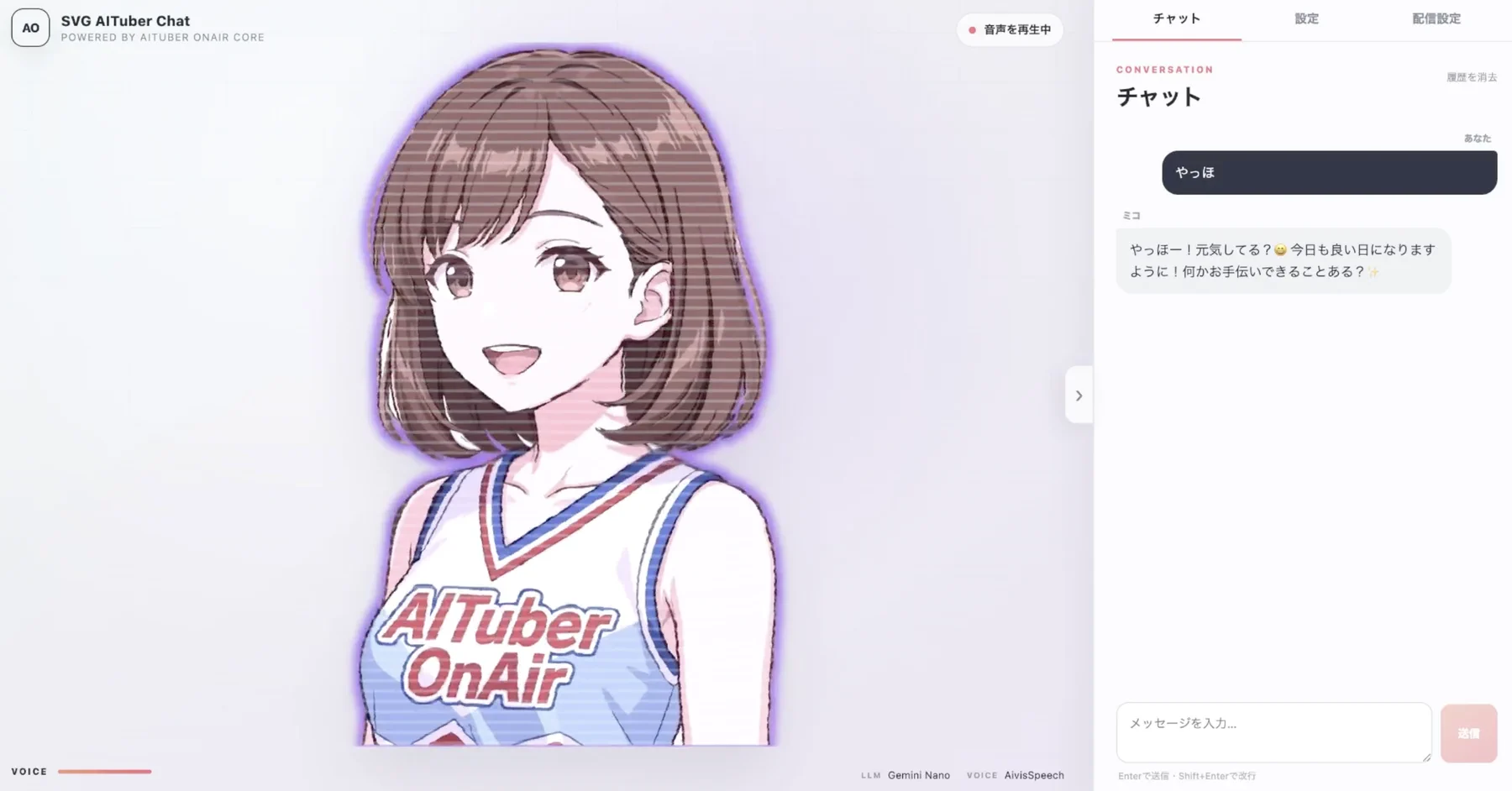
SVG AITuber Chat is a local-first demo that combines an animated SVG avatar with the published @aituber-onair/core package. It supports text chat, TTS, audio-driven lip sync, visual effects, and automatic replies to YouTube Live comments.
Features
- Chat with the LLM providers supported by AITuber OnAir Core
- Speak replies with the supported TTS engines
- Drive the avatar's mouth from the actual audio signal
- Animate blinking, breathing, head movement, and hair movement
- Switch eyes, eyebrows, mouth, blush, and emotion marks to match the reply emotion (happy, sad, angry, surprised)
- Play gestures such as a nod, head tilt, or jump, and look up while the LLM is thinking
- Apply SVG-native visual effects such as line art, neon, glitch, distortion, and reveal animations
- Add a sticker outline, rim light, poster look, aura, drop shadow, hair hue shift, particles, and focus-line or halftone backdrops
- Receive YouTube Live comments and reply to them in sequence
- Trigger avatar reactions from comment keywords such as
cute,888, andlol - Collapse the control panel for a clean streaming view
Getting started
cd svg-aituber-chat
npm install
npm run dev
Open http://localhost:5173/, then select an LLM and TTS engine in the settings panel and enter the required API keys.
Settings are stored in the browser's localStorage. This demo is intended for local use. If you adapt it for a publicly hosted service, do not store provider credentials in the browser; route the requests through a secure backend instead.
The center arrow button or the Esc key collapses the control panel so that the SVG avatar can fill the streaming view.
YouTube Live comments
- Enable YouTube Data API v3 in Google Cloud and create an API key.
- Open the 配信設定 (Streaming) tab and enter the API key and a live YouTube URL or video ID.
- Select the polling interval and start comment retrieval.
The app keeps up to 50 comments in its queue. If the LLM is processing a response or audio is playing, later comments wait and are handled in order. The avatar can also replay the selected entrance effect when it starts replying to a comment.
The YouTube integration adapts the structure and behavior of the AITuber OnAir React PSD example.
When コメントのキーワードに反応する (React to comment keywords) is enabled in the streaming settings, the avatar reacts to words in a comment. For example, cute releases hearts, 888 shows clap marks, and lol plays a laughing gesture.
URL parameters for checking expressions and effects
Add parameters to the URL to freeze an expression or effect without configuring an LLM or TTS engine. Combine several with &.
| Parameter | Description |
|---|---|
?emotion=happy | Freeze the expression: happy, sad, angry, surprised, relaxed, or neutral. |
?mouth=0.7&mouthw=1.25 | Freeze the mouth opening (0 to 1) and width (0.75 to 1.25). |
?gesture=nod>=0.35 | Hold a gesture (nod, tilt, jump, laugh) at a progress from 0 to 1. |
?thinking=1 | Show the thinking gaze. |
?outline=sticker, ?rim=1, ?shadow=1 | Show the sticker outline, rim light, or drop shadow. |
?aura=1, ?aura=flame | Show the glow aura or the flame aura behind the avatar. |
?silcache=0 | Turn off the silhouette cache and draw the shadow, aura, and voice rings from the full artwork again (slower; useful for comparison). |
?echo=0.6 | Show the outline rings that follow the voice level, at a fixed level from 0 to 1. |
?visual=poster | Use the poster look. |
?visual=halftone | Add comic-style dots to darker regions. |
?visual=duotone&mood=dramatic | Map brightness to a two- or three-color palette; the palette follows the color mood (mood). |
?reveal=dissolve&rp=0.5 | Hold the entrance effect at a progress from 0 to 1. |
?hue=120 | Rotate the hair hue between -180 and 180 degrees. |
?particles=heart&pt=0.5 | Hold particles (heart, star, petal, clap) at a progress from 0 to 1. |
?backdrop=focusLines | Show focus lines (focusLines) or halftone dots (halftone) behind the avatar. |
?comment=cute | React once to the given text as a comment, one second after startup. |
?wobble=full&wseed=3 | Show a hand-drawn wobble on the whole avatar (full) or only its outline (edge); wseed fixes the noise seed. |
?hairfx=stars | Show a pattern inside the hair: stars, stripes, or hologram (the hologram angle follows the pointer). |
?shine=0.5 | Hold the diagonal shine sweep at a progress from 0 to 1. |
?textfx=1&ptext=hello | Flow the given text diagonally inside the avatar silhouette. During a stream it switches to the selected comment (first 24 characters) for a few seconds. |
?bg=dark | Choose the background: white, dark, or green. |
?t=1.5&mx=0&my=0 | Freeze the animation time and pointer position. |
?blink=1, ?debug=1, ?flat=1 | Freeze mid-blink, show region boundaries, or render the original SVG without splitting it. |
Voice and lip-sync test
The 音声・口パクテスト (Voice & Lip-sync Test) button speaks a test sentence with the currently selected TTS engine and drives the mouth from the returned audio.
- External TTS engines make a real API request during the test.
- Web Speech API does not expose an audio buffer, so audio-analysis lip sync is not available for that engine.
- The
noneengine does not play audio. - Fish Audio is accessed through the local Vite proxy. Other providers with browser CORS restrictions may require a similar local proxy.
Miko avatar
The bundled miko.svg and demo screenshot depict Miko, the official character of AITuber OnAir. The SVG is a modified, vectorized avatar asset included as an integral part of this application sample.
The Miko files are not licensed under this repository's MIT License. Their use is governed by the Miko Character Usage Guidelines. The guidelines permit modification and redistribution as part of software, apps, games, videos, websites, and other works, but prohibit redistributing the asset by itself or as part of an asset collection. See MIKO_ASSET_TERMS.md for the repository-specific summary.
Development checks
npm run typecheck
npm run test
npm run build
Security notes
- Use your own API keys and never commit them to the repository.
- YouTube Live comments are untrusted external input. This sample wraps comments as conversation data and tells the model not to treat them as instructions. Add moderation and stronger safety controls before adapting the app into a public service.
- Review each provider's pricing, data-handling terms, and CORS requirements before use.
License
The source code in this repository is available under the MIT License.
Miko character assets are excluded from the MIT License and remain subject to the Miko Character Usage Guidelines.