
MousePods
Your AirPods are a mouse.
Head tracking and motion sensors from AirPods 3 and AirPods Pro, on Linux, without an Apple device.
Including the first public documentation of Apple's RemoteHID protocol, the way AirPods 3 expose their sensors.





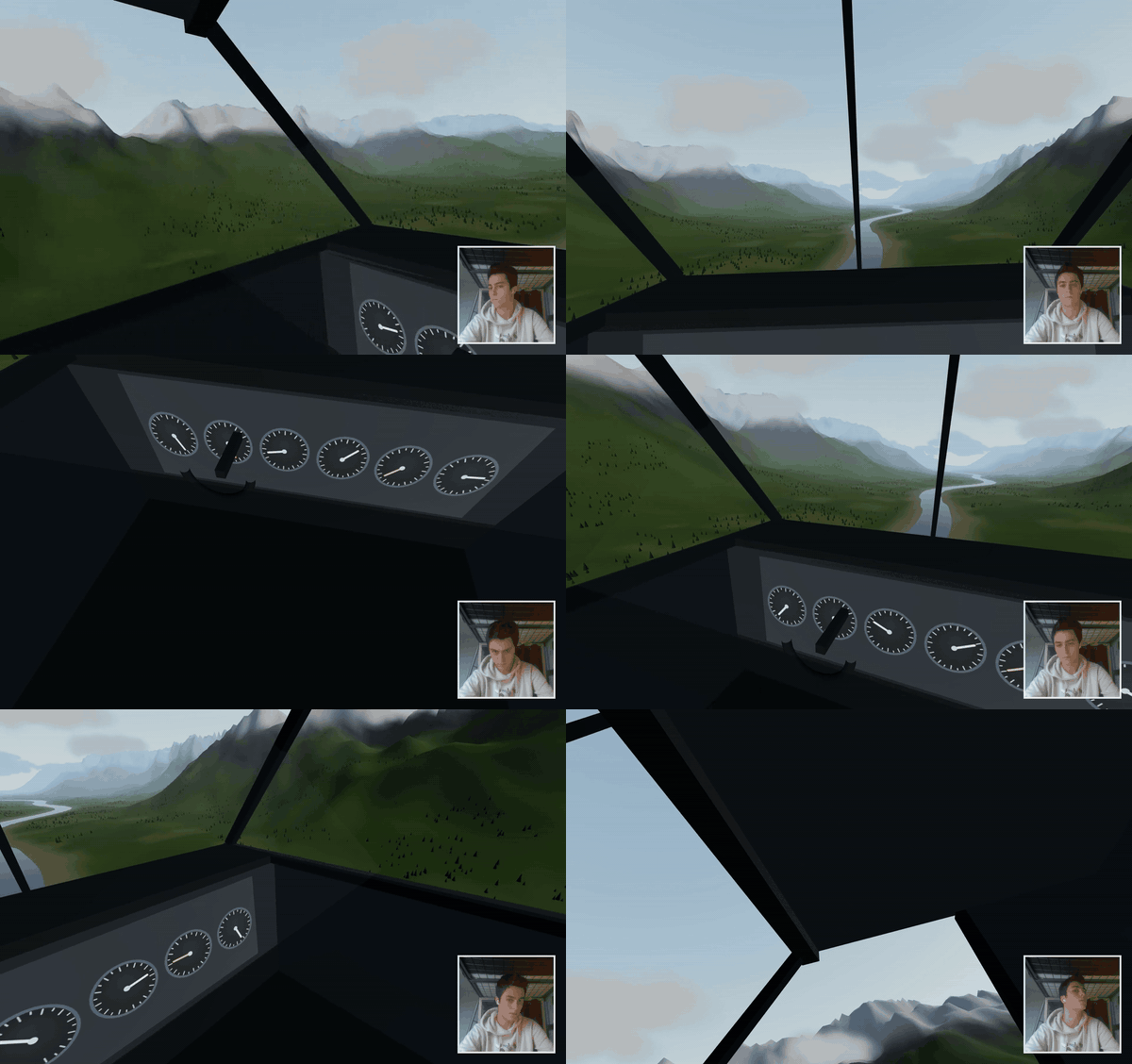
The built-in cockpit demo: the view follows the AirPods (smooth 60 fps video).
Website · New findings · RemoteHID protocol · AirPods 3 sensors · Français
Quick start
flatpak install --user https://starman-tech.github.io/mousepods/MousePods.flatpakrefPair your AirPods with the PC, open MousePods, and follow the first-run wizard. Updates come
through flatpak update or your software center. Want the newest changes first? Use the test
channel: flatpak install --user https://starman-tech.github.io/mousepods/MousePods-test.flatpakref. Running from source is under Install.
Games, desktop app and Flatpak
Contributed by @henningnorden for sim racing on Linux gaming systems (Bazzite, tested with AirPods Pro 2 in Assetto Corsa and ETS2):
- Games page: tick a Steam game running through Proton and its camera follows your head,
without opentrack and without launch options. MousePods places a small TrackIR/FreeTrack DLL
(
native/) in the game's Proton prefix; the game reads the head pose from a file MousePods writes. Unticking puts back whatever tracker was set up before. - Per-game profiles: damping, range and response curve per axis, axes on/off, and a neck model (computed from the head rotation, AirPods cannot measure leaning). Calibrate shows one point at a time full screen on the monitors you play that game on; hold still at each and MousePods measures how far you turn your head, so a small monitor and three monitors both work.
- Desktop app: own window, tray icon, autostart at login, first-run wizard; packaged as a
Flatpak (
packaging/flatpak/, built by GitHub Actions). Bluetooth works withoutbluetoothctlthrough BlueZ over D-Bus. - Languages: English and German besides French (
ui/i18n/).
Install: see Quick start. Steam installed as a Flatpak works too (tested with ETS2 under Proton Experimental); a game installed in both Steams lets you pick which one on its card.
Browser extension
Look around 360° videos on YouTube (and other 360° sites, experimental) by turning your head, right in Chrome: see browser-extension/.
What's new here
Before this project, no public tool could get head-tracking data out of AirPods 3. LibrePods, librepods-rs, pods-head-tracker, airpods-head-track and aap-head-tracker all list them as untested or unsupported. The reason turned out to be three things nobody had written down:
| Finding | |
|---|---|
| AirPods 3 ignore the SensorDataWX protocol that AirPods Pro 2/3/4 and AirPods 4 use | §2 |
They expose their sensors as virtual HID devices through Apple RemoteHID (RTBuddy channel 0x800). The wire format is now fully documented | protocol |
| At the Linux default L2CAP MTU (672), the motion sensors are not announced at all. They appear at 2582, the value iOS uses | §6 |
Along the way: the complete AirPods 3 sensor catalog (devmotion6, accel, gyro, cma, kadabra…), sample rates up to
~210 Hz instead of 25 Hz, the scales of the motion block, and how the buds power their sensors on and off.
→ All findings, with evidence and an honest "not isolated yet" list: docs/DISCOVERIES.md.
How it works
 AirPods 3 ──── L2CAP 0x1001 (AACP, MTU 2582) ────▶ AAPClient ──▶ MotionEngine ──▶ Controller ──▶ /dev/uinput ──▶ cursor
   │  HostConnect ◀─────────────────────────────────┤             gyro + gravity     souris / pointeur        (Wayland, X11)
   │  DeviceConnect ×8 (HID descriptors) ──────────▶│             → yaw · pitch · roll    / glisse
   │  SetReport feature 1 = 10 000 µs ◀─────────────┤                                       │
   │  InputReport @ 100 Hz (58-byte block) ────────▶│                         http://127.0.0.1:8737  (app)
 AirPods Pro 2 ── same, through SensorDataWX (protobuf, 0x100000) ──┘
- Connect without root: L2CAP PSM
0x1001, encrypted link, receive MTU 2582. - Start the sensor: RemoteHID for AirPods 3, SensorDataWX for AirPods Pro / 4. Detected automatically.
- Compute motion that doesn't depend on how the bud is held: yaw is the rotation around the vertical (taken from the gravity vector), pitch the rotation around a lateral axis learned during calibration. Gyro bias is re-estimated whenever the device is still.
- Move the cursor through a virtual
uinputdevice (works on Wayland), rendered at 120 Hz with One-Euro smoothing.
Modes
| Mode | Move | Feels like |
|---|---|---|
| Souris (mouse) | turn / tilt your head, or a bud in your hand | an air mouse, with acceleration |
| Pointeur (pointer) | aim at the screen | a laser pointer. Calibrated by aiming at two corners: aim at a corner and the cursor lands there |
| Glisse (glide) | slide a bud flat on the table | an inertial mouse. Experimental: see the limits below |
Clicks: stem press, quick head tilt (optional), or dwell. Shortcuts: Ctrl+Alt+C recenter · Ctrl+Alt+P pause · Ctrl+Alt+M mode · Ctrl+Alt+S scroll.
The app
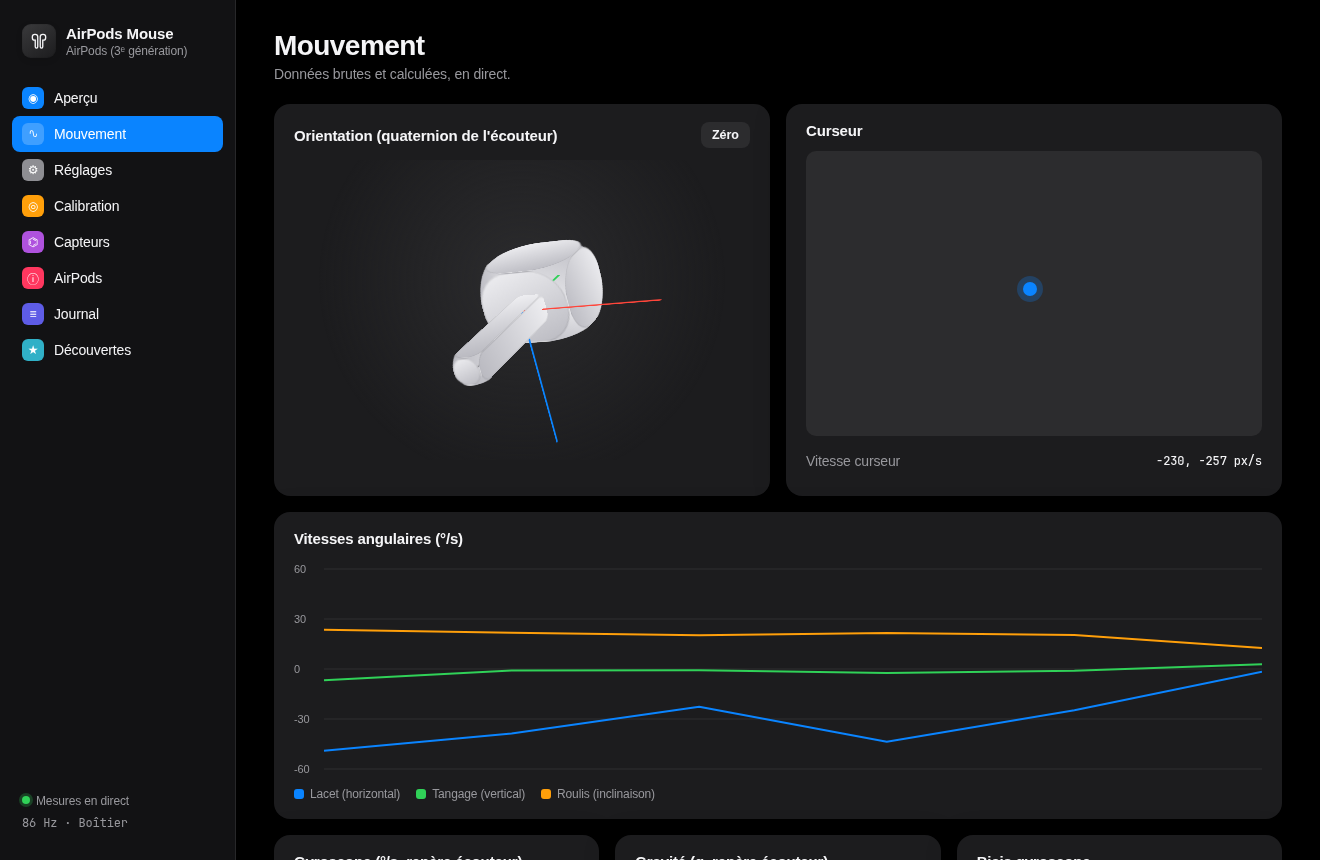
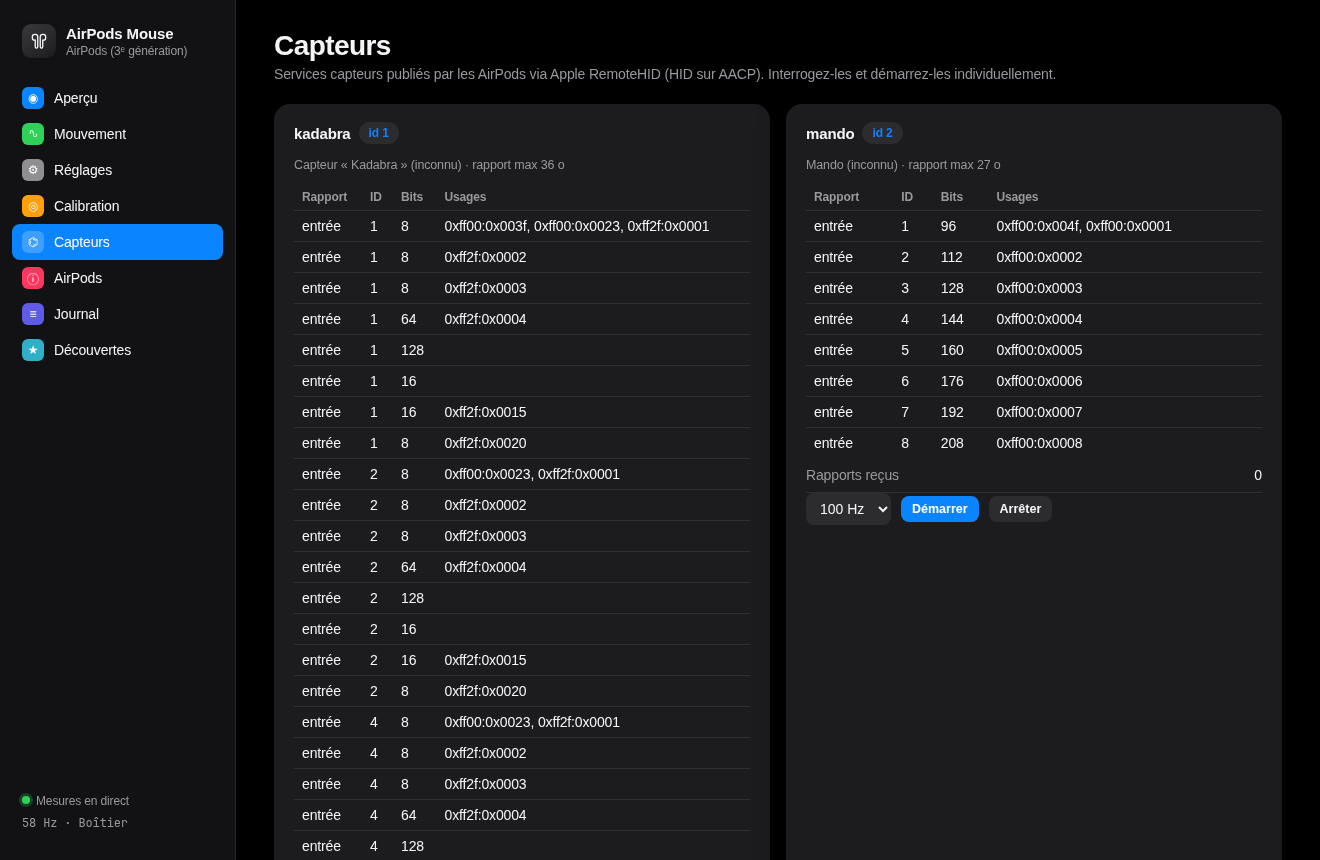
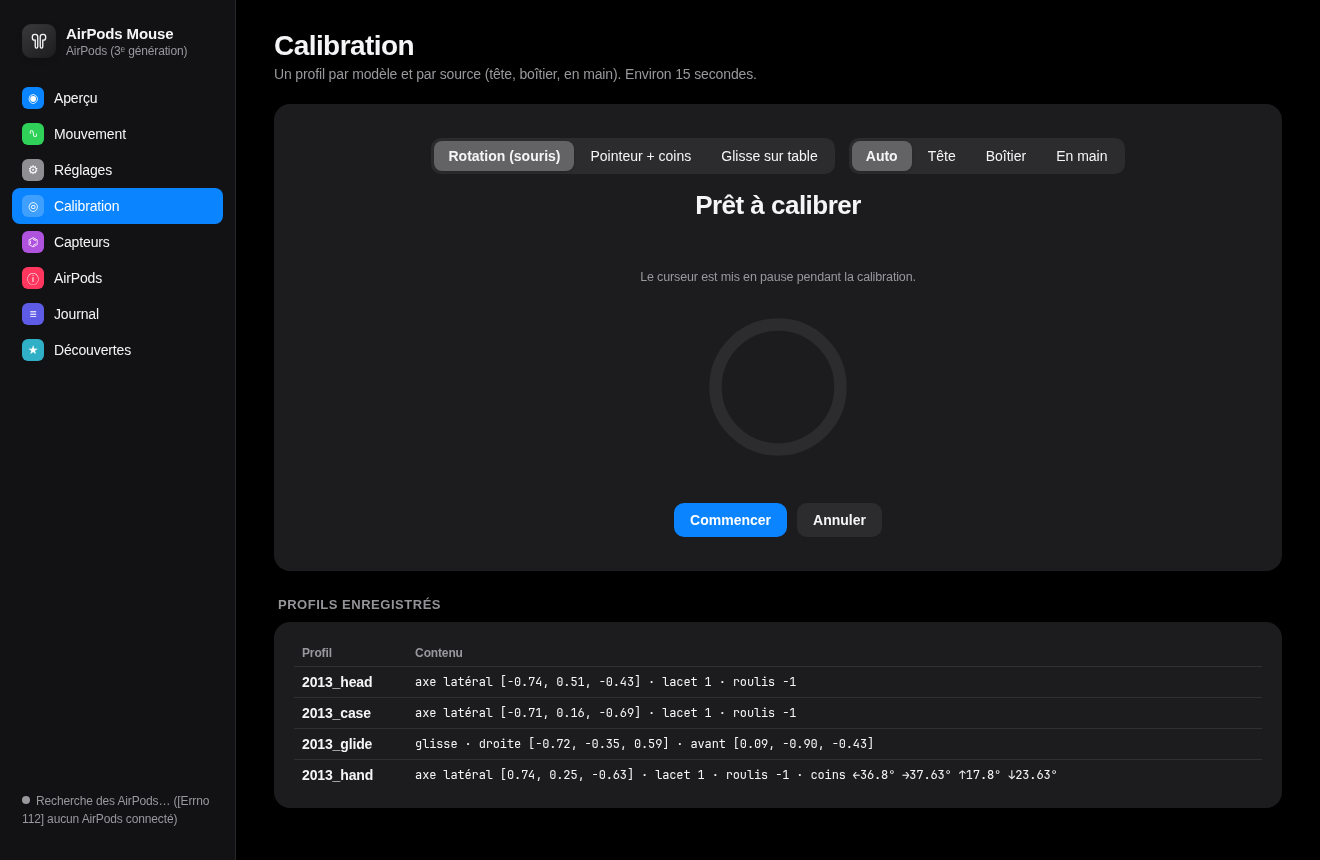
A local app in the style of macOS Settings (light and dark): battery rings, live 3D orientation, rate charts, every setting applied live, guided calibration, a sensor explorer to start and query each RemoteHID device, the AirPods' internal settings and a raw packet log.
Install
git clone https://github.com/starman-tech/mousepods && cd mousepods
python3 -m venv .venv && .venv/bin/pip install -r requirements.txt
.venv/bin/python airpods_mouse_controller.py --ui            # opens the app, starts the controller
.venv/bin/python airpods_mouse_controller.py --install-hotkeys   # GNOME shortcuts (optional)
Requirements: Linux with BlueZ, AirPods paired and connected, write access to /dev/uinput (granted to the logged-in user by
uaccess on most desktop distributions). No root.
.venv/bin/python airpods_mouse_controller.py --diag          # live rates in the terminal, no cursor control
.venv/bin/python -m unittest discover -s tests               # 400+ tests, no hardware needed
Immutable distros (Bazzite, Fedora Atomic): use a distrobox
On Bazzite the host Python cannot build evdev (no wheel on PyPI, and no Python.h on the
read-only system), and Homebrew's Python has no socket.AF_BLUETOOTH. A Fedora distrobox has
both. It shares Bluetooth, /dev/uinput and your home directory with the host.
distrobox create -n mousepods -i registry.fedoraproject.org/fedora-toolbox:43 -Y
distrobox enter mousepods
sudo dnf install -y python3-devel gcc
sudo ln -s /usr/bin/distrobox-host-exec /usr/local/bin/bluetoothctl   # use the host's bluetoothctl
git clone https://github.com/starman-tech/mousepods && cd mousepods
python3 -m venv .venv && .venv/bin/pip install -r requirements.txt
.venv/bin/python airpods_mouse_controller.py --ui
Without the bluetoothctl link (or sudo dnf install bluez inside the box) MousePods cannot list
the paired AirPods and says so. Tested on Bazzite with AirPods Pro 2. SteamOS 3.5+ ships distrobox
too, so the same steps should work there in Desktop Mode (untested).
Proton games (Assetto Corsa tested): run the Windows build of opentrack inside the game's
Proton prefix with opentrack-launcher: set the
game's Steam launch option to $HOME/.local/bin/opentrack-launcher %command% (exactly one
%command%). In opentrack: input UDP over network port 4242, output freetrack 2.0 Enhanced
with Enable both. Assetto Corsa follows the head in the cockpit camera.
What works
Earbuds and devices
| Device | Status | Details |
|---|---|---|
| AirPods 3 | ✅ verified on hardware | RemoteHID, up to ~210 Hz |
| AirPods Pro 2 (Lightning and USB-C) | ✅ verified on hardware | SensorDataWX, ~100 Hz |
| AirPods Pro (1st gen), AirPods 4, AirPods Max | ❓ untested | they have the sensors; report how it goes |
| AirPods 1 / 2 | ❌ | no head-tracking sensors |
| Sony WH/WF-1000XM5 and XM6, ULT Wear · Pixel Buds Pro / Pro 2 | ⚠️ experimental | Android's head-tracker HID, needs testing: docs/HEADSETS.md |
| Garmin watch (optional module) | ⚠️ first tests | wrist tilt, accelerometer only, 25 Hz (below) |
Features
| Feature | Status | Notes |
|---|---|---|
| Mouse with your head or a bud in hand | ✅ | tried on hardware, still being tuned |
| Pointer mode (corner calibration) | ⚠️ | tested in simulation |
| Glide mode (slide a bud on the table) | ⚠️ | experimental, will never match an optical mouse |
| Head and jaw gestures | ⚠️ | experimental |
| Games page: Proton games follow your head, no opentrack | ✅ | tested in Assetto Corsa and ETS2 |
| opentrack output (UDP) | ✅ | tested in Assetto Corsa under Proton |
| Virtual joystick for native games | ⚠️ | axes tested, not yet tried in a game |
| 3D cockpit demo, no game needed | ✅ | /demo, also side-by-side 3D |
| 360° / VR video player (local files, YouTube) | ✅ | /vr, side-by-side 3D for goggles (tested on Fat Shark Dominator V3) |
| Browser extension (YouTube 360° on youtube.com) | ⚠️ | new, see browser-extension/ |
| Flatpak app with automatic updates | ✅ | stable and test channels |
| Interface in English, French, German | ✅ | add your language |
| Case as a mouse (buds inside) | ❌ | the AirPods 3 sensors are off in the case |
Games tested
| Game | How | Earbuds | Tested by |
|---|---|---|---|
| Assetto Corsa | Proton, Games page or opentrack | AirPods Pro 2 | @henningnorden |
| Euro Truck Simulator 2 | Proton Experimental, Games page | AirPods Pro 2 | @henningnorden |
Tried it in another game? Tell us, it goes in this table.
Platforms
| Platform | Status |
|---|---|
| Linux, GNOME / KDE, Wayland and X11 | ✅ (Ubuntu 24.04, Bazzite) |
| Immutable distros (Bazzite, Fedora Atomic, SteamOS) | ✅ Flatpak, or a distrobox from source |
| Windows | ❌ not yet: Windows doesn't let apps open the Bluetooth channel AirPods use |
| macOS | ❌ not needed: Apple's own API already gives head tracking |
| Android | ❌ not yet: needs a Bluetooth stack that allows the AirPods channel |
Head tracking for simulators
AirPods 3 and AirPods Pro as a TrackIR: the in-game camera follows your head. Page Simulateurs
in the app (or --opentrack, --sim-joystick):
- opentrack output ("UDP over network", 127.0.0.1:4242), then opentrack's Wine/Proton output for DCS, MSFS, IL-2, Elite Dangerous… (FreeTrack + TrackIR), or its X-Plane / FlightGear outputs;
- a virtual joystick ("MousePods head tracker", same axes as opentrack's libevdev output) for native Linux games that bind the camera to axes: Euro Truck Simulator 2, American Truck Simulator, War Thunder…
Angles come from the buds' own orientation quaternion, checked against the gyroscope on a real capture: pitch and roll do not drift, yaw is recentered with one click. Rotation only (3 DoF). Step-by-step guide and what was found: docs/SIMS.md.
Garmin watch as a mouse (optional)
A Garmin watch can drive the cursor too: tilt your wrist to move, double-tap the watch to click, drop your arm to pause. It has its own page in the app (Garmin: connect, guided 5-pose calibration with a live tilt dot, Recentrer / Recalibrer tout / Pause, speed, dead zone, smoothing, tap force, joystick or pointer mode) and a standalone window.
.venv/bin/pip install -r requirements-garmin.txt      # optional: garmin-ble (AGPL-3.0) + bleak
bluetoothctl                                          # once, phone Bluetooth off (one BLE client only)
  scan le
  pair XX:XX:XX:XX:XX:XX
  trust XX:XX:XX:XX:XX:XX
.venv/bin/python airpods_mouse_controller.py --ui     # then page "Garmin", enter the address, "Connecter"
.venv/bin/python -m garmin.garmin_mouse --address XX:XX:XX:XX:XX:XX   # or the standalone window
Limits: the watch streams only its accelerometer in real time (24.9 Hz, 3 samples every 120 ms, 12-bit, no gyroscope), so the cursor follows the tilt of the wrist, not its rotation, with about 0.2 s of delay. Good for pointing, not for games. What was tried to get more (services 17 SPAM and 18 BMX_RAW, the Garmin Connect app, a Connect IQ app) and every measurement: docs/GARMIN.md.
The Bluetooth link uses garmin-ble, which is AGPL-3.0-only. It is not bundled and no code from it is copied: it is installed separately, and only the Garmin module imports it. MousePods stays Apache-2.0; if you redistribute it together with garmin-ble, that combination is under the AGPL-3.0.
Built with Claude
I reverse-engineered this together with Claude (Anthropic), used as an AI pair engineer in Claude Code. In one afternoon, Claude:
- ran the Bluetooth probes and the ~300 blind attempts that failed;
- sent background agents through LibrePods, the Wireshark dissector, the OpenHuilian clone firmware (static disassembly) and the iOS
RemoteHID.frameworkpseudocode; - found the MTU and RemoteHID keys, wrote the controller, the app and the tests;
- kept the journal of every attempt.
I held the AirPods, made the calls and checked every result on real hardware. The method, failures included, is in the journal.
Star history
Credits
This builds on public work: LibrePods (AACP and the SensorDataWX start packets),
pabloaul/apple-wireshark (RTBuddy dissector and rtbuddy.proto),
Gheop/mutix and LibrePods PR #887 (layout of the 58-byte block),
arctumn/ntpods (MTU gating, on AirPods Pro 3 heart rate),
spacedouut/OpenHuilian (clone firmware) and the public iOS 26.1 restore dump
by EthanArbuckle. Garmin module: the Gadgetbridge protocol notes served as
documentation and garmin-ble is an optional dependency. No code was copied from these projects.
License and attribution
| What | License | What it requires |
|---|---|---|
| Source code | Apache-2.0 + NOTICE | Keep the copyright and the NOTICE text in any redistribution or derivative work (in its NOTICE file, docs or "about" screen), and mark modified files |
| Optional Garmin dependency garmin-ble (not included) | AGPL-3.0-only | Only if you use the Garmin module. Distributing MousePods bundled with it makes the combination AGPL-3.0: see docs/GARMIN.md |
Findings, documentation, captures (docs/, captures/) | CC BY 4.0 | Credit the author, link to this repository and say if you changed anything, in any reuse: article, video, talk, other project, AI dataset |
How to credit:
MousePods by Matteo Gaudioso (starman-tech): https://github.com/starman-tech/mousepods
Please tell me when you use it. It's not a legal requirement, just a request: open an issue, or mention @starman-tech. I'd love to see what you build, and I'll link to it. For academic work, use CITATION.cff (GitHub's "Cite this repository" button).
© 2026 Matteo Gaudioso. Not affiliated with Apple. AirPods is a trademark of Apple Inc.